Hobbit to IPPhone
list Charles Jones
I just cobbled together a script that puts a hobbit display on a Cisco IPPhone (7960). The display is pretty spartan since we only have half a dozen lines to put text on :)  The script is run out of cron on my linux workstation, and requires access to an http server, and knowing your phones login and password (same as your user login to call manager).

If anyone is interested in this script I will post it here or send it to the Shire.

I just did it mainly for fun, but with some effort you could easily even acknowledge alerts right from your phone :)

-Charles
Attachments (1)
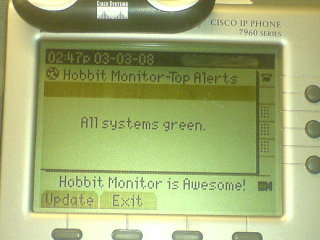 attachment.jpg
list Josh Luthman
We are using the Cisco IP phones (7940/60/70) as well.  Can you give me what
you did to make this work?  We're using the Genband M6 - not the Cisco Call
Manager but if all I need to do is redirect the services button I can do
that =)

Josh
▸
On 3/3/08, Charles Jones <user-e86b4aeade4e@xymon.invalid> wrote:I just cobbled together a script that puts a hobbit display on a Cisco IPPhone (7960). The display is pretty spartan since we only have half a dozen lines to put text on :) The script is run out of cron on my linux workstation, and requires access to an http server, and knowing your phones login and password (same as your user login to call manager). If anyone is interested in this script I will post it here or send it to the Shire. I just did it mainly for fun, but with some effort you could easily even acknowledge alerts right from your phone :) -Charles
--
Josh Luthman
Office: XXX-XXX-XXXX
Direct: XXX-XXX-XXXX
XXXX Wayne St
Suite XXXX
Troy, OH XXXXX
Those who don't understand UNIX are condemned to reinvent it, poorly.
--- Henry Spencer
list Asif Iqbal
I can't wait to get hold of that script. Thanks Charles!
▸
On Mon, Mar 3, 2008 at 4:52 PM, Charles Jones <user-e86b4aeade4e@xymon.invalid> wrote:I just cobbled together a script that puts a hobbit display on a Cisco IPPhone (7960). The display is pretty spartan since we only have half a dozen lines to put text on :) The script is run out of cron on my linux workstation, and requires access to an http server, and knowing your phones login and password (same as your user login to call manager). If anyone is interested in this script I will post it here or send it to the Shire. I just did it mainly for fun, but with some effort you could easily even acknowledge alerts right from your phone :) -Charles
--
Asif Iqbal
PGP Key: 0xE62693C5 KeyServer: pgp.mit.edu
list Johann Eggers
Hi Charles, I'm really interested in your script as we also have Cisco IPPhones (7961) and I really would like to check out what you did! Thanks -Johann
▸
From: Charles Jones [mailto:user-e86b4aeade4e@xymon.invalid]
Sent: Montag, 3. März 2008 22:53
To: user-ae9b8668bcde@xymon.invalid
Subject: [hobbit] Hobbit to IPPhone
 I just cobbled together a script that puts a hobbit display on a Cisco
IPPhone (7960). The display is pretty spartan since we only have half a
dozen lines to put text on :)  The script is run out of cron on my linux
workstation, and requires access to an http server, and knowing your phones
login and password (same as your user login to call manager).

If anyone is interested in this script I will post it here or send it to
the Shire.

I just did it mainly for fun, but with some effort you could easily even
acknowledge alerts right from your phone :)

-Charles
list Charles Jones
I have a fellow Hobbiter testing the script on his system, this will let me shake out any confusion in the self-contained docs I wrote. I will then post the script to the list and you guys can have at it :)

-Charles
▸
Johann Eggers wrote:Hi Charles, I'm really interested in your script as we also have Cisco IPPhones (7961) and I really would like to check out what you did! Thanks -Johann *From:* Charles Jones [mailto:user-e86b4aeade4e@xymon.invalid] *Sent:* Montag, 3. März 2008 22:53 *To:* user-ae9b8668bcde@xymon.invalid *Subject:* [hobbit] Hobbit to IPPhone I just cobbled together a script that puts a hobbit display on a Cisco IPPhone (7960). The display is pretty spartan since we only have half a dozen lines to put text on :) The script is run out of cron on my linux workstation, and requires access to an http server, and knowing your phones login and password (same as your user login to call manager). If anyone is interested in this script I will post it here or send it to the Shire. I just did it mainly for fun, but with some effort you could easily even acknowledge alerts right from your phone :) -Charles
list Josh Luthman
Ahh why must you torture us!!!

Thank you very much for the update, we are all looking forward to it.
▸
On 3/4/08, Charles Jones <user-e86b4aeade4e@xymon.invalid> wrote:I have a fellow Hobbiter testing the script on his system, this will let me shake out any confusion in the self-contained docs I wrote. I will then post the script to the list and you guys can have at it :) -Charles Johann Eggers wrote:Hi Charles, I'm really interested in your script as we also have Cisco IPPhones (7961) and I really would like to check out what you did! Thanks -Johann *From:* Charles Jones [mailto:user-e86b4aeade4e@xymon.invalid] *Sent:* Montag, 3. März 2008 22:53 *To:* user-ae9b8668bcde@xymon.invalid *Subject:* [hobbit] Hobbit to IPPhone I just cobbled together a script that puts a hobbit display on a Cisco IPPhone (7960). The display is pretty spartan since we only have half a dozen lines to put text on :) The script is run out of cron on my linux workstation, and requires access to an http server, and knowing your phones login and password (same as your user login to call manager). If anyone is interested in this script I will post it here or send it to the Shire. I just did it mainly for fun, but with some effort you could easily even acknowledge alerts right from your phone :) -Charles
--
Josh Luthman
Office: XXX-XXX-XXXX
Direct: XXX-XXX-XXXX
XXXX Wayne St
Suite XXXX
Troy, OH XXXXX

Those who don't understand UNIX are condemned to reinvent it, poorly.
--- Henry Spencer
list Charles Jones
Just giving an update. I've decided to make it a bit more fancy, in that you can optionally select an alerting host to read its full status message, and removing all of my debug code and making it actually readable for other folks :-) Hopefully I will be done by the end of the week.

-Charles
▸
Josh Luthman wrote:Ahh why must you torture us!!! Thank you very much for the update, we are all looking forward to it.
list Charles Jones
Another quick update...I did indeed get the extra cool feature working :) Reading the "Developing Cisco IP Phone Services" book helped significantly. I've also discovered how do do things like custom icons and graphics, so I could in theory do a full-fledged graphical hobbit display, but I think I will save that for version 2.0  :)

A couple more days of tweaking and cleaning up the code and I will release it to my fellow Hobbit-ers.

-Charles
▸
Charles Jones wrote:Just giving an update. I've decided to make it a bit more fancy, in that you can optionally select an alerting host to read its full status message, and removing all of my debug code and making it actually readable for other folks :-) Hopefully I will be done by the end of the week. -Charles Josh Luthman wrote:Ahh why must you torture us!!! Thank you very much for the update, we are all looking forward to it.
list Charles Jones
Just thought I would send another update and a preview. This has been really fun to work on. I think I am going to officially call it "Hobbit2IPPhone". I will probably create a sourceforge project and whatnot for it as well.

Here is some info on Hobbit2IPPhone:
* Hobbit2IPPhone can be run without touching the Call Manger, or having admin access to the CM. All you need is your normal user login and pass to the CM (same one you use to set your speed dials, etc).
* Hobbit2IPPhone requires a web server with CGI access (could easily use your Hobbit server).
* The web server that the CGI is run on, needs bi-directional connectivity to your IPPhone. If you can telnet to port 80 of your phones IP address, you should be good to go. The phone also needs to be able to hit port 80 of your web server.
* The CGI needs connectivity to your Hobbit server, as it uses $BB to query the hobbitdboard to get the host infos. If you are running the CGI on your Hobbit server, this is a non-issue as it will just talk to localhost just like any server-side Hobbit extension script.
* Hobbit2IPPhone can be run as a sever-side Hobbit extension script, or out of a cron job on another server, provided there is connectivity from the CGI host to the IPPhone on port 80.

Here's how my phone looks when everything is OK:

* Currently it is optional to display this message if all is green. I figured some people may only want their screen to change if there is an alert.
* Hitting "update" updates the display. There is also an automatic refresh timer.


Heres the view when some alerts have triggered:

As you can see, you get a nice ordered list, with a summary of how many hosts are alerting.
* You can select either via the up/down rocker on the phone and then hitting "Select"
* You can also select by pressing the number that is next to the alert.
* To make it look nicely formatted I coded it so that it automatically truncates the hostname so as not to line wrap.
* Hobbit2IPPhone will override your phones idlescreen/screensaver, so any alerts will not be hidden :)
* Due to a limitation in the IPPhone, a maximum of 99 alerts can be selected. I hope you never have this many!


Here's what you get when you select a host, in this case, the first one:

Right now I have it showing the current status message for the alert, as well as the alert duration. This can easily be configured to display anything you can get from hobbitdboard.  I still have to reformat the text a bit so that it compacts better. * Text that doesn't fit on the screen is accessible by scrolling down.
* When you hit "Exit" you are automatically brought back to the first menu (an updated version of it, not a stale copy)
* I also have to truncate the hostname in the upper title "Status for ..." because the IPPhone is picky and if this is too long, it just bombs and won't accept the rest of the data at all!


That's it for now...I'm going to continue hacking on this and try to make it as user-friendly as possible before I release it.

Possible future features:
Hobbit2IPPhone 2.0:
* Acknowledge/Enable/Disable alerts from the IPPhone, including text input of reason.
* Viewing of some reports or log data, like notification log, alert history, etc.

Hobbit2IPPhone 3.0:
* Full graphics implementation - It's possible to have a mini hobbit-like display and interface, and even view trends graphs

FAQ:
Q. What model IPPhones will this work on?
A. I am currently developing using a 7960. I assume any 79xx will work.

Q. What about color?
A. Send me a color IP Phone to dev with and I will see what I can do :P
Q. Wha? You work for Cisco, don't you have color IPPhones and routers coming out of your ears?
A. I actually work for a nonprofit section of Cisco. We don't have any spare equipment, and even with my "discount" I can't afford to buy an IPPhone just to play with, otherwise I would run a VOIP network at home :)

Q. Can you make the message light flash, or the phone chirp when there is an alert?
A. So far, I don't think so. I have not found anything in the HTTP/XML protocol that gives me access to those functions. I'd like that feature as well, and I suspect it is possible, so I will keep looking for a way to do it.

Q. What software prerequisites are there?
A. Any webserver that can run a Perl CGI script. For Apache, this means mod_perl, which shouldn't be a problem for most linux distros, Solaris folks may have to jump through some hoops. The script uses the following perl modules:
CGI;
LWP::UserAgent;
URI;
Time::localtime;
It may also use Cisco::IPPhone, but thusfar I have written most of my own simple XML functions and may remove that dependancy. With the exception of Cisco::IPPhone, all of the modules are common ones that should be installable via your linux distros package manager. For Solaris folks and anyone else, you can install them via CPAN ie "perl -MCPAN -e 'install LWP::UserAgent'
list Josh Luthman
I have 7940s and 7960s everywhere, so I can test the one other phone, but
I'm certain it will work (the only difference is four stupid buttons - damn
Cisco's need to make money!)  As far as the 7970 and 7941/7961 I'm confident
it will work, but the display is significantly different so it won't be as
fitting.

Charles - I see that you are using the SCCP firmware, as am I, but I am not
using the Cisco Call Manager.  Can you tell me how you change the services
button on your system?  I'm pretty confident I know how to do it on what I'm
using.

Thank you very much for sharing this with us!  I know I will greatly enjoy
it =)
▸
On 3/11/08, Charles Jones <user-e86b4aeade4e@xymon.invalid> wrote:Just thought I would send another update and a preview. This has been really fun to work on. I think I am going to officially call it "Hobbit2IPPhone". I will probably create a sourceforge project and whatnot for it as well. Here is some info on Hobbit2IPPhone: * Hobbit2IPPhone can be run without touching the Call Manger, or having admin access to the CM. All you need is your normal user login and pass to the CM (same one you use to set your speed dials, etc). * Hobbit2IPPhone requires a web server with CGI access (could easily use your Hobbit server). * The web server that the CGI is run on, needs bi-directional connectivity to your IPPhone. If you can telnet to port 80 of your phones IP address, you should be good to go. The phone also needs to be able to hit port 80 of your web server. * The CGI needs connectivity to your Hobbit server, as it uses $BB to query the hobbitdboard to get the host infos. If you are running the CGI on your Hobbit server, this is a non-issue as it will just talk to localhost just like any server-side Hobbit extension script. * Hobbit2IPPhone can be run as a sever-side Hobbit extension script, or out of a cron job on another server, provided there is connectivity from the CGI host to the IPPhone on port 80. Here's how my phone looks when everything is OK: * Currently it is optional to display this message if all is green. I figured some people may only want their screen to change if there is an alert. * Hitting "update" updates the display. There is also an automatic refresh timer. Heres the view when some alerts have triggered: As you can see, you get a nice ordered list, with a summary of how many hosts are alerting. * You can select either via the up/down rocker on the phone and then hitting "Select" * You can also select by pressing the number that is next to the alert. * To make it look nicely formatted I coded it so that it automatically truncates the hostname so as not to line wrap. * Hobbit2IPPhone will override your phones idlescreen/screensaver, so any alerts will not be hidden :) * Due to a limitation in the IPPhone, a maximum of 99 alerts can be selected. I hope you never have this many! Here's what you get when you select a host, in this case, the first one: Right now I have it showing the current status message for the alert, as well as the alert duration. This can easily be configured to display anything you can get from hobbitdboard. I still have to reformat the text a bit so that it compacts better. * Text that doesn't fit on the screen is accessible by scrolling down. * When you hit "Exit" you are automatically brought back to the first menu (an updated version of it, not a stale copy) * I also have to truncate the hostname in the upper title "Status for ..." because the IPPhone is picky and if this is too long, it just bombs and won't accept the rest of the data at all! That's it for now...I'm going to continue hacking on this and try to make it as user-friendly as possible before I release it. Possible future features: Hobbit2IPPhone 2.0: * Acknowledge/Enable/Disable alerts from the IPPhone, including text input of reason. * Viewing of some reports or log data, like notification log, alert history, etc. Hobbit2IPPhone 3.0: * Full graphics implementation - It's possible to have a mini hobbit-like display and interface, and even view trends graphs FAQ: Q. What model IPPhones will this work on? A. I am currently developing using a 7960. I assume any 79xx will work. Q. What about color? A. Send me a color IP Phone to dev with and I will see what I can do :P Q. Wha? You work for Cisco, don't you have color IPPhones and routers coming out of your ears? A. I actually work for a nonprofit section of Cisco. We don't have any spare equipment, and even with my "discount" I can't afford to buy an IPPhone just to play with, otherwise I would run a VOIP network at home :) Q. Can you make the message light flash, or the phone chirp when there is an alert? A. So far, I don't think so. I have not found anything in the HTTP/XML protocol that gives me access to those functions. I'd like that feature as well, and I suspect it is possible, so I will keep looking for a way to do it. Q. What software prerequisites are there? A. Any webserver that can run a Perl CGI script. For Apache, this means mod_perl, which shouldn't be a problem for most linux distros, Solaris folks may have to jump through some hoops. The script uses the following perl modules: CGI; LWP::UserAgent; URI; Time::localtime; It may also use Cisco::IPPhone, but thusfar I have written most of my own simple XML functions and may remove that dependancy. With the exception of Cisco::IPPhone, all of the modules are common ones that should be installable via your linux distros package manager. For Solaris folks and anyone else, you can install them via CPAN ie "perl -MCPAN -e 'install LWP::UserAgent'
-- Josh Luthman Office: XXX-XXX-XXXX Direct: XXX-XXX-XXXX XXXX Wayne St Suite XXXX Troy, OH XXXXX Those who don't understand UNIX are condemned to reinvent it, poorly. --- Henry Spencer
list Galen Johnson
When you get your project set up, let me know and I'll put a link on The Shire front page. =G=
▸
From: Charles Jones [mailto:user-e86b4aeade4e@xymon.invalid]
Sent: Tuesday, March 11, 2008 10:54 PM
To: user-ae9b8668bcde@xymon.invalid
Subject: Re: [hobbit] Hobbit to IPPhone
Just thought I would send another update and a preview. This has been really fun to work on. I think I am going to officially call it "Hobbit2IPPhone". I will probably create a sourceforge project and whatnot for it as well.
Here is some info on Hobbit2IPPhone:
* Hobbit2IPPhone can be run without touching the Call Manger, or having admin access to the CM. All you need is your normal user login and pass to the CM (same one you use to set your speed dials, etc).
* Hobbit2IPPhone requires a web server with CGI access (could easily use your Hobbit server).
* The web server that the CGI is run on, needs bi-directional connectivity to your IPPhone. If you can telnet to port 80 of your phones IP address, you should be good to go. The phone also needs to be able to hit port 80 of your web server.
* The CGI needs connectivity to your Hobbit server, as it uses $BB to query the hobbitdboard to get the host infos. If you are running the CGI on your Hobbit server, this is a non-issue as it will just talk to localhost just like any server-side Hobbit extension script.
* Hobbit2IPPhone can be run as a sever-side Hobbit extension script, or out of a cron job on another server, provided there is connectivity from the CGI host to the IPPhone on port 80.
Here's how my phone looks when everything is OK:
[cid:image001.jpg at 01C883D5.C809D760]
▸
* Currently it is optional to display this message if all is green. I figured some people may only want their screen to change if there is an alert.
* Hitting "update" updates the display. There is also an automatic refresh timer.
Heres the view when some alerts have triggered:
[cid:image002.jpg at 01C883D5.C809D760]
▸
As you can see, you get a nice ordered list, with a summary of how many hosts are alerting.
* You can select either via the up/down rocker on the phone and then hitting "Select"
* You can also select by pressing the number that is next to the alert.
* To make it look nicely formatted I coded it so that it automatically truncates the hostname so as not to line wrap.
* Hobbit2IPPhone will override your phones idlescreen/screensaver, so any alerts will not be hidden :)
* Due to a limitation in the IPPhone, a maximum of 99 alerts can be selected. I hope you never have this many!
Here's what you get when you select a host, in this case, the first one:
[cid:image003.jpg at 01C883D5.C809D760]
▸
Right now I have it showing the current status message for the alert, as well as the alert duration. This can easily be configured to display anything you can get from hobbitdboard. I still have to reformat the text a bit so that it compacts better. * Text that doesn't fit on the screen is accessible by scrolling down.
* When you hit "Exit" you are automatically brought back to the first menu (an updated version of it, not a stale copy)
* I also have to truncate the hostname in the upper title "Status for ..." because the IPPhone is picky and if this is too long, it just bombs and won't accept the rest of the data at all!
That's it for now...I'm going to continue hacking on this and try to make it as user-friendly as possible before I release it.
Possible future features:
Hobbit2IPPhone 2.0:
* Acknowledge/Enable/Disable alerts from the IPPhone, including text input of reason.
* Viewing of some reports or log data, like notification log, alert history, etc.
Hobbit2IPPhone 3.0:
* Full graphics implementation - It's possible to have a mini hobbit-like display and interface, and even view trends graphs
FAQ:
Q. What model IPPhones will this work on?
A. I am currently developing using a 7960. I assume any 79xx will work.
Q. What about color?
A. Send me a color IP Phone to dev with and I will see what I can do :P
Q. Wha? You work for Cisco, don't you have color IPPhones and routers coming out of your ears?
A. I actually work for a nonprofit section of Cisco. We don't have any spare equipment, and even with my "discount" I can't afford to buy an IPPhone just to play with, otherwise I would run a VOIP network at home :)
Q. Can you make the message light flash, or the phone chirp when there is an alert?
A. So far, I don't think so. I have not found anything in the HTTP/XML protocol that gives me access to those functions. I'd like that feature as well, and I suspect it is possible, so I will keep looking for a way to do it.
Q. What software prerequisites are there?
A. Any webserver that can run a Perl CGI script. For Apache, this means mod_perl, which shouldn't be a problem for most linux distros, Solaris folks may have to jump through some hoops. The script uses the following perl modules:
CGI;
LWP::UserAgent;
URI;
Time::localtime;
It may also use Cisco::IPPhone, but thusfar I have written most of my own simple XML functions and may remove that dependancy. With the exception of Cisco::IPPhone, all of the modules are common ones that should be installable via your linux distros package manager. For Solaris folks and anyone else, you can install them via CPAN ie "perl -MCPAN -e 'install LWP::UserAgent'
list Asif Iqbal
On Tue, Mar 11, 2008 at 10:54 PM, Charles Jones <user-e86b4aeade4e@xymon.invalid> wrote:
[stripped for brevity]
▸
Q. What software prerequisites are there?
A. Any webserver that can run a Perl CGI script. For Apache, this means
mod_perl, which shouldn't be a problem for most linux distros, Solaris folks
may have to jump through some hoops. The script uses the following perlSolaris: pkg-get install ap2_modperl
▸
modules: CGI; LWP::UserAgent; URI; Time::localtime; It may also use Cisco::IPPhone, but thusfar I have written most of my own simple XML functions and may remove that dependancy. With the exception of Cisco::IPPhone, all of the modules are common ones that should be installable via your linux distros package manager. For Solaris folks and anyone else, you can install them via CPAN ie "perl -MCPAN -e 'install LWP::UserAgent'
-- Asif Iqbal PGP Key: 0xE62693C5 KeyServer: pgp.mit.edu
list Michael A. Price
That looks awesome, nice work...
▸
On 3/11/08 9:54 PM, "Charles Jones" <user-e86b4aeade4e@xymon.invalid> wrote:
 Just thought I would send another update and a preview. This has been
really fun to work on. I think I am going to officially call it
"Hobbit2IPPhone". I will probably create a sourceforge project and whatnot
for it as well.

Here is some info on Hobbit2IPPhone:
* Hobbit2IPPhone can be run without touching the Call Manger, or having
admin access to the CM. All you need is your normal user login and pass to
the CM (same one you use to set your speed dials, etc).
* Hobbit2IPPhone requires a web server with CGI access (could easily use
your Hobbit server).
* The web server that the CGI is run on, needs bi-directional connectivity
to your IPPhone. If you can telnet to port 80 of your phones IP address, you
should be good to go. The phone also needs to be able to hit port 80 of your
web server.
* The CGI needs connectivity to your Hobbit server, as it uses $BB to
query the hobbitdboard to get the host infos. If you are running the CGI on
your Hobbit server, this is a non-issue as it will just talk to localhost
just like any server-side Hobbit extension script.
* Hobbit2IPPhone can be run as a sever-side Hobbit extension script, or
out of a cron job on another server, provided there is connectivity from the
CGI host to the IPPhone on port 80.

Here's how my phone looks when everything is OK:

* Currently it is optional to display this message if all is green. I
figured some people may only want their screen to change if there is an
alert.
* Hitting "update" updates the display. There is also an automatic refresh
timer.


Heres the view when some alerts have triggered:

As you can see, you get a nice ordered list, with a summary of how many
hosts are alerting.
* You can select either via the up/down rocker on the phone and then
hitting "Select"
* You can also select by pressing the number that is next to the alert.
* To make it look nicely formatted I coded it so that it automatically
truncates the hostname so as not to line wrap.
* Hobbit2IPPhone will override your phones idlescreen/screensaver, so any
alerts will not be hidden :)
* Due to a limitation in the IPPhone, a maximum of 99 alerts can be
selected. I hope you never have this many!


Here's what you get when you select a host, in this case, the first one:

Right now I have it showing the current status message for the alert, as
well as the alert duration. This can easily be configured to display
anything you can get from hobbitdboard.  I still have to reformat the text a
bit so that it compacts better. * Text that doesn't fit on the screen is
accessible by scrolling down.
* When you hit "Exit" you are automatically brought back to the first menu
(an updated version of it, not a stale copy)
* I also have to truncate the hostname in the upper title "Status for ..."
because the IPPhone is picky and if this is too long, it just bombs and
won't accept the rest of the data at all!


That's it for now...I'm going to continue hacking on this and try to make
it as user-friendly as possible before I release it.

Possible future features:
Hobbit2IPPhone 2.0:
* Acknowledge/Enable/Disable alerts from the IPPhone, including text input
of reason.
* Viewing of some reports or log data, like notification log, alert
history, etc.

Hobbit2IPPhone 3.0:
* Full graphics implementation - It's possible to have a mini hobbit-like
display and interface, and even view trends graphs

FAQ:
Q. What model IPPhones will this work on?
A. I am currently developing using a 7960. I assume any 79xx will work.

Q. What about color?
A. Send me a color IP Phone to dev with and I will see what I can do :P
Q. Wha? You work for Cisco, don't you have color IPPhones and routers
coming out of your ears?
A. I actually work for a nonprofit section of Cisco. We don't have any
spare equipment, and even with my "discount" I can't afford to buy an
IPPhone just to play with, otherwise I would run a VOIP network at home :)

Q. Can you make the message light flash, or the phone chirp when there is
an alert?
A. So far, I don't think so. I have not found anything in the HTTP/XML
protocol that gives me access to those functions. I'd like that feature as
well, and I suspect it is possible, so I will keep looking for a way to do
it.

Q. What software prerequisites are there?
A. Any webserver that can run a Perl CGI script. For Apache, this means
mod_perl, which shouldn't be a problem for most linux distros, Solaris folks
may have to jump through some hoops. The script uses the following perl
modules:
CGI;
LWP::UserAgent;
URI;
Time::localtime;
It may also use Cisco::IPPhone, but thusfar I have written most of my own
simple XML functions and may remove that dependancy. With the exception of
Cisco::IPPhone, all of the modules are common ones that should be
installable via your linux distros package manager. For Solaris folks and
anyone else, you can install them via CPAN ie "perl -MCPAN -e 'install
LWP::UserAgent'
list Charles Jones
Yet another update...I figured out a way to do sound alerts :-) So now Hobbit2IPPhone has a configurable option where you can select the sound alert (any ring sound that is selectable on your phone), and whether or not it plays if there is a red status. I also did away with the Cisco::IPPhone perl module as my own XML functions were more compact, so one less perl module to have to install. I wish I could find a way to also make the MWI flash, but it looks like this function is simply unavailable via any of the XML Objects that are provided. You can still have a custom audio alert though, that is different from your ring tone, so that will have to suffice. I also consolidated the command line launcher and CGI script into a single program that can both be launched from cron or hobbitlaunch, and be used as a CGI. -Charles
list Charles Jones
Yet another update...I figured out a way to do sound alerts :-) So now Hobbit2IPPhone has a configurable option where you can select the sound alert (any ring sound that is selectable on your phone), and whether or not it plays if there is a red status. I also did away with the Cisco::IPPhone perl module as my own XML functions were more compact, so one less perl module to have to install. I wish I could find a way to also make the MWI flash, but it looks like this function is simply unavailable via any of the XML Objects that are provided. You can still have a custom audio alert though, that is different from your ring tone, so that will have to suffice. I also consolidated the command line launcher and CGI script into a single program that can both be launched from cron or hobbitlaunch, and be used as a CGI. -Charles
list Charles Jones
Just an update for the folks that are waiting to try this out. I've been pretty busy this week so havn't had as much time as I would like to get the code into a releasable format. Right now all of the parameters are hard coded, so I think I will make it use a config file, which will make it easier both to configure, and for using different configs for different phones. An amusing note, I am currently testing a feature where under certain user-specified conditions, the IP phone can optionally dial a number on the speakerphone, wait for it to answer, and then play a pre-recorded sound. I seriously LOL'd the first time my phone called my cell and looped "Oh No! a few times :) After laughing for a bit, I realized this could actually be a helpful feature, if it were triggered in the event that the network was totally down, or the mail server was down (thus no hobbit alerts can be sent). It could also be used as a form of escalation, so that if an alert goes unacked for 60 minutes, it calls up $BOSS and says "Hey your sysadmin is asleep and the office is on fire!" :-) -Charles
list Josh Luthman
I beg to have that feature and for it to work on the M6 CA. I beg of you!!! :) That would be amazingly helpful in my situation. When things are red a while we all start to ignore then. If a specific hosts goes down, something at the utmost importance would deserve a phone call in case the 3am email doesn't make it to the admin :)
▸
On 3/18/08, Charles Jones <user-e86b4aeade4e@xymon.invalid> wrote:Just an update for the folks that are waiting to try this out. I've been pretty busy this week so havn't had as much time as I would like to get the code into a releasable format. Right now all of the parameters are hard coded, so I think I will make it use a config file, which will make it easier both to configure, and for using different configs for different phones. An amusing note, I am currently testing a feature where under certain user-specified conditions, the IP phone can optionally dial a number on the speakerphone, wait for it to answer, and then play a pre-recorded sound. I seriously LOL'd the first time my phone called my cell and looped "Oh No! a few times :) After laughing for a bit, I realized this could actually be a helpful feature, if it were triggered in the event that the network was totally down, or the mail server was down (thus no hobbit alerts can be sent). It could also be used as a form of escalation, so that if an alert goes unacked for 60 minutes, it calls up $BOSS and says "Hey your sysadmin is asleep and the office is on fire!" :-) -Charles
--
Josh Luthman
Office: XXX-XXX-XXXX
Direct: XXX-XXX-XXXX
XXXX Wayne St
Suite XXXX
Troy, OH XXXXX

Those who don't understand UNIX are condemned to reinvent it, poorly.
--- Henry Spencer
list Charles Jones
I've posted a beta of Hobbit2IPPhone here: http://www.the-ownage.com/?p=620 This is a stable beta, I'm currently using it daily. There is still lots of work I need to do to make a real portable release, and a "services" version as well. Enjoy! -Charles
list Galen Johnson
Is this the url that the stable version will always live at? =G=
▸
-----Original Message----- From: Charles Jones [mailto:user-e86b4aeade4e@xymon.invalid] Sent: Friday, March 21, 2008 3:13 PM To: user-ae9b8668bcde@xymon.invalid Subject: [hobbit] Hobbit to IPPhone Beta I've posted a beta of Hobbit2IPPhone here: http://www.the-ownage.com/?p=620 This is a stable beta, I'm currently using it daily. There is still lots of work I need to do to make a real portable release, and a "services" version as well. Enjoy! -Charles
list Charles Jones
▸
Galen Johnson wrote:
Is this the url that the stable version will always live at?
Once I get setup on SourceForge I will post v1.00 and further versions there (and will probably have links posted on TheShire) -Charles
list Galen Johnson
Way ahead of me, I see :-).
▸
=G=
-----Original Message-----
From: Charles Jones [mailto:user-e86b4aeade4e@xymon.invalid]
Sent: Friday, March 21, 2008 3:33 PM
To: user-ae9b8668bcde@xymon.invalid
Subject: Re: [hobbit] Hobbit to IPPhone Beta
Galen Johnson wrote:Is this the url that the stable version will always live at?
Once I get setup on SourceForge I will post v1.00 and further versions there (and will probably have links posted on TheShire) -Charles
list Rafal Roginela
Hi, Cool!! We don't run Call manager but we do run the same phones with FreePBX. Would this still work for me? Thank you Rafal Roginela
▸
-----Original Message-----
From: Galen Johnson [mailto:user-87f955643e3d@xymon.invalid]
Sent: Friday, March 21, 2008 2:53 PM
To: user-ae9b8668bcde@xymon.invalid
Subject: RE: [hobbit] Hobbit to IPPhone Beta
Way ahead of me, I see :-).
=G=
-----Original Message-----
From: Charles Jones [mailto:user-e86b4aeade4e@xymon.invalid]
Sent: Friday, March 21, 2008 3:33 PM
To: user-ae9b8668bcde@xymon.invalid
Subject: Re: [hobbit] Hobbit to IPPhone Beta
Galen Johnson wrote:Is this the url that the stable version will always live at?
Once I get setup on SourceForge I will post v1.00 and further versions there (and will probably have links posted on TheShire) -Charles
list Charles Jones
▸
Rafal Roginela wrote:
Hi, Cool!! We don't run Call manager but we do run the same phones with FreePBX. Would this still work for me?
I think so...there is nothing call-manager specific in the code. The XML stuff is specific to the phone, and I assume that even if you are running asterisk or something like freepbx, there is still something that the phone auths the username and password against. Please let me know if you get it working and any trouble that you had. -Charles
list Charles Jones
▸
Charles Jones wrote:
I've posted a beta of Hobbit2IPPhone here: http://www.the-ownage.com/?p=620 This is a stable beta, I'm currently using it daily. There is still lots of work I need to do to make a real portable release, and a "services" version as well. Enjoy! -Charles
I just realized that I forgot to mention in the "docs" at the top of the program that for this to work properly, you should run it out of cron every minute, ie: $ crontab -l * * * * * /var/www/perl/hobbit.cgi You can run it from command-line manually for testing purposes. Explanation of why it is run this way...You cannot just "push" XML to an IPPhone to create menus and such. However, you can push a bit of XML that instructs the phone to fetch a remote CGI, and that remote CGI can have the XML for menus and such. In other words, the phone will only act on code that IT fetches itself. The only thing you can push to it in one action is the command to execute a remote CGI. So, when hobbit.cgi is run from command-line (or cron), it does the initial authentication to the IPPhone, and tells it to execute a remote CGI, which happens to be the same hobbit.cgi program, except it passes along some parameters that tell it to do the Hobbit stuff. I know that is kind of confusing...its basically a cgi and command-line program all in one. If run from the command-line, it tells the phone to fetch it via http along with parameters that make it act like a web CGI instead. Anyhow running it out of cron every minute is the best way to keep it running. I am experimenting with using meta-refresh instead, but so far I don't like that, because if you exit the hobbit menu, it stops refreshing and you have to kick it off again manually. Ahh..the fun of beta software :)
list Charles Jones
Just thought I would mention that I just got it working as a full service as well, so the release version should work as a Call Manager service (and hopefully with others like asterisk etc), as well as being able to run as an unprivileged user who can only authenticate to their own associated phone. -Charles
list Josh Luthman
I'm at home and not up to detective work. As the Hobbit server needs to get to the phone (in my case NAT'ed at home) I won't be able to test it until I get to the office next week. Josh
▸
On 3/21/08, Charles Jones <user-e86b4aeade4e@xymon.invalid> wrote:Just thought I would mention that I just got it working as a full service as well, so the release version should work as a Call Manager service (and hopefully with others like asterisk etc), as well as being able to run as an unprivileged user who can only authenticate to their own associated phone. -Charles
-- Josh Luthman Office: XXX-XXX-XXXX Direct: XXX-XXX-XXXX XXXX Wayne St Suite XXXX Troy, OH XXXXX Those who don't understand UNIX are condemned to reinvent it, poorly. --- Henry Spencer
list Detlef Stracke
Hi Charles, if I execute "execute_push", then I get this Error: <CiscoIPPhoneError Number="6" /> Authorization seems to be ok.
▸
-----Ursprüngliche Nachricht-----
Von: Charles Jones [mailto:user-e86b4aeade4e@xymon.invalid] Gesendet: Freitag, 21. März 2008 22:29
An: user-ae9b8668bcde@xymon.invalid
Betreff: Re: [hobbit] Hobbit to IPPhone Beta
Charles Jones wrote:I've posted a beta of Hobbit2IPPhone here: http://www.the-ownage.com/?p=620 This is a stable beta, I'm currently using it daily. There is still lots of work I need to do to make a real portable release, and a "services" version as well. Enjoy! -Charles
I just realized that I forgot to mention in the "docs" at the top of the program that for this to work properly, you should run it out of cron every minute, ie: $ crontab -l * * * * * /var/www/perl/hobbit.cgi You can run it from command-line manually for testing purposes. Explanation of why it is run this way...You cannot just "push" XML to an IPPhone to create menus and such. However, you can push a bit of XML that instructs the phone to fetch a remote CGI, and that remote CGI can have the XML for menus and such. In other words, the phone will only act on code that IT fetches itself. The only thing you can push to it in one action is the command to execute a remote CGI. So, when hobbit.cgi is run from command-line (or cron), it does the initial authentication to the IPPhone, and tells it to execute a remote CGI, which happens to be the same hobbit.cgi program, except it passes along some parameters that tell it to do the Hobbit stuff. I know that is kind of confusing...its basically a cgi and command-line program all in one. If run from the command-line, it tells the phone to fetch it via http along with parameters that make it act like a web CGI instead. Anyhow running it out of cron every minute is the best way to keep it running. I am experimenting with using meta-refresh instead, but so far I don't like that, because if you exit the hobbit menu, it stops refreshing and you have to kick it off again manually. Ahh..the fun of beta software :)
list Asif Iqbal
On Wed, Mar 26, 2008 at 6:27 AM, Detlef Stracke
▸
<user-89dde35a4903@xymon.invalid> wrote:Hi Charles, if I execute "execute_push", then I get this Error: <CiscoIPPhoneError Number="6" />
I am getting the exact same error too
▸
Authorization seems to be ok. -----Ursprüngliche Nachricht----- Von: Charles Jones [mailto:user-e86b4aeade4e@xymon.invalid] Gesendet: Freitag, 21. März 2008 22:29 An: user-ae9b8668bcde@xymon.invalid Betreff: Re: [hobbit] Hobbit to IPPhone Beta Charles Jones wrote:I've posted a beta of Hobbit2IPPhone here: http://www.the-ownage.com/?p=620 This is a stable beta, I'm currently using it daily. There is still lots of work I need to do to make a real portable release, and a "services" version as well. Enjoy! -CharlesI just realized that I forgot to mention in the "docs" at the top of the program that for this to work properly, you should run it out of cron every minute, ie: $ crontab -l * * * * * /var/www/perl/hobbit.cgi You can run it from command-line manually for testing purposes. Explanation of why it is run this way...You cannot just "push" XML to an IPPhone to create menus and such. However, you can push a bit of XML that instructs the phone to fetch a remote CGI, and that remote CGI can have the XML for menus and such. In other words, the phone will only act on code that IT fetches itself. The only thing you can push to it in one action is the command to execute a remote CGI. So, when hobbit.cgi is run from command-line (or cron), it does the initial authentication to the IPPhone, and tells it to execute a remote CGI, which happens to be the same hobbit.cgi program, except it passes along some parameters that tell it to do the Hobbit stuff. I know that is kind of confusing...its basically a cgi and command-line program all in one. If run from the command-line, it tells the phone to fetch it via http along with parameters that make it act like a web CGI instead. Anyhow running it out of cron every minute is the best way to keep it running. I am experimenting with using meta-refresh instead, but so far I don't like that, because if you exit the hobbit menu, it stops refreshing and you have to kick it off again manually. Ahh..the fun of beta software :)
--
Asif Iqbal
PGP Key: 0xE62693C5 KeyServer: pgp.mit.edu
list Josh Luthman
our $IPPHONE = "172.16.0.152"; our $USER = '9375522343'; our $PASSWORD = 'joshisthebestpersonintheworld'; our $display_colors="yellow,red"; our $showgreen=1; our $BBDISPLAY="bbserver.imaginenetworksllc.com"; our $BB="/home/shire/server/bin/bb"; our $CGI_HOST="74.218.x.x"; our $CGI_URL="http://$CGI_HOST/perl/hobbit.cgi";; our $refresh_timer=0; our $alert_sound="ring6.raw"; our $play_alert=1; Does this configuration look right? I execute it at the prompt as the cron job would and I don't get anything on my phone =(
▸
On Wed, Mar 26, 2008 at 5:35 PM, Asif Iqbal <user-6f4b51ac2a40@xymon.invalid> wrote:
On Wed, Mar 26, 2008 at 6:27 AM, Detlef Stracke <user-89dde35a4903@xymon.invalid> wrote:Hi Charles, if I execute "execute_push", then I get this Error: <CiscoIPPhoneError Number="6" />I am getting the exact same error tooAuthorization seems to be ok. -----Ursprüngliche Nachricht----- Von: Charles Jones [mailto:user-e86b4aeade4e@xymon.invalid] Gesendet: Freitag, 21. März 2008 22:29 An: user-ae9b8668bcde@xymon.invalid Betreff: Re: [hobbit] Hobbit to IPPhone Beta Charles Jones wrote:I've posted a beta of Hobbit2IPPhone here: http://www.the-ownage.com/?p=620 This is a stable beta, I'm currently using it daily. There is still lots of work I need to do to make a real portable release, and a "services" version as well. Enjoy! -CharlesI just realized that I forgot to mention in the "docs" at the top of the program that for this to work properly, you should run it out of cron every minute, ie: $ crontab -l * * * * * /var/www/perl/hobbit.cgi You can run it from command-line manually for testing purposes. Explanation of why it is run this way...You cannot just "push" XML to an IPPhone to create menus and such. However, you can push a bit of XML that instructs the phone to fetch a remote CGI, and that remote CGI can have the XML for menus and such. In other words, the phone will only act on code that IT fetches itself. The only thing you can push to it in one action is the command to execute a remote CGI. So, when hobbit.cgi is run from command-line (or cron), it does the initial authentication to the IPPhone, and tells it to execute a remote CGI, which happens to be the same hobbit.cgi program, except it passes along some parameters that tell it to do the Hobbit stuff. I know that is kind of confusing...its basically a cgi and command-line program all in one. If run from the command-line, it tells the phone to fetch it via http along with parameters that make it act like a web CGI instead. Anyhow running it out of cron every minute is the best way to keep it running. I am experimenting with using meta-refresh instead, but so far I don't like that, because if you exit the hobbit menu, it stops refreshing and you have to kick it off again manually. Ahh..the fun of beta software :)-- Asif Iqbal PGP Key: 0xE62693C5 KeyServer: pgp.mit.edu
--
Josh Luthman
Office: XXX-XXX-XXXX
Direct: XXX-XXX-XXXX
XXXX Wayne St
Suite XXXX
Troy, OH XXXXX

Those who don't understand UNIX are condemned to reinvent it, poorly.
--- Henry Spencer
list Charles Jones
▸
Detlef Stracke wrote:
Hi Charles, if I execute "execute_push", then I get this Error: <CiscoIPPhoneError Number="6" /> Authorization seems to be ok.
Hmm I'm not aware of that error. Here are the errors that I know about: Error 1: Error parsing object Error 2: Error framing object Error 3: Internal file error Error 4: Authentication error I've never seen an error 6 :-) I will see if I can dig through the Cisco docs and find out what it is. I have a feeling it's indicating that the phone cannot access the CGI url for some reason. For testing you should tail -f your apache access log, and see if you get a hit from the phone when you run hobbit.cgi.
list Charles Jones
Josh Luthman wrote:
our $IPPHONE = "172.16.0.152 <http://172.16.0.152>";; our $USER = '9375522343'; our $PASSWORD = 'joshisthebestpersonintheworld'; our $display_colors="yellow,red"; our $showgreen=1; our $BBDISPLAY="bbserver.imaginenetworksllc.com <http://bbserver.imaginenetworksllc.com>";;
▸
our $BB="/home/shire/server/bin/bb"; our $CGI_HOST="74.218.x.x"; our $CGI_URL="http://$CGI_HOST/perl/hobbit.cgi";; our $refresh_timer=0; our $alert_sound="ring6.raw"; our $play_alert=1; Does this configuration look right? I execute it at the prompt as the cron job would and I don't get anything on my phone =(
That looks fine to me. Things you should double-check: * See if you can telnet from your bb server to port 80 of your phone (in this case 172.16.0.152) * Make sure that the apache user can execute the bb command (in this case /home/shire/server/bin/bb) * Make sure that the hobbit.cgi is accessible, and that its working properly (from your browser go to http://74.218.x.x/perl/hobbit.cgi and you should get some XML code back in your browser window) * do a tail -f of your apache access_log, and see if you get a hit from the IPPhone when you run hobbit.cgi, you should see something like this: 10.216.100.54 - - [23/Mar/2008:04:21:36 -0700] "GET /perl/hobbit.cgi?action=execute_push HTTP/1.1" 200 260 "-" "Allegro-Software-WebClient/3.12" -Charles
list Josh Luthman
▸
* See if you can telnet from your bb server to port 80 of your phone (in this case 172.16.0.152)
-> telnet 172.16.0.152 80
Trying 172.16.0.152...
Connected to 172.16.0.152 (172.16.0.152).
Escape character is '^]'.
get / http/1.1
HTTP/1.1 405 Method Not Allowed
Allow: GET, HEAD, POST
Content-Length: 0
Server: Allegro-Software-RomPager/3.12
Connection closed by foreign host.
Does this look the same as yours?
▸
* Make sure that the apache user can execute the bb command (in this case
/home/shire/server/bin/bb)
-rwxrwxrwx 1 hobbuzer hobbituzer 216177 Nov 23 09:56 bb
▸
* Make sure that the hobbit.cgi is accessible, and that its working properly (from your browser go to http://74.218.x.x/perl/hobbit.cgi and you should get some XML code back in your browser window)
Here is probably my problem, all I get is a white page. I have nothing in
error_log but I get a (I believe it to be) normal access_log entry:
172.16.0.153 - - [27/Mar/2008:18:21:25 -0400] "GET /perl/hobbit.cgi
HTTP/1.1" 200 - "-" "Mozilla/5.0 (Windows; U; Windows NT 5.1; en-US; rv:
1.8.1.13) Gecko/20080311 Firefox/2.0.0.13"
▸
* do a tail -f of your apache access_log, and see if you get a hit from the
IPPhone when you run hobbit.cgi, you should see something like this:
10.216.100.54 - - [23/Mar/2008:04:21:36 -0700] "GET
/perl/hobbit.cgi?action=execute_push HTTP/1.1" 200 260 "-"
"Allegro-Software-WebClient/3.12"
-> /var/www/perl/hobbit.cgi && grep 172\.16\.0\.152 access_log
->
Is empty =(
From what I can understand is that the hobbit.cgi is not telling the phone
to access the page. Is this right?
▸
On Thu, Mar 27, 2008 at 3:40 PM, Charles Jones <user-e86b4aeade4e@xymon.invalid> wrote:
Josh Luthman wrote: our $IPPHONE = "172.16.0.152"; our $USER = '9375522343'; our $PASSWORD = 'joshisthebestpersonintheworld'; our $display_colors="yellow,red"; our $showgreen=1; our $BBDISPLAY="bbserver.imaginenetworksllc.com"; our $BB="/home/shire/server/bin/bb"; our $CGI_HOST="74.218.x.x";
our $CGI_URL="http://$CGI_HOST/perl/hobbit.cgi"<http://$CGI_HOST/perl/hobbit.cgi>;
▸
; our $refresh_timer=0; our $alert_sound="ring6.raw"; our $play_alert=1; Does this configuration look right? I execute it at the prompt as the cron job would and I don't get anything on my phone =( That looks fine to me. Things you should double-check: * See if you can telnet from your bb server to port 80 of your phone (in this case 172.16.0.152) * Make sure that the apache user can execute the bb command (in this case /home/shire/server/bin/bb) * Make sure that the hobbit.cgi is accessible, and that its working properly (from your browser go to http://74.218.x.x/perl/hobbit.cgi and you should get some XML code back in your browser window) * do a tail -f of your apache access_log, and see if you get a hit from the IPPhone when you run hobbit.cgi, you should see something like this: 10.216.100.54 - - [23/Mar/2008:04:21:36 -0700] "GET /perl/hobbit.cgi?action=execute_push HTTP/1.1" 200 260 "-" "Allegro-Software-WebClient/3.12" -Charles
--
Josh Luthman
Office: XXX-XXX-XXXX
Direct: XXX-XXX-XXXX
XXXX Wayne St
Suite XXXX
Troy, OH XXXXX

Those who don't understand UNIX are condemned to reinvent it, poorly.
--- Henry Spencer
list Charles Jones
Josh Luthman wrote:
* See if you can telnet from your bb server to port 80 of your phone (in this case 172.16.0.152 <http://172.16.0.152/>;) -> telnet 172.16.0.152 <http://172.16.0.152>; 80 Does this look the same as yours?
Yep
▸
* Make sure that the apache user can execute the bb command (in this case /home/shire/server/bin/bb) -rwxrwxrwx 1 hobbuzer hobbituzer 216177 Nov 23 09:56 bb
More perms than needed, but that definitely should work (next version won't need bb binary at all).
▸
* Make sure that the hobbit.cgi is accessible, and that its working properly (from your browser go to http://74.218.x.x/perl/hobbit.cgi and you should get some XML code back in your browser window) Here is probably my problem, all I get is a white page.
Sorry, I should have specified the full URL to try as http://72.218.x.x/perl/hobbit.cgi?action=execute_push That should give you some XML. without that action parameter you will indeed get a blank page.
I have nothing in error_log but I get a (I believe it to be) normal access_log entry: 172.16.0.153 <http://172.16.0.153>; - - [27/Mar/2008:18:21:25 -0400] "GET /perl/hobbit.cgi HTTP/1.1" 200 - "-" "Mozilla/5.0 (Windows; U; Windows NT 5.1; en-US; rv:1.8.1.13 <http://1.8.1.13>;) Gecko/20080311 Firefox/2.0.0.13"
Yep, that's normal for hitting it from your browser.
* do a tail -f of your apache access_log, and see if you get a hit from the IPPhone when you run hobbit.cgi, you should see something like this: 10.216.100.54 <http://10.216.100.54/>; - - [23/Mar/2008:04:21:36 -0700] "GET /perl/hobbit.cgi?action=execute_push HTTP/1.1" 200 260 "-" "Allegro-Software-WebClient/3.12"
▸
-> /var/www/perl/hobbit.cgi && grep 172\.16\.0\.152 access_log
->
Is empty =(
From what I can understand is that the hobbit.cgi is not telling the phone to access the page. Is this right?Right, so there is either something in the script breaking, a CGI issue, or possibly you can connect to IPPhone, but some network acl prevents the IPPhone from connecting to your cgi host. Once you do the test above and get XML back or not, that will tell us where to look next. You may want to make a helloworld.cgi that just has: print "Hello World!\n"; and see if you can hit http://72.218.x.x/perl/helloworld.cgi and see the message in your browser...this will tell us if your mod_perl is configured properly. -Charles
list Josh Luthman
I did get XML from that full URL, among other things I learned that <Prompt
It's not easy being green :-)</Prompt>
Now I did a helloworld.cgi that looks like: #!/usr/bin/perl print "Hello World!\n"; and I get an HTTP 500 error [Thu Mar 27 19:57:35 2008] [error] [client 172.16.0.153] malformed header from script. Bad header=Hello World!: hellowworld.cgi [Thu Mar 27 19:57:35 2008] [warn] /perl/hellowworld.cgi did not send an HTTP header So either my helloworld.cgi is wrong or mod_perl is confused, I think. Josh
▸
On Thu, Mar 27, 2008 at 7:46 PM, Charles Jones <user-e86b4aeade4e@xymon.invalid> wrote:
Josh Luthman wrote: * See if you can telnet from your bb server to port 80 of your phone (in this case 172.16.0.152) -> telnet 172.16.0.152 80 Does this look the same as yours? Yep * Make sure that the apache user can execute the bb command (in this case /home/shire/server/bin/bb) -rwxrwxrwx 1 hobbuzer hobbituzer 216177 Nov 23 09:56 bb More perms than needed, but that definitely should work (next version won't need bb binary at all). * Make sure that the hobbit.cgi is accessible, and that its working properly (from your browser go to http://74.218.x.x/perl/hobbit.cgi and you should get some XML code back in your browser window) Here is probably my problem, all I get is a white page. Sorry, I should have specified the full URL to try as http://72.218.x.x/perl/hobbit.cgi?action=execute_push That should give you some XML. without that action parameter you will indeed get a blank page. I have nothing in error_log but I get a (I believe it to be) normal access_log entry: 172.16.0.153 - - [27/Mar/2008:18:21:25 -0400] "GET /perl/hobbit.cgi HTTP/1.1" 200 - "-" "Mozilla/5.0 (Windows; U; Windows NT 5.1; en-US; rv: 1.8.1.13) Gecko/20080311 Firefox/2.0.0.13" Yep, that's normal for hitting it from your browser. * do a tail -f of your apache access_log, and see if you get a hit from the IPPhone when you run hobbit.cgi, you should see something like this: 10.216.100.54 - - [23/Mar/2008:04:21:36 -0700] "GET /perl/hobbit.cgi?action=execute_push HTTP/1.1" 200 260 "-" "Allegro-Software-WebClient/3.12" -> /var/www/perl/hobbit.cgi && grep 172\.16\.0\.152 access_log -> Is empty =( From what I can understand is that the hobbit.cgi is not telling the phone to access the page. Is this right? Right, so there is either something in the script breaking, a CGI issue, or possibly you can connect to IPPhone, but some network acl prevents the IPPhone from connecting to your cgi host. Once you do the test above and get XML back or not, that will tell us where to look next. You may want to make a helloworld.cgi that just has: print "Hello World!\n"; and see if you can hit http://72.218.x.x/perl/helloworld.cgi and see the message in your browser...this will tell us if your mod_perl is configured properly. -Charles
--
Josh Luthman
Office: XXX-XXX-XXXX
Direct: XXX-XXX-XXXX
XXXX Wayne St
Suite XXXX
Troy, OH XXXXX

Those who don't understand UNIX are condemned to reinvent it, poorly.
--- Henry Spencer
list Charles Jones
Josh Luthman wrote:
I did get XML from that full URL, among other things I learned that <Prompt>It's not easy being green :-)</Prompt>
Heh, okay that's good as it seems the code is working properly.
▸
Now I did a helloworld.cgi that looks like: #!/usr/bin/perl print "Hello World!\n"; and I get an HTTP 500 error
[Thu Mar 27 19:57:35 2008] [error] [client 172.16.0.153 <http://172.16.0.153>;] malformed header from script. Bad header=Hello World!: hellowworld.cgi
▸
[Thu Mar 27 19:57:35 2008] [warn] /perl/hellowworld.cgi did not send an HTTP header
So either my helloworld.cgi is wrong or mod_perl is confused, I think.Oh yeah sorry....for it to work properly it should be: print "Content-type: text/plain\n\n"; print "Hello World!\n"; ... But I think your mod_perl is already working, otherwise you wouldn't have gotten any XML back from your previous test. Tell me more about this Error Number=6. Where is it being displayed? I have gone through all the Cisco docs, and according to them there are only errors 1,2,3, & 4. What model phone do you have? -Charles
list Josh Luthman
I think you're getting the two people with two problems mixed up. I'm not getting anything to the phone when I execute hobbit.cgi. Another person is getting error 6.
▸
On Fri, Mar 28, 2008 at 5:54 AM, Charles Jones <user-e86b4aeade4e@xymon.invalid> wrote:
Josh Luthman wrote: I did get XML from that full URL, among other things I learned that <Prompt>It's not easy being green :-)</Prompt> Heh, okay that's good as it seems the code is working properly. Now I did a helloworld.cgi that looks like: #!/usr/bin/perl print "Hello World!\n"; and I get an HTTP 500 error [Thu Mar 27 19:57:35 2008] [error] [client 172.16.0.153] malformed header from script. Bad header=Hello World!: hellowworld.cgi [Thu Mar 27 19:57:35 2008] [warn] /perl/hellowworld.cgi did not send an HTTP header So either my helloworld.cgi is wrong or mod_perl is confused, I think. Oh yeah sorry....for it to work properly it should be: print "Content-type: text/plain\n\n"; print "Hello World!\n"; ... But I think your mod_perl is already working, otherwise you wouldn't have gotten any XML back from your previous test. Tell me more about this Error Number=6. Where is it being displayed? I have gone through all the Cisco docs, and according to them there are only errors 1,2,3, & 4. What model phone do you have? -Charles
--
Josh Luthman
Office: XXX-XXX-XXXX
Direct: XXX-XXX-XXXX
XXXX Wayne St
Suite XXXX
Troy, OH XXXXX

Those who don't understand UNIX are condemned to reinvent it, poorly.
--- Henry Spencer
list Adam Goryachev
-----BEGIN PGP SIGNED MESSAGE-----
Hash: SHA1
▸
Charles Jones wrote:
Here is some info on Hobbit2IPPhone:
* Hobbit2IPPhone can be run without touching the Call Manger, or having
admin access to the CM. All you need is your normal user login and pass
to the CM (same one you use to set your speed dials, etc).
[SNIP]
Just a suggestion, please name this something like Hobbit2IPCisco or
similar, as it is only working for cisco based phones. BTW, if I had the
time, I'd try and see how much of it would work for my Polycom IP600
phones, which also support some XML/www stuff. BTW, I don't know about
the cisco phones, but personally the stuff I did do for my polycom I
gave up on it, since it was too difficult to read anyway (screen
size/font size/personal blindness/lack of backlight/contrast/etc...)

Sounds like a really handy setup though for a home based IP phone where
you don't always have your PC running just to find out some extra
details of why you are being paged....

Regards,
Adam

- --
Adam Goryachev
Website Managers
www.websitemanagers.com.au
-----BEGIN PGP SIGNATURE-----
Version: GnuPG v1.4.6 (GNU/Linux)
Comment: Using GnuPG with Mozilla - http://enigmail.mozdev.org

iD8DBQFIHmzxGyoxogrTyiURAi+UAJ9PVBrPkwF/ySLBHvSTpSAphAeXggCfc6PZ
tukPxUvNIEknxuKs1jCzuKA=
=1KLg
-----END PGP SIGNATURE-----
list Charles Jones
▸
Adam Goryachev wrote:
BTW, I don't know about
the cisco phones, but personally the stuff I did do for my polycom I
gave up on it, since it was too difficult to read anyway (screen
size/font size/personal blindness/lack of backlight/contrast/etc...)
The "standard Cisco IP phones (the ones you see in movies and tv shows) can show quite a bit of text and you can also create bitmapped graphics. The higher model phones are full color and you can display pretty much anything you want. Plus my script plays optional sounds as well (if you are indeed blind hehe).

-Charles