SMS
list Joshua Krause
I was wondering what SMS program was the best to use in conjunction with
Hobbit?


Thanks,


Josh
list Josh Luthman
Personally I use AT&T's email system (by emailing user-fa134a992533@xymon.invalid)
and it works perfectly well for me.  I don't get to use it too often as the
only time I would receive an SMS message is in case something is red for
<15m which doesn't happen often enough for me to really suggest its
reliability.

If you read through the archives you'll find a couple of suggested and
debugged SMS applications.
▸
On 1/9/08, Joshua Krause <user-41d3365fe380@xymon.invalid> wrote:I was wondering what SMS program was the best to use in conjunction with Hobbit? Thanks, Josh
--
Josh Luthman
Office: XXX-XXX-XXXX
Direct: XXX-XXX-XXXX
XXXX Wayne St
Suite XXXX
Troy, OH XXXXX
Those who don't understand UNIX are condemned to reinvent it, poorly.
--- Henry Spencer
list Johann Eggers
We use the SMS-Gateway software Kannel. The SMS is sent out by a GSM modem connected to the Hobbit server. It's working perfect for us. http://www.kannel.org -Johann
▸
From: Joshua Krause [mailto:user-41d3365fe380@xymon.invalid]
Sent: Mittwoch, 9. Januar 2008 15:34
To: user-ae9b8668bcde@xymon.invalid
Subject: [hobbit] SMS
 I was wondering what SMS program was the best to use in conjunction with
Hobbit?


Thanks,


Josh
list Michael A. Price
I think I used qpage last time, it worked well.. Thanks, michael
▸
From: Joshua Krause [mailto:user-41d3365fe380@xymon.invalid]
Sent: Wednesday, January 09, 2008 9:34 AM
To: user-ae9b8668bcde@xymon.invalid
Subject: [hobbit] SMS
I was wondering what SMS program was the best to use in conjunction with
Hobbit?
Thanks,
Josh
list Howard Snyder
All,
I have been looking at this too long and my eyes are bugging out. I
have Hobbit install and appears to be running.
ps -ef | grep hobbit
hobbit 641 1 0 Jan 08 ? 0:02
/export/home/hobbit/server/bin/hobbitlaunch
--config=/export/home/hobbit/server
hobbit 11106 1 0 11:39:39 ? 0:00
/export/home/hobbit/server/bin/hobbitlaunch
--config=/export/home/hobbit/server
root 11141 10479 0 11:53:55 pts/3 0:00 grep hobbit
Problem is when I go to the IP in the web browser all I get is an index
of files:
Index of /
Name Last modified Size Description
Parent Directory 08-Jan-2008 13:55 -
gifs/ 08-Jan-2008 13:55 -
help/ 08-Jan-2008 13:55 -
html/ 08-Jan-2008 09:52 -
menu/ 08-Jan-2008 13:55 -
notes/ 08-Jan-2008 09:52 -
rep/ 08-Jan-2008 09:52 -
snap/ 08-Jan-2008 09:52 -
wml/ 08-Jan-2008 09:52 -
Apache/1.3.36 Server at 11.154.16.159 Port 80 (Internal IP Address)
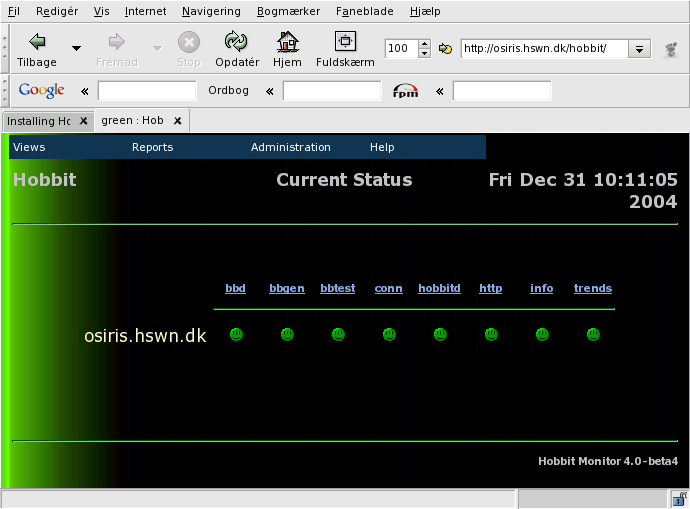
I was expecting a web page kind of like this:
As per the instructions.
I'm pretty sure that I have messed something up but I can't find it.
Can someone please help?
Attachments (1)
 attachment.png
list Martin Ward
Hi Howard, Did you modify your Apache configuration to include the Hobbit bits? Usually all you have to do is include the following in your httpd.conf file: Include /opt/hobbit/server/etc/hobbit-apache.conf Adjust your path to suit, restart your apache server and see what happens. |\/|artin
▸
--
-----Original Message-----
From: Snyder, Howard [mailto:user-e66ae0780d99@xymon.invalid] Sent: 09 January 2008 16:59
To: user-ae9b8668bcde@xymon.invalid
Subject: [hobbit] Running Hobbit for the first time.
All,
I have been looking at this too long and my eyes are bugging
out. I have Hobbit install and appears to be running.
ps -ef | grep hobbit
hobbit 641 1 0 Jan 08 ? 0:02
/export/home/hobbit/server/bin/hobbitlaunch
--config=/export/home/hobbit/server
hobbit 11106 1 0 11:39:39 ? 0:00
/export/home/hobbit/server/bin/hobbitlaunch
--config=/export/home/hobbit/server
root 11141 10479 0 11:53:55 pts/3 0:00 grep hobbit
Problem is when I go to the IP in the web browser all I get is
an index of files:
Index of /
Name Last modified Size Description
Parent Directory 08-Jan-2008 13:55 -
gifs/ 08-Jan-2008 13:55 -
help/ 08-Jan-2008 13:55 -
html/ 08-Jan-2008 09:52 -
menu/ 08-Jan-2008 13:55 -
notes/ 08-Jan-2008 09:52 -
rep/ 08-Jan-2008 09:52 -
snap/ 08-Jan-2008 09:52 -
wml/ 08-Jan-2008 09:52 -
Apache/1.3.36 Server at 11.154.16.159 Port 80 (Internal IP
Address)
I was expecting a web page kind of like this:
As per the instructions.
I'm pretty sure that I have messed something up but I can't find
it. Can someone please help?
*************************************************************************************
The message is intended for the named addressee only and may not be disclosed to or used by anyone else, nor may it be copied in any way.
The contents of this message and its attachments are confidential and may also be subject to legal privilege. If you are not the named addressee and/or have received this message in error, please advise us by e-mailing user-61c7f445d564@xymon.invalid and delete the message and any attachments without retaining any copies.
Internet communications are not secure and COLT does not accept responsibility for this message, its contents nor responsibility for any viruses.
No contracts can be created or varied on behalf of COLT Telecommunications, its subsidiaries or affiliates ("COLT") and any other party by email Communications unless expressly agreed in writing with such other party.
Please note that incoming emails will be automatically scanned to eliminate potential viruses and unsolicited promotional emails. For more information refer to www.colt.net or contact us on +44(0)20 7390 3900.
list Howard Snyder
Martin, Thanks, I'm still very new at this. Can you tell me where to put this in the file? I made the changes recommended at the http://hobbitmon.sourceforge.net/docs/install.html site to include all the items listed under "Configuring your webserver" but did not see anything that show what you listed. Thanks again for any help. Thank you, Howard Snyder user-e66ae0780d99@xymon.invalid **NOTE NEW EMAIL ADDRESS** Network Engineer III Network Services XXX-XXX-XXXX This email, and any attachments, is intended only for use by the addressee(s) named herein and may contain legally privileged and/or confidential information. It is the property of Cingular Wireless and its Affiliates. If you are not the intended recipient of this email, you are hereby notified that any dissemination, distribution or copying of this email, any attachments thereto, and any use of the information contained is strictly prohibited. If you have received this email in error, please notify me at XXX.XXX.XXXX and permanently delete the original and any copy thereof. For login requests and password resets, you will need to open a request on the "My Logins" website: https://nslogins.edc.cingular.net/login.cfm?CFID=13246&CFTOKEN=41726264 <https://nslogins.edc.cingular.net/login.cfm?CFID=13246&CFTOKEN=41726264
For OSS problems: DL-MNOC-OSS Adjunct DL-MNOC-OSS Siemens DL-MNOC-OSS Nortel DL-MNOC-OSS Nokia DL-MNOC-OSS Lucent DL-MNOC-OSS Ericsson
▸
From: Ward, Martin [mailto:user-2d33a6eb6a05@xymon.invalid]
Sent: Wednesday, January 09, 2008 12:30 PM
To: user-ae9b8668bcde@xymon.invalid
Subject: RE: [hobbit] Running Hobbit for the first time.
Hi Howard,
Did you modify your Apache configuration to include the Hobbit bits?
Usually all you have to do is include the following in your httpd.conf
file:
Include /opt/hobbit/server/etc/hobbit-apache.conf
Adjust your path to suit, restart your apache server and see what
happens.
|\/|artin
--
-----Original Message-----
From: Snyder, Howard [mailto:user-e66ae0780d99@xymon.invalid]
Sent: 09 January 2008 16:59
To: user-ae9b8668bcde@xymon.invalid
Subject: [hobbit] Running Hobbit for the first time.
All,
I have been looking at this too long and my eyes are bugging
out. I have Hobbit install and appears to be running.
ps -ef | grep hobbit
hobbit 641 1 0 Jan 08 ? 0:02
/export/home/hobbit/server/bin/hobbitlaunch
--config=/export/home/hobbit/server
hobbit 11106 1 0 11:39:39 ? 0:00
/export/home/hobbit/server/bin/hobbitlaunch
--config=/export/home/hobbit/server
root 11141 10479 0 11:53:55 pts/3 0:00 grep hobbit
Problem is when I go to the IP in the web browser all I get is
an index of files:
Index of /
Name Last modified Size Description
Parent Directory 08-Jan-2008 13:55 -
gifs/ 08-Jan-2008 13:55 -
help/ 08-Jan-2008 13:55 -
html/ 08-Jan-2008 09:52 -
menu/ 08-Jan-2008 13:55 -
notes/ 08-Jan-2008 09:52 -
rep/ 08-Jan-2008 09:52 -
snap/ 08-Jan-2008 09:52 -
wml/ 08-Jan-2008 09:52 -
Apache/1.3.36 Server at 11.154.16.159 Port 80 (Internal IP
Address)
I was expecting a web page kind of like this:
As per the instructions.
I'm pretty sure that I have messed something up but I can't find
it. Can someone please help?
************************************************************************
*************
The message is intended for the named addressee only and may not be
disclosed to or used by anyone else, nor may it be copied in any way.
The contents of this message and its attachments are confidential and
may also be subject to legal privilege. If you are not the named
addressee and/or have received this message in error, please advise us
by e-mailing user-61c7f445d564@xymon.invalid and delete the message and any
attachments without retaining any copies.
Internet communications are not secure and COLT does not accept
responsibility for this message, its contents nor responsibility for any
viruses.
No contracts can be created or varied on behalf of COLT
Telecommunications, its subsidiaries or affiliates ("COLT") and any
other party by email Communications unless expressly agreed in writing
with such other party.
Please note that incoming emails will be automatically scanned to
eliminate potential viruses and unsolicited promotional emails. For more
information refer to www.colt.net or contact us on +44(0)20 7390 3900.
list Galen Johnson
In your httpd.conf file for your apache install, just add "Include /usr/local/hobbit/server/etc/hobbit-apache.conf" to the end of it. Adjust the paths for your environment. =G=
▸
From: Snyder, Howard [mailto:user-e66ae0780d99@xymon.invalid] Sent: Wednesday, January 09, 2008 12:47 PM To: user-ae9b8668bcde@xymon.invalid Subject: RE: [hobbit] Running Hobbit for the first time. Martin, Thanks, I'm still very new at this. Can you tell me where to put this in the file? I made the changes recommended at the http://hobbitmon.sourceforge.net/docs/install.html site to include all the items listed under "Configuring your webserver" but did not see anything that show what you listed. Thanks again for any help. Thank you, Howard Snyder user-e66ae0780d99@xymon.invalid **NOTE NEW EMAIL ADDRESS** Network Engineer III Network Services XXX-XXX-XXXX This email, and any attachments, is intended only for use by the addressee(s) named herein and may contain legally privileged and/or confidential information. It is the property of Cingular Wireless and its Affiliates. If you are not the intended recipient of this email, you are hereby notified that any dissemination, distribution or copying of this email, any attachments thereto, and any use of the information contained is strictly prohibited. If you have received this email in error, please notify me at XXX.XXX.XXXX and permanently delete the original and any copy thereof. For login requests and password resets, you will need to open a request on the "My Logins" website: https://nslogins.edc.cingular.net/login.cfm?CFID=13246&CFTOKEN=41726264 For OSS problems: DL-MNOC-OSS Adjunct DL-MNOC-OSS Siemens DL-MNOC-OSS Nortel DL-MNOC-OSS Nokia DL-MNOC-OSS Lucent DL-MNOC-OSS Ericsson From: Ward, Martin [mailto:user-2d33a6eb6a05@xymon.invalid] Sent: Wednesday, January 09, 2008 12:30 PM To: user-ae9b8668bcde@xymon.invalid Subject: RE: [hobbit] Running Hobbit for the first time. Hi Howard, Did you modify your Apache configuration to include the Hobbit bits? Usually all you have to do is include the following in your httpd.conf file: Include /opt/hobbit/server/etc/hobbit-apache.conf Adjust your path to suit, restart your apache server and see what happens. |\/|artin -- -----Original Message----- From: Snyder, Howard [mailto:user-e66ae0780d99@xymon.invalid] Sent: 09 January 2008 16:59 To: user-ae9b8668bcde@xymon.invalid Subject: [hobbit] Running Hobbit for the first time. All, I have been looking at this too long and my eyes are bugging out. I have Hobbit install and appears to be running. ps -ef | grep hobbit hobbit 641 1 0 Jan 08 ? 0:02 /export/home/hobbit/server/bin/hobbitlaunch --config=/export/home/hobbit/server hobbit 11106 1 0 11:39:39 ? 0:00 /export/home/hobbit/server/bin/hobbitlaunch --config=/export/home/hobbit/server root 11141 10479 0 11:53:55 pts/3 0:00 grep hobbit Problem is when I go to the IP in the web browser all I get is an index of files: Index of / Name Last modified Size Description Parent Directory 08-Jan-2008 13:55 - gifs/ 08-Jan-2008 13:55 - help/ 08-Jan-2008 13:55 - html/ 08-Jan-2008 09:52 - menu/ 08-Jan-2008 13:55 - notes/ 08-Jan-2008 09:52 - rep/ 08-Jan-2008 09:52 - snap/ 08-Jan-2008 09:52 - wml/ 08-Jan-2008 09:52 - Apache/1.3.36 Server at 11.154.16.159 Port 80 (Internal IP Address) I was expecting a web page kind of like this: As per the instructions. I'm pretty sure that I have messed something up but I can't find it. Can someone please help? ************************************************************************ ************* The message is intended for the named addressee only and may not be disclosed to or used by anyone else, nor may it be copied in any way. The contents of this message and its attachments are confidential and may also be subject to legal privilege. If you are not the named addressee and/or have received this message in error, please advise us by e-mailing user-61c7f445d564@xymon.invalid and delete the message and any attachments without retaining any copies. Internet communications are not secure and COLT does not accept responsibility for this message, its contents nor responsibility for any viruses. No contracts can be created or varied on behalf of COLT Telecommunications, its subsidiaries or affiliates ("COLT") and any other party by email Communications unless expressly agreed in writing with such other party. Please note that incoming emails will be automatically scanned to eliminate potential viruses and unsolicited promotional emails. For more information refer to www.colt.net or contact us on +44(0)20 7390 3900.
list Tom Kauffman
This server is my test box and I see that bbtest-net isn't running.
Here's the hobbitlaunch.cfg stanza:
[bbnet]
ENVFILE /usr/local/hobbit/server/etc/hobbitserver.cfg
NEEDS hobbitd
CMD bbtest-net --report --ping --checkresponse --no-ares
LOGFILE $BBSERVERLOGS/bb-network.log
INTERVAL 5m
And the hobbitlaunch error:
2008-01-09 13:14:57 Task bbnet terminated by signal 11
2008-01-09 13:20:00 Task bbnet terminated by signal 11
2008-01-09 13:25:04 Task bbnet terminated by signal 11
There's nothing in bb-network.log
What am I missing?
This is on SuSE Enterprise Server 10.
TIA
Tom Kauffman
CONFIDENTIALITY NOTICE: This email and any attachments are for the exclusive and confidential use of the intended recipient. If you are not
the intended recipient, please do not read, distribute or take action in reliance upon this message. If you have received this in error, please notify us immediately by return email and promptly delete this message and its attachments from your computer system. We do not waive attorney-client or work product privilege by the transmission of this
message.
list Tom Kauffman
I've got three hobbit servers running - elkhart, hobbit1, and hobbit2. Elkhart and hobbit1 are reporting the 'hobbitd' column; hobbit2 is not. They all are running near identical hobbitlaunch.cfg files (hobbit2 is the only one with the alerting module enabled). I'm confused at this point . . . Tom Kauffman NIBCO, Inc
▸
CONFIDENTIALITY NOTICE: This email and any attachments are for the exclusive and confidential use of the intended recipient. If you are not
the intended recipient, please do not read, distribute or take action in reliance upon this message. If you have received this in error, please notify us immediately by return email and promptly delete this message and its attachments from your computer system. We do not waive attorney-client or work product privilege by the transmission of this
message.
list Mike Eggleston
On Wed, 09 Jan 2008, Kauffman, Tom might have said:
▸
This server is my test box and I see that bbtest-net isn't running.
Here's the hobbitlaunch.cfg stanza:
[bbnet]
ENVFILE /usr/local/hobbit/server/etc/hobbitserver.cfg
NEEDS hobbitd
CMD bbtest-net --report --ping --checkresponse --no-ares
LOGFILE $BBSERVERLOGS/bb-network.log
INTERVAL 5m
And the hobbitlaunch error:
2008-01-09 13:14:57 Task bbnet terminated by signal 11
2008-01-09 13:20:00 Task bbnet terminated by signal 11
2008-01-09 13:25:04 Task bbnet terminated by signal 11Is there a core file that you can look into for a stack trace? $ gdb bbnet core
where quite
$
list Tom Kauffman
Doesn't make sense to me -- hobbit at elkhart:~/server> gdb bin/bbtest-net core GNU gdb 6.6 Copyright (C) 2006 Free Software Foundation, Inc. GDB is free software, covered by the GNU General Public License, and you are welcome to change it and/or distribute copies of it under certain conditions. Type "show copying" to see the conditions. There is absolutely no warranty for GDB. Type "show warranty" for details. This GDB was configured as "x86_64-suse-linux"... DW_FORM_strp pointing outside of .debug_str section [in module /usr/local/hobbit/server/bin/bbtest-net] Reading symbols from /usr/lib64/libssl.so.0.9.8...(no debugging symbols found)...done. Using host libthread_db library "/lib64/libthread_db.so.1". Loaded symbols for /usr/lib64/libssl.so.0.9.8 Reading symbols from /usr/lib64/libcrypto.so.0.9.8...(no debugging symbols found)...done. Loaded symbols for /usr/lib64/libcrypto.so.0.9.8 Reading symbols from /lib64/libc.so.6... (no debugging symbols found)...done. Loaded symbols for /lib64/libc.so.6 Reading symbols from /lib64/libdl.so.2...(no debugging symbols found)...done. Loaded symbols for /lib64/libdl.so.2 Reading symbols from /lib64/ld-linux-x86-64.so.2... (no debugging symbols found)...done. Loaded symbols for /lib64/ld-linux-x86-64.so.2 Reading symbols from /lib64/libnss_files.so.2...(no debugging symbols found)...done. Loaded symbols for /lib64/libnss_files.so.2 Core was generated by `bbtest-net --report --ping --checkresponse --no-ares --debug'. Program terminated with signal 11, Segmentation fault. #0 0x0000000000423107 in ?? () (gdb) where #0 0x0000000000423107 in ?? () Cannot access memory at address 0x25955160
▸
-----Original Message-----
From: Mike Eggleston [mailto:user-4ff7b7cae5b8@xymon.invalid]
Sent: Wednesday, January 09, 2008 1:59 PM
To: user-ae9b8668bcde@xymon.invalid
Subject: Re: [hobbit] bbnet test problem -- terminates with signal 11
On Wed, 09 Jan 2008, Kauffman, Tom might have said:
This server is my test box and I see that bbtest-net isn't running.
Here's the hobbitlaunch.cfg stanza:
[bbnet]
ENVFILE /usr/local/hobbit/server/etc/hobbitserver.cfg
NEEDS hobbitd
CMD bbtest-net --report --ping --checkresponse --no-ares
LOGFILE $BBSERVERLOGS/bb-network.log
INTERVAL 5m
And the hobbitlaunch error:
2008-01-09 13:14:57 Task bbnet terminated by signal 11
2008-01-09 13:20:00 Task bbnet terminated by signal 11
2008-01-09 13:25:04 Task bbnet terminated by signal 11Is there a core file that you can look into for a stack trace? $ gdb bbnet core
where quite
$ CONFIDENTIALITY NOTICE: This email and any attachments are for the exclusive and confidential use of the intended recipient. If you are not the intended recipient, please do not read, distribute or take action in reliance upon this message. If you have received this in error, please notify us immediately by return email and promptly delete this message and its attachments from your computer system. We do not waive attorney-client or work product privilege by the transmission of this message.
list Josh Luthman
You're looking for httpd.conf in /etc/httpd/conf/ or /etc/apache2/ Simply add the line Galen told you: Include /usr/local/hobbit/server/etc/hobbit-apache.conf anywhere not within any Directory or VirtualHost statements. Josh
▸
On 1/9/08, Galen Johnson <user-87f955643e3d@xymon.invalid> wrote:In your httpd.conf file for your apache install, just add "Include /usr/local/hobbit/server/etc/hobbit-apache.conf" to the end of it. Adjust the paths for your environment. =G= From: Snyder, Howard [mailto:user-e66ae0780d99@xymon.invalid] Sent: Wednesday, January 09, 2008 12:47 PM To: user-ae9b8668bcde@xymon.invalid Subject: RE: [hobbit] Running Hobbit for the first time. Martin, Thanks, I'm still very new at this. Can you tell me where to put this in the file? I made the changes recommended at the http://hobbitmon.sourceforge.net/docs/install.html site to include all the items listed under "Configuring your webserver" but did not see anything that show what you listed. Thanks again for any help. Thank you, Howard Snyder user-e66ae0780d99@xymon.invalid **NOTE NEW EMAIL ADDRESS** Network Engineer III Network Services XXX-XXX-XXXX This email, and any attachments, is intended only for use by the addressee(s) named herein and may contain legally privileged and/or confidential information. It is the property of Cingular Wireless and its Affiliates. If you are not the intended recipient of this email, you are hereby notified that any dissemination, distribution or copying of this email, any attachments thereto, and any use of the information contained is strictly prohibited. If you have received this email in error, please notify me at XXX.XXX.XXXX and permanently delete the original and any copy thereof. For login requests and password resets, you will need to open a request on the "My Logins" website: https://nslogins.edc.cingular.net/login.cfm?CFID=13246&CFTOKEN=41726264 *For OSS problems:* *DL-MNOC-OSS Adjunct* *DL-MNOC-OSS Siemens* *DL-MNOC-OSS Nortel* *DL-MNOC-OSS Nokia* *DL-MNOC-OSS Lucent* *DL-MNOC-OSS Ericsson*
[image: cid:image001.jpg at 01C746B6.59D85350]
▸
From: Ward, Martin [mailto:user-2d33a6eb6a05@xymon.invalid]
Sent: Wednesday, January 09, 2008 12:30 PM
To: user-ae9b8668bcde@xymon.invalid
Subject: RE: [hobbit] Running Hobbit for the first time.
Hi Howard,
Did you modify your Apache configuration to include the Hobbit bits?
Usually all you have to do is include the following in your httpd.conffile:
▸
Include /opt/hobbit/server/etc/hobbit-apache.conf
Adjust your path to suit, restart your apache server and see what happens.
|\/|artin
--
-----Original Message-----
From: Snyder, Howard [mailto:user-e66ae0780d99@xymon.invalid]
Sent: 09 January 2008 16:59
To: user-ae9b8668bcde@xymon.invalid
Subject: [hobbit] Running Hobbit for the first time.
All,
I have been looking at this too long and my eyes are bugging out. I have
Hobbit install and appears to be running.
ps -ef | grep hobbit
hobbit 641 1 0 Jan 08 ? 0:02
/export/home/hobbit/server/bin/hobbitlaunch
--config=/export/home/hobbit/server
hobbit 11106 1 0 11:39:39 ? 0:00
/export/home/hobbit/server/bin/hobbitlaunch
--config=/export/home/hobbit/server
root 11141 10479 0 11:53:55 pts/3 0:00 grep hobbit
Problem is when I go to the IP in the web browser all I get is an index of
files:
Index of /
Name Last modified Size Description
Parent Directory 08-Jan-2008 13:55 -
gifs/ 08-Jan-2008 13:55 -
help/ 08-Jan-2008 13:55 -
html/ 08-Jan-2008 09:52 -
menu/ 08-Jan-2008 13:55 -
notes/ 08-Jan-2008 09:52 -
rep/ 08-Jan-2008 09:52 -
snap/ 08-Jan-2008 09:52 -
wml/ 08-Jan-2008 09:52 -
Apache/1.3.36 Server at 11.154.16.159 Port 80 (Internal IP Address)
I was expecting a web page kind of like this:
[image: Hobbit main window]
▸
As per the instructions.
I'm pretty sure that I have messed something up but I can't find it. Can
someone please help?
*************************************************************************************
The message is intended for the named addressee only and may not be
disclosed to or used by anyone else, nor may it be copied in any way.
The contents of this message and its attachments are confidential and may
also be subject to legal privilege. If you are not the named addressee
and/or have received this message in error, please advise us by e-mailing
user-61c7f445d564@xymon.invalid and delete the message and any attachments without
retaining any copies.
Internet communications are not secure and COLT does not accept
responsibility for this message, its contents nor responsibility for any
viruses.
No contracts can be created or varied on behalf of COLT
Telecommunications, its subsidiaries or affiliates ("COLT") and any other
party by email Communications unless expressly agreed in writing with such
other party.
Please note that incoming emails will be automatically scanned to
eliminate potential viruses and unsolicited promotional emails. For more
information refer to www.colt.net or contact us on +44(0)20 7390 3900.
-- Josh Luthman Office: XXX-XXX-XXXX Direct: XXX-XXX-XXXX XXXX Wayne St Suite XXXX Troy, OH XXXXX Those who don't understand UNIX are condemned to reinvent it, poorly. --- Henry Spencer
list Henrik Størner
▸
On Wed, Jan 09, 2008 at 01:56:25PM -0500, Kauffman, Tom wrote:
I've got three hobbit servers running - elkhart, hobbit1, and hobbit2. Elkhart and hobbit1 are reporting the 'hobbitd' column; hobbit2 is not. They all are running near identical hobbitlaunch.cfg files (hobbit2 is the only one with the alerting module enabled).
Check hobbitd.log on the hobbit2 server. The only possible explanation for a missing "hobbitd" column is if the hostname given in the MACHINE setting in hobbitserver.cfg does not exist in the bb-hosts file - and this will cause hobbitd to complain in the log. (MACHINE by default is taken from the BBSERVERHOSTNAME). Henrik
list Henrik Størner
▸
On Wed, Jan 09, 2008 at 01:31:57PM -0500, Kauffman, Tom wrote:
This server is my test box and I see that bbtest-net isn't running. 2008-01-09 13:14:57 Task bbnet terminated by signal 11
Since the core file doesn't tell anything about why this happens, I'd suggest you try running it by hand: Login as the hobbit user, and run bbcmd bbtest-net --report --ping --checkresponse --no-ares --debug The output can be quite voluminous, and the interesting part is what happens near the end just before it crashes. Henrik
list Tom Kauffman
The bb-hosts file matches between all three hobbit servers -- here's the end of the run: 2008-01-09 16:03:14 Did not find any network tests for host grn-secondary-router 2008-01-09 16:03:14 Adding hostname 'lac-router-hsrp' to resolver queue 2008-01-09 16:03:14 Got DNS result for host lac-router-hsrp : 10.164.254.1 2008-01-09 16:03:14 Did not find any network tests for host lac-router-hsrp 2008-01-09 16:03:14 Adding hostname 'lac-primary-router' to resolver queue 2008-01-09 16:03:14 gethostbyname() failed with err 1: Unknown host Segmentation fault (core dumped) These are routers and are only tested for connectivity.
▸
-----Original Message-----
From: Henrik Stoerner [mailto:user-ce4a2c883f75@xymon.invalid]
Sent: Wednesday, January 09, 2008 3:34 PM
To: user-ae9b8668bcde@xymon.invalid
Subject: Re: [hobbit] bbnet test problem -- terminates with signal 11
On Wed, Jan 09, 2008 at 01:31:57PM -0500, Kauffman, Tom wrote:This server is my test box and I see that bbtest-net isn't running. 2008-01-09 13:14:57 Task bbnet terminated by signal 11
Since the core file doesn't tell anything about why this happens, I'd suggest you try running it by hand: Login as the hobbit user, and run bbcmd bbtest-net --report --ping --checkresponse --no-ares --debug The output can be quite voluminous, and the interesting part is what happens near the end just before it crashes. Henrik CONFIDENTIALITY NOTICE: This email and any attachments are for the exclusive and confidential use of the intended recipient. If you are not the intended recipient, please do not read, distribute or take action in reliance upon this message. If you have received this in error, please notify us immediately by return email and promptly delete this message and its attachments from your computer system. We do not waive attorney-client or work product privilege by the transmission of this message.
list Henrik Størner
▸
On Wed, Jan 09, 2008 at 04:23:15PM -0500, Kauffman, Tom wrote:
The bb-hosts file matches between all three hobbit servers -- here's the end of the run: 2008-01-09 16:03:14 Adding hostname 'lac-primary-router' to resolver queue 2008-01-09 16:03:14 gethostbyname() failed with err 1: Unknown host Segmentation fault (core dumped)
Hmm ... DNS lookup problem, it seems. As a temporary test thing, could you try adding "testip" to this hosts' entry in bb-hosts ? I noticed you were running with the "--no-ares" option, so I'm a bit puzzled by this - I haven't seen crashes with the standard resolver library. Henrik
list Nick Nauwelaerts
▸
From: Joshua Krause [mailto:user-41d3365fe380@xymon.invalid] Sent: Mittwoch, 9. Januar 2008 15:34 To: user-ae9b8668bcde@xymon.invalid Subject: [hobbit] SMS I was wondering what SMS program was the best to use in conjunction with Hobbit?
We use an external sms device which uses a regular sim card: http://www.acmesystems.it/?id=70 We connect them to our monitoring servers via crossover cables so even network outages can be alerted for. you can mail it, http put, scp, to send your messages. // nick
list Howard Snyder
I did that. I put it at the bottom after the remarked out statement "include /etc/apache/tomcat.conf". I still only get the index of directories. I'll keep plugging away.
▸
Thank you, Howard Snyder user-e66ae0780d99@xymon.invalid **NOTE NEW EMAIL ADDRESS** Network Engineer III Network Services XXX-XXX-XXXX This email, and any attachments, is intended only for use by the addressee(s) named herein and may contain legally privileged and/or confidential information. It is the property of Cingular Wireless and its Affiliates. If you are not the intended recipient of this email, you are hereby notified that any dissemination, distribution or copying of this email, any attachments thereto, and any use of the information contained is strictly prohibited. If you have received this email in error, please notify me at XXX.XXX.XXXX and permanently delete the original and any copy thereof. For login requests and password resets, you will need to open a request on the "My Logins" website: https://nslogins.edc.cingular.net/login.cfm?CFID=13246&CFTOKEN=41726264 <https://nslogins.edc.cingular.net/login.cfm?CFID=13246&CFTOKEN=41726264
For OSS problems: DL-MNOC-OSS Adjunct DL-MNOC-OSS Siemens DL-MNOC-OSS Nortel DL-MNOC-OSS Nokia DL-MNOC-OSS Lucent DL-MNOC-OSS Ericsson From: Josh Luthman [mailto:user-4c45a83f15cb@xymon.invalid] Sent: Wednesday, January 09, 2008 2:52 PM To: user-ae9b8668bcde@xymon.invalid Subject: Re: [hobbit] Running Hobbit for the first time. You're looking for httpd.conf in /etc/httpd/conf/ or /etc/apache2/ Simply add the line Galen told you: Include /usr/local/hobbit/server/etc/hobbit-apache.conf anywhere not within any Directory or VirtualHost statements. Josh On 1/9/08, Galen Johnson <user-87f955643e3d@xymon.invalid> wrote: In your httpd.conf file for your apache install, just add "Include /usr/local/hobbit/server/etc/hobbit-apache.conf" to the end of it. Adjust the paths for your environment. =G= From: Snyder, Howard [mailto:user-e66ae0780d99@xymon.invalid] Sent: Wednesday, January 09, 2008 12:47 PM To: user-ae9b8668bcde@xymon.invalid Subject: RE: [hobbit] Running Hobbit for the first time. Martin, Thanks, I'm still very new at this. Can you tell me where to put this in the file? I made the changes recommended at the http://hobbitmon.sourceforge.net/docs/install.html site to include all the items listed under "Configuring your webserver" but did not see anything that show what you listed. Thanks again for any help. Thank you, Howard Snyder user-e66ae0780d99@xymon.invalid **NOTE NEW EMAIL ADDRESS** Network Engineer III Network Services XXX-XXX-XXXX This email, and any attachments, is intended only for use by the addressee(s) named herein and may contain legally privileged and/or confidential information. It is the property of Cingular Wireless and its Affiliates. If you are not the intended recipient of this email, you are hereby notified that any dissemination, distribution or copying of this email, any attachments thereto, and any use of the information contained is strictly prohibited. If you have received this email in error, please notify me at XXX.XXX.XXXX and permanently delete the original and any copy thereof. For login requests and password resets, you will need to open a request on the "My Logins" website: https://nslogins.edc.cingular.net/login.cfm?CFID=13246&CFTOKEN=41726264 For OSS problems: DL-MNOC-OSS Adjunct DL-MNOC-OSS Siemens DL-MNOC-OSS Nortel DL-MNOC-OSS Nokia DL-MNOC-OSS Lucent DL-MNOC-OSS Ericsson
Error! Filename not specified.
▸
From: Ward, Martin [mailto:user-2d33a6eb6a05@xymon.invalid]
Sent: Wednesday, January 09, 2008 12:30 PM
To: user-ae9b8668bcde@xymon.invalid
Subject: RE: [hobbit] Running Hobbit for the first time.
Hi Howard,
Did you modify your Apache configuration to include the Hobbit bits?
Usually all you have to do is include the following in your httpd.conf
file:
Include /opt/hobbit/server/etc/hobbit-apache.conf
Adjust your path to suit, restart your apache server and see what
happens.
|\/|artin
--
-----Original Message-----
From: Snyder, Howard [mailto:user-e66ae0780d99@xymon.invalid]
Sent: 09 January 2008 16:59
To: user-ae9b8668bcde@xymon.invalid
Subject: [hobbit] Running Hobbit for the first time.
All,
I have been looking at this too long and my eyes are bugging
out. I have Hobbit install and appears to be running.
ps -ef | grep hobbit
hobbit 641 1 0 Jan 08 ? 0:02
/export/home/hobbit/server/bin/hobbitlaunch
--config=/export/home/hobbit/server
hobbit 11106 1 0 11:39:39 ? 0:00
/export/home/hobbit/server/bin/hobbitlaunch
--config=/export/home/hobbit/server
root 11141 10479 0 11:53:55 pts/3 0:00 grep hobbit
Problem is when I go to the IP in the web browser all I get is
an index of files:
Index of /
Name Last modified Size Description
Parent Directory 08-Jan-2008 13:55 -
gifs/ 08-Jan-2008 13:55 -
help/ 08-Jan-2008 13:55 -
html/ 08-Jan-2008 09:52 -
menu/ 08-Jan-2008 13:55 -
notes/ 08-Jan-2008 09:52 -
rep/ 08-Jan-2008 09:52 -
snap/ 08-Jan-2008 09:52 -
wml/ 08-Jan-2008 09:52 -
Apache/1.3.36 Server at 11.154.16.159 Port 80 (Internal IP
Address)
I was expecting a web page kind of like this:
Error! Filename not specified.
▸
As per the instructions.
I'm pretty sure that I have messed something up but I can't find
it. Can someone please help?
************************************************************************
*************
The message is intended for the named addressee only and may not be
disclosed to or used by anyone else, nor may it be copied in any way.
The contents of this message and its attachments are confidential and
may also be subject to legal privilege. If you are not the named
addressee and/or have received this message in error, please advise us
by e-mailing user-61c7f445d564@xymon.invalid and delete the message and any
attachments without retaining any copies.
Internet communications are not secure and COLT does not accept
responsibility for this message, its contents nor responsibility for any
viruses.
No contracts can be created or varied on behalf of COLT
Telecommunications, its subsidiaries or affiliates ("COLT") and any
other party by email Communications unless expressly agreed in writing
with such other party.
Please note that incoming emails will be automatically scanned to
eliminate potential viruses and unsolicited promotional emails. For more
information refer to www.colt.net or contact us on +44(0)20 7390 3900.
--
Josh Luthman
Office: XXX-XXX-XXXX
Direct: XXX-XXX-XXXX
XXXX Wayne St
Suite XXXX
Troy, OH XXXXX

Those who don't understand UNIX are condemned to reinvent it, poorly.
--- Henry Spencer
list Hezki Englander
Another good option is Stefan Frings' smstools for linux : http://smstools.meinemullemaus.de/ --Hezki
▸
On Jan 10, 2008 11:02 AM, <user-03256bc58777@xymon.invalid> wrote:
From: Joshua Krause [mailto:user-41d3365fe380@xymon.invalid] Sent: Mittwoch, 9. Januar 2008 15:34 To: user-ae9b8668bcde@xymon.invalid Subject: [hobbit] SMS I was wondering what SMS program was the best to use in conjunction with Hobbit?We use an external sms device which uses a regular sim card: http://www.acmesystems.it/?id=70 We connect them to our monitoring servers via crossover cables so even network outages can be alerted for. you can mail it, http put, scp, to send your messages. // nick
list Eric van de Meerakker
We use the smstools software package in conjunction with a USB-connected Falcom Samba 55 mobile data modem. Links: http://smstools.meinemullemaus.de/ (version 2, in use at our central site) http://smstools3.kekekasvi.com/ (version 3, now in use at a remote site) http://www.falcom.de/products/mobile-data/samba55-56/ Works for us... Eric.
▸
Joshua Krause wrote:I was wondering what SMS program was the best to use in conjunction with Hobbit? Thanks, Josh
list Tom Kauffman
I'm getting more confused as I work through this. 1) elkhart is having problems with dns resolution 2) hobbit2 has no problems 3) the /etc/resolv.conf matches 4) they are both running SLES 10 SP1 at the same update/patch level 5) my windows desktop gets the same resolution errors as elkhart (we seem to be having MS AD dns issues here) 6) and running the SAME bbtest-net command on hobbit2 works -- but as you noticed, I'm specifying 'no-ares' so why do I see this on hobbit2? 2008-01-10 09:05:03 ares_search: tlookup='whqdc2', class=1, type=1 2008-01-10 09:05:03 Processing 496 DNS lookups with ARES 2008-01-10 09:05:03 ares_search: tlookup='whqdc1', class=1, type=1 2008-01-10 09:05:03 Processing 496 DNS lookups with ARES
▸
-----Original Message-----
From: Henrik Stoerner [mailto:user-ce4a2c883f75@xymon.invalid]
Sent: Wednesday, January 09, 2008 6:06 PM
To: user-ae9b8668bcde@xymon.invalid
Subject: Re: [hobbit] bbnet test problem -- terminates with signal 11
On Wed, Jan 09, 2008 at 04:23:15PM -0500, Kauffman, Tom wrote:The bb-hosts file matches between all three hobbit servers -- here's the end of the run: 2008-01-09 16:03:14 Adding hostname 'lac-primary-router' to resolver queue 2008-01-09 16:03:14 gethostbyname() failed with err 1: Unknown host Segmentation fault (core dumped)
Hmm ... DNS lookup problem, it seems. As a temporary test thing, could you try adding "testip" to this hosts' entry in bb-hosts ? I noticed you were running with the "--no-ares" option, so I'm a bit puzzled by this - I haven't seen crashes with the standard resolver library. Henrik CONFIDENTIALITY NOTICE: This email and any attachments are for the exclusive and confidential use of the intended recipient. If you are not the intended recipient, please do not read, distribute or take action in reliance upon this message. If you have received this in error, please notify us immediately by return email and promptly delete this message and its attachments from your computer system. We do not waive attorney-client or work product privilege by the transmission of this message.
list Frank M. Ramaekers
I had a similar problem, caused by improper configuration of <Directory> and/or Alias. Check your access_log and error_log. Frank M. Ramaekers Jr. Systems Programmer MCP, MCP+I, MCSE & RHCE American Income Life Insurance Co. Phone: (XXX)XXX-XXXX XXXX Wooded Acres Dr. Fax: (XXX)XXX-XXXX Waco, Texas 76701
▸
From: Snyder, Howard [mailto:user-e66ae0780d99@xymon.invalid] Sent: Thursday, January 10, 2008 5:23 AM To: user-ae9b8668bcde@xymon.invalid Subject: RE: [hobbit] Running Hobbit for the first time. I did that. I put it at the bottom after the remarked out statement "include /etc/apache/tomcat.conf". I still only get the index of directories. I'll keep plugging away. Thank you, Howard Snyder user-e66ae0780d99@xymon.invalid **NOTE NEW EMAIL ADDRESS** Network Engineer III Network Services XXX-XXX-XXXX This email, and any attachments, is intended only for use by the addressee(s) named herein and may contain legally privileged and/or confidential information. It is the property of Cingular Wireless and its Affiliates. If you are not the intended recipient of this email, you are hereby notified that any dissemination, distribution or copying of this email, any attachments thereto, and any use of the information contained is strictly prohibited. If you have received this email in error, please notify me at XXX.XXX.XXXX and permanently delete the original and any copy thereof. For login requests and password resets, you will need to open a request on the "My Logins" website: https://nslogins.edc.cingular.net/login.cfm?CFID=13246&CFTOKEN=41726264 For OSS problems: DL-MNOC-OSS Adjunct DL-MNOC-OSS Siemens DL-MNOC-OSS Nortel DL-MNOC-OSS Nokia DL-MNOC-OSS Lucent DL-MNOC-OSS Ericsson From: Josh Luthman [mailto:user-4c45a83f15cb@xymon.invalid] Sent: Wednesday, January 09, 2008 2:52 PM To: user-ae9b8668bcde@xymon.invalid Subject: Re: [hobbit] Running Hobbit for the first time. You're looking for httpd.conf in /etc/httpd/conf/ or /etc/apache2/ Simply add the line Galen told you: Include /usr/local/hobbit/server/etc/hobbit-apache.conf anywhere not within any Directory or VirtualHost statements. Josh On 1/9/08, Galen Johnson <user-87f955643e3d@xymon.invalid> wrote: In your httpd.conf file for your apache install, just add "Include /usr/local/hobbit/server/etc/hobbit-apache.conf" to the end of it. Adjust the paths for your environment. =G= From: Snyder, Howard [mailto:user-e66ae0780d99@xymon.invalid] Sent: Wednesday, January 09, 2008 12:47 PM To: user-ae9b8668bcde@xymon.invalid Subject: RE: [hobbit] Running Hobbit for the first time. Martin, Thanks, I'm still very new at this. Can you tell me where to put this in the file? I made the changes recommended at the http://hobbitmon.sourceforge.net/docs/install.html site to include all the items listed under "Configuring your webserver" but did not see anything that show what you listed. Thanks again for any help. Thank you, Howard Snyder user-e66ae0780d99@xymon.invalid **NOTE NEW EMAIL ADDRESS** Network Engineer III Network Services XXX-XXX-XXXX This email, and any attachments, is intended only for use by the addressee(s) named herein and may contain legally privileged and/or confidential information. It is the property of Cingular Wireless and its Affiliates. If you are not the intended recipient of this email, you are hereby notified that any dissemination, distribution or copying of this email, any attachments thereto, and any use of the information contained is strictly prohibited. If you have received this email in error, please notify me at XXX.XXX.XXXX and permanently delete the original and any copy thereof. For login requests and password resets, you will need to open a request on the "My Logins" website: https://nslogins.edc.cingular.net/login.cfm?CFID=13246&CFTOKEN=41726264 For OSS problems: DL-MNOC-OSS Adjunct DL-MNOC-OSS Siemens DL-MNOC-OSS Nortel DL-MNOC-OSS Nokia DL-MNOC-OSS Lucent DL-MNOC-OSS Ericsson Error! Filename not specified. From: Ward, Martin [mailto:user-2d33a6eb6a05@xymon.invalid] Sent: Wednesday, January 09, 2008 12:30 PM To: user-ae9b8668bcde@xymon.invalid Subject: RE: [hobbit] Running Hobbit for the first time. Hi Howard, Did you modify your Apache configuration to include the Hobbit bits? Usually all you have to do is include the following in your httpd.conf file: Include /opt/hobbit/server/etc/hobbit-apache.conf Adjust your path to suit, restart your apache server and see what happens. |\/|artin -- -----Original Message----- From: Snyder, Howard [mailto:user-e66ae0780d99@xymon.invalid] Sent: 09 January 2008 16:59 To: user-ae9b8668bcde@xymon.invalid Subject: [hobbit] Running Hobbit for the first time. All, I have been looking at this too long and my eyes are bugging out. I have Hobbit install and appears to be running. ps -ef | grep hobbit hobbit 641 1 0 Jan 08 ? 0:02 /export/home/hobbit/server/bin/hobbitlaunch --config=/export/home/hobbit/server hobbit 11106 1 0 11:39:39 ? 0:00 /export/home/hobbit/server/bin/hobbitlaunch --config=/export/home/hobbit/server root 11141 10479 0 11:53:55 pts/3 0:00 grep hobbit Problem is when I go to the IP in the web browser all I get is an index of files: Index of / Name Last modified Size Description Parent Directory 08-Jan-2008 13:55 - gifs/ 08-Jan-2008 13:55 - help/ 08-Jan-2008 13:55 - html/ 08-Jan-2008 09:52 - menu/ 08-Jan-2008 13:55 - notes/ 08-Jan-2008 09:52 - rep/ 08-Jan-2008 09:52 - snap/ 08-Jan-2008 09:52 - wml/ 08-Jan-2008 09:52 - Apache/1.3.36 Server at 11.154.16.159 Port 80 (Internal IP Address) I was expecting a web page kind of like this: Error! Filename not specified. As per the instructions. I'm pretty sure that I have messed something up but I can't find it. Can someone please help? ************************************************************************ ************* The message is intended for the named addressee only and may not be disclosed to or used by anyone else, nor may it be copied in any way. The contents of this message and its attachments are confidential and may also be subject to legal privilege. If you are not the named addressee and/or have received this message in error, please advise us by e-mailing user-61c7f445d564@xymon.invalid and delete the message and any attachments without retaining any copies. Internet communications are not secure and COLT does not accept responsibility for this message, its contents nor responsibility for any viruses. No contracts can be created or varied on behalf of COLT Telecommunications, its subsidiaries or affiliates ("COLT") and any other party by email Communications unless expressly agreed in writing with such other party. Please note that incoming emails will be automatically scanned to eliminate potential viruses and unsolicited promotional emails. For more information refer to www.colt.net or contact us on +44(0)20 7390 3900. -- Josh Luthman Office: XXX-XXX-XXXX Direct: XXX-XXX-XXXX XXXX Wayne St Suite XXXX Troy, OH XXXXX Those who don't understand UNIX are condemned to reinvent it, poorly. --- Henry Spencer
This message contains information which is privileged and confidential and is solely for the use of the
intended recipient. If you are not the intended recipient, be aware that any review, disclosure,
copying, distribution, or use of the contents of this message is strictly prohibited. If you have
received this in error, please destroy it immediately and notify us at user-2f780dbd82da@xymon.invalid.
list Josh Luthman
Also be sure you're requesting /hobbit/
▸
On 1/10/08, Frank M. Ramaekers <user-dbd5c100cfe9@xymon.invalid> wrote:I had a similar problem, caused by improper configuration of <Directory> and/or Alias. Check your access_log and error_log. Frank M. Ramaekers Jr. Systems Programmer MCP, MCP+I, MCSE & RHCE American Income Life Insurance Co. Phone: (XXX)XXX-XXXX XXXX Wooded Acres Dr. Fax: (XXX)XXX-XXXX Waco, Texas 76701 From: Snyder, Howard [mailto:user-e66ae0780d99@xymon.invalid] Sent: Thursday, January 10, 2008 5:23 AM To: user-ae9b8668bcde@xymon.invalid Subject: RE: [hobbit] Running Hobbit for the first time. I did that. I put it at the bottom after the remarked out statement "include /etc/apache/tomcat.conf". I still only get the index of directories. I'll keep plugging away. Thank you, Howard Snyder user-e66ae0780d99@xymon.invalid **NOTE NEW EMAIL ADDRESS** Network Engineer III Network Services XXX-XXX-XXXX This email, and any attachments, is intended only for use by the addressee(s) named herein and may contain legally privileged and/or confidential information. It is the property of Cingular Wireless and its Affiliates. If you are not the intended recipient of this email, you are hereby notified that any dissemination, distribution or copying of this email, any attachments thereto, and any use of the information contained is strictly prohibited. If you have received this email in error, please notify me at XXX.XXX.XXXX and permanently delete the original and any copy thereof. For login requests and password resets, you will need to open a request on the "My Logins" website: https://nslogins.edc.cingular.net/login.cfm?CFID=13246&CFTOKEN=41726264 For OSS problems: DL-MNOC-OSS Adjunct DL-MNOC-OSS Siemens DL-MNOC-OSS Nortel DL-MNOC-OSS Nokia DL-MNOC-OSS Lucent DL-MNOC-OSS Ericsson From: Josh Luthman [mailto:user-4c45a83f15cb@xymon.invalid] Sent: Wednesday, January 09, 2008 2:52 PM To: user-ae9b8668bcde@xymon.invalid Subject: Re: [hobbit] Running Hobbit for the first time. You're looking for httpd.conf in /etc/httpd/conf/ or /etc/apache2/ Simply add the line Galen told you: Include /usr/local/hobbit/server/etc/hobbit-apache.conf anywhere not within any Directory or VirtualHost statements. Josh On 1/9/08, Galen Johnson <user-87f955643e3d@xymon.invalid> wrote: In your httpd.conf file for your apache install, just add "Include /usr/local/hobbit/server/etc/hobbit-apache.conf" to the end of it. Adjust the paths for your environment. =G= From: Snyder, Howard [mailto:user-e66ae0780d99@xymon.invalid] Sent: Wednesday, January 09, 2008 12:47 PM To: user-ae9b8668bcde@xymon.invalid Subject: RE: [hobbit] Running Hobbit for the first time. Martin, Thanks, I'm still very new at this. Can you tell me where to put this in the file? I made the changes recommended at the http://hobbitmon.sourceforge.net/docs/install.html site to include all the items listed under "Configuring your webserver" but did not see anything that show what you listed. Thanks again for any help. Thank you, Howard Snyder user-e66ae0780d99@xymon.invalid **NOTE NEW EMAIL ADDRESS** Network Engineer III Network Services XXX-XXX-XXXX This email, and any attachments, is intended only for use by the addressee(s) named herein and may contain legally privileged and/or confidential information. It is the property of Cingular Wireless and its Affiliates. If you are not the intended recipient of this email, you are hereby notified that any dissemination, distribution or copying of this email, any attachments thereto, and any use of the information contained is strictly prohibited. If you have received this email in error, please notify me at XXX.XXX.XXXX and permanently delete the original and any copy thereof. For login requests and password resets, you will need to open a request on the "My Logins" website: https://nslogins.edc.cingular.net/login.cfm?CFID=13246&CFTOKEN=41726264 For OSS problems: DL-MNOC-OSS Adjunct DL-MNOC-OSS Siemens DL-MNOC-OSS Nortel DL-MNOC-OSS Nokia DL-MNOC-OSS Lucent DL-MNOC-OSS Ericsson Error! Filename not specified. From: Ward, Martin [mailto:user-2d33a6eb6a05@xymon.invalid] Sent: Wednesday, January 09, 2008 12:30 PM To: user-ae9b8668bcde@xymon.invalid Subject: RE: [hobbit] Running Hobbit for the first time. Hi Howard, Did you modify your Apache configuration to include the Hobbit bits? Usually all you have to do is include the following in your httpd.conf file: Include /opt/hobbit/server/etc/hobbit-apache.conf Adjust your path to suit, restart your apache server and see what happens. |\/|artin -- -----Original Message----- From: Snyder, Howard [mailto:user-e66ae0780d99@xymon.invalid] Sent: 09 January 2008 16:59 To: user-ae9b8668bcde@xymon.invalid Subject: [hobbit] Running Hobbit for the first time. All, I have been looking at this too long and my eyes are bugging out. I have Hobbit install and appears to be running. ps -ef | grep hobbit hobbit 641 1 0 Jan 08 ? 0:02 /export/home/hobbit/server/bin/hobbitlaunch --config=/export/home/hobbit/server hobbit 11106 1 0 11:39:39 ? 0:00 /export/home/hobbit/server/bin/hobbitlaunch --config=/export/home/hobbit/server root 11141 10479 0 11:53:55 pts/3 0:00 grep hobbit Problem is when I go to the IP in the web browser all I get is an index of files: Index of / Name Last modified Size Description Parent Directory 08-Jan-2008 13:55 - gifs/ 08-Jan-2008 13:55 - help/ 08-Jan-2008 13:55 - html/ 08-Jan-2008 09:52 - menu/ 08-Jan-2008 13:55 - notes/ 08-Jan-2008 09:52 - rep/ 08-Jan-2008 09:52 - snap/ 08-Jan-2008 09:52 - wml/ 08-Jan-2008 09:52 - Apache/1.3.36 Server at 11.154.16.159 Port 80 (Internal IP Address) I was expecting a web page kind of like this: Error! Filename not specified. As per the instructions. I'm pretty sure that I have messed something up but I can't find it. Can someone please help? ************************************************************************ ************* The message is intended for the named addressee only and may not be disclosed to or used by anyone else, nor may it be copied in any way. The contents of this message and its attachments are confidential and may also be subject to legal privilege. If you are not the named addressee and/or have received this message in error, please advise us by e-mailing user-61c7f445d564@xymon.invalid and delete the message and any attachments without retaining any copies. Internet communications are not secure and COLT does not accept responsibility for this message, its contents nor responsibility for any viruses. No contracts can be created or varied on behalf of COLT Telecommunications, its subsidiaries or affiliates ("COLT") and any other party by email Communications unless expressly agreed in writing with such other party. Please note that incoming emails will be automatically scanned to eliminate potential viruses and unsolicited promotional emails. For more information refer to www.colt.net or contact us on +44(0)20 7390 3900. -- Josh Luthman Office: XXX-XXX-XXXX Direct: XXX-XXX-XXXX XXXX Wayne St Suite XXXX Troy, OH XXXXX Those who don't understand UNIX are condemned to reinvent it, poorly. --- Henry Spencer This message contains information which is privileged and confidential and is solely for the use of the intended recipient. If you are not the intended recipient, be aware that any review, disclosure, copying, distribution, or use of the contents of this message is strictly prohibited. If you have received this in error, please destroy it immediately and notify us at user-2f780dbd82da@xymon.invalid.
-- Josh Luthman Office: XXX-XXX-XXXX Direct: XXX-XXX-XXXX XXXX Wayne St Suite XXXX Troy, OH XXXXX Those who don't understand UNIX are condemned to reinvent it, poorly. --- Henry Spencer
list Ralph Mitchell
On Jan 10, 2008 8:42 AM, Josh Luthman <user-4c45a83f15cb@xymon.invalid> wrote:
Also be sure you're requesting /hobbit/
Going back to the original email, I'd say it's not an Apache problem. After all, Apache *is* handing out a directory listing, which is correct behaviour when there's no index.html file in the directory... Which there isn't. There also isnt a bb.html or a bb2.html, both of which appear in server/www when the page generator runs. So, probably Hobbit isn't running properly. My "ps -ef | grep hobbit" shows this (I've edited off the uninteresting process ids and run times): /home/hobbit/server/bin/hobbitlaunch --config=/home/hobbit/server/etc/hobbitlaunch.cfg --env=/home/hobbit/server/etc/hobbitserver.cfg --log=/var/log/hobbit/hobbitlaunch.log --pidfile=/var/log/hobbit/hobbitlaunch.pid hobbitd --pidfile=/var/log/hobbit/hobbitd.pid --restart=/home/hobbit/server/tmp/hobbitd.chk --checkpoint-file=/home/hobbit/server/tmp/hobbitd.chk --checkpoint-interval=600 --log=/var/log/hobbit/hobbitd.log --admin-senders= 127.0.0.1 10.134.13.133 --store-clientlogs=!msgs hobbitd_channel --channel=stachg --log=/var/log/hobbit/history.log hobbitd_history hobbitd_channel --channel=clichg --log=/var/log/hobbit/hostdata.log hobbitd_hostdata hobbitd_channel --channel=page --log=/var/log/hobbit/page.log hobbitd_alert --checkpoint-file=/home/hobbit/server/tmp/alert.chk --checkpoint-interval=600 hobbitd_channel --channel=status --log=/var/log/hobbit/rrd-status.loghobbitd_rrd --rrddir=/home/hobbit/data/rrd hobbitd_channel --channel=data --log=/var/log/hobbit/rrd-data.loghobbitd_rrd --rrddir=/home/hobbit/data/rrd hobbitd_channel --channel=client --log=/var/log/hobbit/clientdata.log hobbitd_client hobbitd_rrd --rrddir=/home/hobbit/data/rrd hobbitd_history hobbitd_client hobbitd_rrd --rrddir=/home/hobbit/data/rrd hobbitd_alert --checkpoint-file=/home/hobbit/server/tmp/alert.chk --checkpoint-interval=600 hobbitd_hostdata Ralph Mitchell
list Howard Snyder
Thanks for the info, I can to the same conclusion as you. I have found
that the hobbit.sh script was pointing to a different directory the
where all the files were located:
more hobbit.sh
#!/bin/sh
# Startup script for the Hobbit monitor
#
# This starts the "hobbitlaunch" tool, which in turn starts
# all of the other Hobbit server programs.
case "`uname -s`" in
"SunOS")
ID=/usr/xpg4/bin/id
;;
*)
ID=id
;;
esac
if test `$ID -un` != hobbit
then
echo "Hobbit must be started as the hobbit user"
exit 1
fi
case "$1" in
"start")
if test -s /var/log/hobbit/hobbitlaunch.pid
then
kill -0 `cat /var/log/hobbit/hobbitlaunch.pid`
if test $? -eq 0
then
echo "Hobbit appears to be running, doing
restart"
$0 stop
else
rm -f /var/log/hobbit/hobbitlaunch.pid
fi
fi
##############################
## I have remarked out the next line and added a modified version as a
test.
##
## /export/home/hobbit/server/bin/hobbitlaunch
--config=/export/home/hobbit/server/etc/hobbitlaunch.cfg
--env=/export/home/h
obbit/server/etc/hobbitserver.cfg --log=/var/log/hobbit/hobbitlaunch.log
--pidfile=/var/log/hobbit/hobbitlaunch.pid
##
##############################
/usr/lib/hobbit/server/bin/hobbitlaunch
--config=/usr/lib/hobbit/server/etc/hobbitlaunch.cfg
--env=/usr/lib/hobbit/server/
etc/hobbitserver.cfg --log=/var/log/hobbit/hobbit.launch.log
--pidfile=/var/log/hobbit/hobbitlaunch.pid
echo "Hobbit started"
;;
"stop")
if test -s /var/log/hobbit/hobbitlaunch.pid
then
kill -TERM `cat /var/log/hobbit/hobbitlaunch.pid`
echo "Hobbit stopped"
else
echo "Hobbit is not running"
fi
rm -f /var/log/hobbit/hobbitlaunch.pid
;;
"status")
if test -s /var/log/hobbit/hobbitlaunch.pid
then
kill -0 `cat /var/log/hobbit/hobbitlaunch.pid`
if test $? -eq 0
then
echo "Hobbit (hobbitlaunch) running with PID
`cat /var/log/hobbit/hobbitlaunch.pid`"
else
echo "Hobbit not running, removing stale PID
file"
rm -f /var/log/hobbit/hobbitlaunch.pid
fi
else
echo "Hobbit (hobbitlaunch) does not appear to be
running"
fi
;;
"restart")
if test -s /var/log/hobbit/hobbitlaunch.pid
then
$0 stop
sleep 10
$0 start
else
echo "hobbitlaunch does not appear to be running,
starting it"
$0 start
I have checked all the locations listed and those files are there. This
is what I'm getting in the log file:
2008-01-10 10:40:31 hobbitlaunch starting
2008-01-10 10:40:31 Loading tasklist configuration from
/usr/lib/hobbit/server/etc/hobbitlaunch.cfg
ld.so.1: hobbitd: fatal: libpcre.so.0: open failed: No such file or
directory
2008-01-10 10:40:36 Task hobbitd terminated by signal 9
ld.so.1: hobbitd: fatal: libpcre.so.0: open failed: No such file or
directory
2008-01-10 10:40:41 Task hobbitd terminated by signal 9
ld.so.1: hobbitd: fatal: libpcre.so.0: open failed: No such file or
directory
2008-01-10 10:40:46 Task hobbitd terminated by signal 9
ld.so.1: hobbitd: fatal: libpcre.so.0: open failed: No such file or
directory
2008-01-10 10:50:47 Task hobbitd terminated by signal 9
ld.so.1: hobbitd: fatal: libpcre.so.0: open failed: No such file or
directory
2008-01-10 10:50:52 Task hobbitd terminated by signal 9
ld.so.1: hobbitd: fatal: libpcre.so.0: open failed: No such file or
directory
2008-01-10 10:50:57 Task hobbitd terminated by signal 9
$
Any ideas?
▸
Thank you, Howard Snyder user-e66ae0780d99@xymon.invalid **NOTE NEW EMAIL ADDRESS** Network Engineer III Network Services XXX-XXX-XXXX This email, and any attachments, is intended only for use by the addressee(s) named herein and may contain legally privileged and/or confidential information. It is the property of Cingular Wireless and its Affiliates. If you are not the intended recipient of this email, you are hereby notified that any dissemination, distribution or copying of this email, any attachments thereto, and any use of the information contained is strictly prohibited. If you have received this email in error, please notify me at XXX.XXX.XXXX and permanently delete the original and any copy thereof. For login requests and password resets, you will need to open a request on the "My Logins" website: https://nslogins.edc.cingular.net/login.cfm?CFID=13246&CFTOKEN=41726264 <https://nslogins.edc.cingular.net/login.cfm?CFID=13246&CFTOKEN=41726264
For OSS problems: DL-MNOC-OSS Adjunct DL-MNOC-OSS Siemens DL-MNOC-OSS Nortel DL-MNOC-OSS Nokia DL-MNOC-OSS Lucent DL-MNOC-OSS Ericsson From: Ralph Mitchell [mailto:user-00a5e44c48c0@xymon.invalid] Sent: Thursday, January 10, 2008 9:56 AM To: user-ae9b8668bcde@xymon.invalid Subject: Re: [hobbit] Running Hobbit for the first time. On Jan 10, 2008 8:42 AM, Josh Luthman <user-4c45a83f15cb@xymon.invalid> wrote: Also be sure you're requesting /hobbit/ Going back to the original email, I'd say it's not an Apache problem. After all, Apache *is* handing out a directory listing, which is correct behaviour when there's no index.html file in the directory... Which there isn't. There also isnt a bb.html or a bb2.html, both of which appear in server/www when the page generator runs. So, probably Hobbit isn't running properly. My "ps -ef | grep hobbit" shows this (I've edited off the uninteresting process ids and run times): /home/hobbit/server/bin/hobbitlaunch --config=/home/hobbit/server/etc/hobbitlaunch.cfg --env=/home/hobbit/server/etc/hobbitserver.cfg --log=/var/log/hobbit/hobbitlaunch.log --pidfile=/var/log/hobbit/hobbitlaunch.pid hobbitd --pidfile=/var/log/hobbit/hobbitd.pid --restart=/home/hobbit/server/tmp/hobbitd.chk --checkpoint-file=/home/hobbit/server/tmp/hobbitd.chk --checkpoint-interval=600 --log=/var/log/hobbit/hobbitd.log --admin-senders= 127.0.0.1 10.134.13.133 --store-clientlogs=!msgs hobbitd_channel --channel=stachg --log=/var/log/hobbit/history.log hobbitd_history hobbitd_channel --channel=clichg --log=/var/log/hobbit/hostdata.log hobbitd_hostdata hobbitd_channel --channel=page --log=/var/log/hobbit/page.log hobbitd_alert --checkpoint-file=/home/hobbit/server/tmp/alert.chk --checkpoint-interval=600
hobbitd_channel --channel=status --log=/var/log/hobbit/rrd-status.log
hobbitd_rrd --rrddir=/home/hobbit/data/rrd
hobbitd_channel --channel=data --log=/var/log/hobbit/rrd-data.log
hobbitd_rrd --rrddir=/home/hobbit/data/rrd
▸
hobbitd_channel --channel=client --log=/var/log/hobbit/clientdata.log
hobbitd_client
hobbitd_rrd --rrddir=/home/hobbit/data/rrd
hobbitd_history
hobbitd_client
hobbitd_rrd --rrddir=/home/hobbit/data/rrd
hobbitd_alert --checkpoint-file=/home/hobbit/server/tmp/alert.chk
--checkpoint-interval=600
hobbitd_hostdata
Ralph Mitchell
list Ralph Mitchell
▸
On Jan 10, 2008 9:57 AM, Snyder, Howard <user-e66ae0780d99@xymon.invalid> wrote:
I have checked all the locations listed and those files are there. This is what I'm getting in the log file: 2008-01-10 10:40:31 hobbitlaunch starting 2008-01-10 10:40:31 Loading tasklist configuration from /usr/lib/hobbit/server/etc/hobbitlaunch.cfg ld.so.1: hobbitd: fatal: libpcre.so.0: open failed: No such file or directory 2008-01-10 10:40:36 Task hobbitd terminated by signal 9 ld.so.1: hobbitd: fatal: libpcre.so.0: open failed: No such file or directory 2008-01-10 10:40:41 Task hobbitd terminated by signal 9 ld.so.1: hobbitd: fatal: libpcre.so.0: open failed: No such file or directory 2008-01-10 10:40:46 Task hobbitd terminated by signal 9 ld.so.1: hobbitd: fatal: libpcre.so.0: open failed: No such file or directory 2008-01-10 10:50:47 Task hobbitd terminated by signal 9 ld.so.1: hobbitd: fatal: libpcre.so.0: open failed: No such file or directory 2008-01-10 10:50:52 Task hobbitd terminated by signal 9 ld.so.1: hobbitd: fatal: libpcre.so.0: open failed: No such file or directory 2008-01-10 10:50:57 Task hobbitd terminated by signal 9
Looks like you don't have libpcre installed, at least not in a place where Hobbit can find it. How you install that will depend on the OS you have running. Ralph Mitchell
list Josh Luthman
Can I ask how Hobbit was installed? I'm curious to know if it was from source or a package. Josh
▸
On 1/10/08, Snyder, Howard <user-e66ae0780d99@xymon.invalid> wrote:
Thanks for the info, I can to the same conclusion as you. I have found
that the hobbit.sh script was pointing to a different directory the where
all the files were located:
more hobbit.sh
#!/bin/sh
# Startup script for the Hobbit monitor
#
# This starts the "hobbitlaunch" tool, which in turn starts
# all of the other Hobbit server programs.
case "`uname -s`" in
"SunOS")
ID=/usr/xpg4/bin/id
;;
*)
ID=id
;;
esac
if test `$ID -un` != hobbit
then
echo "Hobbit must be started as the hobbit user"
exit 1
fi
case "$1" in
"start")
if test -s /var/log/hobbit/hobbitlaunch.pid
then
kill -0 `cat /var/log/hobbit/hobbitlaunch.pid`
if test $? -eq 0
then
echo "Hobbit appears to be running, doing restart"
$0 stop
else
rm -f /var/log/hobbit/hobbitlaunch.pid
fi
fi
##############################
## I have remarked out the next line and added a modified version as a
test.
##
## /export/home/hobbit/server/bin/hobbitlaunch
--config=/export/home/hobbit/server/etc/hobbitlaunch.cfg
--env=/export/home/h
obbit/server/etc/hobbitserver.cfg --log=/var/log/hobbit/hobbitlaunch.log
--pidfile=/var/log/hobbit/hobbitlaunch.pid
##
##############################
/usr/lib/hobbit/server/bin/hobbitlaunch
--config=/usr/lib/hobbit/server/etc/hobbitlaunch.cfg
--env=/usr/lib/hobbit/server/
etc/hobbitserver.cfg --log=/var/log/hobbit/hobbit.launch.log
--pidfile=/var/log/hobbit/hobbitlaunch.pid
echo "Hobbit started"
;;
"stop")
if test -s /var/log/hobbit/hobbitlaunch.pid
then
kill -TERM `cat /var/log/hobbit/hobbitlaunch.pid`
echo "Hobbit stopped"
else
echo "Hobbit is not running"
fi
rm -f /var/log/hobbit/hobbitlaunch.pid
;;
"status")
if test -s /var/log/hobbit/hobbitlaunch.pid
then
kill -0 `cat /var/log/hobbit/hobbitlaunch.pid`
if test $? -eq 0
then
echo "Hobbit (hobbitlaunch) running with PID `cat
/var/log/hobbit/hobbitlaunch.pid`"
else
echo "Hobbit not running, removing stale PID file"
rm -f /var/log/hobbit/hobbitlaunch.pid
fi
else
echo "Hobbit (hobbitlaunch) does not appear to be running"
fi
;;
"restart")
if test -s /var/log/hobbit/hobbitlaunch.pid
then
$0 stop
sleep 10
$0 start
else
echo "hobbitlaunch does not appear to be running, starting
it"
$0 start
I have checked all the locations listed and those files are there. This
is what I'm getting in the log file:
2008-01-10 10:40:31 hobbitlaunch starting
2008-01-10 10:40:31 Loading tasklist configuration from
/usr/lib/hobbit/server/etc/hobbitlaunch.cfg
ld.so.1: hobbitd: fatal: libpcre.so.0: open failed: No such file or
directory
2008-01-10 10:40:36 Task hobbitd terminated by signal 9
ld.so.1: hobbitd: fatal: libpcre.so.0: open failed: No such file or
directory
2008-01-10 10:40:41 Task hobbitd terminated by signal 9
ld.so.1: hobbitd: fatal: libpcre.so.0: open failed: No such file or
directory
2008-01-10 10:40:46 Task hobbitd terminated by signal 9
ld.so.1: hobbitd: fatal: libpcre.so.0: open failed: No such file or
directory
2008-01-10 10:50:47 Task hobbitd terminated by signal 9
ld.so.1: hobbitd: fatal: libpcre.so.0: open failed: No such file or
directory
2008-01-10 10:50:52 Task hobbitd terminated by signal 9
ld.so.1: hobbitd: fatal: libpcre.so.0: open failed: No such file or
directory
2008-01-10 10:50:57 Task hobbitd terminated by signal 9
$
Any ideas?
Thank you,
Howard Snyder
user-e66ae0780d99@xymon.invalid **NOTE NEW EMAIL ADDRESS**
Network Engineer III
Network Services
XXX-XXX-XXXX
This email, and any attachments, is intended only for use by the
addressee(s) named herein and may contain legally privileged and/or
confidential information. It is the property of Cingular Wireless and its
Affiliates. If you are not the intended recipient of this email, you are
hereby notified that any dissemination, distribution or copying of this
email, any attachments thereto, and any use of the information contained is
strictly prohibited. If you have received this email in error, please notify
me at XXX.XXX.XXXX and permanently delete the original and any copy
thereof.
For login requests and password resets, you will need to open a request on
the "My Logins" website:
https://nslogins.edc.cingular.net/login.cfm?CFID=13246&CFTOKEN=41726264
*For OSS problems:*
*DL-MNOC-OSS Adjunct*
*DL-MNOC-OSS Siemens*
*DL-MNOC-OSS Nortel*
*DL-MNOC-OSS Nokia*
*DL-MNOC-OSS Lucent*
*DL-MNOC-OSS Ericsson***
[image: cid:image001.jpg at 01C746B6.59D85350]
From: Ralph Mitchell [mailto:user-00a5e44c48c0@xymon.invalid]
Sent: Thursday, January 10, 2008 9:56 AM
To: user-ae9b8668bcde@xymon.invalid
Subject: Re: [hobbit] Running Hobbit for the first time.
On Jan 10, 2008 8:42 AM, Josh Luthman <user-4c45a83f15cb@xymon.invalid> wrote:
Also be sure you're requesting /hobbit/
Going back to the original email, I'd say it's not an Apache problem.
After all, Apache *is* handing out a directory listing, which is correct
behaviour when there's no index.html file in the directory... Which there
isn't. There also isnt a bb.html or a bb2.html, both of which appear in
server/www when the page generator runs.
So, probably Hobbit isn't running properly.
My "ps -ef | grep hobbit" shows this (I've edited off the uninteresting
process ids and run times):
/home/hobbit/server/bin/hobbitlaunch
--config=/home/hobbit/server/etc/hobbitlaunch.cfg
--env=/home/hobbit/server/etc/hobbitserver.cfg
--log=/var/log/hobbit/hobbitlaunch.log
--pidfile=/var/log/hobbit/hobbitlaunch.pid
hobbitd --pidfile=/var/log/hobbit/hobbitd.pid
--restart=/home/hobbit/server/tmp/hobbitd.chk
--checkpoint-file=/home/hobbit/server/tmp/hobbitd.chk
--checkpoint-interval=600 --log=/var/log/hobbit/hobbitd.log --admin-senders=
127.0.0.1 10.134.13.133 --store-clientlogs=!msgs
hobbitd_channel --channel=stachg --log=/var/log/hobbit/history.log
hobbitd_history
hobbitd_channel --channel=clichg --log=/var/log/hobbit/hostdata.log
hobbitd_hostdata
hobbitd_channel --channel=page --log=/var/log/hobbit/page.log
hobbitd_alert --checkpoint-file=/home/hobbit/server/tmp/alert.chk
--checkpoint-interval=600
hobbitd_channel --channel=status --log=/var/log/hobbit/rrd-status.loghobbitd_rrd --rrddir=/home/hobbit/data/rrd
hobbitd_channel --channel=data --log=/var/log/hobbit/rrd-data.loghobbitd_rrd --rrddir=/home/hobbit/data/rrd
hobbitd_channel --channel=client --log=/var/log/hobbit/clientdata.log
hobbitd_client
hobbitd_rrd --rrddir=/home/hobbit/data/rrd
hobbitd_history
hobbitd_client
hobbitd_rrd --rrddir=/home/hobbit/data/rrd
hobbitd_alert --checkpoint-file=/home/hobbit/server/tmp/alert.chk
--checkpoint-interval=600
hobbitd_hostdata
Ralph Mitchell
--
Josh Luthman
Office: XXX-XXX-XXXX
Direct: XXX-XXX-XXXX
XXXX Wayne St
Suite XXXX
Troy, OH XXXXX

Those who don't understand UNIX are condemned to reinvent it, poorly.
--- Henry Spencer
list Tom Kauffman
And I don't know if 'testip' would fix this one: 2008-01-10 09:52:45 Got DNS result for host www.nibco.com : 206.252.142.133 2008-01-10 09:52:45 Adding hostname 'nibco-ecom' to resolver queue 2008-01-10 09:52:46 gethostbyname() failed with err 1: Unknown host Segmentation fault (core dumped) 0.0.0.0 nibcopartner # noconn http://www.nibcopartner.com/index.html 0.0.0.0 nibco-ecom # noconn http://www.nibco.com As it's supposed to be just a web test . . .
▸
-----Original Message-----
From: Henrik Stoerner [mailto:user-ce4a2c883f75@xymon.invalid]
Sent: Wednesday, January 09, 2008 6:06 PM
To: user-ae9b8668bcde@xymon.invalid
Subject: Re: [hobbit] bbnet test problem -- terminates with signal 11
On Wed, Jan 09, 2008 at 04:23:15PM -0500, Kauffman, Tom wrote:The bb-hosts file matches between all three hobbit servers -- here's the end of the run: 2008-01-09 16:03:14 Adding hostname 'lac-primary-router' to resolver queue 2008-01-09 16:03:14 gethostbyname() failed with err 1: Unknown host Segmentation fault (core dumped)
Hmm ... DNS lookup problem, it seems. As a temporary test thing, could you try adding "testip" to this hosts' entry in bb-hosts ? I noticed you were running with the "--no-ares" option, so I'm a bit puzzled by this - I haven't seen crashes with the standard resolver library. Henrik CONFIDENTIALITY NOTICE: This email and any attachments are for the exclusive and confidential use of the intended recipient. If you are not the intended recipient, please do not read, distribute or take action in reliance upon this message. If you have received this in error, please notify us immediately by return email and promptly delete this message and its attachments from your computer system. We do not waive attorney-client or work product privilege by the transmission of this message.
list Howard Snyder
source
▸
Thank you,

Howard Snyder

user-e66ae0780d99@xymon.invalid  **NOTE NEW EMAIL ADDRESS**

Network Engineer III

Network Services

XXX-XXX-XXXX


This email, and any attachments, is intended only for use by the
addressee(s) named herein and may contain legally privileged and/or
confidential information. It is the property of Cingular Wireless and
its Affiliates. If you are not the intended recipient of this email, you
are hereby notified that any dissemination, distribution or copying of
this email, any attachments thereto, and any use of the information
contained is strictly prohibited. If you have received this email in
error, please notify me at XXX.XXX.XXXX and permanently delete the
original and any copy thereof.


For login requests and password resets, you will need to open a request
on the "My Logins" website:


https://nslogins.edc.cingular.net/login.cfm?CFID=13246&CFTOKEN=41726264
<https://nslogins.edc.cingular.net/login.cfm?CFID=13246&CFTOKEN=41726264
For OSS problems:

DL-MNOC-OSS Adjunct

DL-MNOC-OSS Siemens

DL-MNOC-OSS Nortel

DL-MNOC-OSS Nokia

DL-MNOC-OSS Lucent

DL-MNOC-OSS Ericsson


From: Josh Luthman [mailto:user-4c45a83f15cb@xymon.invalid]
Sent: Thursday, January 10, 2008 11:09 AM
To: user-ae9b8668bcde@xymon.invalid
Subject: Re: [hobbit] Running Hobbit for the first time.


Can I ask how Hobbit was installed?  I'm curious to know if it was from
source or a package.

Josh
On 1/10/08, Snyder, Howard < user-e66ae0780d99@xymon.invalid <mailto:user-e66ae0780d99@xymon.invalid> >
▸
wrote:

Thanks for the info, I can to the same conclusion as you.  I have found
that the hobbit.sh script was pointing to a different directory the
where all the files were located:


more hobbit.sh

#!/bin/sh


# Startup script for the Hobbit monitor

#

# This starts the "hobbitlaunch" tool, which in turn starts

# all of the other Hobbit server programs.


case "`uname -s`" in

   "SunOS")

        ID=/usr/xpg4/bin/id

        ;;

   *)

        ID=id

        ;;

esac


if test `$ID -un` != hobbit

then

        echo "Hobbit must be started as the hobbit user"

        exit 1

fi


case "$1" in

   "start")

        if test -s /var/log/hobbit/hobbitlaunch.pid

        then

                kill -0 `cat /var/log/hobbit/hobbitlaunch.pid`

                if test $? -eq 0

                then

                        echo "Hobbit appears to be running, doing
restart"

                        $0 stop

                else

                        rm -f /var/log/hobbit/hobbitlaunch.pid

                fi

        fi

##############################

## I have remarked out the next line and added a modified version as a
test.

##

##       /export/home/hobbit/server/bin/hobbitlaunch
--config=/export/home/hobbit/server/etc/hobbitlaunch.cfg
--env=/export/home/h

obbit/server/etc/hobbitserver.cfg --log=/var/log/hobbit/hobbitlaunch.log
--pidfile=/var/log/hobbit/hobbitlaunch.pid

##

##############################

        /usr/lib/hobbit/server/bin/hobbitlaunch
--config=/usr/lib/hobbit/server/etc/hobbitlaunch.cfg
--env=/usr/lib/hobbit/server/

etc/hobbitserver.cfg --log=/var/log/hobbit/hobbit.launch.log
--pidfile=/var/log/hobbit/hobbitlaunch.pid

        echo "Hobbit started"

        ;;


   "stop")

        if test -s /var/log/hobbit/hobbitlaunch.pid

        then

                kill -TERM `cat /var/log/hobbit/hobbitlaunch.pid`

                echo "Hobbit stopped"

        else

                echo "Hobbit is not running"

        fi

        rm -f /var/log/hobbit/hobbitlaunch.pid

        ;;


   "status")

        if test -s /var/log/hobbit/hobbitlaunch.pid

        then

                kill -0 `cat /var/log/hobbit/hobbitlaunch.pid`

                if test $? -eq 0

                then

                        echo "Hobbit (hobbitlaunch) running with PID
`cat /var/log/hobbit/hobbitlaunch.pid`"

                else

                        echo "Hobbit not running, removing stale PID
file"

                        rm -f /var/log/hobbit/hobbitlaunch.pid

                fi

        else

                echo "Hobbit (hobbitlaunch) does not appear to be
running"

        fi

        ;;


   "restart")

        if test -s /var/log/hobbit/hobbitlaunch.pid

        then

                $0 stop

                sleep 10

                $0 start

        else

                echo "hobbitlaunch does not appear to be running,
starting it"

                $0 start


I have checked all the locations listed and those files are there.  This
is what I'm getting in the log file:


2008-01-10 10:40:31 hobbitlaunch starting

2008-01-10 10:40:31 Loading tasklist configuration from
/usr/lib/hobbit/server/etc/hobbitlaunch.cfg

ld.so.1: hobbitd: fatal: libpcre.so.0: open failed: No such file or
directory

2008-01-10 10:40:36 Task hobbitd terminated by signal 9

ld.so.1: hobbitd: fatal: libpcre.so.0: open failed: No such file or
directory

2008-01-10 10:40:41 Task hobbitd terminated by signal 9

ld.so.1: hobbitd: fatal: libpcre.so.0: open failed: No such file or
directory

2008-01-10 10:40:46 Task hobbitd terminated by signal 9

ld.so.1: hobbitd: fatal: libpcre.so.0: open failed: No such file or
directory

2008-01-10 10:50:47 Task hobbitd terminated by signal 9

ld.so.1: hobbitd: fatal: libpcre.so.0: open failed: No such file or
directory

2008-01-10 10:50:52 Task hobbitd terminated by signal 9

ld.so.1: hobbitd: fatal: libpcre.so.0: open failed: No such file or
directory

2008-01-10 10:50:57 Task hobbitd terminated by signal 9

$


Any ideas?


Thank you,

Howard Snyder

user-e66ae0780d99@xymon.invalid  **NOTE NEW EMAIL ADDRESS**

Network Engineer III

Network Services

XXX-XXX-XXXX


This email, and any attachments, is intended only for use by the
addressee(s) named herein and may contain legally privileged and/or
confidential information. It is the property of Cingular Wireless and
its Affiliates. If you are not the intended recipient of this email, you
are hereby notified that any dissemination, distribution or copying of
this email, any attachments thereto, and any use of the information
contained is strictly prohibited. If you have received this email in
error, please notify me at XXX.XXX.XXXX and permanently delete the
original and any copy thereof.


For login requests and password resets, you will need to open a request
on the "My Logins" website:


https://nslogins.edc.cingular.net/login.cfm?CFID=13246&CFTOKEN=41726264


For OSS problems:

DL-MNOC-OSS Adjunct

DL-MNOC-OSS Siemens

DL-MNOC-OSS Nortel

DL-MNOC-OSS Nokia

DL-MNOC-OSS Lucent

DL-MNOC-OSS Ericsson


Error! Filename not specified.


From: Ralph Mitchell [mailto:user-00a5e44c48c0@xymon.invalid]
Sent: Thursday, January 10, 2008 9:56 AM
To: user-ae9b8668bcde@xymon.invalid
Subject: Re: [hobbit] Running Hobbit for the first time.


On Jan 10, 2008 8:42 AM, Josh Luthman <user-4c45a83f15cb@xymon.invalid>
wrote:

	Also be sure you're requesting /hobbit/


Going back to the original email, I'd say it's not an Apache problem.
After all, Apache *is* handing out a directory listing, which is correct
behaviour when there's no index.html file in the directory...  Which
there isn't.  There also isnt a bb.html or a bb2.html, both of which
appear in server/www when the page generator runs.

So, probably Hobbit isn't running properly.

My "ps -ef | grep hobbit" shows this (I've edited off the uninteresting
process ids and run times):

/home/hobbit/server/bin/hobbitlaunch
--config=/home/hobbit/server/etc/hobbitlaunch.cfg
--env=/home/hobbit/server/etc/hobbitserver.cfg
--log=/var/log/hobbit/hobbitlaunch.log
--pidfile=/var/log/hobbit/hobbitlaunch.pid
hobbitd --pidfile=/var/log/hobbit/hobbitd.pid
--restart=/home/hobbit/server/tmp/hobbitd.chk
--checkpoint-file=/home/hobbit/server/tmp/hobbitd.chk
--checkpoint-interval=600 --log=/var/log/hobbit/hobbitd.log
--admin-senders= 127.0.0.1 10.134.13.133 --store-clientlogs=!msgs
hobbitd_channel --channel=stachg --log=/var/log/hobbit/history.log
hobbitd_history
hobbitd_channel --channel=clichg --log=/var/log/hobbit/hostdata.log
hobbitd_hostdata
hobbitd_channel --channel=page --log=/var/log/hobbit/page.log
hobbitd_alert --checkpoint-file=/home/hobbit/server/tmp/alert.chk
--checkpoint-interval=600
hobbitd_channel --channel=status --log=/var/log/hobbit/rrd-status.log
hobbitd_rrd --rrddir=/home/hobbit/data/rrd
hobbitd_channel --channel=data --log=/var/log/hobbit/rrd-data.log
hobbitd_rrd --rrddir=/home/hobbit/data/rrd
hobbitd_channel --channel=client --log=/var/log/hobbit/clientdata.log
hobbitd_client
hobbitd_rrd --rrddir=/home/hobbit/data/rrd
hobbitd_history
hobbitd_client
hobbitd_rrd --rrddir=/home/hobbit/data/rrd
hobbitd_alert --checkpoint-file=/home/hobbit/server/tmp/alert.chk
--checkpoint-interval=600
hobbitd_hostdata

Ralph Mitchell


--
Josh Luthman
Office: XXX-XXX-XXXX
Direct: XXX-XXX-XXXX
XXXX Wayne St
Suite XXXX
Troy, OH XXXXX

Those who don't understand UNIX are condemned to reinvent it, poorly.
--- Henry Spencer