bbwin 0.11 available
list Etienne Grignon
Hello,

I publish today BBWin 0.11. This is the new stuffs I put in it
(focused on centralized mode) :

BBWin 0.11 Preview version -  February 11th 2008

* svcs centralized mode with autorestart option
* new agent to be used with centralized mode : filesystem.dll
  - file client-local.cfg implemented : support md5 and sha1 checksum algorithms
  - dir client-local.cfg implemented
  - logfile client-local.cfg implemented
  - linecount client-local.cfg implemented
  - back quotes for FILENAME and DIRECTORY implemented.
* eventlog client-local.cfg implemented : msgs.dll
* fix initialisation error on bbwinupdate agent
* prevent loading bbwin.cfg agent configurations when centralized mode enabled
* fix memory leak on bbwinupdate agent
* fix memory leak on service BBWin.exe when centralized mode enabled
* Use ip address instead of mac address for the graph title for
network interfaces (ifstat)
* multiple bbdisplay supported when centralized mode enabled
* Who agent now use qwinsta executable output instead of native functions
* Centralized Mode implemented directly in future hobbit 4.3 and with
a patch for hobbit 4.2

Here the link for the download :

http://sourceforge.net/projects/bbwin

As you can see, almost all options from client-local.cfg are now
implemented for the Windows client. Syntax for client-local.cfg and
for hobbit-clients.cfg are the same than Unix side so it will be very
easy to use. Client autoupdate is the latest feature to implement to
be at the same level than Unix hobbit client.

Centralized mode server part is now included in current hobbit
snapshot (future 4.3). For hobbit 4.2,  there is a new patch available
on the bbwin webpage :
http://bbwin.sourceforge.net/

Options from client-local.cfg only work with centralized mode. To
enable these new features for centralized mode, you will have to turn
on central mode and load the new agent filesystem.dll in your
BBWin.cfg which is not loaded by default at this time. For the moment,
local mode is still the default mode for BBWin. When hobbit 4.3 will
be released, BBWin default mode will become central and filesystem.dll
loaded.

It would help a lot if people who have testing hobbit servers could
try to use BBWin new features to find out if there are any bugs in it
:-) People who are testing BBWin centralized mode with 0.10 should
upgrade to 0.11 and get the new patch for hobbit 4.2 or the current
snapshot of hobbit.

As usual, let me know if you get troubles with this new version.

Regards,

--
Etienne GRIGNON
list Stef Coene
▸
On Monday 11 February 2008, Etienne Grignon wrote:
As usual, let me know if you get troubles with this new version.
I have a feature request.  We have some custom scripts and the output is too big to send from the command line.  So we changed the source so you can specify a file as the message.
Is it possible to include this in the default client?  Now we have to recompile the client each time you do a new release.


Stef
list Magnus Carlebjörk
Hi.
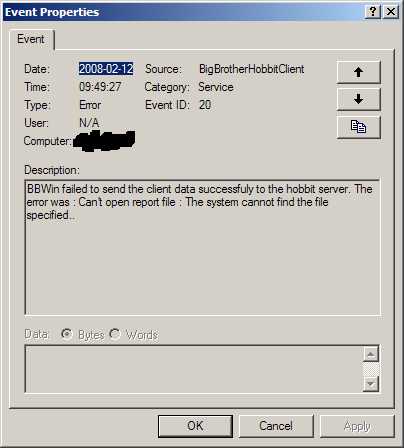
I installed the new version of bbwin on my workstation over a previous 0.10 installation using 2 hobbit 4.3 servers. I received this error:
I can't see any errors on the hobbit server though...
On the server side, things behave as they did before, that is, client-side details are only sent to the first server.
Any thoughts on why I receive this error?
/ Magnus
I installed the new version of bbwin on my workstation over a previous 0.10 installation using 2 hobbit 4.3 servers. I received this error:
I can't see any errors on the hobbit server though...
On the server side, things behave as they did before, that is, client-side details are only sent to the first server.
Any thoughts on why I receive this error?
/ Magnus
▸
Etienne Grignon skrev:Hello, I publish today BBWin 0.11. This is the new stuffs I put in it (focused on centralized mode) : BBWin 0.11 Preview version - February 11th 2008 ------------------- * svcs centralized mode with autorestart option * new agent to be used with centralized mode : filesystem.dll - file client-local.cfg implemented : support md5 and sha1 checksum algorithms - dir client-local.cfg implemented - logfile client-local.cfg implemented - linecount client-local.cfg implemented - back quotes for FILENAME and DIRECTORY implemented. * eventlog client-local.cfg implemented : msgs.dll * fix initialisation error on bbwinupdate agent * prevent loading bbwin.cfg agent configurations when centralized mode enabled * fix memory leak on bbwinupdate agent * fix memory leak on service BBWin.exe when centralized mode enabled * Use ip address instead of mac address for the graph title for network interfaces (ifstat) * multiple bbdisplay supported when centralized mode enabled * Who agent now use qwinsta executable output instead of native functions * Centralized Mode implemented directly in future hobbit 4.3 and with a patch for hobbit 4.2 Here the link for the download : http://sourceforge.net/projects/bbwin As you can see, almost all options from client-local.cfg are now implemented for the Windows client. Syntax for client-local.cfg and for hobbit-clients.cfg are the same than Unix side so it will be very easy to use. Client autoupdate is the latest feature to implement to be at the same level than Unix hobbit client. Centralized mode server part is now included in current hobbit snapshot (future 4.3). For hobbit 4.2, there is a new patch available on the bbwin webpage : http://bbwin.sourceforge.net/ Options from client-local.cfg only work with centralized mode. To enable these new features for centralized mode, you will have to turn on central mode and load the new agent filesystem.dll in your BBWin.cfg which is not loaded by default at this time. For the moment, local mode is still the default mode for BBWin. When hobbit 4.3 will be released, BBWin default mode will become central and filesystem.dll loaded. It would help a lot if people who have testing hobbit servers could try to use BBWin new features to find out if there are any bugs in it :-) People who are testing BBWin centralized mode with 0.10 should upgrade to 0.11 and get the new patch for hobbit 4.2 or the current snapshot of hobbit. As usual, let me know if you get troubles with this new version. Regards,
Attachments (1)
 attachment.jpg
list Etienne Grignon
Hello Stef,

2008/2/12, Stef Coene <user-dbffe946c0f4@xymon.invalid>:
▸
On Monday 11 February 2008, Etienne Grignon wrote:As usual, let me know if you get troubles with this new version.I have a feature request. We have some custom scripts and the output is too big to send from the command line. So we changed the source so you can specify a file as the message. Is it possible to include this in the default client? Now we have to recompile the client each time you do a new release.
Sure, could you send me the modification you made so I can apply your
add on to the bbwin sources ?

Thanks,


--
Etienne GRIGNON
list Etienne Grignon
Hello Magnus,


2008/2/12, Magnus Carlebjörk <user-c92457131d08@xymon.invalid>:
▸
 Hi.

I installed the new version of bbwin on my workstation over a previous
0.10 installation using 2 hobbit 4.3 servers. I received this error:


I can't see any errors on the hobbit server though...

On the server side, things behave as they did before, that is, client-side
details are only sent to the first server.

Any thoughts on why I receive this error?
Well, after some new tests, it seems multiple bbdisplays still doesn't work
very well with centralized mode :( I will work on it and let you know when I
definitely resolve the issue.

--
Etienne GRIGNON
list Bryan A Kennedy
Hi.  I have installed the BBWin 0.11 Hobbit server patch and the new BBWin
0.11 client version.  I am running in centralized mode.   Most items look
good, but I having trouble getting the 'svcs' and 'files' columns to work
with a Windows machine.  What is the correct syntax in the client-local.cfg
and hobbit-clients.cfg files for Windows files and services?  I have tried
various options with no luck so far.  The other items in centralized mode
look great.  This was a huge improvement!!

Thank you in advance for your help.

Bryan


             "Etienne Grignon"
             <etienne.grignon@
             gmail.com>                                                 To
                                       user-ae9b8668bcde@xymon.invalid, "BBWin mailing
             02/11/2008 04:36          list"
             PM                        <user-cfc16496e024@xymon.invalid>
                                                                        cc

             Please respond to                                     Subject
              user-ae9b8668bcde@xymon.invalid           [hobbit] bbwin 0.11 available
▸
Hello,

I publish today BBWin 0.11. This is the new stuffs I put in it
(focused on centralized mode) :

BBWin 0.11 Preview version -  February 11th 2008

* svcs centralized mode with autorestart option
* new agent to be used with centralized mode : filesystem.dll
  - file client-local.cfg implemented : support md5 and sha1 checksum
algorithms
  - dir client-local.cfg implemented
  - logfile client-local.cfg implemented
  - linecount client-local.cfg implemented
  - back quotes for FILENAME and DIRECTORY implemented.
* eventlog client-local.cfg implemented : msgs.dll
* fix initialisation error on bbwinupdate agent
* prevent loading bbwin.cfg agent configurations when centralized mode
enabled
* fix memory leak on bbwinupdate agent
* fix memory leak on service BBWin.exe when centralized mode enabled
* Use ip address instead of mac address for the graph title for
network interfaces (ifstat)
* multiple bbdisplay supported when centralized mode enabled
* Who agent now use qwinsta executable output instead of native functions
* Centralized Mode implemented directly in future hobbit 4.3 and with
a patch for hobbit 4.2

Here the link for the download :

http://sourceforge.net/projects/bbwin

As you can see, almost all options from client-local.cfg are now
implemented for the Windows client. Syntax for client-local.cfg and
for hobbit-clients.cfg are the same than Unix side so it will be very
easy to use. Client autoupdate is the latest feature to implement to
be at the same level than Unix hobbit client.

Centralized mode server part is now included in current hobbit
snapshot (future 4.3). For hobbit 4.2,  there is a new patch available
on the bbwin webpage :
http://bbwin.sourceforge.net/

Options from client-local.cfg only work with centralized mode. To
enable these new features for centralized mode, you will have to turn
on central mode and load the new agent filesystem.dll in your
BBWin.cfg which is not loaded by default at this time. For the moment,
local mode is still the default mode for BBWin. When hobbit 4.3 will
be released, BBWin default mode will become central and filesystem.dll
loaded.

It would help a lot if people who have testing hobbit servers could
try to use BBWin new features to find out if there are any bugs in it
:-) People who are testing BBWin centralized mode with 0.10 should
upgrade to 0.11 and get the new patch for hobbit 4.2 or the current
snapshot of hobbit.

As usual, let me know if you get troubles with this new version.

Regards,

--
Etienne GRIGNON
list Etienne Grignon
Hi Brian,

2008/2/13, Bryan A Kennedy <user-89addf3fbee6@xymon.invalid>:
▸
 Hi.  I have installed the BBWin 0.11 Hobbit server patch and the new BBWin
 0.11 client version.  I am running in centralized mode.   Most items look
 good, but I having trouble getting the 'svcs' and 'files' columns to work
 with a Windows machine.  What is the correct syntax in the client-local.cfg
 and hobbit-clients.cfg files for Windows files and services?  I have tried
 various options with no luck so far.  The other items in centralized mode
 look great.  This was a huge improvement!!
This is the man page part for SVC usage in hobbit-clients.cfg :

#    SVC servicename startup status color
#             The "svcs" listing sent by the client will be scanned to check
#             that specific services are running.
#
#             "servicename" is a simple string, in which case this string must
#             show up in the "svcs" listing.
#             Note that servicename is case-sensitive.
#
#             If "servicename" contains whitespace (blanks or TAB),
you must enclose
#             the full string in double quotes. You cannot use regular
expression.
#             Both options startup and status are required and are
simple strings, and
#             must show up in the "svcs" listing as StartupType and
Status columns.
#
#                 SVC Fax startup=manual status=stopped
#                 SVC MSSQLSERVER startup=automatic status=started
#
#             You can have multiple "SVC" entries for the same host, all of the
#             checks are merged into the "svcs" status and the most severe
#             check defines the color of the status.
#
#             Example: Check that SQL Server Agent is running:
#                 SVC SQLSERVERAGENT startup=automatic status=started
color=yellow
#
#             Defaults: color="red".
#                       Note: No service are checked by default.


This is the man page part for SVC usage in client-local.cfg :

#   "svcautorestart:on|off" (BBWin client only)
#       Enable the automatic restart of stopped services which
#       are configured in the automatic startup mode.

This is some examples of configuration :

hobbit-clients.cfg :

HOST=myserver
        LOAD 80 90
        DISK D 50 55
        DISK colt 30 35
        MEMPHYS 90 101
        MEMSWAP 90 95
        MEMACT  90 97
        PORT "LOCAL=%([.:]80)$" state=LISTENING TEXT=http
        #SVC BBWin startup=automatic status=stopped
        SVC Fax startup=manual status=stopped
        SVC SQLSERVERAGENT startup=automatic status=started color=yellow
        PROC BBWin.exe 1 1
        PROC svchost.exe 3 4
        FILE "C:\Program Files\BBWin\bin\BBWin.exe" MTIME=1128514608
SIZE=645140 MD5=5bd81afecf0eb93849a2fd9df54e8bcbe3fefd72
        LOG %.*  %.*error.* COLOR=yellow
        DIR "C:\restore\perso" SIZE<5000


client-local.cfg :

[win32]
svcautorestart:on
file:C:\Program Files\BBWin\bin\who.dll:md5
file:C:\Program Files\BBWin\bin\disk.dll:sha1
file:C:\Program Files\BBWin\bin\BBWin.exe:md5
file:C:\Program Files\BBWin\bin\toto
file:C:\restore\perso
file:`D:\log files\listing.cmd`
log:`C:\files.cmd`:189345
log:C:\Program Files\BBWin\logs\BBWin.log:51200
ignore drive string
ignore .*DEBUG.*
ignore destroyed
ignore Terminating
ignore info
ignore started
linecount:C:\WINDOWS\setupapi.log
HARDS hardware ID\(s\)
eventlog:Security
ignore process has been created: New Process
ignore A process has exited: Process ID:
ignore Privileged object operation
ignore Object Open: Object Server
eventlog:application
ignore BigBrotherHobbitClient \(10\)

As you can see, it use the same syntax than unix. I hope it will help you.


--
Etienne GRIGNON
list Bryan A Kennedy
Etienne
Thank you.  It is looking great now, and is a huge enhancement.  I'm not
sure if I made mistakes during the setup, but I had to do a few extra
things.  Just in case I didn't make a mistake, Here is what I did.

I applied bbwin_4.2.patch, but I had to add the lib/misc.c patch changes
(below) to the newest bbwin_4.2.patch.  The bbwin_4.2.patch from bbwin_0.10
had it, but it was missing from the 0.11 patch I had.

@@ -69,6 +69,7 @@
        else if (strcasecmp(osname, "macosx") == 0)      result =
OS_DARWIN;
        else if (strcasecmp(osname, "darwin") == 0)      result =
OS_DARWIN;
        else if (strcasecmp(osname, "sco_sv") == 0)      result =
OS_SCO_SV;
+       else if (strcasecmp(osname, "bbwin") == 0)      result =
OS_WIN32_BBWIN;

        if (result == OS_UNKNOWN) dbgprintf("Unknown OS: '%s'\n", osname);

@@ -94,6 +95,7 @@
                case OS_IRIX: return "irix";
                case OS_DARWIN: return "darwin";
                case OS_SCO_SV: return "sco_sv";
+               case OS_WIN32_BBWIN: return "bbwin";
                case OS_UNKNOWN: return "unknown";
        }

I had to add <load name="files" value="filesystem.dll"/> to bbwin.cfg on
the Windows clients under the <bbwin> section.

The SVC restart option worked on my test machine and stopped service.  The
file, dir and svc checks are all now working.  The TEXT enhancement is very
nice.

Great work on this new client for Windows.  We use it heavily and it has
been very well received.  Thank you for your hard work.


Regards,

Bryan


             "Etienne Grignon"
             <etienne.grignon@
             gmail.com>                                                 To
                                       user-ae9b8668bcde@xymon.invalid
             02/14/2008 03:33                                           cc
             AM
                                                                   Subject
                                       Re: [hobbit] bbwin 0.11 available
             Please respond to
              user-ae9b8668bcde@xymon.invalid
▸
Hi Brian,

2008/2/13, Bryan A Kennedy <user-89addf3fbee6@xymon.invalid>:
Hi. I have installed the BBWin 0.11 Hobbit server patch and the new
BBWin
 0.11 client version.  I am running in centralized mode.   Most items
look
 good, but I having trouble getting the 'svcs' and 'files' columns to
work
 with a Windows machine.  What is the correct syntax in the
client-local.cfg
 and hobbit-clients.cfg files for Windows files and services?  I have
tried
 various options with no luck so far.  The other items in centralized
mode
 look great.  This was a huge improvement!!
This is the man page part for SVC usage in hobbit-clients.cfg :

#    SVC servicename startup status color
#             The "svcs" listing sent by the client will be scanned to
check
#             that specific services are running.
#
#             "servicename" is a simple string, in which case this string
must
#             show up in the "svcs" listing.
#             Note that servicename is case-sensitive.
#
#             If "servicename" contains whitespace (blanks or TAB),
you must enclose
#             the full string in double quotes. You cannot use regular
expression.
#             Both options startup and status are required and are
simple strings, and
#             must show up in the "svcs" listing as StartupType and
Status columns.
#
#                 SVC Fax startup=manual status=stopped
#                 SVC MSSQLSERVER startup=automatic status=started
#
#             You can have multiple "SVC" entries for the same host, all of
the
#             checks are merged into the "svcs" status and the most severe
#             check defines the color of the status.
#
#             Example: Check that SQL Server Agent is running:
#                 SVC SQLSERVERAGENT startup=automatic status=started
color=yellow
#
#             Defaults: color="red".
#                       Note: No service are checked by default.


This is the man page part for SVC usage in client-local.cfg :

#   "svcautorestart:on|off" (BBWin client only)
#       Enable the automatic restart of stopped services which
#       are configured in the automatic startup mode.

This is some examples of configuration :

hobbit-clients.cfg :

HOST=myserver
        LOAD 80 90
        DISK D 50 55
        DISK colt 30 35
        MEMPHYS 90 101
        MEMSWAP 90 95
        MEMACT  90 97
        PORT "LOCAL=%([.:]80)$" state=LISTENING TEXT=http
        #SVC BBWin startup=automatic status=stopped
        SVC Fax startup=manual status=stopped
        SVC SQLSERVERAGENT startup=automatic status=started color=yellow
        PROC BBWin.exe 1 1
        PROC svchost.exe 3 4
        FILE "C:\Program Files\BBWin\bin\BBWin.exe" MTIME=1128514608
SIZE=645140 MD5=5bd81afecf0eb93849a2fd9df54e8bcbe3fefd72
        LOG %.*  %.*error.* COLOR=yellow
        DIR "C:\restore\perso" SIZE<5000


client-local.cfg :

[win32]
svcautorestart:on
file:C:\Program Files\BBWin\bin\who.dll:md5
file:C:\Program Files\BBWin\bin\disk.dll:sha1
file:C:\Program Files\BBWin\bin\BBWin.exe:md5
file:C:\Program Files\BBWin\bin\toto
file:C:\restore\perso
file:`D:\log files\listing.cmd`
log:`C:\files.cmd`:189345
log:C:\Program Files\BBWin\logs\BBWin.log:51200
ignore drive string
ignore .*DEBUG.*
ignore destroyed
ignore Terminating
ignore info
ignore started
linecount:C:\WINDOWS\setupapi.log
HARDS hardware ID\(s\)
eventlog:Security
ignore process has been created: New Process
ignore A process has exited: Process ID:
ignore Privileged object operation
ignore Object Open: Object Server
eventlog:application
ignore BigBrotherHobbitClient \(10\)

As you can see, it use the same syntax than unix. I hope it will help you.


--
Etienne GRIGNON
list Etienne Grignon
Hi Bryan,

2008/2/18, Bryan A Kennedy <user-89addf3fbee6@xymon.invalid>:
▸
Etienne
Thank you.  It is looking great now, and is a huge enhancement.  I'm not
sure if I made mistakes during the setup, but I had to do a few extra
things.  Just in case I didn't make a mistake, Here is what I did.

I applied bbwin_4.2.patch, but I had to add the lib/misc.c patch changes
(below) to the newest bbwin_4.2.patch.  The bbwin_4.2.patch from bbwin_0.10
had it, but it was missing from the 0.11 patch I had.

@@ -69,6 +69,7 @@
        else if (strcasecmp(osname, "macosx") == 0)      result =
OS_DARWIN;
        else if (strcasecmp(osname, "darwin") == 0)      result =
OS_DARWIN;
        else if (strcasecmp(osname, "sco_sv") == 0)      result =
OS_SCO_SV;
+       else if (strcasecmp(osname, "bbwin") == 0)      result =
OS_WIN32_BBWIN;

        if (result == OS_UNKNOWN) dbgprintf("Unknown OS: '%s'\n", osname);

@@ -94,6 +95,7 @@
                case OS_IRIX: return "irix";
                case OS_DARWIN: return "darwin";
                case OS_SCO_SV: return "sco_sv";
+               case OS_WIN32_BBWIN: return "bbwin";
                case OS_UNKNOWN: return "unknown";
        }
Thanks for reporting that, I forgot that path when I generated the
patch for hobbit 4.2. I updated the patch available on the bbwin
▸
webpage.
I had to add <load name="files" value="filesystem.dll"/> to bbwin.cfg on
the Windows clients under the <bbwin> section.
Yes, you have to add it manually for the moment.
▸
The SVC restart option worked on my test machine and stopped service.  The
file, dir and svc checks are all now working.  The TEXT enhancement is very
nice.
Don't hesitate to report bugs or abnormal things when using it, it
will be very helpful to make it better.

Best Regards,

--
Etienne GRIGNON
list Padraig Lennon
<logfile client-local.cfg implemented>

This is great news.. I had been wreaking my head with this one... Great
work Etienne...


Padraig Lennon
Senior Systems Engineer
Production Services
Pioneer Global Investments (Dublin)
5th Floor Georges Quay Plaza, Dublin 2
ext: XXXX
Direct dial: 00353 1 480 2081
-------------- next part --------------


"The information in this e-mail and in any attachments is confidential and intended solely for the attention and use of the named addressee(s). This information may be subject to legal, professional or other privilege and further distribution of it is strictly prohibited without our authority. If you are not the intended recipient, you are not authorised to and must not disclose, copy, distribute, or retain this message or any part of it, and should notify us immediately.

This footnote also confirms that this email has been automatically scanned for the presence of computer viruses, profanities and certain file types."

Pioneer Investment Management Limited.

1 George’s Quay Plaza, George’s Quay, Dublin 2, Ireland.
Registered in Ireland no. 287793.
list Quinton [pyr] Jansen
Hello Etienne,

I tried installing bbwin 0.11 on a few windows systems, centralized
mode, only to have hobbitd_client crash (snapshot from 2008-01-22).

Attempts at using today's snapshot resulted in some rather strange
effects:
- The files and msgs were combined for all systems (linux + win) and
totally messed up
- The hobbit-ghosts.c failed to compile (used 2008-01-22 version).

bbwin in local configuration is working OK so far.

Many thanks for your efforts,

Quinton
▸
Etienne Grignon wrote:Hello, I publish today BBWin 0.11. This is the new stuffs I put in it (focused on centralized mode) : BBWin 0.11 Preview version - February 11th 2008 * svcs centralized mode with autorestart option * new agent to be used with centralized mode : filesystem.dll - file client-local.cfg implemented : support md5 and sha1 checksum algorithms - dir client-local.cfg implemented - logfile client-local.cfg implemented - linecount client-local.cfg implemented - back quotes for FILENAME and DIRECTORY implemented. * eventlog client-local.cfg implemented : msgs.dll * fix initialisation error on bbwinupdate agent * prevent loading bbwin.cfg agent configurations when centralized mode
enabled
* fix memory leak on bbwinupdate agent
* fix memory leak on service BBWin.exe when centralized mode enabled
* Use ip address instead of mac address for the graph title for network interfaces (ifstat)
* multiple bbdisplay supported when centralized mode enabled
* Who agent now use qwinsta executable output instead of native functions
* Centralized Mode implemented directly in future hobbit 4.3 and with a patch for hobbit 4.2

Here the link for the download :

http://sourceforge.net/projects/bbwin

As you can see, almost all options from client-local.cfg are now implemented for the Windows client. Syntax for client-local.cfg and for hobbit-clients.cfg are the same than Unix side so it will be very easy to use. Client autoupdate is the latest feature to implement to be at the same level than Unix hobbit client.

Centralized mode server part is now included in current hobbit snapshot (future 4.3). For hobbit 4.2,  there is a new patch available
on the bbwin webpage :
http://bbwin.sourceforge.net/

Options from client-local.cfg only work with centralized mode. To enable these new features for centralized mode, you will have to turn on central mode and load the new agent filesystem.dll in your BBWin.cfg which is not loaded by default at this time. For the moment,
local mode is still the default mode for BBWin. When hobbit 4.3 will be released, BBWin default mode will become central and filesystem.dll
loaded.

It would help a lot if people who have testing hobbit servers could try to use BBWin new features to find out if there are any bugs in it
:-) People who are testing BBWin centralized mode with 0.10 should upgrade to 0.11 and get the new patch for hobbit 4.2 or the current snapshot of hobbit.

As usual, let me know if you get troubles with this new version.

Regards,
list David W David Gore
Quinton,

I have the same behavior.  Are you sure it was bbwin 0.11?   Have you
managed to recover your hobbit install?  Luckily it is our secondary
server, but so far it is still trashed with the files and msgs mangled.
I stopped the bbwin clients, stopped the hobbit server and removed
everything from the tmp directory and restarted, but so far no luck.
~David
▸
-----Original Message----- From: Jansen,Quinton [PYR] [mailto:user-a2b6f7d63750@xymon.invalid] Sent: Thursday, February 21, 2008 23:52 To: user-ae9b8668bcde@xymon.invalid Subject: RE: [hobbit] bbwin 0.11 available Hello Etienne, I tried installing bbwin 0.11 on a few windows systems, centralized mode, only to have hobbitd_client crash (snapshot from 2008-01-22). Attempts at using today's snapshot resulted in some rather strange effects: - The files and msgs were combined for all systems (linux + win) and totally messed up - The hobbit-ghosts.c failed to compile (used 2008-01-22 version). bbwin in local configuration is working OK so far. Many thanks for your efforts, Quinton Etienne Grignon wrote:Hello,I publish today BBWin 0.11. This is the new stuffs I put in it > (focused on centralized mode) : BBWin 0.11 Preview version - February 11th 2008 * svcs centralized mode with autorestart option* new agent to be used with centralized mode : filesystem.dll - file client-local.cfg implemented : support md5 and sha1 checksum algorithms - dir client-local.cfg implemented - logfile client-local.cfg implemented - linecount client-local.cfg implemented - back quotes for FILENAME and DIRECTORY implemented. * eventlog client-local.cfg implemented : msgs.dll * fix initialisation error on bbwinupdate agent * prevent loading bbwin.cfg agent configurations when centralized modeenabled * fix memory leak on bbwinupdate agent * fix memory leak on service BBWin.exe when centralized mode enabled * Use ip address instead of mac address for the graph title for > network interfaces (ifstat) * multiple bbdisplay supported when centralized mode enabled * Who agent now use qwinsta executable output instead of native > functions * Centralized Mode implemented directly in future hobbit 4.3 and with > a patch for hobbit 4.2Here the link for the download : http://sourceforge.net/projects/bbwin As you can see, almost all options from client-local.cfg are now > implemented for the Windows client. Syntax for client-local.cfg and > for hobbit-clients.cfg are the same than Unix side so it will be very > easy to use. Client autoupdate is the latest feature to implement to > be at the same level than Unix hobbit client. Centralized mode server part is now included in current hobbit > snapshot (future 4.3). For hobbit 4.2, there is a new patch availableon the bbwin webpage : http://bbwin.sourceforge.net/Options from client-local.cfg only work with centralized mode. To > enable these new features for centralized mode, you will have to turn > on central mode and load the new agent filesystem.dll in your > BBWin.cfg which is not loaded by default at this time. For the moment,local mode is still the default mode for BBWin. When hobbit 4.3 will > be released, BBWin default mode will become central and filesystem.dllloaded.It would help a lot if people who have testing hobbit servers could > try to use BBWin new features to find out if there are any bugs in it:-) People who are testing BBWin centralized mode with 0.10 should > upgrade to 0.11 and get the new patch for hobbit 4.2 or the current > snapshot of hobbit.As usual, let me know if you get troubles with this new version. Regards,
list Etienne Grignon
Hello,


2008/2/22, Gore, David W (David) <user-3e5761c68b56@xymon.invalid>:
▸
Quinton,

 I have the same behavior.  Are you sure it was bbwin 0.11?   Have you
 managed to recover your hobbit install?  Luckily it is our secondary
 server, but so far it is still trashed with the files and msgs mangled.
 I stopped the bbwin clients, stopped the hobbit server and removed
 everything from the tmp directory and restarted, but so far no luck.
Could you precise me what version do you use of hobbit ? Is it the
snapshot or 4.2 + patch ? If it is the snapshot, what snapshot day do
you use ?

Could you also send me the clientdata report sent from bbwin ?
(see on your Windows server C:\Program Files\BBWin\tmp\msg.SERVERNAME.txt).

Thank you in advance,


Etienne.
list Stef Coene
▸
On Tuesday 12 February 2008, Etienne Grignon wrote:
Sure, could you send me the modification you made so I can apply your
add on to the bbwin sources ?
I finally got an answer.  The function
void UploadMessage(int argc, char *argv[], BBWinNet & bbobj)
is added.  So you can execute
"bbwincmd.exe <bbdisplay>[:<port>] uploadmessage <filename>"

Thx,


Stef
Attachments (1)
list Etienne Grignon
Hello Stef,

2008/2/26, Stef Coene <user-dbffe946c0f4@xymon.invalid>:
▸
On Tuesday 12 February 2008, Etienne Grignon wrote:Sure, could you send me the modification you made so I can apply your add on to the bbwin sources ?I finally got an answer. The function void UploadMessage(int argc, char *argv[], BBWinNet & bbobj) is added. So you can execute "bbwincmd.exe <bbdisplay>[:<port>] uploadmessage <filename>"
I applied your patch to the bbwin sources :

http://bbwin.svn.sourceforge.net/viewvc/bbwin?view=rev&revision=90

Thank you very much,


Etienne.
list Quinton Jansen
I'm using the snapshot from 2008-01-22 (Yes, I did manage to back out
from the oops with little impact).

I'll send you a copy of the data file off-line (tomorrow)

Quinton
▸
Etienne Grignon wrote:Hello, 2008/2/22, Gore, David W (David) <user-3e5761c68b56@xymon.invalid>:Quinton, I have the same behavior. Are you sure it was bbwin 0.11? Have you managed to recover your hobbit install? Luckily it is our secondary server, but so far it is still trashed with the files and msgs mangled. I stopped the bbwin clients, stopped the hobbit server and removed everything from the tmp directory and restarted, but so far no luck.Could you precise me what version do you use of hobbit ? Is it the snapshot or 4.2 + patch ? If it is the snapshot, what snapshot day do you use ? Could you also send me the clientdata report sent from bbwin ? (see on your Windows server C:\Program Files\BBWin\tmp\msg.SERVERNAME.txt). Thank you in advance, Etienne.
list Stef Coene
▸
On Wednesday 27 February 2008, Etienne Grignon wrote:
Hello Stef,

2008/2/26, Stef Coene <user-dbffe946c0f4@xymon.invalid>:
On Tuesday 12 February 2008, Etienne Grignon wrote:Sure, could you send me the modification you made so I can apply your add on to the bbwin sources ?I finally got an answer. The function void UploadMessage(int argc, char *argv[], BBWinNet & bbobj) is added. So you can execute "bbwincmd.exe <bbdisplay>[:<port>] uploadmessage <filename>"I applied your patch to the bbwin sources : http://bbwin.svn.sourceforge.net/viewvc/bbwin?view=rev&revision=90
Thx, have you a recompiled version somewhere so I can test it ?


Stef