Issue with xymon-rclient.sh
list Becker Christian
Hi to the list,
working with xymon since 2008, still using it.
Now I was in the situation to include a LinuxMint machine (with desktop environment), using Jeremy’s xymon-rclient.sh 0.6.1 to monitor this thing.
After setting up the ssh-based authentication and waiting a couple of minutes, the data of this LinuxMint machine came up and appeared in Xymon.
Other than other machines i’m pulling with xymon-rclient.sh, the CPU state of this machine became red immediately.
It seems to me that the Load Average of the LinuxMint machine is interpreted wrong: when looking in Xymon, it tells me a Load Average of 60.00, while looking to the LinuxMint machine, seeing it’s Load Average at 0.6.
What could be wrong? The LinuxMint machine is running LinuxMint 22.1 with it’s lates updates.
These are the locales used by the LinuxMint machine:
LANG=en_US.UTF-8
LANGUAGE=en_US
LC_CTYPE="en_US.UTF-8"
LC_NUMERIC=de_DE.UTF-8
LC_TIME=de_DE.UTF-8
LC_COLLATE="en_US.UTF-8"
LC_MONETARY=de_DE.UTF-8
LC_MESSAGES="en_US.UTF-8"
LC_PAPER=de_DE.UTF-8
LC_NAME=de_DE.UTF-8
LC_ADDRESS=de_DE.UTF-8
LC_TELEPHONE=de_DE.UTF-8
LC_MEASUREMENT=de_DE.UTF-8
LC_IDENTIFICATION=de_DE.UTF-8
LC_ALL=
Yes, they are mixed….
We’ve a few other linux client machines running “non-server-linuxes” (i.e. RaspberryPi running Raspberry PI OS) which are reporting fine using xymon-rclient.sh.
Regards
Christian
list Tom Schmidt
▸
Hi to the list,
working with xymon since 2008, still using it.
Now I was in the situation to include a LinuxMint machine (with desktop environment), using Jeremy’s xymon-rclient.sh 0.6.1 to monitor this thing.
After setting up the ssh-based authentication and waiting a couple of minutes, the data of this LinuxMint machine came up and appeared in Xymon.
Other than other machines i’m pulling with xymon-rclient.sh, the CPU state of this machine became red immediately.
It seems to me that the Load Average of the LinuxMint machine is interpreted wrong: when looking in Xymon, it tells me a Load Average of 60.00, while looking to the LinuxMint machine, seeing it’s Load Average at 0.6.
What could be wrong? The LinuxMint machine is running LinuxMint 22.1 with it’s lates updates.
These are the locales used by the LinuxMint machine:
LANG=en_US.UTF-8
LANGUAGE=en_US
LC_CTYPE="en_US.UTF-8"
LC_NUMERIC=de_DE.UTF-8
LC_TIME=de_DE.UTF-8
LC_COLLATE="en_US.UTF-8"
LC_MONETARY=de_DE.UTF-8
LC_MESSAGES="en_US.UTF-8"
LC_PAPER=de_DE.UTF-8
LC_NAME=de_DE.UTF-8
LC_ADDRESS=de_DE.UTF-8
LC_TELEPHONE=de_DE.UTF-8
LC_MEASUREMENT=de_DE.UTF-8
LC_IDENTIFICATION=de_DE.UTF-8
LC_ALL=
Yes, they are mixed….
We’ve a few other linux client machines running “non-server-linuxes” (i.e. RaspberryPi running Raspberry PI OS) which are reporting fine using xymon-rclient.sh.
Regards
list Adam Thorn
Looking at the server side code, the cpu load average for a linux client is actually extracted from the [uptime] section, not the [top] section, which surprised me a little.

(i.e. the sections as generated in the output of /usr/lib/xymon/client/bin/xymonclient-linux.sh)

The [uptime] section is the output of just running "uptime". The server code looks for the string "load average: " or "load averages: ", then after that looks for either of the patterns "FLOAT, FLOAT, FLOAT" or "FLOAT FLOAT FLOAT". The middle float from that list is then reported as the CPU load.

Christian: what does the output of "uptime" look like on your client?

Adam
▸
On 24/07/2025 19:06, Tom Schmidt wrote:Christian,
Looking at xymon-rclient.sh, it will grab the load average from the "top" command. I assume for your configuration that it is using the xymonclient-linux.sh script to collect the data. If so, it runs "$TOP - b -n 1" and the line near the top that has the load average is used. $TOP would be defined in your xymonclient.cfg file for the client.
What does the head of "top -b -n 1" look like on your system?
Tom
On Thu, Jul 24, 2025 at 3:39 AM Becker Christian via Xymon <xymon@xymon.com <mailto:xymon@xymon.com>> wrote:
Hi to the list,____
__ __
working with xymon since 2008, still using it.____
__ __
Now I was in the situation to include a LinuxMint machine (with
desktop environment), using Jeremy’s xymon-rclient.sh 0.6.1 to
monitor this thing.____
After setting up the ssh-based authentication and waiting a couple
of minutes, the data of this LinuxMint machine came up and appeared
in Xymon.____
__ __
Other than other machines i’m pulling with xymon-rclient.sh, the CPU
state of this machine became red immediately.____
It seems to me that the Load Average of the LinuxMint machine is
interpreted wrong: when looking in Xymon, it tells me a Load Average
of 60.00, while looking to the LinuxMint machine, seeing it’s Load
Average at 0.6.____
__ __
What could be wrong? The LinuxMint machine is running LinuxMint 22.1
with it’s lates updates.____
These are the locales used by the LinuxMint machine:____
__ __
LANG=en_US.UTF-8____
LANGUAGE=en_US____
LC_CTYPE="en_US.UTF-8"____
LC_NUMERIC=de_DE.UTF-8____
LC_TIME=de_DE.UTF-8____
LC_COLLATE="en_US.UTF-8"____
LC_MONETARY=de_DE.UTF-8____
LC_MESSAGES="en_US.UTF-8"____
LC_PAPER=de_DE.UTF-8____
LC_NAME=de_DE.UTF-8____
LC_ADDRESS=de_DE.UTF-8____
LC_TELEPHONE=de_DE.UTF-8____
LC_MEASUREMENT=de_DE.UTF-8____
LC_IDENTIFICATION=de_DE.UTF-8____
LC_ALL=____
__ __
Yes, they are mixed….____
__ __
    We’ve a few other linux client machines running “non-server-
    linuxes” (i.e. RaspberryPi running Raspberry PI OS) which are
    reporting fine using xymon-rclient.sh.____

    __ __

    Regards____

    Christian____
list Becker Christian
Tom,
thx for your help.
The output of top -b -n 1 is:
top - 12:42:33 up 22:43, 4 users, load average: 0,04, 0,04, 0,00
Tasks: 242 total, 1 running, 241 sleeping, 0 stopped, 0 zombie
%Cpu(s): 7,4 us, 3,7 sy, 0,0 ni, 88,9 id, 0,0 wa, 0,0 hi, 0,0 si, 0,0 st
MiB Mem : 3618,2 total, 390,7 free, 1124,9 used, 2416,0 buff/cache
MiB Swap: 4020,0 total, 4019,2 free, 0,8 used. 2493,3 avail Mem
PID USER PR NI VIRT RES SHR S %CPU %MEM TIME+ COMMAND
59020 becker 20 0 14880 5760 3712 R 23,1 0,2 0:00.07 top
1 root 20 0 22648 13540 9444 S 0,0 0,4 0:17.14 systemd
2 root 20 0 0 0 0 S 0,0 0,0 0:00.05 kthreadd
3 root 20 0 0 0 0 S 0,0 0,0 0:00.00 pool_wo+
4 root 0 -20 0 0 0 I 0,0 0,0 0:00.00 kworker+
5 root 0 -20 0 0 0 I 0,0 0,0 0:00.00 kworker+
6 root 0 -20 0 0 0 I 0,0 0,0 0:00.00 kworker+
7 root 0 -20 0 0 0 I 0,0 0,0 0:00.00 kworker+
10 root 0 -20 0 0 0 I 0,0 0,0 0:00.00 kworker+
12 root 0 -20 0 0 0 I 0,0 0,0 0:00.00 kworker+
13 root 20 0 0 0 0 I 0,0 0,0 0:00.00 rcu_tas+
14 root 20 0 0 0 0 I 0,0 0,0 0:00.00 rcu_tas+
15 root 20 0 0 0 0 I 0,0 0,0 0:00.00 rcu_tas+
16 root 20 0 0 0 0 S 0,0 0,0 0:00.46 ksoftir+
17 root 20 0 0 0 0 I 0,0 0,0 0:24.40 rcu_pre+
18 root rt 0 0 0 0 S 0,0 0,0 0:00.78 migrati+
Regards
Christian
|
|
|
|
|
|
Von: Tom Schmidt <user-d34f6118b459@xymon.invalid>
Gesendet: Donnerstag, 24. Juli 2025 20:06
An: Xymon mailinglist <xymon@xymon.com>
Cc: Becker Christian <user-e4a19bfb94c0@xymon.invalid>
Betreff: Re: [Xymon] Issue with xymon-rclient.sh
WARNUNG: Diese E-Mail kam von außerhalb der Organisation. Klicken Sie nicht auf Links oder öffnen Sie keine Anhänge, es sei denn, Sie kennen den Absender und wissen, dass der Inhalt sicher ist.
▸
Christian,
Looking at xymon-rclient.sh, it will grab the load average from the "top" command. I assume for your configuration that it is using the xymonclient-linux.sh script to collect the data. If so, it runs "$TOP -b -n 1" and the line near the top that has the load average is used. $TOP would be defined in your xymonclient.cfg file for the client.
What does the head of "top -b -n 1" look like on your system?
Tom
On Thu, Jul 24, 2025 at 3:39 AM Becker Christian via Xymon <xymon@xymon.com> wrote:
Hi to the list,
working with xymon since 2008, still using it.
Now I was in the situation to include a LinuxMint machine (with desktop environment), using Jeremy’s xymon-rclient.sh 0.6.1 to monitor this thing.
After setting up the ssh-based authentication and waiting a couple of minutes, the data of this LinuxMint machine came up and appeared in Xymon.
Other than other machines i’m pulling with xymon-rclient.sh, the CPU state of this machine became red immediately.
It seems to me that the Load Average of the LinuxMint machine is interpreted wrong: when looking in Xymon, it tells me a Load Average of 60.00, while looking to the LinuxMint machine, seeing it’s Load Average at 0.6.
What could be wrong? The LinuxMint machine is running LinuxMint 22.1 with it’s lates updates.
These are the locales used by the LinuxMint machine:
LANG=en_US.UTF-8
LANGUAGE=en_US
LC_CTYPE="en_US.UTF-8"
LC_NUMERIC=de_DE.UTF-8
LC_TIME=de_DE.UTF-8
LC_COLLATE="en_US.UTF-8"
LC_MONETARY=de_DE.UTF-8
LC_MESSAGES="en_US.UTF-8"
LC_PAPER=de_DE.UTF-8
LC_NAME=de_DE.UTF-8
LC_ADDRESS=de_DE.UTF-8
LC_TELEPHONE=de_DE.UTF-8
LC_MEASUREMENT=de_DE.UTF-8
LC_IDENTIFICATION=de_DE.UTF-8
LC_ALL=
Yes, they are mixed….
We’ve a few other linux client machines running “non-server-linuxes” (i.e. RaspberryPi running Raspberry PI OS) which are reporting fine using xymon-rclient.sh.
Regards
Christian
list Becker Christian
Adam,
thx for your help.
The output of uptime is:
13:02:45 up 23:03, 4 users, load average: 0,60, 0,13, 0,04
Nearly at the same time I get this in Xymon:
Regards
▸
-----Ursprüngliche Nachricht-----
Von: Adam Thorn via Xymon <xymon@xymon.com>
Gesendet: Freitag, 25. Juli 2025 10:24
An: xymon@xymon.com
Cc: Adam Thorn <user-f6b877930936@xymon.invalid>
Betreff: [Xymon] Re: Issue with xymon-rclient.sh
WARNUNG: Diese E-Mail kam von außerhalb der Organisation. Klicken Sie nicht auf Links oder öffnen Sie keine Anhänge, es sei denn, Sie kennen den Absender und wissen, dass der Inhalt sicher ist.
Looking at the server side code, the cpu load average for a linux client is actually extracted from the [uptime] section, not the [top] section, which surprised me a little.
(i.e. the sections as generated in the output of
/usr/lib/xymon/client/bin/xymonclient-linux.sh)
The [uptime] section is the output of just running "uptime". The server code looks for the string "load average: " or "load averages: ", then after that looks for either of the patterns "FLOAT, FLOAT, FLOAT" or "FLOAT FLOAT FLOAT". The middle float from that list is then reported as the CPU load.
Christian: what does the output of "uptime" look like on your client?
Adam
On 24/07/2025 19:06, Tom Schmidt wrote:
> Christian,
> Looking at xymon-rclient.sh, it will grab the load average from
> the "top" command. I assume for your configuration that it is using
> the xymonclient-linux.sh script to collect the data. If so, it runs
> "$TOP - b -n 1" and the line near the top that has the load average is used.
> $TOP would be defined in your xymonclient.cfg file for the client.
> What does the head of "top -b -n 1" look like on your system?
>
> Tom
>
> On Thu, Jul 24, 2025 at 3:39 AM Becker Christian via Xymon
> <xymon@xymon.com <mailto:xymon@xymon.com>> wrote:
>
> Hi to the list,____
>
> __ __
>
> working with xymon since 2008, still using it.____
>
> __ __
>
> Now I was in the situation to include a LinuxMint machine (with
> desktop environment), using Jeremy’s xymon-rclient.sh 0.6.1 to
> monitor this thing.____
>
> After setting up the ssh-based authentication and waiting a couple
> of minutes, the data of this LinuxMint machine came up and appeared
> in Xymon.____
>
> __ __
>
> Other than other machines i’m pulling with xymon-rclient.sh, the CPU
> state of this machine became red immediately.____
>
> It seems to me that the Load Average of the LinuxMint machine is
> interpreted wrong: when looking in Xymon, it tells me a Load Average
> of 60.00, while looking to the LinuxMint machine, seeing it’s Load
> Average at 0.6.____
>
> __ __
>
> What could be wrong? The LinuxMint machine is running LinuxMint 22.1
> with it’s lates updates.____
>
> These are the locales used by the LinuxMint machine:____
>
> __ __
>
> LANG=en_US.UTF-8____
>
> LANGUAGE=en_US____
>
> LC_CTYPE="en_US.UTF-8"____
>
> LC_NUMERIC=de_DE.UTF-8____
>
> LC_TIME=de_DE.UTF-8____
>
> LC_COLLATE="en_US.UTF-8"____
>
> LC_MONETARY=de_DE.UTF-8____
>
> LC_MESSAGES="en_US.UTF-8"____
>
> LC_PAPER=de_DE.UTF-8____
>
> LC_NAME=de_DE.UTF-8____
>
> LC_ADDRESS=de_DE.UTF-8____
>
> LC_TELEPHONE=de_DE.UTF-8____
>
> LC_MEASUREMENT=de_DE.UTF-8____
>
> LC_IDENTIFICATION=de_DE.UTF-8____
>
> LC_ALL=____
>
> __ __
>
> Yes, they are mixed….____
>
> __ __
>
> We’ve a few other linux client machines running “non-server-
> linuxes” (i.e. RaspberryPi running Raspberry PI OS) which are
> reporting fine using xymon-rclient.sh.____
>
> __ __
>
> Regards____
>
> Christian____
>
> xymon@xymon.com <mailto:xymon@xymon.com>
> To unsubscribe send an email to xymon-leave@xymon.com <mailto:xymon-
>
>
> To unsubscribe send an email to xymon-leave@xymon.com
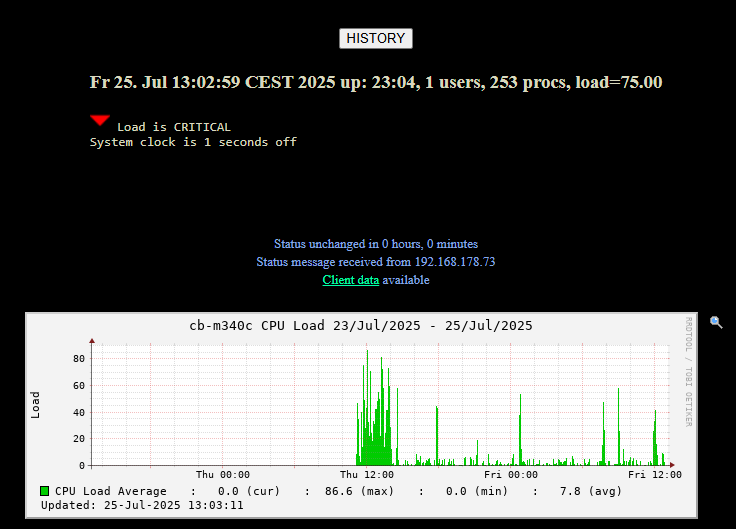 image001.png
list Ron Cohen
▸
Adam,
thx for your help.
The output of uptime is:
13:02:45 up 23:03, 4 users, load average: 0,60, 0,13, 0,04
Nearly at the same time I get this in Xymon:
Regards
-----Ursprüngliche Nachricht-----
Von: Adam Thorn via Xymon <xymon@xymon.com>
Gesendet: Freitag, 25. Juli 2025 10:24
An: xymon@xymon.com
Cc: Adam Thorn <user-f6b877930936@xymon.invalid>
Betreff: [Xymon] Re: Issue with xymon-rclient.sh
WARNUNG: Diese E-Mail kam von außerhalb der Organisation. Klicken Sie nicht auf Links oder öffnen Sie keine Anhänge, es sei denn, Sie kennen den Absender und wissen, dass der Inhalt sicher ist.
Looking at the server side code, the cpu load average for a linux client is actually extracted from the [uptime] section, not the [top] section, which surprised me a little.
(i.e. the sections as generated in the output of
/usr/lib/xymon/client/bin/xymonclient-linux.sh)
The [uptime] section is the output of just running "uptime". The server code looks for the string "load average: " or "load averages: ", then after that looks for either of the patterns "FLOAT, FLOAT, FLOAT" or "FLOAT FLOAT FLOAT". The middle float from that list is then reported as the CPU load.
Christian: what does the output of "uptime" look like on your client?
Adam
On 24/07/2025 19:06, Tom Schmidt wrote:
> Christian,
> Looking at xymon-rclient.sh, it will grab the load average from
> the "top" command. I assume for your configuration that it is using
> the xymonclient-linux.sh script to collect the data. If so, it runs
> "$TOP - b -n 1" and the line near the top that has the load average is used.
> $TOP would be defined in your xymonclient.cfg file for the client.
> What does the head of "top -b -n 1" look like on your system?
>
> Tom
>
> On Thu, Jul 24, 2025 at 3:39 AM Becker Christian via Xymon
> <xymon@xymon.com <mailto:xymon@xymon.com>> wrote:
>
> Hi to the list,____
>
> __ __
>
> working with xymon since 2008, still using it.____
>
> __ __
>
> Now I was in the situation to include a LinuxMint machine (with
> desktop environment), using Jeremy’s xymon-rclient.sh 0.6.1 to
> monitor this thing.____
>
> After setting up the ssh-based authentication and waiting a couple
> of minutes, the data of this LinuxMint machine came up and appeared
> in Xymon.____
>
> __ __
>
> Other than other machines i’m pulling with xymon-rclient.sh, the CPU
> state of this machine became red immediately.____
>
> It seems to me that the Load Average of the LinuxMint machine is
> interpreted wrong: when looking in Xymon, it tells me a Load Average
> of 60.00, while looking to the LinuxMint machine, seeing it’s Load
> Average at 0.6.____
>
> __ __
>
> What could be wrong? The LinuxMint machine is running LinuxMint 22.1
> with it’s lates updates.____
>
> These are the locales used by the LinuxMint machine:____
>
> __ __
>
> LANG=en_US.UTF-8____
>
> LANGUAGE=en_US____
>
> LC_CTYPE="en_US.UTF-8"____
>
> LC_NUMERIC=de_DE.UTF-8____
>
> LC_TIME=de_DE.UTF-8____
>
> LC_COLLATE="en_US.UTF-8"____
>
> LC_MONETARY=de_DE.UTF-8____
>
> LC_MESSAGES="en_US.UTF-8"____
>
> LC_PAPER=de_DE.UTF-8____
>
> LC_NAME=de_DE.UTF-8____
>
> LC_ADDRESS=de_DE.UTF-8____
>
> LC_TELEPHONE=de_DE.UTF-8____
>
> LC_MEASUREMENT=de_DE.UTF-8____
>
> LC_IDENTIFICATION=de_DE.UTF-8____
>
> LC_ALL=____
>
> __ __
>
> Yes, they are mixed….____
>
> __ __
>
> We’ve a few other linux client machines running “non-server-
> linuxes” (i.e. RaspberryPi running Raspberry PI OS) which are
> reporting fine using xymon-rclient.sh.____
>
> __ __
>
> Regards____
>
> Christian____
>
> xymon@xymon.com <mailto:xymon@xymon.com>
> To unsubscribe send an email to xymon-leave@xymon.com <mailto:xymon-
>
>
> To unsubscribe send an email to xymon-leave@xymon.com
list Becker Christian
Yes, indeed this is a good point – i’ll start over changing it and see what happens
▸
|
|
|
Von: Ron Cohen <user-f26e06d1e992@xymon.invalid>
Gesendet: Freitag, 25. Juli 2025 13:32
An: Xymon mailinglist <xymon@xymon.com>
Betreff: [Xymon] Re: Issue with xymon-rclient.sh
WARNUNG: Diese E-Mail kam von außerhalb der Organisation. Klicken Sie nicht auf Links oder öffnen Sie keine Anhänge, es sei denn, Sie kennen den Absender und wissen, dass der Inhalt sicher ist.
Seems like a locale issue. The decimal point is a comma so the server ignores the leading zero.
On Fri, 25 Jul 2025, 12:04 Becker Christian via Xymon, <xymon@xymon.com> wrote:
Adam,
thx for your help.
The output of uptime is:
13:02:45 up 23:03, 4 users, load average: 0,60, 0,13, 0,04
Nearly at the same time I get this in Xymon:
Regards
-----Ursprüngliche Nachricht-----
Von: Adam Thorn via Xymon <xymon@xymon.com>
Gesendet: Freitag, 25. Juli 2025 10:24
An: xymon@xymon.com
Cc: Adam Thorn <user-f6b877930936@xymon.invalid>
Betreff: [Xymon] Re: Issue with xymon-rclient.sh
WARNUNG: Diese E-Mail kam von außerhalb der Organisation. Klicken Sie nicht auf Links oder öffnen Sie keine Anhänge, es sei denn, Sie kennen den Absender und wissen, dass der Inhalt sicher ist.
Looking at the server side code, the cpu load average for a linux client is actually extracted from the [uptime] section, not the [top] section, which surprised me a little.
(i.e. the sections as generated in the output of
/usr/lib/xymon/client/bin/xymonclient-linux.sh)
The [uptime] section is the output of just running "uptime". The server code looks for the string "load average: " or "load averages: ", then after that looks for either of the patterns "FLOAT, FLOAT, FLOAT" or "FLOAT FLOAT FLOAT". The middle float from that list is then reported as the CPU load.
Christian: what does the output of "uptime" look like on your client?
Adam
On 24/07/2025 19:06, Tom Schmidt wrote:
> Christian,
> Looking at xymon-rclient.sh, it will grab the load average from
> the "top" command. I assume for your configuration that it is using
> the xymonclient-linux.sh script to collect the data. If so, it runs
> "$TOP - b -n 1" and the line near the top that has the load average is used.
> $TOP would be defined in your xymonclient.cfg file for the client.
> What does the head of "top -b -n 1" look like on your system?
>
> Tom
>
> On Thu, Jul 24, 2025 at 3:39 AM Becker Christian via Xymon
> <xymon@xymon.com <mailto:xymon@xymon.com>> wrote:
>
> Hi to the list,____
>
> __ __
>
> working with xymon since 2008, still using it.____
>
> __ __
>
> Now I was in the situation to include a LinuxMint machine (with
> desktop environment), using Jeremy’s xymon-rclient.sh 0.6.1 to
> monitor this thing.____
>
> After setting up the ssh-based authentication and waiting a couple
> of minutes, the data of this LinuxMint machine came up and appeared
> in Xymon.____
>
> __ __
>
> Other than other machines i’m pulling with xymon-rclient.sh, the CPU
> state of this machine became red immediately.____
>
> It seems to me that the Load Average of the LinuxMint machine is
> interpreted wrong: when looking in Xymon, it tells me a Load Average
> of 60.00, while looking to the LinuxMint machine, seeing it’s Load
> Average at 0.6.____
>
> __ __
>
> What could be wrong? The LinuxMint machine is running LinuxMint 22.1
> with it’s lates updates.____
>
> These are the locales used by the LinuxMint machine:____
>
> __ __
>
> LANG=en_US.UTF-8____
>
> LANGUAGE=en_US____
>
> LC_CTYPE="en_US.UTF-8"____
>
> LC_NUMERIC=de_DE.UTF-8____
>
> LC_TIME=de_DE.UTF-8____
>
> LC_COLLATE="en_US.UTF-8"____
>
> LC_MONETARY=de_DE.UTF-8____
>
> LC_MESSAGES="en_US.UTF-8"____
>
> LC_PAPER=de_DE.UTF-8____
>
> LC_NAME=de_DE.UTF-8____
>
> LC_ADDRESS=de_DE.UTF-8____
>
> LC_TELEPHONE=de_DE.UTF-8____
>
> LC_MEASUREMENT=de_DE.UTF-8____
>
> LC_IDENTIFICATION=de_DE.UTF-8____
>
> LC_ALL=____
>
> __ __
>
> Yes, they are mixed….____
>
> __ __
>
> We’ve a few other linux client machines running “non-server-
> linuxes” (i.e. RaspberryPi running Raspberry PI OS) which are
> reporting fine using xymon-rclient.sh.____
>
> __ __
>
> Regards____
>
> Christian____
>
> xymon@xymon.com <mailto:xymon@xymon.com>
> To unsubscribe send an email to xymon-leave@xymon.com <mailto:xymon-
>
>
> To unsubscribe send an email to xymon-leave@xymon.com
list Becker Christian
It really was a locale issue. After applying en_US.UTF-8 as locale, rebooting the LinuxMint machine, and another run of xymon-rclient.sh, the CPU check is fine within Xymon.
Thx all!
▸
Von: Becker Christian via Xymon <xymon@xymon.com>
Gesendet: Freitag, 25. Juli 2025 13:51
An: Xymon mailinglist <xymon@xymon.com>
Cc: Becker Christian <user-e4a19bfb94c0@xymon.invalid>
Betreff: [Xymon] Re: Issue with xymon-rclient.sh
WARNUNG: Diese E-Mail kam von außerhalb der Organisation. Klicken Sie nicht auf Links oder öffnen Sie keine Anhänge, es sei denn, Sie kennen den Absender und wissen, dass der Inhalt sicher ist.
Yes, indeed this is a good point – i’ll start over changing it and see what happens
|
|
|
Von: Ron Cohen <user-f26e06d1e992@xymon.invalid>
Gesendet: Freitag, 25. Juli 2025 13:32
An: Xymon mailinglist <xymon@xymon.com>
Betreff: [Xymon] Re: Issue with xymon-rclient.sh
WARNUNG: Diese E-Mail kam von außerhalb der Organisation. Klicken Sie nicht auf Links oder öffnen Sie keine Anhänge, es sei denn, Sie kennen den Absender und wissen, dass der Inhalt sicher ist.
Seems like a locale issue. The decimal point is a comma so the server ignores the leading zero.
On Fri, 25 Jul 2025, 12:04 Becker Christian via Xymon, <xymon@xymon.com> wrote:
Adam,
thx for your help.
The output of uptime is:
13:02:45 up 23:03, 4 users, load average: 0,60, 0,13, 0,04
Nearly at the same time I get this in Xymon:
Regards
-----Ursprüngliche Nachricht-----
Von: Adam Thorn via Xymon <xymon@xymon.com>
Gesendet: Freitag, 25. Juli 2025 10:24
An: xymon@xymon.com
Cc: Adam Thorn <user-f6b877930936@xymon.invalid>
Betreff: [Xymon] Re: Issue with xymon-rclient.sh
WARNUNG: Diese E-Mail kam von außerhalb der Organisation. Klicken Sie nicht auf Links oder öffnen Sie keine Anhänge, es sei denn, Sie kennen den Absender und wissen, dass der Inhalt sicher ist.
Looking at the server side code, the cpu load average for a linux client is actually extracted from the [uptime] section, not the [top] section, which surprised me a little.
(i.e. the sections as generated in the output of
/usr/lib/xymon/client/bin/xymonclient-linux.sh)
The [uptime] section is the output of just running "uptime". The server code looks for the string "load average: " or "load averages: ", then after that looks for either of the patterns "FLOAT, FLOAT, FLOAT" or "FLOAT FLOAT FLOAT". The middle float from that list is then reported as the CPU load.
Christian: what does the output of "uptime" look like on your client?
Adam
On 24/07/2025 19:06, Tom Schmidt wrote:
> Christian,
> Looking at xymon-rclient.sh, it will grab the load average from
> the "top" command. I assume for your configuration that it is using
> the xymonclient-linux.sh script to collect the data. If so, it runs
> "$TOP - b -n 1" and the line near the top that has the load average is used.
> $TOP would be defined in your xymonclient.cfg file for the client.
> What does the head of "top -b -n 1" look like on your system?
>
> Tom
>
> On Thu, Jul 24, 2025 at 3:39 AM Becker Christian via Xymon
> <xymon@xymon.com <mailto:xymon@xymon.com>> wrote:
>
> Hi to the list,____
>
> __ __
>
> working with xymon since 2008, still using it.____
>
> __ __
>
> Now I was in the situation to include a LinuxMint machine (with
> desktop environment), using Jeremy’s xymon-rclient.sh 0.6.1 to
> monitor this thing.____
>
> After setting up the ssh-based authentication and waiting a couple
> of minutes, the data of this LinuxMint machine came up and appeared
> in Xymon.____
>
> __ __
>
> Other than other machines i’m pulling with xymon-rclient.sh, the CPU
> state of this machine became red immediately.____
>
> It seems to me that the Load Average of the LinuxMint machine is
> interpreted wrong: when looking in Xymon, it tells me a Load Average
> of 60.00, while looking to the LinuxMint machine, seeing it’s Load
> Average at 0.6.____
>
> __ __
>
> What could be wrong? The LinuxMint machine is running LinuxMint 22.1
> with it’s lates updates.____
>
> These are the locales used by the LinuxMint machine:____
>
> __ __
>
> LANG=en_US.UTF-8____
>
> LANGUAGE=en_US____
>
> LC_CTYPE="en_US.UTF-8"____
>
> LC_NUMERIC=de_DE.UTF-8____
>
> LC_TIME=de_DE.UTF-8____
>
> LC_COLLATE="en_US.UTF-8"____
>
> LC_MONETARY=de_DE.UTF-8____
>
> LC_MESSAGES="en_US.UTF-8"____
>
> LC_PAPER=de_DE.UTF-8____
>
> LC_NAME=de_DE.UTF-8____
>
> LC_ADDRESS=de_DE.UTF-8____
>
> LC_TELEPHONE=de_DE.UTF-8____
>
> LC_MEASUREMENT=de_DE.UTF-8____
>
> LC_IDENTIFICATION=de_DE.UTF-8____
>
> LC_ALL=____
>
> __ __
>
> Yes, they are mixed….____
>
> __ __
>
> We’ve a few other linux client machines running “non-server-
> linuxes” (i.e. RaspberryPi running Raspberry PI OS) which are
> reporting fine using xymon-rclient.sh.____
>
> __ __
>
> Regards____
>
> Christian____
>
> xymon@xymon.com <mailto:xymon@xymon.com>
> To unsubscribe send an email to xymon-leave@xymon.com <mailto:xymon-
>
>
> To unsubscribe send an email to xymon-leave@xymon.com
list Adam Thorn
I think it's LC_NUMERIC that matters here. I think the underlying bug here is that the server code uses sscanf() to parse uptime, and I guess that's not properly locale-aware.

A possible workaround if you want to maintain your locale comes from noting that xymonclient-linux.sh just runs "uptime" which thus implicitly uses whichever "uptime" is first on your path. On my systems that's /usr/bin/uptime, so I could provide /usr/local/bin/uptime with:

#!/bin/bash
LC_NUMERIC=C /usr/bin/uptime

to just run uptime with the expected locale. Or, I see multiple sscanf() calls in xymond_client.c so maybe there are similar bugs lurking elsewhere... So, you could edit the xymonclient-linux.sh script sent by xymon-rclient.sh and put

LC_NUMERIC=C
(and perhaps other locale variables if necessary? Or just LC_ALL?)

at the top of the script.

Regards,

Adam


On 25/07/2025 13:13, Becker Christian via Xymon wrote:
It really was a locale issue. After applying en_US.UTF-8as locale, rebooting the LinuxMint machine, and another run of xymon-rclient.sh, the CPU check is fine within Xymon.

Thx all!

*Von:*Becker Christian via Xymon <xymon@xymon.com>
▸
*Gesendet:* Freitag, 25. Juli 2025 13:51
*An:* Xymon mailinglist <xymon@xymon.com>
*Cc:* Becker Christian <user-e4a19bfb94c0@xymon.invalid>
*Betreff:* [Xymon] Re: Issue with xymon-rclient.sh

WARNUNG:Diese E-Mail kam von außerhalb der Organisation. Klicken Sie nicht auf Links oder öffnen Sie keine Anhänge, es sei denn, Sie kennen den Absender und wissen, dass der Inhalt sicher ist.

Yes, indeed this is a good point – i’ll start over changing it and see what happens
*Von:*Ron Cohen <user-f26e06d1e992@xymon.invalid <mailto:user-f26e06d1e992@xymon.invalid>>
*Gesendet:* Freitag, 25. Juli 2025 13:32
*An:* Xymon mailinglist <xymon@xymon.com <mailto:xymon@xymon.com>>
▸
*Betreff:* [Xymon] Re: Issue with xymon-rclient.sh WARNUNG:Diese E-Mail kam von außerhalb der Organisation. Klicken Sie nicht auf Links oder öffnen Sie keine Anhänge, es sei denn, Sie kennen den Absender und wissen, dass der Inhalt sicher ist. Seems like a locale issue. The decimal point is a comma so the server ignores the leading zero. On Fri, 25 Jul 2025, 12:04 Becker Christian via Xymon, <xymon@xymon.com <mailto:xymon@xymon.com>> wrote: Adam, thx for your help. The output of uptime is: 13:02:45 up 23:03, 4 users, load average: 0,60, 0,13, 0,04 Nearly at the same time I get this in Xymon: Regards -----Ursprüngliche Nachricht----- Von: Adam Thorn via Xymon <xymon@xymon.com <mailto:xymon@xymon.com>> Gesendet: Freitag, 25. Juli 2025 10:24 An: xymon@xymon.com <mailto:xymon@xymon.com> Cc: Adam Thorn <user-f6b877930936@xymon.invalid <mailto:user-f6b877930936@xymon.invalid>> Betreff: [Xymon] Re: Issue with xymon-rclient.sh WARNUNG: Diese E-Mail kam von außerhalb der Organisation. Klicken Sie nicht auf Links oder öffnen Sie keine Anhänge, es sei denn, Sie kennen den Absender und wissen, dass der Inhalt sicher ist. Looking at the server side code, the cpu load average for a linux client is actually extracted from the [uptime] section, not the [top] section, which surprised me a little. (i.e. the sections as generated in the output of /usr/lib/xymon/client/bin/xymonclient-linux.sh) The [uptime] section is the output of just running "uptime". The server code looks for the string "load average: " or "load averages: ", then after that looks for either of the patterns "FLOAT, FLOAT, FLOAT" or "FLOAT FLOAT FLOAT". The middle float from that list is then reported as the CPU load. Christian: what does the output of "uptime" look like on your client? Adam On 24/07/2025 19:06, Tom Schmidt wrote:Christian,Looking at xymon-rclient.sh, it will grab the load average fromthe "top" command. I assume for your configuration that it is usingthe xymonclient-linux.sh script to collect the data. If so, it runs"$TOP - b -n 1" and the line near the top that has the load average is used.$TOP would be defined in your xymonclient.cfg file for the client.What does the head of "top -b -n 1" look like on your system?TomOn Thu, Jul 24, 2025 at 3:39 AM Becker Christian via Xymon<xymon@xymon.com <mailto:xymon@xymon.com<mailto:xymon@xymon.com%20%3cmailto:xymon@xymon.com>>> wrote:Hi to the list,______ __working with xymon since 2008, still using it.______ __Now I was in the situation to include a LinuxMint machine (withdesktop environment), using Jeremy’s xymon-rclient.sh 0.6.1 tomonitor this thing.____After setting up the ssh-based authentication and waiting a coupleof minutes, the data of this LinuxMint machine came up and appearedin Xymon.______ __Other than other machines i’m pulling with xymon-rclient.sh, the CPUstate of this machine became red immediately.____It seems to me that the Load Average of the LinuxMint machine isinterpreted wrong: when looking in Xymon, it tells me a LoadAverageof 60.00, while looking to the LinuxMint machine, seeing it’sLoadAverage at 0.6.______ __What could be wrong? The LinuxMint machine is runningLinuxMint 22.1with it’s lates updates.____These are the locales used by the LinuxMint machine:______ __LANG=en_US.UTF-8____LANGUAGE=en_US____LC_CTYPE="en_US.UTF-8"____LC_NUMERIC=de_DE.UTF-8____LC_TIME=de_DE.UTF-8____LC_COLLATE="en_US.UTF-8"____LC_MONETARY=de_DE.UTF-8____LC_MESSAGES="en_US.UTF-8"____LC_PAPER=de_DE.UTF-8____LC_NAME=de_DE.UTF-8____LC_ADDRESS=de_DE.UTF-8____LC_TELEPHONE=de_DE.UTF-8____LC_MEASUREMENT=de_DE.UTF-8____LC_IDENTIFICATION=de_DE.UTF-8____LC_ALL=______ __Yes, they are mixed….______ __We’ve a few other linux client machines running “non-server-linuxes” (i.e. RaspberryPi running Raspberry PI OS) which arereporting fine using xymon-rclient.sh.______ __Regards____Christian____
list Jeremy Laidman
▸
I think it's LC_NUMERIC that matters here. I think the underlying bug
here is that the server code uses sscanf() to parse uptime, and I guess
that's not properly locale-aware.
A possible workaround if you want to maintain your locale comes from
noting that xymonclient-linux.sh just runs "uptime" which thus
implicitly uses whichever "uptime" is first on your path. On my systems
that's /usr/bin/uptime, so I could provide /usr/local/bin/uptime with:
#!/bin/bash
LC_NUMERIC=C /usr/bin/uptime
to just run uptime with the expected locale. Or, I see multiple sscanf()
calls in xymond_client.c so maybe there are similar bugs lurking
elsewhere... So, you could edit the xymonclient-linux.sh script sent by
xymon-rclient.sh and put
LC_NUMERIC=C
(and perhaps other locale variables if necessary? Or just LC_ALL?)
at the top of the script.
Regards,
Adam
On 25/07/2025 13:13, Becker Christian via Xymon wrote:
> It really was a locale issue. After applying en_US.UTF-8as locale,
> rebooting the LinuxMint machine, and another run of xymon-rclient.sh,
> the CPU check is fine within Xymon.
>
> Thx all!
>
> *Von:*Becker Christian via Xymon <xymon@xymon.com>
> *Gesendet:* Freitag, 25. Juli 2025 13:51
> *An:* Xymon mailinglist <xymon@xymon.com>
> *Cc:* Becker Christian <user-e4a19bfb94c0@xymon.invalid>
> *Betreff:* [Xymon] Re: Issue with xymon-rclient.sh
>
> WARNUNG:Diese E-Mail kam von außerhalb der Organisation. Klicken Sie
> nicht auf Links oder öffnen Sie keine Anhänge, es sei denn, Sie kennen
> den Absender und wissen, dass der Inhalt sicher ist.
>
> Yes, indeed this is a good point – i’ll start over changing it and see
> what happens
>
>
>
> *Von:*Ron Cohen <user-f26e06d1e992@xymon.invalid <mailto:user-f26e06d1e992@xymon.invalid>>
> *Gesendet:* Freitag, 25. Juli 2025 13:32
> *An:* Xymon mailinglist <xymon@xymon.com <mailto:xymon@xymon.com>>
> *Betreff:* [Xymon] Re: Issue with xymon-rclient.sh
>
> WARNUNG:Diese E-Mail kam von außerhalb der Organisation. Klicken Sie
> nicht auf Links oder öffnen Sie keine Anhänge, es sei denn, Sie kennen
> den Absender und wissen, dass der Inhalt sicher ist.
>
> Seems like a locale issue. The decimal point is a comma so the server
> ignores the leading zero.
>
> On Fri, 25 Jul 2025, 12:04 Becker Christian via Xymon, <xymon@xymon.com
> <mailto:xymon@xymon.com>> wrote:
>
> Adam,
>
> thx for your help.
>
> The output of uptime is:
>
> 13:02:45 up 23:03, 4 users, load average: 0,60, 0,13, 0,04
>
> Nearly at the same time I get this in Xymon:
>
> Regards
>
> -----Ursprüngliche Nachricht-----
> Von: Adam Thorn via Xymon <xymon@xymon.com <mailto:xymon@xymon.com>>
> Gesendet: Freitag, 25. Juli 2025 10:24
> An: xymon@xymon.com <mailto:xymon@xymon.com>
> Cc: Adam Thorn <user-f6b877930936@xymon.invalid <mailto:user-f6b877930936@xymon.invalid>>
> Betreff: [Xymon] Re: Issue with xymon-rclient.sh
>
> WARNUNG: Diese E-Mail kam von außerhalb der Organisation. Klicken
> Sie nicht auf Links oder öffnen Sie keine Anhänge, es sei denn, Sie
> kennen den Absender und wissen, dass der Inhalt sicher ist.
>
> Looking at the server side code, the cpu load average for a linux
> client is actually extracted from the [uptime] section, not the
> [top] section, which surprised me a little.
>
> (i.e. the sections as generated in the output of
>
> /usr/lib/xymon/client/bin/xymonclient-linux.sh)
>
> The [uptime] section is the output of just running "uptime". The
> server code looks for the string "load average: " or "load averages:
> ", then after that looks for either of the patterns "FLOAT, FLOAT,
> FLOAT" or "FLOAT FLOAT FLOAT". The middle float from that list is
> then reported as the CPU load.
>
> Christian: what does the output of "uptime" look like on your client?
>
> Adam
>
> On 24/07/2025 19:06, Tom Schmidt wrote:
>
> > Christian,
>
> > Looking at xymon-rclient.sh, it will grab the load average from
>
> > the "top" command. I assume for your configuration that it is using
>
> > the xymonclient-linux.sh script to collect the data. If so, it runs
>
> > "$TOP - b -n 1" and the line near the top that has the load
> average is used.
>
> > $TOP would be defined in your xymonclient.cfg file for the client.
>
> > What does the head of "top -b -n 1" look like on your system?
>
> >
>
> > Tom
>
> >
>
> > On Thu, Jul 24, 2025 at 3:39 AM Becker Christian via Xymon
>
> > <xymon@xymon.com <mailto:xymon@xymon.com
> <mailto:xymon@xymon.com%20%3cmailto:xymon@xymon.com>>> wrote:
>
> >
>
> > Hi to the list,____
>
> >
>
> > __ __
>
> >
>
> > working with xymon since 2008, still using it.____
>
> >
>
> > __ __
>
> >
>
> > Now I was in the situation to include a LinuxMint machine (with
>
> > desktop environment), using Jeremy’s xymon-rclient.sh 0.6.1 to
>
> > monitor this thing.____
>
> >
>
> > After setting up the ssh-based authentication and waiting a
> couple
>
> > of minutes, the data of this LinuxMint machine came up and
> appeared
>
> > in Xymon.____
>
> >
>
> > __ __
>
> >
>
> > Other than other machines i’m pulling with xymon-rclient.sh,
> the CPU
>
> > state of this machine became red immediately.____
>
> >
>
> > It seems to me that the Load Average of the LinuxMint machine is
>
> > interpreted wrong: when looking in Xymon, it tells me a Load
> Average
>
> > of 60.00, while looking to the LinuxMint machine, seeing it’s
> Load
>
> > Average at 0.6.____
>
> >
>
> > __ __
>
> >
>
> > What could be wrong? The LinuxMint machine is running
> LinuxMint 22.1
>
> > with it’s lates updates.____
>
> >
>
> > These are the locales used by the LinuxMint machine:____
>
> >
>
> > __ __
>
> >
>
> > LANG=en_US.UTF-8____
>
> >
>
> > LANGUAGE=en_US____
>
> >
>
> > LC_CTYPE="en_US.UTF-8"____
>
> >
>
> > LC_NUMERIC=de_DE.UTF-8____
>
> >
>
> > LC_TIME=de_DE.UTF-8____
>
> >
>
> > LC_COLLATE="en_US.UTF-8"____
>
> >
>
> > LC_MONETARY=de_DE.UTF-8____
>
> >
>
> > LC_MESSAGES="en_US.UTF-8"____
>
> >
>
> > LC_PAPER=de_DE.UTF-8____
>
> >
>
> > LC_NAME=de_DE.UTF-8____
>
> >
>
> > LC_ADDRESS=de_DE.UTF-8____
>
> >
>
> > LC_TELEPHONE=de_DE.UTF-8____
>
> >
>
> > LC_MEASUREMENT=de_DE.UTF-8____
>
> >
>
> > LC_IDENTIFICATION=de_DE.UTF-8____
>
> >
>
> > LC_ALL=____
>
> >
>
> > __ __
>
> >
>
> > Yes, they are mixed….____
>
> >
>
> > __ __
>
> >
>
> > We’ve a few other linux client machines running “non-server-
>
> > linuxes” (i.e. RaspberryPi running Raspberry PI OS) which are
>
> > reporting fine using xymon-rclient.sh.____
>
> >
>
> > __ __
>
> >
>
> > Regards____
>
> >
>
> > Christian____
>
> >
>
> > xymon@xymon.com
> <mailto:xymon@xymon.com> <mailto:xymon@xymon.com
> <mailto:xymon@xymon.com>>
>
> > To unsubscribe send an email to xymon-leave@xymon.com
> <mailto:xymon-leave@xymon.com> <mailto:xymon- <mailto:xymon->
>
> > leave@xymon.com <mailto:leave@xymon.com>>
>
> >
>
> >
>
> > xymon@xymon.com <mailto:xymon@xymon.com>
>
> > To unsubscribe send an email to xymon-leave@xymon.com
> <mailto:xymon-leave@xymon.com>
▸
>
> xymon@xymon.com <mailto:xymon@xymon.com>
>
> To unsubscribe send an email to xymon-leave@xymon.com <mailto:xymon-
> leave@xymon.com>
>
> xymon@xymon.com <mailto:xymon@xymon.com>
> To unsubscribe send an email to xymon-leave@xymon.com <mailto:xymon-
> leave@xymon.com>
>
>
> xymon@xymon.com
> To unsubscribe send an email to xymon-leave@xymon.com
xymon@xymon.com
To unsubscribe send an email to xymon-leave@xymon.com
list Becker Christian
That’s by far my favourite solution, because then for me there’s no need to change the locales on the LinuxMint system….
Thank you!
▸
Von: Jeremy Laidman <user-0608abae5e7c@xymon.invalid>
Gesendet: Samstag, 26. Juli 2025 08:48
An: Xymon mailinglist <xymon@xymon.com>
Cc: Adam Thorn <user-f6b877930936@xymon.invalid>
Betreff: [Xymon] Re: Issue with xymon-rclient.sh
WARNUNG: Diese E-Mail kam von außerhalb der Organisation. Klicken Sie nicht auf Links oder öffnen Sie keine Anhänge, es sei denn, Sie kennen den Absender und wissen, dass der Inhalt sicher ist.
Another option is to add an env() to the RCLIENT settings in hosts.cfg, such as:
127.0.0.42 cb-m340c # "RCLIENT:cmd(ssh -T user@%{H}),env(LC_NUMERIC=C)"