Client Data not showing up
list Howard Snyder
I can't get any data from my client to the server.  I think I know the
problem but I do have 1 question.  How is the data moved back and forth
between the client and the server?  telnet? ftp?  The reason that I'm
asking is, this is what I see when I run the command - bb {IP address}
"pullclient":


2008-02-07 08:54:15 Could not connect to bbd@{IP address}:1984 -
Connection refused

2008-02-07 08:54:15 Whoops ! bb failed to send message - Connection
failed


If the data is moved via telnet, I have a problem.  My company requires
that I turn off telnet on all Solaris 10 boxes.  Any ideas?


Thank you,
list Paul Williamson
"Snyder, Howard" <user-e66ae0780d99@xymon.invalid> 2/7/2008 9:06 AM >>>
If the data is moved via telnet, I have a problem. My company requires that I turn off telnet on all Solaris 10 boxes. Any ideas?
 The protocol is not telnet.  That happens over port 23.  Hobbit comms are done via a hobbit protocol over port 1984.  It's too bad the port can't be changed to 'eleventy hundred' or something close. ;-)  It sounds like you don't have the client running on that machine where you're trying to pull data from.

Paul


************************************
This email may contain privileged and/or confidential information that is intended solely for the use of the addressee.  If you are not the intended recipient or entity, you are strictly prohibited from disclosing, copying, distributing or using any of the information contained in the transmission.  If you received this communication in error, please contact the sender immediately and destroy the material in its entirety, whether electronic or hard copy.  This communication may contain nonpublic personal information about consumers subject to the restrictions of the Gramm-Leach-Bliley Act and the Sarbanes-Oxley Act.  You may not directly or indirectly reuse or disclose such information for any purpose other than to provide the services for which you are receiving the information.
There are risks associated with the use of electronic transmission.  The sender of this information does not control the method of transmittal or service providers and assumes no duty or obligation for the security, receipt, or third party interception of this transmission.
************************************
list Buchan Milne
▸
On Thursday 07 February 2008 16:06:12 Snyder, Howard wrote:
I can't get any data from my client to the server.  I think I know the
problem but I do have 1 question.  How is the data moved back and forth
between the client and the server?  telnet? ftp?
The client connects the the host configured in BBDISP (or all the hosts configured in BBDISPLAYS) on the port 1984, or if specified, the port in BBPORT.

For example, the 'bb' tool does this.

So, not telnet or ftp.

However, if you want the server to collect the data from the client, by setting the pulldata option in bb-hosts for this client, you need to run the 'hobbitfetch' task on the server, and the 'msgcache' task on the client.
▸
The reason that I'm asking is, this is what I see when I run the command - bb {IP address}
"pullclient":
Why do you think you should be running this command?
2008-02-07 08:54:15 Could not connect to bbd@{IP address}:1984 -
Connection refused
Notice bb isn't managing to connect to port 1984 on the IP address.
If the data is moved via telnet, I have a problem.
It's not.
My company requires that I turn off telnet on all Solaris 10 boxes.
IMHO it shouldn't be enabled by default ...
Any ideas?
If you are trying to run with the pulldata method, is msgcache running on the client? It listens on port 1984 ...

Regards,
Buchan
list Howard Snyder
Gary,

I thought that I sent it to the list, sorry.  The is what I get when I try to telnet to it:

Trying 10.184.16.150...
Connected to 10.184.16.150.
Escape character is '^]'.
Connection to 10.184.16.150 closed by foreign host.


Thank you,
Howard Snyder
user-e66ae0780d99@xymon.invalid
SR Network Control Engineer
Network Services
XXX-XXX-XXXX

This email, and any attachments, is intended only for use by the addressee(s) named herein and may contain legally privileged and/or confidential information. It is the property of Cingular Wireless and its Affiliates. If you are not the intended recipient of this email, you are hereby notified that any dissemination, distribution or copying of this email, any attachments thereto, and any use of the information contained is strictly prohibited. If you have received this email in error, please notify me at XXX.XXX.XXXX and permanently delete the original and any copy thereof.

For login requests and password resets, you will need to open a request on the “My Logins” website:

https://nslogins.edc.cingular.net/login.cfm?CFID=13246&CFTOKEN=41726264

For OSS problems:
DL-MNOC-OSS Adjunct
DL-MNOC-OSS Siemens
DL-MNOC-OSS Nortel
DL-MNOC-OSS Nokia
DL-MNOC-OSS Lucent
DL-MNOC-OSS Ericsson


-----Original Message-----
From: Buchan Milne [mailto:user-9b139aff4dec@xymon.invalid]
Sent: Thursday, February 07, 2008 9:55 AM
To: Snyder, Howard
Subject: Re: [hobbit] Client Data not showing up

On Thursday 07 February 2008 16:40:59 Snyder, Howard wrote:
I ran that command as a test only.  I thought that the client automatically
sent raw data to the server and the hobbit-clients.cfg file told the server
what to display.
Can you connect from the client to the server on port 1984? You can use the
telnet command to test this, e.g.:

telnet ip.of.bb.disp 1984

If you can't connect, *that* is your problem (but has nothing to do with the
telnet daemon running or not).

Please rather keep replies on the list.
list Howard Snyder
Can anyone get to this site and copy and paste the responses?

http://64.233.169.104/search?q=cache:HitrdwLxvGAJ:www.hswn.dk/hobbiton/2006/12/msg00367.html+Hobbit+Client+information+not+showing+up+on+Hobbit+Server&hl=en&ct=clnk&cd=14&gl=us
▸
-----Original Message-----
From: Buchan Milne [mailto:user-9b139aff4dec@xymon.invalid] Sent: Thursday, February 07, 2008 9:55 AM
To: Snyder, Howard
Subject: Re: [hobbit] Client Data not showing up

On Thursday 07 February 2008 16:40:59 Snyder, Howard wrote:
I ran that command as a test only. I thought that the client automatically sent raw data to the server and the hobbit-clients.cfg file told the server what to display.
Can you connect from the client to the server on port 1984? You can use the telnet command to test this, e.g.:

telnet ip.of.bb.disp 1984

If you can't connect, *that* is your problem (but has nothing to do with the telnet daemon running or not).

Please rather keep replies on the list.
list Buchan Milne
▸
On Thursday 07 February 2008 16:59:34 Snyder, Howard wrote:
Gary,

I thought that I sent it to the list, sorry.  The is what I get when I try
to telnet to it:

Trying 10.184.16.150...
Connected to 10.184.16.150.
Escape character is '^]'.
Connection to 10.184.16.150 closed by foreign host.
So, then the client should be able to send it's data to the hobbit server.
list Howard Snyder
That is what I thought but I'm not getting anything to the server.  The only items that I see are the tests listed in the bb-hosts file:


subparent New-Servers Backup-Servers Backup Servers

155.174.25.229  wfs-bkp01-atl           # ssh

155.174.25.232  wfs-bkp02-atl           # ssh

#

group Clustered Subsystems

155.174.25.230  wfs-bkp01a-atl          # ssh

155.174.25.231  wfs-bkp01b-atl          # ssh

155.174.25.233  wfs-bkp02a-atl          # ssh

155.174.25.234  wfs-bkp02b-atl          # ssh

#


Am I just not telling the client or the server something.  I have tried to edit the hobbit-client.cfg file on the server to include:


DEFAULT

        # These are the built-in defaults.

        UP      1h

        LOAD    5.0 10.0

        DISK    * 90 95

        MEMPHYS 100 101

        MEMSWAP 50 80

        MEMACT  90 97

        PROC    httpd 3 40

        PROC    /usr/lib/inet/inetd start

        PROC    /usr/lib/ssh/sshd 1 99

        PROC    /usr/lib/hobbit/server/bin/hobbitlaunch

#

        PORT "LOCAL=%([.:]22)$" state=ESTABLISHED min=0 max=99 color=yellow TRACK=ssh "TEXT=SSH logins"

        PORT "LOCAL=%([.:]80)$" state=ESTABLISHED min=0 max=99 color=yellow TRACK=http "TEXT=HTTP"


HOST=SGLNHHOBBIT

file /var/adm/messages SIZE>0 MTIME>86400 TRACK yellow

##file /var/log/hobbit/page.log SIZE>0 MTIME<7200 TRACK yellow

file /var/log/hobbit/hobbitd.log SIZE>0 MTIME<7200 TRACK yellow

file /var/log/hobbit/hobbitlaunch.log SIZE>0 MTIME<7200 TRACK yellow

file /var/log/hobbit/hobbitd.pid SIZE>0 SIZE>0 MTIME<7200 TRACK yellow

file /var/log/hobbit/rrd-status.log SIZE>0 MTIME<7200 TRACK yellow

file /var/log/hobbit/bb-network.log SIZE>0 MTIME<7200 TRACK yellow

file /var/log/hobbit/bb-display.log SIZE>0 MTIME<7200 TRACK yellow

file /var/log/hobbit/rrd-data.log SIZE>0 MTIME<7200 TRACK yellow

file /var/log/syslog SIZE>0 MTIME<7200 TRACK yellow


HOST=wfs-bkp01-atl

file /var/adm/messages SIZE>0 MTIME>86400 TRACK yellow

file /var/log/hobbit/hobbitd.log SIZE>0 MTIME<7200 TRACK yellow

file /var/log/hobbit/hobbitlaunch.log SIZE>0 MTIME<7200 TRACK yellow

file /var/log/hobbit/hobbitd.pid SIZE>0 SIZE>0 MTIME<7200 TRACK yellow

file /var/log/hobbit/rrd-status.log SIZE>0 MTIME<7200 TRACK yellow

file /var/log/hobbit/bb-network.log SIZE>0 MTIME<7200 TRACK yellow

file /var/log/hobbit/bb-display.log SIZE>0 MTIME<7200 TRACK yellow

file /var/log/hobbit/rrd-data.log SIZE>0 MTIME<7200 TRACK yellow

file /var/log/syslog SIZE>0 MTIME<7200 TRACK yellow


but I still get nothing.  The client-local.cfg (on the server) file contains:


[wfs-bkp01-atl]

file:/var/log/


[sunos]

log:/var/adm/messages:10240


I’m probably just not seeing what is right in front of my eyes but if you see something please turn on the light for me. J
▸
Thank you,

Howard Snyder

user-e66ae0780d99@xymon.invalid

SR Network Control Engineer

Network Services

XXX-XXX-XXXX


This email, and any attachments, is intended only for use by the addressee(s) named herein and may contain legally privileged and/or confidential information. It is the property of Cingular Wireless and its Affiliates. If you are not the intended recipient of this email, you are hereby notified that any dissemination, distribution or copying of this email, any attachments thereto, and any use of the information contained is strictly prohibited. If you have received this email in error, please notify me at XXX.XXX.XXXX and permanently delete the original and any copy thereof.


For login requests and password resets, you will need to open a request on the “My Logins” website:


https://nslogins.edc.cingular.net/login.cfm?CFID=13246&CFTOKEN=41726264


For OSS problems:

DL-MNOC-OSS Adjunct

DL-MNOC-OSS Siemens

DL-MNOC-OSS Nortel

DL-MNOC-OSS Nokia

DL-MNOC-OSS Lucent

DL-MNOC-OSS Ericsson


-----Original Message-----
From: Buchan Milne [mailto:user-9b139aff4dec@xymon.invalid]
Sent: Thursday, February 07, 2008 10:10 AM
To: user-ae9b8668bcde@xymon.invalid
Cc: Snyder, Howard
Subject: Re: [hobbit] Client Data not showing up


On Thursday 07 February 2008 16:59:34 Snyder, Howard wrote:
Gary,
I thought that I sent it to the list, sorry. The is what I get when I try
to telnet to it:
Trying 10.184.16.150...
Connected to 10.184.16.150.
Escape character is '^]'.
Connection to 10.184.16.150 closed by foreign host.
So, then the client should be able to send it's data to the hobbit server.
Attachments (1)
 attachment.jpg
list Josh Luthman
Are you specifying port 1984 in that telnet command?
▸
On 2/7/08, Snyder, Howard <user-e66ae0780d99@xymon.invalid> wrote:Can anyone get to this site and copy and paste the responses? http://64.233.169.104/search?q=cache:HitrdwLxvGAJ:www.hswn.dk/hobbiton/2006/12/msg00367.html+Hobbit+Client+information+not+showing+up+on+Hobbit+Server&hl=en&ct=clnk&cd=14&gl=us -----Original Message----- From: Buchan Milne [mailto:user-9b139aff4dec@xymon.invalid] Sent: Thursday, February 07, 2008 9:55 AM To: Snyder, Howard Subject: Re: [hobbit] Client Data not showing up On Thursday 07 February 2008 16:40:59 Snyder, Howard wrote:I ran that command as a test only. I thought that the client automatically sent raw data to the server and the hobbit-clients.cfg file told the server what to display.Can you connect from the client to the server on port 1984? You can use the telnet command to test this, e.g.: telnet ip.of.bb.disp 1984 If you can't connect, *that* is your problem (but has nothing to do with the telnet daemon running or not). Please rather keep replies on the list.
--
Josh Luthman
Office: XXX-XXX-XXXX
Direct: XXX-XXX-XXXX
XXXX Wayne St
Suite XXXX
Troy, OH XXXXX
Those who don't understand UNIX are condemned to reinvent it, poorly.
--- Henry Spencer
list Howard Snyder
Yes: telnet 155.174.25.229 1984
▸
Thank you, Howard Snyder user-e66ae0780d99@xymon.invalid SR Network Control Engineer Network Services XXX-XXX-XXXX This email, and any attachments, is intended only for use by the addressee(s) named herein and may contain legally privileged and/or confidential information. It is the property of Cingular Wireless and its Affiliates. If you are not the intended recipient of this email, you are hereby notified that any dissemination, distribution or copying of this email, any attachments thereto, and any use of the information contained is strictly prohibited. If you have received this email in error, please notify me at XXX.XXX.XXXX and permanently delete the original and any copy thereof. For login requests and password resets, you will need to open a request on the "My Logins" website: https://nslogins.edc.cingular.net/login.cfm?CFID=13246&CFTOKEN=41726264 For OSS problems: DL-MNOC-OSS Adjunct DL-MNOC-OSS Siemens DL-MNOC-OSS Nortel DL-MNOC-OSS Nokia DL-MNOC-OSS Lucent DL-MNOC-OSS Ericsson -----Original Message----- From: Josh Luthman [mailto:user-4c45a83f15cb@xymon.invalid] Sent: Thursday, February 07, 2008 10:25 AM To: user-ae9b8668bcde@xymon.invalid Subject: Re: [hobbit] Client Data not showing up Are you specifying port 1984 in that telnet command? On 2/7/08, Snyder, Howard <user-e66ae0780d99@xymon.invalid> wrote:
Can anyone get to this site and copy and paste the responses?

http://64.233.169.104/search?q=cache:HitrdwLxvGAJ:www.hswn.dk/hobbiton/2006/12/msg00367.html+Hobbit+Client+information+not+showing+up+on+Hobbit+Server&hl=en&ct=clnk&cd=14&gl=us


-----Original Message-----
From: Buchan Milne [mailto:user-9b139aff4dec@xymon.invalid]
Sent: Thursday, February 07, 2008 9:55 AM
To: Snyder, Howard
Subject: Re: [hobbit] Client Data not showing up

On Thursday 07 February 2008 16:40:59 Snyder, Howard wrote:
I ran that command as a test only. I thought that the client automatically sent raw data to the server and the hobbit-clients.cfg file told the server what to display.Can you connect from the client to the server on port 1984? You can use the telnet command to test this, e.g.: telnet ip.of.bb.disp 1984 If you can't connect, *that* is your problem (but has nothing to do with the telnet daemon running or not). Please rather keep replies on the list.
--
Josh Luthman
Office: XXX-XXX-XXXX
Direct: XXX-XXX-XXXX
XXXX Wayne St
Suite XXXX
Troy, OH XXXXX

Those who don't understand UNIX are condemned to reinvent it, poorly.
--- Henry Spencer
list Josh Luthman
1) What does hobbitclient.cfg:BBDISP= have?
2) Can you install nmap or telnet on port 1984 from the client?  I'm
wondering if theres a firewall stopping the traffic.

nmap -v -p T:1984 10.184.16.150
▸
On 2/7/08, Snyder, Howard <user-e66ae0780d99@xymon.invalid> wrote:That is what I thought but I'm not getting anything to the server. The only items that I see are the tests listed in the bb-hosts file: subparent New-Servers Backup-Servers Backup Servers 155.174.25.229 wfs-bkp01-atl # ssh 155.174.25.232 wfs-bkp02-atl # ssh # group Clustered Subsystems 155.174.25.230 wfs-bkp01a-atl # ssh 155.174.25.231 wfs-bkp01b-atl # ssh 155.174.25.233 wfs-bkp02a-atl # ssh 155.174.25.234 wfs-bkp02b-atl # ssh # Am I just not telling the client or the server something. I have tried to edit the hobbit-client.cfg file on the server to include: DEFAULT # These are the built-in defaults. UP 1h LOAD 5.0 10.0 DISK * 90 95 MEMPHYS 100 101 MEMSWAP 50 80 MEMACT 90 97 PROC httpd 3 40 PROC /usr/lib/inet/inetd start PROC /usr/lib/ssh/sshd 1 99 PROC /usr/lib/hobbit/server/bin/hobbitlaunch # PORT "LOCAL=%([.:]22)$" state=ESTABLISHED min=0 max=99 color=yellow TRACK=ssh "TEXT=SSH logins" PORT "LOCAL=%([.:]80)$" state=ESTABLISHED min=0 max=99 color=yellow TRACK=http "TEXT=HTTP" HOST=SGLNHHOBBIT file /var/adm/messages SIZE>0 MTIME>86400 TRACK yellow ##file /var/log/hobbit/page.log SIZE>0 MTIME<7200 TRACK yellow file /var/log/hobbit/hobbitd.log SIZE>0 MTIME<7200 TRACK yellow file /var/log/hobbit/hobbitlaunch.log SIZE>0 MTIME<7200 TRACK yellow file /var/log/hobbit/hobbitd.pid SIZE>0 SIZE>0 MTIME<7200 TRACK yellow file /var/log/hobbit/rrd-status.log SIZE>0 MTIME<7200 TRACK yellow file /var/log/hobbit/bb-network.log SIZE>0 MTIME<7200 TRACK yellow file /var/log/hobbit/bb-display.log SIZE>0 MTIME<7200 TRACK yellow file /var/log/hobbit/rrd-data.log SIZE>0 MTIME<7200 TRACK yellow file /var/log/syslog SIZE>0 MTIME<7200 TRACK yellow HOST=wfs-bkp01-atl file /var/adm/messages SIZE>0 MTIME>86400 TRACK yellow file /var/log/hobbit/hobbitd.log SIZE>0 MTIME<7200 TRACK yellow file /var/log/hobbit/hobbitlaunch.log SIZE>0 MTIME<7200 TRACK yellow file /var/log/hobbit/hobbitd.pid SIZE>0 SIZE>0 MTIME<7200 TRACK yellow file /var/log/hobbit/rrd-status.log SIZE>0 MTIME<7200 TRACK yellow file /var/log/hobbit/bb-network.log SIZE>0 MTIME<7200 TRACK yellow file /var/log/hobbit/bb-display.log SIZE>0 MTIME<7200 TRACK yellow file /var/log/hobbit/rrd-data.log SIZE>0 MTIME<7200 TRACK yellow file /var/log/syslog SIZE>0 MTIME<7200 TRACK yellow but I still get nothing. The client-local.cfg (on the server) file contains: [wfs-bkp01-atl] file:/var/log/ [sunos] log:/var/adm/messages:10240 I'm probably just not seeing what is right in front of my eyes but if you see something please turn on the light for me. J Thank you, Howard Snyder user-e66ae0780d99@xymon.invalid SR Network Control Engineer Network Services XXX-XXX-XXXX This email, and any attachments, is intended only for use by the addressee(s) named herein and may contain legally privileged and/or confidential information. It is the property of Cingular Wireless and its Affiliates. If you are not the intended recipient of this email, you are hereby notified that any dissemination, distribution or copying of this email, any attachments thereto, and any use of the information contained is strictly prohibited. If you have received this email in error, please notify me at XXX.XXX.XXXX and permanently delete the original and any copy thereof. For login requests and password resets, you will need to open a request on the "My Logins" website: https://nslogins.edc.cingular.net/login.cfm?CFID=13246&CFTOKEN=41726264 For OSS problems: DL-MNOC-OSS Adjunct DL-MNOC-OSS Siemens DL-MNOC-OSS Nortel DL-MNOC-OSS Nokia DL-MNOC-OSS Lucent DL-MNOC-OSS Ericsson -----Original Message----- From: Buchan Milne [mailto:user-9b139aff4dec@xymon.invalid] Sent: Thursday, February 07, 2008 10:10 AM To: user-ae9b8668bcde@xymon.invalid Cc: Snyder, Howard Subject: Re: [hobbit] Client Data not showing up On Thursday 07 February 2008 16:59:34 Snyder, Howard wrote:Gary,I thought that I sent it to the list, sorry. The is what I get when I tryto telnet to it:Trying 10.184.16.150...Connected to 10.184.16.150.Escape character is '^]'.Connection to 10.184.16.150 closed by foreign host.So, then the client should be able to send it's data to the hobbit server.
-- Josh Luthman Office: XXX-XXX-XXXX Direct: XXX-XXX-XXXX XXXX Wayne St Suite XXXX Troy, OH XXXXX Those who don't understand UNIX are condemned to reinvent it, poorly. --- Henry Spencer
list Pkc_mls
▸
Snyder, Howard a écrit :
That is what I thought but I'm not getting anything to the server. The only items that I see are the tests listed in the bb-hosts file:
run a network sniffer on the server, check the messages sent. perhaps th eclient is not configured correctly so the messages are not displayed because of a mismatch between the name used to sent the messages and the name in the bb-hosts. check also in your server/data directory if you can find the logs for this client.
list Josh Luthman
Here's what you requested, working from a live client: -> telnet digital 1984 Trying 10.0.0.61... Connected to digital.iam8up.com (10.0.0.61). Escape character is '^]'. ^] telnet> quit Connection closed.
▸
On 2/7/08, Josh Luthman <user-4c45a83f15cb@xymon.invalid> wrote:1) What does hobbitclient.cfg:BBDISP= have? 2) Can you install nmap or telnet on port 1984 from the client? I'm wondering if theres a firewall stopping the traffic. nmap -v -p T:1984 10.184.16.150 On 2/7/08, Snyder, Howard <user-e66ae0780d99@xymon.invalid> wrote:That is what I thought but I'm not getting anything to the server. The only items that I see are the tests listed in the bb-hosts file: subparent New-Servers Backup-Servers Backup Servers 155.174.25.229 wfs-bkp01-atl # ssh 155.174.25.232 wfs-bkp02-atl # ssh # group Clustered Subsystems 155.174.25.230 wfs-bkp01a-atl # ssh 155.174.25.231 wfs-bkp01b-atl # ssh 155.174.25.233 wfs-bkp02a-atl # ssh 155.174.25.234 wfs-bkp02b-atl # ssh # Am I just not telling the client or the server something. I have tried to edit the hobbit-client.cfg file on the server to include: DEFAULT # These are the built-in defaults. UP 1h LOAD 5.0 10.0 DISK * 90 95 MEMPHYS 100 101 MEMSWAP 50 80 MEMACT 90 97 PROC httpd 3 40 PROC /usr/lib/inet/inetd start PROC /usr/lib/ssh/sshd 1 99 PROC /usr/lib/hobbit/server/bin/hobbitlaunch # PORT "LOCAL=%([.:]22)$" state=ESTABLISHED min=0 max=99 color=yellow TRACK=ssh "TEXT=SSH logins" PORT "LOCAL=%([.:]80)$" state=ESTABLISHED min=0 max=99 color=yellow TRACK=http "TEXT=HTTP" HOST=SGLNHHOBBIT file /var/adm/messages SIZE>0 MTIME>86400 TRACK yellow ##file /var/log/hobbit/page.log SIZE>0 MTIME<7200 TRACK yellow file /var/log/hobbit/hobbitd.log SIZE>0 MTIME<7200 TRACK yellow file /var/log/hobbit/hobbitlaunch.log SIZE>0 MTIME<7200 TRACK yellow file /var/log/hobbit/hobbitd.pid SIZE>0 SIZE>0 MTIME<7200 TRACK yellow file /var/log/hobbit/rrd-status.log SIZE>0 MTIME<7200 TRACK yellow file /var/log/hobbit/bb-network.log SIZE>0 MTIME<7200 TRACK yellow file /var/log/hobbit/bb-display.log SIZE>0 MTIME<7200 TRACK yellow file /var/log/hobbit/rrd-data.log SIZE>0 MTIME<7200 TRACK yellow file /var/log/syslog SIZE>0 MTIME<7200 TRACK yellow HOST=wfs-bkp01-atl file /var/adm/messages SIZE>0 MTIME>86400 TRACK yellow file /var/log/hobbit/hobbitd.log SIZE>0 MTIME<7200 TRACK yellow file /var/log/hobbit/hobbitlaunch.log SIZE>0 MTIME<7200 TRACK yellow file /var/log/hobbit/hobbitd.pid SIZE>0 SIZE>0 MTIME<7200 TRACK yellow file /var/log/hobbit/rrd-status.log SIZE>0 MTIME<7200 TRACK yellow file /var/log/hobbit/bb-network.log SIZE>0 MTIME<7200 TRACK yellow file /var/log/hobbit/bb-display.log SIZE>0 MTIME<7200 TRACK yellow file /var/log/hobbit/rrd-data.log SIZE>0 MTIME<7200 TRACK yellow file /var/log/syslog SIZE>0 MTIME<7200 TRACK yellow but I still get nothing. The client-local.cfg (on the server) file contains: [wfs-bkp01-atl] file:/var/log/ [sunos] log:/var/adm/messages:10240 I'm probably just not seeing what is right in front of my eyes but if you see something please turn on the light for me. J Thank you, Howard Snyder user-e66ae0780d99@xymon.invalid SR Network Control Engineer Network Services XXX-XXX-XXXX This email, and any attachments, is intended only for use by the addressee(s) named herein and may contain legally privileged and/or confidential information. It is the property of Cingular Wireless and its Affiliates. If you are not the intended recipient of this email, you are hereby notified that any dissemination, distribution or copying of this email, any attachments thereto, and any use of the information contained is strictly prohibited. If you have received this email in error, please notify me at XXX.XXX.XXXX and permanently delete the original and any copy thereof. For login requests and password resets, you will need to open a request on the "My Logins" website: https://nslogins.edc.cingular.net/login.cfm?CFID=13246&CFTOKEN=41726264 For OSS problems: DL-MNOC-OSS Adjunct DL-MNOC-OSS Siemens DL-MNOC-OSS Nortel DL-MNOC-OSS Nokia DL-MNOC-OSS Lucent DL-MNOC-OSS Ericsson -----Original Message----- From: Buchan Milne [mailto:user-9b139aff4dec@xymon.invalid] Sent: Thursday, February 07, 2008 10:10 AM To: user-ae9b8668bcde@xymon.invalid Cc: Snyder, Howard Subject: Re: [hobbit] Client Data not showing up On Thursday 07 February 2008 16:59:34 Snyder, Howard wrote:Gary,I thought that I sent it to the list, sorry. The is what I get when I tryto telnet to it:Trying 10.184.16.150...Connected to 10.184.16.150.Escape character is '^]'.Connection to 10.184.16.150 closed by foreign host.So, then the client should be able to send it's data to the hobbit server.-- Josh Luthman Office: XXX-XXX-XXXX Direct: XXX-XXX-XXXX XXXX Wayne St Suite XXXX Troy, OH XXXXX Those who don't understand UNIX are condemned to reinvent it, poorly. --- Henry Spencer
-- Josh Luthman Office: XXX-XXX-XXXX Direct: XXX-XXX-XXXX XXXX Wayne St Suite XXXX Troy, OH XXXXX Those who don't understand UNIX are condemned to reinvent it, poorly. --- Henry Spencer
list Buchan Milne
▸
On Thursday 07 February 2008 17:20:52 Snyder, Howard wrote:
That is what I thought but I'm not getting anything to the server.
Is the client software running on the clients? Do you see anything in the client log files on these clients? Do you see anything in the ghosts report on the Hobbit server? When you start the client up, does the hostname printed out match the name you are using in bb-hosts ?
The only items that I see are the tests listed in the bb-hosts file:
I note that the recommendation is to use FQDNs ... if your servers have FQDNs as their host name, this is most likely the cause of your problems.
▸
subparent New-Servers Backup-Servers Backup Servers 155.174.25.229 wfs-bkp01-atl # ssh 155.174.25.232 wfs-bkp02-atl # ssh # group Clustered Subsystems 155.174.25.230 wfs-bkp01a-atl # ssh 155.174.25.231 wfs-bkp01b-atl # ssh 155.174.25.233 wfs-bkp02a-atl # ssh 155.174.25.234 wfs-bkp02b-atl # ssh Am I just not telling the client or the server something. I have tried to edit the hobbit-client.cfg file on the server to include:
The hobbit-client.cfg or client-local.cfg files don't determine whether or not you see data from the clients, only how Hobbit interprets the data, and what additional data the client sends (respectively). Without configuring anything, you should still see the cpu, disk, memory checks at minimum.
list Henrik Størner
▸
On Thu, Feb 07, 2008 at 09:59:34AM -0500, Snyder, Howard wrote:
Trying 10.184.16.150... Connected to 10.184.16.150. Escape character is '^]'. Connection to 10.184.16.150 closed by foreign host.
There should be a delay (about 30 seconds, if memory serves me right) before the connection is closed - that is how long Hobbit will wait for data to be sent from the client. The "bb" utility from the Hobbit client really is the best way to do the connection test - run bb IP-OF-HOBBIT-SERVER ping and it should respond with the version number of your Hobbit server. Add a --debug option just after the "bb" command for some more detail. If you can connect, but the bb-ping test fails, then there are a couple of possibilities: 1) The IP-address you're using is wrong 2) There's a firewall or proxy which blocks port 1984 3) The Hobbit daemon restricts what IP-adresses it will talk to (the --status-senders option to hobbitd in hobbitlaunch.cfg) Probably something else I just cannot think of right now ... Regards, Henrik
list Howard Snyder
Here is what is in the hobbitclient.cfg: Environment settings for the Hobbit client. BBDISP="10.184.16.150" # IP address of the Hobbit server BBDISPLAYS="" # IP of multiple Hobbit servers. BBDISP must be "0.0.0.0". CONFIGCLASS="$BBOSTYPE" # Default configuration class for logfiles PATH="/bin:/usr/bin:/sbin:/usr/sbin:/etc" # PATH setting for the client scripts. # You normally dont need to modify anything below here BBPORT="1984" # Portnumber where hobbitd listens BBHOME="$HOBBITCLIENTHOME" # Directory for the Hobbit client files BB="$BBHOME/bin/bb" # The Hobbit client "bb" utility BBTMP="$BBHOME/tmp" # Where we may store temporary files. BBCLIENTLOGS="$BBHOME/logs" # Where we store the client logfiles Here is what I get when I attempt a telnet from the client to the server: telnet 10.184.16.150 1984
▸
Trying 10.184.16.150... Connected to 10.184.16.150. Escape character is '^]'. Thank you, Howard Snyder user-e66ae0780d99@xymon.invalid SR Network Control Engineer Network Services XXX-XXX-XXXX This email, and any attachments, is intended only for use by the addressee(s) named herein and may contain legally privileged and/or confidential information. It is the property of Cingular Wireless and its Affiliates. If you are not the intended recipient of this email, you are hereby notified that any dissemination, distribution or copying of this email, any attachments thereto, and any use of the information contained is strictly prohibited. If you have received this email in error, please notify me at XXX.XXX.XXXX and permanently delete the original and any copy thereof. For login requests and password resets, you will need to open a request on the "My Logins" website: https://nslogins.edc.cingular.net/login.cfm?CFID=13246&CFTOKEN=41726264 <https://nslogins.edc.cingular.net/login.cfm?CFID=13246&CFTOKEN=41726264
For OSS problems:
DL-MNOC-OSS Adjunct
DL-MNOC-OSS Siemens
DL-MNOC-OSS Nortel
DL-MNOC-OSS Nokia
DL-MNOC-OSS Lucent
DL-MNOC-OSS Ericsson
From: Josh Luthman [mailto:user-4c45a83f15cb@xymon.invalid]
Sent: Thursday, February 07, 2008 10:42 AM
To: user-ae9b8668bcde@xymon.invalid
Subject: Re: [hobbit] Client Data not showing up
1) What does hobbitclient.cfg:BBDISP= have?
2) Can you install nmap or telnet on port 1984 from the client? I'm
wondering if theres a firewall stopping the traffic.
nmap -v -p T:1984 10.184.16.150
On 2/7/08, Snyder, Howard <user-e66ae0780d99@xymon.invalid> wrote:
 That is what I thought but I'm not getting anything to the server.  The
only items that I see are the tests listed in the bb-hosts file:


subparent New-Servers Backup-Servers Backup Servers

155.174.25.229  wfs-bkp01-atl           # ssh

155.174.25.232  wfs-bkp02-atl           # ssh

#

group Clustered Subsystems

155.174.25.230  wfs-bkp01a-atl          # ssh

155.174.25.231  wfs-bkp01b-atl          # ssh

155.174.25.233  wfs-bkp02a-atl          # ssh

155.174.25.234  wfs-bkp02b-atl          # ssh

#


Am I just not telling the client or the server something.  I have tried to
edit the hobbit-client.cfg file on the server to include:


DEFAULT

        # These are the built-in defaults.

        UP      1h

        LOAD    5.0 10.0

        DISK    * 90 95

        MEMPHYS 100 101

        MEMSWAP 50 80

        MEMACT  90 97

        PROC    httpd 3 40

        PROC    /usr/lib/inet/inetd start

        PROC    /usr/lib/ssh/sshd 1 99

        PROC    /usr/lib/hobbit/server/bin/hobbitlaunch

#

        PORT "LOCAL=%([.:]22)$" state=ESTABLISHED min=0 max=99
color=yellow TRACK=ssh "TEXT=SSH logins"

        PORT "LOCAL=%([.:]80)$" state=ESTABLISHED min=0 max=99
color=yellow TRACK=http "TEXT=HTTP"


HOST=SGLNHHOBBIT

file /var/adm/messages SIZE>0 MTIME>86400 TRACK yellow

##file /var/log/hobbit/page.log SIZE>0 MTIME<7200 TRACK yellow

file /var/log/hobbit/hobbitd.log SIZE>0 MTIME<7200 TRACK yellow

file /var/log/hobbit/hobbitlaunch.log SIZE>0 MTIME<7200 TRACK yellow

file /var/log/hobbit/hobbitd.pid SIZE>0 SIZE>0 MTIME<7200 TRACK yellow

file /var/log/hobbit/rrd-status.log SIZE>0 MTIME<7200 TRACK yellow

file /var/log/hobbit/bb-network.log SIZE>0 MTIME<7200 TRACK yellow

file /var/log/hobbit/bb-display.log SIZE>0 MTIME<7200 TRACK yellow

file /var/log/hobbit/rrd-data.log SIZE>0 MTIME<7200 TRACK yellow

file /var/log/syslog SIZE>0 MTIME<7200 TRACK yellow


HOST=wfs-bkp01-atl

file /var/adm/messages SIZE>0 MTIME>86400 TRACK yellow

file /var/log/hobbit/hobbitd.log SIZE>0 MTIME<7200 TRACK yellow

file /var/log/hobbit/hobbitlaunch.log SIZE>0 MTIME<7200 TRACK yellow

file /var/log/hobbit/hobbitd.pid SIZE>0 SIZE>0 MTIME<7200 TRACK yellow

file /var/log/hobbit/rrd-status.log SIZE>0 MTIME<7200 TRACK yellow

file /var/log/hobbit/bb-network.log SIZE>0 MTIME<7200 TRACK yellow

file /var/log/hobbit/bb-display.log SIZE>0 MTIME<7200 TRACK yellow

file /var/log/hobbit/rrd-data.log SIZE>0 MTIME<7200 TRACK yellow

file /var/log/syslog SIZE>0 MTIME<7200 TRACK yellow


but I still get nothing.  The client-local.cfg (on the server) file
contains:


[wfs-bkp01-atl]

file:/var/log/


[sunos]

log:/var/adm/messages:10240


I'm probably just not seeing what is right in front of my eyes but if you
see something please turn on the light for me. J


Thank you,

Howard Snyder

user-e66ae0780d99@xymon.invalid

SR Network Control Engineer

Network Services

XXX-XXX-XXXX


This email, and any attachments, is intended only for use by the
addressee(s) named herein and may contain legally privileged and/or
confidential information. It is the property of Cingular Wireless and its
Affiliates. If you are not the intended recipient of this email, you are
hereby notified that any dissemination, distribution or copying of this
email, any attachments thereto, and any use of the information contained is
strictly prohibited. If you have received this email in error, please notify
me at XXX.XXX.XXXX and permanently delete the original and any copy
thereof.


For login requests and password resets, you will need to open a request on
the "My Logins" website:


https://nslogins.edc.cingular.net/login.cfm?CFID=13246&CFTOKEN=41726264


For OSS problems:

DL-MNOC-OSS Adjunct

DL-MNOC-OSS Siemens

DL-MNOC-OSS Nortel

DL-MNOC-OSS Nokia

DL-MNOC-OSS Lucent

DL-MNOC-OSS Ericsson


-----Original Message-----
From: Buchan Milne [mailto:user-9b139aff4dec@xymon.invalid]
Sent: Thursday, February 07, 2008 10:10 AM
To: user-ae9b8668bcde@xymon.invalid
Cc: Snyder, Howard
Subject: Re: [hobbit] Client Data not showing up


On Thursday 07 February 2008 16:59:34 Snyder, Howard wrote:
Gary,
I thought that I sent it to the list, sorry.  The is what I get when I
try
to telnet to it:
Trying 10.184.16.150...
Connected to 10.184.16.150.
Escape character is '^]'.
Connection to 10.184.16.150 closed by foreign host.
So, then the client should be able to send it's data to the hobbit
server.
-- Josh Luthman Office: XXX-XXX-XXXX Direct: XXX-XXX-XXXX XXXX Wayne St Suite XXXX Troy, OH XXXXX Those who don't understand UNIX are condemned to reinvent it, poorly. --- Henry Spencer
list Howard Snyder
Here are the contents of the log files:
more clientlaunch.log
2008-02-07 07:34:05 hobbitlaunch starting
2008-02-07 07:34:05 Loading tasklist configuration from /export/home/hobbit/client/etc/clientlaunch.cfg
Contents of /export/home/hobbit/client/etc/clientlaunch.cfg:
more /export/home/hobbit/client/etc/clientlaunch.cfg
#
# The clientlaunch.cfg file is loaded by "hobbitlaunch".
# It controls which of the Hobbit client-side modules to run,
# (both the main client "hobbitclient.sh" and any client-side
# extensions); how often, and with which parameters, options
# and environment variables.
#
# Note: On the Hobbit *server* itself, this file is normally
# NOT used. Instead, both the client- and server-tasks
# are controlled by the hobbitlaunch.cfg file.
#
# msgcache is used for passive clients, that cannot connect
# directly to the Hobbit server. This is not the default
# setup, so this task is normally disabled.
[msgcache]
DISABLED
ENVFILE $HOBBITCLIENTHOME/etc/hobbitclient.cfg
CMD $HOBBITCLIENTHOME/bin/msgcache --no-daemon --pidfile=$HOBBITCLIENTHOME/logs/msgcache.pid
LOGFILE $HOBBITCLIENTHOME/logs/msgcache.log
# The main client task
[client]
ENVFILE $HOBBITCLIENTHOME/etc/hobbitclient.cfg
CMD $HOBBITCLIENTHOME/bin/hobbitclient.sh --local
LOGFILE $HOBBITCLIENTHOME/logs/hobbitclient.log
INTERVAL 5m
# ORCA data collector. This is an experimental add-on module,
# the data sent by this module are not processed by Hobbit 4.2.
[orcadata]
DISABLED
ENVFILE $HOBBITCLIENTHOME/etc/hobbitclient.cfg
CMD $HOBBITCLIENTHOME/bin/orcahobbit --orca=/usr/local/orca/orcallator
LOGFILE $HOBBITCLIENTHOME/logs/hobbitclient.log
INTERVAL 5m
more hobbitclient.log
2008-02-07 07:34:12 Failed to get a message, terminating
Results of the bb test.
./bb --debug 10.184.16.150 ping
2008-02-07 12:02:33 Transport setup is:
2008-02-07 12:02:33 bbdportnumber = 1984
2008-02-07 12:02:33 bbdispproxyhost = NONE
2008-02-07 12:02:33 bbdispproxyport = 0
2008-02-07 12:02:33 Recipient listed as '10.184.16.150'
2008-02-07 12:02:33 Standard BB protocol on port 1984
2008-02-07 12:02:33 Will connect to address 10.184.16.150 port 1984
2008-02-07 12:02:33 Connect status is 0
2008-02-07 12:02:33 Sent 4 bytes
2008-02-07 12:02:33 Read 14 bytes
hobbitd 4.2.0
2008-02-07 12:02:33 Closing connection
▸
Thank you, Howard Snyder user-e66ae0780d99@xymon.invalid SR Network Control Engineer Network Services XXX-XXX-XXXX This email, and any attachments, is intended only for use by the addressee(s) named herein and may contain legally privileged and/or confidential information. It is the property of Cingular Wireless and its Affiliates. If you are not the intended recipient of this email, you are hereby notified that any dissemination, distribution or copying of this email, any attachments thereto, and any use of the information contained is strictly prohibited. If you have received this email in error, please notify me at XXX.XXX.XXXX and permanently delete the original and any copy thereof. For login requests and password resets, you will need to open a request on the "My Logins" website: https://nslogins.edc.cingular.net/login.cfm?CFID=13246&CFTOKEN=41726264 For OSS problems: DL-MNOC-OSS Adjunct DL-MNOC-OSS Siemens DL-MNOC-OSS Nortel DL-MNOC-OSS Nokia DL-MNOC-OSS Lucent DL-MNOC-OSS Ericsson -----Original Message----- From: Henrik Stoerner [mailto:user-ce4a2c883f75@xymon.invalid] Sent: Thursday, February 07, 2008 11:30 AM To: user-ae9b8668bcde@xymon.invalid Subject: Re: [hobbit] Client Data not showing up On Thu, Feb 07, 2008 at 09:59:34AM -0500, Snyder, Howard wrote:
Trying 10.184.16.150...
Connected to 10.184.16.150.
Escape character is '^]'.
Connection to 10.184.16.150 closed by foreign host.
There should be a delay (about 30 seconds, if memory serves me right)
before the connection is closed - that is how long Hobbit will wait for
data to be sent from the client.

The "bb" utility from the Hobbit client really is the best way to do the
connection test - run
   bb IP-OF-HOBBIT-SERVER ping
and it should respond with the version number of your Hobbit server. Add
a --debug option just after the "bb" command for some more detail.

If you can connect, but the bb-ping test fails, then there are a couple
of possibilities:

1) The IP-address you're using is wrong
2) There's a firewall or proxy which blocks port 1984
3) The Hobbit daemon restricts what IP-adresses it will talk to
   (the --status-senders option to hobbitd in hobbitlaunch.cfg)

Probably something else I just cannot think of right now ...


Regards,
Henrik
list Howard Snyder
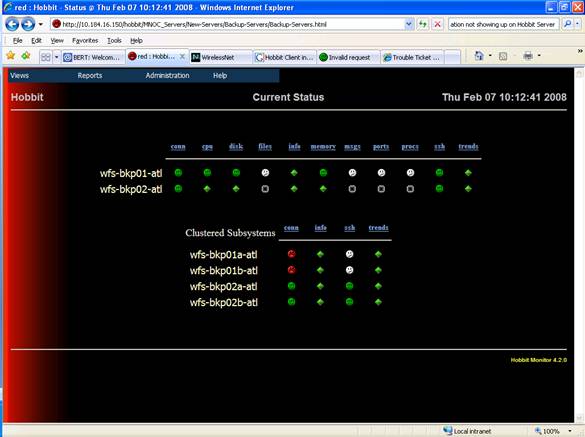
Ok, so I'm kind of dumb. I am now getting data from the clients, show in the histlogs. The problem now is that I don't know why it's not changing the white icons with green ones based on the settings in hobbit-clients.cfg. This is probably something easy but, I can't seem to figure it out. If I have read the man pages right (along with a few hundred archived emails) the hobbit-client.cfg reads from top to bottom. So if you have the following in the file in this order:
▸
HOST=SGLNHHOBBIT
file /var/adm/messages SIZE>0 MTIME>86400 TRACK yellow
##file /var/log/hobbit/page.log SIZE>0 MTIME<7200 TRACK yellow
file /var/log/hobbit/hobbitd.log SIZE>0 MTIME<7200 TRACK yellow
file /var/log/hobbit/hobbitlaunch.log SIZE>0 MTIME<7200 TRACK yellow
file /var/log/hobbit/hobbitd.pid SIZE>0 SIZE>0 MTIME<7200 TRACK yellow
file /var/log/hobbit/rrd-status.log SIZE>0 MTIME<7200 TRACK yellow
file /var/log/hobbit/bb-network.log SIZE>0 MTIME<7200 TRACK yellow
file /var/log/hobbit/bb-display.log SIZE>0 MTIME<7200 TRACK yellow
file /var/log/hobbit/rrd-data.log SIZE>0 MTIME<7200 TRACK yellow
file /var/log/syslog SIZE>0 MTIME<7200 TRACK yellow
DEFAULT
# These are the built-in defaults.
UP 1h
LOAD 5.0 10.0
DISK * 90 95
MEMPHYS 100 101
MEMSWAP 50 80
MEMACT 90 97
PROC httpd 3 40
PROC /usr/lib/inet/inetd start
PROC /usr/lib/ssh/sshd 1 99
PROC /usr/lib/hobbit/server/bin/hobbitlaunch
#
PORT "LOCAL=%([.:]22)$" state=ESTABLISHED min=0 max=99 color=yellow TRACK=ssh "TEXT=SSH logins"
PORT "LOCAL=%([.:]80)$" state=ESTABLISHED min=0 max=99 color=yellow TRACK=http "TEXT=HTTP"
It should apply the setting for the 1st listed host and then apply the "DEFAULT" settings right?
▸
Thank you,
Howard Snyder
user-e66ae0780d99@xymon.invalid
SR Network Control Engineer
Network Services
XXX-XXX-XXXX

This email, and any attachments, is intended only for use by the addressee(s) named herein and may contain legally privileged and/or confidential information. It is the property of Cingular Wireless and its Affiliates. If you are not the intended recipient of this email, you are hereby notified that any dissemination, distribution or copying of this email, any attachments thereto, and any use of the information contained is strictly prohibited. If you have received this email in error, please notify me at XXX.XXX.XXXX and permanently delete the original and any copy thereof.

For login requests and password resets, you will need to open a request on the "My Logins" website:

https://nslogins.edc.cingular.net/login.cfm?CFID=13246&CFTOKEN=41726264

For OSS problems:
DL-MNOC-OSS Adjunct
DL-MNOC-OSS Siemens
DL-MNOC-OSS Nortel
DL-MNOC-OSS Nokia
DL-MNOC-OSS Lucent
DL-MNOC-OSS Ericsson


-----Original Message-----
From: Henrik Stoerner [mailto:user-ce4a2c883f75@xymon.invalid]
Sent: Thursday, February 07, 2008 11:30 AM
To: user-ae9b8668bcde@xymon.invalid
Subject: Re: [hobbit] Client Data not showing up

On Thu, Feb 07, 2008 at 09:59:34AM -0500, Snyder, Howard wrote:
Trying 10.184.16.150...
Connected to 10.184.16.150.
Escape character is '^]'.
Connection to 10.184.16.150 closed by foreign host.
There should be a delay (about 30 seconds, if memory serves me right)
before the connection is closed - that is how long Hobbit will wait for
data to be sent from the client.

The "bb" utility from the Hobbit client really is the best way to do the
connection test - run
   bb IP-OF-HOBBIT-SERVER ping
and it should respond with the version number of your Hobbit server. Add
a --debug option just after the "bb" command for some more detail.

If you can connect, but the bb-ping test fails, then there are a couple
of possibilities:

1) The IP-address you're using is wrong
2) There's a firewall or proxy which blocks port 1984
3) The Hobbit daemon restricts what IP-adresses it will talk to
   (the --status-senders option to hobbitd in hobbitlaunch.cfg)

Probably something else I just cannot think of right now ...


Regards,
Henrik
list Greg L Hubbard
You have to configure two files, not just one.
▸
-----Original Message----- From: Snyder, Howard [mailto:user-e66ae0780d99@xymon.invalid] Sent: Thursday, February 07, 2008 12:16 PM To: user-ae9b8668bcde@xymon.invalid Subject: RE: [hobbit] Client Data not showing up Ok, so I'm kind of dumb. I am now getting data from the clients, show in the histlogs. The problem now is that I don't know why it's not changing the white icons with green ones based on the settings in hobbit-clients.cfg. This is probably something easy but, I can't seem to figure it out. If I have read the man pages right (along with a few hundred archived emails) the hobbit-client.cfg reads from top to bottom. So if you have the following in the file in this order: HOST=SGLNHHOBBIT file /var/adm/messages SIZE>0 MTIME>86400 TRACK yellow ##file /var/log/hobbit/page.log SIZE>0 MTIME<7200 TRACK yellow file /var/log/hobbit/hobbitd.log SIZE>0 MTIME<7200 TRACK yellow file /var/log/hobbit/hobbitlaunch.log SIZE>0 MTIME<7200 TRACK yellow file /var/log/hobbit/hobbitd.pid SIZE>0 SIZE>0 MTIME<7200 TRACK yellow file /var/log/hobbit/rrd-status.log SIZE>0 MTIME<7200 TRACK yellow file /var/log/hobbit/bb-network.log SIZE>0 MTIME<7200 TRACK yellow file /var/log/hobbit/bb-display.log SIZE>0 MTIME<7200 TRACK yellow file /var/log/hobbit/rrd-data.log SIZE>0 MTIME<7200 TRACK yellow file /var/log/syslog SIZE>0 MTIME<7200 TRACK yellow DEFAULT # These are the built-in defaults. UP 1h LOAD 5.0 10.0 DISK * 90 95 MEMPHYS 100 101 MEMSWAP 50 80 MEMACT 90 97 PROC httpd 3 40 PROC /usr/lib/inet/inetd start PROC /usr/lib/ssh/sshd 1 99 PROC /usr/lib/hobbit/server/bin/hobbitlaunch # PORT "LOCAL=%([.:]22)$" state=ESTABLISHED min=0 max=99 color=yellow TRACK=ssh "TEXT=SSH logins" PORT "LOCAL=%([.:]80)$" state=ESTABLISHED min=0 max=99 color=yellow TRACK=http "TEXT=HTTP" It should apply the setting for the 1st listed host and then apply the "DEFAULT" settings right? Thank you, Howard Snyder user-e66ae0780d99@xymon.invalid SR Network Control Engineer Network Services XXX-XXX-XXXX This email, and any attachments, is intended only for use by the addressee(s) named herein and may contain legally privileged and/or confidential information. It is the property of Cingular Wireless and its Affiliates. If you are not the intended recipient of this email, you are hereby notified that any dissemination, distribution or copying of this email, any attachments thereto, and any use of the information contained is strictly prohibited. If you have received this email in error, please notify me at XXX.XXX.XXXX and permanently delete the original and any copy thereof. For login requests and password resets, you will need to open a request on the "My Logins" website: https://nslogins.edc.cingular.net/login.cfm?CFID=13246&CFTOKEN=41726264 For OSS problems: DL-MNOC-OSS Adjunct DL-MNOC-OSS Siemens DL-MNOC-OSS Nortel DL-MNOC-OSS Nokia DL-MNOC-OSS Lucent DL-MNOC-OSS Ericsson -----Original Message----- From: Henrik Stoerner [mailto:user-ce4a2c883f75@xymon.invalid] Sent: Thursday, February 07, 2008 11:30 AM To: user-ae9b8668bcde@xymon.invalid Subject: Re: [hobbit] Client Data not showing up On Thu, Feb 07, 2008 at 09:59:34AM -0500, Snyder, Howard wrote:
Trying 10.184.16.150...
Connected to 10.184.16.150.
Escape character is '^]'.
Connection to 10.184.16.150 closed by foreign host.
There should be a delay (about 30 seconds, if memory serves me right)
before the connection is closed - that is how long Hobbit will wait for
data to be sent from the client.

The "bb" utility from the Hobbit client really is the best way to do the
connection test - run
   bb IP-OF-HOBBIT-SERVER ping
and it should respond with the version number of your Hobbit server. Add
a --debug option just after the "bb" command for some more detail.

If you can connect, but the bb-ping test fails, then there are a couple
of possibilities:

1) The IP-address you're using is wrong
2) There's a firewall or proxy which blocks port 1984
3) The Hobbit daemon restricts what IP-adresses it will talk to
   (the --status-senders option to hobbitd in hobbitlaunch.cfg)

Probably something else I just cannot think of right now ...


Regards,
Henrik
list Howard Snyder
Which one? Thank you, Howard Snyder user-e66ae0780d99@xymon.invalid SR Network Control Engineer Network Services XXX-XXX-XXXX This email, and any attachments, is intended only for use by the addressee(s) named herein and may contain legally privileged and/or confidential information. It is the property of Cingular Wireless and its Affiliates. If you are not the intended recipient of this email, you are hereby notified that any dissemination, distribution or copying of this email, any attachments thereto, and any use of the information contained is strictly prohibited. If you have received this email in error, please notify me at XXX.XXX.XXXX and permanently delete the original and any copy thereof. For login requests and password resets, you will need to open a request on the "My Logins" website: https://nslogins.edc.cingular.net/login.cfm?CFID=13246&CFTOKEN=41726264 For OSS problems: DL-MNOC-OSS Adjunct DL-MNOC-OSS Siemens DL-MNOC-OSS Nortel DL-MNOC-OSS Nokia DL-MNOC-OSS Lucent DL-MNOC-OSS Ericsson -----Original Message----- From: Hubbard, Greg L [mailto:user-d970b5e56ec9@xymon.invalid] Sent: Thursday, February 07, 2008 1:36 PM To: user-ae9b8668bcde@xymon.invalid Subject: RE: [hobbit] Client Data not showing up You have to configure two files, not just one. -----Original Message----- From: Snyder, Howard [mailto:user-e66ae0780d99@xymon.invalid] Sent: Thursday, February 07, 2008 12:16 PM To: user-ae9b8668bcde@xymon.invalid Subject: RE: [hobbit] Client Data not showing up Ok, so I'm kind of dumb. I am now getting data from the clients, show in the histlogs. The problem now is that I don't know why it's not changing the white icons with green ones based on the settings in hobbit-clients.cfg. This is probably something easy but, I can't seem to figure it out. If I have read the man pages right (along with a few hundred archived emails) the hobbit-client.cfg reads from top to bottom. So if you have the following in the file in this order: HOST=SGLNHHOBBIT file /var/adm/messages SIZE>0 MTIME>86400 TRACK yellow ##file /var/log/hobbit/page.log SIZE>0 MTIME<7200 TRACK yellow file /var/log/hobbit/hobbitd.log SIZE>0 MTIME<7200 TRACK yellow file /var/log/hobbit/hobbitlaunch.log SIZE>0 MTIME<7200 TRACK yellow file /var/log/hobbit/hobbitd.pid SIZE>0 SIZE>0 MTIME<7200 TRACK yellow file /var/log/hobbit/rrd-status.log SIZE>0 MTIME<7200 TRACK yellow file /var/log/hobbit/bb-network.log SIZE>0 MTIME<7200 TRACK yellow file /var/log/hobbit/bb-display.log SIZE>0 MTIME<7200 TRACK yellow file /var/log/hobbit/rrd-data.log SIZE>0 MTIME<7200 TRACK yellow file /var/log/syslog SIZE>0 MTIME<7200 TRACK yellow DEFAULT # These are the built-in defaults. UP 1h LOAD 5.0 10.0 DISK * 90 95 MEMPHYS 100 101 MEMSWAP 50 80 MEMACT 90 97 PROC httpd 3 40 PROC /usr/lib/inet/inetd start PROC /usr/lib/ssh/sshd 1 99 PROC /usr/lib/hobbit/server/bin/hobbitlaunch # PORT "LOCAL=%([.:]22)$" state=ESTABLISHED min=0 max=99 color=yellow TRACK=ssh "TEXT=SSH logins" PORT "LOCAL=%([.:]80)$" state=ESTABLISHED min=0 max=99 color=yellow TRACK=http "TEXT=HTTP" It should apply the setting for the 1st listed host and then apply the "DEFAULT" settings right? Thank you, Howard Snyder user-e66ae0780d99@xymon.invalid SR Network Control Engineer Network Services XXX-XXX-XXXX This email, and any attachments, is intended only for use by the addressee(s) named herein and may contain legally privileged and/or confidential information. It is the property of Cingular Wireless and its Affiliates. If you are not the intended recipient of this email, you are hereby notified that any dissemination, distribution or copying of this email, any attachments thereto, and any use of the information contained is strictly prohibited. If you have received this email in error, please notify me at XXX.XXX.XXXX and permanently delete the original and any copy thereof. For login requests and password resets, you will need to open a request on the "My Logins" website: https://nslogins.edc.cingular.net/login.cfm?CFID=13246&CFTOKEN=41726264 For OSS problems: DL-MNOC-OSS Adjunct DL-MNOC-OSS Siemens DL-MNOC-OSS Nortel DL-MNOC-OSS Nokia DL-MNOC-OSS Lucent DL-MNOC-OSS Ericsson -----Original Message----- From: Henrik Stoerner [mailto:user-ce4a2c883f75@xymon.invalid] Sent: Thursday, February 07, 2008 11:30 AM To: user-ae9b8668bcde@xymon.invalid Subject: Re: [hobbit] Client Data not showing up On Thu, Feb 07, 2008 at 09:59:34AM -0500, Snyder, Howard wrote:
Trying 10.184.16.150...
Connected to 10.184.16.150.
Escape character is '^]'.
Connection to 10.184.16.150 closed by foreign host.
There should be a delay (about 30 seconds, if memory serves me right) before the connection is closed - that is how long Hobbit will wait for data to be sent from the client.

The "bb" utility from the Hobbit client really is the best way to do the connection test - run
   bb IP-OF-HOBBIT-SERVER ping
and it should respond with the version number of your Hobbit server. Add a --debug option just after the "bb" command for some more detail.

If you can connect, but the bb-ping test fails, then there are a couple of possibilities:

1) The IP-address you're using is wrong
2) There's a firewall or proxy which blocks port 1984
3) The Hobbit daemon restricts what IP-adresses it will talk to
   (the --status-senders option to hobbitd in hobbitlaunch.cfg)

Probably something else I just cannot think of right now ...


Regards,
Henrik
list Howard Snyder
Do you have a sample that you can paste in?
▸
Thank you, Howard Snyder user-e66ae0780d99@xymon.invalid SR Network Control Engineer Network Services XXX-XXX-XXXX This email, and any attachments, is intended only for use by the addressee(s) named herein and may contain legally privileged and/or confidential information. It is the property of Cingular Wireless and its Affiliates. If you are not the intended recipient of this email, you are hereby notified that any dissemination, distribution or copying of this email, any attachments thereto, and any use of the information contained is strictly prohibited. If you have received this email in error, please notify me at XXX.XXX.XXXX and permanently delete the original and any copy thereof. For login requests and password resets, you will need to open a request on the "My Logins" website: https://nslogins.edc.cingular.net/login.cfm?CFID=13246&CFTOKEN=41726264 For OSS problems: DL-MNOC-OSS Adjunct DL-MNOC-OSS Siemens DL-MNOC-OSS Nortel DL-MNOC-OSS Nokia DL-MNOC-OSS Lucent DL-MNOC-OSS Ericsson -----Original Message----- From: Hubbard, Greg L [mailto:user-d970b5e56ec9@xymon.invalid] Sent: Thursday, February 07, 2008 1:36 PM To: user-ae9b8668bcde@xymon.invalid Subject: RE: [hobbit] Client Data not showing up You have to configure two files, not just one. -----Original Message----- From: Snyder, Howard [mailto:user-e66ae0780d99@xymon.invalid] Sent: Thursday, February 07, 2008 12:16 PM To: user-ae9b8668bcde@xymon.invalid Subject: RE: [hobbit] Client Data not showing up Ok, so I'm kind of dumb. I am now getting data from the clients, show in the histlogs. The problem now is that I don't know why it's not changing the white icons with green ones based on the settings in hobbit-clients.cfg. This is probably something easy but, I can't seem to figure it out. If I have read the man pages right (along with a few hundred archived emails) the hobbit-client.cfg reads from top to bottom. So if you have the following in the file in this order: HOST=SGLNHHOBBIT file /var/adm/messages SIZE>0 MTIME>86400 TRACK yellow ##file /var/log/hobbit/page.log SIZE>0 MTIME<7200 TRACK yellow file /var/log/hobbit/hobbitd.log SIZE>0 MTIME<7200 TRACK yellow file /var/log/hobbit/hobbitlaunch.log SIZE>0 MTIME<7200 TRACK yellow file /var/log/hobbit/hobbitd.pid SIZE>0 SIZE>0 MTIME<7200 TRACK yellow file /var/log/hobbit/rrd-status.log SIZE>0 MTIME<7200 TRACK yellow file /var/log/hobbit/bb-network.log SIZE>0 MTIME<7200 TRACK yellow file /var/log/hobbit/bb-display.log SIZE>0 MTIME<7200 TRACK yellow file /var/log/hobbit/rrd-data.log SIZE>0 MTIME<7200 TRACK yellow file /var/log/syslog SIZE>0 MTIME<7200 TRACK yellow DEFAULT # These are the built-in defaults. UP 1h LOAD 5.0 10.0 DISK * 90 95 MEMPHYS 100 101 MEMSWAP 50 80 MEMACT 90 97 PROC httpd 3 40 PROC /usr/lib/inet/inetd start PROC /usr/lib/ssh/sshd 1 99 PROC /usr/lib/hobbit/server/bin/hobbitlaunch # PORT "LOCAL=%([.:]22)$" state=ESTABLISHED min=0 max=99 color=yellow TRACK=ssh "TEXT=SSH logins" PORT "LOCAL=%([.:]80)$" state=ESTABLISHED min=0 max=99 color=yellow TRACK=http "TEXT=HTTP" It should apply the setting for the 1st listed host and then apply the "DEFAULT" settings right? Thank you, Howard Snyder user-e66ae0780d99@xymon.invalid SR Network Control Engineer Network Services XXX-XXX-XXXX This email, and any attachments, is intended only for use by the addressee(s) named herein and may contain legally privileged and/or confidential information. It is the property of Cingular Wireless and its Affiliates. If you are not the intended recipient of this email, you are hereby notified that any dissemination, distribution or copying of this email, any attachments thereto, and any use of the information contained is strictly prohibited. If you have received this email in error, please notify me at XXX.XXX.XXXX and permanently delete the original and any copy thereof. For login requests and password resets, you will need to open a request on the "My Logins" website: https://nslogins.edc.cingular.net/login.cfm?CFID=13246&CFTOKEN=41726264 For OSS problems: DL-MNOC-OSS Adjunct DL-MNOC-OSS Siemens DL-MNOC-OSS Nortel DL-MNOC-OSS Nokia DL-MNOC-OSS Lucent DL-MNOC-OSS Ericsson -----Original Message----- From: Henrik Stoerner [mailto:user-ce4a2c883f75@xymon.invalid] Sent: Thursday, February 07, 2008 11:30 AM To: user-ae9b8668bcde@xymon.invalid Subject: Re: [hobbit] Client Data not showing up On Thu, Feb 07, 2008 at 09:59:34AM -0500, Snyder, Howard wrote:
Trying 10.184.16.150...
Connected to 10.184.16.150.
Escape character is '^]'.
Connection to 10.184.16.150 closed by foreign host.
There should be a delay (about 30 seconds, if memory serves me right) before the connection is closed - that is how long Hobbit will wait for data to be sent from the client.

The "bb" utility from the Hobbit client really is the best way to do the connection test - run
   bb IP-OF-HOBBIT-SERVER ping
and it should respond with the version number of your Hobbit server. Add a --debug option just after the "bb" command for some more detail.

If you can connect, but the bb-ping test fails, then there are a couple of possibilities:

1) The IP-address you're using is wrong
2) There's a firewall or proxy which blocks port 1984
3) The Hobbit daemon restricts what IP-adresses it will talk to
   (the --status-senders option to hobbitd in hobbitlaunch.cfg)

Probably something else I just cannot think of right now ...


Regards,
Henrik
list Howard Snyder
Are you talking about the client-local.cfg file? If so this is one of the entries: [wfs-bkp01-atl] file:/var/log/
▸
Thank you,
Howard Snyder
user-e66ae0780d99@xymon.invalid
SR Network Control Engineer
Network Services
XXX-XXX-XXXX

This email, and any attachments, is intended only for use by the addressee(s) named herein and may contain legally privileged and/or confidential information. It is the property of Cingular Wireless and its Affiliates. If you are not the intended recipient of this email, you are hereby notified that any dissemination, distribution or copying of this email, any attachments thereto, and any use of the information contained is strictly prohibited. If you have received this email in error, please notify me at XXX.XXX.XXXX and permanently delete the original and any copy thereof.

For login requests and password resets, you will need to open a request on the "My Logins" website:

https://nslogins.edc.cingular.net/login.cfm?CFID=13246&CFTOKEN=41726264

For OSS problems:
DL-MNOC-OSS Adjunct
DL-MNOC-OSS Siemens
DL-MNOC-OSS Nortel
DL-MNOC-OSS Nokia
DL-MNOC-OSS Lucent
DL-MNOC-OSS Ericsson


-----Original Message-----
From: Hubbard, Greg L [mailto:user-d970b5e56ec9@xymon.invalid]
Sent: Thursday, February 07, 2008 1:36 PM
To: user-ae9b8668bcde@xymon.invalid
Subject: RE: [hobbit] Client Data not showing up

You have to configure two files, not just one.

-----Original Message-----
From: Snyder, Howard [mailto:user-e66ae0780d99@xymon.invalid]
Sent: Thursday, February 07, 2008 12:16 PM
To: user-ae9b8668bcde@xymon.invalid
Subject: RE: [hobbit] Client Data not showing up

Ok, so I'm kind of dumb.  I am now getting data from the clients, show in the histlogs.  The problem now is that I don't know why it's not changing the white icons with green ones based on the settings in hobbit-clients.cfg.  This is probably something easy but, I can't seem to figure it out.  If I have read the man pages right (along with a few hundred archived emails) the hobbit-client.cfg reads from top to bottom.  So if you have the following in the file in this order:

HOST=SGLNHHOBBIT
file /var/adm/messages SIZE>0 MTIME>86400 TRACK yellow ##file /var/log/hobbit/page.log SIZE>0 MTIME<7200 TRACK yellow file /var/log/hobbit/hobbitd.log SIZE>0 MTIME<7200 TRACK yellow file /var/log/hobbit/hobbitlaunch.log SIZE>0 MTIME<7200 TRACK yellow file /var/log/hobbit/hobbitd.pid SIZE>0 SIZE>0 MTIME<7200 TRACK yellow file /var/log/hobbit/rrd-status.log SIZE>0 MTIME<7200 TRACK yellow file /var/log/hobbit/bb-network.log SIZE>0 MTIME<7200 TRACK yellow file /var/log/hobbit/bb-display.log SIZE>0 MTIME<7200 TRACK yellow file /var/log/hobbit/rrd-data.log SIZE>0 MTIME<7200 TRACK yellow file /var/log/syslog SIZE>0 MTIME<7200 TRACK yellow

DEFAULT
        # These are the built-in defaults.
        UP      1h
        LOAD    5.0 10.0
        DISK    * 90 95
        MEMPHYS 100 101
        MEMSWAP 50 80
        MEMACT  90 97
        PROC    httpd 3 40
        PROC    /usr/lib/inet/inetd start
        PROC    /usr/lib/ssh/sshd 1 99
        PROC    /usr/lib/hobbit/server/bin/hobbitlaunch
#
        PORT "LOCAL=%([.:]22)$" state=ESTABLISHED min=0 max=99 color=yellow TRACK=ssh "TEXT=SSH logins"
        PORT "LOCAL=%([.:]80)$" state=ESTABLISHED min=0 max=99 color=yellow TRACK=http "TEXT=HTTP"

It should apply the setting for the 1st listed host and then apply the "DEFAULT" settings right?


Thank you,
Howard Snyder
user-e66ae0780d99@xymon.invalid
SR Network Control Engineer
Network Services
XXX-XXX-XXXX

This email, and any attachments, is intended only for use by the addressee(s) named herein and may contain legally privileged and/or confidential information. It is the property of Cingular Wireless and its Affiliates. If you are not the intended recipient of this email, you are hereby notified that any dissemination, distribution or copying of this email, any attachments thereto, and any use of the information contained is strictly prohibited. If you have received this email in error, please notify me at XXX.XXX.XXXX and permanently delete the original and any copy thereof.

For login requests and password resets, you will need to open a request on the "My Logins" website:

https://nslogins.edc.cingular.net/login.cfm?CFID=13246&CFTOKEN=41726264

For OSS problems:
DL-MNOC-OSS Adjunct
DL-MNOC-OSS Siemens
DL-MNOC-OSS Nortel
DL-MNOC-OSS Nokia
DL-MNOC-OSS Lucent
DL-MNOC-OSS Ericsson


-----Original Message-----
From: Henrik Stoerner [mailto:user-ce4a2c883f75@xymon.invalid]
Sent: Thursday, February 07, 2008 11:30 AM
To: user-ae9b8668bcde@xymon.invalid
Subject: Re: [hobbit] Client Data not showing up

On Thu, Feb 07, 2008 at 09:59:34AM -0500, Snyder, Howard wrote:
Trying 10.184.16.150...
Connected to 10.184.16.150.
Escape character is '^]'.
Connection to 10.184.16.150 closed by foreign host.
There should be a delay (about 30 seconds, if memory serves me right) before the connection is closed - that is how long Hobbit will wait for data to be sent from the client.

The "bb" utility from the Hobbit client really is the best way to do the connection test - run
   bb IP-OF-HOBBIT-SERVER ping
and it should respond with the version number of your Hobbit server. Add a --debug option just after the "bb" command for some more detail.

If you can connect, but the bb-ping test fails, then there are a couple of possibilities:

1) The IP-address you're using is wrong
2) There's a firewall or proxy which blocks port 1984
3) The Hobbit daemon restricts what IP-adresses it will talk to
   (the --status-senders option to hobbitd in hobbitlaunch.cfg)

Probably something else I just cannot think of right now ...


Regards,
Henrik
list Greg L Hubbard
Howard, I think it is called client-local.cfg or something like that. The stuff you enter in this file gets sent to each Hobbit client to tell it what to do. It is most used to tell the client which files and directories to start sending information for, and also how to filter log files so the client doesn't try to send the whole thing to the server for processing. It is also used to tell the client what version of code to run -- if you work at it, you can get the clients to update themselves (except on AIX machines). GLH
▸
-----Original Message----- From: Snyder, Howard [mailto:user-e66ae0780d99@xymon.invalid] Sent: Thursday, February 07, 2008 12:42 PM To: user-ae9b8668bcde@xymon.invalid Subject: RE: [hobbit] Client Data not showing up Which one? Thank you, Howard Snyder user-e66ae0780d99@xymon.invalid SR Network Control Engineer Network Services XXX-XXX-XXXX This email, and any attachments, is intended only for use by the addressee(s) named herein and may contain legally privileged and/or confidential information. It is the property of Cingular Wireless and its Affiliates. If you are not the intended recipient of this email, you are hereby notified that any dissemination, distribution or copying of this email, any attachments thereto, and any use of the information contained is strictly prohibited. If you have received this email in error, please notify me at XXX.XXX.XXXX and permanently delete the original and any copy thereof. For login requests and password resets, you will need to open a request on the "My Logins" website: https://nslogins.edc.cingular.net/login.cfm?CFID=13246&CFTOKEN=41726264 For OSS problems: DL-MNOC-OSS Adjunct DL-MNOC-OSS Siemens DL-MNOC-OSS Nortel DL-MNOC-OSS Nokia DL-MNOC-OSS Lucent DL-MNOC-OSS Ericsson -----Original Message----- From: Hubbard, Greg L [mailto:user-d970b5e56ec9@xymon.invalid] Sent: Thursday, February 07, 2008 1:36 PM To: user-ae9b8668bcde@xymon.invalid Subject: RE: [hobbit] Client Data not showing up You have to configure two files, not just one. -----Original Message----- From: Snyder, Howard [mailto:user-e66ae0780d99@xymon.invalid] Sent: Thursday, February 07, 2008 12:16 PM To: user-ae9b8668bcde@xymon.invalid Subject: RE: [hobbit] Client Data not showing up Ok, so I'm kind of dumb. I am now getting data from the clients, show in the histlogs. The problem now is that I don't know why it's not changing the white icons with green ones based on the settings in hobbit-clients.cfg. This is probably something easy but, I can't seem to figure it out. If I have read the man pages right (along with a few hundred archived emails) the hobbit-client.cfg reads from top to bottom. So if you have the following in the file in this order: HOST=SGLNHHOBBIT file /var/adm/messages SIZE>0 MTIME>86400 TRACK yellow ##file /var/log/hobbit/page.log SIZE>0 MTIME<7200 TRACK yellow file /var/log/hobbit/hobbitd.log SIZE>0 MTIME<7200 TRACK yellow file /var/log/hobbit/hobbitlaunch.log SIZE>0 MTIME<7200 TRACK yellow file /var/log/hobbit/hobbitd.pid SIZE>0 SIZE>0 MTIME<7200 TRACK yellow file /var/log/hobbit/rrd-status.log SIZE>0 MTIME<7200 TRACK yellow file /var/log/hobbit/bb-network.log SIZE>0 MTIME<7200 TRACK yellow file /var/log/hobbit/bb-display.log SIZE>0 MTIME<7200 TRACK yellow file /var/log/hobbit/rrd-data.log SIZE>0 MTIME<7200 TRACK yellow file /var/log/syslog SIZE>0 MTIME<7200 TRACK yellow DEFAULT # These are the built-in defaults. UP 1h LOAD 5.0 10.0 DISK * 90 95 MEMPHYS 100 101 MEMSWAP 50 80 MEMACT 90 97 PROC httpd 3 40 PROC /usr/lib/inet/inetd start PROC /usr/lib/ssh/sshd 1 99 PROC /usr/lib/hobbit/server/bin/hobbitlaunch # PORT "LOCAL=%([.:]22)$" state=ESTABLISHED min=0 max=99 color=yellow TRACK=ssh "TEXT=SSH logins" PORT "LOCAL=%([.:]80)$" state=ESTABLISHED min=0 max=99 color=yellow TRACK=http "TEXT=HTTP" It should apply the setting for the 1st listed host and then apply the "DEFAULT" settings right? Thank you, Howard Snyder user-e66ae0780d99@xymon.invalid SR Network Control Engineer Network Services XXX-XXX-XXXX This email, and any attachments, is intended only for use by the addressee(s) named herein and may contain legally privileged and/or confidential information. It is the property of Cingular Wireless and its Affiliates. If you are not the intended recipient of this email, you are hereby notified that any dissemination, distribution or copying of this email, any attachments thereto, and any use of the information contained is strictly prohibited. If you have received this email in error, please notify me at XXX.XXX.XXXX and permanently delete the original and any copy thereof. For login requests and password resets, you will need to open a request on the "My Logins" website: https://nslogins.edc.cingular.net/login.cfm?CFID=13246&CFTOKEN=41726264 For OSS problems: DL-MNOC-OSS Adjunct DL-MNOC-OSS Siemens DL-MNOC-OSS Nortel DL-MNOC-OSS Nokia DL-MNOC-OSS Lucent DL-MNOC-OSS Ericsson -----Original Message----- From: Henrik Stoerner [mailto:user-ce4a2c883f75@xymon.invalid] Sent: Thursday, February 07, 2008 11:30 AM To: user-ae9b8668bcde@xymon.invalid Subject: Re: [hobbit] Client Data not showing up On Thu, Feb 07, 2008 at 09:59:34AM -0500, Snyder, Howard wrote:
Trying 10.184.16.150...
Connected to 10.184.16.150.
Escape character is '^]'.
Connection to 10.184.16.150 closed by foreign host.
There should be a delay (about 30 seconds, if memory serves me right) before the connection is closed - that is how long Hobbit will wait for data to be sent from the client.

The "bb" utility from the Hobbit client really is the best way to do the connection test - run
   bb IP-OF-HOBBIT-SERVER ping
and it should respond with the version number of your Hobbit server. Add a --debug option just after the "bb" command for some more detail.

If you can connect, but the bb-ping test fails, then there are a couple of possibilities:

1) The IP-address you're using is wrong
2) There's a firewall or proxy which blocks port 1984
3) The Hobbit daemon restricts what IP-adresses it will talk to
   (the --status-senders option to hobbitd in hobbitlaunch.cfg)

Probably something else I just cannot think of right now ...


Regards,
Henrik
list Greg L Hubbard
Howard, That tells the client to watch that file (but didn't you enter a directory?). Then in the hobbit-clients.cfg (or whatever it is called) you can specify what to watch for that file -- mostly looking for search patterns, file sizes, mod times, etc. BTW, be very careful about what you put in your defaults section. The defaults section is "and"-ed with the host specific section.
▸
GLH -----Original Message----- From: Snyder, Howard [mailto:user-e66ae0780d99@xymon.invalid] Sent: Thursday, February 07, 2008 12:54 PM To: user-ae9b8668bcde@xymon.invalid Subject: RE: [hobbit] Client Data not showing up Are you talking about the client-local.cfg file? If so this is one of the entries: [wfs-bkp01-atl] file:/var/log/ Thank you, Howard Snyder user-e66ae0780d99@xymon.invalid SR Network Control Engineer Network Services XXX-XXX-XXXX This email, and any attachments, is intended only for use by the addressee(s) named herein and may contain legally privileged and/or confidential information. It is the property of Cingular Wireless and its Affiliates. If you are not the intended recipient of this email, you are hereby notified that any dissemination, distribution or copying of this email, any attachments thereto, and any use of the information contained is strictly prohibited. If you have received this email in error, please notify me at XXX.XXX.XXXX and permanently delete the original and any copy thereof. For login requests and password resets, you will need to open a request on the "My Logins" website: https://nslogins.edc.cingular.net/login.cfm?CFID=13246&CFTOKEN=41726264 For OSS problems: DL-MNOC-OSS Adjunct DL-MNOC-OSS Siemens DL-MNOC-OSS Nortel DL-MNOC-OSS Nokia DL-MNOC-OSS Lucent DL-MNOC-OSS Ericsson -----Original Message----- From: Hubbard, Greg L [mailto:user-d970b5e56ec9@xymon.invalid] Sent: Thursday, February 07, 2008 1:36 PM To: user-ae9b8668bcde@xymon.invalid Subject: RE: [hobbit] Client Data not showing up You have to configure two files, not just one. -----Original Message----- From: Snyder, Howard [mailto:user-e66ae0780d99@xymon.invalid] Sent: Thursday, February 07, 2008 12:16 PM To: user-ae9b8668bcde@xymon.invalid Subject: RE: [hobbit] Client Data not showing up Ok, so I'm kind of dumb. I am now getting data from the clients, show in the histlogs. The problem now is that I don't know why it's not changing the white icons with green ones based on the settings in hobbit-clients.cfg. This is probably something easy but, I can't seem to figure it out. If I have read the man pages right (along with a few hundred archived emails) the hobbit-client.cfg reads from top to bottom. So if you have the following in the file in this order: HOST=SGLNHHOBBIT file /var/adm/messages SIZE>0 MTIME>86400 TRACK yellow ##file /var/log/hobbit/page.log SIZE>0 MTIME<7200 TRACK yellow file /var/log/hobbit/hobbitd.log SIZE>0 MTIME<7200 TRACK yellow file /var/log/hobbit/hobbitlaunch.log SIZE>0 MTIME<7200 TRACK yellow file /var/log/hobbit/hobbitd.pid SIZE>0 SIZE>0 MTIME<7200 TRACK yellow file /var/log/hobbit/rrd-status.log SIZE>0 MTIME<7200 TRACK yellow file /var/log/hobbit/bb-network.log SIZE>0 MTIME<7200 TRACK yellow file /var/log/hobbit/bb-display.log SIZE>0 MTIME<7200 TRACK yellow file /var/log/hobbit/rrd-data.log SIZE>0 MTIME<7200 TRACK yellow file /var/log/syslog SIZE>0 MTIME<7200 TRACK yellow DEFAULT # These are the built-in defaults. UP 1h LOAD 5.0 10.0 DISK * 90 95 MEMPHYS 100 101 MEMSWAP 50 80 MEMACT 90 97 PROC httpd 3 40 PROC /usr/lib/inet/inetd start PROC /usr/lib/ssh/sshd 1 99 PROC /usr/lib/hobbit/server/bin/hobbitlaunch # PORT "LOCAL=%([.:]22)$" state=ESTABLISHED min=0 max=99 color=yellow TRACK=ssh "TEXT=SSH logins" PORT "LOCAL=%([.:]80)$" state=ESTABLISHED min=0 max=99 color=yellow TRACK=http "TEXT=HTTP" It should apply the setting for the 1st listed host and then apply the "DEFAULT" settings right? Thank you, Howard Snyder user-e66ae0780d99@xymon.invalid SR Network Control Engineer Network Services XXX-XXX-XXXX This email, and any attachments, is intended only for use by the addressee(s) named herein and may contain legally privileged and/or confidential information. It is the property of Cingular Wireless and its Affiliates. If you are not the intended recipient of this email, you are hereby notified that any dissemination, distribution or copying of this email, any attachments thereto, and any use of the information contained is strictly prohibited. If you have received this email in error, please notify me at XXX.XXX.XXXX and permanently delete the original and any copy thereof. For login requests and password resets, you will need to open a request on the "My Logins" website: https://nslogins.edc.cingular.net/login.cfm?CFID=13246&CFTOKEN=41726264 For OSS problems: DL-MNOC-OSS Adjunct DL-MNOC-OSS Siemens DL-MNOC-OSS Nortel DL-MNOC-OSS Nokia DL-MNOC-OSS Lucent DL-MNOC-OSS Ericsson -----Original Message----- From: Henrik Stoerner [mailto:user-ce4a2c883f75@xymon.invalid] Sent: Thursday, February 07, 2008 11:30 AM To: user-ae9b8668bcde@xymon.invalid Subject: Re: [hobbit] Client Data not showing up On Thu, Feb 07, 2008 at 09:59:34AM -0500, Snyder, Howard wrote:
Trying 10.184.16.150...
Connected to 10.184.16.150.
Escape character is '^]'.
Connection to 10.184.16.150 closed by foreign host.
There should be a delay (about 30 seconds, if memory serves me right) before the connection is closed - that is how long Hobbit will wait for data to be sent from the client.

The "bb" utility from the Hobbit client really is the best way to do the connection test - run
   bb IP-OF-HOBBIT-SERVER ping
and it should respond with the version number of your Hobbit server. Add a --debug option just after the "bb" command for some more detail.

If you can connect, but the bb-ping test fails, then there are a couple of possibilities:

1) The IP-address you're using is wrong
2) There's a firewall or proxy which blocks port 1984
3) The Hobbit daemon restricts what IP-adresses it will talk to
   (the --status-senders option to hobbitd in hobbitlaunch.cfg)

Probably something else I just cannot think of right now ...


Regards,
Henrik