State of the art for monitoring ESXi hosts?
list John Thurston
Can anyone offer a 'state of the art' statement regarding Xymon and
VMWare ESXi hosts (versions 6.0 and 6.5)? Looking in the archives, I see
a little content from several years ago.

It's now 2018. What are y'all monitoring, and how are ya' doing it?

--
    Do things because you should, not just because you can.

John Thurston    XXX-XXX-XXXX
user-ce4d79d99bab@xymon.invalid
Department of Administration
State of Alaska
list Kris Springer
I'd be interested in that as well. I abandoned those particular
tests a while ago because they didn't give much info.
Kris Springer
▸
On 01/31/2018 11:07 AM, John Thurston
wrote:
Can anyone offer a 'state of the art' statement regarding Xymon and VMWare ESXi hosts (versions 6.0 and 6.5)? Looking in the archives, I see a little content from several years ago.
It's now 2018. What are y'all monitoring, and how are ya' doing it?
list Ralph Mitchell
I managed to get bb-ESXi working for a while last year.  It looked useful,
but I turned it off due to restrictions on what I can do with ESXi.  I may
run it past our Windows support people (for the 4th time) and see if
they're interested in it.

Ralph Mitchell

On Wed, Jan 31, 2018 at 3:02 PM, Kris Springer <user-c2caa0a7a8d5@xymon.invalid>
▸
wrote:
I'd be interested in that as well.  I abandoned those particular tests a
while ago because they didn't give much info.

Kris Springer


On 01/31/2018 11:07 AM, John Thurston wrote:

Can anyone offer a 'state of the art' statement regarding Xymon and VMWare
ESXi hosts (versions 6.0 and 6.5)? Looking in the archives, I see a little
content from several years ago.

It's now 2018. What are y'all monitoring, and how are ya' doing it?
list Paul Root
I used to use bb-esx, which I had modified and renamed xymon-esx.   Upgrading to ESXi 6.x broke it, if I remember correctly.

I ended up using devmon with connecting to the ESXi server.   That gives me interface stats and states of the VMs (power, location, OS, and status).
And IPMI connecting to the ILO of the hardware, providing disk, temperature, fan, power supply.

And a custom script that looks at the hardware raid.
▸
From: Xymon [mailto:xymon-bounces at xymon.com] On Behalf Of Kris Springer
Sent: Wednesday, January 31, 2018 2:02 PM
To: John Thurston; xymon at xymon.com
Subject: Re: [Xymon] State of the art for monitoring ESXi hosts?

I'd be interested in that as well.  I abandoned those particular tests a while ago because they didn't give much info.

Kris Springer


On 01/31/2018 11:07 AM, John Thurston wrote:
Can anyone offer a 'state of the art' statement regarding Xymon and VMWare ESXi hosts (versions 6.0 and 6.5)? Looking in the archives, I see a little content from several years ago.

It's now 2018. What are y'all monitoring, and how are ya' doing it?
This communication is the property of CenturyLink and may contain confidential or privileged information. Unauthorized use of this communication is strictly prohibited and may be unlawful. If you have received this communication in error, please immediately notify the sender by reply e-mail and destroy all copies of the communication and any attachments.
list Jonathan Trott
We run a CentOS VM with a standard xymon client install, we replace the xymonclient-linux.sh with a customised version that uses esx-cli to report on CPU (along with guest VM status), disk, and memory from the ESXi host.
We then have xymon extensions that report on disk consolidation, open snapshots, temperature of host hardware (with a graph), and status of host hardware (last two from the sensors view in esxi).
We have one VM running on each host so that purple will alert us if the host goes down and we store the VM on the local datastore so that we get alerts if a shared datastore goes offline for a particular host.
Has been working since ESXi 5, works fine on 6.5.
Happy to share if requested, although the code isn't very pretty!

Thanks,
JT


From:   John Thurston <user-ce4d79d99bab@xymon.invalid>
To:     xymon at xymon.com
Date:   01/02/18 06:08
Subject:        [Xymon] State of the art for monitoring ESXi hosts?
Sent by:        "Xymon" <xymon-bounces at xymon.com>
▸
Can anyone offer a 'state of the art' statement regarding Xymon and VMWare ESXi hosts (versions 6.0 and 6.5)? Looking in the archives, I see a little content from several years ago.

It's now 2018. What are y'all monitoring, and how are ya' doing it?

--
    Do things because you should, not just because you can.

John Thurston    XXX-XXX-XXXX
user-ce4d79d99bab@xymon.invalid
Department of Administration
State of Alaska
list Xymon
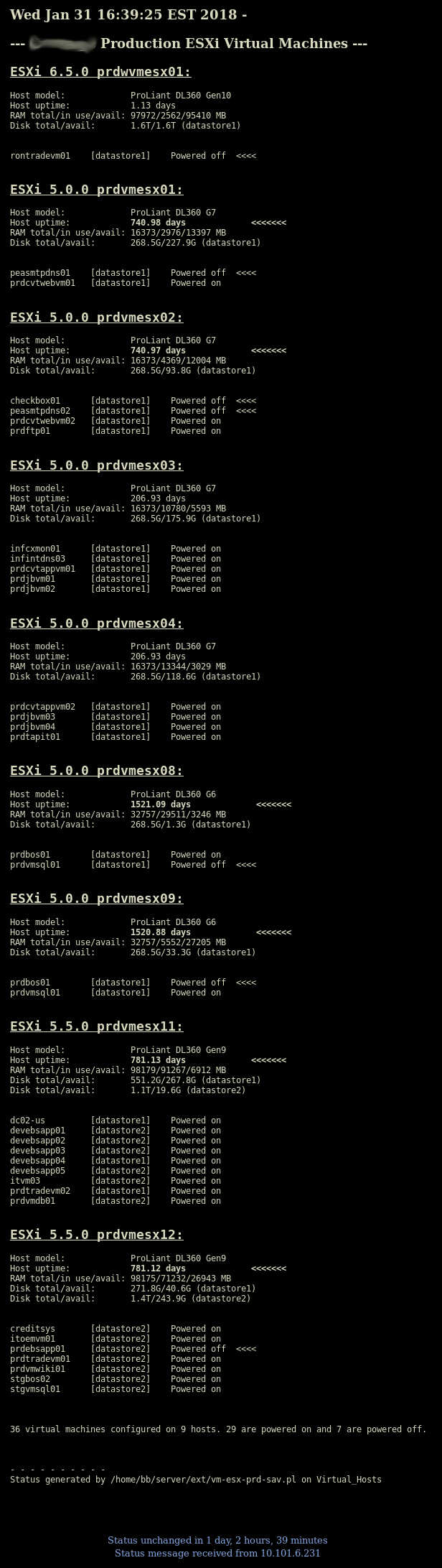
I use a custom Perl script that connects to all of my ESXi servers (about 21 of them) and generates a single page that lists each host server, its version, RAM usage, disk space usage per datastore, host uptime, which virtual machines are on them, and the power state of each VM.
It flags VMs that are powered off and hosts that have been up for more than 365 days. I'm not sending alerts for these at this time, but the page that is generated points these things out.

Actually, the 21 hosts are broken up into three different pages depending on the location of the host.

That gives me a pretty quick way to find out which host a particular VM is running on.

It uses ssh to connect to each host and run a series of commands on the hosts. Then it processes the results. I'm using it on ESXi 5.0, 5.5, and 6.5. Running all these commands on the hosts is time consuming, so I don't know how scalable this is.

Strict environments may have security concerns about having ssh enabled, but it works for me.

The attachment is a screen capture of the output.

Ron


John Thurston <user-ce4d79d99bab@xymon.invalid> wrote ..
▸
Can anyone offer a 'state of the art' statement regarding Xymon and VMWare ESXi hosts (versions 6.0 and 6.5)? Looking in the archives, I see a little content from several years ago.

It's now 2018. What are y'all monitoring, and how are ya' doing it?

--
    Do things because you should, not just because you can.

John Thurston    XXX-XXX-XXXX
user-ce4d79d99bab@xymon.invalid
Department of Administration
State of Alaska
Attachments (1)
 attachment.jpg
list Chris Pretorius
Will be very useful for us as well.

Regards
▸
From: Xymon [mailto:xymon-bounces at xymon.com] On Behalf Of Kris Springer
Sent: Wednesday, January 31, 2018 10:02 PM
To: John Thurston <user-ce4d79d99bab@xymon.invalid>; xymon at xymon.com
Subject: Re: [Xymon] State of the art for monitoring ESXi hosts?

I'd be interested in that as well.  I abandoned those particular tests a while ago because they didn't give much info.

Kris Springer


On 01/31/2018 11:07 AM, John Thurston wrote:
Can anyone offer a 'state of the art' statement regarding Xymon and VMWare ESXi hosts (versions 6.0 and 6.5)? Looking in the archives, I see a little content from several years ago.

It's now 2018. What are y'all monitoring, and how are ya' doing it?
list Greg Earle
▸
On 31 Jan 2018, at 11:07 AM, John Thurston <user-ce4d79d99bab@xymon.invalid> wrote:
Can anyone offer a 'state of the art' statement regarding Xymon and
VMware ESXi hosts (versions 6.0 and 6.5)?  Looking in the archives, I see
a little content from several years ago.

It's now 2018.  What are y'all monitoring, and how are ya' doing it?
We set up our ESXi hosts (all 6.0 at the moment) to point their syslog configs at our central syslog server, and then set up <syslog server>.msgs red & yellow alerts from what we get out of that.  Crude but quasi-effective.

(In case you've never set it up, ESXi hosts emit a FLOOD of syslog messages.)

		- Greg
list Andreas Kunberger
I'm using

Vmware-Monitor for Xymon (VMX) v1.3.1  from www.it-eckert.de<mailto:user-7a2ccd75ec6f@xymon.invalid>

with VMware ESXi 6.5.0


Andreas
▸
--

Von: Xymon <xymon-bounces at xymon.com> im Auftrag von Greg Earle <user-8f45ae7a27f3@xymon.invalid>
Gesendet: Donnerstag, 1. Februar 2018 13:19:42
An: xymon at xymon.com
Betreff: Re: [Xymon] State of the art for monitoring ESXi hosts?

On 31 Jan 2018, at 11:07 AM, John Thurston <user-ce4d79d99bab@xymon.invalid>
wrote:
Can anyone offer a 'state of the art' statement regarding Xymon and
VMware ESXi hosts (versions 6.0 and 6.5)?  Looking in the archives, I
see
a little content from several years ago.

It's now 2018.  What are y'all monitoring, and how are ya' doing it?
We set up our ESXi hosts (all 6.0 at the moment) to point their syslog
configs at our central syslog server, and then set up <syslog
server>.msgs red & yellow alerts from what we get out of that.  Crude
but quasi-effective.

(In case you've never set it up, ESXi hosts emit a FLOOD of syslog
messages.)

                - Greg