Xymon conn icon shows white, rather than green
list Kingston Peng
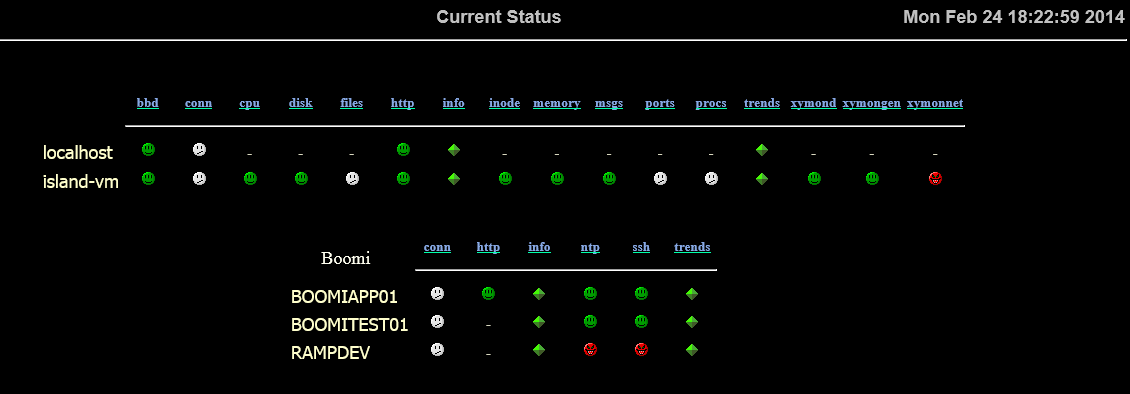
I recently setup a Xymon server.  After turn on, the web page all the
"conn" item shows white, rather than green:
(I only put contents on hosts.cfg and /etc/hosts files, not going deep
into any other configuration yet).


When I use fping, it shows the server is alive:

[root at island-vm etc]# fping BOOMIAPP01

BOOMIAPP01 is alive


Where is the configuration file to control it?
Attachments (1)
 attachment.png
list John Thurston
▸
On 2/24/2014 2:28 PM, Peng, Kingston wrote:
I recently setup a Xymon server.  After turn on, the web page all the
“conn” item shows white, rather than green:

(I only put contents on hosts.cfg and /etc/hosts files, not going deep
into any other configuration yet).
Why are you putting anything in /etc/hosts.cfg ?
▸
When I use fping, it shows the server is alive:

[root at island-vm etc]# *fping BOOMIAPP01*

BOOMIAPP01 is alive

Where is the configuration file to control it?
hosts.cfg

Can you post a sippet of your hosts.cfg for us to look at?
(Please post it as text in your reply.)

--
    Do things because you should, not just because you can.

John Thurston    XXX-XXX-XXXX
user-ce4d79d99bab@xymon.invalid
Enterprise Technology Services
Department of Administration
State of Alaska
list Kingston Peng
I didn't put anything on /etc/hosts.cfg.  When I said hosts.cfg, it is
/home/xymon/server/etc/hosts.cfg.

cat /home/xymon/server/etc/hosts.cfg
127.0.0.1   localhost      # bbd http://localhost/
10.1.2.159  island-vm      # bbd http://localhost/
group-compress Boomi
172.33.1.39     BOOMIAPP01 #ssh ntp
http://172.33.1.39:28080/connect/Interchange.html
172.33.1.38     BOOMITEST01 #ssh ntp
172.33.1.81     RAMPDEV #ssh ntp

cat /etc/hosts
127.0.0.1   localhost localhost.localdomain localhost4
localhost4.localdomain4
::1         localhost localhost.localdomain localhost6
localhost6.localdomain6
10.1.2.159  island-vm
172.33.1.39     boomiapp01
172.33.1.38     boomitest01
172.33.1.81     RAMPDEV
▸
-----Original Message-----
From: Xymon [mailto:xymon-bounces at xymon.com] On Behalf Of John Thurston
Sent: Monday, February 24, 2014 8:00 PM
To: xymon at xymon.com
Subject: Re: [Xymon] Xymon conn icon shows white, rather than green

On 2/24/2014 2:28 PM, Peng, Kingston wrote:
I recently setup a Xymon server. After turn on, the web page all the "conn" item shows white, rather than green: (I only put contents on hosts.cfg and /etc/hosts files, not going deep into any other configuration yet).
Why are you putting anything in /etc/hosts.cfg ?
When I use fping, it shows the server is alive:

[root at island-vm etc]# *fping BOOMIAPP01*

BOOMIAPP01 is alive

Where is the configuration file to control it?
hosts.cfg

Can you post a sippet of your hosts.cfg for us to look at?
(Please post it as text in your reply.)

--
    Do things because you should, not just because you can.

John Thurston    XXX-XXX-XXXX
user-ce4d79d99bab@xymon.invalid
Enterprise Technology Services
Department of Administration
State of Alaska
list John Thurston
▸
On 2/24/2014 4:25 PM, Peng, Kingston wrote:
I didn't put anything on /etc/hosts.cfg.  When I said hosts.cfg, it is
/home/xymon/server/etc/hosts.cfg.
Sorry for the confusion. My fingers auto-corrected as they typed. I
don't understand why you are making any changes to /etc/hosts
... especially after seeing your hosts.cfg  If you have embedded short
hostnames and ip addresses in hosts.cfg, there is no need to dual-enter
the same information in /etc/hosts

Does your xymon behave any better if your hosts.cfg looks like:
# We are not going to use FQDNs or DNS. Use testip instead.
0.0.0.0		.default.	# testip
127.0.0.1	localhost	# bbd	http://localhost/
10.1.2.159	island-vm	# bbd	http://localhost/

# group-compress is a hold-over from BB. 'group' does the same thing.
group	Boomi
▸
172.33.1.39	BOOMIAPP01	# ssh ntp http://172.33.1.39:28080/connect/Interchange.html
172.33.1.38	BOOMITEST01	# ssh ntp
172.33.1.81	RAMPDEV		# ssh ntp
Is there anything in ~/data/hist/BOOMIAPP01.conn ?

If you insert --debug on the xymonnet line in tasks.cfg, does anything
interesting appear in the log file (named in that section)?
▸
--
    Do things because you should, not just because you can.

John Thurston    XXX-XXX-XXXX
user-ce4d79d99bab@xymon.invalid
Enterprise Technology Services
Department of Administration
State of Alaska
list Kingston Peng
Here is the info you asked (only one line):
 [root at island-vm hist]# more /home/xymon/data/hist/BOOMIAPP01.conn
Mon Feb 24 16:12:55 2014 clear 1393276375

As I click the white icon named "conn" for server BOOMIAPP01, I see the
following message (same error for all my servers monitored):
Mon Feb 24 21:18:57 2014 conn ok : System failure of the ping test

Service conn on BOOMITEST01 is OK
Xymon system error

However, if I manually run ping or fping, both results are good (also,
same result for all my servers monitored):

[root at island-vm hist]# ping BOOMIAPP01
PING boomiapp01 (172.33.1.39) 56(84) bytes of data.
64 bytes from boomiapp01 (172.33.1.39): icmp_seq=1 ttl=126 time=0.000 ms
64 bytes from boomiapp01 (172.33.1.39): icmp_seq=2 ttl=126 time=0.906 ms
^C
--- boomiapp01 ping statistics ---
2 packets transmitted, 2 received, 0% packet loss, time 1611ms
rtt min/avg/max/mdev = 0.000/0.453/0.906/0.453 ms
[root at island-vm hist]# fping BOOMIAPP01
BOOMIAPP01 is alive
▸
-----Original Message-----
From: Xymon [mailto:xymon-bounces at xymon.com] On Behalf Of John Thurston
Sent: Monday, February 24, 2014 9:00 PM
To: xymon at xymon.com
Subject: Re: [Xymon] Xymon conn icon shows white, rather than green

On 2/24/2014 4:25 PM, Peng, Kingston wrote:
I didn't put anything on /etc/hosts.cfg. When I said hosts.cfg, it is /home/xymon/server/etc/hosts.cfg.
Sorry for the confusion. My fingers auto-corrected as they typed. I
don't understand why you are making any changes to /etc/hosts
... especially after seeing your hosts.cfg  If you have embedded short
hostnames and ip addresses in hosts.cfg, there is no need to dual-enter
the same information in /etc/hosts

Does your xymon behave any better if your hosts.cfg looks like:
# We are not going to use FQDNs or DNS. Use testip instead.
0.0.0.0		.default.	# testip
127.0.0.1	localhost	# bbd	http://localhost/
10.1.2.159	island-vm	# bbd	http://localhost/

# group-compress is a hold-over from BB. 'group' does the same thing.
group	Boomi
172.33.1.39	BOOMIAPP01	# ssh ntp
http://172.33.1.39:28080/connect/Interchange.html
172.33.1.38	BOOMITEST01	# ssh ntp
172.33.1.81	RAMPDEV		# ssh ntp
Is there anything in ~/data/hist/BOOMIAPP01.conn ?

If you insert --debug on the xymonnet line in tasks.cfg, does anything
interesting appear in the log file (named in that section)?


--
    Do things because you should, not just because you can.

John Thurston    XXX-XXX-XXXX
user-ce4d79d99bab@xymon.invalid
Enterprise Technology Services
Department of Administration
State of Alaska
list Galen Johnson
Just curious but is fping setuid root?  You're running the command as root
but xymon should be running as the xymon user.
▸
On Mon, Feb 24, 2014 at 9:27 PM, Peng, Kingston <user-4a9c5086bf3c@xymon.invalid> wrote:
Here is the info you asked (only one line):
 [root at island-vm hist]# more /home/xymon/data/hist/BOOMIAPP01.conn
Mon Feb 24 16:12:55 2014 clear 1393276375

As I click the white icon named "conn" for server BOOMIAPP01, I see the
following message (same error for all my servers monitored):
Mon Feb 24 21:18:57 2014 conn ok : System failure of the ping test

Service conn on BOOMITEST01 is OK
Xymon system error

However, if I manually run ping or fping, both results are good (also,
same result for all my servers monitored):

[root at island-vm hist]# ping BOOMIAPP01
PING boomiapp01 (172.33.1.39) 56(84) bytes of data.
64 bytes from boomiapp01 (172.33.1.39): icmp_seq=1 ttl=126 time=0.000 ms
64 bytes from boomiapp01 (172.33.1.39): icmp_seq=2 ttl=126 time=0.906 ms
^C
--- boomiapp01 ping statistics ---
2 packets transmitted, 2 received, 0% packet loss, time 1611ms
rtt min/avg/max/mdev = 0.000/0.453/0.906/0.453 ms
[root at island-vm hist]# fping BOOMIAPP01
BOOMIAPP01 is alive

-----Original Message-----
From: Xymon [mailto:xymon-bounces at xymon.com] On Behalf Of John Thurston
Sent: Monday, February 24, 2014 9:00 PM
To: xymon at xymon.com
Subject: Re: [Xymon] Xymon conn icon shows white, rather than green

On 2/24/2014 4:25 PM, Peng, Kingston wrote:
I didn't put anything on /etc/hosts.cfg. When I said hosts.cfg, it is /home/xymon/server/etc/hosts.cfg.Sorry for the confusion. My fingers auto-corrected as they typed. I don't understand why you are making any changes to /etc/hosts ... especially after seeing your hosts.cfg If you have embedded short hostnames and ip addresses in hosts.cfg, there is no need to dual-enter the same information in /etc/hosts Does your xymon behave any better if your hosts.cfg looks like:# We are not going to use FQDNs or DNS. Use testip instead. 0.0.0.0 .default. # testip 127.0.0.1 localhost # bbd http://localhost/ 10.1.2.159 island-vm # bbd http://localhost/ # group-compress is a hold-over from BB. 'group' does the same thing. group Boomi 172.33.1.39 BOOMIAPP01 # ssh ntp http://172.33.1.39:28080/connect/Interchange.html 172.33.1.38 BOOMITEST01 # ssh ntp 172.33.1.81 RAMPDEV # ssh ntpIs there anything in ~/data/hist/BOOMIAPP01.conn ? If you insert --debug on the xymonnet line in tasks.cfg, does anything interesting appear in the log file (named in that section)? -- Do things because you should, not just because you can. John Thurston XXX-XXX-XXXX user-ce4d79d99bab@xymon.invalid Enterprise Technology Services Department of Administration State of Alaska
list Kingston Peng
OK, thanks! It's true when I use ID xymon to fping, then I got problem: -bash-4.1$ id uid=501(xymon) gid=501(xymon) groups=501(xymon) context=unconfined_u:unconfined_r:unconfined_t:s0-s0:c0.c1023 -bash-4.1$ fping BOOMIAPP01 fping: can't create raw socket (must run as root?) : Operation not permitted How can I fix it then?
▸
From: Galen Johnson [mailto:user-fc632e705d24@xymon.invalid]
Sent: Monday, February 24, 2014 10:47 PM
To: Peng, Kingston
Cc: John Thurston; xymon at xymon.com
Subject: Re: [Xymon] Xymon conn icon shows white, rather than green
Just curious but is fping setuid root? You're running the command as
root but xymon should be running as the xymon user.
On Mon, Feb 24, 2014 at 9:27 PM, Peng, Kingston <user-4a9c5086bf3c@xymon.invalid>
wrote:
Here is the info you asked (only one line):
[root at island-vm hist]# more /home/xymon/data/hist/BOOMIAPP01.conn
Mon Feb 24 16:12:55 2014 clear 1393276375
As I click the white icon named "conn" for server BOOMIAPP01, I see the
following message (same error for all my servers monitored):
Mon Feb 24 21:18:57 2014 conn ok : System failure of the ping test
Service conn on BOOMITEST01 is OK
Xymon system error
However, if I manually run ping or fping, both results are good (also,
same result for all my servers monitored):
[root at island-vm hist]# ping BOOMIAPP01
PING boomiapp01 (172.33.1.39) 56(84) bytes of data.
64 bytes from boomiapp01 (172.33.1.39): icmp_seq=1 ttl=126 time=0.000 ms
64 bytes from boomiapp01 (172.33.1.39): icmp_seq=2 ttl=126 time=0.906 ms
^C
--- boomiapp01 ping statistics ---
2 packets transmitted, 2 received, 0% packet loss, time 1611ms
rtt min/avg/max/mdev = 0.000/0.453/0.906/0.453 ms
[root at island-vm hist]# fping BOOMIAPP01
BOOMIAPP01 is alive
-----Original Message-----
From: Xymon [mailto:xymon-bounces at xymon.com] On Behalf Of John Thurston
Sent: Monday, February 24, 2014 9:00 PM
To: xymon at xymon.com
Subject: Re: [Xymon] Xymon conn icon shows white, rather than green
On 2/24/2014 4:25 PM, Peng, Kingston wrote:I didn't put anything on /etc/hosts.cfg. When I said hosts.cfg, it is /home/xymon/server/etc/hosts.cfg.
Sorry for the confusion. My fingers auto-corrected as they typed. I
don't understand why you are making any changes to /etc/hosts
... especially after seeing your hosts.cfg  If you have embedded short
hostnames and ip addresses in hosts.cfg, there is no need to dual-enter
the same information in /etc/hosts

Does your xymon behave any better if your hosts.cfg looks like:
# We are not going to use FQDNs or DNS. Use testip instead.
0.0.0.0               .default.       # testip
127.0.0.1     localhost       # bbd   http://localhost/
10.1.2.159    island-vm       # bbd   http://localhost/

# group-compress is a hold-over from BB. 'group' does the same thing.
group Boomi
172.33.1.39   BOOMIAPP01      # ssh ntp
http://172.33.1.39:28080/connect/Interchange.html
172.33.1.38   BOOMITEST01     # ssh ntp
172.33.1.81   RAMPDEV         # ssh ntp
Is there anything in ~/data/hist/BOOMIAPP01.conn ?

If you insert --debug on the xymonnet line in tasks.cfg, does anything
interesting appear in the log file (named in that section)?


--
    Do things because you should, not just because you can.

John Thurston    XXX-XXX-XXXX
user-ce4d79d99bab@xymon.invalid
Enterprise Technology Services
Department of Administration
State of Alaska
list Galen Johnson
as root 'chmod 4755 /usr/sbin/fping/' (adjust path as necessary)...make sure it's owned by root. However you installed fping should have done this for you. =G=
▸
From: Xymon <xymon-bounces at xymon.com> on behalf of Peng, Kingston <user-4a9c5086bf3c@xymon.invalid>
Sent: Tuesday, February 25, 2014 2:52 PM
To: Galen Johnson
Cc: xymon at xymon.com
Subject: Re: [Xymon] Xymon conn icon shows white, rather than green
OK, thanks!

It's true when I use ID xymon to fping, then I got problem:


-bash-4.1$ id

uid=501(xymon) gid=501(xymon) groups=501(xymon)
context=unconfined_u:unconfined_r:unconfined_t:s0-s0:c0.c1023


-bash-4.1$ fping BOOMIAPP01

fping: can't create raw socket (must run as root?) : Operation not
permitted


How can I fix it then?
From: Galen Johnson [mailto:user-fc632e705d24@xymon.invalid]
Sent: Monday, February 24, 2014 10:47 PM
To: Peng, Kingston
Cc: John Thurston; xymon at xymon.com
Subject: Re: [Xymon] Xymon conn icon shows white, rather than green
Just curious but is fping setuid root? You're running the command as root but xymon should be running as the xymon user.
On Mon, Feb 24, 2014 at 9:27 PM, Peng, Kingston <user-4a9c5086bf3c@xymon.invalid<mailto:user-4a9c5086bf3c@xymon.invalid>> wrote:
Here is the info you asked (only one line):
[root at island-vm hist]# more /home/xymon/data/hist/BOOMIAPP01.conn
Mon Feb 24 16:12:55 2014 clear 1393276375
As I click the white icon named "conn" for server BOOMIAPP01, I see the
following message (same error for all my servers monitored):
Mon Feb 24 21:18:57 2014 conn ok : System failure of the ping test
Service conn on BOOMITEST01 is OK
Xymon system error
However, if I manually run ping or fping, both results are good (also,
same result for all my servers monitored):
[root at island-vm hist]# ping BOOMIAPP01
PING boomiapp01 (172.33.1.39) 56(84) bytes of data.
64 bytes from boomiapp01 (172.33.1.39): icmp_seq=1 ttl=126 time=0.000 ms
64 bytes from boomiapp01 (172.33.1.39): icmp_seq=2 ttl=126 time=0.906 ms
^C
--- boomiapp01 ping statistics ---
2 packets transmitted, 2 received, 0% packet loss, time 1611ms
rtt min/avg/max/mdev = 0.000/0.453/0.906/0.453 ms
[root at island-vm hist]# fping BOOMIAPP01
BOOMIAPP01 is alive
-----Original Message-----
From: Xymon [mailto:xymon-bounces at xymon.com<mailto:xymon-bounces at xymon.com>] On Behalf Of John Thurston
Sent: Monday, February 24, 2014 9:00 PM
To: xymon at xymon.com<mailto:xymon at xymon.com>
Subject: Re: [Xymon] Xymon conn icon shows white, rather than green
On 2/24/2014 4:25 PM, Peng, Kingston wrote:I didn't put anything on /etc/hosts.cfg. When I said hosts.cfg, it is /home/xymon/server/etc/hosts.cfg.
Sorry for the confusion. My fingers auto-corrected as they typed. I don't understand why you are making any changes to /etc/hosts ... especially after seeing your hosts.cfg If you have embedded short hostnames and ip addresses in hosts.cfg, there is no need to dual-enter the same information in /etc/hosts Does your xymon behave any better if your hosts.cfg looks like:
# We are not going to use FQDNs or DNS. Use testip instead. 0.0.0.0 .default. # testip 127.0.0.1 localhost # bbd http://localhost/ 10.1.2.159 island-vm # bbd http://localhost/ # group-compress is a hold-over from BB. 'group' does the same thing. group Boomi 172.33.1.39 BOOMIAPP01 # ssh ntp http://172.33.1.39:28080/connect/Interchange.html 172.33.1.38 BOOMITEST01 # ssh ntp 172.33.1.81 RAMPDEV # ssh ntp
Is there anything in ~/data/hist/BOOMIAPP01.conn ?
If you insert --debug on the xymonnet line in tasks.cfg, does anything
interesting appear in the log file (named in that section)?
--
Do things because you should, not just because you can.
John Thurston XXX-XXX-XXXX
user-ce4d79d99bab@xymon.invalid<mailto:user-ce4d79d99bab@xymon.invalid>
Enterprise Technology Services
Department of Administration
State of Alaska
list John Thurston
▸
On 2/25/2014 10:52 AM, Peng, Kingston wrote:
OK, thanks! It’s true *when I use ID xymon to fping, then I got problem*: -bash-4.1$ id uid=501(xymon) gid=501(xymon) groups=501(xymon) context=unconfined_u:unconfined_r:unconfined_t:s0-s0:c0.c1023 -bash-4.1$ fping BOOMIAPP01 fping: can't create raw socket (must run as root?) : Operation not permitted
*How can I fix it*then?http://xymon.sourceforge.net/xymon/help/install.html Use: chmod u+s on your fping binary
▸
--
Do things because you should, not just because you can.
John Thurston XXX-XXX-XXXX
user-ce4d79d99bab@xymon.invalid
Enterprise Technology Services
Department of Administration
State of Alaska
list Kingston Peng
Thank you very much! Now it works: [root at island-vm ~]# chmod 4755 /usr/local/sbin/fping [root at island-vm ~]# ls -ld /usr/local/sbin/fping -rwsr-xr-x. 1 root root 67420 Feb 24 12:36 /usr/local/sbin/fping [root at island-vm ~]# su - xymon -bash-4.1$ fping BOOMIAPP01 BOOMIAPP01 is alive And all my white icons turn green after ~10 minutes.
▸
From: Galen Johnson [mailto:user-87f955643e3d@xymon.invalid]
Sent: Tuesday, February 25, 2014 3:02 PM
To: Peng, Kingston; Galen Johnson
Cc: xymon at xymon.com
Subject: RE: [Xymon] Xymon conn icon shows white, rather than green
as root 'chmod 4755 /usr/sbin/fping/' (adjust path as necessary)...make
sure it's owned by root. However you installed fping should have done
this for you.
=G=
From: Xymon <xymon-bounces at xymon.com> on behalf of Peng, Kingston
<user-4a9c5086bf3c@xymon.invalid>
Sent: Tuesday, February 25, 2014 2:52 PM
To: Galen Johnson
Cc: xymon at xymon.com
Subject: Re: [Xymon] Xymon conn icon shows white, rather than green
OK, thanks!
It's true when I use ID xymon to fping, then I got problem:
-bash-4.1$ id
uid=501(xymon) gid=501(xymon) groups=501(xymon)
context=unconfined_u:unconfined_r:unconfined_t:s0-s0:c0.c1023
-bash-4.1$ fping BOOMIAPP01
fping: can't create raw socket (must run as root?) : Operation not
permitted
How can I fix it then?
From: Galen Johnson [mailto:user-fc632e705d24@xymon.invalid]
Sent: Monday, February 24, 2014 10:47 PM
To: Peng, Kingston
Cc: John Thurston; xymon at xymon.com
Subject: Re: [Xymon] Xymon conn icon shows white, rather than green


Just curious but is fping setuid root?  You're running the command as
root but xymon should be running as the xymon user.


On Mon, Feb 24, 2014 at 9:27 PM, Peng, Kingston <user-4a9c5086bf3c@xymon.invalid>
wrote:

Here is the info you asked (only one line):
 [root at island-vm hist]# more /home/xymon/data/hist/BOOMIAPP01.conn
Mon Feb 24 16:12:55 2014 clear 1393276375

As I click the white icon named "conn" for server BOOMIAPP01, I see the
following message (same error for all my servers monitored):
Mon Feb 24 21:18:57 2014 conn ok : System failure of the ping test

Service conn on BOOMITEST01 is OK
Xymon system error

However, if I manually run ping or fping, both results are good (also,
same result for all my servers monitored):

[root at island-vm hist]# ping BOOMIAPP01
PING boomiapp01 (172.33.1.39) 56(84) bytes of data.
64 bytes from boomiapp01 (172.33.1.39): icmp_seq=1 ttl=126 time=0.000 ms
64 bytes from boomiapp01 (172.33.1.39): icmp_seq=2 ttl=126 time=0.906 ms
^C
--- boomiapp01 ping statistics ---
2 packets transmitted, 2 received, 0% packet loss, time 1611ms
rtt min/avg/max/mdev = 0.000/0.453/0.906/0.453 ms
[root at island-vm hist]# fping BOOMIAPP01
BOOMIAPP01 is alive


-----Original Message-----
From: Xymon [mailto:xymon-bounces at xymon.com] On Behalf Of John Thurston
Sent: Monday, February 24, 2014 9:00 PM
To: xymon at xymon.com
Subject: Re: [Xymon] Xymon conn icon shows white, rather than green

On 2/24/2014 4:25 PM, Peng, Kingston wrote:
I didn't put anything on /etc/hosts.cfg. When I said hosts.cfg, it is /home/xymon/server/etc/hosts.cfg.
Sorry for the confusion. My fingers auto-corrected as they typed. I
don't understand why you are making any changes to /etc/hosts
... especially after seeing your hosts.cfg  If you have embedded short
hostnames and ip addresses in hosts.cfg, there is no need to dual-enter
the same information in /etc/hosts

Does your xymon behave any better if your hosts.cfg looks like:
# We are not going to use FQDNs or DNS. Use testip instead.
0.0.0.0               .default.       # testip
127.0.0.1     localhost       # bbd   http://localhost/
10.1.2.159    island-vm       # bbd   http://localhost/

# group-compress is a hold-over from BB. 'group' does the same thing.
group Boomi
172.33.1.39   BOOMIAPP01      # ssh ntp
http://172.33.1.39:28080/connect/Interchange.html
172.33.1.38   BOOMITEST01     # ssh ntp
172.33.1.81   RAMPDEV         # ssh ntp
Is there anything in ~/data/hist/BOOMIAPP01.conn ?

If you insert --debug on the xymonnet line in tasks.cfg, does anything
interesting appear in the log file (named in that section)?


--
    Do things because you should, not just because you can.

John Thurston    XXX-XXX-XXXX
user-ce4d79d99bab@xymon.invalid
Enterprise Technology Services
Department of Administration
State of Alaska
list Kingston Peng
My test shows if I only put the hostname and ip address on ~xymon/server/etc/hosts.cfg, then "ssh" test will show red. Only after I put the same hostname and ip address on /etc/hosts, then the "ssh" icon will show green.
▸
-----Original Message-----
From: Xymon [mailto:xymon-bounces at xymon.com] On Behalf Of John Thurston
Sent: Monday, February 24, 2014 9:00 PM
To: xymon at xymon.com
Subject: Re: [Xymon] Xymon conn icon shows white, rather than green
On 2/24/2014 4:25 PM, Peng, Kingston wrote:I didn't put anything on /etc/hosts.cfg. When I said hosts.cfg, it is /home/xymon/server/etc/hosts.cfg.
Sorry for the confusion. My fingers auto-corrected as they typed. I
don't understand why you are making any changes to /etc/hosts
... especially after seeing your hosts.cfg  If you have embedded short
hostnames and ip addresses in hosts.cfg, there is no need to dual-enter
the same information in /etc/hosts

Does your xymon behave any better if your hosts.cfg looks like:
# We are not going to use FQDNs or DNS. Use testip instead.
0.0.0.0               .default.       # testip
127.0.0.1     localhost       # bbd   http://localhost/
10.1.2.159    island-vm       # bbd   http://localhost/

# group-compress is a hold-over from BB. 'group' does the same thing.
group Boomi
172.33.1.39   BOOMIAPP01      # ssh ntp
http://172.33.1.39:28080/connect/Interchange.html
172.33.1.38   BOOMITEST01     # ssh ntp
172.33.1.81   RAMPDEV         # ssh ntp
Is there anything in ~/data/hist/BOOMIAPP01.conn ?

If you insert --debug on the xymonnet line in tasks.cfg, does anything
interesting appear in the log file (named in that section)?


--
    Do things because you should, not just because you can.

John Thurston    XXX-XXX-XXXX
user-ce4d79d99bab@xymon.invalid
Enterprise Technology Services
Department of Administration
State of Alaska
list Paul Root
Ssh needs a place to look up the machine. It either needs to be in /etc/hosts or DNS.
▸
-----Original Message-----
From: Xymon [mailto:xymon-bounces at xymon.com] On Behalf Of Peng, Kingston
Sent: Wednesday, February 26, 2014 5:45 AM
To: John Thurston; xymon at xymon.com
Subject: Re: [Xymon] Xymon conn icon shows white, rather than green
My test shows if I only put the hostname and ip address on
~xymon/server/etc/hosts.cfg, then "ssh" test will show red.
Only after I put the same hostname and ip address on /etc/hosts, then
the "ssh" icon will show green.
-----Original Message-----
From: Xymon [mailto:xymon-bounces at xymon.com] On Behalf Of John Thurston
Sent: Monday, February 24, 2014 9:00 PM
To: xymon at xymon.com
Subject: Re: [Xymon] Xymon conn icon shows white, rather than green
On 2/24/2014 4:25 PM, Peng, Kingston wrote:I didn't put anything on /etc/hosts.cfg. When I said hosts.cfg, it is /home/xymon/server/etc/hosts.cfg.
Sorry for the confusion. My fingers auto-corrected as they typed. I don't understand why you are making any changes to /etc/hosts ... especially after seeing your hosts.cfg If you have embedded short hostnames and ip addresses in hosts.cfg, there is no need to dual-enter the same information in /etc/hosts Does your xymon behave any better if your hosts.cfg looks like:
# We are not going to use FQDNs or DNS. Use testip instead. 0.0.0.0 .default. # testip 127.0.0.1 localhost # bbd http://localhost/ 10.1.2.159 island-vm # bbd http://localhost/ # group-compress is a hold-over from BB. 'group' does the same thing. group Boomi 172.33.1.39 BOOMIAPP01 # ssh ntp http://172.33.1.39:28080/connect/Interchange.html 172.33.1.38 BOOMITEST01 # ssh ntp 172.33.1.81 RAMPDEV # ssh ntp
Is there anything in ~/data/hist/BOOMIAPP01.conn ?
If you insert --debug on the xymonnet line in tasks.cfg, does anything
interesting appear in the log file (named in that section)?
--
    Do things because you should, not just because you can.

John Thurston    XXX-XXX-XXXX
user-ce4d79d99bab@xymon.invalid
Enterprise Technology Services
Department of Administration
State of Alaska
list John Thurston
Or, Xymon needs to be told to use the IP address you have embedded in
the hosts.cfg file. This is what the 'testip' directive does. By putting
it as a .default. line (in the example) it applies to all subsequent
lines. Alternatively, it could be added to each line.
▸
--
    Do things because you should, not just because you can.

John Thurston    XXX-XXX-XXXX
user-ce4d79d99bab@xymon.invalid
Enterprise Technology Services
Department of Administration
State of Alaska
▸
On 2/26/2014 7:28 AM, Root, Paul T wrote:Ssh needs a place to look up the machine. It either needs to be in /etc/hosts or DNS. -----Original Message----- From: Xymon [mailto:xymon-bounces at xymon.com] On Behalf Of Peng, Kingston Sent: Wednesday, February 26, 2014 5:45 AM To: John Thurston; xymon at xymon.com Subject: Re: [Xymon] Xymon conn icon shows white, rather than green My test shows if I only put the hostname and ip address on ~xymon/server/etc/hosts.cfg, then "ssh" test will show red. Only after I put the same hostname and ip address on /etc/hosts, then the "ssh" icon will show green. -----Original Message----- From: Xymon [mailto:xymon-bounces at xymon.com] On Behalf Of John Thurston Sent: Monday, February 24, 2014 9:00 PM To: xymon at xymon.com Subject: Re: [Xymon] Xymon conn icon shows white, rather than green On 2/24/2014 4:25 PM, Peng, Kingston wrote:I didn't put anything on /etc/hosts.cfg. When I said hosts.cfg, it is /home/xymon/server/etc/hosts.cfg.Sorry for the confusion. My fingers auto-corrected as they typed. I don't understand why you are making any changes to /etc/hosts ... especially after seeing your hosts.cfg If you have embedded short hostnames and ip addresses in hosts.cfg, there is no need to dual-enter the same information in /etc/hosts Does your xymon behave any better if your hosts.cfg looks like:# We are not going to use FQDNs or DNS. Use testip instead. 0.0.0.0 .default. # testip 127.0.0.1 localhost # bbd http://localhost/ 10.1.2.159 island-vm # bbd http://localhost/ # group-compress is a hold-over from BB. 'group' does the same thing. group Boomi 172.33.1.39 BOOMIAPP01 # ssh ntp http://172.33.1.39:28080/connect/Interchange.html 172.33.1.38 BOOMITEST01 # ssh ntp 172.33.1.81 RAMPDEV # ssh ntpIs there anything in ~/data/hist/BOOMIAPP01.conn ? If you insert --debug on the xymonnet line in tasks.cfg, does anything interesting appear in the log file (named in that section)?