not receiving alerts
list Kris Springer
I'm not receiving alerts on red and yellow's.  I set up my server a while
ago and received many alerts during setup and even after.  But about a week
ago I stopped receiving the emails.  They're not going to spam, and I am
able to send emails via command line from the Xymon server with no trouble.
 I've looked in the logs and am not seeing anything.  Xymon is running on
an Ubuntu v13 box hosted on AWS.  Ideas?

Thank you.
*Kris Springer*

• *
list Mike Burger
You mentioned looking at logs...the Xymon logs, or /var/log/maillog?

I'm curious as to what the maillog shows for the events/times in question.
--
Mike Burger
http://www.bubbanfriends.org

"It's always suicide-mission this, save-the-planet that. No one ever just
stops by to say 'hi' anymore." --Colonel Jack O'Neill, SG1
▸
I'm not receiving alerts on red and yellow's.  I set up my server a while
ago and received many alerts during setup and even after.  But about a
week
ago I stopped receiving the emails.  They're not going to spam, and I am
able to send emails via command line from the Xymon server with no
trouble.
 I've looked in the logs and am not seeing anything.  Xymon is running on
an Ubuntu v13 box hosted on AWS.  Ideas?

Thank you.
*Kris Springer*

• *
list Paul Root
Use: /usr/lib64/xymon/server/bin/xymond_alert --test $* --duration=500 |grep -v Failed
To test what alerts do.
Look at ~xymon/server/logs/notifications.log (or where ever you have it. I have /var/log/xymon) to see what it actually did.
▸
-----Original Message-----
From: Xymon [mailto:xymon-bounces at xymon.com] On Behalf Of Mike Burger
Sent: Saturday, October 19, 2013 11:26 AM
To: Kris Springer
Cc: xymon at xymon.com
Subject: Re: [Xymon] not receiving alerts

You mentioned looking at logs...the Xymon logs, or /var/log/maillog?

I'm curious as to what the maillog shows for the events/times in question.
--
Mike Burger
http://www.bubbanfriends.org

"It's always suicide-mission this, save-the-planet that. No one ever just stops by to say 'hi' anymore." --Colonel Jack O'Neill, SG1
I'm not receiving alerts on red and yellow's.  I set up my server a while ago and received many alerts during setup and even after.  But about a week ago I stopped receiving the emails.  They're not going to spam, and I am able to send emails via command line from the Xymon server with no trouble.
 I've looked in the logs and am not seeing anything.  Xymon is running on an Ubuntu v13 box hosted on AWS.  Ideas?

Thank you.
*Kris Springer*

• *
list Kris Springer
I'm still trying to find a solution to this.  I haven't been able to focus
on this for a while.  My alerts are still not sending out.  I assumed that
maybe Amazon AWS was blocking them for some reason, but I filled out all
the forms and supposedly have no blocking going on.  The logs on Xymon
don't show me anything that jump out as the problem.  I am able to send
test messages using sendmail from the command line with not trouble at all
to email addresses hosted at Google and Godaddy.  I've checked spam and
junk folders but the alerts just aren't getting there.  HELP!  Any
suggestion will be attempted, but please don't just make general
suggestions like "check the logs" without specifying what exactly I'm
supposed to be checking.

Thank you.
*Kris Springer*
▸
On Sat, Oct 19, 2013 at 3:46 PM, Root, Paul T <user-76fdb6883669@xymon.invalid>wrote:
Use: /usr/lib64/xymon/server/bin/xymond_alert --test $* --duration=500
|grep -v Failed
To test what alerts do.

Look at ~xymon/server/logs/notifications.log (or where ever you have it. I
have /var/log/xymon) to see what it actually did.

-----Original Message-----
From: Xymon [mailto:xymon-bounces at xymon.com] On Behalf Of Mike Burger
Sent: Saturday, October 19, 2013 11:26 AM
To: Kris Springer
Cc: xymon at xymon.com
Subject: Re: [Xymon] not receiving alerts

You mentioned looking at logs...the Xymon logs, or /var/log/maillog?

I'm curious as to what the maillog shows for the events/times in question.
--
Mike Burger
http://www.bubbanfriends.org

"It's always suicide-mission this, save-the-planet that. No one ever just
stops by to say 'hi' anymore." --Colonel Jack O'Neill, SG1
I'm not receiving alerts on red and yellow's. I set up my server a while ago and received many alerts during setup and even after. But about a week ago I stopped receiving the emails. They're not going to spam, and I am able to send emails via command line from the Xymon server with no trouble. I've looked in the logs and am not seeing anything. Xymon is running on an Ubuntu v13 box hosted on AWS. Ideas? Thank you. *Kris Springer* • *
list Japheth Cleaver
You should see something in in /var/log/xymon/notifications.log whenever
xymond_alert thinks it's sending (e.g.) an email off:


Fri Nov  8 14:16:33 2013 monitor.example.net.procs (192.168.2.5)
user-87556346d4af@xymon.invalid[170] 1383948993 300


If you see that, then your config logic is probably OK. Double check your
'mail' lines in xymonserver.cfg:


MAILC="mail"           # Command used to send an e-mail with no subject
MAIL="$MAILC -s"       # Command used to send an e-mail with a subject


If you can send an email by hand, and those binaries are in normal spots,
perhaps there's a permissions problem? Weird PATH issues? SELinux?


HTH,
-jc
▸
On Fri, November 8, 2013 3:14 pm, Kris Springer wrote:I'm still trying to find a solution to this. I haven't been able to focus on this for a while. My alerts are still not sending out. I assumed that maybe Amazon AWS was blocking them for some reason, but I filled out all the forms and supposedly have no blocking going on. The logs on Xymon don't show me anything that jump out as the problem. I am able to send test messages using sendmail from the command line with not trouble at all to email addresses hosted at Google and Godaddy. I've checked spam and junk folders but the alerts just aren't getting there. HELP! Any suggestion will be attempted, but please don't just make general suggestions like "check the logs" without specifying what exactly I'm supposed to be checking. Thank you. *Kris Springer* On Sat, Oct 19, 2013 at 3:46 PM, Root, Paul T <user-76fdb6883669@xymon.invalid>wrote:Use: /usr/lib64/xymon/server/bin/xymond_alert --test $* --duration=500 |grep -v Failed To test what alerts do. Look at ~xymon/server/logs/notifications.log (or where ever you have it. I have /var/log/xymon) to see what it actually did. -----Original Message----- From: Xymon [mailto:xymon-bounces at xymon.com] On Behalf Of Mike Burger Sent: Saturday, October 19, 2013 11:26 AM To: Kris Springer Cc: xymon at xymon.com Subject: Re: [Xymon] not receiving alerts You mentioned looking at logs...the Xymon logs, or /var/log/maillog? I'm curious as to what the maillog shows for the events/times in question. -- Mike Burger http://www.bubbanfriends.org "It's always suicide-mission this, save-the-planet that. No one ever just stops by to say 'hi' anymore." --Colonel Jack O'Neill, SG1I'm not receiving alerts on red and yellow's. I set up my server a while ago and received many alerts during setup and even after. But about a week ago I stopped receiving the emails. They're not going to spam, and I am able to send emails via command line from the Xymon server with no trouble. I've looked in the logs and am not seeing anything. Xymon is running on an Ubuntu v13 box hosted on AWS. Ideas? Thank you. *Kris Springer* • *
list Kris Springer
Thanks for the ideas.  But the notifications.log is completely empty.  The
MAIL lines in xymonserver.cfg match what you suggested.  The permissions
issue was worth looking into.  When I send a test message I'm always sudo
root.  I've made the xymon user part of the 'root' group, but that didn't
help any.  I noticed there's a 'mail' group.  I thought maybe adding the
xymon user to the 'mail' group may have affected something, but it didn't
either.  Any more ideas?

Thank you.
*Kris Springer*
▸
*=======================*


On Fri, Nov 8, 2013 at 5:26 PM, Japheth Cleaver <user-87556346d4af@xymon.invalid>wrote:
You should see something in in /var/log/xymon/notifications.log whenever
xymond_alert thinks it's sending (e.g.) an email off:


Fri Nov  8 14:16:33 2013 monitor.example.net.procs (192.168.2.5)
user-87556346d4af@xymon.invalid[170] 1383948993 300


If you see that, then your config logic is probably OK. Double check your
'mail' lines in xymonserver.cfg:


MAILC="mail"           # Command used to send an e-mail with no subject
MAIL="$MAILC -s"       # Command used to send an e-mail with a subject


If you can send an email by hand, and those binaries are in normal spots,
perhaps there's a permissions problem? Weird PATH issues? SELinux?


HTH,
-jc


On Fri, November 8, 2013 3:14 pm, Kris Springer wrote:
I'm still trying to find a solution to this. I haven't been able to focus on this for a while. My alerts are still not sending out. I assumed that maybe Amazon AWS was blocking them for some reason, but I filled out all the forms and supposedly have no blocking going on. The logs on Xymon don't show me anything that jump out as the problem. I am able to send test messages using sendmail from the command line with not trouble at all to email addresses hosted at Google and Godaddy. I've checked spam and junk folders but the alerts just aren't getting there. HELP! Any suggestion will be attempted, but please don't just make general suggestions like "check the logs" without specifying what exactly I'm supposed to be checking. Thank you. *Kris Springer* On Sat, Oct 19, 2013 at 3:46 PM, Root, Paul T <user-76fdb6883669@xymon.invalid>wrote:Use: /usr/lib64/xymon/server/bin/xymond_alert --test $* --duration=500 |grep -v Failed To test what alerts do. Look at ~xymon/server/logs/notifications.log (or where ever you have it. I have /var/log/xymon) to see what it actually did. -----Original Message----- From: Xymon [mailto:xymon-bounces at xymon.com] On Behalf Of Mike Burger Sent: Saturday, October 19, 2013 11:26 AM To: Kris Springer Cc: xymon at xymon.com Subject: Re: [Xymon] not receiving alerts You mentioned looking at logs...the Xymon logs, or /var/log/maillog? I'm curious as to what the maillog shows for the events/times in question. -- Mike Burger http://www.bubbanfriends.org "It's always suicide-mission this, save-the-planet that. No one ever just stops by to say 'hi' anymore." --Colonel Jack O'Neill, SG1I'm not receiving alerts on red and yellow's. I set up my server a while ago and received many alerts during setup and even after. But about a week ago I stopped receiving the emails. They're not going to spam, and I am able to send emails via command line from the Xymon server with no trouble. I've looked in the logs and am not seeing anything. Xymon is running on an Ubuntu v13 box hosted on AWS. Ideas? Thank you. *Kris Springer* • *
list Carl Inglis
Have you tried sending email as the xymon user rather than as root?
▸
From: Xymon [mailto:xymon-bounces at xymon.com] On Behalf Of Kris Springer
Sent: 09 November 2013 07:30
To: Japheth Cleaver
Cc: xymon at xymon.com
Subject: Re: [Xymon] not receiving alerts

Thanks for the ideas.  But the notifications.log is completely empty.  The MAIL lines in xymonserver.cfg match what you suggested.  The permissions issue was worth looking into.  When I send a test message I'm always sudo root.  I've made the xymon user part of the 'root' group, but that didn't help any.  I noticed there's a 'mail' group.  I thought maybe adding the xymon user to the 'mail' group may have affected something, but it didn't either.  Any more ideas?

Thank you.
Kris Springer
=======================


On Fri, Nov 8, 2013 at 5:26 PM, Japheth Cleaver <user-87556346d4af@xymon.invalid<mailto:user-87556346d4af@xymon.invalid>> wrote:
You should see something in in /var/log/xymon/notifications.log whenever
xymond_alert thinks it's sending (e.g.) an email off:


Fri Nov  8 14:16:33 2013 monitor.example.net.procs (192.168.2.5)
user-87556346d4af@xymon.invalid<mailto:user-87556346d4af@xymon.invalid>[170] 1383948993 300
▸
If you see that, then your config logic is probably OK. Double check your
'mail' lines in xymonserver.cfg:


MAILC="mail"           # Command used to send an e-mail with no subject
MAIL="$MAILC -s"       # Command used to send an e-mail with a subject


If you can send an email by hand, and those binaries are in normal spots,
perhaps there's a permissions problem? Weird PATH issues? SELinux?


HTH,
-jc


On Fri, November 8, 2013 3:14 pm, Kris Springer wrote:
I'm still trying to find a solution to this. I haven't been able to focus on this for a while. My alerts are still not sending out. I assumed that maybe Amazon AWS was blocking them for some reason, but I filled out all the forms and supposedly have no blocking going on. The logs on Xymon don't show me anything that jump out as the problem. I am able to send test messages using sendmail from the command line with not trouble at all to email addresses hosted at Google and Godaddy. I've checked spam and junk folders but the alerts just aren't getting there. HELP! Any suggestion will be attempted, but please don't just make general suggestions like "check the logs" without specifying what exactly I'm supposed to be checking. Thank you. *Kris Springer* On Sat, Oct 19, 2013 at 3:46 PM, Root, Paul T <user-76fdb6883669@xymon.invalid<mailto:user-76fdb6883669@xymon.invalid>>wrote:Use: /usr/lib64/xymon/server/bin/xymond_alert --test $* --duration=500 |grep -v Failed To test what alerts do. Look at ~xymon/server/logs/notifications.log (or where ever you have it. I have /var/log/xymon) to see what it actually did.
Carl Inglis
Systems Administrator

Rakon UK Limited
Dowsett House, Sadler Road, Lincoln LN6 3RS, United Kingdom
Tel: +XX XXXX XXXXXX | Fax: +XX XXXX XXXXXX | Mob: +44 7786 552915
user-96685bdc864b@xymon.invalid | www.rakon.com

[The Queens Awards for Enterprise 2012]

[Rakon Logo]

This message together with any attachments contains confidential information and may be
subject to privilege. If you are not the intended recipient you may not distribute it in any
way, you must notify the sender immediately and delete any copies of the message along
with its attachments.

Rakon UK Ltd is a limited company registered in England and Wales.
Registered Office: Dowsett House, Sadler Road, Lincoln LN6 3RS
Company Registration Number: 5128090.

Please be aware that Rakon UK Limited may monitor email traffic data
including the date, time, subject line, sender and recipients for the
purposes of security and usage monitoring. Automated monitoring
systems may also be applied to ascertain whether incoming/outgoing
emails are likely to contain viruses, other destructive devices or
inappropriate content.
▸
-----Original Message-----From: Xymon [mailto:xymon-bounces at xymon.com<mailto:xymon-bounces at xymon.com>] On Behalf Of Mike Burger Sent: Saturday, October 19, 2013 11:26 AM To: Kris Springer Cc: xymon at xymon.com<mailto:xymon at xymon.com> Subject: Re: [Xymon] not receiving alerts You mentioned looking at logs...the Xymon logs, or /var/log/maillog? I'm curious as to what the maillog shows for the events/times in question. -- Mike Burger http://www.bubbanfriends.org "It's always suicide-mission this, save-the-planet that. No one ever just stops by to say 'hi' anymore." --Colonel Jack O'Neill, SG1I'm not receiving alerts on red and yellow's. I set up my server a while ago and received many alerts during setup and even after. But about a week ago I stopped receiving the emails. They're not going to spam, and I am able to send emails via command line from the Xymon server with no trouble. I've looked in the logs and am not seeing anything. Xymon is running on an Ubuntu v13 box hosted on AWS. Ideas? Thank you. *Kris Springer* • *
list Kris Springer
Yes, I am able to send mail from the command line when using the xymon
user.
▸
Thank you.
*Kris Springer*
*=======================*


On Fri, Nov 8, 2013 at 11:32 PM, Carl Inglis <user-96685bdc864b@xymon.invalid> wrote:
 Have you tried sending email as the xymon user rather than as root?


*From:* Xymon [mailto:xymon-bounces at xymon.com] *On Behalf Of *Kris
Springer
*Sent:* 09 November 2013 07:30
*To:* Japheth Cleaver
*Cc:* xymon at xymon.com
*Subject:* Re: [Xymon] not receiving alerts


Thanks for the ideas.  But the notifications.log is completely empty.  The
MAIL lines in xymonserver.cfg match what you suggested.  The permissions
issue was worth looking into.  When I send a test message I'm always sudo
root.  I've made the xymon user part of the 'root' group, but that didn't
help any.  I noticed there's a 'mail' group.  I thought maybe adding the
xymon user to the 'mail' group may have affected something, but it didn't
either.  Any more ideas?


  Thank you.


*Kris Springer*

*=======================*
On Fri, Nov 8, 2013 at 5:26 PM, Japheth Cleaver <user-87556346d4af@xymon.invalid>
▸
wrote:

You should see something in in /var/log/xymon/notifications.log whenever
xymond_alert thinks it's sending (e.g.) an email off:


Fri Nov  8 14:16:33 2013 monitor.example.net.procs (192.168.2.5)
user-87556346d4af@xymon.invalid[170] 1383948993 300


If you see that, then your config logic is probably OK. Double check your
'mail' lines in xymonserver.cfg:


MAILC="mail"           # Command used to send an e-mail with no subject
MAIL="$MAILC -s"       # Command used to send an e-mail with a subject


If you can send an email by hand, and those binaries are in normal spots,
perhaps there's a permissions problem? Weird PATH issues? SELinux?


HTH,
-jc


On Fri, November 8, 2013 3:14 pm, Kris Springer wrote:
I'm still trying to find a solution to this. I haven't been able to focus on this for a while. My alerts are still not sending out. I assumed that maybe Amazon AWS was blocking them for some reason, but I filled out all the forms and supposedly have no blocking going on. The logs on Xymon don't show me anything that jump out as the problem. I am able to send test messages using sendmail from the command line with not trouble at all to email addresses hosted at Google and Godaddy. I've checked spam and junk folders but the alerts just aren't getting there. HELP! Any suggestion will be attempted, but please don't just make general suggestions like "check the logs" without specifying what exactly I'm supposed to be checking. Thank you. *Kris Springer* On Sat, Oct 19, 2013 at 3:46 PM, Root, Paul T <user-76fdb6883669@xymon.invalid>wrote:Use: /usr/lib64/xymon/server/bin/xymond_alert --test $* --duration=500 |grep -v Failed To test what alerts do. Look at ~xymon/server/logs/notifications.log (or where ever you have it. I have /var/log/xymon) to see what it actually did.Carl Inglis * Systems Administrator* *Rakon UK Limited* Dowsett House, Sadler Road, Lincoln LN6 3RS, United Kingdom Tel: +XX XXXX XXXXXX | Fax: +XX XXXX XXXXXX | Mob: +44 7786 552915 user-96685bdc864b@xymon.invalid | www.rakon.com
[image: The Queens Awards for Enterprise 2012]
[image: Rakon Logo]
▸
This message together with any attachments contains confidential information and may be subject to privilege. If you are not the intended recipient you may not distribute it in any way, you must notify the sender immediately and delete any copies of the message along with its attachments. *Rakon UK Ltd is a limited company registered in England and Wales. Registered Office: Dowsett House, Sadler Road, Lincoln LN6 3RS Company Registration Number: 5128090. Please be aware that Rakon UK Limited may monitor email traffic data including the date, time, subject line, sender and recipients for the purposes of security and usage monitoring. Automated monitoring systems may also be applied to ascertain whether incoming/outgoing emails are likely to contain viruses, other destructive devices or inappropriate content. * -----Original Message-----From: Xymon [mailto:xymon-bounces at xymon.com] On Behalf Of Mike Burger Sent: Saturday, October 19, 2013 11:26 AM To: Kris Springer Cc: xymon at xymon.com Subject: Re: [Xymon] not receiving alerts You mentioned looking at logs...the Xymon logs, or /var/log/maillog? I'm curious as to what the maillog shows for the events/times in question. -- Mike Burger http://www.bubbanfriends.org "It's always suicide-mission this, save-the-planet that. No one ever just stops by to say 'hi' anymore." --Colonel Jack O'Neill, SG1I'm not receiving alerts on red and yellow's. I set up my server a while ago and received many alerts during setup and even after. But about a week ago I stopped receiving the emails. They're not going to spam, and I am able to send emails via command line from the Xymon server with no trouble. I've looked in the logs and am not seeing anything. Xymon is running on an Ubuntu v13 box hosted on AWS. Ideas? Thank you. *Kris Springer* • *
list Kris Springer
Here's my alerts.cfg HOST=* COLOR=red,yellow MAIL user-800263fcb636@xymon.invalid RECOVERED NOTICE
▸
Thank you.
*Kris Springer*
*=======================*
On Fri, Nov 8, 2013 at 11:32 PM, Carl Inglis <user-96685bdc864b@xymon.invalid> wrote:
Have you tried sending email as the xymon user rather than as root? *From:* Xymon [mailto:xymon-bounces at xymon.com] *On Behalf Of *Kris Springer *Sent:* 09 November 2013 07:30 *To:* Japheth Cleaver *Cc:* xymon at xymon.com *Subject:* Re: [Xymon] not receiving alerts Thanks for the ideas. But the notifications.log is completely empty. The MAIL lines in xymonserver.cfg match what you suggested. The permissions issue was worth looking into. When I send a test message I'm always sudo root. I've made the xymon user part of the 'root' group, but that didn't help any. I noticed there's a 'mail' group. I thought maybe adding the xymon user to the 'mail' group may have affected something, but it didn't either. Any more ideas? Thank you. *Kris Springer* *=======================* On Fri, Nov 8, 2013 at 5:26 PM, Japheth Cleaver <user-87556346d4af@xymon.invalid> wrote: You should see something in in /var/log/xymon/notifications.log whenever xymond_alert thinks it's sending (e.g.) an email off: Fri Nov 8 14:16:33 2013 monitor.example.net.procs (192.168.2.5) user-87556346d4af@xymon.invalid[170] 1383948993 300 If you see that, then your config logic is probably OK. Double check your 'mail' lines in xymonserver.cfg: MAILC="mail" # Command used to send an e-mail with no subject MAIL="$MAILC -s" # Command used to send an e-mail with a subject If you can send an email by hand, and those binaries are in normal spots, perhaps there's a permissions problem? Weird PATH issues? SELinux? HTH, -jc On Fri, November 8, 2013 3:14 pm, Kris Springer wrote:I'm still trying to find a solution to this. I haven't been able to focus on this for a while. My alerts are still not sending out. I assumed that maybe Amazon AWS was blocking them for some reason, but I filled out all the forms and supposedly have no blocking going on. The logs on Xymon don't show me anything that jump out as the problem. I am able to send test messages using sendmail from the command line with not trouble at all to email addresses hosted at Google and Godaddy. I've checked spam and junk folders but the alerts just aren't getting there. HELP! Any suggestion will be attempted, but please don't just make general suggestions like "check the logs" without specifying what exactly I'm supposed to be checking. Thank you. *Kris Springer* On Sat, Oct 19, 2013 at 3:46 PM, Root, Paul T <user-76fdb6883669@xymon.invalid>wrote:Use: /usr/lib64/xymon/server/bin/xymond_alert --test $* --duration=500 |grep -v Failed To test what alerts do. Look at ~xymon/server/logs/notifications.log (or where ever you have it. I have /var/log/xymon) to see what it actually did.Carl Inglis * Systems Administrator* *Rakon UK Limited* Dowsett House, Sadler Road, Lincoln LN6 3RS, United Kingdom Tel: +XX XXXX XXXXXX | Fax: +XX XXXX XXXXXX | Mob: +44 7786 552915 user-96685bdc864b@xymon.invalid | www.rakon.com [image: The Queens Awards for Enterprise 2012] [image: Rakon Logo] This message together with any attachments contains confidential information and may be subject to privilege. If you are not the intended recipient you may not distribute it in any way, you must notify the sender immediately and delete any copies of the message along with its attachments. *Rakon UK Ltd is a limited company registered in England and Wales. Registered Office: Dowsett House, Sadler Road, Lincoln LN6 3RS Company Registration Number: 5128090. Please be aware that Rakon UK Limited may monitor email traffic data including the date, time, subject line, sender and recipients for the purposes of security and usage monitoring. Automated monitoring systems may also be applied to ascertain whether incoming/outgoing emails are likely to contain viruses, other destructive devices or inappropriate content. * -----Original Message-----From: Xymon [mailto:xymon-bounces at xymon.com] On Behalf Of Mike Burger Sent: Saturday, October 19, 2013 11:26 AM To: Kris Springer Cc: xymon at xymon.com Subject: Re: [Xymon] not receiving alerts You mentioned looking at logs...the Xymon logs, or /var/log/maillog? I'm curious as to what the maillog shows for the events/times in question. -- Mike Burger http://www.bubbanfriends.org "It's always suicide-mission this, save-the-planet that. No one ever just stops by to say 'hi' anymore." --Colonel Jack O'Neill, SG1I'm not receiving alerts on red and yellow's. I set up my server a while ago and received many alerts during setup and even after. But about a week ago I stopped receiving the emails. They're not going to spam, and I am able to send emails via command line from the Xymon server with no trouble. I've looked in the logs and am not seeing anything. Xymon is running on an Ubuntu v13 box hosted on AWS. Ideas? Thank you. *Kris Springer* • *
list Kris Springer
Ok, my new alerts.cfg HOST=* MAIL user-800263fcb636@xymon.invalid COLOR=red RECOVERED NOTICE Still no good. Any other ideas? Thank you. *Kris Springer* *=======================* On Sat, Nov 9, 2013 at 6:26 AM, Carl Inglis <user-96685bdc864b@xymon.invalid> wrote:
Try having the HOST entry on one line, and the other entries on another
line:
HOST=*
MAIL user-800263fcb636@xymon.invalid RECOVERED NOTICE
(I don’t know if your color keyword is valid with the commas)
The documentation says that the first line is the host line, the other
lines are one per recipient. So you could have:
HOST=*
MAIL user-ae0aed9781ba@xymon.invalid COLOR=yellow
DURATION>10m NOTICE RECOVERED
MAIL user-8b238e71d2af@xymon.invalid COLOR=yellow
DURATION>1h NOTICE RECOVERED
MAIL user-6931ab0c56cc@xymon.invalid COLOR=yellow DURATION>5h
NOTICE RECOVERED
MAIL user-8b238e71d2af@xymon.invalid COLOR=red NOTICE
RECOVERED
MAIL user-6931ab0c56cc@xymon.invalid COLOR=red DURATION>120m
NOTICE RECOVERED
Hope that helps.
Carl
*From:* Kris Springer [mailto:user-c2caa0a7a8d5@xymon.invalid]
*Sent:* 09 November 2013 08:54
*To:* Carl Inglis
▸
*Cc:* xymon at xymon.com *Subject:* Re: [Xymon] not receiving alerts Here's my alerts.cfg HOST=* COLOR=red,yellow MAIL user-800263fcb636@xymon.invalid RECOVERED NOTICE Thank you. *Kris Springer* *=======================* On Fri, Nov 8, 2013 at 11:32 PM, Carl Inglis <user-96685bdc864b@xymon.invalid> wrote: Have you tried sending email as the xymon user rather than as root? *From:* Xymon [mailto:xymon-bounces at xymon.com] *On Behalf Of *Kris Springer *Sent:* 09 November 2013 07:30 *To:* Japheth Cleaver *Cc:* xymon at xymon.com *Subject:* Re: [Xymon] not receiving alerts Thanks for the ideas. But the notifications.log is completely empty. The MAIL lines in xymonserver.cfg match what you suggested. The permissions issue was worth looking into. When I send a test message I'm always sudo root. I've made the xymon user part of the 'root' group, but that didn't help any. I noticed there's a 'mail' group. I thought maybe adding the xymon user to the 'mail' group may have affected something, but it didn't either. Any more ideas? Thank you. *Kris Springer* *=======================* On Fri, Nov 8, 2013 at 5:26 PM, Japheth Cleaver <user-87556346d4af@xymon.invalid> wrote: You should see something in in /var/log/xymon/notifications.log whenever xymond_alert thinks it's sending (e.g.) an email off: Fri Nov 8 14:16:33 2013 monitor.example.net.procs (192.168.2.5) user-87556346d4af@xymon.invalid[170] 1383948993 300 If you see that, then your config logic is probably OK. Double check your 'mail' lines in xymonserver.cfg: MAILC="mail" # Command used to send an e-mail with no subject MAIL="$MAILC -s" # Command used to send an e-mail with a subject If you can send an email by hand, and those binaries are in normal spots, perhaps there's a permissions problem? Weird PATH issues? SELinux? HTH, -jc On Fri, November 8, 2013 3:14 pm, Kris Springer wrote:I'm still trying to find a solution to this. I haven't been able to focus on this for a while. My alerts are still not sending out. I assumed that maybe Amazon AWS was blocking them for some reason, but I filled out all the forms and supposedly have no blocking going on. The logs on Xymon don't show me anything that jump out as the problem. I am able to send test messages using sendmail from the command line with not trouble at all to email addresses hosted at Google and Godaddy. I've checked spam and junk folders but the alerts just aren't getting there. HELP! Any suggestion will be attempted, but please don't just make general suggestions like "check the logs" without specifying what exactly I'm supposed to be checking. Thank you. *Kris Springer* On Sat, Oct 19, 2013 at 3:46 PM, Root, Paul T <user-76fdb6883669@xymon.invalid>wrote:Use: /usr/lib64/xymon/server/bin/xymond_alert --test $* --duration=500 |grep -v Failed To test what alerts do. Look at ~xymon/server/logs/notifications.log (or where ever you have it. I have /var/log/xymon) to see what it actually did.Carl Inglis * Systems Administrator* *Rakon UK Limited* Dowsett House, Sadler Road, Lincoln LN6 3RS, United Kingdom Tel: +XX XXXX XXXXXX | Fax: +XX XXXX XXXXXX | Mob: +44 7786 552915 user-96685bdc864b@xymon.invalid | www.rakon.com [image: The Queens Awards for Enterprise 2012] [image: Rakon Logo] This message together with any attachments contains confidential information and may be subject to privilege. If you are not the intended recipient you may not distribute it in any way, you must notify the sender immediately and delete any copies of the message along with its attachments. *Rakon UK Ltd is a limited company registered in England and Wales. * * Registered Office: Dowsett House, Sadler Road, Lincoln LN6 3RS Company Registration Number: 5128090. Please be aware that Rakon UK Limited may monitor email traffic data including the date, time, subject line, sender and recipients for the purposes of security and usage monitoring. Automated monitoring systems may also be applied to ascertain whether incoming/outgoing emails are likely to contain viruses, other destructive devices or inappropriate content. * Carl Inglis * Systems Administrator* *Rakon UK Limited* Dowsett House, Sadler Road, Lincoln LN6 3RS, United Kingdom Tel: +XX XXXX XXXXXX | Fax: +XX XXXX XXXXXX | Mob: +44 7786 552915 user-96685bdc864b@xymon.invalid | www.rakon.com
[image: Rakon Logo]
▸
-----Original Message-----From: Xymon [mailto:xymon-bounces at xymon.com] On Behalf Of Mike Burger Sent: Saturday, October 19, 2013 11:26 AM To: Kris Springer Cc: xymon at xymon.com Subject: Re: [Xymon] not receiving alerts You mentioned looking at logs...the Xymon logs, or /var/log/maillog? I'm curious as to what the maillog shows for the events/times in question. -- Mike Burger http://www.bubbanfriends.org "It's always suicide-mission this, save-the-planet that. No one ever just stops by to say 'hi' anymore." --Colonel Jack O'Neill, SG1I'm not receiving alerts on red and yellow's. I set up my server a while ago and received many alerts during setup and even after. But about a week ago I stopped receiving the emails. They're not going to spam, and I am able to send emails via command line from the Xymon server with no trouble. I've looked in the logs and am not seeing anything. Xymon is running on an Ubuntu v13 box hosted on AWS. Ideas? Thank you. *Kris Springer* • *
list Kris Springer
Here's my new alerts.cfg file. It didn't change anything though. I'm still not receiving alerts. To force a trouble situation I've got a line in my hosts file that's checking for ssh on a machine that has it turned off so it will cause a red alert.
▸
HOST=*
MAIL user-800263fcb636@xymon.invalid COLOR=red RECOVERED NOTICE
Thank you.
*Kris Springer*
*=======================*
On Sat, Nov 9, 2013 at 6:26 AM, Carl Inglis <user-96685bdc864b@xymon.invalid> wrote:
Try having the HOST entry on one line, and the other entries on another
line:
HOST=*
MAIL user-800263fcb636@xymon.invalid RECOVERED NOTICE
(I don’t know if your color keyword is valid with the commas)
The documentation says that the first line is the host line, the other
lines are one per recipient. So you could have:
HOST=*
MAIL user-ae0aed9781ba@xymon.invalid COLOR=yellow
DURATION>10m NOTICE RECOVERED
MAIL user-8b238e71d2af@xymon.invalid COLOR=yellow
DURATION>1h NOTICE RECOVERED
MAIL user-6931ab0c56cc@xymon.invalid COLOR=yellow DURATION>5h
NOTICE RECOVERED
MAIL user-8b238e71d2af@xymon.invalid COLOR=red NOTICE
RECOVERED
MAIL user-6931ab0c56cc@xymon.invalid COLOR=red DURATION>120m
NOTICE RECOVERED
Hope that helps.
Carl
*From:* Kris Springer [mailto:user-c2caa0a7a8d5@xymon.invalid]
*Sent:* 09 November 2013 08:54
*To:* Carl Inglis
*Cc:* xymon at xymon.com
*Subject:* Re: [Xymon] not receiving alerts
Here's my alerts.cfg
HOST=*
COLOR=red,yellow
MAIL user-800263fcb636@xymon.invalid
RECOVERED
NOTICE
Thank you.
*Kris Springer*
*=======================*
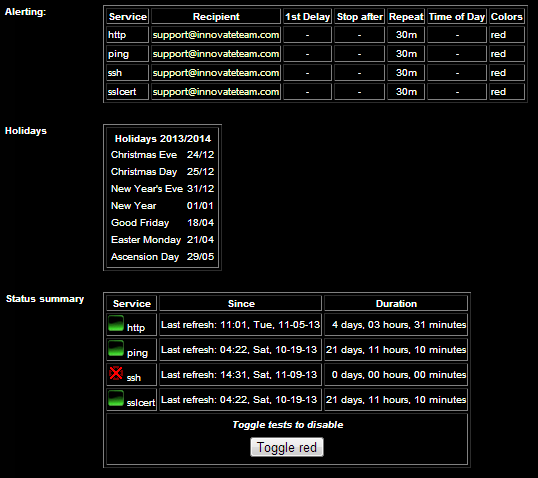
list Kris Springer
I've attached a screen shot of the 'info' page of the host that's red. Strangely enough the notifications.log file suddenly has some data in it now that I stripped some options out of the alerts.cfg file. Here's some of the notifications.log data. I X'd out the IP that was showing. Sat Nov 9 11:50:47 2013 VM-Firewall.ssh (x.x.x.x) user-800263fcb636@xymon.invalid[2] 1384026647 722 Sat Nov 9 12:12:48 2013 VM-Firewall.ssh (x.x.x.x) user-800263fcb636@xymon.invalid[2] 1384027968 722 Sat Nov 9 12:20:57 2013 VM-Firewall.ssh (x.x.x.x) user-800263fcb636@xymon.invalid[2] 1384028457 722 Sat Nov 9 12:35:59 2013 VM-Firewall.ssh (x.x.x.x) user-800263fcb636@xymon.invalid[2] 1384029359 722 Sat Nov 9 14:31:55 2013 VM-Firewall.ssh (x.x.x.x) user-800263fcb636@xymon.invalid[2] 1384036315 722
▸
Thank you.
*Kris Springer*
*=======================*
On Sat, Nov 9, 2013 at 1:02 PM, Henrik Størner <user-ce4a2c883f75@xymon.invalid> wrote:
On 09-11-2013 19:49, Kris Springer wrote:Here's my new alerts.cfg file. It didn't change anything though. I'm still not receiving alerts. To force a trouble situation I've got a line in my hosts file that's checking for ssh on a machine that has it turned off so it will cause a red alert. HOST=*
MAIL user-800263fcb636@xymon.invalid <mailto:user-800263fcb636@xymon.invalid> COLOR=red RECOVERED NOTICEFirst, check the "info" status column for that host: The alert must be shown there, or your configuration is not being picked up. Second, check the notifications.log logfile to see if the alerts are being sent. If they are, then you need to look into the mail logs. Third, try running xymond_alert with the "--test HOSTNAME SERVICE" option to see what rules get picked up; see the man-page. Regards, Henrik
Attachments (1)
 attachment.png
list Carl Inglis
Hi Kris, Searching the Archives I found this: http://lists.xymon.com/archive/2008-June/019952.html It includes an example of the "-test" option which will allow you to ensure that your tests are firing correctly. Hope that helps. Carl
▸
From: Xymon [mailto:xymon-bounces at xymon.com] On Behalf Of Kris Springer
Sent: 09 November 2013 22:45
To: Henrik Størner; Xymon MailingList
Subject: Re: [Xymon] not receiving alerts
I've attached a screen shot of the 'info' page of the host that's red.
Strangely enough the notifications.log file suddenly has some data in it now that I stripped some options out of the alerts.cfg file.
Here's some of the notifications.log data. I X'd out the IP that was showing.
Sat Nov 9 11:50:47 2013 VM-Firewall.ssh (x.x.x.x) user-800263fcb636@xymon.invalid<mailto:user-800263fcb636@xymon.invalid>[2] 1384026647 722
Sat Nov 9 12:12:48 2013 VM-Firewall.ssh (x.x.x.x) user-800263fcb636@xymon.invalid<mailto:user-800263fcb636@xymon.invalid>[2] 1384027968 722
Sat Nov 9 12:20:57 2013 VM-Firewall.ssh (x.x.x.x) user-800263fcb636@xymon.invalid<mailto:user-800263fcb636@xymon.invalid>[2] 1384028457 722
Sat Nov 9 12:35:59 2013 VM-Firewall.ssh (x.x.x.x) user-800263fcb636@xymon.invalid<mailto:user-800263fcb636@xymon.invalid>[2] 1384029359 722
Sat Nov 9 14:31:55 2013 VM-Firewall.ssh (x.x.x.x) user-800263fcb636@xymon.invalid<mailto:user-800263fcb636@xymon.invalid>[2] 1384036315 722
▸
Thank you.
Kris Springer
=======================
On Sat, Nov 9, 2013 at 1:02 PM, Henrik Størner <user-ce4a2c883f75@xymon.invalid<mailto:user-ce4a2c883f75@xymon.invalid>> wrote:
On 09-11-2013 19:49, Kris Springer wrote:
Here's my new alerts.cfg file. It didn't change anything though. I'm
still not receiving alerts. To force a trouble situation I've got a
line in my hosts file that's checking for ssh on a machine that has it
turned off so it will cause a red alert.
HOST=*
MAIL user-800263fcb636@xymon.invalid<mailto:user-800263fcb636@xymon.invalid> <mailto:user-800263fcb636@xymon.invalid<mailto:user-800263fcb636@xymon.invalid>>
▸
COLOR=red RECOVERED NOTICE
First, check the "info" status column for that host: The alert must be shown there, or your configuration is not being picked up.
Second, check the notifications.log logfile to see if the alerts are being sent. If they are, then you need to look into the mail logs.
Third, try running xymond_alert with the "--test HOSTNAME SERVICE" option to see what rules get picked up; see the man-page.
Regards,
Henrik
Carl Inglis
Systems Administrator
Rakon UK Limited
Dowsett House, Sadler Road, Lincoln LN6 3RS, United Kingdom
Tel: +XX XXXX XXXXXX | Fax: +XX XXXX XXXXXX | Mob: +44 7786 552915
user-96685bdc864b@xymon.invalid | www.rakon.com
[The Queens Awards for Enterprise 2012]
[Rakon Logo]
This message together with any attachments contains confidential information and may be
subject to privilege. If you are not the intended recipient you may not distribute it in any
way, you must notify the sender immediately and delete any copies of the message along
with its attachments.
Rakon UK Ltd is a limited company registered in England and Wales.
Registered Office: Dowsett House, Sadler Road, Lincoln LN6 3RS
Company Registration Number: 5128090.
Please be aware that Rakon UK Limited may monitor email traffic data
including the date, time, subject line, sender and recipients for the
purposes of security and usage monitoring. Automated monitoring
systems may also be applied to ascertain whether incoming/outgoing
emails are likely to contain viruses, other destructive devices or
inappropriate content.
list Kris Springer
Here's the output from the --test. root at ip:/xymon/bin# ./bbcmd xymond_alert --test VM-Firewall proc 2013-11-09 17:31:40 Using default environment file /usr/lib/xymon/client/etc/xymonserver.cfg 00011942 2013-11-09 17:31:40 send_alert VM-Firewall:proc state Paging 00011942 2013-11-09 17:31:40 Matching host:service:dgroup:page 'VM-Firewall:proc:Innovate Servers:' against rule line 1 00011942 2013-11-09 17:31:40 *** Match with 'HOST=*' *** 00011942 2013-11-09 17:31:40 Matching host:service:dgroup:page 'VM-Firewall:proc:Innovate Servers:' against rule line 2 00011942 2013-11-09 17:31:40 *** Match with 'MAIL user-002915a21a76@xymon.invalid=red' *** 00011942 2013-11-09 17:31:40 Mail alert with command 'mail -s "Xymon [12345] VM-Firewall:proc CRITICAL (RED)" user-800263fcb636@xymon.invalid'
▸
Thank you.
*Kris Springer*
*=======================*
On Sat, Nov 9, 2013 at 3:32 PM, Carl Inglis <user-96685bdc864b@xymon.invalid> wrote:
Hi Kris, Searching the Archives I found this: http://lists.xymon.com/archive/2008-June/019952.html It includes an example of the “—test” option which will allow you to ensure that your tests are firing correctly. Hope that helps. Carl *From:* Xymon [mailto:xymon-bounces at xymon.com] *On Behalf Of *Kris Springer *Sent:* 09 November 2013 22:45 *To:* Henrik Størner; Xymon MailingList *Subject:* Re: [Xymon] not receiving alerts I've attached a screen shot of the 'info' page of the host that's red. Strangely enough the notifications.log file suddenly has some data in it now that I stripped some options out of the alerts.cfg file. Here's some of the notifications.log data. I X'd out the IP that was showing. Sat Nov 9 11:50:47 2013 VM-Firewall.ssh (x.x.x.x) user-800263fcb636@xymon.invalid[2] 1384026647 722 Sat Nov 9 12:12:48 2013 VM-Firewall.ssh (x.x.x.x) user-800263fcb636@xymon.invalid[2] 1384027968 722 Sat Nov 9 12:20:57 2013 VM-Firewall.ssh (x.x.x.x) user-800263fcb636@xymon.invalid[2] 1384028457 722 Sat Nov 9 12:35:59 2013 VM-Firewall.ssh (x.x.x.x) user-800263fcb636@xymon.invalid[2] 1384029359 722 Sat Nov 9 14:31:55 2013 VM-Firewall.ssh (x.x.x.x) user-800263fcb636@xymon.invalid[2] 1384036315 722 Thank you. *Kris Springer* *=======================* On Sat, Nov 9, 2013 at 1:02 PM, Henrik Størner <user-ce4a2c883f75@xymon.invalid> wrote: On 09-11-2013 19:49, Kris Springer wrote: Here's my new alerts.cfg file. It didn't change anything though. I'm still not receiving alerts. To force a trouble situation I've got a line in my hosts file that's checking for ssh on a machine that has it turned off so it will cause a red alert. HOST=* MAIL user-800263fcb636@xymon.invalid <mailto:user-800263fcb636@xymon.invalid> COLOR=red RECOVERED NOTICE First, check the "info" status column for that host: The alert must be shown there, or your configuration is not being picked up. Second, check the notifications.log logfile to see if the alerts are being sent. If they are, then you need to look into the mail logs. Third, try running xymond_alert with the "--test HOSTNAME SERVICE" option to see what rules get picked up; see the man-page. Regards, Henrik
list Carl Inglis
I guess the next thing is to check your mail logs on the server, and see if it's mentioned there at that time and date. Where would your xymon server send undeliverables? Regards,
▸
Carl
From: Kris Springer [mailto:user-c2caa0a7a8d5@xymon.invalid]
Sent: 10 November 2013 01:36
To: Carl Inglis
Cc: Xymon MailingList
Subject: Re: [Xymon] not receiving alerts
Here's the output from the --test.
root at ip:/xymon/bin# ./bbcmd xymond_alert --test VM-Firewall proc
2013-11-09 17:31:40 Using default environment file /usr/lib/xymon/client/etc/xymonserver.cfg
00011942 2013-11-09 17:31:40 send_alert VM-Firewall:proc state Paging
00011942 2013-11-09 17:31:40 Matching host:service:dgroup:page 'VM-Firewall:proc:Innovate Servers:' against rule line 1
00011942 2013-11-09 17:31:40 *** Match with 'HOST=*' ***
00011942 2013-11-09 17:31:40 Matching host:service:dgroup:page 'VM-Firewall:proc:Innovate Servers:' against rule line 2
00011942 2013-11-09 17:31:40 *** Match with 'MAIL user-800263fcb636@xymon.invalid<mailto:user-800263fcb636@xymon.invalid> COLOR=red' ***
00011942 2013-11-09 17:31:40 Mail alert with command 'mail -s "Xymon [12345] VM-Firewall:proc CRITICAL (RED)" user-800263fcb636@xymon.invalid<mailto:user-800263fcb636@xymon.invalid>'
▸
Thank you. Kris Springer ======================= On Sat, Nov 9, 2013 at 3:32 PM, Carl Inglis <user-96685bdc864b@xymon.invalid<mailto:user-96685bdc864b@xymon.invalid>> wrote: Hi Kris, Searching the Archives I found this: http://lists.xymon.com/archive/2008-June/019952.html It includes an example of the "-test" option which will allow you to ensure that your tests are firing correctly. Hope that helps. Carl From: Xymon [mailto:xymon-bounces at xymon.com<mailto:xymon-bounces at xymon.com>] On Behalf Of Kris Springer Sent: 09 November 2013 22:45 To: Henrik Størner; Xymon MailingList Subject: Re: [Xymon] not receiving alerts I've attached a screen shot of the 'info' page of the host that's red. Strangely enough the notifications.log file suddenly has some data in it now that I stripped some options out of the alerts.cfg file. Here's some of the notifications.log data. I X'd out the IP that was showing. Sat Nov 9 11:50:47 2013 VM-Firewall.ssh (x.x.x.x) user-800263fcb636@xymon.invalid<mailto:user-800263fcb636@xymon.invalid>[2] 1384026647 722 Sat Nov 9 12:12:48 2013 VM-Firewall.ssh (x.x.x.x) user-800263fcb636@xymon.invalid<mailto:user-800263fcb636@xymon.invalid>[2] 1384027968 722 Sat Nov 9 12:20:57 2013 VM-Firewall.ssh (x.x.x.x) user-800263fcb636@xymon.invalid<mailto:user-800263fcb636@xymon.invalid>[2] 1384028457 722 Sat Nov 9 12:35:59 2013 VM-Firewall.ssh (x.x.x.x) user-800263fcb636@xymon.invalid<mailto:user-800263fcb636@xymon.invalid>[2] 1384029359 722 Sat Nov 9 14:31:55 2013 VM-Firewall.ssh (x.x.x.x) user-800263fcb636@xymon.invalid<mailto:user-800263fcb636@xymon.invalid>[2] 1384036315 722 Thank you. Kris Springer ======================= On Sat, Nov 9, 2013 at 1:02 PM, Henrik Størner <user-ce4a2c883f75@xymon.invalid<mailto:user-ce4a2c883f75@xymon.invalid>> wrote: On 09-11-2013 19:49, Kris Springer wrote: Here's my new alerts.cfg file. It didn't change anything though. I'm still not receiving alerts. To force a trouble situation I've got a line in my hosts file that's checking for ssh on a machine that has it turned off so it will cause a red alert. HOST=* MAIL user-800263fcb636@xymon.invalid<mailto:user-800263fcb636@xymon.invalid> <mailto:user-800263fcb636@xymon.invalid<mailto:user-800263fcb636@xymon.invalid>> COLOR=red RECOVERED NOTICE First, check the "info" status column for that host: The alert must be shown there, or your configuration is not being picked up. Second, check the notifications.log logfile to see if the alerts are being sent. If they are, then you need to look into the mail logs. Third, try running xymond_alert with the "--test HOSTNAME SERVICE" option to see what rules get picked up; see the man-page. Regards, Henrik Carl Inglis Systems Administrator Rakon UK Limited Dowsett House, Sadler Road, Lincoln LN6 3RS, United Kingdom Tel: +XX XXXX XXXXXX | Fax: +XX XXXX XXXXXX | Mob: +44 7786 552915 user-96685bdc864b@xymon.invalid | www.rakon.com [The Queens Awards for Enterprise 2012] [Rakon Logo] This message together with any attachments contains confidential information and may be subject to privilege. If you are not the intended recipient you may not distribute it in any way, you must notify the sender immediately and delete any copies of the message along with its attachments. Rakon UK Ltd is a limited company registered in England and Wales. Registered Office: Dowsett House, Sadler Road, Lincoln LN6 3RS Company Registration Number: 5128090. Please be aware that Rakon UK Limited may monitor email traffic data including the date, time, subject line, sender and recipients for the purposes of security and usage monitoring. Automated monitoring systems may also be applied to ascertain whether incoming/outgoing emails are likely to contain viruses, other destructive devices or inappropriate content.
list Henrik Størner
So, what happens if you run this command from the commandline: On 10-11-2013 02:35, Kris Springer wrote: echo "mail test" | mail -s "Xymon [12345] VM-Firewall:proc CRITICAL (RED)" user-800263fcb636@xymon.invalid Your notifications.log file shows that the alerts are being generated, so we can now rule out problems with the alerts.cfg configuration. Regards, Henrik
list Kris Springer
When that particular host is green nothing happens. When I make it red and I run that command I receive an email with the info that's defined in the command. I think we're making progress tracking this down. It appears that things are working via command line, just not when automated. Thank you. *Kris Springer*
▸
*=======================*
On Sun, Nov 10, 2013 at 4:34 AM, Henrik Størner <user-ce4a2c883f75@xymon.invalid> wrote:
So, what happens if you run this command from the commandline: On 10-11-2013 02:35, Kris Springer wrote: echo "mail test" | mail -s "Xymon [12345] VM-Firewall:proc CRITICAL (RED)" user-800263fcb636@xymon.invalid Your notifications.log file shows that the alerts are being generated, so we can now rule out problems with the alerts.cfg configuration. Regards, Henrik
list Kris Springer
UPDATE: I was receiving test emails even when the host was green, they just all got combined by Gmail and only appeared to be 1 email.
▸
Thank you.
*Kris Springer*
*=======================*
On Sun, Nov 10, 2013 at 4:34 AM, Henrik Størner <user-ce4a2c883f75@xymon.invalid> wrote:
So, what happens if you run this command from the commandline: On 10-11-2013 02:35, Kris Springer wrote: echo "mail test" | mail -s "Xymon [12345] VM-Firewall:proc CRITICAL (RED)" user-800263fcb636@xymon.invalid Your notifications.log file shows that the alerts are being generated, so we can now rule out problems with the alerts.cfg configuration. Regards, Henrik
list Carl Inglis
Who are you running that command as? Make sure you're doing it using "su [user] -c [command" - that way you can replicate the situation as it would be from inside Xymon. Regards,
▸
Carl
From: Xymon [mailto:xymon-bounces at xymon.com] On Behalf Of Kris Springer
Sent: 10 November 2013 18:34
To: Henrik Størner
Cc: Xymon MailingList
Subject: Re: [Xymon] not receiving alerts
When that particular host is green nothing happens. When I make it red and I run that command I receive an email with the info that's defined in the command.
I think we're making progress tracking this down. It appears that things are working via command line, just not when automated.
Thank you.
Kris Springer
=======================
On Sun, Nov 10, 2013 at 4:34 AM, Henrik Størner <user-ce4a2c883f75@xymon.invalid<mailto:user-ce4a2c883f75@xymon.invalid>> wrote:
So, what happens if you run this command from the commandline:
On 10-11-2013 02:35, Kris Springer wrote:
echo "mail test" | mail -s "Xymon [12345] VM-Firewall:proc CRITICAL (RED)" user-800263fcb636@xymon.invalid<mailto:user-800263fcb636@xymon.invalid>
Your notifications.log file shows that the alerts are being generated, so we can now rule out problems with the alerts.cfg configuration.
Regards,
Henrik
Carl Inglis
Systems Administrator
Rakon UK Limited
Dowsett House, Sadler Road, Lincoln LN6 3RS, United Kingdom
Tel: +XX XXXX XXXXXX | Fax: +XX XXXX XXXXXX | Mob: +44 7786 552915
user-96685bdc864b@xymon.invalid | www.rakon.com
[The Queens Awards for Enterprise 2012]
[Rakon Logo]
This message together with any attachments contains confidential information and may be
subject to privilege. If you are not the intended recipient you may not distribute it in any
way, you must notify the sender immediately and delete any copies of the message along
with its attachments.
Rakon UK Ltd is a limited company registered in England and Wales.
Registered Office: Dowsett House, Sadler Road, Lincoln LN6 3RS
Company Registration Number: 5128090.
Please be aware that Rakon UK Limited may monitor email traffic data
including the date, time, subject line, sender and recipients for the
purposes of security and usage monitoring. Automated monitoring
systems may also be applied to ascertain whether incoming/outgoing
emails are likely to contain viruses, other destructive devices or
inappropriate content.
list Kris Springer
When I run the following command it works and I receive an email immediately. su xymon -c echo "mail test" | mail -s "Xymon [12345] VM-Firewall:proc
▸
CRITICAL (RED)" user-800263fcb636@xymon.invalid
Thank you.
*Kris Springer*
*=======================*
On Sun, Nov 10, 2013 at 12:15 PM, Carl Inglis <user-96685bdc864b@xymon.invalid> wrote:
Who are you running that command as? Make sure you’re doing it using “su [user] –c [command” – that way you can replicate the situation as it would be from inside Xymon. Regards, Carl *From:* Xymon [mailto:xymon-bounces at xymon.com] *On Behalf Of *Kris Springer *Sent:* 10 November 2013 18:34 *To:* Henrik Størner *Cc:* Xymon MailingList *Subject:* Re: [Xymon] not receiving alerts When I run that command I receive an email with the info that's defined in the command. I think we're making progress tracking this down. It appears that things are working via command line, just not when automated. Thank you. *Kris Springer* *=======================* On Sun, Nov 10, 2013 at 4:34 AM, Henrik Størner <user-ce4a2c883f75@xymon.invalid> wrote: So, what happens if you run this command from the commandline: On 10-11-2013 02:35, Kris Springer wrote: echo "mail test" | mail -s "Xymon [12345] VM-Firewall:proc CRITICAL (RED)" user-800263fcb636@xymon.invalid Your notifications.log file shows that the alerts are being generated, so we can now rule out problems with the alerts.cfg configuration. Regards, Henrik Carl Inglis
list Jeremy Laidman
▸
On 11 November 2013 07:19, Kris Springer <user-c2caa0a7a8d5@xymon.invalid> wrote:
When I run the following command it works and I receive an email immediately. su xymon -c echo "mail test" | mail -s "Xymon [12345] VM-Firewall:proc CRITICAL (RED)" user-800263fcb636@xymon.invalid Thank you.
The environment might have something to do with it, so should be tested, and at least eliminated from our enquiries. When Xymon runs the command, it does so using the Xymon server environment, including PATH and MAIL. To test, try running the command like this: su xymon -c xymoncmd echo "mail test" | $MAIL "Xymon [12345] VM-Firewall:proc CRITICAL (RED)" user-800263fcb636@xymon.invalid J
list Kris Springer
Alright. Now we may be getting somewhere. When I run that command as user ubuntu, it attempts then hangs. ubuntu at ip:~$ su xymon -c xymoncmd echo "mail test" | $MAIL "Xymon [12345] VM-Firewall:proc CRITICAL (RED)" user-800263fcb636@xymon.invalid -bash: /var/mail/ubuntu: No such file or directory Password: 2013-11-11 05:41:39 Using default environment file /usr/lib/xymon/client/etc/xymonserver.cfg When I run the command as user root, it attempts then hangs. ubuntu at ip:~# sudo bash root at ip:~# su xymon -c xymoncmd echo "mail test" | $MAIL "Xymon [12345] VM-Firewall:proc CRITICAL (RED)" user-800263fcb636@xymon.invalid bash: /var/mail/root: Permission denied 2013-11-11 05:44:20 Using default environment file /usr/lib/xymon/client/etc/xymonserver.cfg When I run that command as user xymon, it attempts then hangs. root at ip:~# su xymon xymon at ip:/home/ubuntu$ su xymon -c xymoncmd echo "mail test" | $MAIL "Xyon [12345] VM-Firesall:proc CRITICAL (RED)" user-800263fcb636@xymon.invalid bash: /var/mail/xymon: No such file or directory Password: 2013-11-11 05:47:16 Using default environment file /usr/lib/xymon/client/etc/xymonserver.cfg I have to CTRL+C to stop it when it hangs, and I never receive any emails from these tests.
▸
Thank you.
*Kris Springer*
*=======================*
On Sun, Nov 10, 2013 at 4:15 PM, Jeremy Laidman <user-71895fb2e44c@xymon.invalid>wrote:
On 11 November 2013 07:19, Kris Springer <user-c2caa0a7a8d5@xymon.invalid>wrote:When I run the following command it works and I receive an email immediately. su xymon -c echo "mail test" | mail -s "Xymon [12345] VM-Firewall:proc CRITICAL (RED)" user-800263fcb636@xymon.invalid Thank you.The environment might have something to do with it, so should be tested, and at least eliminated from our enquiries. When Xymon runs the command, it does so using the Xymon server environment, including PATH and MAIL. To test, try running the command like this: su xymon -c xymoncmd echo "mail test" | $MAIL "Xymon [12345] VM-Firewall:proc CRITICAL (RED)" user-800263fcb636@xymon.invalid J
list Carl Inglis
Hi Kris, That seems to be trying to use the client configuration rather than the server configuration. Are you running this on the server host? Are you running it from inside the server directory? Have you checked the setting for MAIL in the config file it's using? Of course, I may be missing the point completely.
▸
Regards,
Carl
From: Kris Springer [mailto:user-c2caa0a7a8d5@xymon.invalid]
Sent: 11 November 2013 13:57
To: Jeremy Laidman
Cc: Carl Inglis; Xymon MailingList
Subject: Re: [Xymon] not receiving alerts
Alright. Now we may be getting somewhere.
When I run that command as user ubuntu, it attempts then hangs.
ubuntu at ip:~$ su xymon -c xymoncmd echo "mail test" | $MAIL "Xymon [12345] VM-Firewall:proc CRITICAL (RED)" user-800263fcb636@xymon.invalid<mailto:user-800263fcb636@xymon.invalid>
-bash: /var/mail/ubuntu: No such file or directory
Password:
2013-11-11 05:41:39 Using default environment file /usr/lib/xymon/client/etc/xymonserver.cfg
When I run the command as user root, it attempts then hangs.
ubuntu at ip:~# sudo bash
root at ip:~# su xymon -c xymoncmd echo "mail test" | $MAIL "Xymon [12345] VM-Firewall:proc CRITICAL (RED)" user-800263fcb636@xymon.invalid<mailto:user-800263fcb636@xymon.invalid>
bash: /var/mail/root: Permission denied
2013-11-11 05:44:20 Using default environment file /usr/lib/xymon/client/etc/xymonserver.cfg
When I run that command as user xymon, it attempts then hangs.
root at ip:~# su xymon
xymon at ip:/home/ubuntu$ su xymon -c xymoncmd echo "mail test" | $MAIL "Xyon [12345] VM-Firesall:proc CRITICAL (RED)" user-800263fcb636@xymon.invalid<mailto:user-800263fcb636@xymon.invalid>
▸
bash: /var/mail/xymon: No such file or directory
Password:
2013-11-11 05:47:16 Using default environment file /usr/lib/xymon/client/etc/xymonserver.cfg
I have to CTRL+C to stop it when it hangs, and I never receive any emails from these tests.
Thank you.
Kris Springer
=======================
On Sun, Nov 10, 2013 at 4:15 PM, Jeremy Laidman <user-71895fb2e44c@xymon.invalid<mailto:user-71895fb2e44c@xymon.invalid>> wrote:
On 11 November 2013 07:19, Kris Springer <user-c2caa0a7a8d5@xymon.invalid<mailto:user-c2caa0a7a8d5@xymon.invalid>> wrote:
When I run the following command it works and I receive an email immediately.
su xymon -c echo "mail test" | mail -s "Xymon [12345] VM-Firewall:proc CRITICAL (RED)" user-800263fcb636@xymon.invalid<mailto:user-800263fcb636@xymon.invalid>
Thank you.
The environment might have something to do with it, so should be tested, and at least eliminated from our enquiries. When Xymon runs the command, it does so using the Xymon server environment, including PATH and MAIL. To test, try running the command like this:
su xymon -c xymoncmd
echo "mail test" | $MAIL "Xymon [12345] VM-Firewall:proc CRITICAL (RED)" user-800263fcb636@xymon.invalid<mailto:user-800263fcb636@xymon.invalid>
J
▸
Carl Inglis
Systems Administrator
Rakon UK Limited
Dowsett House, Sadler Road, Lincoln LN6 3RS, United Kingdom
Tel: +XX XXXX XXXXXX | Fax: +XX XXXX XXXXXX | Mob: +44 7786 552915
user-96685bdc864b@xymon.invalid | www.rakon.com
[The Queens Awards for Enterprise 2012]
[Rakon Logo]
This message together with any attachments contains confidential information and may be
subject to privilege. If you are not the intended recipient you may not distribute it in any
way, you must notify the sender immediately and delete any copies of the message along
with its attachments.
Rakon UK Ltd is a limited company registered in England and Wales.
Registered Office: Dowsett House, Sadler Road, Lincoln LN6 3RS
Company Registration Number: 5128090.
Please be aware that Rakon UK Limited may monitor email traffic data
including the date, time, subject line, sender and recipients for the
purposes of security and usage monitoring. Automated monitoring
systems may also be applied to ascertain whether incoming/outgoing
emails are likely to contain viruses, other destructive devices or
inappropriate content.
list Kris Springer
Yes, I'm running the commands on the only xymon server that I have. What directory should I be in when I run the command? What settings for MAIL in the config file should there be? Which config file are you referring to? A previous person asked me about the MAIL settings xymonserver.cfg and my settings are what he said they should be. Thank you. *Kris Springer*
▸
*=======================*
On Mon, Nov 11, 2013 at 6:20 AM, Carl Inglis <user-96685bdc864b@xymon.invalid> wrote:
Hi Kris, That seems to be trying to use the client configuration rather than the server configuration. Are you running this on the server host? Are you running it from inside the server directory? Have you checked the setting for MAIL in the config file it’s using? Of course, I may be missing the point completely. Regards, Carl *From:* Kris Springer [mailto:user-c2caa0a7a8d5@xymon.invalid] *Sent:* 11 November 2013 13:57 *To:* Jeremy Laidman *Cc:* Carl Inglis; Xymon MailingList *Subject:* Re: [Xymon] not receiving alerts Alright. Now we may be getting somewhere. When I run that command as user ubuntu, it attempts then hangs. ubuntu at ip:~$ su xymon -c xymoncmd echo "mail test" | $MAIL "Xymon [12345] VM-Firewall:proc CRITICAL (RED)" user-800263fcb636@xymon.invalid -bash: /var/mail/ubuntu: No such file or directory Password: 2013-11-11 05:41:39 Using default environment file /usr/lib/xymon/client/etc/xymonserver.cfg When I run the command as user root, it attempts then hangs. ubuntu at ip:~# sudo bash root at ip:~# su xymon -c xymoncmd echo "mail test" | $MAIL "Xymon [12345] VM-Firewall:proc CRITICAL (RED)" user-800263fcb636@xymon.invalid bash: /var/mail/root: Permission denied 2013-11-11 05:44:20 Using default environment file /usr/lib/xymon/client/etc/xymonserver.cfg When I run that command as user xymon, it attempts then hangs. root at ip:~# su xymon xymon at ip:/home/ubuntu$ su xymon -c xymoncmd echo "mail test" | $MAIL "Xyon [12345] VM-Firesall:proc CRITICAL (RED)" user-800263fcb636@xymon.invalid bash: /var/mail/xymon: No such file or directory Password: 2013-11-11 05:47:16 Using default environment file /usr/lib/xymon/client/etc/xymonserver.cfg I have to CTRL+C to stop it when it hangs, and I never receive any emails from these tests. Thank you. *Kris Springer* *=======================*
On Sun, Nov 10, 2013 at 4:15 PM, Jeremy Laidman <user-71895fb2e44c@xymon.invalid>
▸
wrote:
On 11 November 2013 07:19, Kris Springer <user-c2caa0a7a8d5@xymon.invalid>
wrote:
When I run the following command it works and I receive an email
immediately.
su xymon -c echo "mail test" | mail -s "Xymon [12345] VM-Firewall:proc
CRITICAL (RED)" user-800263fcb636@xymon.invalid
Thank you.
The environment might have something to do with it, so should be tested,
and at least eliminated from our enquiries. When Xymon runs the command,
it does so using the Xymon server environment, including PATH and MAIL. To
test, try running the command like this:
su xymon -c xymoncmd
echo "mail test" | $MAIL "Xymon [12345] VM-Firewall:proc CRITICAL (RED)"
user-800263fcb636@xymon.invalid
J
Carl Inglis
* Systems Administrator*

*Rakon UK Limited*
Dowsett House, Sadler Road, Lincoln LN6 3RS, United Kingdom
Tel: +XX XXXX XXXXXX | Fax: +XX XXXX XXXXXX | Mob: +44 7786 552915
user-96685bdc864b@xymon.invalid | www.rakon.com
[image: The Queens Awards for Enterprise 2012]

[image: Rakon Logo]
This message together with any attachments contains confidential
information and may be
subject to privilege. If you are not the intended recipient you may not
distribute it in any
way, you must notify the sender immediately and delete any copies of the
message along
with its attachments.
*Rakon UK Ltd is a limited company registered in England and Wales.
Registered Office: Dowsett House, Sadler Road, Lincoln LN6 3RS Company
Registration Number: 5128090. Please be aware that Rakon UK Limited may
monitor email traffic data including the date, time, subject line, sender
and recipients for the purposes of security and usage monitoring. Automated
monitoring systems may also be applied to ascertain whether
incoming/outgoing emails are likely to contain viruses, other destructive
devices or inappropriate content. *
list Jeremy Laidman
▸
On 12 November 2013 00:56, Kris Springer <user-c2caa0a7a8d5@xymon.invalid> wrote:
When I run that command as user xymon, it attempts then hangs.
root at ip:~# su xymon
Good.
▸
xymon at ip:/home/ubuntu$ su xymon -c xymoncmd echo "mail test" | $MAIL
"Xyon [12345] VM-Firesall:proc CRITICAL (RED)" user-800263fcb636@xymon.invalid
No, this won't do the same thing as I said.  The "$MAIL" variable will be
expanded by the shell of the xymon user, which won't have run xymoncmd yet,
and so $MAIL probably will be defined as /var/mail/xymon - the path to the
xymon user's mailbox file, /var/mail/xymon (which doesn't exist because the
xymon user has never received mail).

(Also, you have already run "su xymon" so no need to do it a second time.)

Instead, you should run xymoncmd, and then at a command prompt (once $MAIL
is defined) run the subsequent command.  You could even do "echo $MAIL" in
the middle, to be sure, like so:

$ su xymon
$ echo $MAIL
/var/mail/xymon
$ xymoncmd
$ echo $MAIL
/usr/bin/mail
$ echo "mail test" | $MAIL "what ever you want here"
user-800263fcb636@xymon.invalid

Cheers
Jeremy