Xymon app for iPhone?
list John Rothlisberger
I see there is an app for the android - does anyone have any advice for monitoring your servers with an iPhone?

Thanks,
John
Upcoming PTO:
John Rothlisberger
IT Strategy, Infrastructure & Security - Technology Growth Platform
TGP for Business Process Outsourcing
Accenture
XXX.XXX.XXXX office


This message is for the designated recipient only and may contain privileged, proprietary, or otherwise confidential information. If you have received it in error, please notify the sender immediately and delete the original. Any other use of the e-mail by you is prohibited. Where allowed by local law, electronic communications with Accenture and its affiliates, including e-mail and instant messaging (including content), may be scanned by our systems for the purposes of information security and assessment of internal compliance with Accenture policy.

www.accenture.com
list Ryan Novosielski
Really just that Safari doesn’t work that well with the stock web interface. The menus specifically work better in either Firefox or Chrome I think. Maybe both.

--
____
|| \\UTGERS,  	 |---------------------------*O*---------------------------
||_// the State	 |         Ryan Novosielski - user-46c89e614701@xymon.invalid
|| \\ University | Sr. Technologist - 973/972.0922 (2x0922) ~*~ RBHS Campus
||  \\    of NJ	 | Office of Advanced Research Computing - MSB C630, Newark
▸
`'
On Sep 6, 2017, at 8:39 AM, Rothlisberger, John R. <user-7adce57665bb@xymon.invalid> wrote:

I see there is an app for the android – does anyone have any advice for monitoring your servers with an iPhone?

Thanks,
John
Upcoming PTO:
John Rothlisberger
IT Strategy, Infrastructure & Security - Technology Growth Platform
TGP for Business Process Outsourcing
Accenture
XXX.XXX.XXXX office


This message is for the designated recipient only and may contain privileged, proprietary, or otherwise confidential information. If you have received it in error, please notify the sender immediately and delete the original. Any other use of the e-mail by you is prohibited. Where allowed by local law, electronic communications with Accenture and its affiliates, including e-mail and instant messaging (including content), may be scanned by our systems for the purposes of information security and assessment of internal compliance with Accenture policy.

www.accenture.com
https://na01.safelinks.protection.outlook.com/?url=http%3A%2F%2Flists.xymon.com%2Fmailman%2Flistinfo%2Fxymon&data=user-da588e45ae5a@xymon.invalid%7C01cad7e54dbe435b7e4108d4f539b7ac%7Cb92d2b234d35447093ff69aca6632ffe%7C1%7C0%7C636403075638385870&sdata=o0GsLPY69kbZzKjLGepiBk90sGteQVJf7Xur1g7uAcc%3D&reserved=0
list Paul Root
Just use the browser.

The Android app works ok, but not great. It has issues with font scaling the alerts.
▸
From: Xymon [mailto:xymon-bounces at xymon.com] On Behalf Of Rothlisberger, John R.
Sent: Wednesday, September 06, 2017 7:39 AM
To: 'xymon >> xymon at xymon.com'
Subject: [Xymon] Xymon app for iPhone?

I see there is an app for the android - does anyone have any advice for monitoring your servers with an iPhone?

Thanks,
John
Upcoming PTO:
John Rothlisberger
IT Strategy, Infrastructure & Security - Technology Growth Platform
TGP for Business Process Outsourcing
Accenture
XXX.XXX.XXXX office


This message is for the designated recipient only and may contain privileged, proprietary, or otherwise confidential information. If you have received it in error, please notify the sender immediately and delete the original. Any other use of the e-mail by you is prohibited. Where allowed by local law, electronic communications with Accenture and its affiliates, including e-mail and instant messaging (including content), may be scanned by our systems for the purposes of information security and assessment of internal compliance with Accenture policy.
www.accenture.com<http://www.accenture.com>;
This communication is the property of CenturyLink and may contain confidential or privileged information. Unauthorized use of this communication is strictly prohibited and may be unlawful. If you have received this communication in error, please immediately notify the sender by reply e-mail and destroy all copies of the communication and any attachments.
list Josh Luthman
I didn't like the Android app myself.

I strongly prefer the traditional notification (email, email to text).  The
web interface on modern smart phones does a great job (at least on Android,
I can't speak to Safari/iPhone).

I would assume you can on the iPhone since Android can, but I find it's
great to have a shortcut to Xymon's home page on the "desktop".  When a
text hits you, click on the shortcut.


Josh Luthman
Office: XXX-XXX-XXXX
Direct: XXX-XXX-XXXX
XXXX Wayne St
Suite XXXX
Troy, OH XXXXX

On Wed, Sep 6, 2017 at 11:14 AM, Root, Paul T <user-76fdb6883669@xymon.invalid>
▸
wrote:
Just use the browser.


The Android app works ok, but not great. It has issues with font scaling
the alerts.


*From:* Xymon [mailto:xymon-bounces at xymon.com] *On Behalf Of *Rothlisberger,
John R.
*Sent:* Wednesday, September 06, 2017 7:39 AM
*To:* 'xymon >> xymon at xymon.com'
*Subject:* [Xymon] Xymon app for iPhone?


I see there is an app for the android – does anyone have any advice for
monitoring your servers with an iPhone?


Thanks,

John

Upcoming PTO:


John Rothlisberger

IT Strategy, Infrastructure & Security - Technology Growth Platform

TGP for Business Process Outsourcing

Accenture
XXX.XXX.XXXX <(312)%20693-3136> office
▸
This message is for the designated recipient only and may contain
privileged, proprietary, or otherwise confidential information. If you have
received it in error, please notify the sender immediately and delete the
original. Any other use of the e-mail by you is prohibited. Where allowed
by local law, electronic communications with Accenture and its affiliates,
including e-mail and instant messaging (including content), may be scanned
by our systems for the purposes of information security and assessment of
internal compliance with Accenture policy.

www.accenture.com
This communication is the property of CenturyLink and may contain
confidential or privileged information. Unauthorized use of this
communication is strictly prohibited and may be unlawful. If you have
received this communication in error, please immediately notify the sender
by reply e-mail and destroy all copies of the communication and any
attachments.
list Frank Torontour
    Hi,

   I have an iphone and I use Safari.  Plus I get the email
notifications as a text and an email on the iphone.
It is redundant because not always can I check my email.  Safari
displays xymon very well, however
there are issues with the enable/disable page. Things are really small
and magnifying and clicking
on things is a bit tricky I find.  But it does work.
▸
On 9/6/17 11:24, Josh Luthman wrote:I didn't like the Android app myself.
I strongly prefer the traditional notification (email, email to
text). The web interface on modern smart phones does a great job (at
least on Android, I can't speak to Safari/iPhone).
I would assume you can on the iPhone since Android can, but I find
it's great to have a shortcut to Xymon's home page on the "desktop".
When a text hits you, click on the shortcut.
Josh Luthman
Office: XXX-XXX-XXXX
Direct: XXX-XXX-XXXX
XXXX Wayne St
Suite XXXX
Troy, OH XXXXX
On Wed, Sep 6, 2017 at 11:14 AM, Root, Paul T
<user-76fdb6883669@xymon.invalid <mailto:user-76fdb6883669@xymon.invalid>> wrote:
Just use the browser.
The Android app works ok, but not great. It has issues with font
scaling the alerts.
*From:*Xymon [mailto:xymon-bounces at xymon.com
▸
    <mailto:xymon-bounces at xymon.com>] *On Behalf Of *Rothlisberger,
    John R.
    *Sent:* Wednesday, September 06, 2017 7:39 AM
*To:* 'xymon >> xymon at xymon.com <mailto:xymon at xymon.com>'
▸
    *Subject:* [Xymon] Xymon app for iPhone?

    I see there is an app for the android – does anyone have any
    advice for monitoring your servers with an iPhone?

    Thanks,

    John

    Upcoming PTO:


    John Rothlisberger

    IT Strategy, Infrastructure & Security - Technology Growth Platform

    TGP for Business Process Outsourcing

    Accenture
XXX.XXX.XXXX <tel:%28312%29%20693-3136> office**
▸
    This message is for the designated recipient only and may contain
    privileged, proprietary, or otherwise confidential information. If
    you have received it in error, please notify the sender
    immediately and delete the original. Any other use of the e-mail
    by you is prohibited. Where allowed by local law, electronic
    communications with Accenture and its affiliates, including e-mail
    and instant messaging (including content), may be scanned by our
    systems for the purposes of information security and assessment of
    internal compliance with Accenture policy.
www.accenture.com <http://www.accenture.com>;
▸
    This communication is the property of CenturyLink and may contain
    confidential or privileged information. Unauthorized use of this
    communication is strictly prohibited and may be unlawful. If you
    have received this communication in error, please immediately
    notify the sender by reply e-mail and destroy all copies of the
    communication and any attachments.


    <
--
sysadm  cronomagic.com/gemstelecom.com
user-3a42a2ba864a@xymon.invalid

POWERED BY LINUX
list Paul Root
My android client actually connects to a little webserver outside the firewall, that just has a readonly view of non-green.html and the file the app looks for.

It’s big win is that it will save the username/password, so I can have a quick view of the health of my network.

Yes, email and text is much more important, and that’s what we use for production critical machines, but sometimes I want to see a little more.
▸
From: Josh Luthman [mailto:user-4c45a83f15cb@xymon.invalid]
Sent: Wednesday, September 06, 2017 10:25 AM
To: Root, Paul T
Cc: Rothlisberger, John R.; xymon >> xymon at xymon.com
Subject: Re: [Xymon] Xymon app for iPhone?

I didn't like the Android app myself.

I strongly prefer the traditional notification (email, email to text).  The web interface on modern smart phones does a great job (at least on Android, I can't speak to Safari/iPhone).

I would assume you can on the iPhone since Android can, but I find it's great to have a shortcut to Xymon's home page on the "desktop".  When a text hits you, click on the shortcut.


Josh Luthman
Office: XXX-XXX-XXXX
Direct: XXX-XXX-XXXX
XXXX Wayne St
Suite XXXX
Troy, OH XXXXX

On Wed, Sep 6, 2017 at 11:14 AM, Root, Paul T <user-76fdb6883669@xymon.invalid<mailto:user-76fdb6883669@xymon.invalid>> wrote:
Just use the browser.

The Android app works ok, but not great. It has issues with font scaling the alerts.

From: Xymon [mailto:xymon-bounces at xymon.com<mailto:xymon-bounces at xymon.com>] On Behalf Of Rothlisberger, John R.
Sent: Wednesday, September 06, 2017 7:39 AM
To: 'xymon >> xymon at xymon.com<mailto:xymon at xymon.com>'
Subject: [Xymon] Xymon app for iPhone?

I see there is an app for the android – does anyone have any advice for monitoring your servers with an iPhone?

Thanks,
John
Upcoming PTO:
John Rothlisberger
IT Strategy, Infrastructure & Security - Technology Growth Platform
TGP for Business Process Outsourcing
Accenture
XXX.XXX.XXXX<tel:(312)%20693-3136> office
▸
This message is for the designated recipient only and may contain privileged, proprietary, or otherwise confidential information. If you have received it in error, please notify the sender immediately and delete the original. Any other use of the e-mail by you is prohibited. Where allowed by local law, electronic communications with Accenture and its affiliates, including e-mail and instant messaging (including content), may be scanned by our systems for the purposes of information security and assessment of internal compliance with Accenture policy.

www.accenture.com<http://www.accenture.com>;
This communication is the property of CenturyLink and may contain confidential or privileged information. Unauthorized use of this communication is strictly prohibited and may be unlawful. If you have received this communication in error, please immediately notify the sender by reply e-mail and destroy all copies of the communication and any attachments.


This communication is the property of CenturyLink and may contain confidential or privileged information. Unauthorized use of this communication is strictly prohibited and may be unlawful. If you have received this communication in error, please immediately notify the sender by reply e-mail and destroy all copies of the communication and any attachments.
list Frank Torontour
     Been awhile since I was in there with the iphone, and now I
remember.  It wasn't so much the
zoom but selecting the machine etc I had to figure out.  The hostname or
tests field is empty
and I had to figure out how to fill it. There are 3 dots to the right of
each field that need to
be clicked on to select stuff.
      Also when I first got the iphone the enable/disable didn't work at
all. You couldn't see
anything. A few upgrades of the iphone passed before I noticed it was
working perfectly
once I figured out how to use the select function.

On 9/6/17 11:35, Josh Luthman wrote:
Have you tried pinch/zoom on the outer black area? I've seen putting
your fingers on the "buttons" and "links" while trying to zoom on
Android causes some hassle.
▸
Josh Luthman
Office: XXX-XXX-XXXX
Direct: XXX-XXX-XXXX
XXXX Wayne St
Suite XXXX
Troy, OH XXXXX
On Wed, Sep 6, 2017 at 11:33 AM, Frank <user-fbc5ef527f6f@xymon.invalid
▸
<mailto:user-fbc5ef527f6f@xymon.invalid>> wrote:

       Hi,

      I have an iphone and I use Safari.  Plus I get the email
    notifications as a text and an email on the iphone.
    It is redundant because not always can I check my email. Safari
    displays xymon very well, however
    there are issues with the enable/disable page. Things are really
    small and magnifying and clicking
    on things is a bit tricky I find.  But it does work.


    On 9/6/17 11:24, Josh Luthman wrote:
I didn't like the Android app myself. I strongly prefer the traditional notification (email, email to text). The web interface on modern smart phones does a great job (at least on Android, I can't speak to Safari/iPhone). I would assume you can on the iPhone since Android can, but I find it's great to have a shortcut to Xymon's home page on the "desktop". When a text hits you, click on the shortcut. Josh Luthman
    Office: XXX-XXX-XXXX <tel:%28937%29%20552-2340>
    Direct: XXX-XXX-XXXX <tel:%28937%29%20552-2343>
▸
    XXXX Wayne St
    Suite XXXX
    Troy, OH XXXXX

    On Wed, Sep 6, 2017 at 11:14 AM, Root, Paul T
    <user-76fdb6883669@xymon.invalid <mailto:user-76fdb6883669@xymon.invalid>> wrote:

        Just use the browser.

        The Android app works ok, but not great. It has issues with
        font scaling the alerts.

        *From:*Xymon [mailto:xymon-bounces at xymon.com
        <mailto:xymon-bounces at xymon.com>] *On Behalf Of
        *Rothlisberger, John R.
        *Sent:* Wednesday, September 06, 2017 7:39 AM
        *To:* 'xymon >> xymon at xymon.com <mailto:xymon at xymon.com>'
        *Subject:* [Xymon] Xymon app for iPhone?

        I see there is an app for the android – does anyone have any
        advice for monitoring your servers with an iPhone?

        Thanks,

        John

        Upcoming PTO:


        John Rothlisberger

        IT Strategy, Infrastructure & Security - Technology Growth
        Platform

        TGP for Business Process Outsourcing

        Accenture

        XXX.XXX.XXXX <tel:%28312%29%20693-3136> office**


        This message is for the designated recipient only and may
        contain privileged, proprietary, or otherwise confidential
        information. If you have received it in error, please notify
        the sender immediately and delete the original. Any other use
        of the e-mail by you is prohibited. Where allowed by local
        law, electronic communications with Accenture and its
        affiliates, including e-mail and instant messaging (including
        content), may be scanned by our systems for the purposes of
        information security and assessment of internal compliance
        with Accenture policy.

        www.accenture.com <http://www.accenture.com>;

        This communication is the property of CenturyLink and may
        contain confidential or privileged information. Unauthorized
        use of this communication is strictly prohibited and may be
        unlawful. If you have received this communication in error,
        please immediately notify the sender by reply e-mail and
        destroy all copies of the communication and any attachments.


        <


    <
--
    sysadmcronomagic.com/gemstelecom.com <http://cronomagic.com/gemstelecom.com>;
    user-3a42a2ba864a@xymon.invalid <mailto:user-fbc5ef527f6f@xymon.invalid>

    POWERED BY LINUX


    <
--

sysadm  cronomagic.com/gemstelecom.com
e-mail  user-fbc5ef527f6f@xymon.invalid

POWERED BY LINUX
list Josh Luthman
Wow that's really strange - but I can see it being different in the Apple
world.

Does it look normal with modern Safari?
▸
Josh Luthman
Office: XXX-XXX-XXXX
Direct: XXX-XXX-XXXX
XXXX Wayne St
Suite XXXX
Troy, OH XXXXX
▸
On Wed, Sep 6, 2017 at 11:44 AM, Frank <user-fbc5ef527f6f@xymon.invalid> wrote:
    Been awhile since I was in there with the iphone, and now I remember.
It wasn't so much the
zoom but selecting the machine etc I had to figure out.  The hostname or
tests field is empty
and I had to figure out how to fill it. There are 3 dots to the right of
each field that need to
be clicked on to select stuff.
     Also when I first got the iphone the enable/disable didn't work at
all. You couldn't see
anything. A few upgrades of the iphone passed before I noticed it was
working perfectly
once I figured out how to use the select function.


On 9/6/17 11:35, Josh Luthman wrote:

Have you tried pinch/zoom on the outer black area?  I've seen putting your
fingers on the "buttons" and "links" while trying to zoom on Android causes
some hassle.


Josh Luthman
Office: XXX-XXX-XXXX <(937)%20552-2340>
Direct: XXX-XXX-XXXX <(937)%20552-2343>
▸
XXXX Wayne St
Suite XXXX
Troy, OH XXXXX

On Wed, Sep 6, 2017 at 11:33 AM, Frank <user-fbc5ef527f6f@xymon.invalid> wrote:
Hi, I have an iphone and I use Safari. Plus I get the email notifications as a text and an email on the iphone. It is redundant because not always can I check my email. Safari displays xymon very well, however there are issues with the enable/disable page. Things are really small and magnifying and clicking on things is a bit tricky I find. But it does work. On 9/6/17 11:24, Josh Luthman wrote: I didn't like the Android app myself. I strongly prefer the traditional notification (email, email to text). The web interface on modern smart phones does a great job (at least on Android, I can't speak to Safari/iPhone). I would assume you can on the iPhone since Android can, but I find it's great to have a shortcut to Xymon's home page on the "desktop". When a text hits you, click on the shortcut. Josh Luthman
Office: XXX-XXX-XXXX <%28937%29%20552-2340>
Direct: XXX-XXX-XXXX <%28937%29%20552-2343>
▸
XXXX Wayne St
Suite XXXX
Troy, OH XXXXX

On Wed, Sep 6, 2017 at 11:14 AM, Root, Paul T <user-76fdb6883669@xymon.invalid>
▸
wrote:Just use the browser. The Android app works ok, but not great. It has issues with font scaling the alerts. *From:* Xymon [mailto:xymon-bounces at xymon.com] *On Behalf Of *Rothlisberger, John R. *Sent:* Wednesday, September 06, 2017 7:39 AM *To:* 'xymon >> xymon at xymon.com' *Subject:* [Xymon] Xymon app for iPhone? I see there is an app for the android – does anyone have any advice for monitoring your servers with an iPhone? Thanks, John Upcoming PTO: John Rothlisberger IT Strategy, Infrastructure & Security - Technology Growth Platform TGP for Business Process Outsourcing Accenture
XXX.XXX.XXXX <%28312%29%20693-3136> office
▸
This message is for the designated recipient only and may contain
privileged, proprietary, or otherwise confidential information. If you have
received it in error, please notify the sender immediately and delete the
original. Any other use of the e-mail by you is prohibited. Where allowed
by local law, electronic communications with Accenture and its affiliates,
including e-mail and instant messaging (including content), may be scanned
by our systems for the purposes of information security and assessment of
internal compliance with Accenture policy.

www.accenture.com
This communication is the property of CenturyLink and may contain
confidential or privileged information. Unauthorized use of this
communication is strictly prohibited and may be unlawful. If you have
received this communication in error, please immediately notify the sender
by reply e-mail and destroy all copies of the communication and any
attachments.
Xymon mailing user-d459c9d661b6@xymon.invalid
▸
--

sysadm  cronomagic.com/gemstelecom.com
e-mail  user-fbc5ef527f6f@xymon.invalid

POWERED BY LINUX
-- sysadm cronomagic.com/gemstelecom.com e-mail user-fbc5ef527f6f@xymon.invalid POWERED BY LINUX
list Frank Torontour
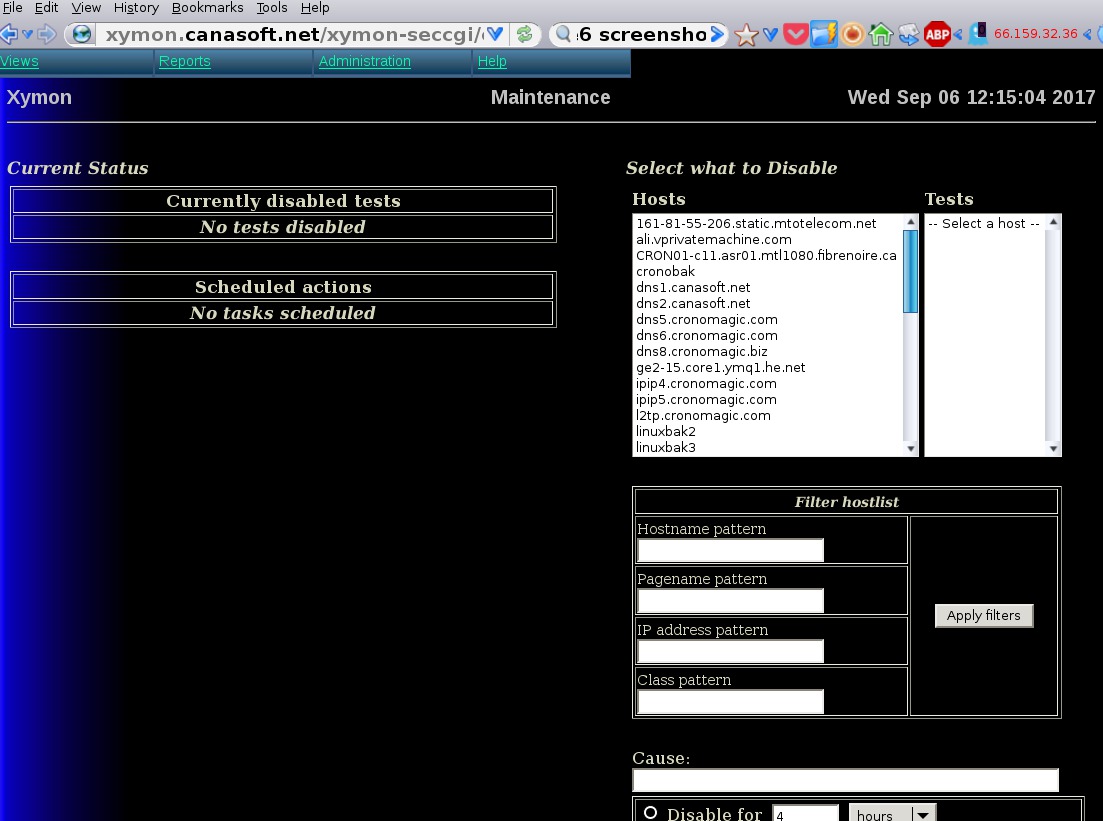
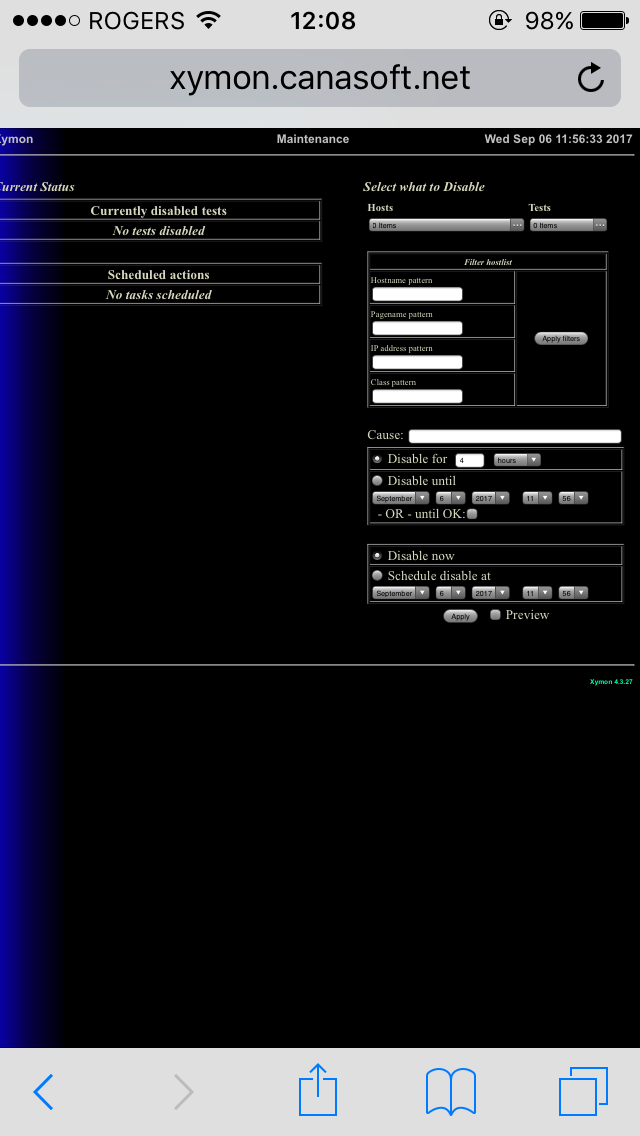
Except for the 3 dots part (and I suspect anything involving choices works like this) Safari on iphone looks just like a computer browser. In my case firefox on linux. Maybe later I will take a photo with my camera of the iphone screen and a screenshot of firefox and send them to the group. I have no idea at this time how to do a screenshot in my iphone.
▸
On 9/6/17 11:50, Josh Luthman wrote:Wow that's really strange - but I can see it being different in the Apple world. Does it look normal with modern Safari? Josh Luthman Office: XXX-XXX-XXXX Direct: XXX-XXX-XXXX XXXX Wayne St Suite XXXX Troy, OH XXXXX On Wed, Sep 6, 2017 at 11:44 AM, Frank <user-fbc5ef527f6f@xymon.invalid <mailto:user-fbc5ef527f6f@xymon.invalid>> wrote: Been awhile since I was in there with the iphone, and now I remember. It wasn't so much the zoom but selecting the machine etc I had to figure out. The hostname or tests field is empty and I had to figure out how to fill it. There are 3 dots to the right of each field that need to be clicked on to select stuff. Also when I first got the iphone the enable/disable didn't work at all. You couldn't see anything. A few upgrades of the iphone passed before I noticed it was working perfectly once I figured out how to use the select function. On 9/6/17 11:35, Josh Luthman wrote:Have you tried pinch/zoom on the outer black area? I've seen putting your fingers on the "buttons" and "links" while trying to zoom on Android causes some hassle. Josh Luthman Office: XXX-XXX-XXXX <tel:%28937%29%20552-2340> Direct: XXX-XXX-XXXX <tel:%28937%29%20552-2343> XXXX Wayne St Suite XXXX Troy, OH XXXXX On Wed, Sep 6, 2017 at 11:33 AM, Frank <user-fbc5ef527f6f@xymon.invalid <mailto:user-fbc5ef527f6f@xymon.invalid>> wrote: Hi, I have an iphone and I use Safari. Plus I get the email notifications as a text and an email on the iphone. It is redundant because not always can I check my email. Safari displays xymon very well, however there are issues with the enable/disable page. Things are really small and magnifying and clicking on things is a bit tricky I find. But it does work. On 9/6/17 11:24, Josh Luthman wrote:I didn't like the Android app myself. I strongly prefer the traditional notification (email, email to text). The web interface on modern smart phones does a great job (at least on Android, I can't speak to Safari/iPhone). I would assume you can on the iPhone since Android can, but I find it's great to have a shortcut to Xymon's home page on the "desktop". When a text hits you, click on the shortcut. Josh Luthman Office: XXX-XXX-XXXX <tel:%28937%29%20552-2340> Direct: XXX-XXX-XXXX <tel:%28937%29%20552-2343> XXXX Wayne St Suite XXXX Troy, OH XXXXX On Wed, Sep 6, 2017 at 11:14 AM, Root, Paul T <user-76fdb6883669@xymon.invalid <mailto:user-76fdb6883669@xymon.invalid>> wrote: Just use the browser. The Android app works ok, but not great. It has issues with font scaling the alerts. *From:*Xymon [mailto:xymon-bounces at xymon.com <mailto:xymon-bounces at xymon.com>] *On Behalf Of *Rothlisberger, John R. *Sent:* Wednesday, September 06, 2017 7:39 AM *To:* 'xymon >> xymon at xymon.com <mailto:xymon at xymon.com>' *Subject:* [Xymon] Xymon app for iPhone? I see there is an app for the android – does anyone have any advice for monitoring your servers with an iPhone? Thanks, John Upcoming PTO: John Rothlisberger IT Strategy, Infrastructure & Security - Technology Growth Platform TGP for Business Process Outsourcing Accenture XXX.XXX.XXXX <tel:%28312%29%20693-3136> office** This message is for the designated recipient only and may contain privileged, proprietary, or otherwise confidential information. If you have received it in error, please notify the sender immediately and delete the original. Any other use of the e-mail by you is prohibited. Where allowed by local law, electronic communications with Accenture and its affiliates, including e-mail and instant messaging (including content), may be scanned by our systems for the purposes of information security and assessment of internal compliance with Accenture policy. www.accenture.com <http://www.accenture.com>; This communication is the property of CenturyLink and may contain confidential or privileged information. Unauthorized use of this communication is strictly prohibited and may be unlawful. If you have received this communication in error, please immediately notify the sender by reply e-mail and destroy all copies of the communication and any attachments. < <-- sysadmcronomagic.com/gemstelecom.com <http://cronomagic.com/gemstelecom.com>; user-3a42a2ba864a@xymon.invalid <mailto:user-fbc5ef527f6f@xymon.invalid> POWERED BY LINUX <-- sysadmcronomagic.com/gemstelecom.com <http://cronomagic.com/gemstelecom.com>; user-3a42a2ba864a@xymon.invalid <mailto:user-fbc5ef527f6f@xymon.invalid> POWERED BY LINUX <
--

sysadm  cronomagic.com/gemstelecom.com
e-mail  user-fbc5ef527f6f@xymon.invalid

POWERED BY LINUX
list Josh Luthman
Hold the sleep/wake up button + the main button below the screen at the same time.
▸
Josh Luthman
Office: XXX-XXX-XXXX
Direct: XXX-XXX-XXXX
XXXX Wayne St
Suite XXXX
Troy, OH XXXXX
▸
On Wed, Sep 6, 2017 at 11:56 AM, Frank <user-fbc5ef527f6f@xymon.invalid> wrote:
Except for the 3 dots part (and I suspect anything involving choices works like this) Safari on iphone looks just like a computer browser. In my case firefox on linux. Maybe later I will take a photo with my camera of the iphone screen and a screenshot of firefox and send them to the group. I have no idea at this time how to do a screenshot in my iphone. On 9/6/17 11:50, Josh Luthman wrote: Wow that's really strange - but I can see it being different in the Apple world. Does it look normal with modern Safari? Josh Luthman Office: XXX-XXX-XXXX <(937)%20552-2340> Direct: XXX-XXX-XXXX <(937)%20552-2343> XXXX Wayne St Suite XXXX Troy, OH XXXXX On Wed, Sep 6, 2017 at 11:44 AM, Frank <user-fbc5ef527f6f@xymon.invalid> wrote:Been awhile since I was in there with the iphone, and now I remember. It wasn't so much the zoom but selecting the machine etc I had to figure out. The hostname or tests field is empty and I had to figure out how to fill it. There are 3 dots to the right of each field that need to be clicked on to select stuff. Also when I first got the iphone the enable/disable didn't work at all. You couldn't see anything. A few upgrades of the iphone passed before I noticed it was working perfectly once I figured out how to use the select function. On 9/6/17 11:35, Josh Luthman wrote: Have you tried pinch/zoom on the outer black area? I've seen putting your fingers on the "buttons" and "links" while trying to zoom on Android causes some hassle. Josh Luthman Office: XXX-XXX-XXXX <%28937%29%20552-2340> Direct: XXX-XXX-XXXX <%28937%29%20552-2343> XXXX Wayne St Suite XXXX Troy, OH XXXXX On Wed, Sep 6, 2017 at 11:33 AM, Frank <user-fbc5ef527f6f@xymon.invalid> wrote:Hi, I have an iphone and I use Safari. Plus I get the email notifications as a text and an email on the iphone. It is redundant because not always can I check my email. Safari displays xymon very well, however there are issues with the enable/disable page. Things are really small and magnifying and clicking on things is a bit tricky I find. But it does work. On 9/6/17 11:24, Josh Luthman wrote: I didn't like the Android app myself. I strongly prefer the traditional notification (email, email to text). The web interface on modern smart phones does a great job (at least on Android, I can't speak to Safari/iPhone). I would assume you can on the iPhone since Android can, but I find it's great to have a shortcut to Xymon's home page on the "desktop". When a text hits you, click on the shortcut. Josh Luthman Office: XXX-XXX-XXXX <%28937%29%20552-2340> Direct: XXX-XXX-XXXX <%28937%29%20552-2343> XXXX Wayne St Suite XXXX Troy, OH XXXXX On Wed, Sep 6, 2017 at 11:14 AM, Root, Paul T <user-76fdb6883669@xymon.invalidwrote:Just use the browser. The Android app works ok, but not great. It has issues with font scaling the alerts. *From:* Xymon [mailto:xymon-bounces at xymon.com] *On Behalf Of *Rothlisberger, John R. *Sent:* Wednesday, September 06, 2017 7:39 AM *To:* 'xymon >> xymon at xymon.com' *Subject:* [Xymon] Xymon app for iPhone? I see there is an app for the android – does anyone have any advice for monitoring your servers with an iPhone? Thanks, John Upcoming PTO: John Rothlisberger IT Strategy, Infrastructure & Security - Technology Growth Platform TGP for Business Process Outsourcing Accenture XXX.XXX.XXXX <%28312%29%20693-3136> office This message is for the designated recipient only and may contain privileged, proprietary, or otherwise confidential information. If you have received it in error, please notify the sender immediately and delete the original. Any other use of the e-mail by you is prohibited. Where allowed by local law, electronic communications with Accenture and its affiliates, including e-mail and instant messaging (including content), may be scanned by our systems for the purposes of information security and assessment of internal compliance with Accenture policy. www.accenture.com This communication is the property of CenturyLink and may contain confidential or privileged information. Unauthorized use of this communication is strictly prohibited and may be unlawful. If you have received this communication in error, please immediately notify the sender by reply e-mail and destroy all copies of the communication and any attachments.Xymon mailing user-d459c9d661b6@xymon.invalid -- sysadm cronomagic.com/gemstelecom.com e-mail user-fbc5ef527f6f@xymon.invalid POWERED BY LINUX-- sysadm cronomagic.com/gemstelecom.com e-mail user-fbc5ef527f6f@xymon.invalid POWERED BY LINUX-- sysadm cronomagic.com/gemstelecom.com e-mail user-fbc5ef527f6f@xymon.invalid POWERED BY LINUX
list Frank Torontour
Hi, The sleep/home button does not work. The shutter works but no flash and no picture. However the AssistiveTouch did the trick. Attached are the photos. On 9/6/17 12:00, Matt Vander Werf wrote:
Screenshot on iPhone: https://support.apple.com/en-us/HT200289 -- Matt Vander Werf HPC System Administrator University of Notre Dame Center for Research Computing - Union Station XXX W. South Street South Bend, IN XXXXX Phone: (XXX) XXX-XXXX
▸
On Wed, Sep 6, 2017 at 11:56 AM, Frank <user-fbc5ef527f6f@xymon.invalid <mailto:user-fbc5ef527f6f@xymon.invalid>> wrote: Except for the 3 dots part (and I suspect anything involving choices works like this) Safari on iphone looks just like a computer browser. In my case firefox on linux. Maybe later I will take a photo with my camera of the iphone screen and a screenshot of firefox and send them to the group. I have no idea at this time how to do a screenshot in my iphone. On 9/6/17 11:50, Josh Luthman wrote:Wow that's really strange - but I can see it being different in the Apple world. Does it look normal with modern Safari? Josh Luthman Office: XXX-XXX-XXXX <tel:%28937%29%20552-2340> Direct: XXX-XXX-XXXX <tel:%28937%29%20552-2343> XXXX Wayne St Suite XXXX Troy, OH XXXXX On Wed, Sep 6, 2017 at 11:44 AM, Frank <user-fbc5ef527f6f@xymon.invalid <mailto:user-fbc5ef527f6f@xymon.invalid>> wrote: Been awhile since I was in there with the iphone, and now I remember. It wasn't so much the zoom but selecting the machine etc I had to figure out. The hostname or tests field is empty and I had to figure out how to fill it. There are 3 dots to the right of each field that need to be clicked on to select stuff. Also when I first got the iphone the enable/disable didn't work at all. You couldn't see anything. A few upgrades of the iphone passed before I noticed it was working perfectly once I figured out how to use the select function. On 9/6/17 11:35, Josh Luthman wrote:Have you tried pinch/zoom on the outer black area? I've seen putting your fingers on the "buttons" and "links" while trying to zoom on Android causes some hassle. Josh Luthman Office: XXX-XXX-XXXX <tel:%28937%29%20552-2340> Direct: XXX-XXX-XXXX <tel:%28937%29%20552-2343> XXXX Wayne St Suite XXXX Troy, OH XXXXX On Wed, Sep 6, 2017 at 11:33 AM, Frank <user-fbc5ef527f6f@xymon.invalid <mailto:user-fbc5ef527f6f@xymon.invalid>> wrote: Hi, I have an iphone and I use Safari. Plus I get the email notifications as a text and an email on the iphone. It is redundant because not always can I check my email. Safari displays xymon very well, however there are issues with the enable/disable page. Things are really small and magnifying and clicking on things is a bit tricky I find. But it does work. On 9/6/17 11:24, Josh Luthman wrote:I didn't like the Android app myself. I strongly prefer the traditional notification (email, email to text). The web interface on modern smart phones does a great job (at least on Android, I can't speak to Safari/iPhone). I would assume you can on the iPhone since Android can, but I find it's great to have a shortcut to Xymon's home page on the "desktop". When a text hits you, click on the shortcut. Josh Luthman Office: XXX-XXX-XXXX <tel:%28937%29%20552-2340> Direct: XXX-XXX-XXXX <tel:%28937%29%20552-2343> XXXX Wayne St Suite XXXX Troy, OH XXXXX On Wed, Sep 6, 2017 at 11:14 AM, Root, Paul T <user-76fdb6883669@xymon.invalid <mailto:user-76fdb6883669@xymon.invalid>> wrote: Just use the browser. The Android app works ok, but not great. It has issues with font scaling the alerts. *From:*Xymon [mailto:xymon-bounces at xymon.com <mailto:xymon-bounces at xymon.com>] *On Behalf Of *Rothlisberger, John R. *Sent:* Wednesday, September 06, 2017 7:39 AM *To:* 'xymon >> xymon at xymon.com <mailto:xymon at xymon.com>' *Subject:* [Xymon] Xymon app for iPhone? I see there is an app for the android – does anyone have any advice for monitoring your servers with an iPhone? Thanks, John Upcoming PTO: John Rothlisberger IT Strategy, Infrastructure & Security - Technology Growth Platform TGP for Business Process Outsourcing Accenture XXX.XXX.XXXX <tel:%28312%29%20693-3136> office** This message is for the designated recipient only and may contain privileged, proprietary, or otherwise confidential information. If you have received it in error, please notify the sender immediately and delete the original. Any other use of the e-mail by you is prohibited. Where allowed by local law, electronic communications with Accenture and its affiliates, including e-mail and instant messaging (including content), may be scanned by our systems for the purposes of information security and assessment of internal compliance with Accenture policy. www.accenture.com <http://www.accenture.com>; This communication is the property of CenturyLink and may contain confidential or privileged information. Unauthorized use of this communication is strictly prohibited and may be unlawful. If you have received this communication in error, please immediately notify the sender by reply e-mail and destroy all copies of the communication and any attachments. < <-- sysadmcronomagic.com/gemstelecom.com <http://cronomagic.com/gemstelecom.com>; user-3a42a2ba864a@xymon.invalid <mailto:user-fbc5ef527f6f@xymon.invalid> POWERED BY LINUX <-- sysadmcronomagic.com/gemstelecom.com <http://cronomagic.com/gemstelecom.com>; user-3a42a2ba864a@xymon.invalid <mailto:user-fbc5ef527f6f@xymon.invalid> POWERED BY LINUX <-- sysadmcronomagic.com/gemstelecom.com <http://cronomagic.com/gemstelecom.com>; user-3a42a2ba864a@xymon.invalid <mailto:user-fbc5ef527f6f@xymon.invalid> POWERED BY LINUX <
--

sysadm  cronomagic.com/gemstelecom.com
e-mail  user-fbc5ef527f6f@xymon.invalid

POWERED BY LINUX
Attachments (2)
 attachment.jpg
 attachment.png