Disk I/O check for Linux
list Raymund A. Layoso
Hi Henrik,

Thanks, it works .. maybe it will be more comprehensive and impressive if it will give graphical I/O stat per filesystem ?

<<..>>

Raymund A. Layoso
Jr. System Administrator
Technical Support Group - Information Technology Services
SM Retail Inc.
SM Corporate Office, Bldg D
1000 Bay Boulevard, SM Central Business Park
Bay City, Pasay City 1300

CORPORATE DISCLAIMER:

This e-mail message, including any attached file, is confidential and legally privileged. It is solely for the intended recipient and if you received this e-mail by mistake, you should notify the sender immediately and delete this message from your system. You are further prohibited from disseminating, distributing or copying this e-mail. This e-mail cannot be guaranteed to be secure and error-free as it could be intercepted, corrupted, lost, destroyed, arrive late, or incomplete, or contain viruses or other malicious programs. The company does not accept any liability for such improper, erroneous or delayed receipt of the e-mail or for the presence of such viruses and malicious programs. Any views, opinions or factual assertions contained are those of the author and not necessarily of the company. The company prihibits unofficial use of its e-mail and consequently disclaims and accepts no liability for any damage caused by any libelous and defamatory statements transmitted via this e-mail.


Henrik Stoerner <user-ce4a2c883f75@xymon.invalid> 10/14/2008 04:34 AM

To
user-883c06d02443@xymon.invalid
cc

Subject
Re: Disk I/O check for Linux


Hi,

the Hobbit mailing list - user-ae9b8668bcde@xymon.invalid - really is the best place for
support questions.

The only I/O measurement built into Hobbit is the data collected from
"vmstat", which gives you an overall measure of the amount of time
spent waiting for disk I/O. This graph is not displayed by default; you can make them appear on the "trends" page by adding
   TRENDS:*,vmstat:vmstat1|vmstat5
to each of the host entries in bb-hosts. That will give you a "CPU
utilisation" graph that includes the I/O wait time, and a "Block I/O"
graph showing the number of blocks read from/written to a disk device.


Regards,
Henrik


On Tue, Oct 14, 2008 at 04:01:29AM +0800, user-883c06d02443@xymon.invalid wrote:
Is there any scripts in hobbit that monitors disk I/O performance in
linux
box ? and with graphical presentation ?
Can you help me on this since we are now having an issue with disk I/O performance in our Oracle servers ?
list Keith Meserole
Hi,

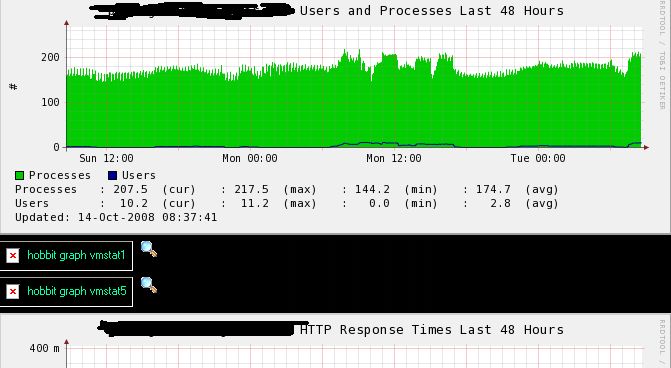
I gave this a try and the vmstat items show up only as objects and not
graphs.   Part of the host entry is below for this host.

I am sure I am missing something really easy.   Any ideas?


TRENDS:*,apache:apache|apache1|apache2|apache3,vmstat:vmstat1|vmstat5
▸
From: user-883c06d02443@xymon.invalid [mailto:user-883c06d02443@xymon.invalid]
Sent: Monday, October 13, 2008 7:31 PM
To: Henrik Stoerner
Cc: user-ae9b8668bcde@xymon.invalid
Subject: [hobbit] Re: Disk I/O check for Linux


Hi Henrik,

Thanks, it works .. maybe it will be more comprehensive and impressive if it
will give graphical I/O stat per filesystem ?

<<..>>

Raymund A. Layoso
Jr. System Administrator
Technical Support Group - Information Technology Services
SM Retail Inc.
SM Corporate Office, Bldg D
1000 Bay Boulevard, SM Central Business Park
Bay City, Pasay City 1300

CORPORATE DISCLAIMER:

This e-mail message, including any attached file, is confidential and
legally privileged. It is solely for the intended recipient and if you
received this e-mail by mistake, you should notify the sender immediately
and delete this message from your system. You are further prohibited from
disseminating, distributing or copying this e-mail. This e-mail cannot be
guaranteed to be secure and error-free as it could be intercepted,
corrupted, lost, destroyed, arrive late, or incomplete, or contain viruses
or other malicious programs. The company does not accept any liability for
such improper, erroneous or delayed receipt of the e-mail or for the
presence of such viruses and malicious programs. Any views, opinions or
factual assertions contained are those of the author and not necessarily of
the company. The company prihibits unofficial use of its e-mail and
consequently disclaims and accepts no liability for any damage caused by any
libelous and defamatory statements transmitted via this e-mail.


Henrik Stoerner <user-ce4a2c883f75@xymon.invalid>


10/14/2008 04:34 AM


To
user-883c06d02443@xymon.invalid

cc

Subject
Re: Disk I/O check for Linux


Hi,

the Hobbit mailing list - user-ae9b8668bcde@xymon.invalid - really is the best place for
support questions.

The only I/O measurement built into Hobbit is the data collected from
"vmstat", which gives you an overall measure of the amount of time
spent waiting for disk I/O. This graph is not displayed by default;
you can make them appear on the "trends" page by adding
  TRENDS:*,vmstat:vmstat1|vmstat5
to each of the host entries in bb-hosts. That will give you a "CPU
utilisation" graph that includes the I/O wait time, and a "Block I/O"
graph showing the number of blocks read from/written to a disk device.


Regards,
Henrik


On Tue, Oct 14, 2008 at 04:01:29AM +0800, user-883c06d02443@xymon.invalid wrote:
Is there any scripts in hobbit that monitors disk I/O performance in linux
box ? and with graphical presentation ?
Can you help me on this since we are now having an issue with disk I/O
performance in our Oracle servers ?
Attachments (1)
 attachment.jpg
list Jon Dustin
On 10/13/2008 at 7:30 PM, in message <48F511FC.B63 : 18 : 56163>,
▸
<user-883c06d02443@xymon.invalid> wrote:
The only I/O measurement built into Hobbit is the data collected from
"vmstat", which gives you an overall measure of the amount of time
spent waiting for disk I/O. This graph is not displayed by default;
you can make them appear on the "trends" page by adding
   TRENDS:*,vmstat:vmstat1|vmstat5
to each of the host entries in bb-hosts. That will give you a "CPU
utilisation" graph that includes the I/O wait time, and a "Block I/O"
graph showing the number of blocks read from/written to a disk device.
Sorry for hijacking this thread, but this is *mostly* on-topic.

Is there a way to make the above TRENDS setting for all hosts? I tried looking at hobbitgraph.cfg and hobbitserver.cfg, but could not determine any applicable syntax.

PS - I like the added graphs.

Thanks for any assistance you can provide.

--

--
Jon Dustin - Network Specialist
University of Southern Maine
Portland, ME  XXX-XXX-XXXX
list Shawn Heisey
▸
Jon Dustin wrote:
Sorry for hijacking this thread, but this is *mostly* on-topic.

Is there a way to make the above TRENDS setting for all hosts? I tried looking at hobbitgraph.cfg and hobbitserver.cfg, but could not determine any applicable syntax.
PS - I like the added graphs.

Thanks for any assistance you can provide.
I'm going to drift the thread into yet another tangent ... I'd like to have the vmstat graph for CPU utlization show up on the cpu column along with load average. Is that possible?
list Gavin Leonard
How would a host entry look with this info?

-Gavin
▸
From: user-883c06d02443@xymon.invalid [mailto:user-883c06d02443@xymon.invalid]
Sent: Monday, October 13, 2008 5:31 PM
To: Henrik Stoerner
Cc: user-ae9b8668bcde@xymon.invalid
Subject: [hobbit] Re: Disk I/O check for Linux


Hi Henrik,

Thanks, it works .. maybe it will be more comprehensive and impressive if it will give graphical I/O stat per filesystem ?

<<..>>

Raymund A. Layoso
Jr. System Administrator
Technical Support Group - Information Technology Services
SM Retail Inc.
SM Corporate Office, Bldg D
1000 Bay Boulevard, SM Central Business Park
Bay City, Pasay City 1300

CORPORATE DISCLAIMER:

This e-mail message, including any attached file, is confidential and legally privileged. It is solely for the intended recipient and if you received this e-mail by mistake, you should notify the sender immediately and delete this message from your system. You are further prohibited from disseminating, distributing or copying this e-mail. This e-mail cannot be guaranteed to be secure and error-free as it could be intercepted, corrupted, lost, destroyed, arrive late, or incomplete, or contain viruses or other malicious programs. The company does not accept any liability for such improper, erroneous or delayed receipt of the e-mail or for the presence of such viruses and malicious programs. Any views, opinions or factual assertions contained are those of the author and not necessarily of the company. The company prihibits unofficial use of its e-mail and consequently disclaims and accepts no liability for any damage caused by any libelous and defamatory statements transmitted via this e-mail.


Henrik Stoerner <user-ce4a2c883f75@xymon.invalid>

10/14/2008 04:34 AM

To

user-883c06d02443@xymon.invalid

cc

Subject

Re: Disk I/O check for Linux


Hi,

the Hobbit mailing list - user-ae9b8668bcde@xymon.invalid - really is the best place for
support questions.

The only I/O measurement built into Hobbit is the data collected from
"vmstat", which gives you an overall measure of the amount of time
spent waiting for disk I/O. This graph is not displayed by default;
you can make them appear on the "trends" page by adding
  TRENDS:*,vmstat:vmstat1|vmstat5
to each of the host entries in bb-hosts. That will give you a "CPU
utilisation" graph that includes the I/O wait time, and a "Block I/O"
graph showing the number of blocks read from/written to a disk device.


Regards,
Henrik


On Tue, Oct 14, 2008 at 04:01:29AM +0800, user-883c06d02443@xymon.invalid wrote:
Is there any scripts in hobbit that monitors disk I/O performance in linux box ? and with graphical presentation ? Can you help me on this since we are now having an issue with disk I/O performance in our Oracle servers ?
list Keith Meserole
Anyone have any thoughts?
▸
From: Keith Meserole [mailto:user-73279f70f6bb@xymon.invalid]
Sent: Tuesday, October 14, 2008 9:07 PM
To: user-ae9b8668bcde@xymon.invalid
Subject: RE: [hobbit] Re: Disk I/O check for Linux


Hi,

I gave this a try and the vmstat items show up only as objects and not
graphs.   Part of the host entry is below for this host.

I am sure I am missing something really easy.   Any ideas?


TRENDS:*,apache:apache|apache1|apache2|apache3,vmstat:vmstat1|vmstat5


From: user-883c06d02443@xymon.invalid [mailto:user-883c06d02443@xymon.invalid]
Sent: Monday, October 13, 2008 7:31 PM
To: Henrik Stoerner
Cc: user-ae9b8668bcde@xymon.invalid
Subject: [hobbit] Re: Disk I/O check for Linux


Hi Henrik,

Thanks, it works .. maybe it will be more comprehensive and impressive if it
will give graphical I/O stat per filesystem ?

<<..>>

Raymund A. Layoso
Jr. System Administrator
Technical Support Group - Information Technology Services
SM Retail Inc.
SM Corporate Office, Bldg D
1000 Bay Boulevard, SM Central Business Park
Bay City, Pasay City 1300

CORPORATE DISCLAIMER:

This e-mail message, including any attached file, is confidential and
legally privileged. It is solely for the intended recipient and if you
received this e-mail by mistake, you should notify the sender immediately
and delete this message from your system. You are further prohibited from
disseminating, distributing or copying this e-mail. This e-mail cannot be
guaranteed to be secure and error-free as it could be intercepted,
corrupted, lost, destroyed, arrive late, or incomplete, or contain viruses
or other malicious programs. The company does not accept any liability for
such improper, erroneous or delayed receipt of the e-mail or for the
presence of such viruses and malicious programs. Any views, opinions or
factual assertions contained are those of the author and not necessarily of
the company. The company prihibits unofficial use of its e-mail and
consequently disclaims and accepts no liability for any damage caused by any
libelous and defamatory statements transmitted via this e-mail.


Henrik Stoerner <user-ce4a2c883f75@xymon.invalid>


10/14/2008 04:34 AM


To
user-883c06d02443@xymon.invalid

cc

Subject
Re: Disk I/O check for Linux


Hi,

the Hobbit mailing list - user-ae9b8668bcde@xymon.invalid - really is the best place for
support questions.

The only I/O measurement built into Hobbit is the data collected from
"vmstat", which gives you an overall measure of the amount of time
spent waiting for disk I/O. This graph is not displayed by default;
you can make them appear on the "trends" page by adding
  TRENDS:*,vmstat:vmstat1|vmstat5
to each of the host entries in bb-hosts. That will give you a "CPU
utilisation" graph that includes the I/O wait time, and a "Block I/O"
graph showing the number of blocks read from/written to a disk device.


Regards,
Henrik


On Tue, Oct 14, 2008 at 04:01:29AM +0800, user-883c06d02443@xymon.invalid wrote:
Is there any scripts in hobbit that monitors disk I/O performance in linux
box ? and with graphical presentation ?
Can you help me on this since we are now having an issue with disk I/O
performance in our Oracle servers ?
list Rich Smrcina
Keith Meserole wrote:
Anyone have any thoughts?
Is there a vmstat.rrd file in the data/rrd/<hostname> directory?
--

Rich Smrcina
VM Assist, Inc.
Phone: XXX-XXX-XXXX
Ans Service:  XXX-XXX-XXXX
user-61add9955ef9@xymon.invalid
http://www.linkedin.com/in/richsmrcina

Catch the WAVV!  http://www.wavv.org
WAVV 2009 - Orlando, FL - May 15-19, 2009
list Stephen
I've found HPUX clients don't report some elements and this breaks
hobbitgraph... so....
use rrdtool dump {hosts rrd vmstat file path] to see what's collected and compare to the hard defs in hobbitgraph.cfg
Keith Meserole wrote:
use rrdtool dump {hosts rrd vmstat file path] to see what's collected and compare to the hard defs in hobbitgraph.cfg
▸
=================================Keith Meserole wrote:
Anyone have any thoughts?
From: Keith Meserole [mailto:user-73279f70f6bb@xymon.invalid]
Sent: Tuesday, October 14, 2008 9:07 PM
To: user-ae9b8668bcde@xymon.invalid
Subject: RE: [hobbit] Re: Disk I/O check for LinuxHi,
I gave this a try and the vmstat items show up only as objects and not graphs. Part of the host entry is below for this host.
I am sure I am missing something really easy. Any ideas?
TRENDS:*,apache:apache|apache1|apache2|apache3,vmstat:vmstat1|vmstat5From: user-883c06d02443@xymon.invalid [mailto:user-883c06d02443@xymon.invalid]
Sent: Monday, October 13, 2008 7:31 PM
To: Henrik Stoerner
Cc: user-ae9b8668bcde@xymon.invalid
Subject: [hobbit] Re: Disk I/O check for Linux
Hi Henrik,
Thanks, it works .. maybe it will be more comprehensive and impressive if it will give graphical I/O stat per filesystem ?
<<..>>
Raymund A. Layoso
Jr. System Administrator
Technical Support Group - Information Technology Services
SM Retail Inc.
SM Corporate Office, Bldg D
1000 Bay Boulevard, SM Central Business Park
Bay City, Pasay City 1300
CORPORATE DISCLAIMER:
This e-mail message, including any attached file, is confidential and legally privileged. It is solely for the intended recipient and if you received this e-mail by mistake, you should notify the sender immediately and delete this message from your system. You are further prohibited from disseminating, distributing or copying this e-mail. This e-mail cannot be guaranteed to be secure and error-free as it could be intercepted, corrupted, lost, destroyed, arrive late, or incomplete, or contain viruses or other malicious programs. The company does not accept any liability for such improper, erroneous or delayed receipt of the e-mail or for the presence of such viruses and malicious programs. Any views, opinions or factual assertions contained are those of the author and not necessarily of the company. The company prihibits unofficial use of its e-mail and consequently disclaims and accepts no liability for any damage caused by any libelous and defamatory statements transmitted via this e-mail.
Henrik Stoerner 10/14/2008 04:34 AM
user-883c06d02443@xymon.invalid
Re: Disk I/O check for Linux
Hi,
the Hobbit mailing list - user-ae9b8668bcde@xymon.invalid - really is the best place for
support questions.
The only I/O measurement built into Hobbit is the data collected from
"vmstat", which gives you an overall measure of the amount of time
spent waiting for disk I/O. This graph is not displayed by default;
you can make them appear on the "trends" page by adding
TRENDS:*,vmstat:vmstat1|vmstat5
to each of the host entries in bb-hosts. That will give you a "CPU
utilisation" graph that includes the I/O wait time, and a "Block I/O"
graph showing the number of blocks read from/written to a disk device.
Regards,
Henrik
On Tue, Oct 14, 2008 at 04:01:29AM +0800, user-883c06d02443@xymon.invalid wrote:
> Is there any scripts in hobbit that monitors disk I/O performance in linux
> box ? and with graphical presentation ?
> Can you help me on this since we are now having an issue with disk I/O
> performance in our Oracle servers ?
list Stephen
Linux host which sents "cpu_wait" works, HPUX doesn't send that.
( I've HPUX, SuSE, Tru64 )

# rrdtool dump ../alfpa01/vmstat.rrd |grep name
                <name> cpu_r </name>
                <name> cpu_b </name>
                <name> cpu_w </name>
                <name> mem_swpd </name>
                <name> mem_free </name>
                <name> mem_buff </name>
                <name> mem_cach </name>
                <name> mem_si </name>
                <name> mem_so </name>
                <name> dsk_bi </name>
                <name> dsk_bo </name>
                <name> cpu_int </name>
                <name> cpu_csw </name>
                <name> cpu_usr </name>
                <name> cpu_sys </name>
                <name> cpu_idl </name>
              *  <name> cpu_wait </name>*
▸
 #

Stephen wrote:
I've found HPUX clients don't report some elements and this breaks hobbitgraph... so.... use rrdtool dump {hosts rrd vmstat file path] to see what's collected and compare to the hard defs in hobbitgraph.cfg ================================= Keith Meserole wrote:Anyone have any thoughts? *From:* Keith Meserole [mailto:user-73279f70f6bb@xymon.invalid] *Sent:* Tuesday, October 14, 2008 9:07 PM *To:* user-ae9b8668bcde@xymon.invalid *Subject:* RE: [hobbit] Re: Disk I/O check for Linux Hi, I gave this a try and the vmstat items show up only as objects and not graphs. Part of the host entry is below for this host. I am sure I am missing something really easy. Any ideas? TRENDS:*,apache:apache|apache1|apache2|apache3,vmstat:vmstat1|vmstat5 ------------------------------------------------------------------------ *From:* user-883c06d02443@xymon.invalid [mailto:user-883c06d02443@xymon.invalid] *Sent:* Monday, October 13, 2008 7:31 PM *To:* Henrik Stoerner *Cc:* user-ae9b8668bcde@xymon.invalid *Subject:* [hobbit] Re: Disk I/O check for Linux Hi Henrik, Thanks, it works .. maybe it will be more comprehensive and impressive if it will give graphical I/O stat per filesystem ? <<..>> Raymund A. Layoso Jr. System Administrator Technical Support Group - Information Technology Services SM Retail Inc. SM Corporate Office, Bldg D 1000 Bay Boulevard, SM Central Business Park Bay City, Pasay City 1300 CORPORATE DISCLAIMER: This e-mail message, including any attached file, is confidential and legally privileged. It is solely for the intended recipient and if you received this e-mail by mistake, you should notify the sender immediately and delete this message from your system. You are further prohibited from disseminating, distributing or copying this e-mail. This e-mail cannot be guaranteed to be secure and error-free as it could be intercepted, corrupted, lost, destroyed, arrive late, or incomplete, or contain viruses or other malicious programs. The company does not accept any liability for such improper, erroneous or delayed receipt of the e-mail or for the presence of such viruses and malicious programs. Any views, opinions or factual assertions contained are those of the author and not necessarily of the company. The company prihibits unofficial use of its e-mail and consequently disclaims and accepts no liability for any damage caused by any libelous and defamatory statements transmitted via this e-mail. *Henrik Stoerner <user-ce4a2c883f75@xymon.invalid>* 10/14/2008 04:34 AM To user-883c06d02443@xymon.invalid cc Subject Re: Disk I/O check for Linux Hi, the Hobbit mailing list - user-ae9b8668bcde@xymon.invalid - really is the best place for support questions. The only I/O measurement built into Hobbit is the data collected from "vmstat", which gives you an overall measure of the amount of time spent waiting for disk I/O. This graph is not displayed by default; you can make them appear on the "trends" page by adding TRENDS:*,vmstat:vmstat1|vmstat5 to each of the host entries in bb-hosts. That will give you a "CPU utilisation" graph that includes the I/O wait time, and a "Block I/O" graph showing the number of blocks read from/written to a disk device. Regards, Henrik On Tue, Oct 14, 2008 at 04:01:29AM +0800, user-883c06d02443@xymon.invalid wrote:Is there any scripts in hobbit that monitors disk I/O performance in linux box ? and with graphical presentation ? Can you help me on this since we are now having an issue with disk I/O performance in our Oracle servers ?