fping for xymon 4.3.11
list Camelia Anghel
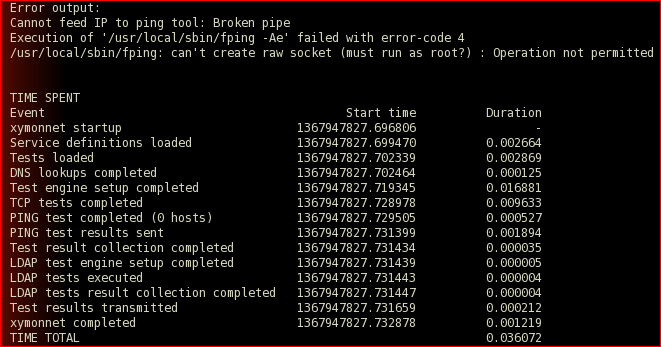
Hello I'm getting this annoying error message for a freshly installed xymon 4.3.11.
[cid:image002.png at 01CE4B27.B0342C20]
Is this a bug that has to be fixed?
I looked over the other error message "failed with error-code 4" .. I assigned the sticky bit, verify the 2 instances of fping.. nothing seems to work.

Any ideas anybody?
Thanks,
Camelia
Attachments (1)
 attachment.png
list Stef Coene
▸
On Tuesday 07 May 2013 17:35:07 Camelia Anghel wrote:
Hello I'm getting this annoying error message for a freshly installed xymon
4.3.11. [cid:image002.png at 01CE4B27.B0342C20]
Is this a bug that has to be fixed?
I looked over the other error message "failed with error-code 4" .. I
assigned the sticky bit, verify the 2 instances of fping.. nothing seems to
work.
Show us the output of
ls -la /usr/local/sbin/fping

My guess is that you miss the sticky bit.


Stef
list Larry Barber
It looks like you don't have the suid bit set on the fping executable, or
it's not owned by root, or both.

Thanks,
Larry Barber
▸
On Tue, May 7, 2013 at 12:35 PM, Camelia Anghel <user-56034f999072@xymon.invalid> wrote:
** **

Hello I’m getting this annoying error message for a freshly installed
xymon 4.3.11. ****

****

Is this a bug that has to be fixed?****

I looked over the other error message “failed with error-code 4” .. I
assigned the sticky bit, verify the 2 instances of fping.. nothing seems to
work.****

** **

Any ideas anybody?****

Thanks,****

Camelia ****

** **
list Milana Malkic
Hello,

I think this is what you should do on your xymon server machine :

chown root:xymon /usr/local/sbin/fping
chmod 710 /usr/local/sbin/fping
chmod ug+s /usr/local/sbin/fping

Regards

Milana
▸
Date: Tue, 7 May 2013 15:12:26 -0500
From: user-6ef9c2864140@xymon.invalid
To: user-56034f999072@xymon.invalid
CC: xymon at xymon.com
Subject: Re: [Xymon] fping for xymon 4.3.11

It looks like you don't have the suid bit set on the fping executable, or it's not owned by root, or both.
Thanks,Larry Barber
▸
On Tue, May 7, 2013 at 12:35 PM, Camelia Anghel <user-56034f999072@xymon.invalid> wrote:

 Hello I’m getting this annoying error message for a freshly installed xymon 4.3.11.
Is this a bug that has to be fixed?I looked over the other error message “failed with error-code 4” .. I assigned the sticky bit, verify the 2 instances of fping.. nothing seems to work.
 Any ideas anybody?Thanks,Camelia
list Ryan Novosielski
I don't know that I speak for others but suspect that I do -- cutting and pasting the text of the error (particularly if the error is text only, which of course it is) is far preferable to screenshots, unless of course there is a compelling reason to use graphics.
▸
From: Camelia Anghel [mailto:user-56034f999072@xymon.invalid]
Sent: Tuesday, May 07, 2013 01:35 PM
To: xymon at xymon.com <xymon at xymon.com>
Subject: [Xymon] fping for xymon 4.3.11


Hello I’m getting this annoying error message for a freshly installed xymon 4.3.11.
[cid:image002.png at 01CE4B27.B0342C20]
Is this a bug that has to be fixed?
I looked over the other error message “failed with error-code 4” .. I assigned the sticky bit, verify the 2 instances of fping.. nothing seems to work.

Any ideas anybody?
Thanks,
Camelia
list Larry Barber
Very much so. Including screen shots can slow down how soon you get an
answer, since the Xymon mailer will hold messages that are too large for
moderation.

Thanks,
Larry Barber
▸
On Wed, May 8, 2013 at 8:20 AM, Novosielski, Ryan <user-ae4522577e16@xymon.invalid>wrote:
 I don't know that I speak for others but suspect that I do -- cutting and
pasting the text of the error (particularly if the error is text only,
which of course it is) is far preferable to screenshots, unless of course
there is a compelling reason to use graphics.


 *From*: Camelia Anghel [mailto:user-56034f999072@xymon.invalid]
*Sent*: Tuesday, May 07, 2013 01:35 PM
*To*: xymon at xymon.com <xymon at xymon.com>
*Subject*: [Xymon] fping for xymon 4.3.11


**

Is this a bug that has to be fixed?****

I looked over the other error message “failed with error-code 4” .. I
assigned the sticky bit, verify the 2 instances of fping.. nothing seems to
work.****

** **

Any ideas anybody?****

Thanks,****

Camelia ****

** **
list Camelia Anghel
Thank you so much to all your responses.
Yes the sticky bit was not set.
Milana, I followed your step and all is working fine now.
Thank you again.
Camelia
▸
From: Milana Malkic [mailto:user-728d365e48fa@xymon.invalid]
Sent: Wednesday, May 08, 2013 8:58 AM
To: user-6ef9c2864140@xymon.invalid; Camelia Anghel
Cc: xymon at xymon.com
Subject: FW: [Xymon] fping for xymon 4.3.11


Hello,
I think this is what you should do on your xymon server machine :

chown root:xymon /usr/local/sbin/fping
chmod 710 /usr/local/sbin/fping
chmod ug+s /usr/local/sbin/fping

Regards

Milana