RRD zoom issues
list Stef Coene
Hi,

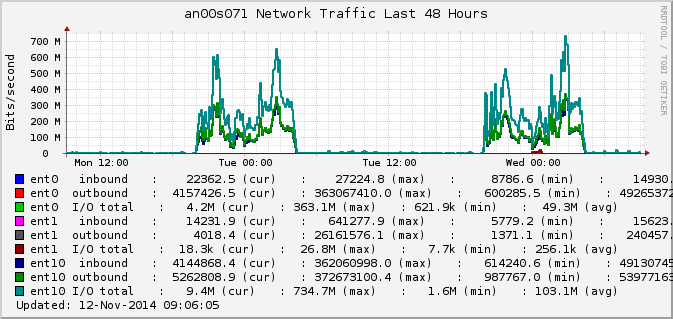
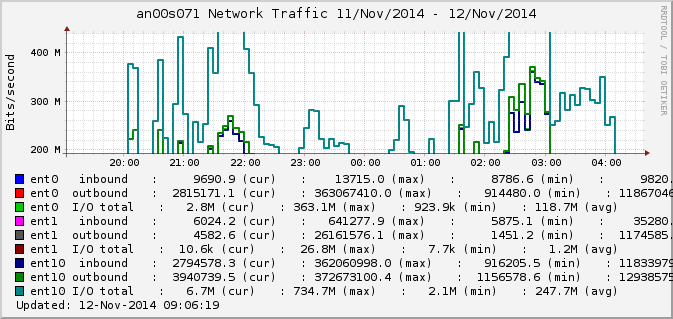
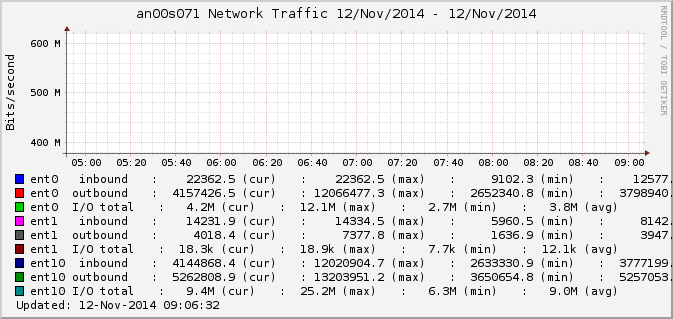
Since the upgrade to 4.3, we have issues when zooming in on the graphs.
See the attached screen shots.

It looks like the max and min values are calculated wrong when zooming in.
This messes up the scaling of the graph.
Does anyone sees the same behavior?

Rrdtool version: 1.4.7-2ubuntu5
Xymon version: 4.3.17


Stef
Attachments (3)
 attachment.png
 attachment-0001.png
 attachment-0002.png
list Stef Coene
Hi,

I also noted that https://www.xymon.com/ has the same issues.
So it is not related to my specific setup.


Stef
list Fran Garcia
▸
On Wed, Nov 12, 2014 at 2:28 PM, Stef Coene <user-dbffe946c0f4@xymon.invalid> wrote:
Hi,

I also noted that https://www.xymon.com/ has the same issues.
So it is not related to my specific setup.
Workaround: when you zoom-in, make sure you select *vertically* the
whole graphic, as well as the horizontal section you're interested in.

I'm not sure when this behaviour started, but I'm pretty sure it
wasn't like this in the olden days. Never bothered to investigate it
though :-)


~f
list Stef Coene
▸
On Thursday 13 November 2014 00:16:06 Fran Garcia wrote:
On Wed, Nov 12, 2014 at 2:28 PM, Stef Coene <user-dbffe946c0f4@xymon.invalid> wrote:Hi, I also noted that https://www.xymon.com/ has the same issues. So it is not related to my specific setup.Workaround: when you zoom-in, make sure you select *vertically* the whole graphic, as well as the horizontal section you're interested in. I'm not sure when this behaviour started, but I'm pretty sure it wasn't like this in the olden days. Never bothered to investigate it though :-)
Nice catch!
Thx for the work around.

I also found out that you can remove upper and lower from the url.


Stef
list Stef Coene
▸
On Thursday 13 November 2014 00:16:06 Fran Garcia wrote:
On Wed, Nov 12, 2014 at 2:28 PM, Stef Coene <user-dbffe946c0f4@xymon.invalid> wrote:Hi, I also noted that https://www.xymon.com/ has the same issues. So it is not related to my specific setup.Workaround: when you zoom-in, make sure you select *vertically* the whole graphic, as well as the horizontal section you're interested in. I'm not sure when this behaviour started, but I'm pretty sure it wasn't like this in the olden days. Never bothered to investigate it though :-)
A better fix is editing file zoom.js and comment out line 688:
// newURL = newURL + "&upper=" + newGraphTop + "&lower=" + newGraphBottom;


Stef
list Jeremy Laidman
I've seen this problem in the past, with an old version of Hobbit when used
with the Chrome browser, whereas there were no problems with IE.  Have you
tried with a different browser?

The xymon.com website works fine for me, in both IE and Chrome.

J
▸
On 13 November 2014 18:56, Stef Coene <user-dbffe946c0f4@xymon.invalid> wrote:
On Thursday 13 November 2014 00:16:06 Fran Garcia wrote:On Wed, Nov 12, 2014 at 2:28 PM, Stef Coene <user-dbffe946c0f4@xymon.invalid> wrote:Hi, I also noted that https://www.xymon.com/ has the same issues. So it is not related to my specific setup.Workaround: when you zoom-in, make sure you select *vertically* the whole graphic, as well as the horizontal section you're interested in. I'm not sure when this behaviour started, but I'm pretty sure it wasn't like this in the olden days. Never bothered to investigate it though :-)A better fix is editing file zoom.js and comment out line 688: // newURL = newURL + "&upper=" + newGraphTop + "&lower=" + newGraphBottom; Stef
list Stef Coene
▸
On Monday 17 November 2014 10:53:20 you wrote:
I've seen this problem in the past, with an old version of Hobbit when used
with the Chrome browser, whereas there were no problems with IE.  Have you
tried with a different browser?

The xymon.com website works fine for me, in both IE and Chrome.
It's not the zoom itself.  But the new zoom scripts also use the upper and lower points as zoom points.  So it not only zooms the X time scale, but also the Y max and min values.


Stef
list Jeremy Laidman
▸
On 17 November 2014 18:30, Stef Coene <user-dbffe946c0f4@xymon.invalid> wrote:
It's not the zoom itself.  But the new zoom scripts also use the upper and
lower points as zoom points.  So it not only zooms the X time scale, but
also
the Y max and min values.
And you don't want this feature?