Xymon to monitor HP OpenVMS
list Jose Leus Jr
Hi Xymon Team,

I am a big fan of your monitoring system. I started to use hobbit since 2007 and now using xymon to watch my systems being manage.

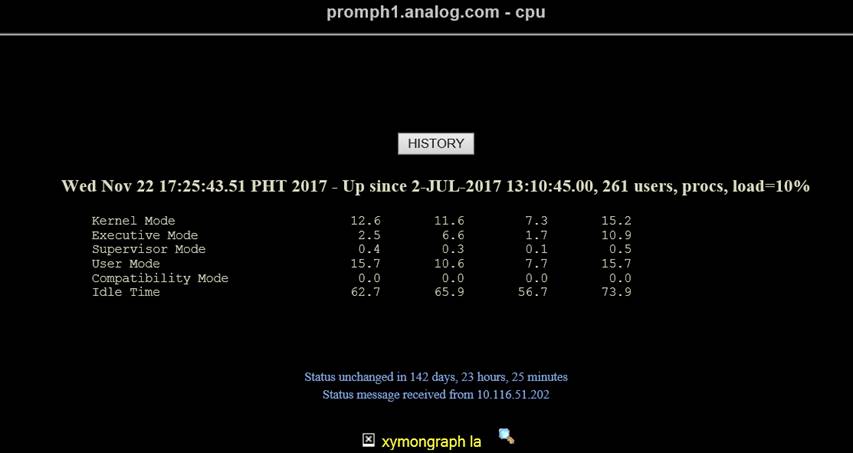
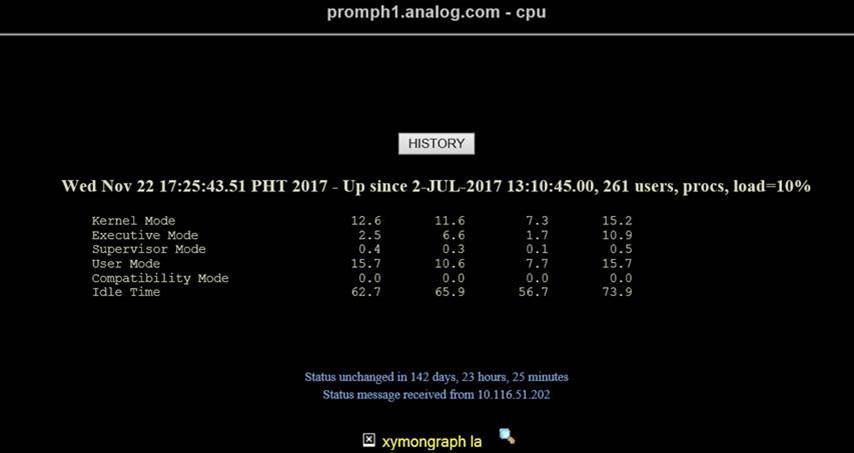
OpenVMS is one of the system that I need to monitor closely. At this time I was able to monitor hdd, connection , procs and cpu only. But as you can see below, the graph for cpu utilization is not displayed. I still need to add other system resources but im having difficulties to integrate it. I would like to seek for your expert assistance to fully monitor our OpenVMS system. Please advise if we can set a conference call to discuss. Our team will allocate budget for development work needed.

I am hoping for your positive response on this matter. Have a nice day to all!


[cid:image001.jpg at 01D32E15.9E17FF00][cid:image002.jpg at 01D32E15.9E17FF00]

Sincerely,
Leus
list Jeremy Laidman
Jose

The broken graph appears to be an attempt to execute
/xymon-cgi/svcstatus.sh as a CGI script. There are a few reasons this might
fail.

The first place I would look is the Apache server logfile. This may show
the reason why svcstatus.sh failed to execute correctly.

Do you see the CPU graph showing on the "trends" page?

Cheers
Jeremy
▸
On 15 September 2017 at 06:00, Leus Jr, Jose <user-b46c364676ee@xymon.invalid> wrote:
Hi Xymon Team,


I am a big fan of your monitoring system. I started to use hobbit since
2007 and now using xymon to watch my systems being manage.


OpenVMS is one of the system that I need to monitor closely. At this time
I was able to monitor hdd, connection , procs and cpu only. But as you can
see below, the graph for cpu utilization is not displayed. I still need to
add other system resources but im having difficulties to integrate it. I
would like to seek for your expert assistance to fully monitor our OpenVMS
system. Please advise if we can set a conference call to discuss. Our team
will allocate budget for development work needed.


I am hoping for your positive response on this matter. Have a nice day to
all!
Sincerely,

Leus
list Jose Leus Jr
Hi Jeremy,

Apology I overlooked this mail.

First, thank you very much for your response.

There is no CPU graph in CPU Trends as checked.

Attached herewith are the logs from /var/log/httpd

Sincerely,
Leus
▸
From: Jeremy Laidman [mailto:user-71895fb2e44c@xymon.invalid]
Sent: Thursday, November 9, 2017 11:00 AM
To: Leus Jr, Jose <user-b46c364676ee@xymon.invalid>
Cc: xymon at xymon.com
Subject: Re: [Xymon] Xymon to monitor HP OpenVMS

Jose

The broken graph appears to be an attempt to execute /xymon-cgi/svcstatus.sh as a CGI script. There are a few reasons this might fail.

The first place I would look is the Apache server logfile. This may show the reason why svcstatus.sh failed to execute correctly.

Do you see the CPU graph showing on the "trends" page?

Cheers
Jeremy


On 15 September 2017 at 06:00, Leus Jr, Jose <user-b46c364676ee@xymon.invalid<mailto:user-b46c364676ee@xymon.invalid>> wrote:
Hi Xymon Team,

I am a big fan of your monitoring system. I started to use hobbit since 2007 and now using xymon to watch my systems being manage.

OpenVMS is one of the system that I need to monitor closely. At this time I was able to monitor hdd, connection , procs and cpu only. But as you can see below, the graph for cpu utilization is not displayed. I still need to add other system resources but im having difficulties to integrate it. I would like to seek for your expert assistance to fully monitor our OpenVMS system. Please advise if we can set a conference call to discuss. Our team will allocate budget for development work needed.

I am hoping for your positive response on this matter. Have a nice day to all!
[cid:user-c38fce098ebb@xymon.invalid060B0][cid:user-00b248a8c02f@xymon.invalid060B0]

Sincerely,
Leus
Attachments (1)
list Jose Leus Jr
Hi David,

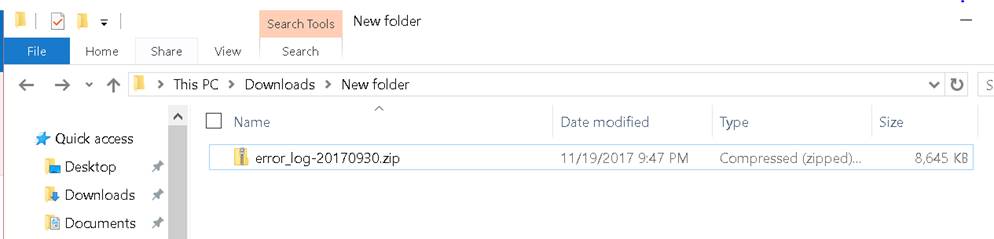
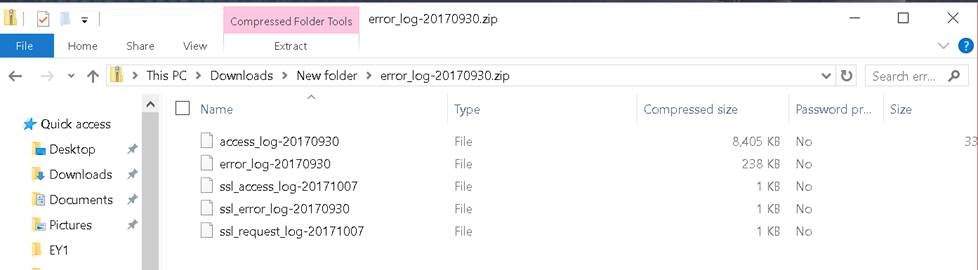
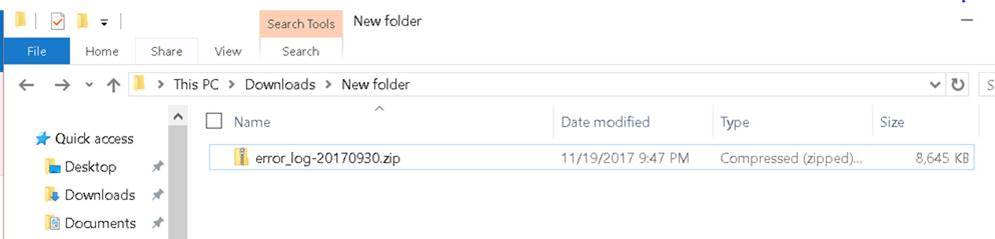
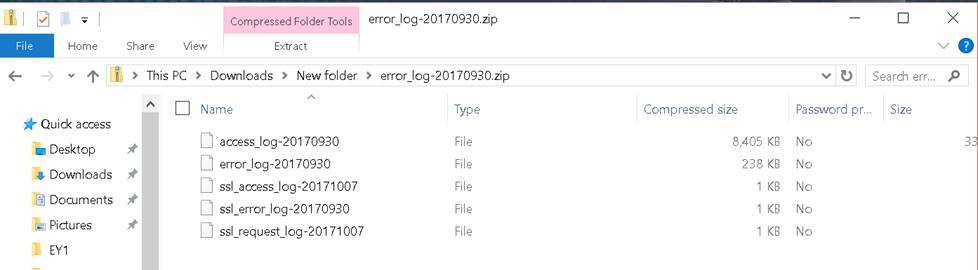
Below are the snapshot of the file attachment I’ve sent and I did not see 1_Warning.txt. Do you mean you only receive the .txt and not the error-log.?

[cid:image003.jpg at 01D361C0.D091AF60]

[cid:image004.jpg at 01D361C0.D091AF60]

Sincerely,
Leus
▸
From: David Boyer [mailto:user-a6c09f28d9d2@xymon.invalid]
Sent: Monday, November 20, 2017 2:54 AM
To: Leus Jr, Jose <user-b46c364676ee@xymon.invalid>
Subject: Re: [Xymon] Xymon to monitor HP OpenVMS
Looking at the 1_Warning.txt file, it appears that the McAfee software is removing the file before xymon has access.
Dave
▸
On Sun, Nov 19, 2017 at 8:53 AM, Leus Jr, Jose <user-b46c364676ee@xymon.invalid<mailto:user-b46c364676ee@xymon.invalid>> wrote:
Hi Jeremy,

Apology I overlooked this mail.

First, thank you very much for your response.

There is no CPU graph in CPU Trends as checked.

Attached herewith are the logs from /var/log/httpd

Sincerely,
Leus

From: Jeremy Laidman [mailto:user-71895fb2e44c@xymon.invalid<mailto:user-71895fb2e44c@xymon.invalid>]
Sent: Thursday, November 9, 2017 11:00 AM
To: Leus Jr, Jose <user-b46c364676ee@xymon.invalid<mailto:user-b46c364676ee@xymon.invalid>>
Cc: xymon at xymon.com<mailto:xymon at xymon.com>
Subject: Re: [Xymon] Xymon to monitor HP OpenVMS

Jose

The broken graph appears to be an attempt to execute /xymon-cgi/svcstatus.sh as a CGI script. There are a few reasons this might fail.

The first place I would look is the Apache server logfile. This may show the reason why svcstatus.sh failed to execute correctly.

Do you see the CPU graph showing on the "trends" page?

Cheers
Jeremy


On 15 September 2017 at 06:00, Leus Jr, Jose <user-b46c364676ee@xymon.invalid<mailto:user-b46c364676ee@xymon.invalid>> wrote:
Hi Xymon Team,

I am a big fan of your monitoring system. I started to use hobbit since 2007 and now using xymon to watch my systems being manage.

OpenVMS is one of the system that I need to monitor closely. At this time I was able to monitor hdd, connection , procs and cpu only. But as you can see below, the graph for cpu utilization is not displayed. I still need to add other system resources but im having difficulties to integrate it. I would like to seek for your expert assistance to fully monitor our OpenVMS system. Please advise if we can set a conference call to discuss. Our team will allocate budget for development work needed.

I am hoping for your positive response on this matter. Have a nice day to all!
[cid:image005.jpg at 01D361C0.D091AF60][cid:image006.jpg at 01D361C0.D091AF60]

Sincerely,
Leus
Attachments (2)
 attachment.jpg
 attachment-0001.jpg
list Jose Leus Jr
Hi David,

Just in case my assumption previously is true, here’s the renamed .zip file.

Sincerely,
Leus
▸
From: Leus Jr, Jose
Sent: Monday, November 20, 2017 5:32 AM
To: David Boyer <user-a6c09f28d9d2@xymon.invalid>
Cc: 'xymon at xymon.com' <xymon at xymon.com>
Subject: RE: [Xymon] Xymon to monitor HP OpenVMS

Hi David,

Below are the snapshot of the file attachment I’ve sent and I did not see 1_Warning.txt. Do you mean you only receive the .txt and not the error-log.?
[cid:image001.jpg at 01D361C1.4B423950]

[cid:image002.jpg at 01D361C1.4B423950]
▸
Sincerely,
Leus

From: David Boyer [mailto:user-a6c09f28d9d2@xymon.invalid]
Sent: Monday, November 20, 2017 2:54 AM
To: Leus Jr, Jose <user-b46c364676ee@xymon.invalid<mailto:user-b46c364676ee@xymon.invalid>>
Subject: Re: [Xymon] Xymon to monitor HP OpenVMS

Looking at the 1_Warning.txt file, it appears that the McAfee software is removing the file before xymon has access.
Dave

On Sun, Nov 19, 2017 at 8:53 AM, Leus Jr, Jose <user-b46c364676ee@xymon.invalid<mailto:user-b46c364676ee@xymon.invalid>> wrote:
Hi Jeremy,

Apology I overlooked this mail.

First, thank you very much for your response.

There is no CPU graph in CPU Trends as checked.

Attached herewith are the logs from /var/log/httpd

Sincerely,
Leus

From: Jeremy Laidman [mailto:user-71895fb2e44c@xymon.invalid<mailto:user-71895fb2e44c@xymon.invalid>]
Sent: Thursday, November 9, 2017 11:00 AM
To: Leus Jr, Jose <user-b46c364676ee@xymon.invalid<mailto:user-b46c364676ee@xymon.invalid>>
Cc: xymon at xymon.com<mailto:xymon at xymon.com>
Subject: Re: [Xymon] Xymon to monitor HP OpenVMS

Jose

The broken graph appears to be an attempt to execute /xymon-cgi/svcstatus.sh as a CGI script. There are a few reasons this might fail.

The first place I would look is the Apache server logfile. This may show the reason why svcstatus.sh failed to execute correctly.

Do you see the CPU graph showing on the "trends" page?

Cheers
Jeremy


On 15 September 2017 at 06:00, Leus Jr, Jose <user-b46c364676ee@xymon.invalid<mailto:user-b46c364676ee@xymon.invalid>> wrote:
Hi Xymon Team,

I am a big fan of your monitoring system. I started to use hobbit since 2007 and now using xymon to watch my systems being manage.

OpenVMS is one of the system that I need to monitor closely. At this time I was able to monitor hdd, connection , procs and cpu only. But as you can see below, the graph for cpu utilization is not displayed. I still need to add other system resources but im having difficulties to integrate it. I would like to seek for your expert assistance to fully monitor our OpenVMS system. Please advise if we can set a conference call to discuss. Our team will allocate budget for development work needed.

I am hoping for your positive response on this matter. Have a nice day to all!
[cid:image005.jpg at 01D361C1.4B423950][cid:image006.jpg at 01D361C1.4B423950]

Sincerely,
Leus
Attachments (3)
 attachment.jpg
 attachment-0001.jpg
list Jeremy Laidman
Yes, me too. Only the 1_Warning.txt from McAfee came through.

It might be best if you look at the Apache error log, rather than sending
it to the list. Perhaps tail the log at the time you're looking at the CPU
page with the broken graph, so you can more easily correlate the failure
with the log entries. If you're not sure what the log messages mean, then
it's likely there will only be a few messages, and you could include them
in an email, rather than attaching a large (>100MB) file.

Cheers
Jeremy
▸
On 20 November 2017 at 08:31, Leus Jr, Jose <user-b46c364676ee@xymon.invalid> wrote:
Hi David,


Below are the snapshot of the file attachment I’ve sent and I did not see
1_Warning.txt. Do you mean you only receive the .txt and not the error-log.?


Sincerely,

Leus


*From:* David Boyer [mailto:user-a6c09f28d9d2@xymon.invalid]
*Sent:* Monday, November 20, 2017 2:54 AM
*To:* Leus Jr, Jose <user-b46c364676ee@xymon.invalid>
*Subject:* Re: [Xymon] Xymon to monitor HP OpenVMS


Looking at the 1_Warning.txt file, it appears that the McAfee software is
removing the file before xymon has access.

Dave


On Sun, Nov 19, 2017 at 8:53 AM, Leus Jr, Jose <user-b46c364676ee@xymon.invalid>
wrote:

Hi Jeremy,


Apology I overlooked this mail.


First, thank you very much for your response.


There is no CPU graph in CPU Trends as checked.


Attached herewith are the logs from /var/log/httpd


Sincerely,

Leus


*From:* Jeremy Laidman [mailto:user-71895fb2e44c@xymon.invalid]
*Sent:* Thursday, November 9, 2017 11:00 AM
*To:* Leus Jr, Jose <user-b46c364676ee@xymon.invalid>
*Cc:* xymon at xymon.com
*Subject:* Re: [Xymon] Xymon to monitor HP OpenVMS


Jose


The broken graph appears to be an attempt to execute
/xymon-cgi/svcstatus.sh as a CGI script. There are a few reasons this might
fail.


The first place I would look is the Apache server logfile. This may show
the reason why svcstatus.sh failed to execute correctly.


Do you see the CPU graph showing on the "trends" page?


Cheers

Jeremy


On 15 September 2017 at 06:00, Leus Jr, Jose <user-b46c364676ee@xymon.invalid>
wrote:

Hi Xymon Team,


I am a big fan of your monitoring system. I started to use hobbit since
2007 and now using xymon to watch my systems being manage.


OpenVMS is one of the system that I need to monitor closely. At this time
I was able to monitor hdd, connection , procs and cpu only. But as you can
see below, the graph for cpu utilization is not displayed. I still need to
add other system resources but im having difficulties to integrate it. I
would like to seek for your expert assistance to fully monitor our OpenVMS
system. Please advise if we can set a conference call to discuss. Our team
will allocate budget for development work needed.


I am hoping for your positive response on this matter. Have a nice day to
all!


Sincerely,

Leus
list Jose Leus Jr
Hi Jeremy, David,


Below is the captured logs from tail -f error_log-20170930 during selection of any graphs. This is also appeared in other hosts being monitored except that, other hosts(linux,windows) cpu graphs are ok.

[Mon Nov 20 19:36:25 2017] [error] [client 10.116.131.209] 2017-11-20 19:36:25.250081 , referer: http://adgtbigbrother/xymon-cgi/showgraph.sh?host=promph1.analog.com&service=la&graph_width=576&graph_height=120&disp=promph1.analog.com&nostale&color=green&graph_start=1511004887&graph_end=1511177687&action=menu
[Mon Nov 20 19:36:25 2017] [error] [client 10.116.131.209] Sendto failed: Connection refused, referer: http://adgtbigbrother/xymon-cgi/showgraph.sh?host=promph1.analog.com&service=la&graph_width=576&graph_height=120&disp=promph1.analog.com&nostale&color=green&graph_start=1511004887&graph_end=1511177687&action=menu
[Mon Nov 20 19:36:25 2017] [error] [client 10.116.131.209] 2017-11-20 19:36:25.253708 , referer: http://adgtbigbrother/xymon-cgi/showgraph.sh?host=promph1.analog.com&service=la&graph_width=576&graph_height=120&disp=promph1.analog.com&nostale&color=green&graph_start=1511004887&graph_end=1511177687&action=menu
[Mon Nov 20 19:36:25 2017] [error] [client 10.116.131.209] Sendto failed: Connection refused, referer: http://adgtbigbrother/xymon-cgi/showgraph.sh?host=promph1.analog.com&service=la&graph_width=576&graph_height=120&disp=promph1.analog.com&nostale&color=green&graph_start=1511004887&graph_end=1511177687&action=menu
[Mon Nov 20 19:36:25 2017] [error] [client 10.116.131.209] 2017-11-20 19:36:25.255815 , referer: http://adgtbigbrother/xymon-cgi/showgraph.sh?host=promph1.analog.com&service=la&graph_width=576&graph_height=120&disp=promph1.analog.com&nostale&color=green&graph_start=1511004887&graph_end=1511177687&action=menu
[Mon Nov 20 19:36:25 2017] [error] [client 10.116.131.209] Sendto failed: Connection refused, referer: http://adgtbigbrother/xymon-cgi/showgraph.sh?host=promph1.analog.com&service=la&graph_width=576&graph_height=120&disp=promph1.analog.com&nostale&color=green&graph_start=1511004887&graph_end=1511177687&action=menu
[Mon Nov 20 19:36:25 2017] [error] [client 10.116.131.209] 2017-11-20 19:36:25.256007 , referer: http://adgtbigbrother/xymon-cgi/showgraph.sh?host=promph1.analog.com&service=la&graph_width=576&graph_height=120&disp=promph1.analog.com&nostale&color=green&graph_start=1511004887&graph_end=1511177687&action=menu
[Mon Nov 20 19:36:25 2017] [error] [client 10.116.131.209] Sendto failed: Connection refused, referer: http://adgtbigbrother/xymon-cgi/showgraph.sh?host=promph1.analog.com&service=la&graph_width=576&graph_height=120&disp=promph1.analog.com&nostale&color=green&graph_start=1511004887&graph_end=1511177687&action=menu
[Mon Nov 20 19:36:25 2017] [error] [client 10.116.131.209] 2017-11-20 19:36:25.265461 , referer: http://adgtbigbrother/xymon-cgi/showgraph.sh?host=promph1.analog.com&service=la&graph_width=576&graph_height=120&disp=promph1.analog.com&nostale&color=green&graph_start=1511004887&graph_end=1511177687&action=menu
[Mon Nov 20 19:36:25 2017] [error] [client 10.116.131.209] Sendto failed: Connection refused, referer: http://adgtbigbrother/xymon-cgi/showgraph.sh?host=promph1.analog.com&service=la&graph_width=576&graph_height=120&disp=promph1.analog.com&nostale&color=green&graph_start=1511004887&graph_end=1511177687&action=menu
[Mon Nov 20 19:36:25 2017] [error] [client 10.116.131.209] 2017-11-20 19:36:25.268706 , referer: http://adgtbigbrother/xymon-cgi/showgraph.sh?host=promph1.analog.com&service=la&graph_width=576&graph_height=120&disp=promph1.analog.com&nostale&color=green&graph_start=1511004887&graph_end=1511177687&action=menu
[Mon Nov 20 19:36:25 2017] [error] [client 10.116.131.209] Sendto failed: Connection refused, referer: http://adgtbigbrother/xymon-cgi/showgraph.sh?host=promph1.analog.com&service=la&graph_width=576&graph_height=120&disp=promph1.analog.com&nostale&color=green&graph_start=1511004887&graph_end=1511177687&action=menu
[Mon Nov 20 19:36:25 2017] [error] [client 10.116.131.209] 2017-11-20 19:36:25.271303 , referer: http://adgtbigbrother/xymon-cgi/showgraph.sh?host=promph1.analog.com&service=la&graph_width=576&graph_height=120&disp=promph1.analog.com&nostale&color=green&graph_start=1511004887&graph_end=1511177687&action=menu
[Mon Nov 20 19:36:25 2017] [error] [client 10.116.131.209] Sendto failed: Connection refused, referer: http://adgtbigbrother/xymon-cgi/showgraph.sh?host=promph1.analog.com&service=la&graph_width=576&graph_height=120&disp=promph1.analog.com&nostale&color=green&graph_start=1511004887&graph_end=1511177687&action=menu
[Mon Nov 20 19:36:25 2017] [error] [client 10.116.131.209] 2017-11-20 19:36:25.271476 , referer: http://adgtbigbrother/xymon-cgi/showgraph.sh?host=promph1.analog.com&service=la&graph_width=576&graph_height=120&disp=promph1.analog.com&nostale&color=green&graph_start=1511004887&graph_end=1511177687&action=menu
[Mon Nov 20 19:36:25 2017] [error] [client 10.116.131.209] Sendto failed: Connection refused, referer: http://adgtbigbrother/xymon-cgi/showgraph.sh?host=promph1.analog.com&service=la&graph_width=576&graph_height=120&disp=promph1.analog.com&nostale&color=green&graph_start=1511004887&graph_end=1511177687&action=menu
[Mon Nov 20 19:37:29 2017] [error] [client 10.116.131.209] 2017-11-20 19:37:29.901849 , referer: http://adgtbigbrother/xymon-cgi/svcstatus.sh?HOST=promph1.analog.com&SERVICE=conn
[Mon Nov 20 19:37:29 2017] [error] [client 10.116.131.209] Sendto failed: Connection refused, referer: http://adgtbigbrother/xymon-cgi/svcstatus.sh?HOST=promph1.analog.com&SERVICE=conn
[Mon Nov 20 19:37:29 2017] [error] [client 10.116.131.209] 2017-11-20 19:37:29.902058 , referer: http://adgtbigbrother/xymon-cgi/svcstatus.sh?HOST=promph1.analog.com&SERVICE=conn
[Mon Nov 20 19:37:29 2017] [error] [client 10.116.131.209] Sendto failed: Connection refused, referer: http://adgtbigbrother/xymon-cgi/svcstatus.sh?HOST=promph1.analog.com&SERVICE=conn
[Mon Nov 20 19:37:53 2017] [error] [client 10.116.131.209] 2017-11-20 19:37:53.076192 , referer: http://adgtbigbrother/xymon-cgi/svcstatus.sh?HOST=promph1.analog.com&SERVICE=disk
[Mon Nov 20 19:37:53 2017] [error] [client 10.116.131.209] Sendto failed: Connection refused, referer: http://adgtbigbrother/xymon-cgi/svcstatus.sh?HOST=promph1.analog.com&SERVICE=disk
[Mon Nov 20 19:37:53 2017] [error] [client 10.116.131.209] 2017-11-20 19:37:53.076388 , referer: http://adgtbigbrother/xymon-cgi/svcstatus.sh?HOST=promph1.analog.com&SERVICE=disk
[Mon Nov 20 19:37:53 2017] [error] [client 10.116.131.209] Sendto failed: Connection refused, referer: http://adgtbigbrother/xymon-cgi/svcstatus.sh?HOST=promph1.analog.com&SERVICE=disk
[Mon Nov 20 19:37:53 2017] [error] [client 10.116.131.209] 2017-11-20 19:37:53.083368 , referer: http://adgtbigbrother/xymon-cgi/svcstatus.sh?HOST=promph1.analog.com&SERVICE=disk
[Mon Nov 20 19:37:53 2017] [error] [client 10.116.131.209] Sendto failed: Connection refused, referer: http://adgtbigbrother/xymon-cgi/svcstatus.sh?HOST=promph1.analog.com&SERVICE=disk
[Mon Nov 20 19:37:53 2017] [error] [client 10.116.131.209] 2017-11-20 19:37:53.083768 , referer: http://adgtbigbrother/xymon-cgi/svcstatus.sh?HOST=promph1.analog.com&SERVICE=disk
[Mon Nov 20 19:37:53 2017] [error] [client 10.116.131.209] Sendto failed: Connection refused, referer: http://adgtbigbrother/xymon-cgi/svcstatus.sh?HOST=promph1.analog.com&SERVICE=disk
[Mon Nov 20 19:37:53 2017] [error] [client 10.116.131.209] 2017-11-20 19:37:53.089486 , referer: http://adgtbigbrother/xymon-cgi/svcstatus.sh?HOST=promph1.analog.com&SERVICE=disk
[Mon Nov 20 19:37:53 2017] [error] [client 10.116.131.209] Sendto failed: Connection refused, referer: http://adgtbigbrother/xymon-cgi/svcstatus.sh?HOST=promph1.analog.com&SERVICE=disk
[Mon Nov 20 19:37:53 2017] [error] [client 10.116.131.209] 2017-11-20 19:37:53.089697 , referer: http://adgtbigbrother/xymon-cgi/svcstatus.sh?HOST=promph1.analog.com&SERVICE=disk
[Mon Nov 20 19:37:53 2017] [error] [client 10.116.131.209] Sendto failed: Connection refused, referer: http://adgtbigbrother/xymon-cgi/svcstatus.sh?HOST=promph1.analog.com&SERVICE=disk
▸
Sincerely,
Leus

From: Jeremy Laidman [mailto:user-71895fb2e44c@xymon.invalid]
Sent: Monday, November 20, 2017 7:33 AM
To: Leus Jr, Jose <user-b46c364676ee@xymon.invalid>
Cc: David Boyer <user-a6c09f28d9d2@xymon.invalid>; xymon at xymon.com
Subject: Re: [Xymon] Xymon to monitor HP OpenVMS

Yes, me too. Only the 1_Warning.txt from McAfee came through.

It might be best if you look at the Apache error log, rather than sending it to the list. Perhaps tail the log at the time you're looking at the CPU page with the broken graph, so you can more easily correlate the failure with the log entries. If you're not sure what the log messages mean, then it's likely there will only be a few messages, and you could include them in an email, rather than attaching a large (>100MB) file.

Cheers
Jeremy


On 20 November 2017 at 08:31, Leus Jr, Jose <user-b46c364676ee@xymon.invalid<mailto:user-b46c364676ee@xymon.invalid>> wrote:
Hi David,

Below are the snapshot of the file attachment I’ve sent and I did not see 1_Warning.txt. Do you mean you only receive the .txt and not the error-log.?
[cid:image002.jpg at 01D36238.1F990910]

[cid:image004.jpg at 01D36238.1F990910]

Sincerely,
Leus
▸
From: David Boyer [mailto:user-a6c09f28d9d2@xymon.invalid<mailto:user-a6c09f28d9d2@xymon.invalid>]
Sent: Monday, November 20, 2017 2:54 AM
To: Leus Jr, Jose <user-b46c364676ee@xymon.invalid<mailto:user-b46c364676ee@xymon.invalid>>
Subject: Re: [Xymon] Xymon to monitor HP OpenVMS

Looking at the 1_Warning.txt file, it appears that the McAfee software is removing the file before xymon has access.
Dave

On Sun, Nov 19, 2017 at 8:53 AM, Leus Jr, Jose <user-b46c364676ee@xymon.invalid<mailto:user-b46c364676ee@xymon.invalid>> wrote:
Hi Jeremy,

Apology I overlooked this mail.

First, thank you very much for your response.

There is no CPU graph in CPU Trends as checked.

Attached herewith are the logs from /var/log/httpd

Sincerely,
Leus

From: Jeremy Laidman [mailto:user-71895fb2e44c@xymon.invalid<mailto:user-71895fb2e44c@xymon.invalid>]
Sent: Thursday, November 9, 2017 11:00 AM
To: Leus Jr, Jose <user-b46c364676ee@xymon.invalid<mailto:user-b46c364676ee@xymon.invalid>>
Cc: xymon at xymon.com<mailto:xymon at xymon.com>
Subject: Re: [Xymon] Xymon to monitor HP OpenVMS

Jose

The broken graph appears to be an attempt to execute /xymon-cgi/svcstatus.sh as a CGI script. There are a few reasons this might fail.

The first place I would look is the Apache server logfile. This may show the reason why svcstatus.sh failed to execute correctly.

Do you see the CPU graph showing on the "trends" page?

Cheers
Jeremy


On 15 September 2017 at 06:00, Leus Jr, Jose <user-b46c364676ee@xymon.invalid<mailto:user-b46c364676ee@xymon.invalid>> wrote:
Hi Xymon Team,

I am a big fan of your monitoring system. I started to use hobbit since 2007 and now using xymon to watch my systems being manage.

OpenVMS is one of the system that I need to monitor closely. At this time I was able to monitor hdd, connection , procs and cpu only. But as you can see below, the graph for cpu utilization is not displayed. I still need to add other system resources but im having difficulties to integrate it. I would like to seek for your expert assistance to fully monitor our OpenVMS system. Please advise if we can set a conference call to discuss. Our team will allocate budget for development work needed.

I am hoping for your positive response on this matter. Have a nice day to all!
[cid:image005.jpg at 01D36238.1F990910][cid:image006.jpg at 01D36238.1F990910]

Sincerely,
Leus
list Jose Leus Jr
Resending,


From: Leus Jr, Jose
Sent: Monday, November 20, 2017 7:49 PM
To: Jeremy Laidman <user-71895fb2e44c@xymon.invalid>; David Boyer <user-a6c09f28d9d2@xymon.invalid>
Cc: xymon at xymon.com
Subject: RE: [Xymon] Xymon to monitor HP OpenVMS

Hi Jeremy, David,


Below is the captured logs from tail -f error_log-20170930 during selection of any graphs. This is also appeared in other hosts being monitored except that, other hosts(linux,windows) cpu graphs are ok.

[Mon Nov 20 19:36:25 2017] [error] [client 10.116.131.209] 2017-11-20 19:36:25.250081 , referer: http://adgtbigbrother/xymon-cgi/showgraph.sh?host=promph1.analog.com&service=la&graph_width=576&graph_height=120&disp=promph1.analog.com&nostale&color=green&graph_start=1511004887&graph_end=1511177687&action=menu
[Mon Nov 20 19:36:25 2017] [error] [client 10.116.131.209] Sendto failed: Connection refused, referer: http://adgtbigbrother/xymon-cgi/showgraph.sh?host=promph1.analog.com&service=la&graph_width=576&graph_height=120&disp=promph1.analog.com&nostale&color=green&graph_start=1511004887&graph_end=1511177687&action=menu
[Mon Nov 20 19:36:25 2017] [error] [client 10.116.131.209] 2017-11-20 19:36:25.253708 , referer: http://adgtbigbrother/xymon-cgi/showgraph.sh?host=promph1.analog.com&service=la&graph_width=576&graph_height=120&disp=promph1.analog.com&nostale&color=green&graph_start=1511004887&graph_end=1511177687&action=menu
[Mon Nov 20 19:36:25 2017] [error] [client 10.116.131.209] Sendto failed: Connection refused, referer: http://adgtbigbrother/xymon-cgi/showgraph.sh?host=promph1.analog.com&service=la&graph_width=576&graph_height=120&disp=promph1.analog.com&nostale&color=green&graph_start=1511004887&graph_end=1511177687&action=menu
[Mon Nov 20 19:36:25 2017] [error] [client 10.116.131.209] 2017-11-20 19:36:25.255815 , referer: http://adgtbigbrother/xymon-cgi/showgraph.sh?host=promph1.analog.com&service=la&graph_width=576&graph_height=120&disp=promph1.analog.com&nostale&color=green&graph_start=1511004887&graph_end=1511177687&action=menu
[Mon Nov 20 19:36:25 2017] [error] [client 10.116.131.209] Sendto failed: Connection refused, referer: http://adgtbigbrother/xymon-cgi/showgraph.sh?host=promph1.analog.com&service=la&graph_width=576&graph_height=120&disp=promph1.analog.com&nostale&color=green&graph_start=1511004887&graph_end=1511177687&action=menu
[Mon Nov 20 19:36:25 2017] [error] [client 10.116.131.209] 2017-11-20 19:36:25.256007 , referer: http://adgtbigbrother/xymon-cgi/showgraph.sh?host=promph1.analog.com&service=la&graph_width=576&graph_height=120&disp=promph1.analog.com&nostale&color=green&graph_start=1511004887&graph_end=1511177687&action=menu
[Mon Nov 20 19:36:25 2017] [error] [client 10.116.131.209] Sendto failed: Connection refused, referer: http://adgtbigbrother/xymon-cgi/showgraph.sh?host=promph1.analog.com&service=la&graph_width=576&graph_height=120&disp=promph1.analog.com&nostale&color=green&graph_start=1511004887&graph_end=1511177687&action=menu
[Mon Nov 20 19:36:25 2017] [error] [client 10.116.131.209] 2017-11-20 19:36:25.265461 , referer: http://adgtbigbrother/xymon-cgi/showgraph.sh?host=promph1.analog.com&service=la&graph_width=576&graph_height=120&disp=promph1.analog.com&nostale&color=green&graph_start=1511004887&graph_end=1511177687&action=menu
[Mon Nov 20 19:36:25 2017] [error] [client 10.116.131.209] Sendto failed: Connection refused, referer: http://adgtbigbrother/xymon-cgi/showgraph.sh?host=promph1.analog.com&service=la&graph_width=576&graph_height=120&disp=promph1.analog.com&nostale&color=green&graph_start=1511004887&graph_end=1511177687&action=menu
[Mon Nov 20 19:36:25 2017] [error] [client 10.116.131.209] 2017-11-20 19:36:25.268706 , referer: http://adgtbigbrother/xymon-cgi/showgraph.sh?host=promph1.analog.com&service=la&graph_width=576&graph_height=120&disp=promph1.analog.com&nostale&color=green&graph_start=1511004887&graph_end=1511177687&action=menu
[Mon Nov 20 19:36:25 2017] [error] [client 10.116.131.209] Sendto failed: Connection refused, referer: http://adgtbigbrother/xymon-cgi/showgraph.sh?host=promph1.analog.com&service=la&graph_width=576&graph_height=120&disp=promph1.analog.com&nostale&color=green&graph_start=1511004887&graph_end=1511177687&action=menu
[Mon Nov 20 19:36:25 2017] [error] [client 10.116.131.209] 2017-11-20 19:36:25.271303 , referer: http://adgtbigbrother/xymon-cgi/showgraph.sh?host=promph1.analog.com&service=la&graph_width=576&graph_height=120&disp=promph1.analog.com&nostale&color=green&graph_start=1511004887&graph_end=1511177687&action=menu
[Mon Nov 20 19:36:25 2017] [error] [client 10.116.131.209] Sendto failed: Connection refused, referer: http://adgtbigbrother/xymon-cgi/showgraph.sh?host=promph1.analog.com&service=la&graph_width=576&graph_height=120&disp=promph1.analog.com&nostale&color=green&graph_start=1511004887&graph_end=1511177687&action=menu
[Mon Nov 20 19:36:25 2017] [error] [client 10.116.131.209] 2017-11-20 19:36:25.271476 , referer: http://adgtbigbrother/xymon-cgi/showgraph.sh?host=promph1.analog.com&service=la&graph_width=576&graph_height=120&disp=promph1.analog.com&nostale&color=green&graph_start=1511004887&graph_end=1511177687&action=menu
[Mon Nov 20 19:36:25 2017] [error] [client 10.116.131.209] Sendto failed: Connection refused, referer: http://adgtbigbrother/xymon-cgi/showgraph.sh?host=promph1.analog.com&service=la&graph_width=576&graph_height=120&disp=promph1.analog.com&nostale&color=green&graph_start=1511004887&graph_end=1511177687&action=menu
[Mon Nov 20 19:37:29 2017] [error] [client 10.116.131.209] 2017-11-20 19:37:29.901849 , referer: http://adgtbigbrother/xymon-cgi/svcstatus.sh?HOST=promph1.analog.com&SERVICE=conn
[Mon Nov 20 19:37:29 2017] [error] [client 10.116.131.209] Sendto failed: Connection refused, referer: http://adgtbigbrother/xymon-cgi/svcstatus.sh?HOST=promph1.analog.com&SERVICE=conn
[Mon Nov 20 19:37:29 2017] [error] [client 10.116.131.209] 2017-11-20 19:37:29.902058 , referer: http://adgtbigbrother/xymon-cgi/svcstatus.sh?HOST=promph1.analog.com&SERVICE=conn
[Mon Nov 20 19:37:29 2017] [error] [client 10.116.131.209] Sendto failed: Connection refused, referer: http://adgtbigbrother/xymon-cgi/svcstatus.sh?HOST=promph1.analog.com&SERVICE=conn
[Mon Nov 20 19:37:53 2017] [error] [client 10.116.131.209] 2017-11-20 19:37:53.076192 , referer: http://adgtbigbrother/xymon-cgi/svcstatus.sh?HOST=promph1.analog.com&SERVICE=disk
[Mon Nov 20 19:37:53 2017] [error] [client 10.116.131.209] Sendto failed: Connection refused, referer: http://adgtbigbrother/xymon-cgi/svcstatus.sh?HOST=promph1.analog.com&SERVICE=disk
[Mon Nov 20 19:37:53 2017] [error] [client 10.116.131.209] 2017-11-20 19:37:53.076388 , referer: http://adgtbigbrother/xymon-cgi/svcstatus.sh?HOST=promph1.analog.com&SERVICE=disk
[Mon Nov 20 19:37:53 2017] [error] [client 10.116.131.209] Sendto failed: Connection refused, referer: http://adgtbigbrother/xymon-cgi/svcstatus.sh?HOST=promph1.analog.com&SERVICE=disk
[Mon Nov 20 19:37:53 2017] [error] [client 10.116.131.209] 2017-11-20 19:37:53.083368 , referer: http://adgtbigbrother/xymon-cgi/svcstatus.sh?HOST=promph1.analog.com&SERVICE=disk
[Mon Nov 20 19:37:53 2017] [error] [client 10.116.131.209] Sendto failed: Connection refused, referer: http://adgtbigbrother/xymon-cgi/svcstatus.sh?HOST=promph1.analog.com&SERVICE=disk
[Mon Nov 20 19:37:53 2017] [error] [client 10.116.131.209] 2017-11-20 19:37:53.083768 , referer: http://adgtbigbrother/xymon-cgi/svcstatus.sh?HOST=promph1.analog.com&SERVICE=disk
[Mon Nov 20 19:37:53 2017] [error] [client 10.116.131.209] Sendto failed: Connection refused, referer: http://adgtbigbrother/xymon-cgi/svcstatus.sh?HOST=promph1.analog.com&SERVICE=disk
[Mon Nov 20 19:37:53 2017] [error] [client 10.116.131.209] 2017-11-20 19:37:53.089486 , referer: http://adgtbigbrother/xymon-cgi/svcstatus.sh?HOST=promph1.analog.com&SERVICE=disk
[Mon Nov 20 19:37:53 2017] [error] [client 10.116.131.209] Sendto failed: Connection refused, referer: http://adgtbigbrother/xymon-cgi/svcstatus.sh?HOST=promph1.analog.com&SERVICE=disk
[Mon Nov 20 19:37:53 2017] [error] [client 10.116.131.209] 2017-11-20 19:37:53.089697 , referer: http://adgtbigbrother/xymon-cgi/svcstatus.sh?HOST=promph1.analog.com&SERVICE=disk
[Mon Nov 20 19:37:53 2017] [error] [client 10.116.131.209] Sendto failed: Connection refused, referer: http://adgtbigbrother/xymon-cgi/svcstatus.sh?HOST=promph1.analog.com&SERVICE=disk

Sincerely,
Leus
list Jeremy Laidman
Might be the same problem and solution described here:

http://lists.xymon.com/archive/2013-September/038150.html


[Mon Nov 20 19:36:25 2017] [error] [client 10.116.131.209] 2017-11-20
19:36:25.250081 , referer: http://adgtbigbrother/xymon-
cgi/showgraph.sh?host=promph1.analog.com&service=la&graph_
width=576&graph_height=120&disp=promph1.analog.com&
nostale&color=green&graph_start=1511004887&graph_end=
1511177687&action=menu

[Mon Nov 20 19:36:25 2017] [error] [client 10.116.131.209] Sendto failed:
Connection refused, referer: http://adgtbigbrother/xymon-
cgi/showgraph.sh?host=promph1.analog.com&service=la&graph_
width=576&graph_height=120&disp=promph1.analog.com&
nostale&color=green&graph_start=1511004887&graph_end=
1511177687&action=menu
list Jose Leus Jr
Hi Jeremy,

I tried to seach all directories  from xymon server but I did not find any rrdctl* files.
▸
Sincerely,
Leus

From: Jeremy Laidman [mailto:user-71895fb2e44c@xymon.invalid]
Sent: Monday, November 20, 2017 8:31 PM
To: Leus Jr, Jose <user-b46c364676ee@xymon.invalid>
Cc: David Boyer <user-a6c09f28d9d2@xymon.invalid>; xymon at xymon.com
Subject: Re: [Xymon] Xymon to monitor HP OpenVMS

Might be the same problem and solution described here:

http://lists.xymon.com/archive/2013-September/038150.html


[Mon Nov 20 19:36:25 2017] [error] [client 10.116.131.209] 2017-11-20 19:36:25.250081 , referer: http://adgtbigbrother/xymon-cgi/showgraph.sh?host=promph1.analog.com&service=la&graph_width=576&graph_height=120&disp=promph1.analog.com&nostale&color=green&graph_start=1511004887&graph_end=1511177687&action=menu
[Mon Nov 20 19:36:25 2017] [error] [client 10.116.131.209] Sendto failed: Connection refused, referer: http://adgtbigbrother/xymon-cgi/showgraph.sh?host=promph1.analog.com&service=la&graph_width=576&graph_height=120&disp=promph1.analog.com&nostale&color=green&graph_start=1511004887&graph_end=1511177687&action=menu
list Jeremy Laidman
Try this:

$ sudo lsof -p `pgrep xymond_rrd|head -1`

One of the files listed will be something like

/usr/lib/xymon/server/tmp/rrdctl.28279

Look in the same dir for other rrdctl.* files. There should be only two in
that directory, corresponding to the two xymond_rrd processes.

Another way:

$ xymoncmd sh -c 'ls -l $XYMONTMP/rrdctl.*'

Cheers
Jeremy
▸
On 21 November 2017 at 00:05, Leus Jr, Jose <user-b46c364676ee@xymon.invalid> wrote:
Hi Jeremy,


I tried to seach all directories  from xymon server but I did not find any
rrdctl* files.


Sincerely,

Leus


*From:* Jeremy Laidman [mailto:user-71895fb2e44c@xymon.invalid]
*Sent:* Monday, November 20, 2017 8:31 PM
*To:* Leus Jr, Jose <user-b46c364676ee@xymon.invalid>
*Cc:* David Boyer <user-a6c09f28d9d2@xymon.invalid>; xymon at xymon.com
*Subject:* Re: [Xymon] Xymon to monitor HP OpenVMS


Might be the same problem and solution described here:


http://lists.xymon.com/archive/2013-September/038150.html


[Mon Nov 20 19:36:25 2017] [error] [client 10.116.131.209] 2017-11-20
19:36:25.250081 , referer: http://adgtbigbrother/xymon-
cgi/showgraph.sh?host=promph1.analog.com&service=la&graph_
width=576&graph_height=120&disp=promph1.analog.com&
nostale&color=green&graph_start=1511004887&graph_end=
1511177687&action=menu

[Mon Nov 20 19:36:25 2017] [error] [client 10.116.131.209] Sendto failed:
Connection refused, referer: http://adgtbigbrother/xymon-
cgi/showgraph.sh?host=promph1.analog.com&service=la&graph_
width=576&graph_height=120&disp=promph1.analog.com&
nostale&color=green&graph_start=1511004887&graph_end=
1511177687&action=menu
list Jose Leus Jr
Thanks Jeremy. I was able to locate the rrdctl files and removed it. The error  in the logs now gone but the CPU graph for OpenVMS systems is not visible.

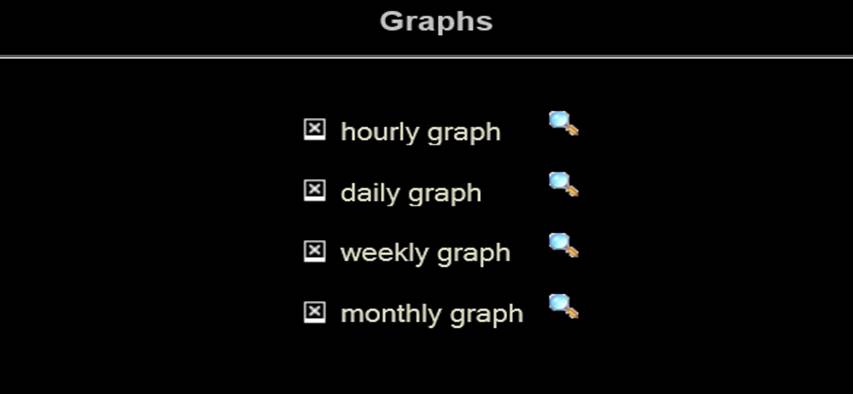
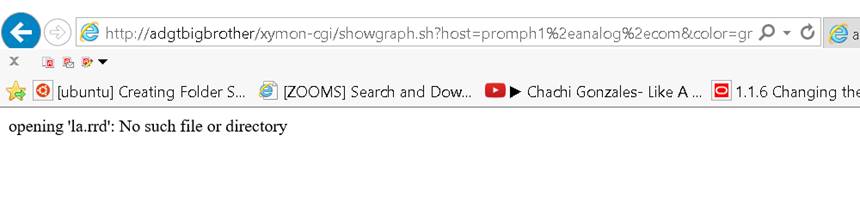
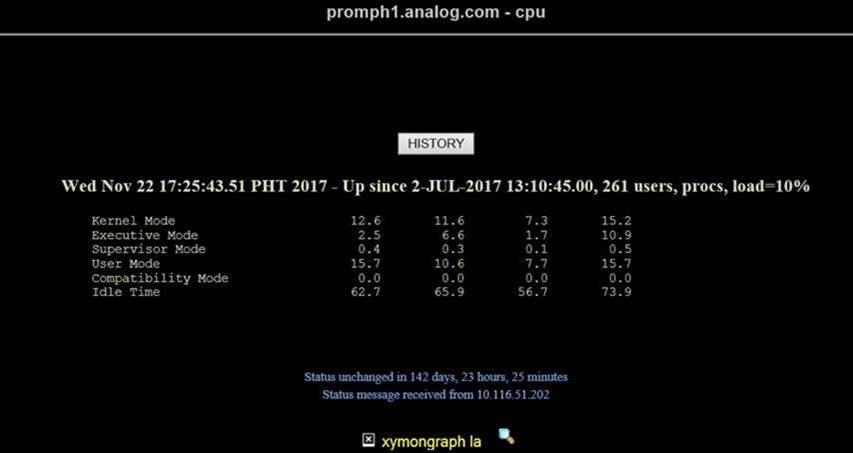
Below is the snapshots when accessing cpu graphs.

[cid:user-02227ae11c42@xymon.invalid8B480]

[cid:user-dd3f4c3d26e7@xymon.invalid8B480]

[cid:user-c8e8c928e6d6@xymon.invalid8B480]
▸
Sincerely,
Leus

From: Jeremy Laidman [mailto:user-71895fb2e44c@xymon.invalid]
Sent: Tuesday, November 21, 2017 9:03 AM
To: Leus Jr, Jose <user-b46c364676ee@xymon.invalid>
Cc: David Boyer <user-a6c09f28d9d2@xymon.invalid>; xymon at xymon.com
Subject: Re: [Xymon] Xymon to monitor HP OpenVMS

Try this:

$ sudo lsof -p `pgrep xymond_rrd|head -1`

One of the files listed will be something like

/usr/lib/xymon/server/tmp/rrdctl.28279

Look in the same dir for other rrdctl.* files. There should be only two in that directory, corresponding to the two xymond_rrd processes.

Another way:

$ xymoncmd sh -c 'ls -l $XYMONTMP/rrdctl.*'

Cheers
Jeremy


On 21 November 2017 at 00:05, Leus Jr, Jose <user-b46c364676ee@xymon.invalid<mailto:user-b46c364676ee@xymon.invalid>> wrote:
Hi Jeremy,

I tried to seach all directories  from xymon server but I did not find any rrdctl* files.


Sincerely,
Leus

From: Jeremy Laidman [mailto:user-71895fb2e44c@xymon.invalid<mailto:user-71895fb2e44c@xymon.invalid>]
Sent: Monday, November 20, 2017 8:31 PM
To: Leus Jr, Jose <user-b46c364676ee@xymon.invalid<mailto:user-b46c364676ee@xymon.invalid>>
Cc: David Boyer <user-a6c09f28d9d2@xymon.invalid<mailto:user-a6c09f28d9d2@xymon.invalid>>; xymon at xymon.com<mailto:xymon at xymon.com>
Subject: Re: [Xymon] Xymon to monitor HP OpenVMS

Might be the same problem and solution described here:

http://lists.xymon.com/archive/2013-September/038150.html


[Mon Nov 20 19:36:25 2017] [error] [client 10.116.131.209] 2017-11-20 19:36:25.250081 , referer: http://adgtbigbrother/xymon-cgi/showgraph.sh?host=promph1.analog.com&service=la&graph_width=576&graph_height=120&disp=promph1.analog.com&nostale&color=green&graph_start=1511004887&graph_end=1511177687&action=menu
[Mon Nov 20 19:36:25 2017] [error] [client 10.116.131.209] Sendto failed: Connection refused, referer: http://adgtbigbrother/xymon-cgi/showgraph.sh?host=promph1.analog.com&service=la&graph_width=576&graph_height=120&disp=promph1.analog.com&nostale&color=green&graph_start=1511004887&graph_end=1511177687&action=menu
Attachments (3)
 attachment.jpg
 attachment-0001.jpg
 attachment-0002.jpg
list Jeremy Laidman
Lues

Make sure you stop xymon, then remove all rrdctl files, then start xymon
again, and check that there are only two rrdctl files left.

Then re-try. If it continues to show problems, re-check the Apache logs to
see if there's another problem.

Cheers
Jeremy
▸
On 22 November 2017 at 20:31, Leus Jr, Jose <user-b46c364676ee@xymon.invalid> wrote:
Thanks Jeremy. I was able to locate the rrdctl files and removed it. The
error  in the logs now gone but the CPU graph for OpenVMS systems is not
visible.


Below is the snapshots when accessing cpu graphs.


Sincerely,

Leus


*From:* Jeremy Laidman [mailto:user-71895fb2e44c@xymon.invalid]
*Sent:* Tuesday, November 21, 2017 9:03 AM

*To:* Leus Jr, Jose <user-b46c364676ee@xymon.invalid>
*Cc:* David Boyer <user-a6c09f28d9d2@xymon.invalid>; xymon at xymon.com
*Subject:* Re: [Xymon] Xymon to monitor HP OpenVMS


Try this:


$ sudo lsof -p `pgrep xymond_rrd|head -1`


One of the files listed will be something like


/usr/lib/xymon/server/tmp/rrdctl.28279


Look in the same dir for other rrdctl.* files. There should be only two in
that directory, corresponding to the two xymond_rrd processes.


Another way:


$ xymoncmd sh -c 'ls -l $XYMONTMP/rrdctl.*'


Cheers

Jeremy


On 21 November 2017 at 00:05, Leus Jr, Jose <user-b46c364676ee@xymon.invalid>
wrote:

Hi Jeremy,


I tried to seach all directories  from xymon server but I did not find any
rrdctl* files.


Sincerely,

Leus


*From:* Jeremy Laidman [mailto:user-71895fb2e44c@xymon.invalid]
*Sent:* Monday, November 20, 2017 8:31 PM
*To:* Leus Jr, Jose <user-b46c364676ee@xymon.invalid>
*Cc:* David Boyer <user-a6c09f28d9d2@xymon.invalid>; xymon at xymon.com
*Subject:* Re: [Xymon] Xymon to monitor HP OpenVMS


Might be the same problem and solution described here:


http://lists.xymon.com/archive/2013-September/038150.html


[Mon Nov 20 19:36:25 2017] [error] [client 10.116.131.209] 2017-11-20
19:36:25.250081 , referer: http://adgtbigbrother/xymon-
cgi/showgraph.sh?host=promph1.analog.com&service=la&graph_
width=576&graph_height=120&disp=promph1.analog.com&
nostale&color=green&graph_start=1511004887&graph_end=
1511177687&action=menu

[Mon Nov 20 19:36:25 2017] [error] [client 10.116.131.209] Sendto failed:
Connection refused, referer: http://adgtbigbrother/xymon-
cgi/showgraph.sh?host=promph1.analog.com&service=la&graph_
width=576&graph_height=120&disp=promph1.analog.com&
nostale&color=green&graph_start=1511004887&graph_end=
1511177687&action=menu
list Jose Leus Jr
Hi Jeremy,

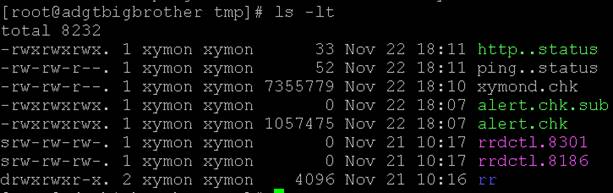
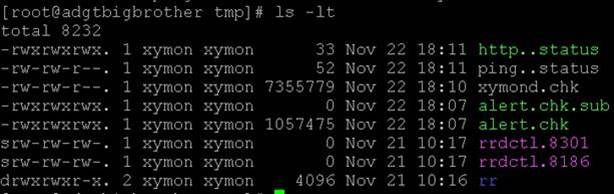
The xymon is stopped when I removed the files. At this time below are the remaining rrd.

[cid:image004.jpg at 01D363BE.E0AF3070]

Here’s the recent from log

[root at adgtbigbrother httpd]# tail -50 error_log-20170930
[Wed Nov 22 15:59:32 2017] [error] [client 10.116.101.69] Directory index forbidden by Options directive: /var/www/html/
[Wed Nov 22 16:04:35 2017] [error] [client 10.116.101.69] Directory index forbidden by Options directive: /var/www/html/
[Wed Nov 22 16:09:39 2017] [error] [client 10.116.101.69] Directory index forbidden by Options directive: /var/www/html/
[Wed Nov 22 16:14:43 2017] [error] [client 10.116.101.69] Directory index forbidden by Options directive: /var/www/html/
[Wed Nov 22 16:19:47 2017] [error] [client 10.116.101.69] Directory index forbidden by Options directive: /var/www/html/
[Wed Nov 22 16:24:50 2017] [error] [client 10.116.101.69] Directory index forbidden by Options directive: /var/www/html/
[Wed Nov 22 16:29:54 2017] [error] [client 10.116.101.69] Directory index forbidden by Options directive: /var/www/html/
[Wed Nov 22 16:34:58 2017] [error] [client 10.116.101.69] Directory index forbidden by Options directive: /var/www/html/
[Wed Nov 22 16:40:01 2017] [error] [client 10.116.101.69] Directory index forbidden by Options directive: /var/www/html/
[Wed Nov 22 16:45:06 2017] [error] [client 10.116.101.69] Directory index forbidden by Options directive: /var/www/html/
[Wed Nov 22 16:50:14 2017] [error] [client 10.116.101.69] Directory index forbidden by Options directive: /var/www/html/
[Wed Nov 22 16:55:09 2017] [error] [client 10.116.101.69] Directory index forbidden by Options directive: /var/www/html/
[Wed Nov 22 17:00:18 2017] [error] [client 10.116.101.69] Directory index forbidden by Options directive: /var/www/html/
[Wed Nov 22 17:05:14 2017] [error] [client 10.116.101.69] Directory index forbidden by Options directive: /var/www/html/
[Wed Nov 22 17:10:17 2017] [error] [client 10.116.101.69] Directory index forbidden by Options directive: /var/www/html/
[Wed Nov 22 17:15:21 2017] [error] [client 10.116.101.69] Directory index forbidden by Options directive: /var/www/html/
[Wed Nov 22 17:20:25 2017] [error] [client 10.116.101.69] Directory index forbidden by Options directive: /var/www/html/
[Wed Nov 22 17:23:11 2017] [error] [client 10.116.131.209] File does not exist: /var/www/html/favicon.ico
[Wed Nov 22 17:23:16 2017] [error] [client 10.116.131.209] File does not exist: /var/www/html/favicon.ico
[Wed Nov 22 17:25:28 2017] [error] [client 10.116.101.69] Directory index forbidden by Options directive: /var/www/html/
[Wed Nov 22 17:30:32 2017] [error] [client 10.116.101.69] Directory index forbidden by Options directive: /var/www/html/
[Wed Nov 22 17:35:36 2017] [error] [client 10.116.101.69] Directory index forbidden by Options directive: /var/www/html/
[Wed Nov 22 17:40:39 2017] [error] [client 10.116.101.69] Directory index forbidden by Options directive: /var/www/html/
[Wed Nov 22 17:45:44 2017] [error] [client 10.116.101.69] Directory index forbidden by Options directive: /var/www/html/
[Wed Nov 22 17:50:47 2017] [error] [client 10.116.101.69] Directory index forbidden by Options directive: /var/www/html/
[Wed Nov 22 17:55:51 2017] [error] [client 10.116.101.69] Directory index forbidden by Options directive: /var/www/html/
[Wed Nov 22 18:00:55 2017] [error] [client 10.116.101.69] Directory index forbidden by Options directive: /var/www/html/
[Wed Nov 22 18:05:59 2017] [error] [client 10.116.101.69] Directory index forbidden by Options directive: /var/www/html/
[Wed Nov 22 18:11:02 2017] [error] [client 10.116.101.69] Directory index forbidden by Options directive: /var/www/html/
[Wed Nov 22 18:16:06 2017] [error] [client 10.116.101.69] Directory index forbidden by Options directive: /var/www/html/
▸
Sincerely,
Leus

From: Jeremy Laidman [mailto:user-71895fb2e44c@xymon.invalid]
Sent: Wednesday, November 22, 2017 6:15 PM
To: Leus Jr, Jose <user-b46c364676ee@xymon.invalid>
Cc: David Boyer <user-a6c09f28d9d2@xymon.invalid>; xymon at xymon.com
Subject: Re: [Xymon] Xymon to monitor HP OpenVMS

Lues

Make sure you stop xymon, then remove all rrdctl files, then start xymon again, and check that there are only two rrdctl files left.

Then re-try. If it continues to show problems, re-check the Apache logs to see if there's another problem.

Cheers
Jeremy


On 22 November 2017 at 20:31, Leus Jr, Jose <user-b46c364676ee@xymon.invalid<mailto:user-b46c364676ee@xymon.invalid>> wrote:
Thanks Jeremy. I was able to locate the rrdctl files and removed it. The error  in the logs now gone but the CPU graph for OpenVMS systems is not visible.

Below is the snapshots when accessing cpu graphs.
[cid:image005.jpg at 01D363BE.E0AF3070]

[cid:image011.jpg at 01D363BE.E0AF3070]

[cid:image012.jpg at 01D363BE.E0AF3070]
▸
Sincerely,
Leus

From: Jeremy Laidman [mailto:user-71895fb2e44c@xymon.invalid<mailto:user-71895fb2e44c@xymon.invalid>]
Sent: Tuesday, November 21, 2017 9:03 AM

To: Leus Jr, Jose <user-b46c364676ee@xymon.invalid<mailto:user-b46c364676ee@xymon.invalid>>
Cc: David Boyer <user-a6c09f28d9d2@xymon.invalid<mailto:user-a6c09f28d9d2@xymon.invalid>>; xymon at xymon.com<mailto:xymon at xymon.com>
Subject: Re: [Xymon] Xymon to monitor HP OpenVMS

Try this:

$ sudo lsof -p `pgrep xymond_rrd|head -1`

One of the files listed will be something like

/usr/lib/xymon/server/tmp/rrdctl.28279

Look in the same dir for other rrdctl.* files. There should be only two in that directory, corresponding to the two xymond_rrd processes.

Another way:

$ xymoncmd sh -c 'ls -l $XYMONTMP/rrdctl.*'

Cheers
Jeremy


On 21 November 2017 at 00:05, Leus Jr, Jose <user-b46c364676ee@xymon.invalid<mailto:user-b46c364676ee@xymon.invalid>> wrote:
Hi Jeremy,

I tried to seach all directories  from xymon server but I did not find any rrdctl* files.


Sincerely,
Leus

From: Jeremy Laidman [mailto:user-71895fb2e44c@xymon.invalid<mailto:user-71895fb2e44c@xymon.invalid>]
Sent: Monday, November 20, 2017 8:31 PM
To: Leus Jr, Jose <user-b46c364676ee@xymon.invalid<mailto:user-b46c364676ee@xymon.invalid>>
Cc: David Boyer <user-a6c09f28d9d2@xymon.invalid<mailto:user-a6c09f28d9d2@xymon.invalid>>; xymon at xymon.com<mailto:xymon at xymon.com>
Subject: Re: [Xymon] Xymon to monitor HP OpenVMS

Might be the same problem and solution described here:

http://lists.xymon.com/archive/2013-September/038150.html


[Mon Nov 20 19:36:25 2017] [error] [client 10.116.131.209] 2017-11-20 19:36:25.250081 , referer: http://adgtbigbrother/xymon-cgi/showgraph.sh?host=promph1.analog.com&service=la&graph_width=576&graph_height=120&disp=promph1.analog.com&nostale&color=green&graph_start=1511004887&graph_end=1511177687&action=menu
[Mon Nov 20 19:36:25 2017] [error] [client 10.116.131.209] Sendto failed: Connection refused, referer: http://adgtbigbrother/xymon-cgi/showgraph.sh?host=promph1.analog.com&service=la&graph_width=576&graph_height=120&disp=promph1.analog.com&nostale&color=green&graph_start=1511004887&graph_end=1511177687&action=menu
Attachments (4)
 attachment.jpg
 attachment-0001.jpg
 attachment-0002.jpg
 attachment-0003.jpg
list Jeremy Laidman
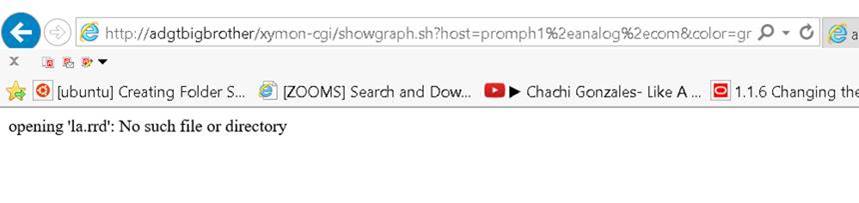
Those log files don't appear to be related to this problem. I suspect they
don't coincide with your viewing of the CPU page.

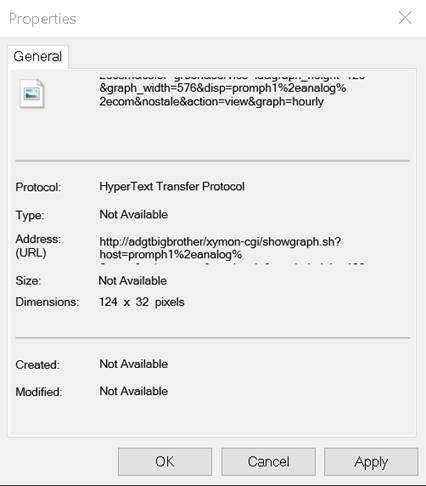
I'm going to assume you're running Internet Explorer (based on your
picture). Can you please right-click on the broken picture image next to
the magnifying glass, then select properties, and then copy the URL.
Finally, please paste the URL into your browser. Please tell me what it
shows, and also any new error log entries that show up at the same time.
▸
On 22 November 2017 at 21:22, Leus Jr, Jose <user-b46c364676ee@xymon.invalid> wrote:
Hi Jeremy,


The xymon is stopped when I removed the files. At this time below are the
remaining rrd.


Here’s the recent from log


[root at adgtbigbrother httpd]# tail -50 error_log-20170930

[Wed Nov 22 15:59:32 2017] [error] [client 10.116.101.69] Directory index
forbidden by Options directive: /var/www/html/

[Wed Nov 22 16:04:35 2017] [error] [client 10.116.101.69] Directory index
forbidden by Options directive: /var/www/html/

[Wed Nov 22 16:09:39 2017] [error] [client 10.116.101.69] Directory index
forbidden by Options directive: /var/www/html/

[Wed Nov 22 16:14:43 2017] [error] [client 10.116.101.69] Directory index
forbidden by Options directive: /var/www/html/

[Wed Nov 22 16:19:47 2017] [error] [client 10.116.101.69] Directory index
forbidden by Options directive: /var/www/html/

[Wed Nov 22 16:24:50 2017] [error] [client 10.116.101.69] Directory index
forbidden by Options directive: /var/www/html/

[Wed Nov 22 16:29:54 2017] [error] [client 10.116.101.69] Directory index
forbidden by Options directive: /var/www/html/

[Wed Nov 22 16:34:58 2017] [error] [client 10.116.101.69] Directory index
forbidden by Options directive: /var/www/html/

[Wed Nov 22 16:40:01 2017] [error] [client 10.116.101.69] Directory index
forbidden by Options directive: /var/www/html/

[Wed Nov 22 16:45:06 2017] [error] [client 10.116.101.69] Directory index
forbidden by Options directive: /var/www/html/

[Wed Nov 22 16:50:14 2017] [error] [client 10.116.101.69] Directory index
forbidden by Options directive: /var/www/html/

[Wed Nov 22 16:55:09 2017] [error] [client 10.116.101.69] Directory index
forbidden by Options directive: /var/www/html/

[Wed Nov 22 17:00:18 2017] [error] [client 10.116.101.69] Directory index
forbidden by Options directive: /var/www/html/

[Wed Nov 22 17:05:14 2017] [error] [client 10.116.101.69] Directory index
forbidden by Options directive: /var/www/html/

[Wed Nov 22 17:10:17 2017] [error] [client 10.116.101.69] Directory index
forbidden by Options directive: /var/www/html/

[Wed Nov 22 17:15:21 2017] [error] [client 10.116.101.69] Directory index
forbidden by Options directive: /var/www/html/

[Wed Nov 22 17:20:25 2017] [error] [client 10.116.101.69] Directory index
forbidden by Options directive: /var/www/html/

[Wed Nov 22 17:23:11 2017] [error] [client 10.116.131.209] File does not
exist: /var/www/html/favicon.ico

[Wed Nov 22 17:23:16 2017] [error] [client 10.116.131.209] File does not
exist: /var/www/html/favicon.ico

[Wed Nov 22 17:25:28 2017] [error] [client 10.116.101.69] Directory index
forbidden by Options directive: /var/www/html/

[Wed Nov 22 17:30:32 2017] [error] [client 10.116.101.69] Directory index
forbidden by Options directive: /var/www/html/

[Wed Nov 22 17:35:36 2017] [error] [client 10.116.101.69] Directory index
forbidden by Options directive: /var/www/html/

[Wed Nov 22 17:40:39 2017] [error] [client 10.116.101.69] Directory index
forbidden by Options directive: /var/www/html/

[Wed Nov 22 17:45:44 2017] [error] [client 10.116.101.69] Directory index
forbidden by Options directive: /var/www/html/

[Wed Nov 22 17:50:47 2017] [error] [client 10.116.101.69] Directory index
forbidden by Options directive: /var/www/html/

[Wed Nov 22 17:55:51 2017] [error] [client 10.116.101.69] Directory index
forbidden by Options directive: /var/www/html/

[Wed Nov 22 18:00:55 2017] [error] [client 10.116.101.69] Directory index
forbidden by Options directive: /var/www/html/

[Wed Nov 22 18:05:59 2017] [error] [client 10.116.101.69] Directory index
forbidden by Options directive: /var/www/html/

[Wed Nov 22 18:11:02 2017] [error] [client 10.116.101.69] Directory index
forbidden by Options directive: /var/www/html/

[Wed Nov 22 18:16:06 2017] [error] [client 10.116.101.69] Directory index
forbidden by Options directive: /var/www/html/


Sincerely,

Leus


*From:* Jeremy Laidman [mailto:user-71895fb2e44c@xymon.invalid]
*Sent:* Wednesday, November 22, 2017 6:15 PM

*To:* Leus Jr, Jose <user-b46c364676ee@xymon.invalid>
*Cc:* David Boyer <user-a6c09f28d9d2@xymon.invalid>; xymon at xymon.com
*Subject:* Re: [Xymon] Xymon to monitor HP OpenVMS


Lues


Make sure you stop xymon, then remove all rrdctl files, then start xymon
again, and check that there are only two rrdctl files left.


Then re-try. If it continues to show problems, re-check the Apache logs to
see if there's another problem.


Cheers

Jeremy


On 22 November 2017 at 20:31, Leus Jr, Jose <user-b46c364676ee@xymon.invalid>
wrote:

Thanks Jeremy. I was able to locate the rrdctl files and removed it. The
error  in the logs now gone but the CPU graph for OpenVMS systems is not
visible.


Below is the snapshots when accessing cpu graphs.


Sincerely,

Leus


*From:* Jeremy Laidman [mailto:user-71895fb2e44c@xymon.invalid]
*Sent:* Tuesday, November 21, 2017 9:03 AM


*To:* Leus Jr, Jose <user-b46c364676ee@xymon.invalid>
*Cc:* David Boyer <user-a6c09f28d9d2@xymon.invalid>; xymon at xymon.com
*Subject:* Re: [Xymon] Xymon to monitor HP OpenVMS


Try this:


$ sudo lsof -p `pgrep xymond_rrd|head -1`


One of the files listed will be something like


/usr/lib/xymon/server/tmp/rrdctl.28279


Look in the same dir for other rrdctl.* files. There should be only two in
that directory, corresponding to the two xymond_rrd processes.


Another way:


$ xymoncmd sh -c 'ls -l $XYMONTMP/rrdctl.*'


Cheers

Jeremy


On 21 November 2017 at 00:05, Leus Jr, Jose <user-b46c364676ee@xymon.invalid>
wrote:

Hi Jeremy,


I tried to seach all directories  from xymon server but I did not find any
rrdctl* files.


Sincerely,

Leus


*From:* Jeremy Laidman [mailto:user-71895fb2e44c@xymon.invalid]
*Sent:* Monday, November 20, 2017 8:31 PM
*To:* Leus Jr, Jose <user-b46c364676ee@xymon.invalid>
*Cc:* David Boyer <user-a6c09f28d9d2@xymon.invalid>; xymon at xymon.com
*Subject:* Re: [Xymon] Xymon to monitor HP OpenVMS


Might be the same problem and solution described here:


http://lists.xymon.com/archive/2013-September/038150.html


[Mon Nov 20 19:36:25 2017] [error] [client 10.116.131.209] 2017-11-20
19:36:25.250081 , referer: http://adgtbigbrother/xymon-
cgi/showgraph.sh?host=promph1.analog.com&service=la&graph_
width=576&graph_height=120&disp=promph1.analog.com&
nostale&color=green&graph_start=1511004887&graph_end=
1511177687&action=menu

[Mon Nov 20 19:36:25 2017] [error] [client 10.116.131.209] Sendto failed:
Connection refused, referer: http://adgtbigbrother/xymon-
cgi/showgraph.sh?host=promph1.analog.com&service=la&graph_
width=576&graph_height=120&disp=promph1.analog.com&
nostale&color=green&graph_start=1511004887&graph_end=
1511177687&action=menu
list Jeremy Laidman
Or, even simpler, use the URL showing in your previous error log:

http://adgtbigbrother/xymon-cgi/showgraph.sh?host=promph1.analog.com&service=la&graph_width=576&graph_height=120&disp=promph1.analog.com&nostale&color=green&graph_start=1511004887&graph_end=1511177687&action=menu


On 22 November 2017 at 21:37, Jeremy Laidman <user-71895fb2e44c@xymon.invalid>
▸
wrote:
Those log files don't appear to be related to this problem. I suspect they
don't coincide with your viewing of the CPU page.

I'm going to assume you're running Internet Explorer (based on your
picture). Can you please right-click on the broken picture image next to
the magnifying glass, then select properties, and then copy the URL.
Finally, please paste the URL into your browser. Please tell me what it
shows, and also any new error log entries that show up at the same time.


On 22 November 2017 at 21:22, Leus Jr, Jose <user-b46c364676ee@xymon.invalid>
wrote:
Hi Jeremy, The xymon is stopped when I removed the files. At this time below are the remaining rrd. Here’s the recent from log [root at adgtbigbrother httpd]# tail -50 error_log-20170930 [Wed Nov 22 15:59:32 2017] [error] [client 10.116.101.69] Directory index forbidden by Options directive: /var/www/html/ [Wed Nov 22 16:04:35 2017] [error] [client 10.116.101.69] Directory index forbidden by Options directive: /var/www/html/ [Wed Nov 22 16:09:39 2017] [error] [client 10.116.101.69] Directory index forbidden by Options directive: /var/www/html/ [Wed Nov 22 16:14:43 2017] [error] [client 10.116.101.69] Directory index forbidden by Options directive: /var/www/html/ [Wed Nov 22 16:19:47 2017] [error] [client 10.116.101.69] Directory index forbidden by Options directive: /var/www/html/ [Wed Nov 22 16:24:50 2017] [error] [client 10.116.101.69] Directory index forbidden by Options directive: /var/www/html/ [Wed Nov 22 16:29:54 2017] [error] [client 10.116.101.69] Directory index forbidden by Options directive: /var/www/html/ [Wed Nov 22 16:34:58 2017] [error] [client 10.116.101.69] Directory index forbidden by Options directive: /var/www/html/ [Wed Nov 22 16:40:01 2017] [error] [client 10.116.101.69] Directory index forbidden by Options directive: /var/www/html/ [Wed Nov 22 16:45:06 2017] [error] [client 10.116.101.69] Directory index forbidden by Options directive: /var/www/html/ [Wed Nov 22 16:50:14 2017] [error] [client 10.116.101.69] Directory index forbidden by Options directive: /var/www/html/ [Wed Nov 22 16:55:09 2017] [error] [client 10.116.101.69] Directory index forbidden by Options directive: /var/www/html/ [Wed Nov 22 17:00:18 2017] [error] [client 10.116.101.69] Directory index forbidden by Options directive: /var/www/html/ [Wed Nov 22 17:05:14 2017] [error] [client 10.116.101.69] Directory index forbidden by Options directive: /var/www/html/ [Wed Nov 22 17:10:17 2017] [error] [client 10.116.101.69] Directory index forbidden by Options directive: /var/www/html/ [Wed Nov 22 17:15:21 2017] [error] [client 10.116.101.69] Directory index forbidden by Options directive: /var/www/html/ [Wed Nov 22 17:20:25 2017] [error] [client 10.116.101.69] Directory index forbidden by Options directive: /var/www/html/ [Wed Nov 22 17:23:11 2017] [error] [client 10.116.131.209] File does not exist: /var/www/html/favicon.ico [Wed Nov 22 17:23:16 2017] [error] [client 10.116.131.209] File does not exist: /var/www/html/favicon.ico [Wed Nov 22 17:25:28 2017] [error] [client 10.116.101.69] Directory index forbidden by Options directive: /var/www/html/ [Wed Nov 22 17:30:32 2017] [error] [client 10.116.101.69] Directory index forbidden by Options directive: /var/www/html/ [Wed Nov 22 17:35:36 2017] [error] [client 10.116.101.69] Directory index forbidden by Options directive: /var/www/html/ [Wed Nov 22 17:40:39 2017] [error] [client 10.116.101.69] Directory index forbidden by Options directive: /var/www/html/ [Wed Nov 22 17:45:44 2017] [error] [client 10.116.101.69] Directory index forbidden by Options directive: /var/www/html/ [Wed Nov 22 17:50:47 2017] [error] [client 10.116.101.69] Directory index forbidden by Options directive: /var/www/html/ [Wed Nov 22 17:55:51 2017] [error] [client 10.116.101.69] Directory index forbidden by Options directive: /var/www/html/ [Wed Nov 22 18:00:55 2017] [error] [client 10.116.101.69] Directory index forbidden by Options directive: /var/www/html/ [Wed Nov 22 18:05:59 2017] [error] [client 10.116.101.69] Directory index forbidden by Options directive: /var/www/html/ [Wed Nov 22 18:11:02 2017] [error] [client 10.116.101.69] Directory index forbidden by Options directive: /var/www/html/ [Wed Nov 22 18:16:06 2017] [error] [client 10.116.101.69] Directory index forbidden by Options directive: /var/www/html/ Sincerely, Leus *From:* Jeremy Laidman [mailto:user-71895fb2e44c@xymon.invalid] *Sent:* Wednesday, November 22, 2017 6:15 PM *To:* Leus Jr, Jose <user-b46c364676ee@xymon.invalid> *Cc:* David Boyer <user-a6c09f28d9d2@xymon.invalid>; xymon at xymon.com *Subject:* Re: [Xymon] Xymon to monitor HP OpenVMS Lues Make sure you stop xymon, then remove all rrdctl files, then start xymon again, and check that there are only two rrdctl files left. Then re-try. If it continues to show problems, re-check the Apache logs to see if there's another problem. Cheers Jeremy On 22 November 2017 at 20:31, Leus Jr, Jose <user-b46c364676ee@xymon.invalid> wrote: Thanks Jeremy. I was able to locate the rrdctl files and removed it. The error in the logs now gone but the CPU graph for OpenVMS systems is not visible. Below is the snapshots when accessing cpu graphs. Sincerely, Leus *From:* Jeremy Laidman [mailto:user-71895fb2e44c@xymon.invalid] *Sent:* Tuesday, November 21, 2017 9:03 AM *To:* Leus Jr, Jose <user-b46c364676ee@xymon.invalid> *Cc:* David Boyer <user-a6c09f28d9d2@xymon.invalid>; xymon at xymon.com *Subject:* Re: [Xymon] Xymon to monitor HP OpenVMS Try this: $ sudo lsof -p `pgrep xymond_rrd|head -1` One of the files listed will be something like /usr/lib/xymon/server/tmp/rrdctl.28279 Look in the same dir for other rrdctl.* files. There should be only two in that directory, corresponding to the two xymond_rrd processes. Another way: $ xymoncmd sh -c 'ls -l $XYMONTMP/rrdctl.*' Cheers Jeremy On 21 November 2017 at 00:05, Leus Jr, Jose <user-b46c364676ee@xymon.invalid> wrote: Hi Jeremy, I tried to seach all directories from xymon server but I did not find any rrdctl* files. Sincerely, Leus *From:* Jeremy Laidman [mailto:user-71895fb2e44c@xymon.invalid] *Sent:* Monday, November 20, 2017 8:31 PM *To:* Leus Jr, Jose <user-b46c364676ee@xymon.invalid> *Cc:* David Boyer <user-a6c09f28d9d2@xymon.invalid>; xymon at xymon.com *Subject:* Re: [Xymon] Xymon to monitor HP OpenVMS Might be the same problem and solution described here: http://lists.xymon.com/archive/2013-September/038150.html [Mon Nov 20 19:36:25 2017] [error] [client 10.116.131.209] 2017-11-20
19:36:25.250081 , referer: http://adgtbigbrother/xymon-cg
i/showgraph.sh?host=promph1.analog.com&service=la&graph_widt
h=576&graph_height=120&disp=promph1.analog.com&nostale&
color=green&graph_start=1511004887&graph_end=1511177687&action=menu

[Mon Nov 20 19:36:25 2017] [error] [client 10.116.131.209] Sendto failed:
Connection refused, referer: http://adgtbigbrother/xymon-cg
i/showgraph.sh?host=promph1.analog.com&service=la&graph_widt
h=576&graph_height=120&disp=promph1.analog.com&nostale&
color=green&graph_start=1511004887&graph_end=1511177687&action=menu
list Jose Leus Jr
Hi Jeremy,

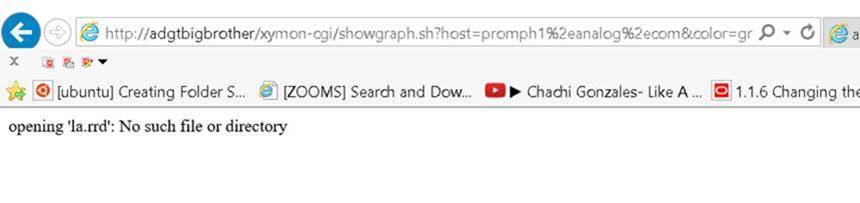
There’s no new error in the log(using tail -f)  when I check below. I would like to ask if it is ok if I will send you conference link for you to connect and to share my screen.

http://adgtbigbrother/xymon-cgi/showgraph.sh?host=promph1%2eanalog%2ecom&color=green&service=la&graph_height=120&graph_width=576&disp=promph1%2eanalog%2ecom&nostale&action=view&graph=hourly

[cid:image001.jpg at 01D363C2.210901C0]
▸
Sincerely,
Leus


From: Jeremy Laidman [mailto:user-71895fb2e44c@xymon.invalid]
Sent: Wednesday, November 22, 2017 6:39 PM
To: Leus Jr, Jose <user-b46c364676ee@xymon.invalid>
Cc: David Boyer <user-a6c09f28d9d2@xymon.invalid>; xymon at xymon.com
Subject: Re: [Xymon] Xymon to monitor HP OpenVMS

Or, even simpler, use the URL showing in your previous error log:

http://adgtbigbrother/xymon-cgi/showgraph.sh?host=promph1.analog.com&service=la&graph_width=576&graph_height=120&disp=promph1.analog.com&nostale&color=green&graph_start=1511004887&graph_end=1511177687&action=menu


On 22 November 2017 at 21:37, Jeremy Laidman <user-71895fb2e44c@xymon.invalid<mailto:user-71895fb2e44c@xymon.invalid>> wrote:
Those log files don't appear to be related to this problem. I suspect they don't coincide with your viewing of the CPU page.

I'm going to assume you're running Internet Explorer (based on your picture). Can you please right-click on the broken picture image next to the magnifying glass, then select properties, and then copy the URL. Finally, please paste the URL into your browser. Please tell me what it shows, and also any new error log entries that show up at the same time.


On 22 November 2017 at 21:22, Leus Jr, Jose <user-b46c364676ee@xymon.invalid<mailto:user-b46c364676ee@xymon.invalid>> wrote:
Hi Jeremy,

The xymon is stopped when I removed the files. At this time below are the remaining rrd.
[cid:image002.jpg at 01D363C2.210901C0]
▸
Here’s the recent from log

[root at adgtbigbrother httpd]# tail -50 error_log-20170930
[Wed Nov 22 15:59:32 2017] [error] [client 10.116.101.69] Directory index forbidden by Options directive: /var/www/html/
[Wed Nov 22 16:04:35 2017] [error] [client 10.116.101.69] Directory index forbidden by Options directive: /var/www/html/
[Wed Nov 22 16:09:39 2017] [error] [client 10.116.101.69] Directory index forbidden by Options directive: /var/www/html/
[Wed Nov 22 16:14:43 2017] [error] [client 10.116.101.69] Directory index forbidden by Options directive: /var/www/html/
[Wed Nov 22 16:19:47 2017] [error] [client 10.116.101.69] Directory index forbidden by Options directive: /var/www/html/
[Wed Nov 22 16:24:50 2017] [error] [client 10.116.101.69] Directory index forbidden by Options directive: /var/www/html/
[Wed Nov 22 16:29:54 2017] [error] [client 10.116.101.69] Directory index forbidden by Options directive: /var/www/html/
[Wed Nov 22 16:34:58 2017] [error] [client 10.116.101.69] Directory index forbidden by Options directive: /var/www/html/
[Wed Nov 22 16:40:01 2017] [error] [client 10.116.101.69] Directory index forbidden by Options directive: /var/www/html/
[Wed Nov 22 16:45:06 2017] [error] [client 10.116.101.69] Directory index forbidden by Options directive: /var/www/html/
[Wed Nov 22 16:50:14 2017] [error] [client 10.116.101.69] Directory index forbidden by Options directive: /var/www/html/
[Wed Nov 22 16:55:09 2017] [error] [client 10.116.101.69] Directory index forbidden by Options directive: /var/www/html/
[Wed Nov 22 17:00:18 2017] [error] [client 10.116.101.69] Directory index forbidden by Options directive: /var/www/html/
[Wed Nov 22 17:05:14 2017] [error] [client 10.116.101.69] Directory index forbidden by Options directive: /var/www/html/
[Wed Nov 22 17:10:17 2017] [error] [client 10.116.101.69] Directory index forbidden by Options directive: /var/www/html/
[Wed Nov 22 17:15:21 2017] [error] [client 10.116.101.69] Directory index forbidden by Options directive: /var/www/html/
[Wed Nov 22 17:20:25 2017] [error] [client 10.116.101.69] Directory index forbidden by Options directive: /var/www/html/
[Wed Nov 22 17:23:11 2017] [error] [client 10.116.131.209] File does not exist: /var/www/html/favicon.ico
[Wed Nov 22 17:23:16 2017] [error] [client 10.116.131.209] File does not exist: /var/www/html/favicon.ico
[Wed Nov 22 17:25:28 2017] [error] [client 10.116.101.69] Directory index forbidden by Options directive: /var/www/html/
[Wed Nov 22 17:30:32 2017] [error] [client 10.116.101.69] Directory index forbidden by Options directive: /var/www/html/
[Wed Nov 22 17:35:36 2017] [error] [client 10.116.101.69] Directory index forbidden by Options directive: /var/www/html/
[Wed Nov 22 17:40:39 2017] [error] [client 10.116.101.69] Directory index forbidden by Options directive: /var/www/html/
[Wed Nov 22 17:45:44 2017] [error] [client 10.116.101.69] Directory index forbidden by Options directive: /var/www/html/
[Wed Nov 22 17:50:47 2017] [error] [client 10.116.101.69] Directory index forbidden by Options directive: /var/www/html/
[Wed Nov 22 17:55:51 2017] [error] [client 10.116.101.69] Directory index forbidden by Options directive: /var/www/html/
[Wed Nov 22 18:00:55 2017] [error] [client 10.116.101.69] Directory index forbidden by Options directive: /var/www/html/
[Wed Nov 22 18:05:59 2017] [error] [client 10.116.101.69] Directory index forbidden by Options directive: /var/www/html/
[Wed Nov 22 18:11:02 2017] [error] [client 10.116.101.69] Directory index forbidden by Options directive: /var/www/html/
[Wed Nov 22 18:16:06 2017] [error] [client 10.116.101.69] Directory index forbidden by Options directive: /var/www/html/

Sincerely,
Leus

From: Jeremy Laidman [mailto:user-71895fb2e44c@xymon.invalid<mailto:user-71895fb2e44c@xymon.invalid>]
Sent: Wednesday, November 22, 2017 6:15 PM

To: Leus Jr, Jose <user-b46c364676ee@xymon.invalid<mailto:user-b46c364676ee@xymon.invalid>>
Cc: David Boyer <user-a6c09f28d9d2@xymon.invalid<mailto:user-a6c09f28d9d2@xymon.invalid>>; xymon at xymon.com<mailto:xymon at xymon.com>
Subject: Re: [Xymon] Xymon to monitor HP OpenVMS

Lues

Make sure you stop xymon, then remove all rrdctl files, then start xymon again, and check that there are only two rrdctl files left.

Then re-try. If it continues to show problems, re-check the Apache logs to see if there's another problem.

Cheers
Jeremy


On 22 November 2017 at 20:31, Leus Jr, Jose <user-b46c364676ee@xymon.invalid<mailto:user-b46c364676ee@xymon.invalid>> wrote:
Thanks Jeremy. I was able to locate the rrdctl files and removed it. The error  in the logs now gone but the CPU graph for OpenVMS systems is not visible.

Below is the snapshots when accessing cpu graphs.
[cid:image003.jpg at 01D363C2.210901C0]

[cid:image006.jpg at 01D363C2.210901C0]

[cid:image007.jpg at 01D363C2.210901C0]
▸
Sincerely,
Leus

From: Jeremy Laidman [mailto:user-71895fb2e44c@xymon.invalid<mailto:user-71895fb2e44c@xymon.invalid>]
Sent: Tuesday, November 21, 2017 9:03 AM

To: Leus Jr, Jose <user-b46c364676ee@xymon.invalid<mailto:user-b46c364676ee@xymon.invalid>>
Cc: David Boyer <user-a6c09f28d9d2@xymon.invalid<mailto:user-a6c09f28d9d2@xymon.invalid>>; xymon at xymon.com<mailto:xymon at xymon.com>
Subject: Re: [Xymon] Xymon to monitor HP OpenVMS

Try this:

$ sudo lsof -p `pgrep xymond_rrd|head -1`

One of the files listed will be something like

/usr/lib/xymon/server/tmp/rrdctl.28279

Look in the same dir for other rrdctl.* files. There should be only two in that directory, corresponding to the two xymond_rrd processes.

Another way:

$ xymoncmd sh -c 'ls -l $XYMONTMP/rrdctl.*'

Cheers
Jeremy


On 21 November 2017 at 00:05, Leus Jr, Jose <user-b46c364676ee@xymon.invalid<mailto:user-b46c364676ee@xymon.invalid>> wrote:
Hi Jeremy,

I tried to seach all directories  from xymon server but I did not find any rrdctl* files.


Sincerely,
Leus

From: Jeremy Laidman [mailto:user-71895fb2e44c@xymon.invalid<mailto:user-71895fb2e44c@xymon.invalid>]
Sent: Monday, November 20, 2017 8:31 PM
To: Leus Jr, Jose <user-b46c364676ee@xymon.invalid<mailto:user-b46c364676ee@xymon.invalid>>
Cc: David Boyer <user-a6c09f28d9d2@xymon.invalid<mailto:user-a6c09f28d9d2@xymon.invalid>>; xymon at xymon.com<mailto:xymon at xymon.com>
Subject: Re: [Xymon] Xymon to monitor HP OpenVMS

Might be the same problem and solution described here:

http://lists.xymon.com/archive/2013-September/038150.html


[Mon Nov 20 19:36:25 2017] [error] [client 10.116.131.209] 2017-11-20 19:36:25.250081 , referer: http://adgtbigbrother/xymon-cgi/showgraph.sh?host=promph1.analog.com&service=la&graph_width=576&graph_height=120&disp=promph1.analog.com&nostale&color=green&graph_start=1511004887&graph_end=1511177687&action=menu
[Mon Nov 20 19:36:25 2017] [error] [client 10.116.131.209] Sendto failed: Connection refused, referer: http://adgtbigbrother/xymon-cgi/showgraph.sh?host=promph1.analog.com&service=la&graph_width=576&graph_height=120&disp=promph1.analog.com&nostale&color=green&graph_start=1511004887&graph_end=1511177687&action=menu
 attachment.jpg
 attachment-0001.jpg
 attachment-0002.jpg
 attachment-0003.jpg
 attachment-0004.jpg
list Jeremy Laidman
Just to close this case, in case it helps others using OpenVMS, it turns
out the client was an old BB client, which sent its CPU status message with
"Up since <date>" rather than "up: <days> days". The difference is that the
Xymon CPU status message parsing code expects "up: " (lower-case "up",
colon, space). The script that generates the status message was adjusted,
and the RRD file came into existence.

In summary, there were some stale rrdctl files being used by Xymon, causing
the original error message in the Apache logs. But the client was also not
100% compatible with Xymon. Both now fixed.

J

On 22 November 2017 at 21:39, Jeremy Laidman <user-71895fb2e44c@xymon.invalid>
▸
wrote:
Or, even simpler, use the URL showing in your previous error log:
http://adgtbigbrother/xymon-cgi/showgraph.sh?host=promph1.
analog.com&service=la&graph_width=576&graph_height=120&
disp=promph1.analog.com&nostale&color=green&graph_
start=1511004887&graph_end=1511177687&action=menu
▸
On 22 November 2017 at 21:37, Jeremy Laidman <user-71895fb2e44c@xymon.invalid>
wrote:
Those log files don't appear to be related to this problem. I suspect they don't coincide with your viewing of the CPU page. I'm going to assume you're running Internet Explorer (based on your picture). Can you please right-click on the broken picture image next to the magnifying glass, then select properties, and then copy the URL. Finally, please paste the URL into your browser. Please tell me what it shows, and also any new error log entries that show up at the same time. On 22 November 2017 at 21:22, Leus Jr, Jose <user-b46c364676ee@xymon.invalid> wrote:Hi Jeremy, The xymon is stopped when I removed the files. At this time below are the remaining rrd. Here’s the recent from log [root at adgtbigbrother httpd]# tail -50 error_log-20170930 [Wed Nov 22 15:59:32 2017] [error] [client 10.116.101.69] Directory index forbidden by Options directive: /var/www/html/ [Wed Nov 22 16:04:35 2017] [error] [client 10.116.101.69] Directory index forbidden by Options directive: /var/www/html/ [Wed Nov 22 16:09:39 2017] [error] [client 10.116.101.69] Directory index forbidden by Options directive: /var/www/html/ [Wed Nov 22 16:14:43 2017] [error] [client 10.116.101.69] Directory index forbidden by Options directive: /var/www/html/ [Wed Nov 22 16:19:47 2017] [error] [client 10.116.101.69] Directory index forbidden by Options directive: /var/www/html/ [Wed Nov 22 16:24:50 2017] [error] [client 10.116.101.69] Directory index forbidden by Options directive: /var/www/html/ [Wed Nov 22 16:29:54 2017] [error] [client 10.116.101.69] Directory index forbidden by Options directive: /var/www/html/ [Wed Nov 22 16:34:58 2017] [error] [client 10.116.101.69] Directory index forbidden by Options directive: /var/www/html/ [Wed Nov 22 16:40:01 2017] [error] [client 10.116.101.69] Directory index forbidden by Options directive: /var/www/html/ [Wed Nov 22 16:45:06 2017] [error] [client 10.116.101.69] Directory index forbidden by Options directive: /var/www/html/ [Wed Nov 22 16:50:14 2017] [error] [client 10.116.101.69] Directory index forbidden by Options directive: /var/www/html/ [Wed Nov 22 16:55:09 2017] [error] [client 10.116.101.69] Directory index forbidden by Options directive: /var/www/html/ [Wed Nov 22 17:00:18 2017] [error] [client 10.116.101.69] Directory index forbidden by Options directive: /var/www/html/ [Wed Nov 22 17:05:14 2017] [error] [client 10.116.101.69] Directory index forbidden by Options directive: /var/www/html/ [Wed Nov 22 17:10:17 2017] [error] [client 10.116.101.69] Directory index forbidden by Options directive: /var/www/html/ [Wed Nov 22 17:15:21 2017] [error] [client 10.116.101.69] Directory index forbidden by Options directive: /var/www/html/ [Wed Nov 22 17:20:25 2017] [error] [client 10.116.101.69] Directory index forbidden by Options directive: /var/www/html/ [Wed Nov 22 17:23:11 2017] [error] [client 10.116.131.209] File does not exist: /var/www/html/favicon.ico [Wed Nov 22 17:23:16 2017] [error] [client 10.116.131.209] File does not exist: /var/www/html/favicon.ico [Wed Nov 22 17:25:28 2017] [error] [client 10.116.101.69] Directory index forbidden by Options directive: /var/www/html/ [Wed Nov 22 17:30:32 2017] [error] [client 10.116.101.69] Directory index forbidden by Options directive: /var/www/html/ [Wed Nov 22 17:35:36 2017] [error] [client 10.116.101.69] Directory index forbidden by Options directive: /var/www/html/ [Wed Nov 22 17:40:39 2017] [error] [client 10.116.101.69] Directory index forbidden by Options directive: /var/www/html/ [Wed Nov 22 17:45:44 2017] [error] [client 10.116.101.69] Directory index forbidden by Options directive: /var/www/html/ [Wed Nov 22 17:50:47 2017] [error] [client 10.116.101.69] Directory index forbidden by Options directive: /var/www/html/ [Wed Nov 22 17:55:51 2017] [error] [client 10.116.101.69] Directory index forbidden by Options directive: /var/www/html/ [Wed Nov 22 18:00:55 2017] [error] [client 10.116.101.69] Directory index forbidden by Options directive: /var/www/html/ [Wed Nov 22 18:05:59 2017] [error] [client 10.116.101.69] Directory index forbidden by Options directive: /var/www/html/ [Wed Nov 22 18:11:02 2017] [error] [client 10.116.101.69] Directory index forbidden by Options directive: /var/www/html/ [Wed Nov 22 18:16:06 2017] [error] [client 10.116.101.69] Directory index forbidden by Options directive: /var/www/html/ Sincerely, Leus *From:* Jeremy Laidman [mailto:user-71895fb2e44c@xymon.invalid] *Sent:* Wednesday, November 22, 2017 6:15 PM *To:* Leus Jr, Jose <user-b46c364676ee@xymon.invalid> *Cc:* David Boyer <user-a6c09f28d9d2@xymon.invalid>; xymon at xymon.com *Subject:* Re: [Xymon] Xymon to monitor HP OpenVMS Lues Make sure you stop xymon, then remove all rrdctl files, then start xymon again, and check that there are only two rrdctl files left. Then re-try. If it continues to show problems, re-check the Apache logs to see if there's another problem. Cheers Jeremy On 22 November 2017 at 20:31, Leus Jr, Jose <user-b46c364676ee@xymon.invalid> wrote: Thanks Jeremy. I was able to locate the rrdctl files and removed it. The error in the logs now gone but the CPU graph for OpenVMS systems is not visible. Below is the snapshots when accessing cpu graphs. Sincerely, Leus *From:* Jeremy Laidman [mailto:user-71895fb2e44c@xymon.invalid] *Sent:* Tuesday, November 21, 2017 9:03 AM *To:* Leus Jr, Jose <user-b46c364676ee@xymon.invalid> *Cc:* David Boyer <user-a6c09f28d9d2@xymon.invalid>; xymon at xymon.com *Subject:* Re: [Xymon] Xymon to monitor HP OpenVMS Try this: $ sudo lsof -p `pgrep xymond_rrd|head -1` One of the files listed will be something like /usr/lib/xymon/server/tmp/rrdctl.28279 Look in the same dir for other rrdctl.* files. There should be only two in that directory, corresponding to the two xymond_rrd processes. Another way: $ xymoncmd sh -c 'ls -l $XYMONTMP/rrdctl.*' Cheers Jeremy On 21 November 2017 at 00:05, Leus Jr, Jose <user-b46c364676ee@xymon.invalid> wrote: Hi Jeremy, I tried to seach all directories from xymon server but I did not find any rrdctl* files. Sincerely, Leus *From:* Jeremy Laidman [mailto:user-71895fb2e44c@xymon.invalid] *Sent:* Monday, November 20, 2017 8:31 PM *To:* Leus Jr, Jose <user-b46c364676ee@xymon.invalid> *Cc:* David Boyer <user-a6c09f28d9d2@xymon.invalid>; xymon at xymon.com *Subject:* Re: [Xymon] Xymon to monitor HP OpenVMS Might be the same problem and solution described here: http://lists.xymon.com/archive/2013-September/038150.html [Mon Nov 20 19:36:25 2017] [error] [client 10.116.131.209] 2017-11-20 19:36:25.250081 , referer: http://adgtbigbrother/xymon-cg i/showgraph.sh?host=promph1.analog.com&service=la&graph_widt
h=576&graph_height=120&disp=promph1.analog.com&nostale&color
=green&graph_start=1511004887&graph_end=1511177687&action=menu
▸
[Mon Nov 20 19:36:25 2017] [error] [client 10.116.131.209] Sendto
failed: Connection refused, referer: http://adgtbigbrother/xymon-cg
i/showgraph.sh?host=promph1.analog.com&service=la&graph_widt
h=576&graph_height=120&disp=promph1.analog.com&nostale&color
=green&graph_start=1511004887&graph_end=1511177687&action=menu
list Jose Leus Jr
Thanks a lot Jeremy for helping me out on this. Here’s the snapshot of the cpu graph.

    [cid:image001.jpg at 01D3669E.94B433E0]

I’m looking forward for the integration of other OPENVMS resources to Xymon.
At this time, below are the only resources I was able to monitor.
[cid:image002.jpg at 01D3669E.94B433E0]
▸
Sincerely,
Leus

From: Jeremy Laidman [mailto:user-71895fb2e44c@xymon.invalid]
Sent: Sunday, November 26, 2017 10:02 AM
To: Leus Jr, Jose <user-b46c364676ee@xymon.invalid>
Cc: David Boyer <user-a6c09f28d9d2@xymon.invalid>; xymon at xymon.com
Subject: Re: [Xymon] Xymon to monitor HP OpenVMS

Just to close this case, in case it helps others using OpenVMS, it turns out the client was an old BB client, which sent its CPU status message with "Up since <date>" rather than "up: <days> days". The difference is that the Xymon CPU status message parsing code expects "up: " (lower-case "up", colon, space). The script that generates the status message was adjusted, and the RRD file came into existence.

In summary, there were some stale rrdctl files being used by Xymon, causing the original error message in the Apache logs. But the client was also not 100% compatible with Xymon. Both now fixed.

J

On 22 November 2017 at 21:39, Jeremy Laidman <user-71895fb2e44c@xymon.invalid<mailto:user-71895fb2e44c@xymon.invalid>> wrote:
Or, even simpler, use the URL showing in your previous error log:

http://adgtbigbrother/xymon-cgi/showgraph.sh?host=promph1.analog.com&service=la&graph_width=576&graph_height=120&disp=promph1.analog.com&nostale&color=green&graph_start=1511004887&graph_end=1511177687&action=menu


On 22 November 2017 at 21:37, Jeremy Laidman <user-71895fb2e44c@xymon.invalid<mailto:user-71895fb2e44c@xymon.invalid>> wrote:
Those log files don't appear to be related to this problem. I suspect they don't coincide with your viewing of the CPU page.

I'm going to assume you're running Internet Explorer (based on your picture). Can you please right-click on the broken picture image next to the magnifying glass, then select properties, and then copy the URL. Finally, please paste the URL into your browser. Please tell me what it shows, and also any new error log entries that show up at the same time.


On 22 November 2017 at 21:22, Leus Jr, Jose <user-b46c364676ee@xymon.invalid<mailto:user-b46c364676ee@xymon.invalid>> wrote:
Hi Jeremy,

The xymon is stopped when I removed the files. At this time below are the remaining rrd.
[cid:image003.jpg at 01D3669E.94B433E0]
▸
Here’s the recent from log

[root at adgtbigbrother httpd]# tail -50 error_log-20170930
[Wed Nov 22 15:59:32 2017] [error] [client 10.116.101.69] Directory index forbidden by Options directive: /var/www/html/
[Wed Nov 22 16:04:35 2017] [error] [client 10.116.101.69] Directory index forbidden by Options directive: /var/www/html/
[Wed Nov 22 16:09:39 2017] [error] [client 10.116.101.69] Directory index forbidden by Options directive: /var/www/html/
[Wed Nov 22 16:14:43 2017] [error] [client 10.116.101.69] Directory index forbidden by Options directive: /var/www/html/
[Wed Nov 22 16:19:47 2017] [error] [client 10.116.101.69] Directory index forbidden by Options directive: /var/www/html/
[Wed Nov 22 16:24:50 2017] [error] [client 10.116.101.69] Directory index forbidden by Options directive: /var/www/html/
[Wed Nov 22 16:29:54 2017] [error] [client 10.116.101.69] Directory index forbidden by Options directive: /var/www/html/
[Wed Nov 22 16:34:58 2017] [error] [client 10.116.101.69] Directory index forbidden by Options directive: /var/www/html/
[Wed Nov 22 16:40:01 2017] [error] [client 10.116.101.69] Directory index forbidden by Options directive: /var/www/html/
[Wed Nov 22 16:45:06 2017] [error] [client 10.116.101.69] Directory index forbidden by Options directive: /var/www/html/
[Wed Nov 22 16:50:14 2017] [error] [client 10.116.101.69] Directory index forbidden by Options directive: /var/www/html/
[Wed Nov 22 16:55:09 2017] [error] [client 10.116.101.69] Directory index forbidden by Options directive: /var/www/html/
[Wed Nov 22 17:00:18 2017] [error] [client 10.116.101.69] Directory index forbidden by Options directive: /var/www/html/
[Wed Nov 22 17:05:14 2017] [error] [client 10.116.101.69] Directory index forbidden by Options directive: /var/www/html/
[Wed Nov 22 17:10:17 2017] [error] [client 10.116.101.69] Directory index forbidden by Options directive: /var/www/html/
[Wed Nov 22 17:15:21 2017] [error] [client 10.116.101.69] Directory index forbidden by Options directive: /var/www/html/
[Wed Nov 22 17:20:25 2017] [error] [client 10.116.101.69] Directory index forbidden by Options directive: /var/www/html/
[Wed Nov 22 17:23:11 2017] [error] [client 10.116.131.209] File does not exist: /var/www/html/favicon.ico
[Wed Nov 22 17:23:16 2017] [error] [client 10.116.131.209] File does not exist: /var/www/html/favicon.ico
[Wed Nov 22 17:25:28 2017] [error] [client 10.116.101.69] Directory index forbidden by Options directive: /var/www/html/
[Wed Nov 22 17:30:32 2017] [error] [client 10.116.101.69] Directory index forbidden by Options directive: /var/www/html/
[Wed Nov 22 17:35:36 2017] [error] [client 10.116.101.69] Directory index forbidden by Options directive: /var/www/html/
[Wed Nov 22 17:40:39 2017] [error] [client 10.116.101.69] Directory index forbidden by Options directive: /var/www/html/
[Wed Nov 22 17:45:44 2017] [error] [client 10.116.101.69] Directory index forbidden by Options directive: /var/www/html/
[Wed Nov 22 17:50:47 2017] [error] [client 10.116.101.69] Directory index forbidden by Options directive: /var/www/html/
[Wed Nov 22 17:55:51 2017] [error] [client 10.116.101.69] Directory index forbidden by Options directive: /var/www/html/
[Wed Nov 22 18:00:55 2017] [error] [client 10.116.101.69] Directory index forbidden by Options directive: /var/www/html/
[Wed Nov 22 18:05:59 2017] [error] [client 10.116.101.69] Directory index forbidden by Options directive: /var/www/html/
[Wed Nov 22 18:11:02 2017] [error] [client 10.116.101.69] Directory index forbidden by Options directive: /var/www/html/
[Wed Nov 22 18:16:06 2017] [error] [client 10.116.101.69] Directory index forbidden by Options directive: /var/www/html/

Sincerely,
Leus

From: Jeremy Laidman [mailto:user-71895fb2e44c@xymon.invalid<mailto:user-71895fb2e44c@xymon.invalid>]
Sent: Wednesday, November 22, 2017 6:15 PM

To: Leus Jr, Jose <user-b46c364676ee@xymon.invalid<mailto:user-b46c364676ee@xymon.invalid>>
Cc: David Boyer <user-a6c09f28d9d2@xymon.invalid<mailto:user-a6c09f28d9d2@xymon.invalid>>; xymon at xymon.com<mailto:xymon at xymon.com>
Subject: Re: [Xymon] Xymon to monitor HP OpenVMS

Lues

Make sure you stop xymon, then remove all rrdctl files, then start xymon again, and check that there are only two rrdctl files left.

Then re-try. If it continues to show problems, re-check the Apache logs to see if there's another problem.

Cheers
Jeremy


On 22 November 2017 at 20:31, Leus Jr, Jose <user-b46c364676ee@xymon.invalid<mailto:user-b46c364676ee@xymon.invalid>> wrote:
Thanks Jeremy. I was able to locate the rrdctl files and removed it. The error  in the logs now gone but the CPU graph for OpenVMS systems is not visible.

Below is the snapshots when accessing cpu graphs.
[cid:image006.jpg at 01D3669E.94B433E0]

[cid:image007.jpg at 01D3669E.94B433E0]

[cid:image008.jpg at 01D3669E.94B433E0]
▸
Sincerely,
Leus

From: Jeremy Laidman [mailto:user-71895fb2e44c@xymon.invalid<mailto:user-71895fb2e44c@xymon.invalid>]
Sent: Tuesday, November 21, 2017 9:03 AM

To: Leus Jr, Jose <user-b46c364676ee@xymon.invalid<mailto:user-b46c364676ee@xymon.invalid>>
Cc: David Boyer <user-a6c09f28d9d2@xymon.invalid<mailto:user-a6c09f28d9d2@xymon.invalid>>; xymon at xymon.com<mailto:xymon at xymon.com>
Subject: Re: [Xymon] Xymon to monitor HP OpenVMS

Try this:

$ sudo lsof -p `pgrep xymond_rrd|head -1`

One of the files listed will be something like

/usr/lib/xymon/server/tmp/rrdctl.28279

Look in the same dir for other rrdctl.* files. There should be only two in that directory, corresponding to the two xymond_rrd processes.

Another way:

$ xymoncmd sh -c 'ls -l $XYMONTMP/rrdctl.*'

Cheers
Jeremy


On 21 November 2017 at 00:05, Leus Jr, Jose <user-b46c364676ee@xymon.invalid<mailto:user-b46c364676ee@xymon.invalid>> wrote:
Hi Jeremy,

I tried to seach all directories  from xymon server but I did not find any rrdctl* files.


Sincerely,
Leus

From: Jeremy Laidman [mailto:user-71895fb2e44c@xymon.invalid<mailto:user-71895fb2e44c@xymon.invalid>]
Sent: Monday, November 20, 2017 8:31 PM
To: Leus Jr, Jose <user-b46c364676ee@xymon.invalid<mailto:user-b46c364676ee@xymon.invalid>>
Cc: David Boyer <user-a6c09f28d9d2@xymon.invalid<mailto:user-a6c09f28d9d2@xymon.invalid>>; xymon at xymon.com<mailto:xymon at xymon.com>
Subject: Re: [Xymon] Xymon to monitor HP OpenVMS

Might be the same problem and solution described here:

http://lists.xymon.com/archive/2013-September/038150.html


[Mon Nov 20 19:36:25 2017] [error] [client 10.116.131.209] 2017-11-20 19:36:25.250081 , referer: http://adgtbigbrother/xymon-cgi/showgraph.sh?host=promph1.analog.com&service=la&graph_width=576&graph_height=120&disp=promph1.analog.com&nostale&color=green&graph_start=1511004887&graph_end=1511177687&action=menu
[Mon Nov 20 19:36:25 2017] [error] [client 10.116.131.209] Sendto failed: Connection refused, referer: http://adgtbigbrother/xymon-cgi/showgraph.sh?host=promph1.analog.com&service=la&graph_width=576&graph_height=120&disp=promph1.analog.com&nostale&color=green&graph_start=1511004887&graph_end=1511177687&action=menu
Attachments (2)
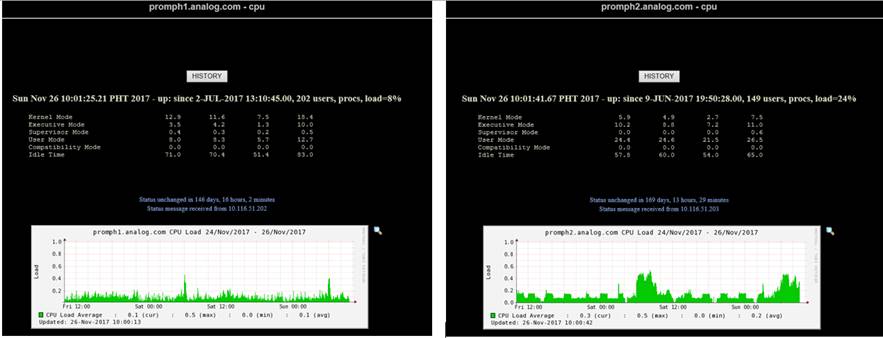 attachment.jpg
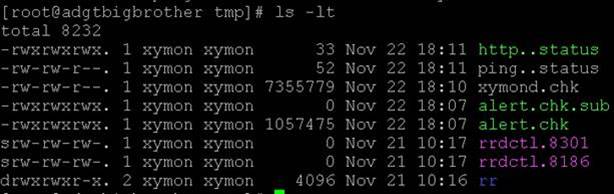 attachment-0002.jpg
list Jose Leus Jr
Resending, seems your mail is only accepting 100kb below.
▸
From: Leus Jr, Jose
Sent: Sunday, November 26, 2017 10:09 AM
To: Jeremy Laidman <user-71895fb2e44c@xymon.invalid>
Cc: David Boyer <user-a6c09f28d9d2@xymon.invalid>; xymon at xymon.com
Subject: RE: [Xymon] Xymon to monitor HP OpenVMS

Thanks a lot Jeremy for helping me out on this. Here’s the snapshot of the cpu graph.
[cid:image004.jpg at 01D3669E.D73A3B60]
▸
I’m looking forward for the integration of other OPENVMS resources to Xymon.
At this time, below are the only resources I was able to monitor.
[cid:image005.jpg at 01D3669E.D73A3B60]
▸
Sincerely,
Leus

From: Jeremy Laidman [mailto:user-71895fb2e44c@xymon.invalid]
Sent: Sunday, November 26, 2017 10:02 AM
To: Leus Jr, Jose <user-b46c364676ee@xymon.invalid<mailto:user-b46c364676ee@xymon.invalid>>
Cc: David Boyer <user-a6c09f28d9d2@xymon.invalid<mailto:user-a6c09f28d9d2@xymon.invalid>>; xymon at xymon.com<mailto:xymon at xymon.com>
Subject: Re: [Xymon] Xymon to monitor HP OpenVMS

Just to close this case, in case it helps others using OpenVMS, it turns out the client was an old BB client, which sent its CPU status message with "Up since <date>" rather than "up: <days> days". The difference is that the Xymon CPU status message parsing code expects "up: " (lower-case "up", colon, space). The script that generates the status message was adjusted, and the RRD file came into existence.

In summary, there were some stale rrdctl files being used by Xymon, causing the original error message in the Apache logs. But the client was also not 100% compatible with Xymon. Both now fixed.

J
Attachments (1)
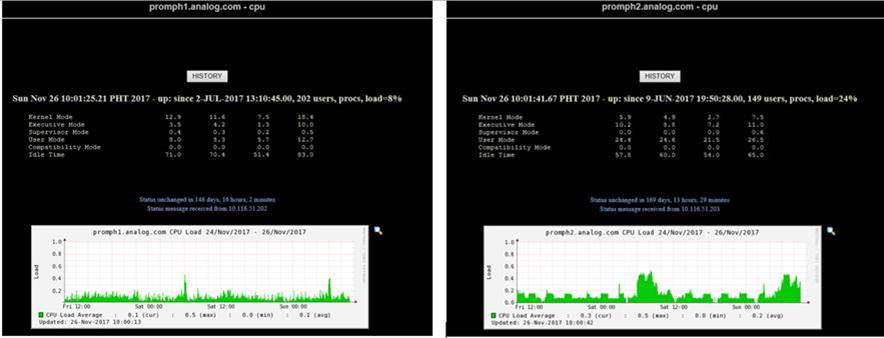 attachment.jpg