xymon disk not alerting at 100%, need another set of eyes
list Scot Kreienkamp
Hi everyone

I found two hosts that weren't alerting on disk full condition and started digging into the problem further.  As I understand it, xymon matches the first entry from analysis config files.  So I dumped the analysis config for disks:

Client line:
[collector:]
client corpvskreienl,na,lzb,hq.linux linux

[root at monvxymon hosts.d]# /usr/libexec/xymon/xymond_client --dump-config --config=etc/analysis.cfg |grep -i ^disk
DISK %^(D|E|F|G|H|I|J|K|L|M|N|O|P|Q|R|S|T|U|V|W|X|Y|Z) 15728640U 10485760U 0 -1 red HOST=%(mondbexec.*|mondb.*|retmaildb.*).na.lzb.hq (line: 515)
DISK %^(1|2|3|4|5|6|7|8|9|0).* IGNORE HOST=%(mondbexec.*|mondb.*|retmaildb.*).na.lzb.hq (line: 516)
DISK %^(D|E|F|G|H|I|J|K|L|M|N|O|P|Q|R|S|T|U|V|W|X|Y|Z) 15728640U 10485760U 0 -1 red HOST=%(mon|new|red|neo|taz|sil|kin|sal|hpt)exch.*.na.lzb.hq (line: 527)
DISK %^(1|2|3|4|5|6|7|8|9|0).* IGNORE HOST=%(mon|new|red|neo|taz|sil|kin|sal|hpt)exch.*.na.lzb.hq (line: 528)
DISK %^(D|E|F|G|H|I|J|K|L|M|N|O|P|Q|R|S|U|V|W|X|Y|Z) 15728640U 10485760U 0 -1 red HOST=%dayexch.*.na.lzb.hq (line: 539)
DISK %^T IGNORE HOST=%dayexch.*.na.lzb.hq (line: 540)
DISK %^(1|2|3|4|5|6|7|8|9|0|).* IGNORE HOST=%dayexch.*.na.lzb.hq (line: 541)
DISK C 204800U 102400U 0 -1 red HOST=mdas4000.mdmza.dmz.hq (line: 567)
DISK E 101% 101% 0 -1 red HOST=mdas4000.mdmza.dmz.hq (line: 568)
DISK F 99% 100% 0 -1 red HOST=mons6000.na.lzb.hq (line: 576)
DISK %^(D|E|F|G|H|I|J|K|L|M|N|O|P|Q|R|S|T|U|V|W|X|Y|Z) 15728640U 10485760U 0 -1 red PAGE=infrastructure/fileserv (line: 582)
DISK D 99% 100% 0 -1 red HOST=lzbv5223.na.lzb.hq,lzbv6016.na.lzb.hq (line: 746)
DISK * 90% 95% 0 -1 red HOST=%dvrvas(0|1)\.mdmza.dmz.hq (line: 762)
DISK * 90% 95% 0 -1 red CLASS=powershell (line: 1054)
DISK * 90% 95% 0 -1 red CLASS=win32 (line: 1073)
DISK * 90% 95% 0 -1 red CLASS=linux (line: 1090)
DISK * 90% 95% 0 -1 red (line: 1132)


I can't find any lines above where the hostname matches, it's on page Infrastructure/Miscellaneous so none of the page statements match, so it should match on the class.  Or the very last line is the system default which should apply if nothing else.  My server is sitting at 100%full on one partition so it SHOULD be alerting.

Thanks for any help.

Scot Kreienkamp | Senior Systems Engineer | La-Z-Boy Corporate
One La-Z-Boy Drive | Monroe, Michigan 48162  | * XXX-XXX-XXXX | | * 7349151444 | *  user-9678697f1438@xymon.invalid<mailto:%7BE-mail%7D>
www<http://www.la-z-boy.com/>.la-z-boy.com<http://www.la-z-boy.com/>; | facebook.<https://www.facebook.com/lazboy>com<https://www.facebook.com/lazboy>/<https://www.facebook.com/lazboy>lazboy<http://facebook.com/lazboy>; | twitter.com/lazboy<https://twitter.com/lazboy>; | youtube.com/<https://www.youtube.com/user/lazboy>lazboy<https://www.youtube.com/user/lazboy>;

[cid:lzbVertical_hres.jpg]


This message is intended only for the individual or entity to which it is addressed.  It may contain privileged, confidential information which is exempt from disclosure under applicable laws.  If you are not the intended recipient, you are strictly prohibited from disseminating or distributing this information (other than to the intended recipient) or copying this information.  If you have received this communication in error, please notify us immediately by e-mail or by telephone at the above number. Thank you.
Attachments (1)
 attachment.jpg
list Scot Kreienkamp
After re-reading I can see how that may not be totally clear. By alerting, I mean that the disk test is still green, even though a partition is at 100%full.
▸
I found two hosts that weren't alerting on disk full condition and started digging into the problem further.  As I understand it, xymon matches the first entry from analysis config files.  So I dumped the analysis config for disks:

Client line:
[collector:]
client corpvskreienl,na,lzb,hq.linux linux

[root at monvxymon hosts.d]# /usr/libexec/xymon/xymond_client --dump-config --config=etc/analysis.cfg |grep -i ^disk
DISK %^(D|E|F|G|H|I|J|K|L|M|N|O|P|Q|R|S|T|U|V|W|X|Y|Z) 15728640U 10485760U 0 -1 red HOST=%(mondbexec.*|mondb.*|retmaildb.*).na.lzb.hq (line: 515)
DISK %^(1|2|3|4|5|6|7|8|9|0).* IGNORE HOST=%(mondbexec.*|mondb.*|retmaildb.*).na.lzb.hq (line: 516)
DISK %^(D|E|F|G|H|I|J|K|L|M|N|O|P|Q|R|S|T|U|V|W|X|Y|Z) 15728640U 10485760U 0 -1 red HOST=%(mon|new|red|neo|taz|sil|kin|sal|hpt)exch.*.na.lzb.hq (line: 527)
DISK %^(1|2|3|4|5|6|7|8|9|0).* IGNORE HOST=%(mon|new|red|neo|taz|sil|kin|sal|hpt)exch.*.na.lzb.hq (line: 528)
DISK %^(D|E|F|G|H|I|J|K|L|M|N|O|P|Q|R|S|U|V|W|X|Y|Z) 15728640U 10485760U 0 -1 red HOST=%dayexch.*.na.lzb.hq (line: 539)
DISK %^T IGNORE HOST=%dayexch.*.na.lzb.hq (line: 540)
DISK %^(1|2|3|4|5|6|7|8|9|0|).* IGNORE HOST=%dayexch.*.na.lzb.hq (line: 541)
DISK C 204800U 102400U 0 -1 red HOST=mdas4000.mdmza.dmz.hq (line: 567)
DISK E 101% 101% 0 -1 red HOST=mdas4000.mdmza.dmz.hq (line: 568)
DISK F 99% 100% 0 -1 red HOST=mons6000.na.lzb.hq (line: 576)
DISK %^(D|E|F|G|H|I|J|K|L|M|N|O|P|Q|R|S|T|U|V|W|X|Y|Z) 15728640U 10485760U 0 -1 red PAGE=infrastructure/fileserv (line: 582)
DISK D 99% 100% 0 -1 red HOST=lzbv5223.na.lzb.hq,lzbv6016.na.lzb.hq (line: 746)
DISK * 90% 95% 0 -1 red HOST=%dvrvas(0|1)\.mdmza.dmz.hq (line: 762)
DISK * 90% 95% 0 -1 red CLASS=powershell (line: 1054)
DISK * 90% 95% 0 -1 red CLASS=win32 (line: 1073)
DISK * 90% 95% 0 -1 red CLASS=linux (line: 1090)
DISK * 90% 95% 0 -1 red (line: 1132)


I can't find any lines above where the hostname matches, it's on page Infrastructure/Miscellaneous so none of the page statements match, so it should match on the class.  Or the very last line is the system default which should apply if nothing else.  My server is sitting at 100%full on one partition so it SHOULD be alerting.

Thanks for any help.


Scot Kreienkamp  | Senior Systems Engineer | La-Z-Boy Corporate
One La-Z-Boy Drive | Monroe, Michigan 48162 | Office: XXX-XXX-XXXX | | Mobile: XXXXXXXXXX | Email: user-9678697f1438@xymon.invalid
▸
This message is intended only for the individual or entity to which it is addressed. It may contain privileged, confidential information which is exempt from disclosure under applicable laws. If you are not the intended recipient, you are strictly prohibited from disseminating or distributing this information (other than to the intended recipient) or copying this information. If you have received this communication in error, please notify us immediately by e-mail or by telephone at the above number. Thank you.
list Scot Kreienkamp
So I had another thought, I copied the class statement to another file so it's now first in the list and last in the list, and my disk test is still green.  Is the class match broken?

I'm on 4.3.27-1 from Terabithia.

Thanks!
▸
Scot Kreienkamp  | Senior Systems Engineer | La-Z-Boy Corporate
One La-Z-Boy Drive | Monroe, Michigan 48162 | Office: XXX-XXX-XXXX | | Mobile: XXXXXXXXXX | Email: user-9678697f1438@xymon.invalid
▸
From: Scot Kreienkamp
Sent: Thursday, January 5, 2017 1:53 PM
To: xymon at xymon.com
Subject: RE: xymon disk not alerting at 100%, need another set of eyes

After re-reading I can see how that may not be totally clear.  By alerting, I mean that the disk test is still green, even though a partition is at 100%full.


I found two hosts that weren't alerting on disk full condition and started digging into the problem further.  As I understand it, xymon matches the first entry from analysis config files.  So I dumped the analysis config for disks:

Client line:
[collector:]
client corpvskreienl,na,lzb,hq.linux linux

[root at monvxymon hosts.d]# /usr/libexec/xymon/xymond_client --dump-config --config=etc/analysis.cfg |grep -i ^disk
DISK %^(D|E|F|G|H|I|J|K|L|M|N|O|P|Q|R|S|T|U|V|W|X|Y|Z) 15728640U 10485760U 0 -1 red HOST=%(mondbexec.*|mondb.*|retmaildb.*).na.lzb.hq (line: 515)
DISK %^(1|2|3|4|5|6|7|8|9|0).* IGNORE HOST=%(mondbexec.*|mondb.*|retmaildb.*).na.lzb.hq (line: 516)
DISK %^(D|E|F|G|H|I|J|K|L|M|N|O|P|Q|R|S|T|U|V|W|X|Y|Z) 15728640U 10485760U 0 -1 red HOST=%(mon|new|red|neo|taz|sil|kin|sal|hpt)exch.*.na.lzb.hq (line: 527)
DISK %^(1|2|3|4|5|6|7|8|9|0).* IGNORE HOST=%(mon|new|red|neo|taz|sil|kin|sal|hpt)exch.*.na.lzb.hq (line: 528)
DISK %^(D|E|F|G|H|I|J|K|L|M|N|O|P|Q|R|S|U|V|W|X|Y|Z) 15728640U 10485760U 0 -1 red HOST=%dayexch.*.na.lzb.hq (line: 539)
DISK %^T IGNORE HOST=%dayexch.*.na.lzb.hq (line: 540)
DISK %^(1|2|3|4|5|6|7|8|9|0|).* IGNORE HOST=%dayexch.*.na.lzb.hq (line: 541)
DISK C 204800U 102400U 0 -1 red HOST=mdas4000.mdmza.dmz.hq (line: 567)
DISK E 101% 101% 0 -1 red HOST=mdas4000.mdmza.dmz.hq (line: 568)
DISK F 99% 100% 0 -1 red HOST=mons6000.na.lzb.hq (line: 576)
DISK %^(D|E|F|G|H|I|J|K|L|M|N|O|P|Q|R|S|T|U|V|W|X|Y|Z) 15728640U 10485760U 0 -1 red PAGE=infrastructure/fileserv (line: 582)
DISK D 99% 100% 0 -1 red HOST=lzbv5223.na.lzb.hq,lzbv6016.na.lzb.hq (line: 746)
DISK * 90% 95% 0 -1 red HOST=%dvrvas(0|1)\.mdmza.dmz.hq (line: 762)
DISK * 90% 95% 0 -1 red CLASS=powershell (line: 1054)
DISK * 90% 95% 0 -1 red CLASS=win32 (line: 1073)
DISK * 90% 95% 0 -1 red CLASS=linux (line: 1090)
DISK * 90% 95% 0 -1 red (line: 1132)


I can't find any lines above where the hostname matches, it's on page Infrastructure/Miscellaneous so none of the page statements match, so it should match on the class.  Or the very last line is the system default which should apply if nothing else.  My server is sitting at 100%full on one partition so it SHOULD be alerting.

Thanks for any help.


This message is intended only for the individual or entity to which it is addressed.  It may contain privileged, confidential information which is exempt from disclosure under applicable laws.  If you are not the intended recipient, you are strictly prohibited from disseminating or distributing this information (other than to the intended recipient) or copying this information.  If you have received this communication in error, please notify us immediately by e-mail or by telephone at the above number. Thank you.
list Greg Shea
Hi Scott,

What may have happened is that the disk filled up quicker than the client could send the alert.
If the client is on the same disk that is full. That's caught me a few times.

HTH
Regards
Greg Shea
▸
----- Original Message -----
So I had another thought, I copied the class statement to another file so
it’s now first in the list and last in the list, and my disk test is still
green. Is the class match broken?
I’m on 4.3.27-1 from Terabithia.
Thanks!
Scot Kreienkamp | Senior Systems Engineer | La-Z-Boy Corporate
One La-Z-Boy Drive | Monroe, Michigan 48162 | Office: XXX-XXX-XXXX | |
Mobile: XXXXXXXXXX | Email: user-9678697f1438@xymon.invalid
From: Scot Kreienkamp
Sent: Thursday, January 5, 2017 1:53 PM
To: xymon at xymon.com
Subject: RE: xymon disk not alerting at 100%, need another set of eyes
After re-reading I can see how that may not be totally clear. By alerting, I
mean that the disk test is still green, even though a partition is at
100%full.
I found two hosts that weren’t alerting on disk full condition and started
digging into the problem further. As I understand it, xymon matches the
first entry from analysis config files. So I dumped the analysis config for
disks:
Client line:
[collector:]
client corpvskreienl,na,lzb,hq.linux linux
[root at monvxymon hosts.d]# /usr/libexec/xymon/xymond_client --dump-config
--config=etc/analysis.cfg |grep -i ^disk
DISK %^(D|E|F|G|H|I|J|K|L|M|N|O|P|Q|R|S|T|U|V|W|X|Y|Z) 15728640U 10485760U 0
-1 red HOST=%(mondbexec.*|mondb.*|retmaildb.*).na.lzb.hq (line: 515)
DISK %^(1|2|3|4|5|6|7|8|9|0).* IGNORE
HOST=%(mondbexec.*|mondb.*|retmaildb.*).na.lzb.hq (line: 516)
DISK %^(D|E|F|G|H|I|J|K|L|M|N|O|P|Q|R|S|T|U|V|W|X|Y|Z) 15728640U 10485760U 0
-1 red HOST=%(mon|new|red|neo|taz|sil|kin|sal|hpt)exch.*.na.lzb.hq (line:
527)
DISK %^(1|2|3|4|5|6|7|8|9|0).* IGNORE
HOST=%(mon|new|red|neo|taz|sil|kin|sal|hpt)exch.*.na.lzb.hq (line: 528)
DISK %^(D|E|F|G|H|I|J|K|L|M|N|O|P|Q|R|S|U|V|W|X|Y|Z) 15728640U 10485760U 0 -1
red HOST=%dayexch.*.na.lzb.hq (line: 539)
DISK %^T IGNORE HOST=%dayexch.*.na.lzb.hq (line: 540)
DISK %^(1|2|3|4|5|6|7|8|9|0|).* IGNORE HOST=%dayexch.*.na.lzb.hq (line: 541)
DISK C 204800U 102400U 0 -1 red HOST=mdas4000.mdmza.dmz.hq (line: 567)
DISK E 101% 101% 0 -1 red HOST=mdas4000.mdmza.dmz.hq (line: 568)
DISK F 99% 100% 0 -1 red HOST=mons6000.na.lzb.hq (line: 576)
DISK %^(D|E|F|G|H|I|J|K|L|M|N|O|P|Q|R|S|T|U|V|W|X|Y|Z) 15728640U 10485760U 0
-1 red PAGE=infrastructure/fileserv (line: 582)
DISK D 99% 100% 0 -1 red HOST=lzbv5223.na.lzb.hq,lzbv6016.na.lzb.hq (line:
746)
DISK * 90% 95% 0 -1 red HOST=%dvrvas(0|1)\.mdmza.dmz.hq (line: 762)
DISK * 90% 95% 0 -1 red CLASS=powershell (line: 1054)
DISK * 90% 95% 0 -1 red CLASS=win32 (line: 1073)
DISK * 90% 95% 0 -1 red CLASS=linux (line: 1090)
DISK * 90% 95% 0 -1 red (line: 1132)
I can’t find any lines above where the hostname matches, it’s on page
Infrastructure/Miscellaneous so none of the page statements match, so it
should match on the class. Or the very last line is the system default which
should apply if nothing else. My server is sitting at 100%full on one
partition so it SHOULD be alerting.
Thanks for any help.
This message is intended only for t he individual or entity to which it is
addressed. It may contain privileged, confi dential information which is
▸
exempt from disclosure under applicable laws. If you are not the intended
recipient, you are strictly prohibited from disseminating or distributing
this information (other than to the intended recipient) or copying this
information. If you have received this communication in error, please notify
us immediately by e-mail or by telephone at the above number. Thank you .
list Scot Kreienkamp
It’s not the partition the client is on, and it’s been that way for days.

So a bit more troubleshooting, I moved all the files out of analysis.d so the only analysis config is the default included from the install and restarted xymon.

[root at monvxymon analysis.d]# /usr/libexec/xymon/xymond_client --dump-config --config=etc/analysis.cfg   ; echo Done
UP 3600 -1 (line: 365)
LOAD 5.00 10.00 (line: 366)
DISK * 90% 95% 0 -1 red (line: 367)
INODE * 70% 90% 0 -1 red (line: 368)
MEMREAL 100 101 (line: 369)
MEMSWAP 50 80 (line: 370)
MEMACT 90 97 (line: 371)
Done


Then I restarted my client to force it to report in.  The disk test is still green with the /boot partition at 100% full!  All my windows clients are working, but NONE of my Linux clients with disk full conditions are working.

Something is definitely broken!

JC, any ideas?
▸
Scot Kreienkamp  | Senior Systems Engineer | La-Z-Boy Corporate
One La-Z-Boy Drive | Monroe, Michigan 48162 | Office: XXX-XXX-XXXX | | Mobile: XXXXXXXXXX | Email: user-9678697f1438@xymon.invalid
▸
From: user-f00ed6e065e8@xymon.invalid [mailto:user-f00ed6e065e8@xymon.invalid]
Sent: Thursday, January 5, 2017 2:18 PM
To: Scot Kreienkamp
Cc: xymon
Subject: Re: [Xymon] xymon disk not alerting at 100%, need another set of eyes

Hi Scott,

What may have happened is that the disk filled up quicker than the client could send the alert.
If the client is on the same disk that is full.  That's caught me a few times.

HTH
Regards
Greg Shea

So I had another thought, I copied the class statement to another file so it’s now first in the list and last in the list, and my disk test is still green.  Is the class match broken?

I’m on 4.3.27-1 from Terabithia.

Thanks!

From: Scot Kreienkamp
Sent: Thursday, January 5, 2017 1:53 PM
To:xymon at xymon.com<mailto:xymon at xymon.com>
▸
Subject: RE: xymon disk not alerting at 100%, need another set of eyes

After re-reading I can see how that may not be totally clear.  By alerting, I mean that the disk test is still green, even though a partition is at 100%full.


I found two hosts that weren’t alerting on disk full condition and started digging into the problem further.  As I understand it, xymon matches the first entry from analysis config files.  So I dumped the analysis config for disks:

Client line:
[collector:]
client corpvskreienl,na,lzb,hq.linux linux

[root at monvxymon hosts.d]# /usr/libexec/xymon/xymond_client --dump-config --config=etc/analysis.cfg |grep -i ^disk
DISK %^(D|E|F|G|H|I|J|K|L|M|N|O|P|Q|R|S|T|U|V|W|X|Y|Z) 15728640U 10485760U 0 -1 red HOST=%(mondbexec.*|mondb.*|retmaildb.*).na.lzb.hq (line: 515)
DISK %^(1|2|3|4|5|6|7|8|9|0).* IGNORE HOST=%(mondbexec.*|mondb.*|retmaildb.*).na.lzb.hq (line: 516)
DISK %^(D|E|F|G|H|I|J|K|L|M|N|O|P|Q|R|S|T|U|V|W|X|Y|Z) 15728640U 10485760U 0 -1 red HOST=%(mon|new|red|neo|taz|sil|kin|sal|hpt)exch.*.na.lzb.hq (line: 527)
DISK %^(1|2|3|4|5|6|7|8|9|0).* IGNORE HOST=%(mon|new|red|neo|taz|sil|kin|sal|hpt)exch.*.na.lzb.hq (line: 528)
DISK %^(D|E|F|G|H|I|J|K|L|M|N|O|P|Q|R|S|U|V|W|X|Y|Z) 15728640U 10485760U 0 -1 red HOST=%dayexch.*.na.lzb.hq (line: 539)
DISK %^T IGNORE HOST=%dayexch.*.na.lzb.hq (line: 540)
DISK %^(1|2|3|4|5|6|7|8|9|0|).* IGNORE HOST=%dayexch.*.na.lzb.hq (line: 541)
DISK C 204800U 102400U 0 -1 red HOST=mdas4000.mdmza.dmz.hq (line: 567)
DISK E 101% 101% 0 -1 red HOST=mdas4000.mdmza.dmz.hq (line: 568)
DISK F 99% 100% 0 -1 red HOST=mons6000.na.lzb.hq (line: 576)
DISK %^(D|E|F|G|H|I|J|K|L|M|N|O|P|Q|R|S|T|U|V|W|X|Y|Z) 15728640U 10485760U 0 -1 red PAGE=infrastructure/fileserv (line: 582)
DISK D 99% 100% 0 -1 red HOST=lzbv5223.na.lzb.hq,lzbv6016.na.lzb.hq (line: 746)
DISK * 90% 95% 0 -1 red HOST=%dvrvas(0|1)\.mdmza.dmz.hq (line: 762)
DISK * 90% 95% 0 -1 red CLASS=powershell (line: 1054)
DISK * 90% 95% 0 -1 red CLASS=win32 (line: 1073)
DISK * 90% 95% 0 -1 red CLASS=linux (line: 1090)
DISK * 90% 95% 0 -1 red (line: 1132)


I can’t find any lines above where the hostname matches, it’s on page Infrastructure/Miscellaneous so none of the page statements match, so it should match on the class.  Or the very last line is the system default which should apply if nothing else.  My server is sitting at 100%full on one partition so it SHOULD be alerting.

Thanks for any help.


This message is intended only for the individual or entity to which it is addressed.  It may contain privileged, confidential information which is exempt from disclosure under applicable laws.  If you are not the intended recipient, you are strictly prohibited from disseminating or distributing this information (other than to the intended recipient) or copying this information.  If you have received this communication in error, please notify us immediately by e-mail or by telephone at the above number. Thank you.
list Greg Shea
Is /boot ignored?
▸
----- Original Message -----
It’s not the partition the client is on, and it’s been that way for days.
So a bit more troubleshooting, I moved all the files out of analysis.d so the
only analysis config is the default included from the install and restarted
xymon.
[root at monvxymon analysis.d]# /usr/libexec/xymon/xymond_client --dump-config
--config=etc/analysis.cfg ; echo Done
UP 3600 -1 (line: 365)
LOAD 5.00 10.00 (line: 366)
DISK * 90% 95% 0 -1 red (line: 367)
INODE * 70% 90% 0 -1 red (line: 368)
MEMREAL 100 101 (line: 369)
MEMSWAP 50 80 (line: 370)
MEMACT 90 97 (line: 371)
Done
Then I restarted my client to force it to report in. The disk test is still
green with the /boot partition at 100% full! All my windows clients are
working, but NONE of my Linux clients with disk full conditions are working.
Something is definitely broken!
JC, any ideas?
Scot Kreienkamp | Senior Systems Engineer | La-Z-Boy Corporate
One La-Z-Boy Drive | Monroe, Michigan 48162 | Office: XXX-XXX-XXXX | |
Mobile: XXXXXXXXXX | Email: user-9678697f1438@xymon.invalid
From: user-f00ed6e065e8@xymon.invalid [mailto:user-f00ed6e065e8@xymon.invalid]
Sent: Thursday, January 5, 2017 2:18 PM
To: Scot Kreienkamp
Cc: xymon
Subject: Re: [Xymon] xymon disk not alerting at 100%, need another set of
eyes
Hi Scott,
What may have happened is that the disk filled up quicker than the client
could send the alert.
If the client is on the same disk that is full. That's caught me a few times.
HTH
Regards
Greg Shea
----- Original Message -----
So I had another thought, I copied the class statement to another file so
it’s now first in the list and last in the list, and my disk test is still
green. Is the class match broken?
I’m on 4.3.27-1 from Terabithia.
Thanks!
From: Scot KreienkampSent: Thursday, January 5, 2017 1:53 PMTo: xymon at xymon.comSubject: RE: xymon disk not alerting at 100%, need another set of eyes
After re-reading I can see how that may not be totally clear. By alerting,
I
mean that the disk test is still green, even though a partition is at
100%full.
I found two hosts that weren’t alerting on disk full condition and started
digging into the problem further. As I understand it, xymon matches the
first entry from analysis config files. So I dumped the analysis config for
disks:
Client line:
[collector:]
client corpvskreienl,na,lzb,hq.linux linux
[root at monvxymon hosts.d]# /usr/libexec/xymon/xymond_client --dump-config
--config=etc/analysis.cfg |grep -i ^disk
DISK %^(D|E|F|G|H|I|J|K|L|M|N|O|P|Q|R|S|T|U|V|W|X|Y|Z) 15728640U 10485760U
0
-1 red HOST=%(mondbexec.*|mondb.*|retmaildb.*).na.lzb.hq (line: 515)
DISK %^(1|2|3|4|5|6|7|8|9|0).* IGNORE
HOST=%(mondbexec.*|mondb.*|retmaildb.*).na.lzb.hq (line: 516)
DISK %^(D|E|F|G|H|I|J|K|L|M|N|O|P|Q|R|S|T|U|V|W|X|Y|Z) 15728640U 10485760U
0
-1 red HOST=%(mon|new|red|neo|taz|sil|kin|sal|hpt)exch.*.na.lzb.hq (line:
527)
DISK %^(1|2|3|4|5|6|7|8|9|0).* IGNORE
HOST=%(mon|new|red|neo|taz|sil|kin|sal|hpt)exch.*.na.lzb.hq (line: 528)
DISK %^(D|E|F|G|H|I|J|K|L|M|N|O|P|Q|R|S|U|V|W|X|Y|Z) 15728640U 10485760U 0
-1
red HOST=%dayexch.*.na.lzb.hq (line: 539)
DISK %^T IGNORE HOST=%dayexch.*.na.lzb.hq (line: 540)
DISK %^(1|2|3|4|5|6|7|8|9|0|).* IGNORE HOST=%dayexch.*.na.lzb.hq (line:
541)
DISK C 204800U 102400U 0 -1 red HOST=mdas4000.mdmza.dmz.hq (line: 567)
DISK E 101% 101% 0 -1 red HOST=mdas4000.mdmza.dmz.hq (line: 568)
DISK F 99% 100% 0 -1 red HOST=mons6000.na.lzb.hq (line: 576)
DISK %^(D|E|F|G|H|I|J|K|L|M|N|O|P|Q|R|S|T|U|V|W|X|Y|Z) 15728640U 10485760U
0
-1 red PAGE=infrastructure/fileserv (line: 582)
DISK D 99% 100% 0 -1 red HOST=lzbv5223.na.lzb.hq,lzbv6016.na.lzb.hq (line:
746)
DISK * 90% 95% 0 -1 red HOST=%dvrvas(0|1)\.mdmza.dmz.hq (line: 762)
DISK * 90% 95% 0 -1 red CLASS=powershell (line: 1054)
DISK * 90% 95% 0 -1 red CLASS=win32 (line: 1073)
DISK * 90% 95% 0 -1 red CLASS=linux (line: 1090)
DISK * 90% 95% 0 -1 red (line: 1132)
I can’t find any lines above where the hostname matches, it’s on page
Infrastructure/Miscellaneous so none of the page statements match, so it
should match on the class. Or the very last line is the system default
which
should apply if nothing else. My server is sitting at 100%full on one
partition so it SHOULD be alerting.
Thanks for any help.
This message is intended only for the individual or entity to which it is
addressed. It may contain privileged, confidential information which is
exempt from disclosure under applicable laws. If you are not the intended
recipient, you are strictly prohibited from disseminating or distributing
this information (other than to the intended recipient) or copying this
information. If you have received this communication in error, please
notify
us immediately by e-mail or by telephone at the above number. Thank you .
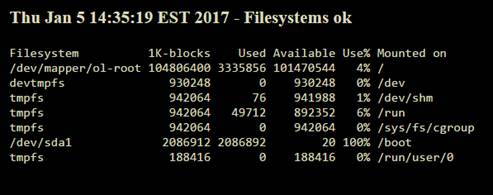
list Scot Kreienkamp
No… it’s showing up on the page and in the graph.  Even if it was ignored, reverting to the default out-of-the-box config would have removed the ignore also.

[cid:image003.jpg at 01D26761.64176870]
▸
Scot Kreienkamp  | Senior Systems Engineer | La-Z-Boy Corporate
One La-Z-Boy Drive | Monroe, Michigan 48162 | Office: XXX-XXX-XXXX | | Mobile: XXXXXXXXXX | Email: user-9678697f1438@xymon.invalid
▸
From: user-f00ed6e065e8@xymon.invalid [mailto:user-f00ed6e065e8@xymon.invalid]
Sent: Thursday, January 5, 2017 2:36 PM
To: Scot Kreienkamp
Cc: user-87556346d4af@xymon.invalid; xymon
Subject: Re: [Xymon] xymon disk not alerting at 100%, need another set of eyes
Is /boot ignored?
▸
It’s not the partition the client is on, and it’s been that way for days.

So a bit more troubleshooting, I moved all the files out of analysis.d so the only analysis config is the default included from the install and restarted xymon.

[root at monvxymon analysis.d]# /usr/libexec/xymon/xymond_client --dump-config --config=etc/analysis.cfg   ; echo Done
UP 3600 -1 (line: 365)
LOAD 5.00 10.00 (line: 366)
DISK * 90% 95% 0 -1 red (line: 367)
INODE * 70% 90% 0 -1 red (line: 368)
MEMREAL 100 101 (line: 369)
MEMSWAP 50 80 (line: 370)
MEMACT 90 97 (line: 371)
Done


Then I restarted my client to force it to report in.  The disk test is still green with the /boot partition at 100% full!  All my windows clients are working, but NONE of my Linux clients with disk full conditions are working.

Something is definitely broken!

JC, any ideas?
From:user-f00ed6e065e8@xymon.invalid<mailto:user-f00ed6e065e8@xymon.invalid> [mailto:user-f00ed6e065e8@xymon.invalid]
▸
Sent: Thursday, January 5, 2017 2:18 PM
To: Scot Kreienkamp
Cc: xymon
Subject: Re: [Xymon] xymon disk not alerting at 100%, need another set of eyes

Hi Scott,

What may have happened is that the disk filled up quicker than the client could send the alert.
If the client is on the same disk that is full.  That's caught me a few times.

HTH
Regards
Greg Shea

So I had another thought, I copied the class statement to another file so it’s now first in the list and last in the list, and my disk test is still green.  Is the class match broken?

I’m on 4.3.27-1 from Terabithia.

Thanks!

From: Scot Kreienkamp
Sent: Thursday, January 5, 2017 1:53 PM
To:xymon at xymon.com<mailto:xymon at xymon.com>
Subject: RE: xymon disk not alerting at 100%, need another set of eyes

After re-reading I can see how that may not be totally clear.  By alerting, I mean that the disk test is still green, even though a partition is at 100%full.


I found two hosts that weren’t alerting on disk full condition and started digging into the problem further.  As I understand it, xymon matches the first entry from analysis config files.  So I dumped the analysis config for disks:

Client line:
[collector:]
client corpvskreienl,na,lzb,hq.linux linux

[root at monvxymon hosts.d]# /usr/libexec/xymon/xymond_client --dump-config --config=etc/analysis.cfg |grep -i ^disk
DISK %^(D|E|F|G|H|I|J|K|L|M|N|O|P|Q|R|S|T|U|V|W|X|Y|Z) 15728640U 10485760U 0 -1 red HOST=%(mondbexec.*|mondb.*|retmaildb.*).na.lzb.hq (line: 515)
DISK %^(1|2|3|4|5|6|7|8|9|0).* IGNORE HOST=%(mondbexec.*|mondb.*|retmaildb.*).na.lzb.hq (line: 516)
DISK %^(D|E|F|G|H|I|J|K|L|M|N|O|P|Q|R|S|T|U|V|W|X|Y|Z) 15728640U 10485760U 0 -1 red HOST=%(mon|new|red|neo|taz|sil|kin|sal|hpt)exch.*.na.lzb.hq (line: 527)
DISK %^(1|2|3|4|5|6|7|8|9|0).* IGNORE HOST=%(mon|new|red|neo|taz|sil|kin|sal|hpt)exch.*.na.lzb.hq (line: 528)
DISK %^(D|E|F|G|H|I|J|K|L|M|N|O|P|Q|R|S|U|V|W|X|Y|Z) 15728640U 10485760U 0 -1 red HOST=%dayexch.*.na.lzb.hq (line: 539)
DISK %^T IGNORE HOST=%dayexch.*.na.lzb.hq (line: 540)
DISK %^(1|2|3|4|5|6|7|8|9|0|).* IGNORE HOST=%dayexch.*.na.lzb.hq (line: 541)
DISK C 204800U 102400U 0 -1 red HOST=mdas4000.mdmza.dmz.hq (line: 567)
DISK E 101% 101% 0 -1 red HOST=mdas4000.mdmza.dmz.hq (line: 568)
DISK F 99% 100% 0 -1 red HOST=mons6000.na.lzb.hq (line: 576)
DISK %^(D|E|F|G|H|I|J|K|L|M|N|O|P|Q|R|S|T|U|V|W|X|Y|Z) 15728640U 10485760U 0 -1 red PAGE=infrastructure/fileserv (line: 582)
DISK D 99% 100% 0 -1 red HOST=lzbv5223.na.lzb.hq,lzbv6016.na.lzb.hq (line: 746)
DISK * 90% 95% 0 -1 red HOST=%dvrvas(0|1)\.mdmza.dmz.hq (line: 762)
DISK * 90% 95% 0 -1 red CLASS=powershell (line: 1054)
DISK * 90% 95% 0 -1 red CLASS=win32 (line: 1073)
DISK * 90% 95% 0 -1 red CLASS=linux (line: 1090)
DISK * 90% 95% 0 -1 red (line: 1132)


I can’t find any lines above where the hostname matches, it’s on page Infrastructure/Miscellaneous so none of the page statements match, so it should match on the class.  Or the very last line is the system default which should apply if nothing else.  My server is sitting at 100%full on one partition so it SHOULD be alerting.

Thanks for any help.


This message is intended only for the individual or entity to which it is addressed.  It may contain privileged, confidential information which is exempt from disclosure under applicable laws.  If you are not the intended recipient, you are strictly prohibited from disseminating or distributing this information (other than to the intended recipient) or copying this information.  If you have received this communication in error, please notify us immediately by e-mail or by telephone at the above number. Thank you.
Attachments (1)
 attachment.jpg
list Japheth Cleaver
Eyeballing it, it seems to be correct, and if windows matches are
working then it seems like class (or at least OS) is being sensed
properly. Can you put xymond_client in debug mode (-USR2) and show the
output from the processing of the disk section for this client? It
should indicate there the thresholds it *thinks* apply to this host.

Also, when running manually like this:
     /usr/libexec/xymon/xymond_client --dump-config
...can you prefix with xymoncmd and see if anything changes? Weird
configs I'd forgotten about in xymonserver.cfg have bit me on occasion.

-jc
▸
On 1/5/2017 11:38 AM, Scot Kreienkamp wrote:
No… it’s showing up on the page and in the graph.  Even if it was
ignored, reverting to the default out-of-the-box config would have
removed the ignore also.

*Scot Kreienkamp  | Senior Systems Engineer | La-Z-Boy Corporate*
One La-Z-Boy Drive | Monroe, Michigan 48162 | Office: XXX-XXX-XXXX | |
Mobile: XXXXXXXXXX | Email: user-9678697f1438@xymon.invalid

*From:* user-f00ed6e065e8@xymon.invalid [mailto:user-f00ed6e065e8@xymon.invalid]
*Sent:* Thursday, January 5, 2017 2:36 PM
*To:* Scot Kreienkamp
*Cc:* user-87556346d4af@xymon.invalid; xymon
*Subject:* Re: [Xymon] xymon disk not alerting at 100%, need another
set of eyes

Is /boot ignored?


    It’s not the partition the client is on, and it’s been that way
    for days.

    So a bit more troubleshooting, I moved all the files out of
    analysis.d so the only analysis config is the default included
    from the install and restarted xymon.

    [root at monvxymon analysis.d]# /usr/libexec/xymon/xymond_client
    --dump-config --config=etc/analysis.cfg   ; echo Done

    UP 3600 -1 (line: 365)

    LOAD 5.00 10.00 (line: 366)

    DISK * 90% 95% 0 -1 red (line: 367)

    INODE * 70% 90% 0 -1 red (line: 368)

    MEMREAL 100 101 (line: 369)

    MEMSWAP 50 80 (line: 370)

    MEMACT 90 97 (line: 371)

    Done

    Then I restarted my client to force it to report in.  The disk
    test is still green with the /boot partition at 100% full!  All my
    windows clients are working, but NONE of my Linux clients with
    disk full conditions are working.

    Something is definitely broken!

    JC, any ideas?
*From:*user-f00ed6e065e8@xymon.invalid <mailto:user-f00ed6e065e8@xymon.invalid>
▸
    [mailto:user-f00ed6e065e8@xymon.invalid]
    *Sent:* Thursday, January 5, 2017 2:18 PM
    *To:* Scot Kreienkamp
    *Cc:* xymon
    *Subject:* Re: [Xymon] xymon disk not alerting at 100%, need
    another set of eyes

    Hi Scott,

    What may have happened is that the disk filled up quicker than the
    client could send the alert.

    If the client is on the same disk that is full.  That's caught me
    a few times.

    HTH

    Regards

    Greg Shea


        So I had another thought, I copied the class statement to
        another file so it’s now first in the list and last in the
        list, and my disk test is still green.  Is the class match broken?

        I’m on 4.3.27-1 from Terabithia.

        Thanks!
        *From:*Scot Kreienkamp
        *Sent:* Thursday, January 5, 2017 1:53 PM
        *To:*xymon at xymon.com <mailto:xymon at xymon.com>
▸
        *Subject:* RE: xymon disk not alerting at 100%, need another
        set of eyes

        After re-reading I can see how that may not be totally clear.
        By alerting, I mean that the disk test is still green, even
        though a partition is at 100%full.

        I found two hosts that weren’t alerting on disk full condition
        and started digging into the problem further.  As I understand
        it, xymon matches the first entry from analysis config files.
        So I dumped the analysis config for disks:

        Client line:

        [collector:]

        client corpvskreienl,na,lzb,hq.linux linux

        [root at monvxymon hosts.d]# /usr/libexec/xymon/xymond_client
        --dump-config --config=etc/analysis.cfg |grep -i ^disk

        DISK %^(D|E|F|G|H|I|J|K|L|M|N|O|P|Q|R|S|T|U|V|W|X|Y|Z)
        15728640U 10485760U 0 -1 red
        HOST=%(mondbexec.*|mondb.*|retmaildb.*).na.lzb.hq (line: 515)

        DISK %^(1|2|3|4|5|6|7|8|9|0).* IGNORE
        HOST=%(mondbexec.*|mondb.*|retmaildb.*).na.lzb.hq (line: 516)

        DISK %^(D|E|F|G|H|I|J|K|L|M|N|O|P|Q|R|S|T|U|V|W|X|Y|Z)
        15728640U 10485760U 0 -1 red
        HOST=%(mon|new|red|neo|taz|sil|kin|sal|hpt)exch.*.na.lzb.hq
        (line: 527)

        DISK %^(1|2|3|4|5|6|7|8|9|0).* IGNORE
        HOST=%(mon|new|red|neo|taz|sil|kin|sal|hpt)exch.*.na.lzb.hq
        (line: 528)

        DISK %^(D|E|F|G|H|I|J|K|L|M|N|O|P|Q|R|S|U|V|W|X|Y|Z) 15728640U
        10485760U 0 -1 red HOST=%dayexch.*.na.lzb.hq (line: 539)

        DISK %^T IGNORE HOST=%dayexch.*.na.lzb.hq (line: 540)

        DISK %^(1|2|3|4|5|6|7|8|9|0|).* IGNORE
        HOST=%dayexch.*.na.lzb.hq (line: 541)

        DISK C 204800U 102400U 0 -1 red HOST=mdas4000.mdmza.dmz.hq
        (line: 567)

        DISK E 101% 101% 0 -1 red HOST=mdas4000.mdmza.dmz.hq (line: 568)

        DISK F 99% 100% 0 -1 red HOST=mons6000.na.lzb.hq (line: 576)

        DISK %^(D|E|F|G|H|I|J|K|L|M|N|O|P|Q|R|S|T|U|V|W|X|Y|Z)
        15728640U 10485760U 0 -1 red PAGE=infrastructure/fileserv
        (line: 582)

        DISK D 99% 100% 0 -1 red
        HOST=lzbv5223.na.lzb.hq,lzbv6016.na.lzb.hq (line: 746)

        DISK * 90% 95% 0 -1 red HOST=%dvrvas(0|1)\.mdmza.dmz.hq (line:
        762)

        DISK * 90% 95% 0 -1 red CLASS=powershell (line: 1054)

        DISK * 90% 95% 0 -1 red CLASS=win32 (line: 1073)

        DISK * 90% 95% 0 -1 red CLASS=linux (line: 1090)

        DISK * 90% 95% 0 -1 red (line: 1132)

        I can’t find any lines above where the hostname matches, it’s
        on page Infrastructure/Miscellaneous so none of the page
        statements match, so it should match on the class. Or the very
        last line is the system default which should apply if nothing
        else.  My server is sitting at 100%full on one partition so it
        SHOULD be alerting.

        Thanks for any help.

        This message is intended only for the individual or entity to
        which it is addressed.  It may contain privileged,
        confidential information which is exempt from disclosure under
        applicable laws.  If you are not the intended recipient, you
        are strictly prohibited from disseminating or distributing
        this information (other than to the intended recipient) or
        copying this information.  If you have received this
        communication in error, please notify us immediately by e-mail
        or by telephone at the above number. Thank you.
list Paul Root
Have you tried doing a test on the condition?

xymond_alert --test machine.test --duration=500 |grep -v Failed
▸
From: Xymon [mailto:xymon-bounces at xymon.com] On Behalf Of Scot Kreienkamp
Sent: Thursday, January 05, 2017 12:59 PM
To: xymon at xymon.com
Subject: Re: [Xymon] xymon disk not alerting at 100%, need another set of eyes

So I had another thought, I copied the class statement to another file so it's now first in the list and last in the list, and my disk test is still green.  Is the class match broken?

I'm on 4.3.27-1 from Terabithia.

Thanks!


Scot Kreienkamp  | Senior Systems Engineer | La-Z-Boy Corporate
One La-Z-Boy Drive | Monroe, Michigan 48162 | Office: XXX-XXX-XXXX | | Mobile: XXXXXXXXXX | Email: user-9678697f1438@xymon.invalid<mailto:user-9678697f1438@xymon.invalid>
▸
From: Scot Kreienkamp
Sent: Thursday, January 5, 2017 1:53 PM
To: xymon at xymon.com<mailto:xymon at xymon.com>
Subject: RE: xymon disk not alerting at 100%, need another set of eyes

After re-reading I can see how that may not be totally clear.  By alerting, I mean that the disk test is still green, even though a partition is at 100%full.


I found two hosts that weren't alerting on disk full condition and started digging into the problem further.  As I understand it, xymon matches the first entry from analysis config files.  So I dumped the analysis config for disks:

Client line:
[collector:]
client corpvskreienl,na,lzb,hq.linux linux

[root at monvxymon hosts.d]# /usr/libexec/xymon/xymond_client --dump-config --config=etc/analysis.cfg |grep -i ^disk
DISK %^(D|E|F|G|H|I|J|K|L|M|N|O|P|Q|R|S|T|U|V|W|X|Y|Z) 15728640U 10485760U 0 -1 red HOST=%(mondbexec.*|mondb.*|retmaildb.*).na.lzb.hq (line: 515)
DISK %^(1|2|3|4|5|6|7|8|9|0).* IGNORE HOST=%(mondbexec.*|mondb.*|retmaildb.*).na.lzb.hq (line: 516)
DISK %^(D|E|F|G|H|I|J|K|L|M|N|O|P|Q|R|S|T|U|V|W|X|Y|Z) 15728640U 10485760U 0 -1 red HOST=%(mon|new|red|neo|taz|sil|kin|sal|hpt)exch.*.na.lzb.hq (line: 527)
DISK %^(1|2|3|4|5|6|7|8|9|0).* IGNORE HOST=%(mon|new|red|neo|taz|sil|kin|sal|hpt)exch.*.na.lzb.hq (line: 528)
DISK %^(D|E|F|G|H|I|J|K|L|M|N|O|P|Q|R|S|U|V|W|X|Y|Z) 15728640U 10485760U 0 -1 red HOST=%dayexch.*.na.lzb.hq (line: 539)
DISK %^T IGNORE HOST=%dayexch.*.na.lzb.hq (line: 540)
DISK %^(1|2|3|4|5|6|7|8|9|0|).* IGNORE HOST=%dayexch.*.na.lzb.hq (line: 541)
DISK C 204800U 102400U 0 -1 red HOST=mdas4000.mdmza.dmz.hq (line: 567)
DISK E 101% 101% 0 -1 red HOST=mdas4000.mdmza.dmz.hq (line: 568)
DISK F 99% 100% 0 -1 red HOST=mons6000.na.lzb.hq (line: 576)
DISK %^(D|E|F|G|H|I|J|K|L|M|N|O|P|Q|R|S|T|U|V|W|X|Y|Z) 15728640U 10485760U 0 -1 red PAGE=infrastructure/fileserv (line: 582)
DISK D 99% 100% 0 -1 red HOST=lzbv5223.na.lzb.hq,lzbv6016.na.lzb.hq (line: 746)
DISK * 90% 95% 0 -1 red HOST=%dvrvas(0|1)\.mdmza.dmz.hq (line: 762)
DISK * 90% 95% 0 -1 red CLASS=powershell (line: 1054)
DISK * 90% 95% 0 -1 red CLASS=win32 (line: 1073)
DISK * 90% 95% 0 -1 red CLASS=linux (line: 1090)
DISK * 90% 95% 0 -1 red (line: 1132)


I can't find any lines above where the hostname matches, it's on page Infrastructure/Miscellaneous so none of the page statements match, so it should match on the class.  Or the very last line is the system default which should apply if nothing else.  My server is sitting at 100%full on one partition so it SHOULD be alerting.

Thanks for any help.


This message is intended only for the individual or entity to which it is addressed.  It may contain privileged, confidential information which is exempt from disclosure under applicable laws.  If you are not the intended recipient, you are strictly prohibited from disseminating or distributing this information (other than to the intended recipient) or copying this information.  If you have received this communication in error, please notify us immediately by e-mail or by telephone at the above number. Thank you.
This communication is the property of CenturyLink and may contain confidential or privileged information. Unauthorized use of this communication is strictly prohibited and may be unlawful. If you have received this communication in error, please immediately notify the sender by reply e-mail and destroy all copies of the communication and any attachments.
list Scot Kreienkamp
Running the config dump with xymoncmd in front of it didn’t make any difference to the output.

Here’s the debug mode output for the disk section:


4873 2017-01-05 15:18:07.632660 Disk check host corpvskreienl.na.lzb.hq
4873 2017-01-05 15:18:07.632670 Disk check: header 'Filesystem          1K-blocks    Used Available Use% Mounted on', columns 3 and -1
4873 2017-01-05 15:18:07.632677 Disk check: FS='/' level 0%/101469992U (thresholds: 90/95, abs: 0/0)
4873 2017-01-05 15:18:07.632683 Disk check: FS='/dev' level 0%/930248U (thresholds: 90/95, abs: 0/0)
4873 2017-01-05 15:18:07.632688 Disk check: FS='/dev/shm' level 0%/941992U (thresholds: 90/95, abs: 0/0)
4873 2017-01-05 15:18:07.632692 Disk check: FS='/run' level 0%/892380U (thresholds: 90/95, abs: 0/0)
4873 2017-01-05 15:18:07.632696 Disk check: FS='/sys/fs/cgroup' level 0%/942064U (thresholds: 90/95, abs: 0/0)
4873 2017-01-05 15:18:07.632700 Disk check: FS='/boot' level 0%/20U (thresholds: 90/95, abs: 0/0)
4873 2017-01-05 15:18:07.632704 Disk check: FS='/run/user/0' level 0%/188416U (thresholds: 90/95, abs: 0/0)
4873 2017-01-05 15:18:07.632708 Adding to combo msg: status corpvskreienl,na,lzb,hq.disk green Thu Jan  5 15:18:07 EST 2017 - Filesystems ok
4873 2017-01-05 15:18:07.632710 combo_add (tcp): current xymonmsg size: 11068, buffer size: 617; maxmsgspercombo: 100, messages queued so far: 2
4873 2017-01-05 15:18:07.632713 Inode check host corpvskreienl.na.lzb.hq
4873 2017-01-05 15:18:07.632719 Inode check: header 'Filesystem          1K-blocks    Used Available Use% Mounted on', columns -1 and -1
4873 2017-01-05 15:18:07.632726 Inode check: FS='/' level 0%/0U (thresholds: 70/90, abs: 0/0)
4873 2017-01-05 15:18:07.632752 Inode check: FS='/dev' level 0%/0U (thresholds: 70/90, abs: 0/0)
4873 2017-01-05 15:18:07.632758 Inode check: FS='/dev/shm' level 0%/0U (thresholds: 70/90, abs: 0/0)
4873 2017-01-05 15:18:07.632762 Inode check: FS='/run' level 0%/0U (thresholds: 70/90, abs: 0/0)
4873 2017-01-05 15:18:07.632766 Inode check: FS='/sys/fs/cgroup' level 0%/0U (thresholds: 70/90, abs: 0/0)
4873 2017-01-05 15:18:07.632770 Inode check: FS='/boot' level 0%/0U (thresholds: 70/90, abs: 0/0)
4873 2017-01-05 15:18:07.632773 Inode check: FS='/run/user/0' level 0%/0U (thresholds: 70/90, abs: 0/0)
4873 2017-01-05 15:18:07.632777 Adding to combo msg: status corpvskreienl,na,lzb,hq.inode green Thu Jan  5 15:18:07 EST 2017 - Filesystems ok
▸
Scot Kreienkamp  | Senior Systems Engineer | La-Z-Boy Corporate
One La-Z-Boy Drive | Monroe, Michigan 48162 | Office: XXX-XXX-XXXX | | Mobile: XXXXXXXXXX | Email: user-9678697f1438@xymon.invalid
▸
From: Japheth Cleaver [mailto:user-87556346d4af@xymon.invalid]
Sent: Thursday, January 5, 2017 3:11 PM
To: Scot Kreienkamp; user-f00ed6e065e8@xymon.invalid
Cc: xymon
Subject: Re: [Xymon] xymon disk not alerting at 100%, need another set of eyes

Eyeballing it, it seems to be correct, and if windows matches are working then it seems like class (or at least OS) is being sensed properly. Can you put xymond_client in debug mode (-USR2) and show the output from the processing of the disk section for this client? It should indicate there the thresholds it *thinks* apply to this host.

Also, when running manually like this:
    /usr/libexec/xymon/xymond_client --dump-config
...can you prefix with xymoncmd and see if anything changes? Weird configs I'd forgotten about in xymonserver.cfg have bit me on occasion.

-jc

On 1/5/2017 11:38 AM, Scot Kreienkamp wrote:
No… it’s showing up on the page and in the graph.  Even if it was ignored, reverting to the default out-of-the-box config would have removed the ignore also.
[cid:image001.jpg at 01D26767.9D2648B0]
▸
From:user-f00ed6e065e8@xymon.invalid<mailto:user-f00ed6e065e8@xymon.invalid> [mailto:user-f00ed6e065e8@xymon.invalid]
Sent: Thursday, January 5, 2017 2:36 PM
To: Scot Kreienkamp
Cc:user-87556346d4af@xymon.invalid<mailto:user-87556346d4af@xymon.invalid>; xymon
▸
Subject: Re: [Xymon] xymon disk not alerting at 100%, need another set of eyes

Is /boot ignored?


It’s not the partition the client is on, and it’s been that way for days.

So a bit more troubleshooting, I moved all the files out of analysis.d so the only analysis config is the default included from the install and restarted xymon.

[root at monvxymon analysis.d]# /usr/libexec/xymon/xymond_client --dump-config --config=etc/analysis.cfg   ; echo Done
UP 3600 -1 (line: 365)
LOAD 5.00 10.00 (line: 366)
DISK * 90% 95% 0 -1 red (line: 367)
INODE * 70% 90% 0 -1 red (line: 368)
MEMREAL 100 101 (line: 369)
MEMSWAP 50 80 (line: 370)
MEMACT 90 97 (line: 371)
Done


Then I restarted my client to force it to report in.  The disk test is still green with the /boot partition at 100% full!  All my windows clients are working, but NONE of my Linux clients with disk full conditions are working.

Something is definitely broken!

JC, any ideas?

From:user-f00ed6e065e8@xymon.invalid<mailto:user-f00ed6e065e8@xymon.invalid> [mailto:user-f00ed6e065e8@xymon.invalid]
Sent: Thursday, January 5, 2017 2:18 PM
To: Scot Kreienkamp
Cc: xymon
Subject: Re: [Xymon] xymon disk not alerting at 100%, need another set of eyes

Hi Scott,

What may have happened is that the disk filled up quicker than the client could send the alert.
If the client is on the same disk that is full.  That's caught me a few times.

HTH
Regards
Greg Shea

So I had another thought, I copied the class statement to another file so it’s now first in the list and last in the list, and my disk test is still green.  Is the class match broken?

I’m on 4.3.27-1 from Terabithia.

Thanks!

From: Scot Kreienkamp
Sent: Thursday, January 5, 2017 1:53 PM
To:xymon at xymon.com<mailto:xymon at xymon.com>
Subject: RE: xymon disk not alerting at 100%, need another set of eyes

After re-reading I can see how that may not be totally clear.  By alerting, I mean that the disk test is still green, even though a partition is at 100%full.


I found two hosts that weren’t alerting on disk full condition and started digging into the problem further.  As I understand it, xymon matches the first entry from analysis config files.  So I dumped the analysis config for disks:

Client line:
[collector:]
client corpvskreienl,na,lzb,hq.linux linux

[root at monvxymon hosts.d]# /usr/libexec/xymon/xymond_client --dump-config --config=etc/analysis.cfg |grep -i ^disk
DISK %^(D|E|F|G|H|I|J|K|L|M|N|O|P|Q|R|S|T|U|V|W|X|Y|Z) 15728640U 10485760U 0 -1 red HOST=%(mondbexec.*|mondb.*|retmaildb.*).na.lzb.hq (line: 515)
DISK %^(1|2|3|4|5|6|7|8|9|0).* IGNORE HOST=%(mondbexec.*|mondb.*|retmaildb.*).na.lzb.hq (line: 516)
DISK %^(D|E|F|G|H|I|J|K|L|M|N|O|P|Q|R|S|T|U|V|W|X|Y|Z) 15728640U 10485760U 0 -1 red HOST=%(mon|new|red|neo|taz|sil|kin|sal|hpt)exch.*.na.lzb.hq (line: 527)
DISK %^(1|2|3|4|5|6|7|8|9|0).* IGNORE HOST=%(mon|new|red|neo|taz|sil|kin|sal|hpt)exch.*.na.lzb.hq (line: 528)
DISK %^(D|E|F|G|H|I|J|K|L|M|N|O|P|Q|R|S|U|V|W|X|Y|Z) 15728640U 10485760U 0 -1 red HOST=%dayexch.*.na.lzb.hq (line: 539)
DISK %^T IGNORE HOST=%dayexch.*.na.lzb.hq (line: 540)
DISK %^(1|2|3|4|5|6|7|8|9|0|).* IGNORE HOST=%dayexch.*.na.lzb.hq (line: 541)
DISK C 204800U 102400U 0 -1 red HOST=mdas4000.mdmza.dmz.hq (line: 567)
DISK E 101% 101% 0 -1 red HOST=mdas4000.mdmza.dmz.hq (line: 568)
DISK F 99% 100% 0 -1 red HOST=mons6000.na.lzb.hq (line: 576)
DISK %^(D|E|F|G|H|I|J|K|L|M|N|O|P|Q|R|S|T|U|V|W|X|Y|Z) 15728640U 10485760U 0 -1 red PAGE=infrastructure/fileserv (line: 582)
DISK D 99% 100% 0 -1 red HOST=lzbv5223.na.lzb.hq,lzbv6016.na.lzb.hq (line: 746)
DISK * 90% 95% 0 -1 red HOST=%dvrvas(0|1)\.mdmza.dmz.hq (line: 762)
DISK * 90% 95% 0 -1 red CLASS=powershell (line: 1054)
DISK * 90% 95% 0 -1 red CLASS=win32 (line: 1073)
DISK * 90% 95% 0 -1 red CLASS=linux (line: 1090)
DISK * 90% 95% 0 -1 red (line: 1132)


I can’t find any lines above where the hostname matches, it’s on page Infrastructure/Miscellaneous so none of the page statements match, so it should match on the class.  Or the very last line is the system default which should apply if nothing else.  My server is sitting at 100%full on one partition so it SHOULD be alerting.

Thanks for any help.


This message is intended only for the individual or entity to which it is addressed.  It may contain privileged, confidential information which is exempt from disclosure under applicable laws.  If you are not the intended recipient, you are strictly prohibited from disseminating or distributing this information (other than to the intended recipient) or copying this information.  If you have received this communication in error, please notify us immediately by e-mail or by telephone at the above number. Thank you.
list Scot Kreienkamp
Hi Paul,

By alerting, I meant the test is not turning red even though the disk is full.  A poor choice of words on my part, sorry.
▸
Scot Kreienkamp  | Senior Systems Engineer | La-Z-Boy Corporate
One La-Z-Boy Drive | Monroe, Michigan 48162 | Office: XXX-XXX-XXXX | | Mobile: XXXXXXXXXX | Email: user-9678697f1438@xymon.invalid
▸
From: Root, Paul T [mailto:user-76fdb6883669@xymon.invalid]
Sent: Thursday, January 5, 2017 3:19 PM
To: Scot Kreienkamp; xymon at xymon.com
Subject: RE: [Xymon] xymon disk not alerting at 100%, need another set of eyes

Have you tried doing a test on the condition?

xymond_alert --test machine.test --duration=500 |grep -v Failed

From: Xymon [mailto:xymon-bounces at xymon.com] On Behalf Of Scot Kreienkamp
Sent: Thursday, January 05, 2017 12:59 PM
To:xymon at xymon.com<mailto:xymon at xymon.com>
Subject: Re: [Xymon] xymon disk not alerting at 100%, need another set of eyes

So I had another thought, I copied the class statement to another file so it's now first in the list and last in the list, and my disk test is still green.  Is the class match broken?

I'm on 4.3.27-1 from Terabithia.

Thanks!
From: Scot Kreienkamp
Sent: Thursday, January 5, 2017 1:53 PM
To:xymon at xymon.com<mailto:xymon at xymon.com>
Subject: RE: xymon disk not alerting at 100%, need another set of eyes

After re-reading I can see how that may not be totally clear.  By alerting, I mean that the disk test is still green, even though a partition is at 100%full.


I found two hosts that weren't alerting on disk full condition and started digging into the problem further.  As I understand it, xymon matches the first entry from analysis config files.  So I dumped the analysis config for disks:

Client line:
[collector:]
client corpvskreienl,na,lzb,hq.linux linux

[root at monvxymon hosts.d]# /usr/libexec/xymon/xymond_client --dump-config --config=etc/analysis.cfg |grep -i ^disk
DISK %^(D|E|F|G|H|I|J|K|L|M|N|O|P|Q|R|S|T|U|V|W|X|Y|Z) 15728640U 10485760U 0 -1 red HOST=%(mondbexec.*|mondb.*|retmaildb.*).na.lzb.hq (line: 515)
DISK %^(1|2|3|4|5|6|7|8|9|0).* IGNORE HOST=%(mondbexec.*|mondb.*|retmaildb.*).na.lzb.hq (line: 516)
DISK %^(D|E|F|G|H|I|J|K|L|M|N|O|P|Q|R|S|T|U|V|W|X|Y|Z) 15728640U 10485760U 0 -1 red HOST=%(mon|new|red|neo|taz|sil|kin|sal|hpt)exch.*.na.lzb.hq (line: 527)
DISK %^(1|2|3|4|5|6|7|8|9|0).* IGNORE HOST=%(mon|new|red|neo|taz|sil|kin|sal|hpt)exch.*.na.lzb.hq (line: 528)
DISK %^(D|E|F|G|H|I|J|K|L|M|N|O|P|Q|R|S|U|V|W|X|Y|Z) 15728640U 10485760U 0 -1 red HOST=%dayexch.*.na.lzb.hq (line: 539)
DISK %^T IGNORE HOST=%dayexch.*.na.lzb.hq (line: 540)
DISK %^(1|2|3|4|5|6|7|8|9|0|).* IGNORE HOST=%dayexch.*.na.lzb.hq (line: 541)
DISK C 204800U 102400U 0 -1 red HOST=mdas4000.mdmza.dmz.hq (line: 567)
DISK E 101% 101% 0 -1 red HOST=mdas4000.mdmza.dmz.hq (line: 568)
DISK F 99% 100% 0 -1 red HOST=mons6000.na.lzb.hq (line: 576)
DISK %^(D|E|F|G|H|I|J|K|L|M|N|O|P|Q|R|S|T|U|V|W|X|Y|Z) 15728640U 10485760U 0 -1 red PAGE=infrastructure/fileserv (line: 582)
DISK D 99% 100% 0 -1 red HOST=lzbv5223.na.lzb.hq,lzbv6016.na.lzb.hq (line: 746)
DISK * 90% 95% 0 -1 red HOST=%dvrvas(0|1)\.mdmza.dmz.hq (line: 762)
DISK * 90% 95% 0 -1 red CLASS=powershell (line: 1054)
DISK * 90% 95% 0 -1 red CLASS=win32 (line: 1073)
DISK * 90% 95% 0 -1 red CLASS=linux (line: 1090)
DISK * 90% 95% 0 -1 red (line: 1132)


I can't find any lines above where the hostname matches, it's on page Infrastructure/Miscellaneous so none of the page statements match, so it should match on the class.  Or the very last line is the system default which should apply if nothing else.  My server is sitting at 100%full on one partition so it SHOULD be alerting.

Thanks for any help.


This message is intended only for the individual or entity to which it is addressed.  It may contain privileged, confidential information which is exempt from disclosure under applicable laws.  If you are not the intended recipient, you are strictly prohibited from disseminating or distributing this information (other than to the intended recipient) or copying this information.  If you have received this communication in error, please notify us immediately by e-mail or by telephone at the above number. Thank you.
This communication is the property of CenturyLink and may contain confidential or privileged information. Unauthorized use of this communication is strictly prohibited and may be unlawful. If you have received this communication in error, please immediately notify the sender by reply e-mail and destroy all copies of the communication and any attachments.
list Japheth Cleaver
Hmm. That seems strange... We're not showing any space data there, just
0%. It should look something like this below...
What's the output of the normal 'df' command on these boxes?

7416 2017-01-05 12:49:20.809413 Disk check host rhel5-i386.build
7416 2017-01-05 12:49:20.809926 Disk check: header 'Filesystem
1024-blocks      Used Available Capacity Mounted on', columns 3 and 4
7416 2017-01-05 12:49:20.810409 Disk check: FS='/' level 74%/1751688U
(thresholds: 90/95, abs: 0/0)
7416 2017-01-05 12:49:20.810818 Disk check: FS='/boot' level 13%/83419U
(thresholds: 90/95, abs: 0/0)
7416 2017-01-05 12:49:20.820510 Disk check: FS='/dev/shm' level
1%/257372U (thresholds: 90/95, abs: 0/0)
7416 2017-01-05 12:49:20.820691 Adding to combo msg: status
rhel5-i386,build.disk green Thu Jan  5 12:49:52 PST 2017 - Filesystems ok

One idea: Are these the same boxes that you had to put the sudo hack in
for? Is it possible the arguments to 'df' are not being passed in with
the execution? At the very least, I think missing a -P (posix) could
cause parsing problems.

-jc
▸
On 1/5/2017 12:23 PM, Scot Kreienkamp wrote:Running the config dump with xymoncmd in front of it didn’t make any difference to the output. Here’s the debug mode output for the disk section: 4873 2017-01-05 15:18:07.632660 Disk check host corpvskreienl.na.lzb.hq 4873 2017-01-05 15:18:07.632670 Disk check: header 'Filesystem 1K-blocks Used Available Use% Mounted on', columns 3 and -1 4873 2017-01-05 15:18:07.632677 Disk check: FS='/' level 0%/101469992U (thresholds: 90/95, abs: 0/0) 4873 2017-01-05 15:18:07.632683 Disk check: FS='/dev' level 0%/930248U (thresholds: 90/95, abs: 0/0) 4873 2017-01-05 15:18:07.632688 Disk check: FS='/dev/shm' level 0%/941992U (thresholds: 90/95, abs: 0/0) 4873 2017-01-05 15:18:07.632692 Disk check: FS='/run' level 0%/892380U (thresholds: 90/95, abs: 0/0) 4873 2017-01-05 15:18:07.632696 Disk check: FS='/sys/fs/cgroup' level 0%/942064U (thresholds: 90/95, abs: 0/0) 4873 2017-01-05 15:18:07.632700 Disk check: FS='/boot' level 0%/20U (thresholds: 90/95, abs: 0/0) 4873 2017-01-05 15:18:07.632704 Disk check: FS='/run/user/0' level 0%/188416U (thresholds: 90/95, abs: 0/0) 4873 2017-01-05 15:18:07.632708 Adding to combo msg: status corpvskreienl,na,lzb,hq.disk green Thu Jan 5 15:18:07 EST 2017 - Filesystems ok 4873 2017-01-05 15:18:07.632710 combo_add (tcp): current xymonmsg size: 11068, buffer size: 617; maxmsgspercombo: 100, messages queued so far: 2 4873 2017-01-05 15:18:07.632713 Inode check host corpvskreienl.na.lzb.hq 4873 2017-01-05 15:18:07.632719 Inode check: header 'Filesystem 1K-blocks Used Available Use% Mounted on', columns -1 and -1 4873 2017-01-05 15:18:07.632726 Inode check: FS='/' level 0%/0U (thresholds: 70/90, abs: 0/0) 4873 2017-01-05 15:18:07.632752 Inode check: FS='/dev' level 0%/0U (thresholds: 70/90, abs: 0/0) 4873 2017-01-05 15:18:07.632758 Inode check: FS='/dev/shm' level 0%/0U (thresholds: 70/90, abs: 0/0) 4873 2017-01-05 15:18:07.632762 Inode check: FS='/run' level 0%/0U (thresholds: 70/90, abs: 0/0) 4873 2017-01-05 15:18:07.632766 Inode check: FS='/sys/fs/cgroup' level 0%/0U (thresholds: 70/90, abs: 0/0) 4873 2017-01-05 15:18:07.632770 Inode check: FS='/boot' level 0%/0U (thresholds: 70/90, abs: 0/0) 4873 2017-01-05 15:18:07.632773 Inode check: FS='/run/user/0' level 0%/0U (thresholds: 70/90, abs: 0/0) 4873 2017-01-05 15:18:07.632777 Adding to combo msg: status corpvskreienl,na,lzb,hq.inode green Thu Jan 5 15:18:07 EST 2017 - Filesystems ok *Scot Kreienkamp | Senior Systems Engineer | La-Z-Boy Corporate* One La-Z-Boy Drive | Monroe, Michigan 48162 | Office: XXX-XXX-XXXX | | Mobile: XXXXXXXXXX | Email: user-9678697f1438@xymon.invalid
*From:*Japheth Cleaver [mailto:user-87556346d4af@xymon.invalid]
▸
*Sent:* Thursday, January 5, 2017 3:11 PM
*To:* Scot Kreienkamp; user-f00ed6e065e8@xymon.invalid
*Cc:* xymon
*Subject:* Re: [Xymon] xymon disk not alerting at 100%, need another
set of eyes

Eyeballing it, it seems to be correct, and if windows matches are
working then it seems like class (or at least OS) is being sensed
properly. Can you put xymond_client in debug mode (-USR2) and show the
output from the processing of the disk section for this client? It
should indicate there the thresholds it *thinks* apply to this host.

Also, when running manually like this:
    /usr/libexec/xymon/xymond_client --dump-config
...can you prefix with xymoncmd and see if anything changes? Weird
configs I'd forgotten about in xymonserver.cfg have bit me on occasion.

-jc

On 1/5/2017 11:38 AM, Scot Kreienkamp wrote:

    No… it’s showing up on the page and in the graph.  Even if it was
    ignored, reverting to the default out-of-the-box config would have
    removed the ignore also.

    *From:*user-f00ed6e065e8@xymon.invalid <mailto:user-f00ed6e065e8@xymon.invalid>
    [mailto:user-f00ed6e065e8@xymon.invalid]
    *Sent:* Thursday, January 5, 2017 2:36 PM
    *To:* Scot Kreienkamp
*Cc:*user-87556346d4af@xymon.invalid <mailto:user-87556346d4af@xymon.invalid>; xymon
▸
    *Subject:* Re: [Xymon] xymon disk not alerting at 100%, need
    another set of eyes

    Is /boot ignored?


        It’s not the partition the client is on, and it’s been that
        way for days.

        So a bit more troubleshooting, I moved all the files out of
        analysis.d so the only analysis config is the default included
        from the install and restarted xymon.

        [root at monvxymon analysis.d]# /usr/libexec/xymon/xymond_client
        --dump-config --config=etc/analysis.cfg   ; echo Done

        UP 3600 -1 (line: 365)

        LOAD 5.00 10.00 (line: 366)

        DISK * 90% 95% 0 -1 red (line: 367)

        INODE * 70% 90% 0 -1 red (line: 368)

        MEMREAL 100 101 (line: 369)

        MEMSWAP 50 80 (line: 370)

        MEMACT 90 97 (line: 371)

        Done

        Then I restarted my client to force it to report in.  The disk
        test is still green with the /boot partition at 100% full!
        All my windows clients are working, but NONE of my Linux
        clients with disk full conditions are working.

        Something is definitely broken!

        JC, any ideas?

        *From:*user-f00ed6e065e8@xymon.invalid <mailto:user-f00ed6e065e8@xymon.invalid>
        [mailto:user-f00ed6e065e8@xymon.invalid]
        *Sent:* Thursday, January 5, 2017 2:18 PM
        *To:* Scot Kreienkamp
        *Cc:* xymon
        *Subject:* Re: [Xymon] xymon disk not alerting at 100%, need
        another set of eyes

        Hi Scott,

        What may have happened is that the disk filled up quicker than
        the client could send the alert.

        If the client is on the same disk that is full. That's caught
        me a few times.

        HTH

        Regards

        Greg Shea


            So I had another thought, I copied the class statement to
            another file so it’s now first in the list and last in the
            list, and my disk test is still green.  Is the class match
            broken?

            I’m on 4.3.27-1 from Terabithia.

            Thanks!

            *From:* Scot Kreienkamp
            *Sent:* Thursday, January 5, 2017 1:53 PM
            *To:*xymon at xymon.com <mailto:xymon at xymon.com>
            *Subject:* RE: xymon disk not alerting at 100%, need
            another set of eyes

            After re-reading I can see how that may not be totally
            clear.  By alerting, I mean that the disk test is still
            green, even though a partition is at 100%full.

            I found two hosts that weren’t alerting on disk full
            condition and started digging into the problem further.
            As I understand it, xymon matches the first entry from
            analysis config files.  So I dumped the analysis config
            for disks:

            Client line:

            [collector:]

            client corpvskreienl,na,lzb,hq.linux linux

            [root at monvxymon hosts.d]# /usr/libexec/xymon/xymond_client
            --dump-config --config=etc/analysis.cfg |grep -i ^disk

            DISK %^(D|E|F|G|H|I|J|K|L|M|N|O|P|Q|R|S|T|U|V|W|X|Y|Z)
            15728640U 10485760U 0 -1 red
            HOST=%(mondbexec.*|mondb.*|retmaildb.*).na.lzb.hq (line: 515)

            DISK %^(1|2|3|4|5|6|7|8|9|0).* IGNORE
            HOST=%(mondbexec.*|mondb.*|retmaildb.*).na.lzb.hq (line: 516)

            DISK %^(D|E|F|G|H|I|J|K|L|M|N|O|P|Q|R|S|T|U|V|W|X|Y|Z)
            15728640U 10485760U 0 -1 red
            HOST=%(mon|new|red|neo|taz|sil|kin|sal|hpt)exch.*.na.lzb.hq
            (line: 527)

            DISK %^(1|2|3|4|5|6|7|8|9|0).* IGNORE
            HOST=%(mon|new|red|neo|taz|sil|kin|sal|hpt)exch.*.na.lzb.hq
            (line: 528)

            DISK %^(D|E|F|G|H|I|J|K|L|M|N|O|P|Q|R|S|U|V|W|X|Y|Z)
            15728640U 10485760U 0 -1 red HOST=%dayexch.*.na.lzb.hq
            (line: 539)

            DISK %^T IGNORE HOST=%dayexch.*.na.lzb.hq (line: 540)

            DISK %^(1|2|3|4|5|6|7|8|9|0|).* IGNORE
            HOST=%dayexch.*.na.lzb.hq (line: 541)

            DISK C 204800U 102400U 0 -1 red HOST=mdas4000.mdmza.dmz.hq
            (line: 567)

            DISK E 101% 101% 0 -1 red HOST=mdas4000.mdmza.dmz.hq
            (line: 568)

            DISK F 99% 100% 0 -1 red HOST=mons6000.na.lzb.hq (line: 576)

            DISK %^(D|E|F|G|H|I|J|K|L|M|N|O|P|Q|R|S|T|U|V|W|X|Y|Z)
            15728640U 10485760U 0 -1 red PAGE=infrastructure/fileserv
            (line: 582)

            DISK D 99% 100% 0 -1 red
            HOST=lzbv5223.na.lzb.hq,lzbv6016.na.lzb.hq (line: 746)

            DISK * 90% 95% 0 -1 red HOST=%dvrvas(0|1)\.mdmza.dmz.hq
            (line: 762)

            DISK * 90% 95% 0 -1 red CLASS=powershell (line: 1054)

            DISK * 90% 95% 0 -1 red CLASS=win32 (line: 1073)

            DISK * 90% 95% 0 -1 red CLASS=linux (line: 1090)

            DISK * 90% 95% 0 -1 red (line: 1132)

            I can’t find any lines above where the hostname matches,
            it’s on page Infrastructure/Miscellaneous so none of the
            page statements match, so it should match on the class.
            Or the very last line is the system default which should
            apply if nothing else.  My server is sitting at 100%full
            on one partition so it SHOULD be alerting.

            Thanks for any help.

            This message is intended only for the individual or entity
            to which it is addressed.  It may contain privileged,
            confidential information which is exempt from disclosure
            under applicable laws.  If you are not the intended
            recipient, you are strictly prohibited from disseminating
            or distributing this information (other than to the
            intended recipient) or copying this information. If you
            have received this communication in error, please notify
            us immediately by e-mail or by telephone at the above
            number. Thank you.
list Scot Kreienkamp
Here’s the output of df, just looks normal to me:

[root at corpvskreienl bin]# df -h
Filesystem           Size  Used Avail Use% Mounted on
/dev/mapper/ol-root  100G  3.2G   97G   4% /
devtmpfs             909M     0  909M   0% /dev
tmpfs                920M   72K  920M   1% /dev/shm
tmpfs                920M   49M  872M   6% /run
tmpfs                920M     0  920M   0% /sys/fs/cgroup
/dev/sda1            2.0G  2.0G   20K 100% /boot
tmpfs                184M     0  184M   0% /run/user/0

[cid:image001.png at 01D26771.4064A9F0]
▸
Scot Kreienkamp  | Senior Systems Engineer | La-Z-Boy Corporate
One La-Z-Boy Drive | Monroe, Michigan 48162 | Office: XXX-XXX-XXXX | | Mobile: XXXXXXXXXX | Email: user-9678697f1438@xymon.invalid
▸
From: Japheth Cleaver [mailto:user-87556346d4af@xymon.invalid]
Sent: Thursday, January 5, 2017 3:55 PM
To: Scot Kreienkamp; user-f00ed6e065e8@xymon.invalid
Cc: xymon
Subject: Re: [Xymon] xymon disk not alerting at 100%, need another set of eyes

Hmm. That seems strange... We're not showing any space data there, just 0%. It should look something like this below...
What's the output of the normal 'df' command on these boxes?

7416 2017-01-05 12:49:20.809413 Disk check host rhel5-i386.build
7416 2017-01-05 12:49:20.809926 Disk check: header 'Filesystem         1024-blocks      Used Available Capacity Mounted on', columns 3 and 4
7416 2017-01-05 12:49:20.810409 Disk check: FS='/' level 74%/1751688U (thresholds: 90/95, abs: 0/0)
7416 2017-01-05 12:49:20.810818 Disk check: FS='/boot' level 13%/83419U (thresholds: 90/95, abs: 0/0)
7416 2017-01-05 12:49:20.820510 Disk check: FS='/dev/shm' level 1%/257372U (thresholds: 90/95, abs: 0/0)
7416 2017-01-05 12:49:20.820691 Adding to combo msg: status rhel5-i386,build.disk green Thu Jan  5 12:49:52 PST 2017 - Filesystems ok

One idea: Are these the same boxes that you had to put the sudo hack in for? Is it possible the arguments to 'df' are not being passed in with the execution? At the very least, I think missing a -P (posix) could cause parsing problems.

-jc

On 1/5/2017 12:23 PM, Scot Kreienkamp wrote:
Running the config dump with xymoncmd in front of it didn’t make any difference to the output.

Here’s the debug mode output for the disk section:


4873 2017-01-05 15:18:07.632660 Disk check host corpvskreienl.na.lzb.hq
4873 2017-01-05 15:18:07.632670 Disk check: header 'Filesystem          1K-blocks    Used Available Use% Mounted on', columns 3 and -1
4873 2017-01-05 15:18:07.632677 Disk check: FS='/' level 0%/101469992U (thresholds: 90/95, abs: 0/0)
4873 2017-01-05 15:18:07.632683 Disk check: FS='/dev' level 0%/930248U (thresholds: 90/95, abs: 0/0)
4873 2017-01-05 15:18:07.632688 Disk check: FS='/dev/shm' level 0%/941992U (thresholds: 90/95, abs: 0/0)
4873 2017-01-05 15:18:07.632692 Disk check: FS='/run' level 0%/892380U (thresholds: 90/95, abs: 0/0)
4873 2017-01-05 15:18:07.632696 Disk check: FS='/sys/fs/cgroup' level 0%/942064U (thresholds: 90/95, abs: 0/0)
4873 2017-01-05 15:18:07.632700 Disk check: FS='/boot' level 0%/20U (thresholds: 90/95, abs: 0/0)
4873 2017-01-05 15:18:07.632704 Disk check: FS='/run/user/0' level 0%/188416U (thresholds: 90/95, abs: 0/0)
4873 2017-01-05 15:18:07.632708 Adding to combo msg: status corpvskreienl,na,lzb,hq.disk green Thu Jan  5 15:18:07 EST 2017 - Filesystems ok
4873 2017-01-05 15:18:07.632710 combo_add (tcp): current xymonmsg size: 11068, buffer size: 617; maxmsgspercombo: 100, messages queued so far: 2
4873 2017-01-05 15:18:07.632713 Inode check host corpvskreienl.na.lzb.hq
4873 2017-01-05 15:18:07.632719 Inode check: header 'Filesystem          1K-blocks    Used Available Use% Mounted on', columns -1 and -1
4873 2017-01-05 15:18:07.632726 Inode check: FS='/' level 0%/0U (thresholds: 70/90, abs: 0/0)
4873 2017-01-05 15:18:07.632752 Inode check: FS='/dev' level 0%/0U (thresholds: 70/90, abs: 0/0)
4873 2017-01-05 15:18:07.632758 Inode check: FS='/dev/shm' level 0%/0U (thresholds: 70/90, abs: 0/0)
4873 2017-01-05 15:18:07.632762 Inode check: FS='/run' level 0%/0U (thresholds: 70/90, abs: 0/0)
4873 2017-01-05 15:18:07.632766 Inode check: FS='/sys/fs/cgroup' level 0%/0U (thresholds: 70/90, abs: 0/0)
4873 2017-01-05 15:18:07.632770 Inode check: FS='/boot' level 0%/0U (thresholds: 70/90, abs: 0/0)
4873 2017-01-05 15:18:07.632773 Inode check: FS='/run/user/0' level 0%/0U (thresholds: 70/90, abs: 0/0)
4873 2017-01-05 15:18:07.632777 Adding to combo msg: status corpvskreienl,na,lzb,hq.inode green Thu Jan  5 15:18:07 EST 2017 - Filesystems ok


From: Japheth Cleaver [mailto:user-87556346d4af@xymon.invalid]
Sent: Thursday, January 5, 2017 3:11 PM
To: Scot Kreienkamp; user-f00ed6e065e8@xymon.invalid<mailto:user-f00ed6e065e8@xymon.invalid>
Cc: xymon
Subject: Re: [Xymon] xymon disk not alerting at 100%, need another set of eyes

Eyeballing it, it seems to be correct, and if windows matches are working then it seems like class (or at least OS) is being sensed properly. Can you put xymond_client in debug mode (-USR2) and show the output from the processing of the disk section for this client? It should indicate there the thresholds it *thinks* apply to this host.

Also, when running manually like this:
    /usr/libexec/xymon/xymond_client --dump-config
...can you prefix with xymoncmd and see if anything changes? Weird configs I'd forgotten about in xymonserver.cfg have bit me on occasion.

-jc

On 1/5/2017 11:38 AM, Scot Kreienkamp wrote:
No… it’s showing up on the page and in the graph.  Even if it was ignored, reverting to the default out-of-the-box config would have removed the ignore also.
[cid:image002.jpg at 01D26771.4064A9F0]
▸
From:user-f00ed6e065e8@xymon.invalid<mailto:user-f00ed6e065e8@xymon.invalid> [mailto:user-f00ed6e065e8@xymon.invalid]
Sent: Thursday, January 5, 2017 2:36 PM
To: Scot Kreienkamp
Cc:user-87556346d4af@xymon.invalid<mailto:user-87556346d4af@xymon.invalid>; xymon
Subject: Re: [Xymon] xymon disk not alerting at 100%, need another set of eyes

Is /boot ignored?


It’s not the partition the client is on, and it’s been that way for days.

So a bit more troubleshooting, I moved all the files out of analysis.d so the only analysis config is the default included from the install and restarted xymon.

[root at monvxymon analysis.d]# /usr/libexec/xymon/xymond_client --dump-config --config=etc/analysis.cfg   ; echo Done
UP 3600 -1 (line: 365)
LOAD 5.00 10.00 (line: 366)
DISK * 90% 95% 0 -1 red (line: 367)
INODE * 70% 90% 0 -1 red (line: 368)
MEMREAL 100 101 (line: 369)
MEMSWAP 50 80 (line: 370)
MEMACT 90 97 (line: 371)
Done


Then I restarted my client to force it to report in.  The disk test is still green with the /boot partition at 100% full!  All my windows clients are working, but NONE of my Linux clients with disk full conditions are working.

Something is definitely broken!

JC, any ideas?

From:user-f00ed6e065e8@xymon.invalid<mailto:user-f00ed6e065e8@xymon.invalid> [mailto:user-f00ed6e065e8@xymon.invalid]
Sent: Thursday, January 5, 2017 2:18 PM
To: Scot Kreienkamp
Cc: xymon
Subject: Re: [Xymon] xymon disk not alerting at 100%, need another set of eyes

Hi Scott,

What may have happened is that the disk filled up quicker than the client could send the alert.
If the client is on the same disk that is full.  That's caught me a few times.

HTH
Regards
Greg Shea

So I had another thought, I copied the class statement to another file so it’s now first in the list and last in the list, and my disk test is still green.  Is the class match broken?

I’m on 4.3.27-1 from Terabithia.

Thanks!

From: Scot Kreienkamp
Sent: Thursday, January 5, 2017 1:53 PM
To:xymon at xymon.com<mailto:xymon at xymon.com>
Subject: RE: xymon disk not alerting at 100%, need another set of eyes

After re-reading I can see how that may not be totally clear.  By alerting, I mean that the disk test is still green, even though a partition is at 100%full.


I found two hosts that weren’t alerting on disk full condition and started digging into the problem further.  As I understand it, xymon matches the first entry from analysis config files.  So I dumped the analysis config for disks:

Client line:
[collector:]
client corpvskreienl,na,lzb,hq.linux linux

[root at monvxymon hosts.d]# /usr/libexec/xymon/xymond_client --dump-config --config=etc/analysis.cfg |grep -i ^disk
DISK %^(D|E|F|G|H|I|J|K|L|M|N|O|P|Q|R|S|T|U|V|W|X|Y|Z) 15728640U 10485760U 0 -1 red HOST=%(mondbexec.*|mondb.*|retmaildb.*).na.lzb.hq (line: 515)
DISK %^(1|2|3|4|5|6|7|8|9|0).* IGNORE HOST=%(mondbexec.*|mondb.*|retmaildb.*).na.lzb.hq (line: 516)
DISK %^(D|E|F|G|H|I|J|K|L|M|N|O|P|Q|R|S|T|U|V|W|X|Y|Z) 15728640U 10485760U 0 -1 red HOST=%(mon|new|red|neo|taz|sil|kin|sal|hpt)exch.*.na.lzb.hq (line: 527)
DISK %^(1|2|3|4|5|6|7|8|9|0).* IGNORE HOST=%(mon|new|red|neo|taz|sil|kin|sal|hpt)exch.*.na.lzb.hq (line: 528)
DISK %^(D|E|F|G|H|I|J|K|L|M|N|O|P|Q|R|S|U|V|W|X|Y|Z) 15728640U 10485760U 0 -1 red HOST=%dayexch.*.na.lzb.hq (line: 539)
DISK %^T IGNORE HOST=%dayexch.*.na.lzb.hq (line: 540)
DISK %^(1|2|3|4|5|6|7|8|9|0|).* IGNORE HOST=%dayexch.*.na.lzb.hq (line: 541)
DISK C 204800U 102400U 0 -1 red HOST=mdas4000.mdmza.dmz.hq (line: 567)
DISK E 101% 101% 0 -1 red HOST=mdas4000.mdmza.dmz.hq (line: 568)
DISK F 99% 100% 0 -1 red HOST=mons6000.na.lzb.hq (line: 576)
DISK %^(D|E|F|G|H|I|J|K|L|M|N|O|P|Q|R|S|T|U|V|W|X|Y|Z) 15728640U 10485760U 0 -1 red PAGE=infrastructure/fileserv (line: 582)
DISK D 99% 100% 0 -1 red HOST=lzbv5223.na.lzb.hq,lzbv6016.na.lzb.hq (line: 746)
DISK * 90% 95% 0 -1 red HOST=%dvrvas(0|1)\.mdmza.dmz.hq (line: 762)
DISK * 90% 95% 0 -1 red CLASS=powershell (line: 1054)
DISK * 90% 95% 0 -1 red CLASS=win32 (line: 1073)
DISK * 90% 95% 0 -1 red CLASS=linux (line: 1090)
DISK * 90% 95% 0 -1 red (line: 1132)


I can’t find any lines above where the hostname matches, it’s on page Infrastructure/Miscellaneous so none of the page statements match, so it should match on the class.  Or the very last line is the system default which should apply if nothing else.  My server is sitting at 100%full on one partition so it SHOULD be alerting.

Thanks for any help.


This message is intended only for the individual or entity to which it is addressed.  It may contain privileged, confidential information which is exempt from disclosure under applicable laws.  If you are not the intended recipient, you are strictly prohibited from disseminating or distributing this information (other than to the intended recipient) or copying this information.  If you have received this communication in error, please notify us immediately by e-mail or by telephone at the above number. Thank you.
list Paul Root
I think you need df –P in your sudo script.
▸
From: Xymon [mailto:xymon-bounces at xymon.com] On Behalf Of Scot Kreienkamp
Sent: Thursday, January 05, 2017 3:32 PM
To: Japheth Cleaver; user-f00ed6e065e8@xymon.invalid
Cc: xymon
Subject: Re: [Xymon] xymon disk not alerting at 100%, need another set of eyes

Here’s the output of df, just looks normal to me:

[root at corpvskreienl bin]# df -h
Filesystem           Size  Used Avail Use% Mounted on
/dev/mapper/ol-root  100G  3.2G   97G   4% /
devtmpfs             909M     0  909M   0% /dev
tmpfs                920M   72K  920M   1% /dev/shm
tmpfs                920M   49M  872M   6% /run
tmpfs                920M     0  920M   0% /sys/fs/cgroup
/dev/sda1            2.0G  2.0G   20K 100% /boot
tmpfs                184M     0  184M   0% /run/user/0
[cid:image001.png at 01D26769.4ED19230]
▸
Scot Kreienkamp  | Senior Systems Engineer | La-Z-Boy Corporate
One La-Z-Boy Drive | Monroe, Michigan 48162 | Office: XXX-XXX-XXXX | | Mobile: XXXXXXXXXX | Email: user-9678697f1438@xymon.invalid<mailto:user-9678697f1438@xymon.invalid>
From: Japheth Cleaver [mailto:user-87556346d4af@xymon.invalid]
Sent: Thursday, January 5, 2017 3:55 PM
To: Scot Kreienkamp; user-f00ed6e065e8@xymon.invalid<mailto:user-f00ed6e065e8@xymon.invalid>
Cc: xymon
Subject: Re: [Xymon] xymon disk not alerting at 100%, need another set of eyes

Hmm. That seems strange... We're not showing any space data there, just 0%. It should look something like this below...
What's the output of the normal 'df' command on these boxes?

7416 2017-01-05 12:49:20.809413 Disk check host rhel5-i386.build
7416 2017-01-05 12:49:20.809926 Disk check: header 'Filesystem         1024-blocks      Used Available Capacity Mounted on', columns 3 and 4
7416 2017-01-05 12:49:20.810409 Disk check: FS='/' level 74%/1751688U (thresholds: 90/95, abs: 0/0)
7416 2017-01-05 12:49:20.810818 Disk check: FS='/boot' level 13%/83419U (thresholds: 90/95, abs: 0/0)
7416 2017-01-05 12:49:20.820510 Disk check: FS='/dev/shm' level 1%/257372U (thresholds: 90/95, abs: 0/0)
7416 2017-01-05 12:49:20.820691 Adding to combo msg: status rhel5-i386,build.disk green Thu Jan  5 12:49:52 PST 2017 - Filesystems ok

One idea: Are these the same boxes that you had to put the sudo hack in for? Is it possible the arguments to 'df' are not being passed in with the execution? At the very least, I think missing a -P (posix) could cause parsing problems.

-jc

On 1/5/2017 12:23 PM, Scot Kreienkamp wrote:
Running the config dump with xymoncmd in front of it didn’t make any difference to the output.

Here’s the debug mode output for the disk section:


4873 2017-01-05 15:18:07.632660 Disk check host corpvskreienl.na.lzb.hq
4873 2017-01-05 15:18:07.632670 Disk check: header 'Filesystem          1K-blocks    Used Available Use% Mounted on', columns 3 and -1
4873 2017-01-05 15:18:07.632677 Disk check: FS='/' level 0%/101469992U (thresholds: 90/95, abs: 0/0)
4873 2017-01-05 15:18:07.632683 Disk check: FS='/dev' level 0%/930248U (thresholds: 90/95, abs: 0/0)
4873 2017-01-05 15:18:07.632688 Disk check: FS='/dev/shm' level 0%/941992U (thresholds: 90/95, abs: 0/0)
4873 2017-01-05 15:18:07.632692 Disk check: FS='/run' level 0%/892380U (thresholds: 90/95, abs: 0/0)
4873 2017-01-05 15:18:07.632696 Disk check: FS='/sys/fs/cgroup' level 0%/942064U (thresholds: 90/95, abs: 0/0)
4873 2017-01-05 15:18:07.632700 Disk check: FS='/boot' level 0%/20U (thresholds: 90/95, abs: 0/0)
4873 2017-01-05 15:18:07.632704 Disk check: FS='/run/user/0' level 0%/188416U (thresholds: 90/95, abs: 0/0)
4873 2017-01-05 15:18:07.632708 Adding to combo msg: status corpvskreienl,na,lzb,hq.disk green Thu Jan  5 15:18:07 EST 2017 - Filesystems ok
4873 2017-01-05 15:18:07.632710 combo_add (tcp): current xymonmsg size: 11068, buffer size: 617; maxmsgspercombo: 100, messages queued so far: 2
4873 2017-01-05 15:18:07.632713 Inode check host corpvskreienl.na.lzb.hq
4873 2017-01-05 15:18:07.632719 Inode check: header 'Filesystem          1K-blocks    Used Available Use% Mounted on', columns -1 and -1
4873 2017-01-05 15:18:07.632726 Inode check: FS='/' level 0%/0U (thresholds: 70/90, abs: 0/0)
4873 2017-01-05 15:18:07.632752 Inode check: FS='/dev' level 0%/0U (thresholds: 70/90, abs: 0/0)
4873 2017-01-05 15:18:07.632758 Inode check: FS='/dev/shm' level 0%/0U (thresholds: 70/90, abs: 0/0)
4873 2017-01-05 15:18:07.632762 Inode check: FS='/run' level 0%/0U (thresholds: 70/90, abs: 0/0)
4873 2017-01-05 15:18:07.632766 Inode check: FS='/sys/fs/cgroup' level 0%/0U (thresholds: 70/90, abs: 0/0)
4873 2017-01-05 15:18:07.632770 Inode check: FS='/boot' level 0%/0U (thresholds: 70/90, abs: 0/0)
4873 2017-01-05 15:18:07.632773 Inode check: FS='/run/user/0' level 0%/0U (thresholds: 70/90, abs: 0/0)
4873 2017-01-05 15:18:07.632777 Adding to combo msg: status corpvskreienl,na,lzb,hq.inode green Thu Jan  5 15:18:07 EST 2017 - Filesystems ok


From: Japheth Cleaver [mailto:user-87556346d4af@xymon.invalid]
Sent: Thursday, January 5, 2017 3:11 PM
To: Scot Kreienkamp; user-f00ed6e065e8@xymon.invalid<mailto:user-f00ed6e065e8@xymon.invalid>
Cc: xymon
Subject: Re: [Xymon] xymon disk not alerting at 100%, need another set of eyes

Eyeballing it, it seems to be correct, and if windows matches are working then it seems like class (or at least OS) is being sensed properly. Can you put xymond_client in debug mode (-USR2) and show the output from the processing of the disk section for this client? It should indicate there the thresholds it *thinks* apply to this host.

Also, when running manually like this:
    /usr/libexec/xymon/xymond_client --dump-config
...can you prefix with xymoncmd and see if anything changes? Weird configs I'd forgotten about in xymonserver.cfg have bit me on occasion.

-jc

On 1/5/2017 11:38 AM, Scot Kreienkamp wrote:
No… it’s showing up on the page and in the graph.  Even if it was ignored, reverting to the default out-of-the-box config would have removed the ignore also.
[cid:image002.jpg at 01D26769.4ED19230]
▸
From:user-f00ed6e065e8@xymon.invalid<mailto:user-f00ed6e065e8@xymon.invalid> [mailto:user-f00ed6e065e8@xymon.invalid]
Sent: Thursday, January 5, 2017 2:36 PM
To: Scot Kreienkamp
Cc:user-87556346d4af@xymon.invalid<mailto:user-87556346d4af@xymon.invalid>; xymon
Subject: Re: [Xymon] xymon disk not alerting at 100%, need another set of eyes

Is /boot ignored?


It’s not the partition the client is on, and it’s been that way for days.

So a bit more troubleshooting, I moved all the files out of analysis.d so the only analysis config is the default included from the install and restarted xymon.

[root at monvxymon analysis.d]# /usr/libexec/xymon/xymond_client --dump-config --config=etc/analysis.cfg   ; echo Done
UP 3600 -1 (line: 365)
LOAD 5.00 10.00 (line: 366)
DISK * 90% 95% 0 -1 red (line: 367)
INODE * 70% 90% 0 -1 red (line: 368)
MEMREAL 100 101 (line: 369)
MEMSWAP 50 80 (line: 370)
MEMACT 90 97 (line: 371)
Done


Then I restarted my client to force it to report in.  The disk test is still green with the /boot partition at 100% full!  All my windows clients are working, but NONE of my Linux clients with disk full conditions are working.

Something is definitely broken!

JC, any ideas?

From:user-f00ed6e065e8@xymon.invalid<mailto:user-f00ed6e065e8@xymon.invalid> [mailto:user-f00ed6e065e8@xymon.invalid]
Sent: Thursday, January 5, 2017 2:18 PM
To: Scot Kreienkamp
Cc: xymon
Subject: Re: [Xymon] xymon disk not alerting at 100%, need another set of eyes

Hi Scott,

What may have happened is that the disk filled up quicker than the client could send the alert.
If the client is on the same disk that is full.  That's caught me a few times.

HTH
Regards
Greg Shea

So I had another thought, I copied the class statement to another file so it’s now first in the list and last in the list, and my disk test is still green.  Is the class match broken?

I’m on 4.3.27-1 from Terabithia.

Thanks!

From: Scot Kreienkamp
Sent: Thursday, January 5, 2017 1:53 PM
To:xymon at xymon.com<mailto:xymon at xymon.com>
Subject: RE: xymon disk not alerting at 100%, need another set of eyes

After re-reading I can see how that may not be totally clear.  By alerting, I mean that the disk test is still green, even though a partition is at 100%full.


I found two hosts that weren’t alerting on disk full condition and started digging into the problem further.  As I understand it, xymon matches the first entry from analysis config files.  So I dumped the analysis config for disks:

Client line:
[collector:]
client corpvskreienl,na,lzb,hq.linux linux

[root at monvxymon hosts.d]# /usr/libexec/xymon/xymond_client --dump-config --config=etc/analysis.cfg |grep -i ^disk
DISK %^(D|E|F|G|H|I|J|K|L|M|N|O|P|Q|R|S|T|U|V|W|X|Y|Z) 15728640U 10485760U 0 -1 red HOST=%(mondbexec.*|mondb.*|retmaildb.*).na.lzb.hq (line: 515)
DISK %^(1|2|3|4|5|6|7|8|9|0).* IGNORE HOST=%(mondbexec.*|mondb.*|retmaildb.*).na.lzb.hq (line: 516)
DISK %^(D|E|F|G|H|I|J|K|L|M|N|O|P|Q|R|S|T|U|V|W|X|Y|Z) 15728640U 10485760U 0 -1 red HOST=%(mon|new|red|neo|taz|sil|kin|sal|hpt)exch.*.na.lzb.hq (line: 527)
DISK %^(1|2|3|4|5|6|7|8|9|0).* IGNORE HOST=%(mon|new|red|neo|taz|sil|kin|sal|hpt)exch.*.na.lzb.hq (line: 528)
DISK %^(D|E|F|G|H|I|J|K|L|M|N|O|P|Q|R|S|U|V|W|X|Y|Z) 15728640U 10485760U 0 -1 red HOST=%dayexch.*.na.lzb.hq (line: 539)
DISK %^T IGNORE HOST=%dayexch.*.na.lzb.hq (line: 540)
DISK %^(1|2|3|4|5|6|7|8|9|0|).* IGNORE HOST=%dayexch.*.na.lzb.hq (line: 541)
DISK C 204800U 102400U 0 -1 red HOST=mdas4000.mdmza.dmz.hq (line: 567)
DISK E 101% 101% 0 -1 red HOST=mdas4000.mdmza.dmz.hq (line: 568)
DISK F 99% 100% 0 -1 red HOST=mons6000.na.lzb.hq (line: 576)
DISK %^(D|E|F|G|H|I|J|K|L|M|N|O|P|Q|R|S|T|U|V|W|X|Y|Z) 15728640U 10485760U 0 -1 red PAGE=infrastructure/fileserv (line: 582)
DISK D 99% 100% 0 -1 red HOST=lzbv5223.na.lzb.hq,lzbv6016.na.lzb.hq (line: 746)
DISK * 90% 95% 0 -1 red HOST=%dvrvas(0|1)\.mdmza.dmz.hq (line: 762)
DISK * 90% 95% 0 -1 red CLASS=powershell (line: 1054)
DISK * 90% 95% 0 -1 red CLASS=win32 (line: 1073)
DISK * 90% 95% 0 -1 red CLASS=linux (line: 1090)
DISK * 90% 95% 0 -1 red (line: 1132)


I can’t find any lines above where the hostname matches, it’s on page Infrastructure/Miscellaneous so none of the page statements match, so it should match on the class.  Or the very last line is the system default which should apply if nothing else.  My server is sitting at 100%full on one partition so it SHOULD be alerting.

Thanks for any help.


This message is intended only for the individual or entity to which it is addressed.  It may contain privileged, confidential information which is exempt from disclosure under applicable laws.  If you are not the intended recipient, you are strictly prohibited from disseminating or distributing this information (other than to the intended recipient) or copying this information.  If you have received this communication in error, please notify us immediately by e-mail or by telephone at the above number. Thank you.


This communication is the property of CenturyLink and may contain confidential or privileged information. Unauthorized use of this communication is strictly prohibited and may be unlawful. If you have received this communication in error, please immediately notify the sender by reply e-mail and destroy all copies of the communication and any attachments.
list Paul Root
Specifically if you look in the xymonclient-linux shell script, the df output is looking for:

EXCLUDES=`cat /proc/filesystems | grep nodev | grep -v rootfs | awk '{print $2}' | xargs echo | sed -e 's! ! -x !g'`
ROOTFS=`readlink -m /dev/root`
df -Pl -x iso9660 -x $EXCLUDES | sed -e '/^[^   ][^     ]*$/{
N
s/[     ]*\n[   ]*/ /
}' -e "s&^rootfs&${ROOTFS}&"
echo "[inode]"
df -Pil -x iso9660 -x $EXCLUDES | sed -e '/^[^  ][^     ]*$/{
N
s/[     ]*\n[   ]*/ /
}' -e "s&^rootfs&${ROOTFS}&"

So it specifically does not want –h.     That is most likely the problem.
▸
From: Root, Paul T
Sent: Thursday, January 05, 2017 3:35 PM
To: 'Scot Kreienkamp'; Japheth Cleaver; user-f00ed6e065e8@xymon.invalid
Cc: xymon
Subject: RE: [Xymon] xymon disk not alerting at 100%, need another set of eyes

I think you need df –P in your sudo script.

From: Xymon [mailto:xymon-bounces at xymon.com] On Behalf Of Scot Kreienkamp
Sent: Thursday, January 05, 2017 3:32 PM
To: Japheth Cleaver; user-f00ed6e065e8@xymon.invalid<mailto:user-f00ed6e065e8@xymon.invalid>
Cc: xymon
Subject: Re: [Xymon] xymon disk not alerting at 100%, need another set of eyes

Here’s the output of df, just looks normal to me:

[root at corpvskreienl bin]# df -h
Filesystem           Size  Used Avail Use% Mounted on
/dev/mapper/ol-root  100G  3.2G   97G   4% /
devtmpfs             909M     0  909M   0% /dev
tmpfs                920M   72K  920M   1% /dev/shm
tmpfs                920M   49M  872M   6% /run
tmpfs                920M     0  920M   0% /sys/fs/cgroup
/dev/sda1            2.0G  2.0G   20K 100% /boot
tmpfs                184M     0  184M   0% /run/user/0
[cid:image001.png at 01D2676A.17404D10]
▸
Scot Kreienkamp  | Senior Systems Engineer | La-Z-Boy Corporate
One La-Z-Boy Drive | Monroe, Michigan 48162 | Office: XXX-XXX-XXXX | | Mobile: XXXXXXXXXX | Email: user-9678697f1438@xymon.invalid<mailto:user-9678697f1438@xymon.invalid>
From: Japheth Cleaver [mailto:user-87556346d4af@xymon.invalid]
Sent: Thursday, January 5, 2017 3:55 PM
To: Scot Kreienkamp; user-f00ed6e065e8@xymon.invalid<mailto:user-f00ed6e065e8@xymon.invalid>
Cc: xymon
Subject: Re: [Xymon] xymon disk not alerting at 100%, need another set of eyes

Hmm. That seems strange... We're not showing any space data there, just 0%. It should look something like this below...
What's the output of the normal 'df' command on these boxes?

7416 2017-01-05 12:49:20.809413 Disk check host rhel5-i386.build
7416 2017-01-05 12:49:20.809926 Disk check: header 'Filesystem         1024-blocks      Used Available Capacity Mounted on', columns 3 and 4
7416 2017-01-05 12:49:20.810409 Disk check: FS='/' level 74%/1751688U (thresholds: 90/95, abs: 0/0)
7416 2017-01-05 12:49:20.810818 Disk check: FS='/boot' level 13%/83419U (thresholds: 90/95, abs: 0/0)
7416 2017-01-05 12:49:20.820510 Disk check: FS='/dev/shm' level 1%/257372U (thresholds: 90/95, abs: 0/0)
7416 2017-01-05 12:49:20.820691 Adding to combo msg: status rhel5-i386,build.disk green Thu Jan  5 12:49:52 PST 2017 - Filesystems ok

One idea: Are these the same boxes that you had to put the sudo hack in for? Is it possible the arguments to 'df' are not being passed in with the execution? At the very least, I think missing a -P (posix) could cause parsing problems.

-jc

On 1/5/2017 12:23 PM, Scot Kreienkamp wrote:
Running the config dump with xymoncmd in front of it didn’t make any difference to the output.

Here’s the debug mode output for the disk section:


4873 2017-01-05 15:18:07.632660 Disk check host corpvskreienl.na.lzb.hq
4873 2017-01-05 15:18:07.632670 Disk check: header 'Filesystem          1K-blocks    Used Available Use% Mounted on', columns 3 and -1
4873 2017-01-05 15:18:07.632677 Disk check: FS='/' level 0%/101469992U (thresholds: 90/95, abs: 0/0)
4873 2017-01-05 15:18:07.632683 Disk check: FS='/dev' level 0%/930248U (thresholds: 90/95, abs: 0/0)
4873 2017-01-05 15:18:07.632688 Disk check: FS='/dev/shm' level 0%/941992U (thresholds: 90/95, abs: 0/0)
4873 2017-01-05 15:18:07.632692 Disk check: FS='/run' level 0%/892380U (thresholds: 90/95, abs: 0/0)
4873 2017-01-05 15:18:07.632696 Disk check: FS='/sys/fs/cgroup' level 0%/942064U (thresholds: 90/95, abs: 0/0)
4873 2017-01-05 15:18:07.632700 Disk check: FS='/boot' level 0%/20U (thresholds: 90/95, abs: 0/0)
4873 2017-01-05 15:18:07.632704 Disk check: FS='/run/user/0' level 0%/188416U (thresholds: 90/95, abs: 0/0)
4873 2017-01-05 15:18:07.632708 Adding to combo msg: status corpvskreienl,na,lzb,hq.disk green Thu Jan  5 15:18:07 EST 2017 - Filesystems ok
4873 2017-01-05 15:18:07.632710 combo_add (tcp): current xymonmsg size: 11068, buffer size: 617; maxmsgspercombo: 100, messages queued so far: 2
4873 2017-01-05 15:18:07.632713 Inode check host corpvskreienl.na.lzb.hq
4873 2017-01-05 15:18:07.632719 Inode check: header 'Filesystem          1K-blocks    Used Available Use% Mounted on', columns -1 and -1
4873 2017-01-05 15:18:07.632726 Inode check: FS='/' level 0%/0U (thresholds: 70/90, abs: 0/0)
4873 2017-01-05 15:18:07.632752 Inode check: FS='/dev' level 0%/0U (thresholds: 70/90, abs: 0/0)
4873 2017-01-05 15:18:07.632758 Inode check: FS='/dev/shm' level 0%/0U (thresholds: 70/90, abs: 0/0)
4873 2017-01-05 15:18:07.632762 Inode check: FS='/run' level 0%/0U (thresholds: 70/90, abs: 0/0)
4873 2017-01-05 15:18:07.632766 Inode check: FS='/sys/fs/cgroup' level 0%/0U (thresholds: 70/90, abs: 0/0)
4873 2017-01-05 15:18:07.632770 Inode check: FS='/boot' level 0%/0U (thresholds: 70/90, abs: 0/0)
4873 2017-01-05 15:18:07.632773 Inode check: FS='/run/user/0' level 0%/0U (thresholds: 70/90, abs: 0/0)
4873 2017-01-05 15:18:07.632777 Adding to combo msg: status corpvskreienl,na,lzb,hq.inode green Thu Jan  5 15:18:07 EST 2017 - Filesystems ok


From: Japheth Cleaver [mailto:user-87556346d4af@xymon.invalid]
Sent: Thursday, January 5, 2017 3:11 PM
To: Scot Kreienkamp; user-f00ed6e065e8@xymon.invalid<mailto:user-f00ed6e065e8@xymon.invalid>
Cc: xymon
Subject: Re: [Xymon] xymon disk not alerting at 100%, need another set of eyes

Eyeballing it, it seems to be correct, and if windows matches are working then it seems like class (or at least OS) is being sensed properly. Can you put xymond_client in debug mode (-USR2) and show the output from the processing of the disk section for this client? It should indicate there the thresholds it *thinks* apply to this host.

Also, when running manually like this:
    /usr/libexec/xymon/xymond_client --dump-config
...can you prefix with xymoncmd and see if anything changes? Weird configs I'd forgotten about in xymonserver.cfg have bit me on occasion.

-jc

On 1/5/2017 11:38 AM, Scot Kreienkamp wrote:
No… it’s showing up on the page and in the graph.  Even if it was ignored, reverting to the default out-of-the-box config would have removed the ignore also.
[cid:image002.jpg at 01D2676A.17404D10]
▸
From:user-f00ed6e065e8@xymon.invalid<mailto:user-f00ed6e065e8@xymon.invalid> [mailto:user-f00ed6e065e8@xymon.invalid]
Sent: Thursday, January 5, 2017 2:36 PM
To: Scot Kreienkamp
Cc:user-87556346d4af@xymon.invalid<mailto:user-87556346d4af@xymon.invalid>; xymon
Subject: Re: [Xymon] xymon disk not alerting at 100%, need another set of eyes

Is /boot ignored?


It’s not the partition the client is on, and it’s been that way for days.

So a bit more troubleshooting, I moved all the files out of analysis.d so the only analysis config is the default included from the install and restarted xymon.

[root at monvxymon analysis.d]# /usr/libexec/xymon/xymond_client --dump-config --config=etc/analysis.cfg   ; echo Done
UP 3600 -1 (line: 365)
LOAD 5.00 10.00 (line: 366)
DISK * 90% 95% 0 -1 red (line: 367)
INODE * 70% 90% 0 -1 red (line: 368)
MEMREAL 100 101 (line: 369)
MEMSWAP 50 80 (line: 370)
MEMACT 90 97 (line: 371)
Done


Then I restarted my client to force it to report in.  The disk test is still green with the /boot partition at 100% full!  All my windows clients are working, but NONE of my Linux clients with disk full conditions are working.

Something is definitely broken!

JC, any ideas?

From:user-f00ed6e065e8@xymon.invalid<mailto:user-f00ed6e065e8@xymon.invalid> [mailto:user-f00ed6e065e8@xymon.invalid]
Sent: Thursday, January 5, 2017 2:18 PM
To: Scot Kreienkamp
Cc: xymon
Subject: Re: [Xymon] xymon disk not alerting at 100%, need another set of eyes

Hi Scott,

What may have happened is that the disk filled up quicker than the client could send the alert.
If the client is on the same disk that is full.  That's caught me a few times.

HTH
Regards
Greg Shea

So I had another thought, I copied the class statement to another file so it’s now first in the list and last in the list, and my disk test is still green.  Is the class match broken?

I’m on 4.3.27-1 from Terabithia.

Thanks!

From: Scot Kreienkamp
Sent: Thursday, January 5, 2017 1:53 PM
To:xymon at xymon.com<mailto:xymon at xymon.com>
Subject: RE: xymon disk not alerting at 100%, need another set of eyes

After re-reading I can see how that may not be totally clear.  By alerting, I mean that the disk test is still green, even though a partition is at 100%full.


I found two hosts that weren’t alerting on disk full condition and started digging into the problem further.  As I understand it, xymon matches the first entry from analysis config files.  So I dumped the analysis config for disks:

Client line:
[collector:]
client corpvskreienl,na,lzb,hq.linux linux

[root at monvxymon hosts.d]# /usr/libexec/xymon/xymond_client --dump-config --config=etc/analysis.cfg |grep -i ^disk
DISK %^(D|E|F|G|H|I|J|K|L|M|N|O|P|Q|R|S|T|U|V|W|X|Y|Z) 15728640U 10485760U 0 -1 red HOST=%(mondbexec.*|mondb.*|retmaildb.*).na.lzb.hq (line: 515)
DISK %^(1|2|3|4|5|6|7|8|9|0).* IGNORE HOST=%(mondbexec.*|mondb.*|retmaildb.*).na.lzb.hq (line: 516)
DISK %^(D|E|F|G|H|I|J|K|L|M|N|O|P|Q|R|S|T|U|V|W|X|Y|Z) 15728640U 10485760U 0 -1 red HOST=%(mon|new|red|neo|taz|sil|kin|sal|hpt)exch.*.na.lzb.hq (line: 527)
DISK %^(1|2|3|4|5|6|7|8|9|0).* IGNORE HOST=%(mon|new|red|neo|taz|sil|kin|sal|hpt)exch.*.na.lzb.hq (line: 528)
DISK %^(D|E|F|G|H|I|J|K|L|M|N|O|P|Q|R|S|U|V|W|X|Y|Z) 15728640U 10485760U 0 -1 red HOST=%dayexch.*.na.lzb.hq (line: 539)
DISK %^T IGNORE HOST=%dayexch.*.na.lzb.hq (line: 540)
DISK %^(1|2|3|4|5|6|7|8|9|0|).* IGNORE HOST=%dayexch.*.na.lzb.hq (line: 541)
DISK C 204800U 102400U 0 -1 red HOST=mdas4000.mdmza.dmz.hq (line: 567)
DISK E 101% 101% 0 -1 red HOST=mdas4000.mdmza.dmz.hq (line: 568)
DISK F 99% 100% 0 -1 red HOST=mons6000.na.lzb.hq (line: 576)
DISK %^(D|E|F|G|H|I|J|K|L|M|N|O|P|Q|R|S|T|U|V|W|X|Y|Z) 15728640U 10485760U 0 -1 red PAGE=infrastructure/fileserv (line: 582)
DISK D 99% 100% 0 -1 red HOST=lzbv5223.na.lzb.hq,lzbv6016.na.lzb.hq (line: 746)
DISK * 90% 95% 0 -1 red HOST=%dvrvas(0|1)\.mdmza.dmz.hq (line: 762)
DISK * 90% 95% 0 -1 red CLASS=powershell (line: 1054)
DISK * 90% 95% 0 -1 red CLASS=win32 (line: 1073)
DISK * 90% 95% 0 -1 red CLASS=linux (line: 1090)
DISK * 90% 95% 0 -1 red (line: 1132)


I can’t find any lines above where the hostname matches, it’s on page Infrastructure/Miscellaneous so none of the page statements match, so it should match on the class.  Or the very last line is the system default which should apply if nothing else.  My server is sitting at 100%full on one partition so it SHOULD be alerting.

Thanks for any help.


This message is intended only for the individual or entity to which it is addressed.  It may contain privileged, confidential information which is exempt from disclosure under applicable laws.  If you are not the intended recipient, you are strictly prohibited from disseminating or distributing this information (other than to the intended recipient) or copying this information.  If you have received this communication in error, please notify us immediately by e-mail or by telephone at the above number. Thank you.


This communication is the property of CenturyLink and may contain confidential or privileged information. Unauthorized use of this communication is strictly prohibited and may be unlawful. If you have received this communication in error, please immediately notify the sender by reply e-mail and destroy all copies of the communication and any attachments.
list Scot Kreienkamp
The –P was it, strange that it would still receive and graph the value but not be able to read it for the testing piece.  I only have the –h in there because I always do that by default without thinking about it, it’s not in the script that xymon runs though.

Thank you, Paul and JC!
▸
Scot Kreienkamp  | Senior Systems Engineer | La-Z-Boy Corporate
One La-Z-Boy Drive | Monroe, Michigan 48162 | Office: XXX-XXX-XXXX | | Mobile: XXXXXXXXXX | Email: user-9678697f1438@xymon.invalid
▸
From: Root, Paul T [mailto:user-76fdb6883669@xymon.invalid]
Sent: Thursday, January 5, 2017 4:41 PM
To: Root, Paul T; Scot Kreienkamp; 'Japheth Cleaver'; 'user-f00ed6e065e8@xymon.invalid'
Cc: 'xymon'
Subject: RE: [Xymon] xymon disk not alerting at 100%, need another set of eyes

Specifically if you look in the xymonclient-linux shell script, the df output is looking for:

EXCLUDES=`cat /proc/filesystems | grep nodev | grep -v rootfs | awk '{print $2}' | xargs echo | sed -e 's! ! -x !g'`
ROOTFS=`readlink -m /dev/root`
df -Pl -x iso9660 -x $EXCLUDES | sed -e '/^[^   ][^     ]*$/{
N
s/[     ]*\n[   ]*/ /
}' -e "s&^rootfs&${ROOTFS}&"
echo "[inode]"
df -Pil -x iso9660 -x $EXCLUDES | sed -e '/^[^  ][^     ]*$/{
N
s/[     ]*\n[   ]*/ /
}' -e "s&^rootfs&${ROOTFS}&"

So it specifically does not want –h.     That is most likely the problem.

From: Root, Paul T
Sent: Thursday, January 05, 2017 3:35 PM
To: 'Scot Kreienkamp'; Japheth Cleaver; user-f00ed6e065e8@xymon.invalid<mailto:user-f00ed6e065e8@xymon.invalid>
Cc: xymon
Subject: RE: [Xymon] xymon disk not alerting at 100%, need another set of eyes

I think you need df –P in your sudo script.

From: Xymon [mailto:xymon-bounces at xymon.com] On Behalf Of Scot Kreienkamp
Sent: Thursday, January 05, 2017 3:32 PM
To: Japheth Cleaver; user-f00ed6e065e8@xymon.invalid<mailto:user-f00ed6e065e8@xymon.invalid>
Cc: xymon
Subject: Re: [Xymon] xymon disk not alerting at 100%, need another set of eyes

Here’s the output of df, just looks normal to me:

[root at corpvskreienl bin]# df -h
Filesystem           Size  Used Avail Use% Mounted on
/dev/mapper/ol-root  100G  3.2G   97G   4% /
devtmpfs             909M     0  909M   0% /dev
tmpfs                920M   72K  920M   1% /dev/shm
tmpfs                920M   49M  872M   6% /run
tmpfs                920M     0  920M   0% /sys/fs/cgroup
/dev/sda1            2.0G  2.0G   20K 100% /boot
tmpfs                184M     0  184M   0% /run/user/0
[cid:image001.png at 01D26773.43A7B510]
▸
From: Japheth Cleaver [mailto:user-87556346d4af@xymon.invalid]
Sent: Thursday, January 5, 2017 3:55 PM
To: Scot Kreienkamp; user-f00ed6e065e8@xymon.invalid<mailto:user-f00ed6e065e8@xymon.invalid>
Cc: xymon
Subject: Re: [Xymon] xymon disk not alerting at 100%, need another set of eyes

Hmm. That seems strange... We're not showing any space data there, just 0%. It should look something like this below...
What's the output of the normal 'df' command on these boxes?

7416 2017-01-05 12:49:20.809413 Disk check host rhel5-i386.build
7416 2017-01-05 12:49:20.809926 Disk check: header 'Filesystem         1024-blocks      Used Available Capacity Mounted on', columns 3 and 4
7416 2017-01-05 12:49:20.810409 Disk check: FS='/' level 74%/1751688U (thresholds: 90/95, abs: 0/0)
7416 2017-01-05 12:49:20.810818 Disk check: FS='/boot' level 13%/83419U (thresholds: 90/95, abs: 0/0)
7416 2017-01-05 12:49:20.820510 Disk check: FS='/dev/shm' level 1%/257372U (thresholds: 90/95, abs: 0/0)
7416 2017-01-05 12:49:20.820691 Adding to combo msg: status rhel5-i386,build.disk green Thu Jan  5 12:49:52 PST 2017 - Filesystems ok

One idea: Are these the same boxes that you had to put the sudo hack in for? Is it possible the arguments to 'df' are not being passed in with the execution? At the very least, I think missing a -P (posix) could cause parsing problems.

-jc

On 1/5/2017 12:23 PM, Scot Kreienkamp wrote:
Running the config dump with xymoncmd in front of it didn’t make any difference to the output.

Here’s the debug mode output for the disk section:


4873 2017-01-05 15:18:07.632660 Disk check host corpvskreienl.na.lzb.hq
4873 2017-01-05 15:18:07.632670 Disk check: header 'Filesystem          1K-blocks    Used Available Use% Mounted on', columns 3 and -1
4873 2017-01-05 15:18:07.632677 Disk check: FS='/' level 0%/101469992U (thresholds: 90/95, abs: 0/0)
4873 2017-01-05 15:18:07.632683 Disk check: FS='/dev' level 0%/930248U (thresholds: 90/95, abs: 0/0)
4873 2017-01-05 15:18:07.632688 Disk check: FS='/dev/shm' level 0%/941992U (thresholds: 90/95, abs: 0/0)
4873 2017-01-05 15:18:07.632692 Disk check: FS='/run' level 0%/892380U (thresholds: 90/95, abs: 0/0)
4873 2017-01-05 15:18:07.632696 Disk check: FS='/sys/fs/cgroup' level 0%/942064U (thresholds: 90/95, abs: 0/0)
4873 2017-01-05 15:18:07.632700 Disk check: FS='/boot' level 0%/20U (thresholds: 90/95, abs: 0/0)
4873 2017-01-05 15:18:07.632704 Disk check: FS='/run/user/0' level 0%/188416U (thresholds: 90/95, abs: 0/0)
4873 2017-01-05 15:18:07.632708 Adding to combo msg: status corpvskreienl,na,lzb,hq.disk green Thu Jan  5 15:18:07 EST 2017 - Filesystems ok
4873 2017-01-05 15:18:07.632710 combo_add (tcp): current xymonmsg size: 11068, buffer size: 617; maxmsgspercombo: 100, messages queued so far: 2
4873 2017-01-05 15:18:07.632713 Inode check host corpvskreienl.na.lzb.hq
4873 2017-01-05 15:18:07.632719 Inode check: header 'Filesystem          1K-blocks    Used Available Use% Mounted on', columns -1 and -1
4873 2017-01-05 15:18:07.632726 Inode check: FS='/' level 0%/0U (thresholds: 70/90, abs: 0/0)
4873 2017-01-05 15:18:07.632752 Inode check: FS='/dev' level 0%/0U (thresholds: 70/90, abs: 0/0)
4873 2017-01-05 15:18:07.632758 Inode check: FS='/dev/shm' level 0%/0U (thresholds: 70/90, abs: 0/0)
4873 2017-01-05 15:18:07.632762 Inode check: FS='/run' level 0%/0U (thresholds: 70/90, abs: 0/0)
4873 2017-01-05 15:18:07.632766 Inode check: FS='/sys/fs/cgroup' level 0%/0U (thresholds: 70/90, abs: 0/0)
4873 2017-01-05 15:18:07.632770 Inode check: FS='/boot' level 0%/0U (thresholds: 70/90, abs: 0/0)
4873 2017-01-05 15:18:07.632773 Inode check: FS='/run/user/0' level 0%/0U (thresholds: 70/90, abs: 0/0)
4873 2017-01-05 15:18:07.632777 Adding to combo msg: status corpvskreienl,na,lzb,hq.inode green Thu Jan  5 15:18:07 EST 2017 - Filesystems ok


From: Japheth Cleaver [mailto:user-87556346d4af@xymon.invalid]
Sent: Thursday, January 5, 2017 3:11 PM
To: Scot Kreienkamp; user-f00ed6e065e8@xymon.invalid<mailto:user-f00ed6e065e8@xymon.invalid>
Cc: xymon
Subject: Re: [Xymon] xymon disk not alerting at 100%, need another set of eyes

Eyeballing it, it seems to be correct, and if windows matches are working then it seems like class (or at least OS) is being sensed properly. Can you put xymond_client in debug mode (-USR2) and show the output from the processing of the disk section for this client? It should indicate there the thresholds it *thinks* apply to this host.

Also, when running manually like this:
    /usr/libexec/xymon/xymond_client --dump-config
...can you prefix with xymoncmd and see if anything changes? Weird configs I'd forgotten about in xymonserver.cfg have bit me on occasion.

-jc

On 1/5/2017 11:38 AM, Scot Kreienkamp wrote:
No… it’s showing up on the page and in the graph.  Even if it was ignored, reverting to the default out-of-the-box config would have removed the ignore also.
[cid:image002.jpg at 01D26773.43A7B510]
▸
From:user-f00ed6e065e8@xymon.invalid<mailto:user-f00ed6e065e8@xymon.invalid> [mailto:user-f00ed6e065e8@xymon.invalid]
Sent: Thursday, January 5, 2017 2:36 PM
To: Scot Kreienkamp
Cc:user-87556346d4af@xymon.invalid<mailto:user-87556346d4af@xymon.invalid>; xymon
Subject: Re: [Xymon] xymon disk not alerting at 100%, need another set of eyes

Is /boot ignored?


It’s not the partition the client is on, and it’s been that way for days.

So a bit more troubleshooting, I moved all the files out of analysis.d so the only analysis config is the default included from the install and restarted xymon.

[root at monvxymon analysis.d]# /usr/libexec/xymon/xymond_client --dump-config --config=etc/analysis.cfg   ; echo Done
UP 3600 -1 (line: 365)
LOAD 5.00 10.00 (line: 366)
DISK * 90% 95% 0 -1 red (line: 367)
INODE * 70% 90% 0 -1 red (line: 368)
MEMREAL 100 101 (line: 369)
MEMSWAP 50 80 (line: 370)
MEMACT 90 97 (line: 371)
Done


Then I restarted my client to force it to report in.  The disk test is still green with the /boot partition at 100% full!  All my windows clients are working, but NONE of my Linux clients with disk full conditions are working.

Something is definitely broken!

JC, any ideas?

From:user-f00ed6e065e8@xymon.invalid<mailto:user-f00ed6e065e8@xymon.invalid> [mailto:user-f00ed6e065e8@xymon.invalid]
Sent: Thursday, January 5, 2017 2:18 PM
To: Scot Kreienkamp
Cc: xymon
Subject: Re: [Xymon] xymon disk not alerting at 100%, need another set of eyes

Hi Scott,

What may have happened is that the disk filled up quicker than the client could send the alert.
If the client is on the same disk that is full.  That's caught me a few times.

HTH
Regards
Greg Shea

So I had another thought, I copied the class statement to another file so it’s now first in the list and last in the list, and my disk test is still green.  Is the class match broken?

I’m on 4.3.27-1 from Terabithia.

Thanks!

From: Scot Kreienkamp
Sent: Thursday, January 5, 2017 1:53 PM
To:xymon at xymon.com<mailto:xymon at xymon.com>
Subject: RE: xymon disk not alerting at 100%, need another set of eyes

After re-reading I can see how that may not be totally clear.  By alerting, I mean that the disk test is still green, even though a partition is at 100%full.


I found two hosts that weren’t alerting on disk full condition and started digging into the problem further.  As I understand it, xymon matches the first entry from analysis config files.  So I dumped the analysis config for disks:

Client line:
[collector:]
client corpvskreienl,na,lzb,hq.linux linux

[root at monvxymon hosts.d]# /usr/libexec/xymon/xymond_client --dump-config --config=etc/analysis.cfg |grep -i ^disk
DISK %^(D|E|F|G|H|I|J|K|L|M|N|O|P|Q|R|S|T|U|V|W|X|Y|Z) 15728640U 10485760U 0 -1 red HOST=%(mondbexec.*|mondb.*|retmaildb.*).na.lzb.hq (line: 515)
DISK %^(1|2|3|4|5|6|7|8|9|0).* IGNORE HOST=%(mondbexec.*|mondb.*|retmaildb.*).na.lzb.hq (line: 516)
DISK %^(D|E|F|G|H|I|J|K|L|M|N|O|P|Q|R|S|T|U|V|W|X|Y|Z) 15728640U 10485760U 0 -1 red HOST=%(mon|new|red|neo|taz|sil|kin|sal|hpt)exch.*.na.lzb.hq (line: 527)
DISK %^(1|2|3|4|5|6|7|8|9|0).* IGNORE HOST=%(mon|new|red|neo|taz|sil|kin|sal|hpt)exch.*.na.lzb.hq (line: 528)
DISK %^(D|E|F|G|H|I|J|K|L|M|N|O|P|Q|R|S|U|V|W|X|Y|Z) 15728640U 10485760U 0 -1 red HOST=%dayexch.*.na.lzb.hq (line: 539)
DISK %^T IGNORE HOST=%dayexch.*.na.lzb.hq (line: 540)
DISK %^(1|2|3|4|5|6|7|8|9|0|).* IGNORE HOST=%dayexch.*.na.lzb.hq (line: 541)
DISK C 204800U 102400U 0 -1 red HOST=mdas4000.mdmza.dmz.hq (line: 567)
DISK E 101% 101% 0 -1 red HOST=mdas4000.mdmza.dmz.hq (line: 568)
DISK F 99% 100% 0 -1 red HOST=mons6000.na.lzb.hq (line: 576)
DISK %^(D|E|F|G|H|I|J|K|L|M|N|O|P|Q|R|S|T|U|V|W|X|Y|Z) 15728640U 10485760U 0 -1 red PAGE=infrastructure/fileserv (line: 582)
DISK D 99% 100% 0 -1 red HOST=lzbv5223.na.lzb.hq,lzbv6016.na.lzb.hq (line: 746)
DISK * 90% 95% 0 -1 red HOST=%dvrvas(0|1)\.mdmza.dmz.hq (line: 762)
DISK * 90% 95% 0 -1 red CLASS=powershell (line: 1054)
DISK * 90% 95% 0 -1 red CLASS=win32 (line: 1073)
DISK * 90% 95% 0 -1 red CLASS=linux (line: 1090)
DISK * 90% 95% 0 -1 red (line: 1132)


I can’t find any lines above where the hostname matches, it’s on page Infrastructure/Miscellaneous so none of the page statements match, so it should match on the class.  Or the very last line is the system default which should apply if nothing else.  My server is sitting at 100%full on one partition so it SHOULD be alerting.

Thanks for any help.


This message is intended only for the individual or entity to which it is addressed.  It may contain privileged, confidential information which is exempt from disclosure under applicable laws.  If you are not the intended recipient, you are strictly prohibited from disseminating or distributing this information (other than to the intended recipient) or copying this information.  If you have received this communication in error, please notify us immediately by e-mail or by telephone at the above number. Thank you.


This communication is the property of CenturyLink and may contain confidential or privileged information. Unauthorized use of this communication is strictly prohibited and may be unlawful. If you have received this communication in error, please immediately notify the sender by reply e-mail and destroy all copies of the communication and any attachments.
list Scot Kreienkamp
I changed my df script to sudo df $* so it receives all the commandline arguments that xymon passes to df. That seems to make it happy.
▸
Scot Kreienkamp  | Senior Systems Engineer | La-Z-Boy Corporate
One La-Z-Boy Drive | Monroe, Michigan 48162 | Office: XXX-XXX-XXXX | | Mobile: XXXXXXXXXX | Email: user-9678697f1438@xymon.invalid
▸
From: Root, Paul T [mailto:user-76fdb6883669@xymon.invalid]
Sent: Thursday, January 5, 2017 4:41 PM
To: Root, Paul T; Scot Kreienkamp; 'Japheth Cleaver'; 'user-f00ed6e065e8@xymon.invalid'
Cc: 'xymon'
Subject: RE: [Xymon] xymon disk not alerting at 100%, need another set of eyes

Specifically if you look in the xymonclient-linux shell script, the df output is looking for:

EXCLUDES=`cat /proc/filesystems | grep nodev | grep -v rootfs | awk '{print $2}' | xargs echo | sed -e 's! ! -x !g'`
ROOTFS=`readlink -m /dev/root`
df -Pl -x iso9660 -x $EXCLUDES | sed -e '/^[^   ][^     ]*$/{
N
s/[     ]*\n[   ]*/ /
}' -e "s&^rootfs&${ROOTFS}&"
echo "[inode]"
df -Pil -x iso9660 -x $EXCLUDES | sed -e '/^[^  ][^     ]*$/{
N
s/[     ]*\n[   ]*/ /
}' -e "s&^rootfs&${ROOTFS}&"

So it specifically does not want –h.     That is most likely the problem.

From: Root, Paul T
Sent: Thursday, January 05, 2017 3:35 PM
To: 'Scot Kreienkamp'; Japheth Cleaver; user-f00ed6e065e8@xymon.invalid<mailto:user-f00ed6e065e8@xymon.invalid>
Cc: xymon
Subject: RE: [Xymon] xymon disk not alerting at 100%, need another set of eyes

I think you need df –P in your sudo script.

From: Xymon [mailto:xymon-bounces at xymon.com] On Behalf Of Scot Kreienkamp
Sent: Thursday, January 05, 2017 3:32 PM
To: Japheth Cleaver; user-f00ed6e065e8@xymon.invalid<mailto:user-f00ed6e065e8@xymon.invalid>
Cc: xymon
Subject: Re: [Xymon] xymon disk not alerting at 100%, need another set of eyes

Here’s the output of df, just looks normal to me:

[root at corpvskreienl bin]# df -h
Filesystem           Size  Used Avail Use% Mounted on
/dev/mapper/ol-root  100G  3.2G   97G   4% /
devtmpfs             909M     0  909M   0% /dev
tmpfs                920M   72K  920M   1% /dev/shm
tmpfs                920M   49M  872M   6% /run
tmpfs                920M     0  920M   0% /sys/fs/cgroup
/dev/sda1            2.0G  2.0G   20K 100% /boot
tmpfs                184M     0  184M   0% /run/user/0
[cid:image001.png at 01D26773.F714C840]
▸
From: Japheth Cleaver [mailto:user-87556346d4af@xymon.invalid]
Sent: Thursday, January 5, 2017 3:55 PM
To: Scot Kreienkamp; user-f00ed6e065e8@xymon.invalid<mailto:user-f00ed6e065e8@xymon.invalid>
Cc: xymon
Subject: Re: [Xymon] xymon disk not alerting at 100%, need another set of eyes

Hmm. That seems strange... We're not showing any space data there, just 0%. It should look something like this below...
What's the output of the normal 'df' command on these boxes?

7416 2017-01-05 12:49:20.809413 Disk check host rhel5-i386.build
7416 2017-01-05 12:49:20.809926 Disk check: header 'Filesystem         1024-blocks      Used Available Capacity Mounted on', columns 3 and 4
7416 2017-01-05 12:49:20.810409 Disk check: FS='/' level 74%/1751688U (thresholds: 90/95, abs: 0/0)
7416 2017-01-05 12:49:20.810818 Disk check: FS='/boot' level 13%/83419U (thresholds: 90/95, abs: 0/0)
7416 2017-01-05 12:49:20.820510 Disk check: FS='/dev/shm' level 1%/257372U (thresholds: 90/95, abs: 0/0)
7416 2017-01-05 12:49:20.820691 Adding to combo msg: status rhel5-i386,build.disk green Thu Jan  5 12:49:52 PST 2017 - Filesystems ok

One idea: Are these the same boxes that you had to put the sudo hack in for? Is it possible the arguments to 'df' are not being passed in with the execution? At the very least, I think missing a -P (posix) could cause parsing problems.

-jc

On 1/5/2017 12:23 PM, Scot Kreienkamp wrote:
Running the config dump with xymoncmd in front of it didn’t make any difference to the output.

Here’s the debug mode output for the disk section:


4873 2017-01-05 15:18:07.632660 Disk check host corpvskreienl.na.lzb.hq
4873 2017-01-05 15:18:07.632670 Disk check: header 'Filesystem          1K-blocks    Used Available Use% Mounted on', columns 3 and -1
4873 2017-01-05 15:18:07.632677 Disk check: FS='/' level 0%/101469992U (thresholds: 90/95, abs: 0/0)
4873 2017-01-05 15:18:07.632683 Disk check: FS='/dev' level 0%/930248U (thresholds: 90/95, abs: 0/0)
4873 2017-01-05 15:18:07.632688 Disk check: FS='/dev/shm' level 0%/941992U (thresholds: 90/95, abs: 0/0)
4873 2017-01-05 15:18:07.632692 Disk check: FS='/run' level 0%/892380U (thresholds: 90/95, abs: 0/0)
4873 2017-01-05 15:18:07.632696 Disk check: FS='/sys/fs/cgroup' level 0%/942064U (thresholds: 90/95, abs: 0/0)
4873 2017-01-05 15:18:07.632700 Disk check: FS='/boot' level 0%/20U (thresholds: 90/95, abs: 0/0)
4873 2017-01-05 15:18:07.632704 Disk check: FS='/run/user/0' level 0%/188416U (thresholds: 90/95, abs: 0/0)
4873 2017-01-05 15:18:07.632708 Adding to combo msg: status corpvskreienl,na,lzb,hq.disk green Thu Jan  5 15:18:07 EST 2017 - Filesystems ok
4873 2017-01-05 15:18:07.632710 combo_add (tcp): current xymonmsg size: 11068, buffer size: 617; maxmsgspercombo: 100, messages queued so far: 2
4873 2017-01-05 15:18:07.632713 Inode check host corpvskreienl.na.lzb.hq
4873 2017-01-05 15:18:07.632719 Inode check: header 'Filesystem          1K-blocks    Used Available Use% Mounted on', columns -1 and -1
4873 2017-01-05 15:18:07.632726 Inode check: FS='/' level 0%/0U (thresholds: 70/90, abs: 0/0)
4873 2017-01-05 15:18:07.632752 Inode check: FS='/dev' level 0%/0U (thresholds: 70/90, abs: 0/0)
4873 2017-01-05 15:18:07.632758 Inode check: FS='/dev/shm' level 0%/0U (thresholds: 70/90, abs: 0/0)
4873 2017-01-05 15:18:07.632762 Inode check: FS='/run' level 0%/0U (thresholds: 70/90, abs: 0/0)
4873 2017-01-05 15:18:07.632766 Inode check: FS='/sys/fs/cgroup' level 0%/0U (thresholds: 70/90, abs: 0/0)
4873 2017-01-05 15:18:07.632770 Inode check: FS='/boot' level 0%/0U (thresholds: 70/90, abs: 0/0)
4873 2017-01-05 15:18:07.632773 Inode check: FS='/run/user/0' level 0%/0U (thresholds: 70/90, abs: 0/0)
4873 2017-01-05 15:18:07.632777 Adding to combo msg: status corpvskreienl,na,lzb,hq.inode green Thu Jan  5 15:18:07 EST 2017 - Filesystems ok


From: Japheth Cleaver [mailto:user-87556346d4af@xymon.invalid]
Sent: Thursday, January 5, 2017 3:11 PM
To: Scot Kreienkamp; user-f00ed6e065e8@xymon.invalid<mailto:user-f00ed6e065e8@xymon.invalid>
Cc: xymon
Subject: Re: [Xymon] xymon disk not alerting at 100%, need another set of eyes

Eyeballing it, it seems to be correct, and if windows matches are working then it seems like class (or at least OS) is being sensed properly. Can you put xymond_client in debug mode (-USR2) and show the output from the processing of the disk section for this client? It should indicate there the thresholds it *thinks* apply to this host.

Also, when running manually like this:
    /usr/libexec/xymon/xymond_client --dump-config
...can you prefix with xymoncmd and see if anything changes? Weird configs I'd forgotten about in xymonserver.cfg have bit me on occasion.

-jc

On 1/5/2017 11:38 AM, Scot Kreienkamp wrote:
No… it’s showing up on the page and in the graph.  Even if it was ignored, reverting to the default out-of-the-box config would have removed the ignore also.
[cid:image002.jpg at 01D26773.F714C840]
▸
From:user-f00ed6e065e8@xymon.invalid<mailto:user-f00ed6e065e8@xymon.invalid> [mailto:user-f00ed6e065e8@xymon.invalid]
Sent: Thursday, January 5, 2017 2:36 PM
To: Scot Kreienkamp
Cc:user-87556346d4af@xymon.invalid<mailto:user-87556346d4af@xymon.invalid>; xymon
Subject: Re: [Xymon] xymon disk not alerting at 100%, need another set of eyes

Is /boot ignored?


It’s not the partition the client is on, and it’s been that way for days.

So a bit more troubleshooting, I moved all the files out of analysis.d so the only analysis config is the default included from the install and restarted xymon.

[root at monvxymon analysis.d]# /usr/libexec/xymon/xymond_client --dump-config --config=etc/analysis.cfg   ; echo Done
UP 3600 -1 (line: 365)
LOAD 5.00 10.00 (line: 366)
DISK * 90% 95% 0 -1 red (line: 367)
INODE * 70% 90% 0 -1 red (line: 368)
MEMREAL 100 101 (line: 369)
MEMSWAP 50 80 (line: 370)
MEMACT 90 97 (line: 371)
Done


Then I restarted my client to force it to report in.  The disk test is still green with the /boot partition at 100% full!  All my windows clients are working, but NONE of my Linux clients with disk full conditions are working.

Something is definitely broken!

JC, any ideas?

From:user-f00ed6e065e8@xymon.invalid<mailto:user-f00ed6e065e8@xymon.invalid> [mailto:user-f00ed6e065e8@xymon.invalid]
Sent: Thursday, January 5, 2017 2:18 PM
To: Scot Kreienkamp
Cc: xymon
Subject: Re: [Xymon] xymon disk not alerting at 100%, need another set of eyes

Hi Scott,

What may have happened is that the disk filled up quicker than the client could send the alert.
If the client is on the same disk that is full.  That's caught me a few times.

HTH
Regards
Greg Shea

So I had another thought, I copied the class statement to another file so it’s now first in the list and last in the list, and my disk test is still green.  Is the class match broken?

I’m on 4.3.27-1 from Terabithia.

Thanks!

From: Scot Kreienkamp
Sent: Thursday, January 5, 2017 1:53 PM
To:xymon at xymon.com<mailto:xymon at xymon.com>
Subject: RE: xymon disk not alerting at 100%, need another set of eyes

After re-reading I can see how that may not be totally clear.  By alerting, I mean that the disk test is still green, even though a partition is at 100%full.


I found two hosts that weren’t alerting on disk full condition and started digging into the problem further.  As I understand it, xymon matches the first entry from analysis config files.  So I dumped the analysis config for disks:

Client line:
[collector:]
client corpvskreienl,na,lzb,hq.linux linux

[root at monvxymon hosts.d]# /usr/libexec/xymon/xymond_client --dump-config --config=etc/analysis.cfg |grep -i ^disk
DISK %^(D|E|F|G|H|I|J|K|L|M|N|O|P|Q|R|S|T|U|V|W|X|Y|Z) 15728640U 10485760U 0 -1 red HOST=%(mondbexec.*|mondb.*|retmaildb.*).na.lzb.hq (line: 515)
DISK %^(1|2|3|4|5|6|7|8|9|0).* IGNORE HOST=%(mondbexec.*|mondb.*|retmaildb.*).na.lzb.hq (line: 516)
DISK %^(D|E|F|G|H|I|J|K|L|M|N|O|P|Q|R|S|T|U|V|W|X|Y|Z) 15728640U 10485760U 0 -1 red HOST=%(mon|new|red|neo|taz|sil|kin|sal|hpt)exch.*.na.lzb.hq (line: 527)
DISK %^(1|2|3|4|5|6|7|8|9|0).* IGNORE HOST=%(mon|new|red|neo|taz|sil|kin|sal|hpt)exch.*.na.lzb.hq (line: 528)
DISK %^(D|E|F|G|H|I|J|K|L|M|N|O|P|Q|R|S|U|V|W|X|Y|Z) 15728640U 10485760U 0 -1 red HOST=%dayexch.*.na.lzb.hq (line: 539)
DISK %^T IGNORE HOST=%dayexch.*.na.lzb.hq (line: 540)
DISK %^(1|2|3|4|5|6|7|8|9|0|).* IGNORE HOST=%dayexch.*.na.lzb.hq (line: 541)
DISK C 204800U 102400U 0 -1 red HOST=mdas4000.mdmza.dmz.hq (line: 567)
DISK E 101% 101% 0 -1 red HOST=mdas4000.mdmza.dmz.hq (line: 568)
DISK F 99% 100% 0 -1 red HOST=mons6000.na.lzb.hq (line: 576)
DISK %^(D|E|F|G|H|I|J|K|L|M|N|O|P|Q|R|S|T|U|V|W|X|Y|Z) 15728640U 10485760U 0 -1 red PAGE=infrastructure/fileserv (line: 582)
DISK D 99% 100% 0 -1 red HOST=lzbv5223.na.lzb.hq,lzbv6016.na.lzb.hq (line: 746)
DISK * 90% 95% 0 -1 red HOST=%dvrvas(0|1)\.mdmza.dmz.hq (line: 762)
DISK * 90% 95% 0 -1 red CLASS=powershell (line: 1054)
DISK * 90% 95% 0 -1 red CLASS=win32 (line: 1073)
DISK * 90% 95% 0 -1 red CLASS=linux (line: 1090)
DISK * 90% 95% 0 -1 red (line: 1132)


I can’t find any lines above where the hostname matches, it’s on page Infrastructure/Miscellaneous so none of the page statements match, so it should match on the class.  Or the very last line is the system default which should apply if nothing else.  My server is sitting at 100%full on one partition so it SHOULD be alerting.

Thanks for any help.


This message is intended only for the individual or entity to which it is addressed.  It may contain privileged, confidential information which is exempt from disclosure under applicable laws.  If you are not the intended recipient, you are strictly prohibited from disseminating or distributing this information (other than to the intended recipient) or copying this information.  If you have received this communication in error, please notify us immediately by e-mail or by telephone at the above number. Thank you.


This communication is the property of CenturyLink and may contain confidential or privileged information. Unauthorized use of this communication is strictly prohibited and may be unlawful. If you have received this communication in error, please immediately notify the sender by reply e-mail and destroy all copies of the communication and any attachments.
list Thomas Eckert
[ kind of a “me too” note ]

This most likely explains a situation I observed with a busybox-based system (QNap) that also graphed all values just fine but happily showed green despite 100% full.
I was expecting the graphing and alerting/color-determination to use the same parser … which is obviously not the case.

Thanks for the investigation.
▸
On 05 Jan 2017, at 22:46, Scot Kreienkamp <user-9678697f1438@xymon.invalid> wrote:

The –P was it, strange that it would still receive and graph the value but not be able to read it for the testing piece.  I only have the –h in there because I always do that by default without thinking about it, it’s not in the script that xymon runs though.   Thank you, Paul and JC!   Scot Kreienkamp  | Senior Systems Engineer | La-Z-Boy Corporate
One La-Z-Boy Drive | Monroe, Michigan 48162 | Office: XXX-XXX-XXXX | | Mobile: XXXXXXXXXX | Email: user-9678697f1438@xymon.invalid <mailto:user-9678697f1438@xymon.invalid>
▸
From: Root, Paul T [mailto:user-76fdb6883669@xymon.invalid] Sent: Thursday, January 5, 2017 4:41 PM
To: Root, Paul T; Scot Kreienkamp; 'Japheth Cleaver'; 'user-f00ed6e065e8@xymon.invalid'
Cc: 'xymon'
Subject: RE: [Xymon] xymon disk not alerting at 100%, need another set of eyes
 Specifically if you look in the xymonclient-linux shell script, the df output is looking for:
 EXCLUDES=`cat /proc/filesystems | grep nodev | grep -v rootfs | awk '{print $2}' | xargs echo | sed -e 's! ! -x !g'`
ROOTFS=`readlink -m /dev/root`
df -Pl -x iso9660 -x $EXCLUDES | sed -e '/^[^   ][^     ]*$/{
N
s/[     ]*\n[   ]*/ /
}' -e "s&^rootfs&${ROOTFS}&"
echo "[inode]"
df -Pil -x iso9660 -x $EXCLUDES | sed -e '/^[^  ][^     ]*$/{
N
s/[     ]*\n[   ]*/ /
}' -e "s&^rootfs&${ROOTFS}&"
 So it specifically does not want –h.     That is most likely the problem.
 From: Root, Paul T Sent: Thursday, January 05, 2017 3:35 PM
To: 'Scot Kreienkamp'; Japheth Cleaver; user-f00ed6e065e8@xymon.invalid <mailto:user-f00ed6e065e8@xymon.invalid>
Cc: xymon
Subject: RE: [Xymon] xymon disk not alerting at 100%, need another set of eyes
 I think you need df –P in your sudo script.
 From: Xymon [mailto:xymon-bounces at xymon.com <mailto:xymon-bounces at xymon.com>] On Behalf Of Scot Kreienkamp
Sent: Thursday, January 05, 2017 3:32 PM
To: Japheth Cleaver; user-f00ed6e065e8@xymon.invalid <mailto:user-f00ed6e065e8@xymon.invalid>
Cc: xymon
Subject: Re: [Xymon] xymon disk not alerting at 100%, need another set of eyes
 Here’s the output of df, just looks normal to me:
 [root at corpvskreienl bin]# df -h
Filesystem           Size  Used Avail Use% Mounted on
/dev/mapper/ol-root  100G  3.2G   97G   4% /
devtmpfs             909M     0  909M   0% /dev
tmpfs                920M   72K  920M   1% /dev/shm
tmpfs                920M   49M  872M   6% /run
tmpfs                920M     0  920M   0% /sys/fs/cgroup
/dev/sda1            2.0G  2.0G   20K 100% /boot
tmpfs                184M     0  184M   0% /run/user/0
<image001.png>
▸
From: Japheth Cleaver [mailto:user-87556346d4af@xymon.invalid <mailto:user-87556346d4af@xymon.invalid>] Sent: Thursday, January 5, 2017 3:55 PM
To: Scot Kreienkamp; user-f00ed6e065e8@xymon.invalid <mailto:user-f00ed6e065e8@xymon.invalid>
Cc: xymon
Subject: Re: [Xymon] xymon disk not alerting at 100%, need another set of eyes
 Hmm. That seems strange... We're not showing any space data there, just 0%. It should look something like this below... What's the output of the normal 'df' command on these boxes?

7416 2017-01-05 12:49:20.809413 Disk check host rhel5-i386.build
7416 2017-01-05 12:49:20.809926 Disk check: header 'Filesystem         1024-blocks      Used Available Capacity Mounted on', columns 3 and 4
7416 2017-01-05 12:49:20.810409 Disk check: FS='/' level 74%/1751688U (thresholds: 90/95, abs: 0/0)
7416 2017-01-05 12:49:20.810818 Disk check: FS='/boot' level 13%/83419U (thresholds: 90/95, abs: 0/0)
7416 2017-01-05 12:49:20.820510 Disk check: FS='/dev/shm' level 1%/257372U (thresholds: 90/95, abs: 0/0)
7416 2017-01-05 12:49:20.820691 Adding to combo msg: status rhel5-i386,build.disk green Thu Jan  5 12:49:52 PST 2017 - Filesystems ok

One idea: Are these the same boxes that you had to put the sudo hack in for? Is it possible the arguments to 'df' are not being passed in with the execution? At the very least, I think missing a -P (posix) could cause parsing problems.

-jc

On 1/5/2017 12:23 PM, Scot Kreienkamp wrote:
Running the config dump with xymoncmd in front of it didn’t make any difference to the output.  Here’s the debug mode output for the disk section:
  4873 2017-01-05 15:18:07.632660 Disk check host corpvskreienl.na.lzb.hq
4873 2017-01-05 15:18:07.632670 Disk check: header 'Filesystem          1K-blocks    Used Available Use% Mounted on', columns 3 and -1
4873 2017-01-05 15:18:07.632677 Disk check: FS='/' level 0%/101469992U (thresholds: 90/95, abs: 0/0)
4873 2017-01-05 15:18:07.632683 Disk check: FS='/dev' level 0%/930248U (thresholds: 90/95, abs: 0/0)
4873 2017-01-05 15:18:07.632688 Disk check: FS='/dev/shm' level 0%/941992U (thresholds: 90/95, abs: 0/0)
4873 2017-01-05 15:18:07.632692 Disk check: FS='/run' level 0%/892380U (thresholds: 90/95, abs: 0/0)
4873 2017-01-05 15:18:07.632696 Disk check: FS='/sys/fs/cgroup' level 0%/942064U (thresholds: 90/95, abs: 0/0)
4873 2017-01-05 15:18:07.632700 Disk check: FS='/boot' level 0%/20U (thresholds: 90/95, abs: 0/0)
4873 2017-01-05 15:18:07.632704 Disk check: FS='/run/user/0' level 0%/188416U (thresholds: 90/95, abs: 0/0)
4873 2017-01-05 15:18:07.632708 Adding to combo msg: status corpvskreienl,na,lzb,hq.disk green Thu Jan  5 15:18:07 EST 2017 - Filesystems ok
4873 2017-01-05 15:18:07.632710 combo_add (tcp): current xymonmsg size: 11068, buffer size: 617; maxmsgspercombo: 100, messages queued so far: 2
4873 2017-01-05 15:18:07.632713 Inode check host corpvskreienl.na.lzb.hq
4873 2017-01-05 15:18:07.632719 Inode check: header 'Filesystem          1K-blocks    Used Available Use% Mounted on', columns -1 and -1
4873 2017-01-05 15:18:07.632726 Inode check: FS='/' level 0%/0U (thresholds: 70/90, abs: 0/0)
4873 2017-01-05 15:18:07.632752 Inode check: FS='/dev' level 0%/0U (thresholds: 70/90, abs: 0/0)
4873 2017-01-05 15:18:07.632758 Inode check: FS='/dev/shm' level 0%/0U (thresholds: 70/90, abs: 0/0)
4873 2017-01-05 15:18:07.632762 Inode check: FS='/run' level 0%/0U (thresholds: 70/90, abs: 0/0)
4873 2017-01-05 15:18:07.632766 Inode check: FS='/sys/fs/cgroup' level 0%/0U (thresholds: 70/90, abs: 0/0)
4873 2017-01-05 15:18:07.632770 Inode check: FS='/boot' level 0%/0U (thresholds: 70/90, abs: 0/0)
4873 2017-01-05 15:18:07.632773 Inode check: FS='/run/user/0' level 0%/0U (thresholds: 70/90, abs: 0/0)
4873 2017-01-05 15:18:07.632777 Adding to combo msg: status corpvskreienl,na,lzb,hq.inode green Thu Jan  5 15:18:07 EST 2017 - Filesystems ok
    From: Japheth Cleaver [mailto:user-87556346d4af@xymon.invalid <mailto:user-87556346d4af@xymon.invalid>] Sent: Thursday, January 5, 2017 3:11 PM
To: Scot Kreienkamp; user-f00ed6e065e8@xymon.invalid <mailto:user-f00ed6e065e8@xymon.invalid>
Cc: xymon
Subject: Re: [Xymon] xymon disk not alerting at 100%, need another set of eyes
 Eyeballing it, it seems to be correct, and if windows matches are working then it seems like class (or at least OS) is being sensed properly. Can you put xymond_client in debug mode (-USR2) and show the output from the processing of the disk section for this client? It should indicate there the thresholds it *thinks* apply to this host.

Also, when running manually like this:
    /usr/libexec/xymon/xymond_client --dump-config
...can you prefix with xymoncmd and see if anything changes? Weird configs I'd forgotten about in xymonserver.cfg have bit me on occasion.

-jc

On 1/5/2017 11:38 AM, Scot Kreienkamp wrote:
No… it’s showing up on the page and in the graph.  Even if it was ignored, reverting to the default out-of-the-box config would have removed the ignore also.  <image002.jpg>
From:user-f00ed6e065e8@xymon.invalid <mailto:user-f00ed6e065e8@xymon.invalid>[mailto:user-f00ed6e065e8@xymon.invalid <mailto:user-f00ed6e065e8@xymon.invalid>] Sent: Thursday, January 5, 2017 2:36 PM
▸
To: Scot Kreienkamp
Cc:user-87556346d4af@xymon.invalid <mailto:user-87556346d4af@xymon.invalid>; xymon
Subject: Re: [Xymon] xymon disk not alerting at 100%, need another set of eyes
 Is /boot ignored?
  It’s not the partition the client is on, and it’s been that way for days.  So a bit more troubleshooting, I moved all the files out of analysis.d so the only analysis config is the default included from the install and restarted xymon.  [root at monvxymon analysis.d]# /usr/libexec/xymon/xymond_client --dump-config --config=etc/analysis.cfg   ; echo Done
UP 3600 -1 (line: 365)
LOAD 5.00 10.00 (line: 366)
DISK * 90% 95% 0 -1 red (line: 367)
INODE * 70% 90% 0 -1 red (line: 368)
MEMREAL 100 101 (line: 369)
MEMSWAP 50 80 (line: 370)
MEMACT 90 97 (line: 371)
Done
  Then I restarted my client to force it to report in.  The disk test is still green with the /boot partition at 100% full!  All my windows clients are working, but NONE of my Linux clients with disk full conditions are working.   Something is definitely broken!
JC, any ideas? From:user-f00ed6e065e8@xymon.invalid <mailto:user-f00ed6e065e8@xymon.invalid>[mailto:user-f00ed6e065e8@xymon.invalid <mailto:user-f00ed6e065e8@xymon.invalid>] Sent: Thursday, January 5, 2017 2:18 PM
▸
To: Scot Kreienkamp
Cc: xymon
Subject: Re: [Xymon] xymon disk not alerting at 100%, need another set of eyes
 Hi Scott,
 What may have happened is that the disk filled up quicker than the client could send the alert.
If the client is on the same disk that is full.  That's caught me a few times.
 HTH
Regards
Greg Shea
 So I had another thought, I copied the class statement to another file so it’s now first in the list and last in the list, and my disk test is still green.  Is the class match broken?
 I’m on 4.3.27-1 from Terabithia.
 Thanks!
 From: Scot Kreienkamp Sent: Thursday, January 5, 2017 1:53 PM
To:xymon at xymon.com <mailto:xymon at xymon.com>
Subject: RE: xymon disk not alerting at 100%, need another set of eyes
 After re-reading I can see how that may not be totally clear.  By alerting, I mean that the disk test is still green, even though a partition is at 100%full.      I found two hosts that weren’t alerting on disk full condition and started digging into the problem further.  As I understand it, xymon matches the first entry from analysis config files.  So I dumped the analysis config for disks:
 Client line:
[collector:]
client corpvskreienl,na,lzb,hq.linux linux
 [root at monvxymon hosts.d]# /usr/libexec/xymon/xymond_client --dump-config --config=etc/analysis.cfg |grep -i ^disk
DISK %^(D|E|F|G|H|I|J|K|L|M|N|O|P|Q|R|S|T|U|V|W|X|Y|Z) 15728640U 10485760U 0 -1 red HOST=%(mondbexec.*|mondb.*|retmaildb.*).na.lzb.hq (line: 515)
DISK %^(1|2|3|4|5|6|7|8|9|0).* IGNORE HOST=%(mondbexec.*|mondb.*|retmaildb.*).na.lzb.hq (line: 516)
DISK %^(D|E|F|G|H|I|J|K|L|M|N|O|P|Q|R|S|T|U|V|W|X|Y|Z) 15728640U 10485760U 0 -1 red HOST=%(mon|new|red|neo|taz|sil|kin|sal|hpt)exch.*.na.lzb.hq (line: 527)
DISK %^(1|2|3|4|5|6|7|8|9|0).* IGNORE HOST=%(mon|new|red|neo|taz|sil|kin|sal|hpt)exch.*.na.lzb.hq (line: 528)
DISK %^(D|E|F|G|H|I|J|K|L|M|N|O|P|Q|R|S|U|V|W|X|Y|Z) 15728640U 10485760U 0 -1 red HOST=%dayexch.*.na.lzb.hq (line: 539)
DISK %^T IGNORE HOST=%dayexch.*.na.lzb.hq (line: 540)
DISK %^(1|2|3|4|5|6|7|8|9|0|).* IGNORE HOST=%dayexch.*.na.lzb.hq (line: 541)
DISK C 204800U 102400U 0 -1 red HOST=mdas4000.mdmza.dmz.hq (line: 567)
DISK E 101% 101% 0 -1 red HOST=mdas4000.mdmza.dmz.hq (line: 568)
DISK F 99% 100% 0 -1 red HOST=mons6000.na.lzb.hq (line: 576)
DISK %^(D|E|F|G|H|I|J|K|L|M|N|O|P|Q|R|S|T|U|V|W|X|Y|Z) 15728640U 10485760U 0 -1 red PAGE=infrastructure/fileserv (line: 582)
DISK D 99% 100% 0 -1 red HOST=lzbv5223.na.lzb.hq,lzbv6016.na.lzb.hq (line: 746)
DISK * 90% 95% 0 -1 red HOST=%dvrvas(0|1)\.mdmza.dmz.hq (line: 762)
DISK * 90% 95% 0 -1 red CLASS=powershell (line: 1054)
DISK * 90% 95% 0 -1 red CLASS=win32 (line: 1073)
DISK * 90% 95% 0 -1 red CLASS=linux (line: 1090)
DISK * 90% 95% 0 -1 red (line: 1132)
  I can’t find any lines above where the hostname matches, it’s on page Infrastructure/Miscellaneous so none of the page statements match, so it should match on the class.  Or the very last line is the system default which should apply if nothing else.  My server is sitting at 100%full on one partition so it SHOULD be alerting.  Thanks for any help.  This message is intended only for the individual or entity to which it is addressed.  It may contain privileged, confidential information which is exempt from disclosure under applicable laws.  If you are not the intended recipient, you are strictly prohibited from disseminating or distributing this information (other than to the intended recipient) or copying this information.  If you have received this communication in error, please notify us immediately by e-mail or by telephone at the above number. Thank you.
Xymon at xymon.com <
▸
This communication is the property of CenturyLink and may contain confidential or privileged information. Unauthorized use of this communication is strictly prohibited and may be unlawful. If you have received this communication in error, please immediately notify the sender by reply e-mail and destroy all copies of the communication and any attachments.