add iowait into cpu utilization graph
list Deepak Deore
How can I add iowait into cpu utilization graph ?
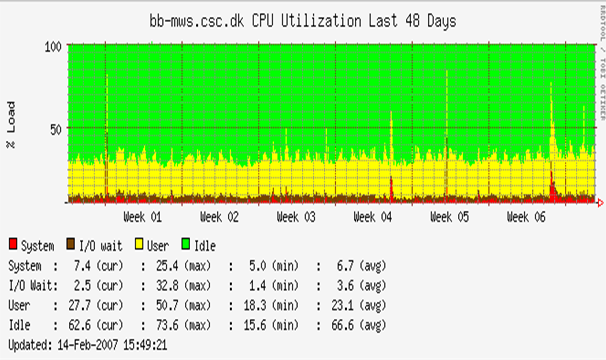
It is there in hobbit ppt as shown in below.

[image: Inline image 1]
Attachments (1)
 attachment.png
list Iain M Conochie
▸
On Mon, 2013-07-01 at 21:41 +0530, deepak deore wrote:
How can I add iowait into cpu utilization graph ?
It is there in hobbit ppt as shown in below.
Deepak,

If this is a linux host, in the hosts.cfg file add the following on the
host definition line:

TRENDS:*,vmstat:vmstat1|vmstat3|vmstat4|vmstat5

If you already have a TRENDS: definition for this host just add
the ,vmstat:vmstat1|vmstat3|vmstat4|vmstat5 part to the trends
definition

Regards

Iain Conochie
Inline image 1
list Deepak Deore
That worked, thanks.

I need to do this entry for every host but is there any option to apply it
to all hosts at one time ?
▸
On Tue, Jul 2, 2013 at 8:37 PM, Iain M Conochie <user-9838ad61d779@xymon.invalid> wrote:
On Mon, 2013-07-01 at 21:41 +0530, deepak deore wrote:How can I add iowait into cpu utilization graph ? It is there in hobbit ppt as shown in below.Deepak, If this is a linux host, in the hosts.cfg file add the following on the host definition line: TRENDS:*,vmstat:vmstat1|vmstat3|vmstat4|vmstat5 If you already have a TRENDS: definition for this host just add the ,vmstat:vmstat1|vmstat3|vmstat4|vmstat5 part to the trends definition Regards Iain ConochieInline image 1
list Jeremy Laidman
▸
On 3 July 2013 21:54, deepak deore <user-7b03b2a1ee70@xymon.invalid> wrote:
I need to do this entry for every host but is there any option to apply it
to all hosts at one time ?
Create a ".default." host entry and add the "TRENDS:..." tag to it.

J