curves went to zero but didn't have a report?
list Andrew Chen
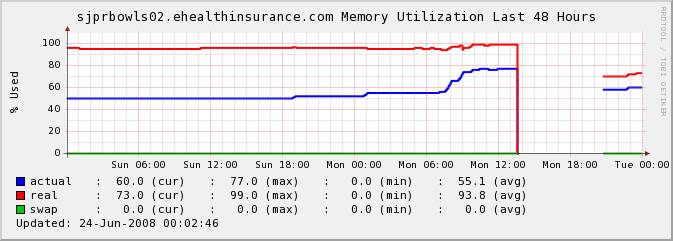
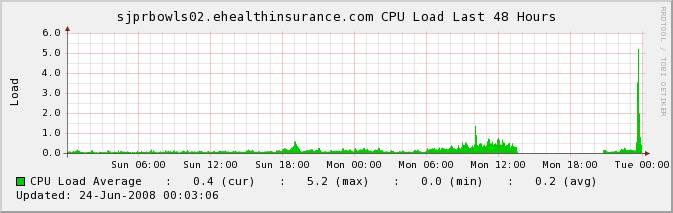
Let's take a look at the CPU and Memory charts for this machine:

At around 01:00pm, the curves went to zero.


   Above, the cpu and memory used 0, but I didn't recevie a RED Alert
report and email. (if there is some mothed to check this problem).

Hobbit-client configured file

   UP 1h 22w

   LOAD 5.0 15.0

   DISK / 80 90

   DISK /boot 80 90

   DISK /var 80 90

 DISK /data 80 90

   MEMSWAP 40 60

   MEMACT 80 90

 MEMPHYS 101 101

This configuration only reported when the cpu and memory reach 5.0(cpu)
and 80(memory), then they will send a alert report and email. But I
can't find about cpu and memory used 0, then send an alert report and
email. Can you teach me how to do it? Thanks.
Attachments (2)
 attachment.jpg
 attachment-0001.jpg
list Paul Krash
do you monitor services/procs on the unit in question? Ping or snmp reads?

When I have a machine go flatline,
There are usually other warnings that get sent out (service down, process in uninterruptible sleep, or host unreachable)....

I don't have an answer for you about the load = 0 , though it might be interesting to only monitor cpu and mem usage.

It would make my world so much simpler.

:-)

Thanks to all on this list, and all that contribute/write code for hobbit.

Hobbit Rocks!
Paul Krash, system administrator, Exegy, Inc.; XXX-XXX-XXXX x 666

This e-mail and any documents accompanying it may contain legally privileged and/or confidential information belonging to Exegy, Inc. Such information may be protected from disclosure by law. The information is intended for use by only the addressee. If you are not the intended recipient, you are hereby notified that any disclosure or use of the information is strictly prohibited. If you have received this e-mail in error, please immediately contact the sender by e-mail or phone regarding instructions for return or destruction and do not use or disclose the content to others.
list Andrew Chen
Hi klash

      Thanks for your reply, I know you mean. When the server stop, many things will happen like you saying(ping and snmp). But I monitor many server and I just want to know if the hobbit can check the server’s CPU and Memory when they Zero. If I can recevie some email from hobbit. So I first know it. Can you give me some advice for hobbit setting? I am learning hobbit:-)
▸
From: Krash, Paul [mailto:user-3e9d978365e3@xymon.invalid]
Sent: 2008年6月24日 19:44
To: user-ae9b8668bcde@xymon.invalid
Subject: Re: [hobbit] curves went to zero but didn't have a report?


do you monitor services/procs on the unit in question? Ping or snmp reads?

When I have a machine go flatline,
There are usually other warnings that get sent out (service down, process in uninterruptible sleep, or host unreachable)....

I don't have an answer for you about the load = 0 , though it might be interesting to only monitor cpu and mem usage.

It would make my world so much simpler.
:-)
▸
Thanks to all on this list, and all that contribute/write code for hobbit.

Hobbit Rocks!
Paul Krash, system administrator, Exegy, Inc.; XXX-XXX-XXXX x 666


This e-mail and any documents accompanying it may contain legally privileged and/or confidential information belonging to Exegy, Inc. Such information may be protected from disclosure by law. The information is intended for use by only the addressee. If you are not the intended recipient, you are hereby notified that any disclosure or use of the information is strictly prohibited. If you have received this e-mail in error, please immediately contact the sender by e-mail or phone regarding instructions for return or destruction and do not use or disclose the content to others.
list Paul Krash
How many OS are you monitoring?
OS = operating system
▸
Paul Krash, system administrator, Exegy, Inc.; XXX-XXX-XXXX x 666

This e-mail and any documents accompanying it may contain legally privileged and/or confidential information belonging to Exegy, Inc. Such information may be protected from disclosure by law. The information is intended for use by only the addressee. If you are not the intended recipient, you are hereby notified that any disclosure or use of the information is strictly prohibited. If you have received this e-mail in error, please immediately contact the sender by e-mail or phone regarding instructions for return or destruction and do not use or disclose the content to others.
list Greg L Hubbard
Looking at this graph, there is always some memory utilization and some
CPU utilization (seen via load average).  I think the real problem is
that something went wrong with the agent on this machine, or it could no
longer communicate with the Hobbit server during this time period. You
should review the alert history for this node and then make sure that
you configure alerts appropriately.  I suspect that you will find that
all of the agent-based tests went "purple" at about 1:30.  The other
thing to check is the "conn" column -- if the system was not reachable,
then the purple alarms for the agent-based tests would have been
suppressed in favor of the reachability alarm.
▸
	From: Andrew Chen [mailto:user-2a0ed696254e@xymon.invalid]
	Sent: Tuesday, June 24, 2008 3:17 AM
	To: user-ae9b8668bcde@xymon.invalid
	Subject: [hobbit] curves went to zero but didn't have a report?


	Let's take a look at the CPU and Memory charts for this machine:

	At around 01:00pm, the curves went to zero.


	   Above, the cpu and memory used 0, but I didn't recevie a RED
Alert report and email. (if there is some mothed to check this problem).

	Hobbit-client configured file

	   UP 1h 22w

	   LOAD 5.0 15.0

	   DISK / 80 90

	   DISK /boot 80 90

	   DISK /var 80 90

	 DISK /data 80 90

	   MEMSWAP 40 60

	   MEMACT 80 90

	 MEMPHYS 101 101

	This configuration only reported when the cpu and memory reach
5.0(cpu) and 80(memory), then they will send a alert report and email.
But I can't find about cpu and memory used 0, then send an alert report
and email. Can you teach me how to do it? Thanks.
list Andrew Chen
Hi Hubbard,

        Thanks for your reply.  I have checked the conn, it  only stopped 10m(13:45~13:55).  I  want to know if the hobbit can check the server’s CPU and Memory when they Zero. If I can recevie some email from hobbit. So I first know it. Can you give me some advice for hobbit setting? I am learning hobbit:-)
▸
From: Hubbard, Greg L [mailto:user-d970b5e56ec9@xymon.invalid]
Sent: 2008年6月24日 21:26
To: user-ae9b8668bcde@xymon.invalid
Subject: RE: [hobbit] curves went to zero but didn't have a report?


Looking at this graph, there is always some memory utilization and some CPU utilization (seen via load average).  I think the real problem is that something went wrong with the agent on this machine, or it could no longer communicate with the Hobbit server during this time period. You should review the alert history for this node and then make sure that you configure alerts appropriately.  I suspect that you will find that all of the agent-based tests went "purple" at about 1:30.  The other thing to check is the "conn" column -- if the system was not reachable, then the purple alarms for the agent-based tests would have been suppressed in favor of the reachability alarm.


	From: Andrew Chen [mailto:user-2a0ed696254e@xymon.invalid]
	Sent: Tuesday, June 24, 2008 3:17 AM
	To: user-ae9b8668bcde@xymon.invalid
	Subject: [hobbit] curves went to zero but didn't have a report?

	Let’s take a look at the CPU and Memory charts for this machine:

	At around 01:00pm, the curves went to zero.


	   Above, the cpu and memory used 0, but I didn’t recevie a RED Alert report and email. (if there is some mothed to check this problem).

	Hobbit-client configured file

	   UP 1h 22w

	   LOAD 5.0 15.0

	   DISK / 80 90

	   DISK /boot 80 90

	   DISK /var 80 90

	 DISK /data 80 90

	   MEMSWAP 40 60

	   MEMACT 80 90

	 MEMPHYS 101 101

	This configuration only reported when the cpu and memory reach 5.0(cpu) and 80(memory), then they will send a alert report and email. But I can’t find about cpu and memory used 0, then send an alert report and email. Can you teach me how to do it? Thanks.
list Steve Holmes
[bottom]

2008/6/24 Andrew Chen <user-2a0ed696254e@xymon.invalid>:
▸
 Hi Hubbard,

        Thanks for your reply.  I have checked the conn, it  only stopped
10m(13:45~13:55).  I  want to know if the hobbit can check the server's CPU
and Memory when they Zero. If I can recevie some email from hobbit. So I
first know it. Can you give me some advice for hobbit setting? I am learning
hobbitJ
▸
*From:* Hubbard, Greg L [mailto:user-d970b5e56ec9@xymon.invalid]
*Sent:* 2008年6月24日 21:26
*To:* user-ae9b8668bcde@xymon.invalid
*Subject:* RE: [hobbit] curves went to zero but didn't have a report?


Looking at this graph, there is always some memory utilization and some CPU
utilization (seen via load average).  I think the real problem is that
something went wrong with the agent on this machine, or it could no longer
communicate with the Hobbit server during this time period. You should
review the alert history for this node and then make sure that you configure
alerts appropriately.  I suspect that you will find that all of the
agent-based tests went "purple" at about 1:30.  The other thing to check is
the "conn" column -- if the system was not reachable, then the purple alarms
for the agent-based tests would have been suppressed in favor of the
reachability alarm.
I think the answer to your question is: not without some programming. I.e.
you are looking for a parameter in hobbit-client.cfg similar to the PROCS
config with which you can specify both a minimum and a maximum allowable
number of processes, but in the memory case you want to be able to specify a
minimum as well as a maximum on memory usage (ditto for cpu).
To do this you would have to write your own script. Note, this says nothing
about whether the usage *really* is dropping to zero or not. I think Greg is
probably right about the agent.

Steve
list Greg L Hubbard
Thanks, Steve. Thinking further, another guess is that the node got rebooted (due to a crash or some other action) and the Hobbit client did not restart. There should have been purple alarms.
▸
	From: user-5425c7b245e1@xymon.invalid [mailto:user-5425c7b245e1@xymon.invalid] On Behalf Of Steve Holmes
	Sent: Tuesday, June 24, 2008 10:04 AM
	To: user-ae9b8668bcde@xymon.invalid
	Subject: Re: [hobbit] curves went to zero but didn't have a report?


	[bottom]


	2008/6/24 Andrew Chen <user-2a0ed696254e@xymon.invalid>:


		Hi Hubbard,

		        Thanks for your reply.  I have checked the conn, it  only stopped 10m(13:45~13:55).  I  want to know if the hobbit can check the server's CPU and Memory when they Zero. If I can recevie some email from hobbit. So I first know it. Can you give me some advice for hobbit setting? I am learning hobbit:-)


		From: Hubbard, Greg L [mailto:user-d970b5e56ec9@xymon.invalid]
		Sent: 2008年6月24日 21:26
		To: user-ae9b8668bcde@xymon.invalid
		Subject: RE: [hobbit] curves went to zero but didn't have a report?


		Looking at this graph, there is always some memory utilization and some CPU utilization (seen via load average).  I think the real problem is that something went wrong with the agent on this machine, or it could no longer communicate with the Hobbit server during this time period. You should review the alert history for this node and then make sure that you configure alerts appropriately.  I suspect that you will find that all of the agent-based tests went "purple" at about 1:30.  The other thing to check is the "conn" column -- if the system was not reachable, then the purple alarms for the agent-based tests would have been suppressed in favor of the reachability alarm.


	I think the answer to your question is: not without some programming. I.e. you are looking for a parameter in hobbit-client.cfg similar to the PROCS config with which you can specify both a minimum and a maximum allowable number of processes, but in the memory case you want to be able to specify a minimum as well as a maximum on memory usage (ditto for cpu).

	To do this you would have to write your own script. Note, this says nothing about whether the usage *really* is dropping to zero or not. I think Greg is probably right about the agent.

	Steve
list Buchan Milne
▸
On Tuesday 24 June 2008 15:41:33 Andrew Chen wrote:
I  want to know if the hobbit can check the server’s CPU
and Memory when they Zero.
Well, in the example you provided, the CPU / memory did not go zero, there simply was no data sent at all (see e.g. your swap line, which was at zero, then stopped, then continued at zero), which is different from there being data with the values being 0.
list Andrew Chen
Thanks again, I know that the hobbit can’t monitor this problem. I will find some other mothed to do it. If you have some advice, pls tell me:-)
▸
From: Hubbard, Greg L [mailto:user-d970b5e56ec9@xymon.invalid]
Sent: 2008年6月24日 23:14
To: user-ae9b8668bcde@xymon.invalid
Subject: RE: [hobbit] curves went to zero but didn't have a report?


Thanks, Steve.  Thinking further, another guess is that the node got rebooted (due to a crash or some other action) and the Hobbit client did not restart.  There should have been purple alarms.


	From: user-5425c7b245e1@xymon.invalid [mailto:user-5425c7b245e1@xymon.invalid] On Behalf Of Steve Holmes
	Sent: Tuesday, June 24, 2008 10:04 AM
	To: user-ae9b8668bcde@xymon.invalid
	Subject: Re: [hobbit] curves went to zero but didn't have a report?

	[bottom]

	2008/6/24 Andrew Chen <user-2a0ed696254e@xymon.invalid>:

	Hi Hubbard,

	        Thanks for your reply.  I have checked the conn, it  only stopped 10m(13:45~13:55).  I  want to know if the hobbit can check the server's CPU and Memory when they Zero. If I can recevie some email from hobbit. So I first know it. Can you give me some advice for hobbit setting? I am learning hobbit:-)


	From: Hubbard, Greg L [mailto:user-d970b5e56ec9@xymon.invalid]
	Sent: 2008年6月24日 21:26
	To: user-ae9b8668bcde@xymon.invalid
	Subject: RE: [hobbit] curves went to zero but didn't have a report?


	Looking at this graph, there is always some memory utilization and some CPU utilization (seen via load average).  I think the real problem is that something went wrong with the agent on this machine, or it could no longer communicate with the Hobbit server during this time period. You should review the alert history for this node and then make sure that you configure alerts appropriately.  I suspect that you will find that all of the agent-based tests went "purple" at about 1:30.  The other thing to check is the "conn" column -- if the system was not reachable, then the purple alarms for the agent-based tests would have been suppressed in favor of the reachability alarm.


	I think the answer to your question is: not without some programming. I.e. you are looking for a parameter in hobbit-client.cfg similar to the PROCS config with which you can specify both a minimum and a maximum allowable number of processes, but in the memory case you want to be able to specify a minimum as well as a maximum on memory usage (ditto for cpu).


	To do this you would have to write your own script. Note, this says nothing about whether the usage *really* is dropping to zero or not. I think Greg is probably right about the agent.


	Steve