temperature script compatible with Hobbit
list Charles Jones
I'm looking for a temperature script suitable for linux machines (using lm_sensors). I found a couple on deadcat but none of them seemed to work very well.  I hacked on one and got basic temperature monitoring working, but no graphs because the output is not in whatever format Hobbits do_temp rrd module is expecting.

Does anyone have an lm_sensors script that both alerts on temp thresholds and is compatible with Hobbits rrd graphing? I tried seaching TheShire with no luck.

-Charles
list Ralph Mitchell
▸
On 7/25/07, Charles Jones <user-e86b4aeade4e@xymon.invalid> wrote:
I'm looking for a temperature script suitable for linux machines (using
lm_sensors). I found a couple on deadcat but none of them seemed to work
very well.  I hacked on one and got basic temperature monitoring
working, but no graphs because the output is not in whatever format
Hobbits do_temp rrd module is expecting.

Does anyone have an lm_sensors script that both alerts on temp
thresholds and is compatible with Hobbits rrd graphing? I tried seaching
TheShire with no luck.
Found this in old email (Dec 06):
Jerry Yu <user-764c1f364fe0@xymon.invalid>
never mind, I found the answers in the source code,
rrd/do_temperature.c. [[ All hail goes to Open Source & Henrik! ]]
1. a lump-all status command will do. Format of the data portion is
somewhat restrictive '&green BMCambient 17 62\n&yellow BMCriserCard 32
93'. It'd be nice to have such format documented elsewhere other than
the source code.
2. if  'temperature' is used as 'test name', nothing needs to be done.
3. the check can be done locally on the client and the overall $status
is reported by 'status server1.temperature $status'.

So, if the script you hacked up can be persuaded to send a status
message that looks something like:

     $BB $BBDISP status "server,domain,com.temperature `date`
        &<color>  <variable_name> <temp_in_celsius>  <temp_in_fahrenheit>"

you could get graphs.  I'm away from my work machines right now, so
the above may be a little lacking.

Alternatively, try the NCV option.  Once a status message is set up to
be pushed through the ncv module, all you need in the status message
is:

     <variable name> : <value>

Anything on the line before the colon becomes the variable name,
anything after the colon is the value that gets stored.

Ralph Mitchell
list Charles Jones
I figured I would share the script and setup that I am now using,  Note
that the script is for use with lm_sensors on linux machines, and
tailored for my particular setup (different servers have different
sensors and thus the temperature parsing section may have to be changed).

Here is the script itself:
#!/bin/sh

# THRESHOLD VALUES FOR TEMPERATURE
YTMP=72
RTMP=80
#
SENSORS="/usr/bin/sensors -f"
STMP=${BBTMP}/SENSE.$$
COLOR=green
MSG=default
#
${SENSORS} > ${STMP}
# PARSE TEMPERATURE INFORMATION.
TMP=`${GREP} -i temp ${STMP}|cut -d"(" -f1|cut -d"?" -f1|cut -d"+"
-f2|cut -d"." -f1`
    if [ ${TMP} -lt ${YTMP} ];
    then
        COLOR=green
        MSG="The Temperature is currently ${TMP}F, which does not exceed
the Warning level (${YTMP}F)"
    fi
    if [ ${TMP} -gt ${YTMP} ] && [ ${TMP} -lt ${RTMP} ];
    then
        COLOR=yellow
        MSG="The Temperature is currently ${TMP}F, which is exceeds the
Warning level (${YTMP}F)"
    fi
    if [ ${TMP} -gt ${RTMP} ];
    then
        COLOR=red
        MSG="The Temperature is currently ${TMP}F, which exceeds the
Panic level (${RTMP}F!)"
    fi
rm ${STMP}

$BB $BBDISP "status $MACHINE.temp $COLOR `date`
$MSG
temp : $TMP
"

The script is launched via this addition to clientlaunch.cfg on the
remote machine:
[temp]
        ENVFILE $HOBBITCLIENTHOME/etc/hobbitclient.cfg
        CMD $HOBBITCLIENTHOME/ext/temp.sh
        INTERVAL 5m

On the server, here is the addition to hobbitgraph.cfg:
[temp]
        TITLE Temperature
        YAXIS Degrees Farenheit
        DEF:t=temp.rrd:temp:AVERAGE
        LINE2:t#@COLOR@:Ambient Temp
        GPRINT:t:LAST: \: %5.1lf (cur)
        GPRINT:t:MAX: \: %5.1lf (max)
        GPRINT:t:MIN: \: %5.1lf (min)
        GPRINT:t:AVERAGE: \: %5.1lf (avg)\n

Let's not forget the additions to hobbitserver.cfg:
TEST2RRD="cpu=la,disk,inode,qtree,memory,$PINGCOLUMN=tcp,http=tcp,dns=tcp,dig=tcp,time=ntpstat,vmstat,iostat,netstat,temperature,apache,bind,sendmail,mailq,nmailq=mailq,socks,bea,iishealth,citrix,bbgen,bbtest,bbproxy,hobbit,hobbitd,files,procs=processes,ports,clock,lines*,temp=ncv*"
GRAPHS="la,disk,inode,qtree,files,processes,memory,users,vmstat,iostat,tcp.http,tcp,ncv,netstat,ifstat,mrtg::1,ports,temperature,ntpstat,apache,bind,sendmail,mailq,socks,bea,iishealth,citrix,bbgen,bbtest,bbproxy,hobbit,hobbitd,clock,lines*,temp*"
*NCV_temp="temp:GAUGE"*

I also put a custom rules in hobbit-alerts.cfg:
# Temp alerts
HOST=myhost.mydomain.com SERVICE=temp
        MAIL $SYSADMINS color=yellow REPEAT=60 RECOVERED NOTICE
        MAIL $SYSADMINS,$SYSADMINS-PAGERS color=red RECOVERED NOTICE
        MAIL $BOSS color=red DURATION>60 RECOVERED format=sms

-Charles
▸
Ralph Mitchell wrote:On 7/25/07, Charles Jones <user-e86b4aeade4e@xymon.invalid> wrote:I'm looking for a temperature script suitable for linux machines (using lm_sensors). I found a couple on deadcat but none of them seemed to work very well. I hacked on one and got basic temperature monitoring working, but no graphs because the output is not in whatever format Hobbits do_temp rrd module is expecting. Does anyone have an lm_sensors script that both alerts on temp thresholds and is compatible with Hobbits rrd graphing? I tried seaching TheShire with no luck.Found this in old email (Dec 06): Jerry Yu <user-764c1f364fe0@xymon.invalid> never mind, I found the answers in the source code, rrd/do_temperature.c. [[ All hail goes to Open Source & Henrik! ]] 1. a lump-all status command will do. Format of the data portion is somewhat restrictive '&green BMCambient 17 62\n&yellow BMCriserCard 32 93'. It'd be nice to have such format documented elsewhere other than the source code. 2. if 'temperature' is used as 'test name', nothing needs to be done. 3. the check can be done locally on the client and the overall $status is reported by 'status server1.temperature $status'. So, if the script you hacked up can be persuaded to send a status message that looks something like: $BB $BBDISP status "server,domain,com.temperature `date` &<color> <variable_name> <temp_in_celsius> <temp_in_fahrenheit>" you could get graphs. I'm away from my work machines right now, so the above may be a little lacking. Alternatively, try the NCV option. Once a status message is set up to be pushed through the ncv module, all you need in the status message is: <variable name> : <value> Anything on the line before the colon becomes the variable name, anything after the colon is the value that gets stored. Ralph Mitchell
list Uma Bandi
Ralph Mitchell, At client side I installed hobbit side, At servers side already so many client are connected, when I am trying to such for this client at hobbit server web page , host not found, could u please tell me am I need to update any file about new Linux client. Thanks Uma Maheswar
▸
From: Charles Jones [mailto:user-e86b4aeade4e@xymon.invalid] Sent: Wednesday, August 01, 2007 6:34 PM
To: user-ae9b8668bcde@xymon.invalid
Subject: Re: [hobbit] temperature script compatible with Hobbit
I figured I would share the script and setup that I am now using, Note that the script is for use with lm_sensors on linux machines, and tailored for my particular setup (different servers have different sensors and thus the temperature parsing section may have to be changed).
Here is the script itself:
#!/bin/sh
# THRESHOLD VALUES FOR TEMPERATURE YTMP=72
RTMP=80
#
SENSORS="/usr/bin/sensors -f"
STMP=${BBTMP}/SENSE.$$
COLOR=green
MSG=default
#
${SENSORS} > ${STMP}
# PARSE TEMPERATURE INFORMATION.
TMP=`${GREP} -i temp ${STMP}|cut -d"(" -f1|cut -d"�" -f1|cut -d"+" -f2|cut -d"." -f1`
if [ ${TMP} -lt ${YTMP} ];
then
COLOR=green
MSG="The Temperature is currently ${TMP}F, which does not exceed the Warning level (${YTMP}F)"
fi
if [ ${TMP} -gt ${YTMP} ] && [ ${TMP} -lt ${RTMP} ];
then
COLOR=yellow
MSG="The Temperature is currently ${TMP}F, which is exceeds the Warning level (${YTMP}F)"
fi
if [ ${TMP} -gt ${RTMP} ]; then
COLOR=red
MSG="The Temperature is currently ${TMP}F, which exceeds the Panic level (${RTMP}F!)"
fi
rm ${STMP}
$BB $BBDISP "status $MACHINE.temp $COLOR `date` $MSG
temp : $TMP
"
The script is launched via this addition to clientlaunch.cfg on the remote machine:
[temp]
ENVFILE $HOBBITCLIENTHOME/etc/hobbitclient.cfg
CMD $HOBBITCLIENTHOME/ext/temp.sh
INTERVAL 5m
On the server, here is the addition to hobbitgraph.cfg:
[temp]
TITLE Temperature
YAXIS Degrees Farenheit
DEF:t=temp.rrd:temp:AVERAGE
LINE2:t#@COLOR@:Ambient Temp
GPRINT:t:LAST: \: %5.1lf (cur)
GPRINT:t:MAX: \: %5.1lf (max)
GPRINT:t:MIN: \: %5.1lf (min)
GPRINT:t:AVERAGE: \: %5.1lf (avg)\n
Let's not forget the additions to hobbitserver.cfg:
TEST2RRD="cpu=la,disk,inode,qtree,memory,$PINGCOLUMN=tcp,http=tcp,dns=tcp,dig=tcp,time=ntpstat,vmstat,iostat,netstat,temperature,apache,bind,sendmail,mailq,nmailq=mailq,socks,bea,iishealth,citrix,bbgen,bbtest,bbproxy,hobbit,hobbitd,files,procs=processes,ports,clock,lines,temp=ncv"
GRAPHS="la,disk,inode,qtree,files,processes,memory,users,vmstat,iostat,tcp.http,tcp,ncv,netstat,ifstat,mrtg::1,ports,temperature,ntpstat,apache,bind,sendmail,mailq,socks,bea,iishealth,citrix,bbgen,bbtest,bbproxy,hobbit,hobbitd,clock,lines,temp"
NCV_temp="temp:GAUGE"
I also put a custom rules in hobbit-alerts.cfg:
# Temp alerts
HOST=myhost.mydomain.com SERVICE=temp
MAIL $SYSADMINS color=yellow REPEAT=60 RECOVERED NOTICE
MAIL $SYSADMINS,$SYSADMINS-PAGERS color=red RECOVERED NOTICE
MAIL $BOSS color=red DURATION>60 RECOVERED format=sms
-Charles
Ralph Mitchell wrote:
On 7/25/07, Charles Jones <user-e86b4aeade4e@xymon.invalid> <mailto:user-e86b4aeade4e@xymon.invalid> wrote:
I'm looking for a temperature script suitable for linux machines (using
lm_sensors). I found a couple on deadcat but none of them seemed to work
very well.  I hacked on one and got basic temperature monitoring
working, but no graphs because the output is not in whatever format
Hobbits do_temp rrd module is expecting.

Does anyone have an lm_sensors script that both alerts on temp
thresholds and is compatible with Hobbits rrd graphing? I tried seaching
TheShire with no luck.
Found this in old email (Dec 06): Jerry Yu <user-764c1f364fe0@xymon.invalid> <mailto:user-764c1f364fe0@xymon.invalid> never mind, I found the answers in the source code, rrd/do_temperature.c. [[ All hail goes to Open Source & Henrik! ]] 1. a lump-all status command will do. Format of the data portion is somewhat restrictive '&green BMCambient 17 62\n&yellow BMCriserCard 32 93'. It'd be nice to have such format documented elsewhere other than the source code. 2. if 'temperature' is used as 'test name', nothing needs to be done. 3. the check can be done locally on the client and the overall $status is reported by 'status server1.temperature $status'.
▸
	So, if the script you hacked up can be persuaded to send a status 	message that looks something like:
	    $BB $BBDISP status "server,domain,com.temperature `date` 	       &<color>  <variable_name> <temp_in_celsius>  <temp_in_fahrenheit>"
	you could get graphs.  I'm away from my work machines right now, so 	the above may be a little lacking.
	Alternatively, try the NCV option.  Once a status message is set up to 	be pushed through the ncv module, all you need in the status message 	is:
	    <variable name> : <value>
	Anything on the line before the colon becomes the variable name, 	anything after the colon is the value that gets stored.
	Ralph Mitchell
list Galen Johnson
Mind if I put this up on The Shire (which is now back after yet another router was taken out by a lightning strike)?

=G=
▸
-----Original Message-----
From: Charles Jones [mailto:user-e86b4aeade4e@xymon.invalid]
Sent: Wed 8/1/2007 6:34 PM
To: user-ae9b8668bcde@xymon.invalid
Subject: Re: [hobbit] temperature script compatible with Hobbit

I figured I would share the script and setup that I am now using,  Note
that the script is for use with lm_sensors on linux machines, and
tailored for my particular setup (different servers have different
sensors and thus the temperature parsing section may have to be changed).

Here is the script itself:
#!/bin/sh

# THRESHOLD VALUES FOR TEMPERATURE
YTMP=72
RTMP=80
#
SENSORS="/usr/bin/sensors -f"
STMP=${BBTMP}/SENSE.$$
COLOR=green
MSG=default
#
${SENSORS} > ${STMP}
# PARSE TEMPERATURE INFORMATION.
TMP=`${GREP} -i temp ${STMP}|cut -d"(" -f1|cut -d"?" -f1|cut -d"+"
-f2|cut -d"." -f1`
    if [ ${TMP} -lt ${YTMP} ];
    then
        COLOR=green
        MSG="The Temperature is currently ${TMP}F, which does not exceed
the Warning level (${YTMP}F)"
    fi
    if [ ${TMP} -gt ${YTMP} ] && [ ${TMP} -lt ${RTMP} ];
    then
        COLOR=yellow
        MSG="The Temperature is currently ${TMP}F, which is exceeds the
Warning level (${YTMP}F)"
    fi
    if [ ${TMP} -gt ${RTMP} ];
    then
        COLOR=red
        MSG="The Temperature is currently ${TMP}F, which exceeds the
Panic level (${RTMP}F!)"
    fi
rm ${STMP}

$BB $BBDISP "status $MACHINE.temp $COLOR `date`
$MSG
temp : $TMP
"

The script is launched via this addition to clientlaunch.cfg on the
remote machine:
[temp]
        ENVFILE $HOBBITCLIENTHOME/etc/hobbitclient.cfg
        CMD $HOBBITCLIENTHOME/ext/temp.sh
        INTERVAL 5m

On the server, here is the addition to hobbitgraph.cfg:
[temp]
        TITLE Temperature
        YAXIS Degrees Farenheit
        DEF:t=temp.rrd:temp:AVERAGE
        LINE2:t#@COLOR@:Ambient Temp
        GPRINT:t:LAST: \: %5.1lf (cur)
        GPRINT:t:MAX: \: %5.1lf (max)
        GPRINT:t:MIN: \: %5.1lf (min)
        GPRINT:t:AVERAGE: \: %5.1lf (avg)\n

Let's not forget the additions to hobbitserver.cfg:
TEST2RRD="cpu=la,disk,inode,qtree,memory,$PINGCOLUMN=tcp,http=tcp,dns=tcp,dig=tcp,time=ntpstat,vmstat,iostat,netstat,temperature,apache,bind,sendmail,mailq,nmailq=mailq,socks,bea,iishealth,citrix,bbgen,bbtest,bbproxy,hobbit,hobbitd,files,procs=processes,ports,clock,lines*,temp=ncv*"
GRAPHS="la,disk,inode,qtree,files,processes,memory,users,vmstat,iostat,tcp.http,tcp,ncv,netstat,ifstat,mrtg::1,ports,temperature,ntpstat,apache,bind,sendmail,mailq,socks,bea,iishealth,citrix,bbgen,bbtest,bbproxy,hobbit,hobbitd,clock,lines*,temp*"
*NCV_temp="temp:GAUGE"*

I also put a custom rules in hobbit-alerts.cfg:
# Temp alerts
HOST=myhost.mydomain.com SERVICE=temp
        MAIL $SYSADMINS color=yellow REPEAT=60 RECOVERED NOTICE
        MAIL $SYSADMINS,$SYSADMINS-PAGERS color=red RECOVERED NOTICE
        MAIL $BOSS color=red DURATION>60 RECOVERED format=sms

-Charles


Ralph Mitchell wrote:
On 7/25/07, Charles Jones <user-e86b4aeade4e@xymon.invalid> wrote:I'm looking for a temperature script suitable for linux machines (using lm_sensors). I found a couple on deadcat but none of them seemed to work very well. I hacked on one and got basic temperature monitoring working, but no graphs because the output is not in whatever format Hobbits do_temp rrd module is expecting. Does anyone have an lm_sensors script that both alerts on temp thresholds and is compatible with Hobbits rrd graphing? I tried seaching TheShire with no luck.Found this in old email (Dec 06): Jerry Yu <user-764c1f364fe0@xymon.invalid> never mind, I found the answers in the source code, rrd/do_temperature.c. [[ All hail goes to Open Source & Henrik! ]] 1. a lump-all status command will do. Format of the data portion is somewhat restrictive '&green BMCambient 17 62\n&yellow BMCriserCard 32 93'. It'd be nice to have such format documented elsewhere other than the source code. 2. if 'temperature' is used as 'test name', nothing needs to be done. 3. the check can be done locally on the client and the overall $status is reported by 'status server1.temperature $status'. So, if the script you hacked up can be persuaded to send a status message that looks something like: $BB $BBDISP status "server,domain,com.temperature `date` &<color> <variable_name> <temp_in_celsius> <temp_in_fahrenheit>" you could get graphs. I'm away from my work machines right now, so the above may be a little lacking. Alternatively, try the NCV option. Once a status message is set up to be pushed through the ncv module, all you need in the status message is: <variable name> : <value> Anything on the line before the colon becomes the variable name, anything after the colon is the value that gets stored. Ralph Mitchell
list Charles Jones
Not at all.  I'm sure other folks with linux servers could find it
handy.  I'm even using it to trend the temperature in my home office :)

-Charles
▸
Galen Johnson wrote:Mind if I put this up on The Shire (which is now back after yet another router was taken out by a lightning strike)? =G= -----Original Message----- From: Charles Jones [mailto:user-e86b4aeade4e@xymon.invalid] Sent: Wed 8/1/2007 6:34 PM To: user-ae9b8668bcde@xymon.invalid Subject: Re: [hobbit] temperature script compatible with Hobbit I figured I would share the script and setup that I am now using, Note that the script is for use with lm_sensors on linux machines, and tailored for my particular setup (different servers have different sensors and thus the temperature parsing section may have to be changed). Here is the script itself: #!/bin/sh # THRESHOLD VALUES FOR TEMPERATURE YTMP=72 RTMP=80 # SENSORS="/usr/bin/sensors -f" STMP=${BBTMP}/SENSE.$$ COLOR=green MSG=default # ${SENSORS} > ${STMP} # PARSE TEMPERATURE INFORMATION. TMP=`${GREP} -i temp ${STMP}|cut -d"(" -f1|cut -d"?" -f1|cut -d"+" -f2|cut -d"." -f1` if [ ${TMP} -lt ${YTMP} ]; then COLOR=green MSG="The Temperature is currently ${TMP}F, which does not exceed the Warning level (${YTMP}F)" fi if [ ${TMP} -gt ${YTMP} ] && [ ${TMP} -lt ${RTMP} ]; then COLOR=yellow MSG="The Temperature is currently ${TMP}F, which is exceeds the Warning level (${YTMP}F)" fi if [ ${TMP} -gt ${RTMP} ]; then COLOR=red MSG="The Temperature is currently ${TMP}F, which exceeds the Panic level (${RTMP}F!)" fi rm ${STMP} $BB $BBDISP "status $MACHINE.temp $COLOR `date` $MSG temp : $TMP " The script is launched via this addition to clientlaunch.cfg on the remote machine: [temp] ENVFILE $HOBBITCLIENTHOME/etc/hobbitclient.cfg CMD $HOBBITCLIENTHOME/ext/temp.sh INTERVAL 5m On the server, here is the addition to hobbitgraph.cfg: [temp] TITLE Temperature YAXIS Degrees Farenheit DEF:t=temp.rrd:temp:AVERAGE LINE2:t#@COLOR@:Ambient Temp GPRINT:t:LAST: \: %5.1lf (cur) GPRINT:t:MAX: \: %5.1lf (max) GPRINT:t:MIN: \: %5.1lf (min) GPRINT:t:AVERAGE: \: %5.1lf (avg)\n Let's not forget the additions to hobbitserver.cfg: TEST2RRD="cpu=la,disk,inode,qtree,memory,$PINGCOLUMN=tcp,http=tcp,dns=tcp,dig=tcp,time=ntpstat,vmstat,iostat,netstat,temperature,apache,bind,sendmail,mailq,nmailq=mailq,socks,bea,iishealth,citrix,bbgen,bbtest,bbproxy,hobbit,hobbitd,files,procs=processes,ports,clock,lines*,temp=ncv*" GRAPHS="la,disk,inode,qtree,files,processes,memory,users,vmstat,iostat,tcp.http,tcp,ncv,netstat,ifstat,mrtg::1,ports,temperature,ntpstat,apache,bind,sendmail,mailq,socks,bea,iishealth,citrix,bbgen,bbtest,bbproxy,hobbit,hobbitd,clock,lines*,temp*" *NCV_temp="temp:GAUGE"* I also put a custom rules in hobbit-alerts.cfg: # Temp alerts HOST=myhost.mydomain.com SERVICE=temp MAIL $SYSADMINS color=yellow REPEAT=60 RECOVERED NOTICE MAIL $SYSADMINS,$SYSADMINS-PAGERS color=red RECOVERED NOTICE MAIL $BOSS color=red DURATION>60 RECOVERED format=sms -Charles Ralph Mitchell wrote:On 7/25/07, Charles Jones <user-e86b4aeade4e@xymon.invalid> wrote:I'm looking for a temperature script suitable for linux machines (using lm_sensors). I found a couple on deadcat but none of them seemed to work very well. I hacked on one and got basic temperature monitoring working, but no graphs because the output is not in whatever format Hobbits do_temp rrd module is expecting. Does anyone have an lm_sensors script that both alerts on temp thresholds and is compatible with Hobbits rrd graphing? I tried seaching TheShire with no luck.Found this in old email (Dec 06): Jerry Yu <user-764c1f364fe0@xymon.invalid> never mind, I found the answers in the source code, rrd/do_temperature.c. [[ All hail goes to Open Source & Henrik! ]] 1. a lump-all status command will do. Format of the data portion is somewhat restrictive '&green BMCambient 17 62\n&yellow BMCriserCard 32 93'. It'd be nice to have such format documented elsewhere other than the source code. 2. if 'temperature' is used as 'test name', nothing needs to be done. 3. the check can be done locally on the client and the overall $status is reported by 'status server1.temperature $status'. So, if the script you hacked up can be persuaded to send a status message that looks something like: $BB $BBDISP status "server,domain,com.temperature `date` &<color> <variable_name> <temp_in_celsius> <temp_in_fahrenheit>" you could get graphs. I'm away from my work machines right now, so the above may be a little lacking. Alternatively, try the NCV option. Once a status message is set up to be pushed through the ncv module, all you need in the status message is: <variable name> : <value> Anything on the line before the colon becomes the variable name, anything after the colon is the value that gets stored. Ralph Mitchell
list Rolf Masfelder
Am Montag, 6. August 2007 19:47 schrieb Charles Jones:
▸
Not at all.  I'm sure other folks with linux servers could find it
handy.  I'm even using it to trend the temperature in my home office
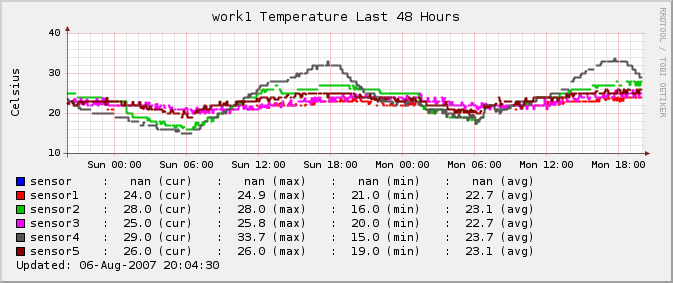
:)You mean something like this: The script originaly based on temperature.sh but now I am reading some 1wire devices using fuse / OWFS.
▸
-Charles

Galen Johnson wrote:
Mind if I put this up on The Shire (which is now back after yet another router was taken out by a lightning strike)? =G=
... schnipp...

greetings Rolf
Attachments (1)
 attachment.png