Feature request, CPU utilization graph
list Johan Sjöberg
Hi.

The CPU utilization graphs on the trends page is missing info. The utilization "types" do not add upp to 100% all the time. I suspect that IO wait and maybe some other types are missing from the graphs. You can see what I mean if you check the attached graph. It would be nice to get the remaining info into the graph as well.

/Johan
Attachments (1)
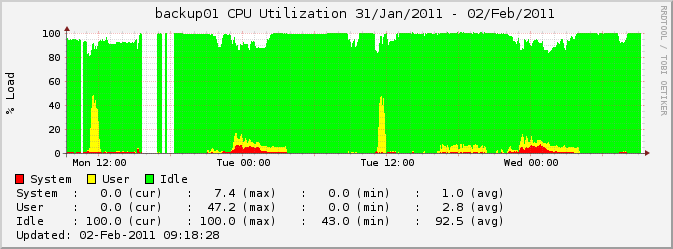 attachment.png
list Stef Coene
▸
On Wednesday 02 February 2011, Johan Sjöberg wrote:
Hi.

The CPU utilization graphs on the trends page is missing info. The
utilization "types" do not add upp to 100% all the time. I suspect that IO
wait and maybe some other types are missing from the graphs. You can see
what I mean if you check the attached graph. It would be nice to get the
remaining info into the graph as well.
It depends on the OS.

For AIX, I have this in my bb-hosts file:
TRENDS:*vmstat:vmstat1

This will load the vmstat1 graph instead of the vmstat graph.
You can experiment with other graphs.  The available definitions can be found
in hobbitgraph.cfg


Stef
list Johan Sjöberg
Hi.

Thanks for your reply. I didn't think about checking the graphs.cfg file. I guess I want to change from vmstat to vmstat1 for all of our linux hosts, and it will look better. Can I change the defaults somewhere, or do I need to add it in hosts.cfg for each host? I see that there are also a number of other interesting graphs that I can add.

/Johan
▸
-----Original Message-----
From: Stef Coene [mailto:user-dbffe946c0f4@xymon.invalid]
Sent: den 2 februari 2011 10:03
To: xymon at xymon.com
Subject: Re: [xymon] Feature request, CPU utilization graph

On Wednesday 02 February 2011, Johan Sjöberg wrote:
Hi. The CPU utilization graphs on the trends page is missing info. The utilization "types" do not add upp to 100% all the time. I suspect that IO wait and maybe some other types are missing from the graphs. You can see what I mean if you check the attached graph. It would be nice to get the remaining info into the graph as well.It depends on the OS. For AIX, I have this in my bb-hosts file: TRENDS:*vmstat:vmstat1 This will load the vmstat1 graph instead of the vmstat graph. You can experiment with other graphs. The available definitions can be found in hobbitgraph.cfg Stef
list Henrik Størner
▸
In <user-c46bc4aef910@xymon.invalid> =?iso-8859-1?Q?Johan_Sj=F6berg?= <user-74c177c1220d@xymon.invalid> writes:
Thanks for your reply. I didn't think about checking the graphs.cfg file. I=
guess I want to change from vmstat to vmstat1 for all of our linux hosts, =
and it will look better. Can I change the defaults somewhere, or do I need =
to add it in hosts.cfg for each host? I see that there are also a number of=
other interesting graphs that I can add.
If you have your Linux hosts grouped together in the hosts.cfg
file, you can use the ".default." definition:

# Configure Linux hosts to show vmstat1 by default
0.0.0.0  .default. # TRENDS:*,vmstat:vmstat1
10.0.0.1 linux1 #
10.0.0.1 linux2 #
# Clear the default settings
0.0.0.0  .default.


Regards,
Henrik
list Johan Sjöberg
Thanks.
We don't have the hosts grouped by OS, but maybe I can change the overall default anyway, since the vmstat graphs don't show up at all for Windows hosts? Or will that cause broken graphs on the trends pages for the Windows hosts?

/Johan
▸
-----Original Message-----
From: Henrik Størner [mailto:user-ce4a2c883f75@xymon.invalid]
Sent: den 2 februari 2011 10:36
To: xymon at xymon.com
Subject: Re: [xymon] Feature request, CPU utilization graph
In
<user-adf54ab0efa0@xymon.invalid
ement.se> =?iso-8859-1?Q?Johan_Sj=F6berg?=
▸
<user-74c177c1220d@xymon.invalid> writes:Thanks for your reply. I didn't think about checking the graphs.cfg file. I= guess I want to change from vmstat to vmstat1 for all of our linux hosts, = and it will look better. Can I change the defaults somewhere, or do I need = to add it in hosts.cfg for each host? I see that there are also a number of= other interesting graphs that I can add.If you have your Linux hosts grouped together in the hosts.cfg file, you can use the ".default." definition: # Configure Linux hosts to show vmstat1 by default 0.0.0.0 .default. # TRENDS:*,vmstat:vmstat1 10.0.0.1 linux1 # 10.0.0.1 linux2 # # Clear the default settings 0.0.0.0 .default. Regards, Henrik
list Loris Serena
Hello List,

Apologies for posting here a BB question, but we all know the best BB
brains are now here! ;-)

I have an installation of BB 1.9i with larrd 0.43e and bbgen 3.6 .
I just noticed that under the Availability Report page, the latest
selectable year is 2010.

Does anyone know how to get 2011 and following years into the picture?

Thanks in advance

Loris


The information contained in this e-mail, and any attachment, is confidential and is intended solely for the use of the intended recipient. Access, copying or re-use of the e-mail or any attachment, or any information contained therein, by any other person is not authorized. If you are not an intended party to this communication, please notify the sender and delete/destroy any and all copies of this communication.

Although we attempt to sweep e-mail and attachments for viruses, we do not guarantee that either are virus-free and accept no liability for any damage sustained as a result of viruses.  There are some inherent risks with exchanging e-mails. You understand and agree that we are not, and will not be, responsible for the unauthorized access, interception, or redirection of e-mails including any attachments, nor will we be responsible for the effect on any computer system of any e-mails or attachments.  You also agree that we will not be responsible for the incorrect or incomplete transmission of information by e-mail

The information contained in this communication is not intended or construed as an offer, solicitation, or a recommendation to purchase any security.

Opinions, suggestions or views presented in this communication are not necessarily those of The Bank of New York Mellon Corporation or any of its affiliates.

Please refer to http://disclaimer.bnymellon.com/eu.htm for disclosures relating to European legal entities
list Henrik Størner
In <user-32d35dbd41ea@xymon.invalid> =?iso-8859-1?Q?Johan_Sj=F6berg?= <user-74c177c1220d@xymon.invalid> writes:
We don't have the hosts grouped by OS, but maybe I can change the overall d=
efault anyway, since the vmstat graphs don't show up at all for Windows hos=
ts? Or will that cause broken graphs on the trends pages for the Windows ho=
sts?
I don't think it will be a problem for Windows hosts, since they
don't have a "vmstat" graph at all.

However, if you have a server with a vmstat graph, but it is one
of those that don't have data for the "vmstat1" graph (with the
disk I/O), then the graph for that host will break. But if you
only have Linux or Solaris servers, then it should work fine.

(All of this dates back to the historical roots of Xymon, where
the "vmstat" data that was collected from the clients was stored
in an RRD file that used different formats depending on what
OS the data was from. I should have changed that when Hobbit was
invented, but instead I stayed compatible with the old data...)


Regards,
Henrik
list Johan Sjöberg
Hi.

We have a few solaris hosts, and I had to override the vmstat1 definition for them, since it did not work. But everything looks good now. Thanks.
▸
/Johan
-----Original Message-----
From: Henrik Størner [mailto:user-ce4a2c883f75@xymon.invalid]
Sent: den 2 februari 2011 12:14
To: xymon at xymon.com
Subject: Re: [xymon] Feature request, CPU utilization graph

In
<user-61d9ca316e4c@xymon.invalid
ement.se> =?iso-8859-1?Q?Johan_Sj=F6berg?=
▸
<user-74c177c1220d@xymon.invalid> writes:We don't have the hosts grouped by OS, but maybe I can change the overall d= efault anyway, since the vmstat graphs don't show up at all for Windows hos= ts? Or will that cause broken graphs on the trends pages for the Windows ho= sts?I don't think it will be a problem for Windows hosts, since they don't have a "vmstat" graph at all. However, if you have a server with a vmstat graph, but it is one of those that don't have data for the "vmstat1" graph (with the disk I/O), then the graph for that host will break. But if you only have Linux or Solaris servers, then it should work fine. (All of this dates back to the historical roots of Xymon, where the "vmstat" data that was collected from the clients was stored in an RRD file that used different formats depending on what OS the data was from. I should have changed that when Hobbit was invented, but instead I stayed compatible with the old data...) Regards, Henrik
list Henrik Størner
Hi Loris,
▸
In <user-71a344377687@xymon.invalid> user-ba31cc5af295@xymon.invalid writes:
Apologies for posting here a BB question, but we all know the best BB
brains are now here! ;-)
well, we can always try to persuade You to switch to Xymon ...
▸
I have an installation of BB 1.9i with larrd 0.43e and bbgen 3.6 .
I just noticed that under the Availability Report page, the latest
selectable year is 2010.
Does anyone know how to get 2011 and following years into the picture?
You'll have to modify the bbgen-3.6/lib/headfoot.c code. Search
for REPYEARLIST (around line 180) and change the end year from
2010 (really? It says 2009 in my original source, so maybe you
already did the modification last year) to whatever you like.
Recompile and copy the new bbdisplay/bbgen binary to the bin
directory.

Alternatively, you can modify the web/report_form template and
replace the &REPYEARLIST placeholder with a suitable set of
   <option value="2010">2010</option>
html tags.


Regards
Henrik

PS: No, this does NOT mean that I will support bbgen any longer.