Problem with top Menu in new install
list Michael Short
Hello All.

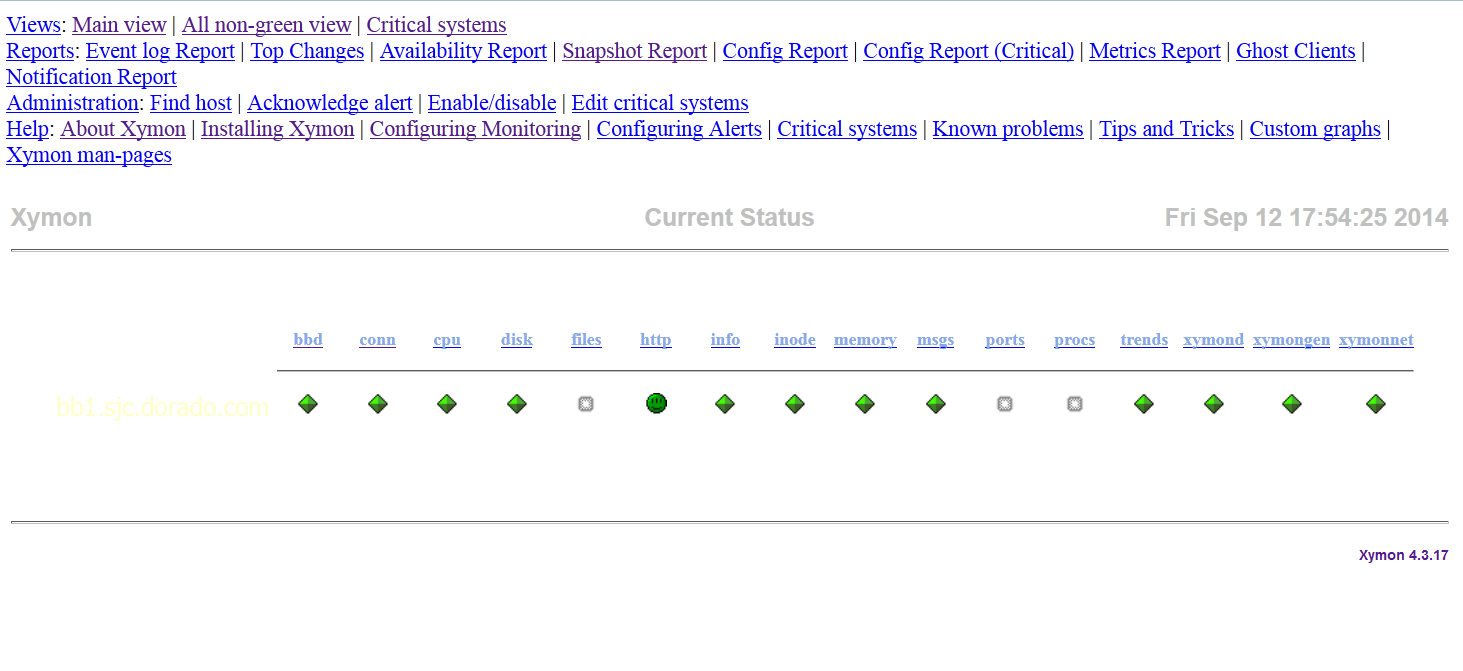
I've got a new install of Xymon that seems to work except for two problems when viewing the webpages:  the top Menu bar does not get drawn, and the background color of the pages stays white.

I've running a RHEL 6.5 system, and installed Xymon 4.3.17, Apache 2.2.15 and RRDTool 1.3.8. Webpages get created, graphs get created.  The server is only monitoring itself at the moment. Icons for the various columns all get drawn correctly. The Logo line, with title and Date get drawn correctly, and all the display below that is OK.  But the background color stays white.  The top Menu prints all the options out as words (i.e. "Views<javascript:;>: Main view<http://10.81.0.55/xymon/xymon.html>; | All non-green view<http://10.81.0.55/xymon/nongreen.html>; | Critical systems<http://10.81.0.55/xymon-cgi-bin/criticalview.sh>";, etc.)

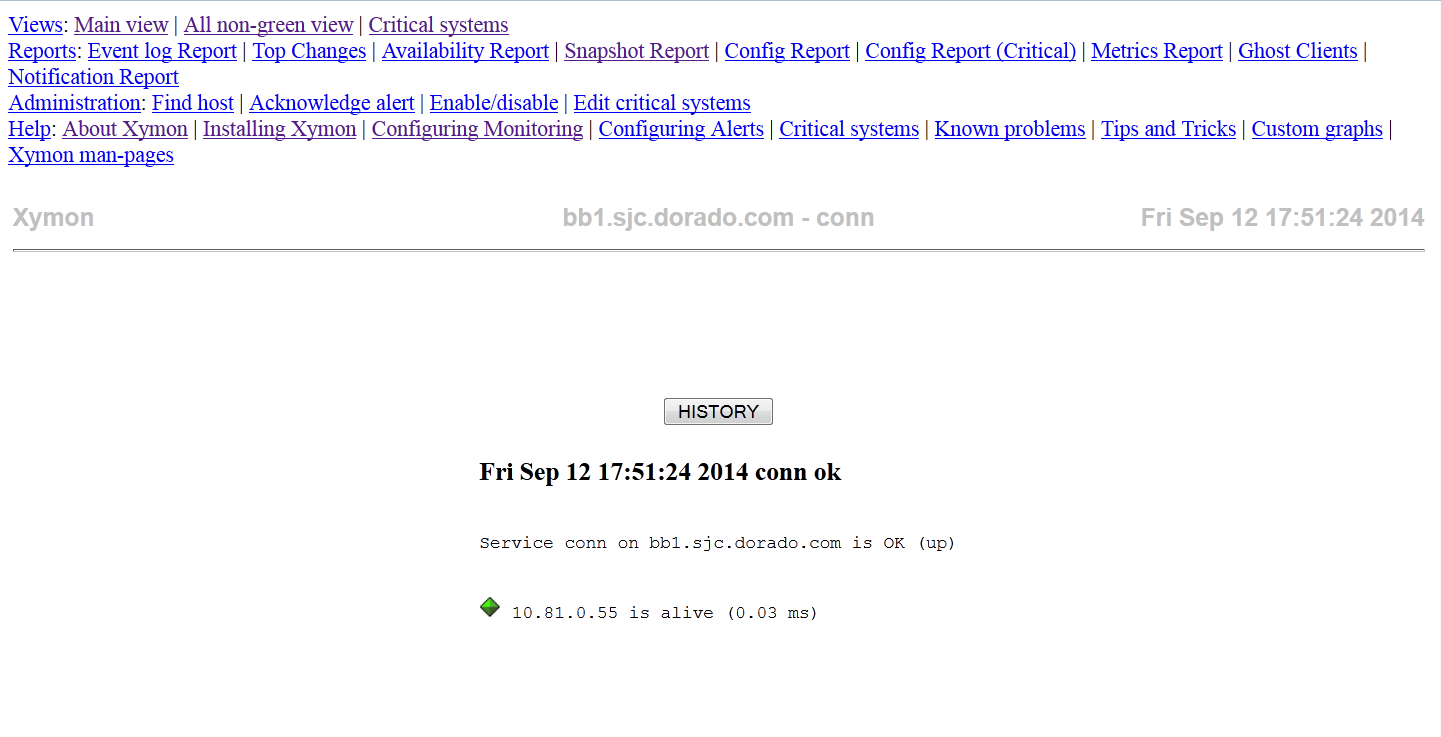
When I click a service light, it takes me to the subpage correctly.  Information on the page is correctly drawn, and graphs correctly displayed.  But, again, the background stays white and the top Menu is not drawn, only spelled out.

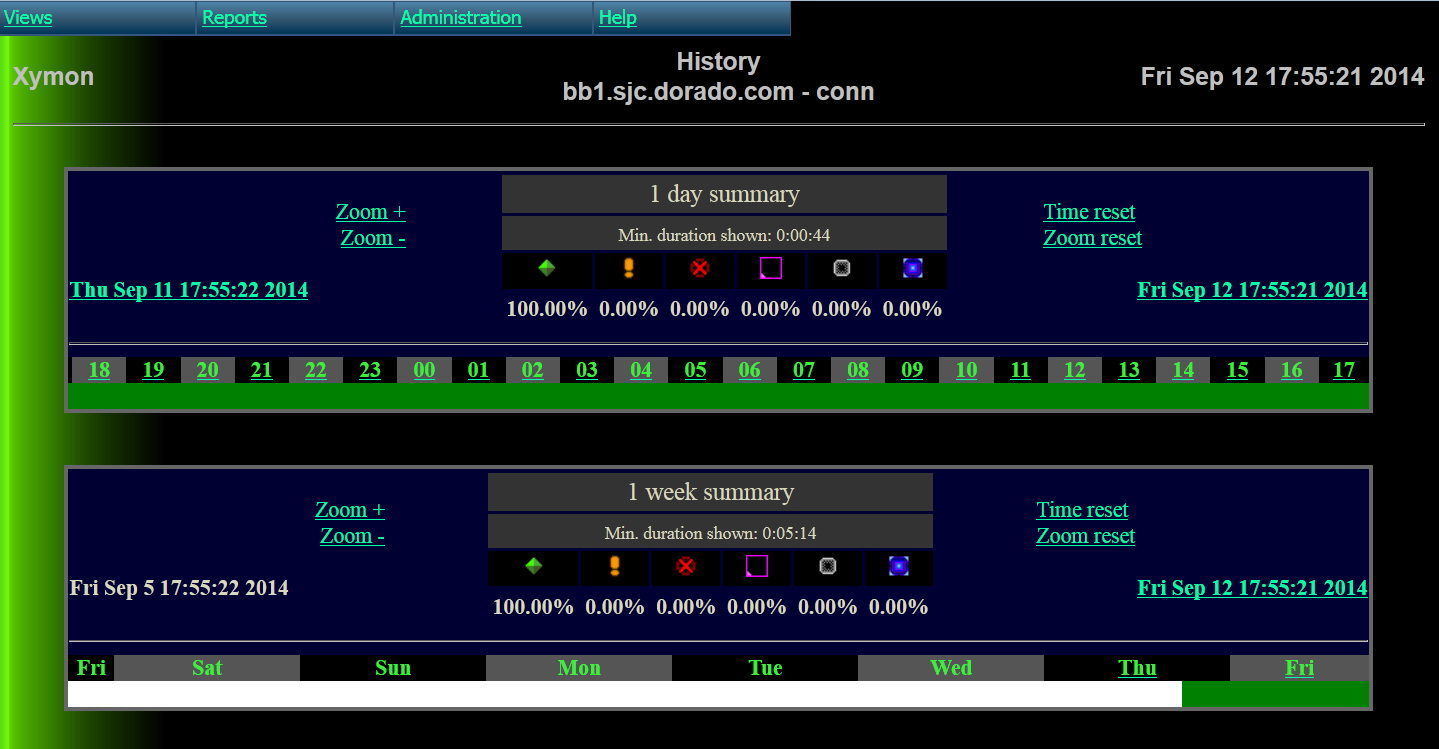
If I then click a History button, I'm taken to a webpage that is correctly drawn in all parts - that is, the background is appropriately colored, and the top Menu does get drawn.

Comparing the html source for the top area of the main page to a history page looks exactly the same.

I've viewed the webpages under Firefox 32.0, Chrome 37.0 and IE 9, and all look the same.

I did the xymon install using all the defaults, except the install directory itself which is /usr/local/xymon/.
Screenshots are attached, though I don't know if they'll carry thru.

Any ideas on what could be causing the problems?

thanks


****************************************************************************************** This message may contain confidential or proprietary information intended only for the use of the addressee(s) named above or may contain information that is legally privileged. If you are not the intended addressee, or the person responsible for delivering it to the intended addressee, you are hereby notified that reading, disseminating, distributing or copying this message is strictly prohibited. If you have received this message by mistake, please immediately notify us by  replying to the message and delete the original message and any copies immediately thereafter.
Thank you. ****************************************************************************************** CLLD
Attachments (3)
 attachment.png
 attachment-0001.png
 attachment-0002.png
list Tres Finocchiaro
Did you look at the error console in your web browsers to see what they
say?  If a web page doesn't load correctly, this usually sheds light on the
cause.
list Michael Short
Thanks – that's the lead I needed to get it fixed.
I didn’t know abpout the Firerox web console.  That told me that the css files at the
top were only loading as "text/plain".  Found out that the /etc/mime.types on the
box was missing an entry for "text/css".  Added that, restared everything, and
it came up correctly.
▸
From: Tres Finocchiaro [mailto:user-88678e65ced1@xymon.invalid]
Sent: Saturday, September 13, 2014 4:49 AM
To: Michael Short
Cc: xymon at xymon.com
Subject: Re: [Xymon] Problem with top Menu in new install


Did you look at the error console in your web browsers to see what they say?  If a web page doesn't load correctly, this usually sheds light on the cause.
****************************************************************************************** This message may contain confidential or proprietary information intended only for the use of the addressee(s) named above or may contain information that is legally privileged. If you are not the intended addressee, or the person responsible for delivering it to the intended addressee, you are hereby notified that reading, disseminating, distributing or copying this message is strictly prohibited. If you have received this message by mistake, please immediately notify us by  replying to the message and delete the original message and any copies immediately thereafter.
Thank you. ****************************************************************************************** CLLD
list Phil Crooker
Never seen this, but could it be a permissions issue ???? Does apache have read access to all the files? Does xymon have r/w access so it can create the html pages?


cheers, Phil
▸
From: Xymon <xymon-bounces at xymon.com> on behalf of Michael Short <user-07a5c9c3c1a3@xymon.invalid>
Sent: Saturday, 13 September 2014 10:30 AM
To: xymon at xymon.com
Subject: [Xymon] Problem with top Menu in new install

Hello All.

I've got a new install of Xymon that seems to work except for two problems when viewing the webpages:  the top Menu bar does not get drawn, and the background color of the pages stays white.
I've running a RHEL 6.5 system, and installed Xymon 4.3.17, Apache 2.2.15 and RRDTool 1.3.8. Webpages get created, graphs get created. The server is only monitoring itself at the moment. Icons for the various columns all get drawn correctly. The Logo line, with title and Date get drawn correctly, and all the display below that is OK. But the background color stays white. The top Menu prints all the options out as words (i.e. "Views: Main view<http://10.81.0.55/xymon/xymon.html>; | All non-green view<http://10.81.0.55/xymon/nongreen.html>; | Critical systems<http://10.81.0.55/xymon-cgi-bin/criticalview.sh>";, etc.)
▸
When I click a service light, it takes me to the subpage correctly.  Information on the page is correctly drawn, and graphs correctly displayed.  But, again, the background stays white and the top Menu is not drawn, only spelled out.

If I then click a History button, I'm taken to a webpage that is correctly drawn in all parts - that is, the background is appropriately colored, and the top Menu does get drawn.

Comparing the html source for the top area of the main page to a history page looks exactly the same.

I've viewed the webpages under Firefox 32.0, Chrome 37.0 and IE 9, and all look the same.

I did the xymon install using all the defaults, except the install directory itself which is /usr/local/xymon/.
Screenshots are attached, though I don't know if they'll carry thru.

Any ideas on what could be causing the problems?

thanks


******************************************************************************************
This message may contain confidential or proprietary information intended only for the use of the
addressee(s) named above or may contain information that is legally privileged. If you are
not the intended addressee, or the person responsible for delivering it to the intended addressee,
you are hereby notified that reading, disseminating, distributing or copying this message is strictly
prohibited. If you have received this message by mistake, please immediately notify us by
replying to the message and delete the original message and any copies immediately thereafter.

Thank you.
******************************************************************************************
CLLD