Custom Script Graphs
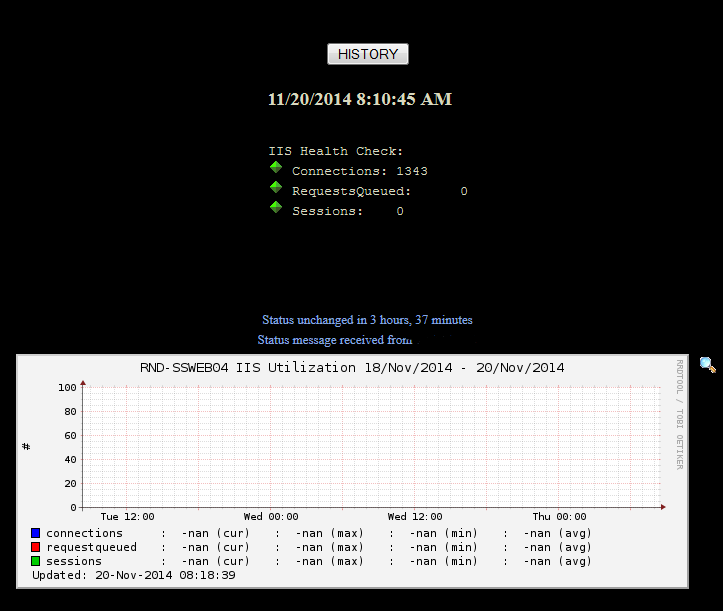
Absolutely, I do this with several custom tests.  You do have to wait for 10-15 minutes for data points to start showing up.  If it's been longer and it's still not populating the graph then either the RRD file isn't being populated with data or the graph definition is wrong.  The graph is showing up so the RRD file is being created.

First, you need to verify it's creating RRD files and populating data.  Find the RRD file and use rrdtool dump to make sure it's being populated.  Second, send us the graph definition you built in graphs.cfg.

From: Xymon [mailto:xymon-bounces at xymon.com] On Behalf Of Johan Brits
Sent: Thursday, November 20, 2014 1:20 AM
To: xymon at xymon.com
Subject: [Xymon] Custom Script Graphs

Hi all

I added a custom script to monitor my IIS_Health.

All working 100% and I can see the connection but, the graph is not populating data.

Can this be done to add the data to the graphs. See below....

[cid:image001.png at 01D0048D.D4EA2940]

[cid:image001.png at 01CF8A2E.0A47CC80]


Johan Brits

Systems Administrator


[cid:image002.png at 01CF8A2E.0A47CC80]


Tel: +XX XX XXX XXXX  Mobile: +XX XX XXX XXXX
Email: user-2d2c82def62c@xymon.invalid<mailto:user-2d2c82def62c@xymon.invalid>


This electronic communication and the attached file(s) are subject to a disclaimer which can be viewed at http://www.multichoice.co.za/multichoice/content/en/email-disclaimer. If you are unable to view the disclaimer, please email user-e033f91cb884@xymon.invalid<mailto:user-e033f91cb884@xymon.invalid> for a copy.


This message is intended only for the individual or entity to which it is addressed. It may contain privileged, confidential information which is exempt from disclosure under applicable laws. If you are not the intended recipient, please note that you are strictly prohibited from disseminating or distributing this information (other than to the intended recipient) or copying this information. If you have received this communication in error, please notify us immediately by e-mail or by telephone at the above number. Thank you.
Attachments (1)
 attachment.png