Client Data not showing up
Here is what is in the hobbitclient.cfg:


Environment settings for the Hobbit client.


BBDISP="10.184.16.150"             # IP address of the Hobbit server

BBDISPLAYS=""                   # IP of multiple Hobbit servers. BBDISP
must be "0.0.0.0".

CONFIGCLASS="$BBOSTYPE"         # Default configuration class for
logfiles


PATH="/bin:/usr/bin:/sbin:/usr/sbin:/etc"  # PATH setting for the client
scripts.


# You normally dont need to modify anything below here

BBPORT="1984"                   # Portnumber where hobbitd listens

BBHOME="$HOBBITCLIENTHOME"      # Directory for the Hobbit client files

BB="$BBHOME/bin/bb"             # The Hobbit client "bb" utility

BBTMP="$BBHOME/tmp"             # Where we may store temporary files.

BBCLIENTLOGS="$BBHOME/logs"     # Where we store the client logfiles


Here is what I get when I attempt a telnet from the client to the
server:

telnet 10.184.16.150 1984

Trying 10.184.16.150...

Connected to 10.184.16.150.

Escape character is '^]'.


Thank you,

Howard Snyder

user-e66ae0780d99@xymon.invalid

SR Network Control Engineer

Network Services

XXX-XXX-XXXX


This email, and any attachments, is intended only for use by the
addressee(s) named herein and may contain legally privileged and/or
confidential information. It is the property of Cingular Wireless and
its Affiliates. If you are not the intended recipient of this email, you
are hereby notified that any dissemination, distribution or copying of
this email, any attachments thereto, and any use of the information
contained is strictly prohibited. If you have received this email in
error, please notify me at XXX.XXX.XXXX and permanently delete the
original and any copy thereof.


For login requests and password resets, you will need to open a request
on the "My Logins" website:


https://nslogins.edc.cingular.net/login.cfm?CFID=13246&CFTOKEN=41726264
<https://nslogins.edc.cingular.net/login.cfm?CFID=13246&CFTOKEN=41726264
For OSS problems:

DL-MNOC-OSS Adjunct

DL-MNOC-OSS Siemens

DL-MNOC-OSS Nortel

DL-MNOC-OSS Nokia

DL-MNOC-OSS Lucent

DL-MNOC-OSS Ericsson


From: Josh Luthman [mailto:user-4c45a83f15cb@xymon.invalid]
Sent: Thursday, February 07, 2008 10:42 AM
To: user-ae9b8668bcde@xymon.invalid
Subject: Re: [hobbit] Client Data not showing up


1) What does hobbitclient.cfg:BBDISP= have?
2) Can you install nmap or telnet on port 1984 from the client?  I'm
wondering if theres a firewall stopping the traffic.

nmap -v -p T:1984 10.184.16.150

On 2/7/08, Snyder, Howard <user-e66ae0780d99@xymon.invalid> wrote:

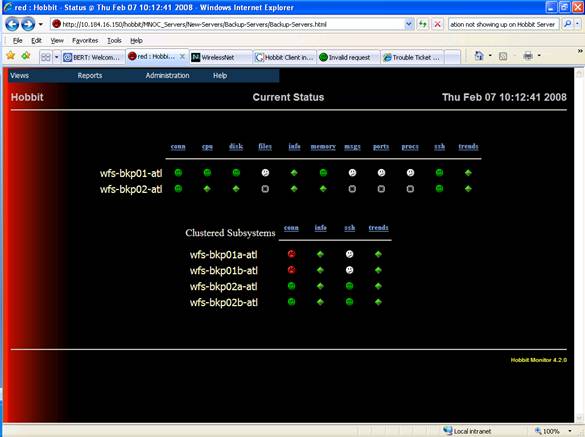
That is what I thought but I'm not getting anything to the server.  The
only items that I see are the tests listed in the bb-hosts file:


subparent New-Servers Backup-Servers Backup Servers

155.174.25.229  wfs-bkp01-atl           # ssh

155.174.25.232  wfs-bkp02-atl           # ssh

#

group Clustered Subsystems

155.174.25.230  wfs-bkp01a-atl          # ssh

155.174.25.231  wfs-bkp01b-atl          # ssh

155.174.25.233  wfs-bkp02a-atl          # ssh

155.174.25.234  wfs-bkp02b-atl          # ssh

#


Am I just not telling the client or the server something.  I have tried
to edit the hobbit-client.cfg file on the server to include:


DEFAULT

        # These are the built-in defaults.

        UP      1h

        LOAD    5.0 10.0

        DISK    * 90 95

        MEMPHYS 100 101

        MEMSWAP 50 80

        MEMACT  90 97

        PROC    httpd 3 40

        PROC    /usr/lib/inet/inetd start

        PROC    /usr/lib/ssh/sshd 1 99

        PROC    /usr/lib/hobbit/server/bin/hobbitlaunch

#

        PORT "LOCAL=%([.:]22)$" state=ESTABLISHED min=0 max=99
color=yellow TRACK=ssh "TEXT=SSH logins"

        PORT "LOCAL=%([.:]80)$" state=ESTABLISHED min=0 max=99
color=yellow TRACK=http "TEXT=HTTP"


HOST=SGLNHHOBBIT

file /var/adm/messages SIZE>0 MTIME>86400 TRACK yellow

##file /var/log/hobbit/page.log SIZE>0 MTIME<7200 TRACK yellow

file /var/log/hobbit/hobbitd.log SIZE>0 MTIME<7200 TRACK yellow

file /var/log/hobbit/hobbitlaunch.log SIZE>0 MTIME<7200 TRACK yellow

file /var/log/hobbit/hobbitd.pid SIZE>0 SIZE>0 MTIME<7200 TRACK yellow

file /var/log/hobbit/rrd-status.log SIZE>0 MTIME<7200 TRACK yellow

file /var/log/hobbit/bb-network.log SIZE>0 MTIME<7200 TRACK yellow

file /var/log/hobbit/bb-display.log SIZE>0 MTIME<7200 TRACK yellow

file /var/log/hobbit/rrd-data.log SIZE>0 MTIME<7200 TRACK yellow

file /var/log/syslog SIZE>0 MTIME<7200 TRACK yellow


HOST=wfs-bkp01-atl

file /var/adm/messages SIZE>0 MTIME>86400 TRACK yellow

file /var/log/hobbit/hobbitd.log SIZE>0 MTIME<7200 TRACK yellow

file /var/log/hobbit/hobbitlaunch.log SIZE>0 MTIME<7200 TRACK yellow

file /var/log/hobbit/hobbitd.pid SIZE>0 SIZE>0 MTIME<7200 TRACK yellow

file /var/log/hobbit/rrd-status.log SIZE>0 MTIME<7200 TRACK yellow

file /var/log/hobbit/bb-network.log SIZE>0 MTIME<7200 TRACK yellow

file /var/log/hobbit/bb-display.log SIZE>0 MTIME<7200 TRACK yellow

file /var/log/hobbit/rrd-data.log SIZE>0 MTIME<7200 TRACK yellow

file /var/log/syslog SIZE>0 MTIME<7200 TRACK yellow


but I still get nothing.  The client-local.cfg (on the server) file
contains:


[wfs-bkp01-atl]

file:/var/log/


[sunos]

log:/var/adm/messages:10240


I'm probably just not seeing what is right in front of my eyes but if
you see something please turn on the light for me. J


Thank you,

Howard Snyder

user-e66ae0780d99@xymon.invalid

SR Network Control Engineer

Network Services

XXX-XXX-XXXX


This email, and any attachments, is intended only for use by the
addressee(s) named herein and may contain legally privileged and/or
confidential information. It is the property of Cingular Wireless and
its Affiliates. If you are not the intended recipient of this email, you
are hereby notified that any dissemination, distribution or copying of
this email, any attachments thereto, and any use of the information
contained is strictly prohibited. If you have received this email in
error, please notify me at XXX.XXX.XXXX and permanently delete the
original and any copy thereof.


For login requests and password resets, you will need to open a request
on the "My Logins" website:


https://nslogins.edc.cingular.net/login.cfm?CFID=13246&CFTOKEN=41726264


For OSS problems:

DL-MNOC-OSS Adjunct

DL-MNOC-OSS Siemens

DL-MNOC-OSS Nortel

DL-MNOC-OSS Nokia

DL-MNOC-OSS Lucent

DL-MNOC-OSS Ericsson


-----Original Message-----
From: Buchan Milne [mailto:user-9b139aff4dec@xymon.invalid]
Sent: Thursday, February 07, 2008 10:10 AM
To: user-ae9b8668bcde@xymon.invalid
Cc: Snyder, Howard
Subject: Re: [hobbit] Client Data not showing up


On Thursday 07 February 2008 16:59:34 Snyder, Howard wrote:
Gary,
I thought that I sent it to the list, sorry.  The is what I get when I
try
to telnet to it:
Trying 10.184.16.150...
Connected to 10.184.16.150.
Escape character is '^]'.
Connection to 10.184.16.150 closed by foreign host.
So, then the client should be able to send it's data to the hobbit
server.


--
Josh Luthman
Office: XXX-XXX-XXXX
Direct: XXX-XXX-XXXX
XXXX Wayne St
Suite XXXX
Troy, OH XXXXX

Those who don't understand UNIX are condemned to reinvent it, poorly.
--- Henry Spencer
Attachments (1)
 attachment-0001.jpg