Capture and send data To Elasticsearch and Kibana
Hi Francois,

Looks good, your sample. I am very interested in your integration efforts.

How do you select what is going to be inserted in the ELK stack? All status
messages that Xymon receives?

And could you provide an example of the xymond_channel block in you
task.cfg and the capture.sh?

Tasks.cfg probably is something like:

[es]
...
 CMD xymond_channel --channel=status /home/xymon/server/ext/capture.sh
...

And the capture.sh contains some curl script to the ELK stack?

Regards,

Peter

2016-12-14 18:15 GMT+01:00 OUTTERYCK Francois <
user-ba0ce136dc99@xymon.invalid>:
Hello, I just do a small work with Xymon in order to send status data to
Elasticsearch. And with Kibana reporting is easy.


How it work ? Simple : With capture of status message (xymond_channel
--channel=status /home/xymon/server/ext/capture.sh ) script encode
 status message in json and send as document in elasticSearch.


Example of Mapping document status in elasticsearch :


"status"=> array(

                     "properties"=>array(

                          "ServerName"=> array("type"=> "string"),

                          "Type"=> array("type"=> "string"),

                          "Status"=> array("type"=> "string"),

                          "LastChange"=> array("type"=> "date","format"=>
"strict_date_optional_time"),

                          "LogTime"=> array("type"=> "date","format"=>
"strict_date_optional_time"),

                          "ValidTime"=> array("type"=> "date","format"=>
"strict_date_optional_time"),

                          "AckTime"=> array("type"=> "date","format"=>
"strict_date_optional_time"),

                          "DisableTime"=> array("type"=> "date","format"=>
"strict_date_optional_time"),

                          "Sender"=> array("type"=> "string"),

                          "DisableMSg"=> array("type"=> "string"),

                          "Message"=> array("type"=> "string")

                     )

                )


All is done with a 130 lines script. So simple to integrate in existing
environment and so powerfull usage of  Xymon/elasticsearch/Kibana


For those who don’t know kibana : https://www.elastic.co/products/kibana
Attachments (1)
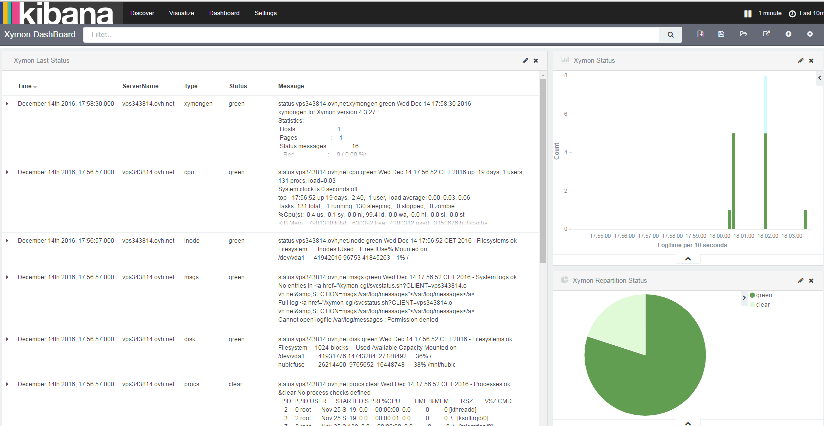 attachment.png