Client uptime status is failing
Hi Kii/SebA ,

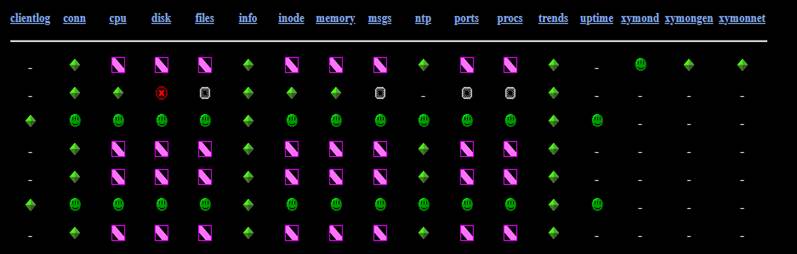
I was able to see the uptime appear in the main view. For both of those servers that are showing correctly, reinstallation worked. But I can’t understand why. Is there any parameters that we need to consider before installing the clients ? Still I have to check the purple ones and the Xymon server itself is showing in purple.

But I need to scan the port 1984 as well. I will update as I work on this.

[cid:image001.jpg at 01D4C008.0054DD20]

Thanks and Regards,
Devvkanth K
Unix SME

From: SebA <user-4631430d620a@xymon.invalid>
Sent: Friday, February 8, 2019 11:31 PM
To: Devvkanth Krishnamurthy <user-8a837177683f@xymon.invalid>
Cc: Kii NODA <user-d20081af5452@xymon.invalid>; xymon at xymon.com
Subject: Re: [Xymon] Client uptime status is failing

Client don't fetch data unless you're using xymon-rclient - they report data.  It could be being reported to the wrong IP address or port, or blocked in a firewall, although given that one of them is your Xymon server, probably not!  You could run tcpdump on port 1984 on the xymon server to see the reports coming in, or lack of them.

After your original e-mail, I actually took what you had added to tasks.cfg and added it to mine and uptime instantly appeared as a new column on my display (by the time I'd looked at the page).  So there is nothing wrong with your syntax.

Kind regards,

SebA


On Fri, 8 Feb 2019 at 13:57, Devvkanth Krishnamurthy <user-8a837177683f@xymon.invalid<mailto:user-8a837177683f@xymon.invalid>> wrote:
Hi Kii,

Thanks for the color coding information. As the CPU top command usually reveals the uptime. I am trying to have a separate uptime column which is not showing up as I mentioned below. I will be troubleshooting why the clients are not fetching the data now when it did 3 days back. But uptime column never worked for me. I need it for monitoring as well as uptime report.

Thanks and Regards,
Devvkanth K
Unix SME

From: Kii NODA <user-d20081af5452@xymon.invalid<mailto:user-d20081af5452@xymon.invalid>>
Sent: Friday, February 8, 2019 5:56 PM
To: Devvkanth Krishnamurthy <user-8a837177683f@xymon.invalid<mailto:user-8a837177683f@xymon.invalid>>
Cc: SebA <user-4631430d620a@xymon.invalid<mailto:user-4631430d620a@xymon.invalid>>; xymon at xymon.com<mailto:xymon at xymon.com>
Subject: Re: [Xymon] Client uptime status is failing

Hi Devvkanth,

looking at the pic you sent it looks like all you're actually checking on all machines other than the server is remote checks - conn & ntp. Other than that, everything is purple so that means that your clients are not sending their statuses to the xymon server. So please check that and get to a state where all your checks are either green, yellow, red or white. If they're purple, it means that you did receive some data in the past but you're no longer receiving data for those checks. Sample screenshot here: https://ibb.co/djX5Tzc<https://apac01.safelinks.protection.outlook.com/?url=https%3A%2F%2Fibb.co%2FdjX5Tzc&data=user-77322baadbba@xymon.invalid%7C643dcffe0e244a6bd4cb08d68def82b5%7C63ce7d592f3e42cda8ccbe764cff5eb6%7C1%7C0%7C636852457482010890&sdata=y0G8izJYBVQZUDpXfoSK0SrJhO8CdfR7q3cLlYrXGVg%3D&reserved=0>;

As for the uptime check, Xymon's uptime check is bundled within the CPU check in the UI, although you can alert on it separately. Sample screenshot here: https://ibb.co/745XLgT<https://apac01.safelinks.protection.outlook.com/?url=https%3A%2F%2Fibb.co%2F745XLgT&data=user-77322baadbba@xymon.invalid%7C643dcffe0e244a6bd4cb08d68def82b5%7C63ce7d592f3e42cda8ccbe764cff5eb6%7C1%7C0%7C636852457482020895&sdata=60sUqkTclPc56Fz3tJKY2HCdS9lCzXUaFcXhHylAyQc%3D&reserved=0>;

Hope that helps!

On Thu, Feb 7, 2019 at 2:08 PM Devvkanth Krishnamurthy <user-8a837177683f@xymon.invalid<mailto:user-8a837177683f@xymon.invalid>> wrote:
Hi,

I have removed the uptime from hosts.cfg file and  --uptime-status is inserted in tasks.cfg. yet I do not see the uptime column in it . Please check below, I have tried all the resolution available on the net, but I m not able to figure this one out.

[cid:image003.png at 01D4C007.A2DD4060]

Thanks and Regards,
Devvkanth K
Unix SME

From: SebA <user-4631430d620a@xymon.invalid<mailto:user-4631430d620a@xymon.invalid>>
Sent: Tuesday, February 5, 2019 12:58 AM
To: Devvkanth Krishnamurthy <user-8a837177683f@xymon.invalid<mailto:user-8a837177683f@xymon.invalid>>
Cc: xymon at xymon.com<mailto:xymon at xymon.com>
Subject: Re: [Xymon] Client uptime status is failing

I've never seen that before - have you added uptime to hosts.cfg?  If so, remove it!  (It looks like the Xymon server is testing a network service here, and uptime is not a network service!)

Kind regards,

SebA


On Mon, 4 Feb 2019 at 16:10, Devvkanth Krishnamurthy <user-8a837177683f@xymon.invalid<mailto:user-8a837177683f@xymon.invalid>> wrote:
Hi,

Do you mind giving any suggestions on why only the Xymon server uptime is reporting correctly whereas the client says that service is unavailable. Not sure what I am missing here.

Thanks and Regards,
Devvkanth K
Unix SME

From: Devvkanth Krishnamurthy
Sent: Tuesday, January 29, 2019 5:45 PM
To: SebA <user-4631430d620a@xymon.invalid<mailto:user-4631430d620a@xymon.invalid>>
Cc: xymon at xymon.com<mailto:xymon at xymon.com>
Subject: RE: [Xymon] Client uptime status is failing

Hi,

I have Xymon version – 4.3.28 for both server and clients.

Thanks and Regards,
Devvkanth K
Unix SME

From: SebA <user-4631430d620a@xymon.invalid<mailto:user-4631430d620a@xymon.invalid>>
Sent: Tuesday, January 29, 2019 5:17 PM
To: Devvkanth Krishnamurthy <user-8a837177683f@xymon.invalid<mailto:user-8a837177683f@xymon.invalid>>
Cc: xymon at xymon.com<mailto:xymon at xymon.com>
Subject: Re: [Xymon] Client uptime status is failing

This may be down to what your clients are reporting.  What client version(s) are you talking about here?

Kind regards,

SebA


On Tue, 29 Jan 2019 at 11:06, Devvkanth Krishnamurthy <user-8a837177683f@xymon.invalid<mailto:user-8a837177683f@xymon.invalid>> wrote:
Hi,
I am having trouble w.r.t to uptime status generation in clients. The server is displaying uptime correctly since xymond fetches the data, whereas for the clients it does not fetch the uptime data. However it populates all other columns. Can you please suggest if I am missing anything here.

Situation :

Xymon server  and Xymon clients are  configured. The table is populated with colors and data being generated except for uptime in clients whereas the server is reporting uptime correctly. This is probably because of xymond daemon. The status message also indicated service not available which indicates xymond service.  So how can we get the Xymon clients to  update the uptime.

Tasks.cfg file :

# The client back-end module. You need this if you are running the Xymon client on any system.
[clientdata]
        ENVFILE /home/xymon/server/etc/xymonserver.cfg
        NEEDS xymond
        CMD xymond_channel --channel=client --log=$XYMONSERVERLOGS/clientdata.log xymond_client --uptime-status

Status message :

[cid:image004.png at 01D4C007.A2DD4060]


Thanks and Regards,
Devvkanth K
Unix SME


Xymon at xymon.com<https://apac01.safelinks.protection.outlook.com/?url=http%3A%2F%2Flists.xymon.com%2Fmailman%2Flistinfo%2Fxymon&data=user-77322baadbba@xymon.invalid%7C643dcffe0e244a6bd4cb08d68def82b5%7C63ce7d592f3e42cda8ccbe764cff5eb6%7C1%7C0%7C636852457482030909&sdata=bD7N4mAOqw4ObKM%2B6qrI8mWtIGL5v9Mna6827XZBKDs%3D&reserved=0>;
Attachments (1)
 attachment.jpg